M Q T T B R O K E R
Adriano Pimpini
Presentation for the Pervasive Systems course A.Y. 2017/18https://vernemq.com/
WHAT IS VERNEMQ?
VerneMQ is a high-performance, distributed MQTT broker,
which aims to provide high availability and scalability.
It is based on Erlang, and this enables VerneMQ to scale
horizontally and vertically by fully utilizing multicore
architectures.
MQTT – A QUICK RECAP
Publish/subscribe messaging protocol
For constrained devices in low-bandwidth, high-latency or unreliable networks
Built on top of TCP/IP
Quality of Service levels:
• QoS 0: At most once (Fire and forget)
• QoS 1: At least once
• QoS 2: Exactly once
PUBLISH/SUBSCRIBE ARCHITECTURE
GENERIC MQTT NETWORK WITH VERNEMQ
SETTING UP VERNEMQ
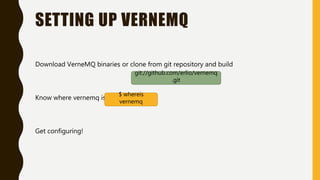
Download VerneMQ binaries or clone from git repository and build
Know where vernemq is
Get configuring!
git://github.com/erlio/vernemq
.git
$ whereis
vernemq
SOME VMQ FEATURES
• File based Authentication & Authorization
• Database based Authentication and Authorization
• Listeners
• Multiple Sessions per ClientId
• Session Balancing
• Cluster Support
FILE BASED AUTHENTICATION
/etc/vernemq/vernemq.conf is the main configuration file for VerneMQ
vmq_passwd.password_file =
/etc/vernemq/vmq.passwd
will be our password file
Add an entry to the password file:
We are then prompted to enter the
password of the user. It will be encrypted and stored in the format
usrname:password
$ vmq-passwd.password –a passwfile
username
pippo:$6$FUUkqxsyQ1HTpWvu$92sr3KrC/w2sHS[…]19mMB4U7MJvUGSMfxHQA
==
allow_anonymous=off Anonymous user access control
We want to accept only configured users. We set it on, and force
authentication
vmq_acl_file =
/etc/vernemq/vmq.acl
will be our access control list file
FILE BASED AUTHORIZATION
We need to set the content of vmq.acl manually.
user pippo
[topic|pattern] [|read|write]
$topic
This is the pattern for defining
user pippo’s access privileges
topic read system/log
topic s01/info
pattern write %u/#
Means the user can read the system/log
topic
User can read/write to s01/info topic
User can write to all topics under its
username
If no user is specified, the policy applies to everyone, even anonymous
users
LISTENERS
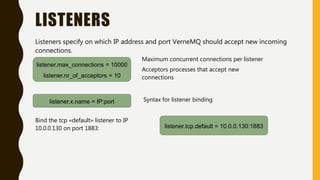
Listeners specify on which IP address and port VerneMQ should accept new incoming
connections.
listener.max_connections = 10000
listener.nr_of_acceptors = 10
Maximum concurrent connections per listener
Acceptors processes that accept new
connections
listener.x.name = IP:port Syntax for listener binding
listener.tcp.default = 10.0.0.130:1883
Bind the tcp «default» listener to IP
10.0.0.130 on port 1883:
SESSIONS AND BALANCING
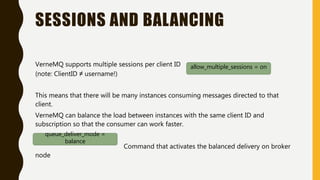
VerneMQ supports multiple sessions per client ID
(note: ClientID ≠ username!)
This means that there will be many instances consuming messages directed to that
client.
VerneMQ can balance the load between instances with the same client ID and
subscription so that the consumer can work faster.
Command that activates the balanced delivery on broker
node
allow_multiple_sessions = on
queue_deliver_mode =
balance
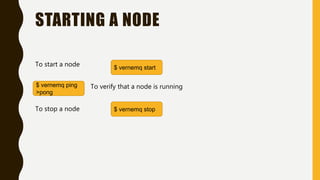
STARTING A NODE
To start a node
To verify that a node is running
To stop a node
$ vernemq start
$ vernemq ping
>pong
$ vernemq stop
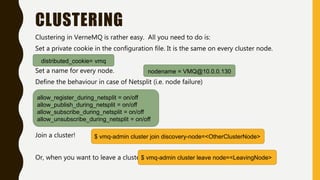
CLUSTERING
Clustering in VerneMQ is rather easy. All you need to do is:
Set a private cookie in the configuration file. It is the same on every cluster node.
Set a name for every node.
Define the behaviour in case of Netsplit (i.e. node failure)
Join a cluster!
Or, when you want to leave a cluster
distributed_cookie= vmq
nodename = VMQ@10.0.0.130
allow_register_during_netsplit = on/off
allow_publish_during_netsplit = on/off
allow_subscribe_during_netsplit = on/off
allow_unsubscribe_during_netsplit = on/off
$ vmq-admin cluster join discovery-node=<OtherClusterNode>
$ vmq-admin cluster leave node=<LeavingNode>
LET’S TALK
ABOUT TESTING
THE SETUP
Broker cluster nodes:
• 3 Cloned Lubuntu 16.04 Virtual Machines
• 1GB RAM
• 1 CPU core @1.6GHz (Physical CPU: Intel Core i5 8250U)
• Connected to network through wi-fi & bridged network adapter mode
Clients:
• 1 Lubuntu 16.04 Virtual Machine
• 15 GB RAM
• 8 CPU cores @3.4GHz (Physical CPU: Intel Core i7 3770)
• Connected to network through ethernet & bridged network adapter mode
• Language: Python, Library: paho.mqtt
STRESS PROCESS & MEASUREMENTS
• Tested both in 3 node cluster, and single node
• Client machine spawns clients, either publishers or subscribers, one thread for each.
• Publishers publish on one of 4 random topics
• Subscribers subscribe to one of 4 random topics
• Publishers publish 5 messages per second, with 64B payload (timestamp + padding)
• Each publisher posts 100 messages and then exits
• Each subscriber waits for 200 messages and then exits
• Upon connecting or receiving a message, clients calculate the delay
• QoS in [0,1,2]; Publisher count in [20,50,100,200]; Subscriber count in [20,50,100,200]
20-50 PUBLISHERS
3 Node cluster Single node
all times are in milliseconds
> 100 PUBLISHERS
3 Node cluster Single node
all times are in milliseconds
THANKS FOR YOUR ATTENTION
https://www.linkedin.com/in/adriano-pimpini/
https://github.com/BathtubRacer
Adriano Pimpini
Presentation for the Pervasive Systems course A.Y. 2017/18

VerneMQ - Distributed MQTT Broker

  • 1.
    M Q TT B R O K E R Adriano Pimpini Presentation for the Pervasive Systems course A.Y. 2017/18https://vernemq.com/
  • 2.
    WHAT IS VERNEMQ? VerneMQis a high-performance, distributed MQTT broker, which aims to provide high availability and scalability. It is based on Erlang, and this enables VerneMQ to scale horizontally and vertically by fully utilizing multicore architectures.
  • 3.
    MQTT – AQUICK RECAP Publish/subscribe messaging protocol For constrained devices in low-bandwidth, high-latency or unreliable networks Built on top of TCP/IP Quality of Service levels: • QoS 0: At most once (Fire and forget) • QoS 1: At least once • QoS 2: Exactly once
  • 4.
  • 5.
    SETTING UP VERNEMQ DownloadVerneMQ binaries or clone from git repository and build Know where vernemq is Get configuring! git://github.com/erlio/vernemq .git $ whereis vernemq
  • 6.
    SOME VMQ FEATURES •File based Authentication & Authorization • Database based Authentication and Authorization • Listeners • Multiple Sessions per ClientId • Session Balancing • Cluster Support
  • 7.
    FILE BASED AUTHENTICATION /etc/vernemq/vernemq.confis the main configuration file for VerneMQ vmq_passwd.password_file = /etc/vernemq/vmq.passwd will be our password file Add an entry to the password file: We are then prompted to enter the password of the user. It will be encrypted and stored in the format usrname:password $ vmq-passwd.password –a passwfile username pippo:$6$FUUkqxsyQ1HTpWvu$92sr3KrC/w2sHS[…]19mMB4U7MJvUGSMfxHQA == allow_anonymous=off Anonymous user access control We want to accept only configured users. We set it on, and force authentication
  • 8.
    vmq_acl_file = /etc/vernemq/vmq.acl will beour access control list file FILE BASED AUTHORIZATION We need to set the content of vmq.acl manually. user pippo [topic|pattern] [|read|write] $topic This is the pattern for defining user pippo’s access privileges topic read system/log topic s01/info pattern write %u/# Means the user can read the system/log topic User can read/write to s01/info topic User can write to all topics under its username If no user is specified, the policy applies to everyone, even anonymous users
  • 9.
    LISTENERS Listeners specify onwhich IP address and port VerneMQ should accept new incoming connections. listener.max_connections = 10000 listener.nr_of_acceptors = 10 Maximum concurrent connections per listener Acceptors processes that accept new connections listener.x.name = IP:port Syntax for listener binding listener.tcp.default = 10.0.0.130:1883 Bind the tcp «default» listener to IP 10.0.0.130 on port 1883:
  • 10.
    SESSIONS AND BALANCING VerneMQsupports multiple sessions per client ID (note: ClientID ≠ username!) This means that there will be many instances consuming messages directed to that client. VerneMQ can balance the load between instances with the same client ID and subscription so that the consumer can work faster. Command that activates the balanced delivery on broker node allow_multiple_sessions = on queue_deliver_mode = balance
  • 11.
    STARTING A NODE Tostart a node To verify that a node is running To stop a node $ vernemq start $ vernemq ping >pong $ vernemq stop
  • 12.
    CLUSTERING Clustering in VerneMQis rather easy. All you need to do is: Set a private cookie in the configuration file. It is the same on every cluster node. Set a name for every node. Define the behaviour in case of Netsplit (i.e. node failure) Join a cluster! Or, when you want to leave a cluster distributed_cookie= vmq nodename = VMQ@10.0.0.130 allow_register_during_netsplit = on/off allow_publish_during_netsplit = on/off allow_subscribe_during_netsplit = on/off allow_unsubscribe_during_netsplit = on/off $ vmq-admin cluster join discovery-node=<OtherClusterNode> $ vmq-admin cluster leave node=<LeavingNode>
  • 13.
  • 14.
    THE SETUP Broker clusternodes: • 3 Cloned Lubuntu 16.04 Virtual Machines • 1GB RAM • 1 CPU core @1.6GHz (Physical CPU: Intel Core i5 8250U) • Connected to network through wi-fi & bridged network adapter mode Clients: • 1 Lubuntu 16.04 Virtual Machine • 15 GB RAM • 8 CPU cores @3.4GHz (Physical CPU: Intel Core i7 3770) • Connected to network through ethernet & bridged network adapter mode • Language: Python, Library: paho.mqtt
  • 15.
    STRESS PROCESS &MEASUREMENTS • Tested both in 3 node cluster, and single node • Client machine spawns clients, either publishers or subscribers, one thread for each. • Publishers publish on one of 4 random topics • Subscribers subscribe to one of 4 random topics • Publishers publish 5 messages per second, with 64B payload (timestamp + padding) • Each publisher posts 100 messages and then exits • Each subscriber waits for 200 messages and then exits • Upon connecting or receiving a message, clients calculate the delay • QoS in [0,1,2]; Publisher count in [20,50,100,200]; Subscriber count in [20,50,100,200]
  • 16.
    20-50 PUBLISHERS 3 Nodecluster Single node all times are in milliseconds
  • 17.
    > 100 PUBLISHERS 3Node cluster Single node all times are in milliseconds
  • 18.
    THANKS FOR YOURATTENTION https://www.linkedin.com/in/adriano-pimpini/ https://github.com/BathtubRacer Adriano Pimpini Presentation for the Pervasive Systems course A.Y. 2017/18

Editor's Notes

  • #8 Autoreloading functionality!
  • #9 Autoreloading functionality!
  • #13 Name unique among the cluster When leaving, a node will close the listeners. Then close the connections and reassign them to other cluster nodes in a round robin fashion
  • #17 Observations on average delivery time increasing
  • #18 Observations on average delivery time increasing