CREATING APPLE
WATCH EXPERIENCES
WITH WATCHKIT AND XAMARIN
ED SNIDER
@edsnider
NORTHERN VA MOBILE C# DEV GROUP – APRIL 8, 2015
INTRO
I AM ED SNIDER
Senior Developer at InfernoRed Technology
Organizer of Northern VA Mobile C# Developers Group
Xamarin MVP
@edsnider
www.edsnider.net
AGENDA
• Setup requirements
• The Apple Watch model
• WatchKit apps
• Architecture
• Lifecycle
• Design
• Navigation
• Parent app
• Glances
• Notifications
• Apple Watch and WatchKit limitations
SETUP REQUIREMENTS
• OSX Mavericks or Yosemite
• Xcode 6.2
• iOS 8.2 Simulators
• Xamarin.iOS 8.8
• Xamarin Studio 5.8 and/or Xamarin for Visual Studio 3.9
• Complete setup and installation instructions available at:
http://developer.xamarin.com/guides/ios/watch/installation/
THE APPLE WATCH MODEL
Core Components of an Apple Watch app:
Parent / Containing iPhone App
WatchKit Extension
WatchKit App
Glance
Notifications
Apple Watch apps are bundled with (and require) an iPhone app – no 3rd party stand
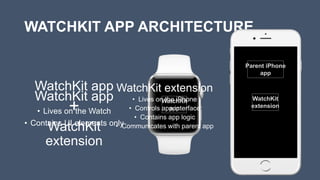
WATCHKIT APP ARCHITECTURE
WatchKit app
• Lives on the Watch
• Contains UI elements only
WatchKit
app
WatchKit
extension
WatchKit app
+
WatchKit
extension
WatchKit extension
• Lives on the iPhone
• Controls app interface
• Contains app logic
• Communicates with parent app
Parent iPhone
app
WATCHKIT APP ARCHITECTURE :
INTERFACE OBJECTS
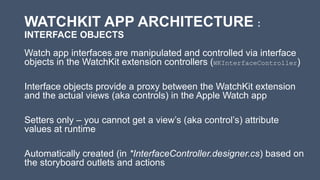
Watch app interfaces are manipulated and controlled via interface
objects in the WatchKit extension controllers (WKInterfaceController)
Interface objects provide a proxy between the WatchKit extension
and the actual views (aka controls) in the Apple Watch app
Setters only – you cannot get a view’s (aka control’s) attribute
values at runtime
Automatically created (in *InterfaceController.designer.cs) based on
the storyboard outlets and actions
WATCHKIT APP ARCHITECTURE : APP
LIFECYCLE
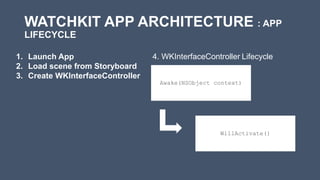
Awake(NSObject context)
4. WKInterfaceController Lifecycle
WillActivate()
1. Launch App
2. Load scene from Storyboard
3. Create WKInterfaceController
WATCHKIT APP DESIGN : USER EXPERIENCE
Controls:
• Label, Button, Switch, Slider, Separator, Image, Map
• prefixed with WKInterface
Layout:
• Group
• Table – similar to a ListView; provides row selection handling (DidSelectRow())
Text Input:
• Pre-defined phrases
• Dictation
• Emoji
WATCHKIT APP DESIGN : SCREEN SIZES
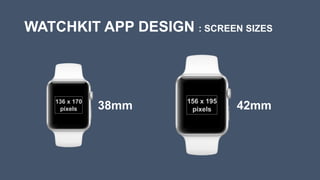
136 x 170
pixels
156 x 195
pixels38mm 42mm
WATCHKIT APP DESIGN : CONTEXT MENUS
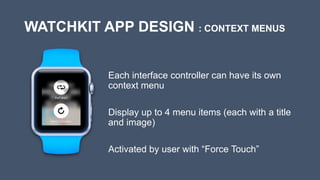
Each interface controller can have its own
context menu
Display up to 4 menu items (each with a title
and image)
Activated by user with “Force Touch”
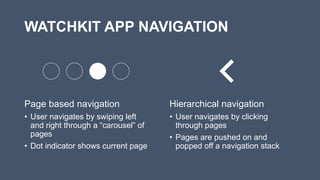
WATCHKIT APP NAVIGATION
Page based navigation
• User navigates by swiping left
and right through a “carousel” of
pages
• Dot indicator shows current page
Hierarchical navigation
• User navigates by clicking
through pages
• Pages are pushed on and
popped off a navigation stack
WATCHKIT APP : WORKING WITH PARENT APP
• Use OpenParentApplication() to offload long running /
background tasks to the parent iPhone app
• Use app groups to share data between the WatchKit extension
and the parent iPhone
GLANCES
A Glance is part of the WatchKit app and WatchKit extension
The Glance’s interface is contained within the WatchKit app’s storyboard
and has its own special interface controller
Only one glance interface per WatchKit app
Same life cycle as WatchKit apps’ standard interface
Use timer to update the Glance’s interface and keep its data relevant
NOTIFICATIONS
Apple Watch displays notifications based on its parent iOS app’s
notification settings
By default, nothing is required to support notifications on Apple
Watch apps, including actionable notifications
Two interfaces - Short-look interface, then Long-look interface if the
user continues to look at it
Apple Watch notifications can be customized (long-look interface
only)
LIMITATIONS
• Watch apps require a parent iPhone app to be present
• Cannot dynamically add UI elements at runtime
RESOURCES
• XAMARIN WATCHKIT DOCUMENTATION:
http://developer.xamarin.com/guides/ios/watch/
• DEMO CODE: http://www.github.com/edsnider
Apple Watch frames: http://infinitapps.com/bezel/
iPhone frames: http://mockuphone.com/

Apple Watch and Xamarin (NoVA Mobile C# Dev Group 4/8/15)

  • 1.
    CREATING APPLE WATCH EXPERIENCES WITHWATCHKIT AND XAMARIN ED SNIDER @edsnider NORTHERN VA MOBILE C# DEV GROUP – APRIL 8, 2015
  • 2.
    INTRO I AM EDSNIDER Senior Developer at InfernoRed Technology Organizer of Northern VA Mobile C# Developers Group Xamarin MVP @edsnider www.edsnider.net
  • 3.
    AGENDA • Setup requirements •The Apple Watch model • WatchKit apps • Architecture • Lifecycle • Design • Navigation • Parent app • Glances • Notifications • Apple Watch and WatchKit limitations
  • 4.
    SETUP REQUIREMENTS • OSXMavericks or Yosemite • Xcode 6.2 • iOS 8.2 Simulators • Xamarin.iOS 8.8 • Xamarin Studio 5.8 and/or Xamarin for Visual Studio 3.9 • Complete setup and installation instructions available at: http://developer.xamarin.com/guides/ios/watch/installation/
  • 5.
    THE APPLE WATCHMODEL Core Components of an Apple Watch app: Parent / Containing iPhone App WatchKit Extension WatchKit App Glance Notifications Apple Watch apps are bundled with (and require) an iPhone app – no 3rd party stand
  • 6.
    WATCHKIT APP ARCHITECTURE WatchKitapp • Lives on the Watch • Contains UI elements only WatchKit app WatchKit extension WatchKit app + WatchKit extension WatchKit extension • Lives on the iPhone • Controls app interface • Contains app logic • Communicates with parent app Parent iPhone app
  • 7.
    WATCHKIT APP ARCHITECTURE: INTERFACE OBJECTS Watch app interfaces are manipulated and controlled via interface objects in the WatchKit extension controllers (WKInterfaceController) Interface objects provide a proxy between the WatchKit extension and the actual views (aka controls) in the Apple Watch app Setters only – you cannot get a view’s (aka control’s) attribute values at runtime Automatically created (in *InterfaceController.designer.cs) based on the storyboard outlets and actions
  • 8.
    WATCHKIT APP ARCHITECTURE: APP LIFECYCLE Awake(NSObject context) 4. WKInterfaceController Lifecycle WillActivate() 1. Launch App 2. Load scene from Storyboard 3. Create WKInterfaceController
  • 9.
    WATCHKIT APP DESIGN: USER EXPERIENCE Controls: • Label, Button, Switch, Slider, Separator, Image, Map • prefixed with WKInterface Layout: • Group • Table – similar to a ListView; provides row selection handling (DidSelectRow()) Text Input: • Pre-defined phrases • Dictation • Emoji
  • 10.
    WATCHKIT APP DESIGN: SCREEN SIZES 136 x 170 pixels 156 x 195 pixels38mm 42mm
  • 11.
    WATCHKIT APP DESIGN: CONTEXT MENUS Each interface controller can have its own context menu Display up to 4 menu items (each with a title and image) Activated by user with “Force Touch”
  • 12.
    WATCHKIT APP NAVIGATION Pagebased navigation • User navigates by swiping left and right through a “carousel” of pages • Dot indicator shows current page Hierarchical navigation • User navigates by clicking through pages • Pages are pushed on and popped off a navigation stack
  • 13.
    WATCHKIT APP :WORKING WITH PARENT APP • Use OpenParentApplication() to offload long running / background tasks to the parent iPhone app • Use app groups to share data between the WatchKit extension and the parent iPhone
  • 14.
    GLANCES A Glance ispart of the WatchKit app and WatchKit extension The Glance’s interface is contained within the WatchKit app’s storyboard and has its own special interface controller Only one glance interface per WatchKit app Same life cycle as WatchKit apps’ standard interface Use timer to update the Glance’s interface and keep its data relevant
  • 15.
    NOTIFICATIONS Apple Watch displaysnotifications based on its parent iOS app’s notification settings By default, nothing is required to support notifications on Apple Watch apps, including actionable notifications Two interfaces - Short-look interface, then Long-look interface if the user continues to look at it Apple Watch notifications can be customized (long-look interface only)
  • 16.
    LIMITATIONS • Watch appsrequire a parent iPhone app to be present • Cannot dynamically add UI elements at runtime
  • 17.
    RESOURCES • XAMARIN WATCHKITDOCUMENTATION: http://developer.xamarin.com/guides/ios/watch/ • DEMO CODE: http://www.github.com/edsnider Apple Watch frames: http://infinitapps.com/bezel/ iPhone frames: http://mockuphone.com/

Editor's Notes

  • #6 Parent / Containing iPhone App Regular iPhone app; contains WatchKit App bundles WatchKit App The main user interface Shares data with parent iPhone app via shared app group WatchKit Extension Glance Read only “quick” look – similar to the Today view in iOS apps Only one per app Notifications (local and remote) Customizable notifications displayed from the iPhone ** App groups are secure data container that apps from different sandboxed processes can access and share.
  • #7 The WatchKit app lives on the Apple Watch device and contains only user interface related elements The WatchKit extension lives on the iPhone and contains the logic for the WatchKit app Both are bundled together with an iPhone app
  • #11 Use the screen width to determine the screen size programmatically if needed. WKInterfaceDevice.CurrentDevice.ScreenBounds.Size.Width Designer and simulators support both 38 and 42
  • #14 App groups are secure data container that apps from different sandboxed processes can access and share.
  • #16 Short-look interfaces are not customizable, non-scrolling Long-look interface Contains a system provided dismiss button Contains notification details/content Contains app-defined action buttons