Project
IMPACT,
TRiO SSS
NOTE TAKING
STRATEGIES
Note taking from lecture
Decide on typing or writing
Decide on a format
Capture main ideas
Assistive technology/ accommodations
Note taking from text
Develop your personal system
Capturing main ideas
OVERVIEW OF WORKSHOP
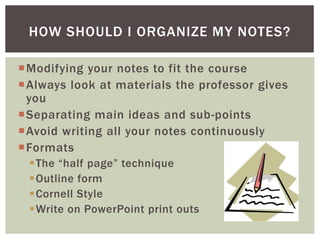
How should I organize my notes?
How do I keep up with the professor?
How can I concentrate on what the professor
is saying, participate AND take notes?
How do I summarize a lecture?
THE CHALLENGES OF TAKING NOTES FROM A
LECTURE
TAKING NOTES FROM A
LECTURE
Benefits of typing
Benefits of writing
FORMATTING YOUR NOTES:
TO TYPE OR NOT TO TYPE….
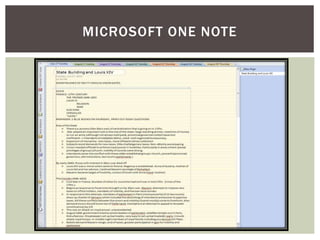
MICROSOFT ONE NOTE
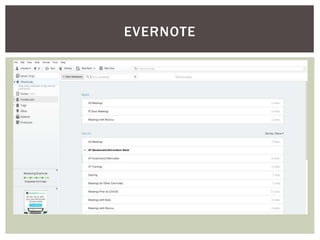
EVERNOTE
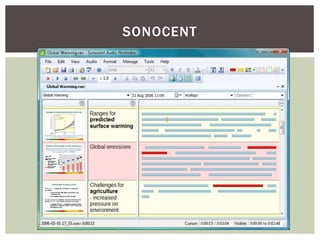
SONOCENT
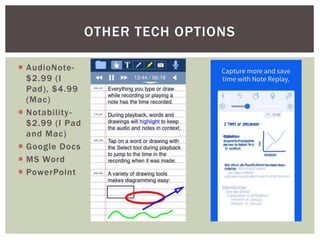
 AudioNote-
$2.99 (I
Pad), $4.99
(Mac)
 Notability-
$2.99 (I Pad
and Mac)
 Google Docs
 MS Word
 PowerPoint
OTHER TECH OPTIONS
Modifying your notes to fit the course
Always look at materials the professor gives
you
Separating main ideas and sub-points
Avoid writing all your notes continuously
Formats
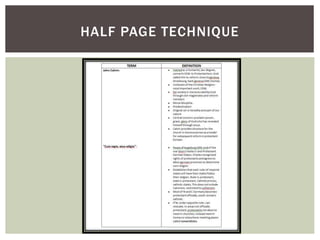
The “half page” technique
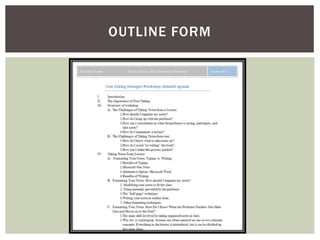
Outline form
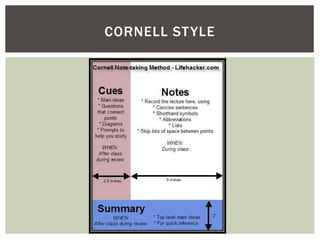
Cornell Style
Write on PowerPoint print outs
HOW SHOULD I ORGANIZE MY NOTES?
HALF PAGE TECHNIQUE
OUTLINE FORM
CORNELL STYLE
PRINTING POWER POINTS FOR NOTE
TAKING
Prepare beforehand
Make use of materials the professor gives you!
Do reading before corresponding lecture
Read the lecture slides before lecture
Other techniques
Practice selecting a main idea in reading
Go back and listen to audio recordings of
lecture to practice
Listen for key terms and changes in key terms
HOW DO I KNOW WHEN THE PROFESSOR
FINISHES ONE MAIN POINT AND MOVES
ONTO THE NEXT?
If you’d like additional help
with this… ask! We have
another workshop!
SELECTING THE MAIN IDEA
Use abbreviations- keep them consistent
Consider typing
 Compare notes with a classmate to see if you
missed any key points
Use assistive technology
HOW DO I KEEP UP WITH MY PROFESSOR?
The challenge of doing two things at once
Talk to your professor
Accommodations- Discuss with your AS
counselor
Have a note taker
Assistive Technology
Voice Recorders
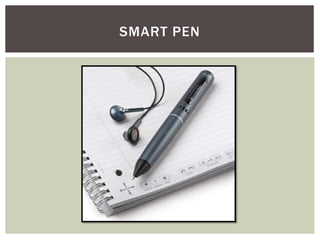
Livescribe Smart Pen
Sonocent
HELP! HOW CAN I ACTIVELY LISTEN, TAKE
NOTES, AND PARTICIPATE?
SMART PEN
How much you write depends on several
things
Your own ability to juggle writing while
listening
Are you using a voice recorder or smart pen?
 Did your professor provide PPT slides?
Was there a topic you were confused about in
the reading?
HOW DO I SUMMARIZE A LECTURE? SHOULD
I WRITE EVERYTHING THE PROFESSOR SAYS?
Immediately after class
Star information, put question marks
Five minute essay
Reorganizing notes
Rewrite in better format/ Adjust formatting
Use different colored fonts and pens
Note Key Terms
Numbering Lists
AFTER CLASS
THE NEXT STEP: REVIEWING YOUR NOTES
For the over-zealous note taker…
For the over-burdened note taker…
Making use of accommodations
AFTER CLASS
THE NEXT STEP: REVIEWING YOUR NOTES
(CONTD.)
TAKING NOTES FROM
TEXT
Do I really need to take notes from my text
book?
How do I know what to take notes on?
How do I avoid “re-writing” the book?
Taking notes from a text seems to take
forever! How can I make this process quicker?
CHALLENGES OF TAKING NOTES FROM TEXT
Do you want to annotate your book or take
separate notes?
Are you going to underline/ highlight?
Are your books digital or traditional?
Do you want to use an app or assistive
technology?
DEVELOP YOUR PERSONAL SYSTEM
Identify the main idea of a paragraph
If you want to underline/ highlight- only mark this
Or- write this in the margin
Or- write this in your notes
Always put information in your own words
Keep it short and to the point
WHAT SHOULD I TAKE NOTES ON?
Use the books structure
Use headings and sub-headings to format your notes,
if you are taking separate notes
 But be judicious!
Five minute summary strategy
Use effective reading strategies
PQRST
WHAT ELSE SHOULD I DO?
CONCLUSION

note-taking-strategies.pptx

  • 1.
  • 2.
    Note taking fromlecture Decide on typing or writing Decide on a format Capture main ideas Assistive technology/ accommodations Note taking from text Develop your personal system Capturing main ideas OVERVIEW OF WORKSHOP
  • 3.
    How should Iorganize my notes? How do I keep up with the professor? How can I concentrate on what the professor is saying, participate AND take notes? How do I summarize a lecture? THE CHALLENGES OF TAKING NOTES FROM A LECTURE
  • 4.
  • 5.
    Benefits of typing Benefitsof writing FORMATTING YOUR NOTES: TO TYPE OR NOT TO TYPE….
  • 6.
  • 7.
  • 8.
  • 9.
     AudioNote- $2.99 (I Pad),$4.99 (Mac)  Notability- $2.99 (I Pad and Mac)  Google Docs  MS Word  PowerPoint OTHER TECH OPTIONS
  • 10.
    Modifying your notesto fit the course Always look at materials the professor gives you Separating main ideas and sub-points Avoid writing all your notes continuously Formats The “half page” technique Outline form Cornell Style Write on PowerPoint print outs HOW SHOULD I ORGANIZE MY NOTES?
  • 11.
  • 12.
  • 13.
  • 14.
    PRINTING POWER POINTSFOR NOTE TAKING
  • 15.
    Prepare beforehand Make useof materials the professor gives you! Do reading before corresponding lecture Read the lecture slides before lecture Other techniques Practice selecting a main idea in reading Go back and listen to audio recordings of lecture to practice Listen for key terms and changes in key terms HOW DO I KNOW WHEN THE PROFESSOR FINISHES ONE MAIN POINT AND MOVES ONTO THE NEXT?
  • 16.
    If you’d likeadditional help with this… ask! We have another workshop! SELECTING THE MAIN IDEA
  • 17.
    Use abbreviations- keepthem consistent Consider typing  Compare notes with a classmate to see if you missed any key points Use assistive technology HOW DO I KEEP UP WITH MY PROFESSOR?
  • 18.
    The challenge ofdoing two things at once Talk to your professor Accommodations- Discuss with your AS counselor Have a note taker Assistive Technology Voice Recorders Livescribe Smart Pen Sonocent HELP! HOW CAN I ACTIVELY LISTEN, TAKE NOTES, AND PARTICIPATE?
  • 19.
  • 20.
    How much youwrite depends on several things Your own ability to juggle writing while listening Are you using a voice recorder or smart pen?  Did your professor provide PPT slides? Was there a topic you were confused about in the reading? HOW DO I SUMMARIZE A LECTURE? SHOULD I WRITE EVERYTHING THE PROFESSOR SAYS?
  • 21.
    Immediately after class Starinformation, put question marks Five minute essay Reorganizing notes Rewrite in better format/ Adjust formatting Use different colored fonts and pens Note Key Terms Numbering Lists AFTER CLASS THE NEXT STEP: REVIEWING YOUR NOTES
  • 22.
    For the over-zealousnote taker… For the over-burdened note taker… Making use of accommodations AFTER CLASS THE NEXT STEP: REVIEWING YOUR NOTES (CONTD.)
  • 23.
  • 24.
    Do I reallyneed to take notes from my text book? How do I know what to take notes on? How do I avoid “re-writing” the book? Taking notes from a text seems to take forever! How can I make this process quicker? CHALLENGES OF TAKING NOTES FROM TEXT
  • 25.
    Do you wantto annotate your book or take separate notes? Are you going to underline/ highlight? Are your books digital or traditional? Do you want to use an app or assistive technology? DEVELOP YOUR PERSONAL SYSTEM
  • 26.
    Identify the mainidea of a paragraph If you want to underline/ highlight- only mark this Or- write this in the margin Or- write this in your notes Always put information in your own words Keep it short and to the point WHAT SHOULD I TAKE NOTES ON?
  • 27.
    Use the booksstructure Use headings and sub-headings to format your notes, if you are taking separate notes  But be judicious! Five minute summary strategy Use effective reading strategies PQRST WHAT ELSE SHOULD I DO?
  • 28.

Editor's Notes

  • #3 Four areas we will cover Format of Workshop - I want it to be interactive, and I would encourage discussions about topics in the slides. Feel free to give comments and opinions. - Shout out questions, or if you feel uncomfortable raise hand at any time - I want this to be beneficial to you- if there are questions you have about note taking that I do not cover please feel free to ask - Encourage you to take notes on this workshop on ppt print out I provided you- an exercise in note taking, at the end I can look them over and give you feedback Information in this workshop is drawn from questions that my students have asked me about note taking over the years, my own experience as a student and tutor, information from other PI staff members.
  • #4 Common questions students have about note taking from a lecture Are there any questions you have about note taking that aren’t up there?
  • #6 Benefits of Typing - Many of us can type faster than we can write- this allows us to copy down more of what the professor says - Typed notes are great because they are easy to re-format. For ex: You can easily insert Roman numerals to make it into an outline. - You can copy key terms into their own document and print them out as flashcards. - You can copy and paste certain information into a “study guide” from many different lectures - You can easily save multiple copies, so you won’t lose them. - Easy to email to friends who have missed a class Benefits of Writing - More likely to commit things to long term memory - Don’t have to carry a laptop
  • #11 Every class is different, many times the formatting of your notes will change as you get used to the professor’s lecturing style. \ However, some note taking styles better suit different courses. First, you always want to look at materials the professor gives you. - If he or she posts powerpoint slides on BB that go with lectures, print these out in this format. You can take notes over here… - Sometimes professors may send out or post a list of key terms. This will help you know what to pay close attention to in lecture. - Other times professors may post an outline to their lecture ahead of time, you can use this format and expand on it in your notes. “Half page” technique - great for classes where the lecture focuses mainly on key terms or vocabulary. Outline form - great for most classes, especially history. - great because they organize main points and their sub-topics. - when studying, its easy to find information quickly - this is easier when you type your notes because Microsoft usually auto-formats The outline format can be tricky at first, but you can create your own note-taking format based on the idea of an outline. - try and separate main ideas with blank lines - use bullet points and indents for sub-points - if your notes get sloppy, draw a box around all the information relating to one main idea.
  • #16 Why this is challenging - lectures are often centered on one or two coherent concepts. - everything in the lecture is interrelated but it can be divided into main ideas Why should I care about this - Not only will it lead to more organized notes for you to study from, but it’s a mental exercise in compartmentalizing information How you do this - it takes practice, and it involves getting used to the professor’s lecturing style
  • #18 Many students struggle keeping up with a professor Abbreviations - it’s ok to make up your own, as long as you know what they stand for - using consistent ones can help
  • #19 Challenge of doing two things at once - listening and thinking while taking notes can be difficult - it takes practice - doing reading beforehand is essential because then you know the areas you are confused on. You can focus your attention on these areas and ask questions Talk to your professor - Ask him/her to provide you with an outline ahead of time, set up your notes ahead of time - Ask for copies of PowerPoint slides - Ask for tips and advice! This can be especially challenging for students with disabilities, but there are accommodations that can help you with this if you feel your disability is presenting challenges with note taking
  • #20 Go to website and show video
  • #21 Your own ability - if you have no problems with this, write down as much as you can - Generally, the more information you can get the better because you can use this for essays and other assignments. When studying, it is easier to choose not to study every detail in your notes than it is to go look up more information. However, you want to still be able to process the information you are writing. - If this is something you have trouble with, focus on main ideas pulse pen or voice recorder? - Focus on main ideas as well ppt slides - do not rewrite down what they already gave you Is this something you’ve studied before? - write down new information Confused? - may want to write down everything your professor says, go back and read it later to see if it clears everything up
  • #22 Put question marks next to areas you are confused on - then look it up in your book, ask your tutor, or talk to your professor
  • #23 For the Over-zealous note taker - underline the most important parts of each section. For the Over-burdened note taker - compare notes with a classmate. Accommodations - listen to your recordings, look at your note takers’ information and compare to your notes. Fill in other things you remember that they missed.
  • #25 Questions students often have about taking notes from text What do you fins most challenging about taking notes from text?
  • #29 Summarizing advice - Decide whether you want to type or write - Choose a way to format your notes - Identify main points during lecture - Use abbreviations - Do reading beforehand - Make use of assistive technology - Review your notes after class - For notes from text - make use of book’s structure - prioritize your tasks - flag pages and underline, then go back Questions? Review students’ notes