

Developing for Node.js in
Visual Studio
@debug_mode

Dhananjay Kumar
Agenda









What is this buzz Node
Create first HTTP Server : Demo
How Node works ?
Understanding EventLoop and Callback
Create Echo Server : Demo
Create app to upload large file asynchronously : Demo
Create routers using Crossroads : Demo
Create REST API using Express and Visual Studio : Demo
Your Presenter
 Dhananjay Kumar
– Evangelist , Telerik
– Microsoft MVP
– Mentror C-Sharpcorner
– @debug_mode
– http://debugmode.net
– http://telerikhelper.net
– Dhananjay.kumar@telerik.com
What is Node.js ?

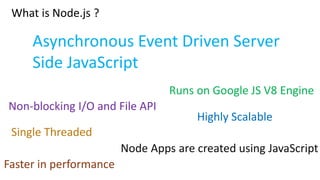
Asynchronous Event Driven Server
Side JavaScript
Runs on Google JS V8 Engine
Non-blocking I/O and File API

Highly Scalable

Single Threaded
Node Apps are created using JavaScript
Faster in performance
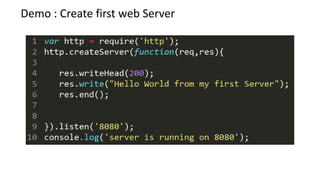
Demo : Create first web Server
Let us understand code line by line
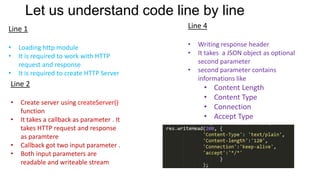
Line 1

Line 4

•
•

•
•

•

Loading http module
It is required to work with HTTP
request and response
It is required to create HTTP Server

Line 2
•
•

•
•

Create server using createServer()
function
It takes a callback as parameter . It
takes HTTP request and response
as paramtere
Callback got two input parameter .
Both input parameters are
readable and writeable stream

•

Writing response header
It takes a JSON object as optional
second parameter
second parameter contains
informations like

•
•
•
•

Content Length
Content Type
Connection
Accept Type
Let us understand code line by line
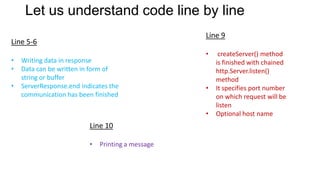
Line 9

Line 5-6
•
•
•

Writing data in response
Data can be written in form of
string or buffer
ServerResponse.end indicates the
communication has been finished

•

•

•

Line 10
•

Printing a message

createServer() method
is finished with chained
http.Server.listen()
method
It specifies port number
on which request will be
listen
Optional host name
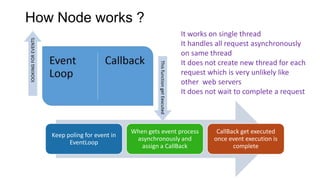
How Node works ?
• It works on single thread
• It handles all request asynchronously
on same thread
• It does not create new thread for each
request which is very unlikely like
other web servers
• It does not wait to complete a request

Keep poling for event in
EventLoop

When gets event process
asynchronously and
assign a CallBack

CallBack get executed
once event execution is
complete
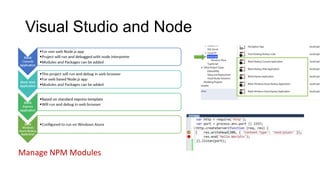
Visual Studio and Node

Manage NPM Modules
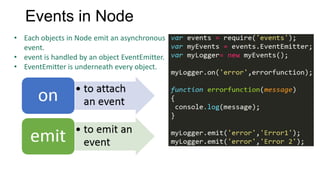
Events in Node
• Each objects in Node emit an asynchronous
event.
• event is handled by an object EventEmitter.
• EventEmitter is underneath every object.
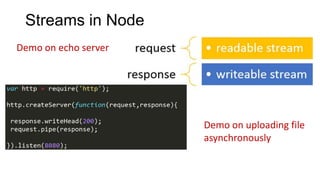
Streams in Node
Demo on echo server

Demo on uploading file
asynchronously
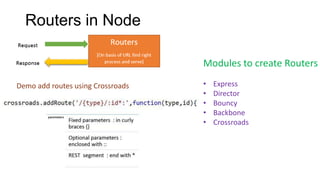
Routers in Node
Modules to create Routers
Demo add routes using Crossroads

•
•
•
•
•

Express
Director
Bouncy
Backbone
Crossroads
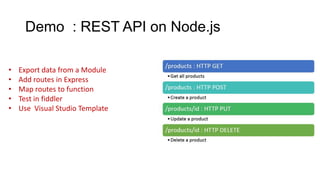
Demo : REST API on Node.js
•
•
•
•
•

Export data from a Module
Add routes in Express
Map routes to function
Test in fiddler
Use Visual Studio Template
Thanks & Questions?
@debug_mode

Nodejsvs

  • 1.
    Developing for Node.jsin Visual Studio @debug_mode Dhananjay Kumar
  • 2.
    Agenda         What is thisbuzz Node Create first HTTP Server : Demo How Node works ? Understanding EventLoop and Callback Create Echo Server : Demo Create app to upload large file asynchronously : Demo Create routers using Crossroads : Demo Create REST API using Express and Visual Studio : Demo
  • 3.
    Your Presenter  DhananjayKumar – Evangelist , Telerik – Microsoft MVP – Mentror C-Sharpcorner – @debug_mode – http://debugmode.net – http://telerikhelper.net – Dhananjay.kumar@telerik.com
  • 4.
    What is Node.js? Asynchronous Event Driven Server Side JavaScript Runs on Google JS V8 Engine Non-blocking I/O and File API Highly Scalable Single Threaded Node Apps are created using JavaScript Faster in performance
  • 5.
    Demo : Createfirst web Server
  • 6.
    Let us understandcode line by line Line 1 Line 4 • • • • • Loading http module It is required to work with HTTP request and response It is required to create HTTP Server Line 2 • • • • Create server using createServer() function It takes a callback as parameter . It takes HTTP request and response as paramtere Callback got two input parameter . Both input parameters are readable and writeable stream • Writing response header It takes a JSON object as optional second parameter second parameter contains informations like • • • • Content Length Content Type Connection Accept Type
  • 7.
    Let us understandcode line by line Line 9 Line 5-6 • • • Writing data in response Data can be written in form of string or buffer ServerResponse.end indicates the communication has been finished • • • Line 10 • Printing a message createServer() method is finished with chained http.Server.listen() method It specifies port number on which request will be listen Optional host name
  • 8.
    How Node works? • It works on single thread • It handles all request asynchronously on same thread • It does not create new thread for each request which is very unlikely like other web servers • It does not wait to complete a request Keep poling for event in EventLoop When gets event process asynchronously and assign a CallBack CallBack get executed once event execution is complete
  • 9.
    Visual Studio andNode Manage NPM Modules
  • 10.
    Events in Node •Each objects in Node emit an asynchronous event. • event is handled by an object EventEmitter. • EventEmitter is underneath every object.
  • 11.
    Streams in Node Demoon echo server Demo on uploading file asynchronously
  • 12.
    Routers in Node Modulesto create Routers Demo add routes using Crossroads • • • • • Express Director Bouncy Backbone Crossroads
  • 13.
    Demo : RESTAPI on Node.js • • • • • Export data from a Module Add routes in Express Map routes to function Test in fiddler Use Visual Studio Template
  • 14.

Editor's Notes

  • #10 https://nodejstools.codeplex.com/releases/view/114437 : download from here
  • #11 https://nodejstools.codeplex.com/releases/view/114437 : download from here