
VERT.X
Columbus Code Camp 2013
Yiguang Hu
What is it?
•
•
•
•
•

PolyGlot
Simple
Scalable
Asynchronous
Concurrent
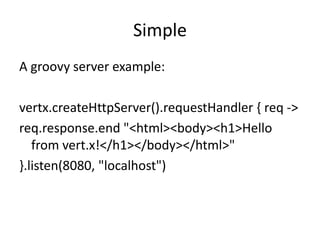
Simple
A groovy server example:
vertx.createHttpServer().requestHandler { req ->
req.response.end "<html><body><h1>Hello
from vert.x!</h1></body></html>"
}.listen(8080, "localhost")
Demo create a simple server that dispays a static
html page
vertx run http/Servertxt.groovy
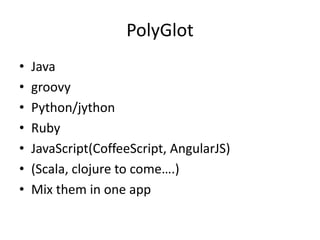
PolyGlot
•
•
•
•
•
•
•

Java
groovy
Python/jython
Ruby
JavaScript(CoffeeScript, AngularJS)
(Scala, clojure to come….)
Mix them in one app
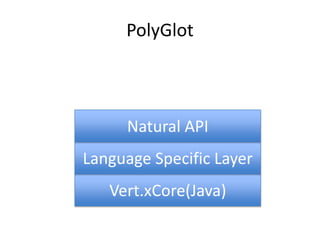
PolyGlot

Natural API
Language Specific Layer
Vert.xCore(Java)
Scalable
•
•
•
•

Linear horizontal scale
Message passing
Automatic load-balancing
Efficiently utilizes server cores
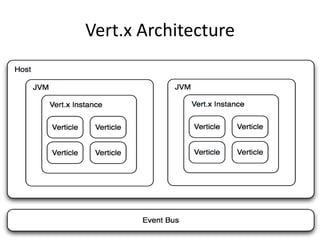
Vert.x Architecture
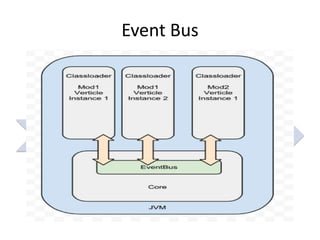
Event Bus

Verticle
Verticle
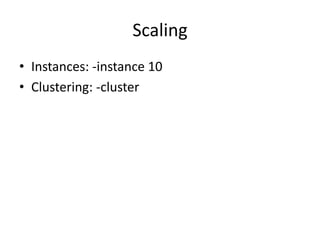
Scaling
• Instances: -instance 10
• Clustering: -cluster
Asynchronous
Java Version web server –Anonymous inner class

public class ServerExample extends Verticle {
public void start() {
vertx.createHttpServer().requestHandler(new Handler<HttpServerRequest>() {
public void handle(HttpServerRequestreq) {

System.out.println("Got request: " + req.uri());
req.response().headers().set("Content-Type", "text/html; charset=UTF-8");
req.response().end("<html><body><h1>Hello from vert.x!</h1></body></html>");
}
}).listen(8080);
}
}
Asynchronous
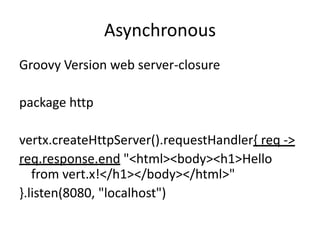
Groovy Version web server-closure
package http

vertx.createHttpServer().requestHandler{ req ->
req.response.end "<html><body><h1>Hello
from vert.x!</h1></body></html>"
}.listen(8080, "localhost")
Asynchronous
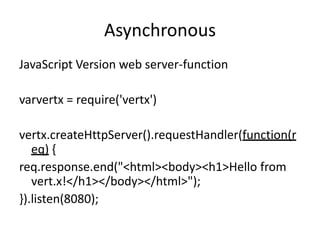
JavaScript Version web server-function
varvertx = require('vertx')

vertx.createHttpServer().requestHandler(function(r
eq) {
req.response.end("<html><body><h1>Hello from
vert.x!</h1></body></html>");
}).listen(8080);
Asynchronous
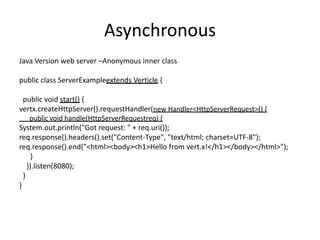
Java Version web server –Anonymous inner class

public class ServerExampleextends Verticle {
public void start() {
vertx.createHttpServer().requestHandler(new Handler<HttpServerRequest>() {
public void handle(HttpServerRequestreq) {

System.out.println("Got request: " + req.uri());
req.response().headers().set("Content-Type", "text/html; charset=UTF-8");
req.response().end("<html><body><h1>Hello from vert.x!</h1></body></html>");
}
}).listen(8080);
}
}
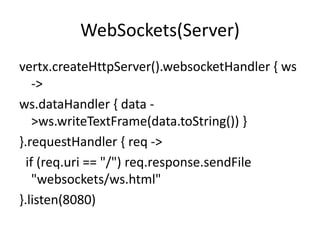
WebSockets(Server)
vertx.createHttpServer().websocketHandler { ws
->
ws.dataHandler { data >ws.writeTextFrame(data.toString()) }
}.requestHandler { req ->
if (req.uri == "/") req.response.sendFile
"websockets/ws.html"
}.listen(8080)
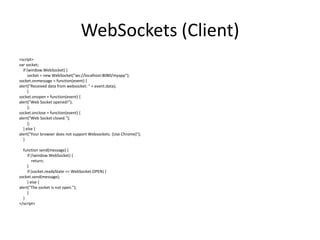
WebSockets (Client)
<script>
var socket;
if (window.WebSocket) {
socket = new WebSocket("ws://localhost:8080/myapp");
socket.onmessage = function(event) {
alert("Received data from websocket: " + event.data);
}
socket.onopen = function(event) {
alert("Web Socket opened!");
};
socket.onclose = function(event) {
alert("Web Socket closed.");
};
} else {
alert("Your browser does not support Websockets. (Use Chrome)");
}
function send(message) {
if (!window.WebSocket) {
return;
}
if (socket.readyState == WebSocket.OPEN) {
socket.send(message);
} else {
alert("The socket is not open.");
}
}
</script>
SockJS
• Handles the communication between the
browser and the server.
• Provides a websocket-like API in client-side JS
• Works when websockets not available
• JSON-Polling, XHR-Polling/Streaming, etc
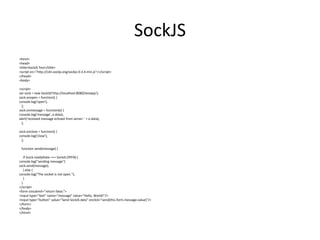
SockJS
<html>
<head>
<title>SockJS Test</title>
<script src="http://cdn.sockjs.org/sockjs-0.3.4.min.js"></script>
</head>
<body>
<script>
var sock = new SockJS('http://localhost:8080/testapp');
sock.onopen = function() {
console.log('open');
};
sock.onmessage = function(e) {
console.log('message', e.data);
alert('received message echoed from server: ' + e.data);
};
sock.onclose = function() {
console.log('close');
};
function send(message) {
if (sock.readyState === SockJS.OPEN) {
console.log("sending message")
sock.send(message);
} else {
console.log("The socket is not open.");
}
}
</script>
<form onsubmit="return false;">
<input type="text" name="message" value="Hello, World!"/>
<input type="button" value="Send SockJS data" onclick="send(this.form.message.value)"/>
</form>
</body>
</html>
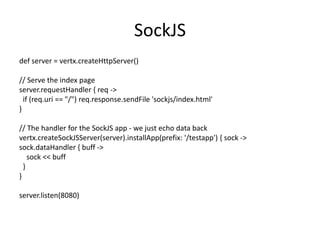
SockJS
def server = vertx.createHttpServer()

// Serve the index page
server.requestHandler { req ->
if (req.uri == "/") req.response.sendFile 'sockjs/index.html'
}
// The handler for the SockJS app - we just echo data back
vertx.createSockJSServer(server).installApp(prefix: '/testapp') { sock ->
sock.dataHandler { buff ->
sock << buff
}
}
server.listen(8080)
How module communicate
•
•
•
•

Shared data
Maps or Sets
May only store immutable data
Immutable-no concurrency issue
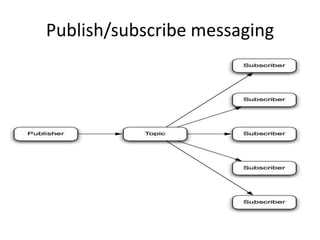
Publish/subscribe messaging
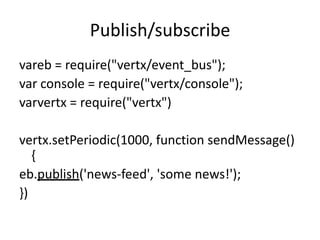
Publish/subscribe
vareb = require("vertx/event_bus");
var console = require("vertx/console");
varvertx = require("vertx")

vertx.setPeriodic(1000, function sendMessage()
{
eb.publish('news-feed', 'some news!');
})
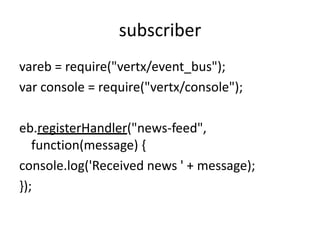
subscriber
vareb = require("vertx/event_bus");
var console = require("vertx/console");
eb.registerHandler("news-feed",
function(message) {
console.log('Received news ' + message);
});
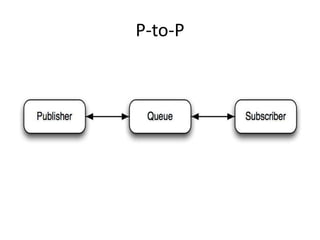
P-to-P
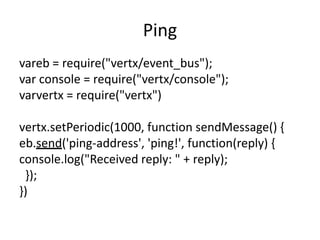
Ping
vareb = require("vertx/event_bus");
var console = require("vertx/console");
varvertx = require("vertx")
vertx.setPeriodic(1000, function sendMessage() {
eb.send('ping-address', 'ping!', function(reply) {
console.log("Received reply: " + reply);
});
})
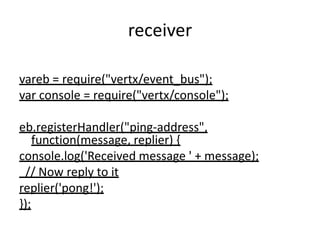
receiver
vareb = require("vertx/event_bus");
var console = require("vertx/console");
eb.registerHandler("ping-address",
function(message, replier) {
console.log('Received message ' + message);
// Now reply to it
replier('pong!');
});
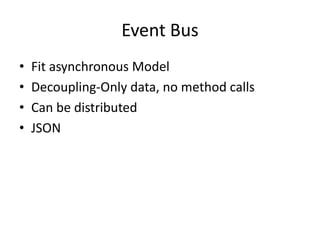
Event Bus
•
•
•
•

Fit asynchronous Model
Decoupling-Only data, no method calls
Can be distributed
JSON
Demonstration
• Web app
• Listen on a topic and send received data to
web through websocket
• A server that searches random topics on
duckduckgo periodically and publish result to
the topic
• Multiple browsers display the data and are
update simultaneously
References
• Vertx.io
• Some slides/charts are lifted from the following
presentations
• http://m.javaworld.com/javaworld/jw-072013/130730-osjp-enterprise-messaging-andintegration-with-vertx.html?page=1
• http://www.cubrid.org/blog/devplatform/inside-vertx-comparison-with-nodejs/
• http://www.javacodegeeks.com/2012/07/osgicase-study-modular-vertx.html
Introduction to Vert.x

Introduction to Vert.x

  • 1.
  • 2.
  • 3.
    Simple A groovy serverexample: vertx.createHttpServer().requestHandler { req -> req.response.end "<html><body><h1>Hello from vert.x!</h1></body></html>" }.listen(8080, "localhost")
  • 4.
    Demo create asimple server that dispays a static html page vertx run http/Servertxt.groovy
  • 5.
  • 6.
  • 7.
    Scalable • • • • Linear horizontal scale Messagepassing Automatic load-balancing Efficiently utilizes server cores
  • 8.
  • 9.
  • 10.
    Scaling • Instances: -instance10 • Clustering: -cluster
  • 11.
    Asynchronous Java Version webserver –Anonymous inner class public class ServerExample extends Verticle { public void start() { vertx.createHttpServer().requestHandler(new Handler<HttpServerRequest>() { public void handle(HttpServerRequestreq) { System.out.println("Got request: " + req.uri()); req.response().headers().set("Content-Type", "text/html; charset=UTF-8"); req.response().end("<html><body><h1>Hello from vert.x!</h1></body></html>"); } }).listen(8080); } }
  • 12.
    Asynchronous Groovy Version webserver-closure package http vertx.createHttpServer().requestHandler{ req -> req.response.end "<html><body><h1>Hello from vert.x!</h1></body></html>" }.listen(8080, "localhost")
  • 13.
    Asynchronous JavaScript Version webserver-function varvertx = require('vertx') vertx.createHttpServer().requestHandler(function(r eq) { req.response.end("<html><body><h1>Hello from vert.x!</h1></body></html>"); }).listen(8080);
  • 14.
    Asynchronous Java Version webserver –Anonymous inner class public class ServerExampleextends Verticle { public void start() { vertx.createHttpServer().requestHandler(new Handler<HttpServerRequest>() { public void handle(HttpServerRequestreq) { System.out.println("Got request: " + req.uri()); req.response().headers().set("Content-Type", "text/html; charset=UTF-8"); req.response().end("<html><body><h1>Hello from vert.x!</h1></body></html>"); } }).listen(8080); } }
  • 15.
    WebSockets(Server) vertx.createHttpServer().websocketHandler { ws -> ws.dataHandler{ data >ws.writeTextFrame(data.toString()) } }.requestHandler { req -> if (req.uri == "/") req.response.sendFile "websockets/ws.html" }.listen(8080)
  • 16.
    WebSockets (Client) <script> var socket; if(window.WebSocket) { socket = new WebSocket("ws://localhost:8080/myapp"); socket.onmessage = function(event) { alert("Received data from websocket: " + event.data); } socket.onopen = function(event) { alert("Web Socket opened!"); }; socket.onclose = function(event) { alert("Web Socket closed."); }; } else { alert("Your browser does not support Websockets. (Use Chrome)"); } function send(message) { if (!window.WebSocket) { return; } if (socket.readyState == WebSocket.OPEN) { socket.send(message); } else { alert("The socket is not open."); } } </script>
  • 17.
    SockJS • Handles thecommunication between the browser and the server. • Provides a websocket-like API in client-side JS • Works when websockets not available • JSON-Polling, XHR-Polling/Streaming, etc
  • 18.
    SockJS <html> <head> <title>SockJS Test</title> <script src="http://cdn.sockjs.org/sockjs-0.3.4.min.js"></script> </head> <body> <script> varsock = new SockJS('http://localhost:8080/testapp'); sock.onopen = function() { console.log('open'); }; sock.onmessage = function(e) { console.log('message', e.data); alert('received message echoed from server: ' + e.data); }; sock.onclose = function() { console.log('close'); }; function send(message) { if (sock.readyState === SockJS.OPEN) { console.log("sending message") sock.send(message); } else { console.log("The socket is not open."); } } </script> <form onsubmit="return false;"> <input type="text" name="message" value="Hello, World!"/> <input type="button" value="Send SockJS data" onclick="send(this.form.message.value)"/> </form> </body> </html>
  • 19.
    SockJS def server =vertx.createHttpServer() // Serve the index page server.requestHandler { req -> if (req.uri == "/") req.response.sendFile 'sockjs/index.html' } // The handler for the SockJS app - we just echo data back vertx.createSockJSServer(server).installApp(prefix: '/testapp') { sock -> sock.dataHandler { buff -> sock << buff } } server.listen(8080)
  • 20.
    How module communicate • • • • Shareddata Maps or Sets May only store immutable data Immutable-no concurrency issue
  • 21.
  • 22.
    Publish/subscribe vareb = require("vertx/event_bus"); varconsole = require("vertx/console"); varvertx = require("vertx") vertx.setPeriodic(1000, function sendMessage() { eb.publish('news-feed', 'some news!'); })
  • 23.
    subscriber vareb = require("vertx/event_bus"); varconsole = require("vertx/console"); eb.registerHandler("news-feed", function(message) { console.log('Received news ' + message); });
  • 24.
  • 25.
    Ping vareb = require("vertx/event_bus"); varconsole = require("vertx/console"); varvertx = require("vertx") vertx.setPeriodic(1000, function sendMessage() { eb.send('ping-address', 'ping!', function(reply) { console.log("Received reply: " + reply); }); })
  • 26.
    receiver vareb = require("vertx/event_bus"); varconsole = require("vertx/console"); eb.registerHandler("ping-address", function(message, replier) { console.log('Received message ' + message); // Now reply to it replier('pong!'); });
  • 27.
    Event Bus • • • • Fit asynchronousModel Decoupling-Only data, no method calls Can be distributed JSON
  • 28.
    Demonstration • Web app •Listen on a topic and send received data to web through websocket • A server that searches random topics on duckduckgo periodically and publish result to the topic • Multiple browsers display the data and are update simultaneously
  • 29.
    References • Vertx.io • Someslides/charts are lifted from the following presentations • http://m.javaworld.com/javaworld/jw-072013/130730-osjp-enterprise-messaging-andintegration-with-vertx.html?page=1 • http://www.cubrid.org/blog/devplatform/inside-vertx-comparison-with-nodejs/ • http://www.javacodegeeks.com/2012/07/osgicase-study-modular-vertx.html

Editor's Notes

  • #4 Explain the code:Request handler handle request eventAsynchronousThe handler accept request and response Response is on request server list port on server
  • #20 Start the server from parent of sockjs folder, then open http://localhost:8080