Node .js
WHO AM I ?
• An Engineering Student at the International
Institute of Technology
• Node.js Developer
• Article Writer at CodeProject.com
What is Node?
• A powerful platform to let you run JS on the
server side
• How? Uses Google’s V8 Engine
• V8 is built in C
• V8 is the fatest JS Engine on the planet
• Great way to build modern web apps on both
Client and Server side!
What Can I Do in Node?
• Anything you want!
• Chat servers, Analytics & Crazy fast backends
• Socket.io library is a wicked way to build real
time apps
• Build a social Network! LinkedIn, Dropbox all
using Node.js
What Can’t I Do in Node?
• Contradicts previous slide but
 Node.js is not a web framework i.e Sinatra
Modules for node.js make it into web
framework i.e Express
Node.js is not Multi-threaded
 A single thread to rule them all
Non-Blocking? Blocking? I’m so confused
• By introducing callbacks. Node can move on to
other requests and whenever the callback is
called, node will process is.
• You should read non-blocking code as « put
function and params in queue and fire
callback when you reach the end of the
queue »
• Blocking= return Non-Blocking= no return.
Only callbacks
Node.js runs on the event loop
• The event loop keeps on running. Checking for
new events, so it can call callbacks for those
events.
• Lets take a look at an example.
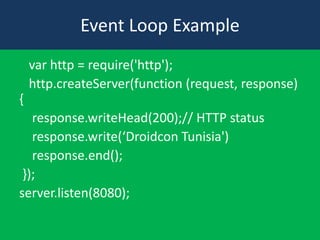
Event Loop Example
var http = require('http');
http.createServer(function (request, response)
{
response.writeHead(200);// HTTP status
response.write(‘Droidcon Tunisia')
response.end();
});
server.listen(8080);
Using Events
• So we saw in our example, whenever an HTTP
request event is fired,our callback is called.
• Node.js has a LOT of events. Lots and Lots!
• Lets see some in action.
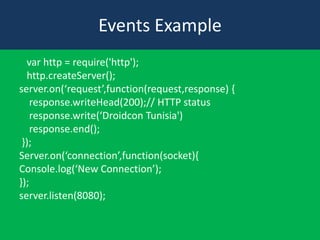
Events Example
var http = require('http');
http.createServer();
server.on(‘request’,function(request,response) {
response.writeHead(200);// HTTP status
response.write(‘Droidcon Tunisia')
response.end();
});
Server.on(‘connection’,function(socket){
Console.log(‘New Connection’);
});
server.listen(8080);
Using Modules
• You might have noticed we’ve been using
require(‘ ’) a lot.
• Require is basically a way to import modules
to your application. Modules are basically
classes.
• They are a module of code that contain
functions which have been exported.
• Exported functions are basically public.
Using Modules
• What does require return then? The file ?
• Well no, when you require a module.It returns
a JS Object. In require(‘http’) it return the
HTTP object.
• This has functions you can call,as well as
public variables
Thank you

hadrichmed@gmail.com

What is Node.js

  • 1.
  • 2.
    WHO AM I? • An Engineering Student at the International Institute of Technology • Node.js Developer • Article Writer at CodeProject.com
  • 3.
    What is Node? •A powerful platform to let you run JS on the server side • How? Uses Google’s V8 Engine • V8 is built in C • V8 is the fatest JS Engine on the planet • Great way to build modern web apps on both Client and Server side!
  • 4.
    What Can IDo in Node? • Anything you want! • Chat servers, Analytics & Crazy fast backends • Socket.io library is a wicked way to build real time apps • Build a social Network! LinkedIn, Dropbox all using Node.js
  • 5.
    What Can’t IDo in Node? • Contradicts previous slide but  Node.js is not a web framework i.e Sinatra Modules for node.js make it into web framework i.e Express Node.js is not Multi-threaded  A single thread to rule them all
  • 6.
    Non-Blocking? Blocking? I’mso confused • By introducing callbacks. Node can move on to other requests and whenever the callback is called, node will process is. • You should read non-blocking code as « put function and params in queue and fire callback when you reach the end of the queue » • Blocking= return Non-Blocking= no return. Only callbacks
  • 7.
    Node.js runs onthe event loop • The event loop keeps on running. Checking for new events, so it can call callbacks for those events. • Lets take a look at an example.
  • 8.
    Event Loop Example varhttp = require('http'); http.createServer(function (request, response) { response.writeHead(200);// HTTP status response.write(‘Droidcon Tunisia') response.end(); }); server.listen(8080);
  • 9.
    Using Events • Sowe saw in our example, whenever an HTTP request event is fired,our callback is called. • Node.js has a LOT of events. Lots and Lots! • Lets see some in action.
  • 10.
    Events Example var http= require('http'); http.createServer(); server.on(‘request’,function(request,response) { response.writeHead(200);// HTTP status response.write(‘Droidcon Tunisia') response.end(); }); Server.on(‘connection’,function(socket){ Console.log(‘New Connection’); }); server.listen(8080);
  • 11.
    Using Modules • Youmight have noticed we’ve been using require(‘ ’) a lot. • Require is basically a way to import modules to your application. Modules are basically classes. • They are a module of code that contain functions which have been exported. • Exported functions are basically public.
  • 12.
    Using Modules • Whatdoes require return then? The file ? • Well no, when you require a module.It returns a JS Object. In require(‘http’) it return the HTTP object. • This has functions you can call,as well as public variables
  • 14.