Node.js	
  for	
  .NET	
  Developers	
  
Speaker:	
  David	
  Neal	
  
Moderator:	
  Alvin	
  Ashcra<	
  
May	
  14,	
  2015	
  
May	
  14	
  –	
  15,	
  2015	
  
2015	
  
Microso<	
  
MVP	
  Virtual	
  
Conference	
  
Your Presenter
David	
  Neal	
  -­‐>	
  reverentgeek.com	
  -­‐>	
  @reverentgeek	


var	
  trustMe	
  =	
  {	


  consumes:	
  ["Bacon",	
  "Caffeine"],	


  facialHair:	
  true,	


  knowsHowToComputer:	
  true,	


  mvp:	
  "ALM"	
  
}	
  
Your Moderator
Alvin	
  Ashcraft	
  -­‐>	
  alvinashcraft.com	
  -­‐>	
  @alvinashcraft	


var	
  alvin	
  =	
  {	


  title:	
  "Software	
  Architect",	


  yearsExperience:	
  20,	


  facialHair:	
  true,	


  knowsHowToComputer:	
  true,	


  mvp:	
  ".NET"	
  
}	
  
Up Ahead
•  Why Node.js?
•  Crash course
•  Tools and frameworks
•  Integration strategies
JavaScript…
…has won the Web.
– Scott Hanselman
Anything that can be
written in JavaScript…
…will eventually be written in JavaScript
– Somebody with incredible powers of observation
(go search for“jslinux”)
JavaScript…
…is tragically important.
– Douglas Crockford,
Author of“JavaScript: The Good Parts”
Why Node.js?
•  Rapid innovation & delivery
•  Developer happiness
•  Attract & retain talent
•  Performance
“Why Node.js is Becoming the Go-To Technology in the Enterprise” – nearform.com
What’s our story?
•  ASP.NET MVC, C#
•  SQL Server + NHibernate
•  JavaScript + JQuery
What’s our story?
•  JavaScript
•  Recruiting
•  Productive, less friction
–  Testing
–  Microservices
–  RabbitMQ, riak, redis
•  Cross-platform
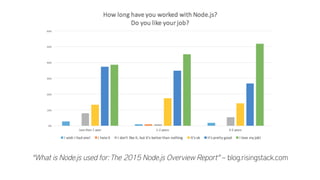
“What is Node.js used for:The 2015 Node.js Overview Report” – blog.risingstack.com
Node.js exemplifies…
Start with the simplest
solution that works.
Do one thing,
and do it well.
Node.js is…
•  blazing fast
•  highly concurrent
•  low-friction
•  cross-platform
•  modern web server
Fandango
•  dramatically shorter development cycles
•  micro-services architecture
•  flexibility in deployment
•  easily scalable infrastructure
“Fandango Goes Live with Node.js” – nearform.com
PayPal
•  2x faster development with fewer developers
•  33% fewer lines of code
•  40% fewer files
•  2x improvement requests/sec
•  35% decrease in avg response time
Walmart
•  Black Friday, 2013
•  Mobile platform
•  200,000,000+ users
•  < 1% CPU utilization
•  Deployed updates
Who else is using Node.js?
•  Dow Jones (WSJ)
•  eBay
•  Groupon
•  LinkedIn
•  Rdio
•  Shutterstock
•  The New York Times
•  Uber
•  Yammer
•  Zendesk
nodjs.org/industry
Node.js Use Cases
•  Single-page apps
•  API server (REST, Hypermedia, etc.)
•  Real-time, streaming, WebSockets
•  Chat, IM, social media
•  Dashboards
•  Proxy service
In other words… the INTERNET
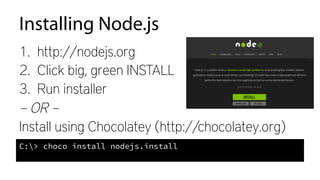
Installing Node.js
1.  http://nodejs.org
2.  Click big, green INSTALL
3.  Run installer
– OR –
Install using Chocolatey (http://chocolatey.org)
C:> choco install nodejs.install
	
  
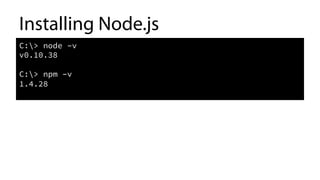
Installing Node.js
C:> node –v
v0.10.38
C:> npm –v
1.4.28
	
  
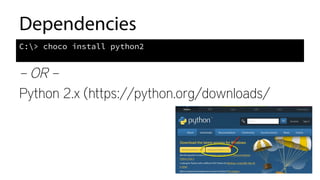
Dependencies
– OR –
Python 2.x (https://python.org/downloads/
C:> choco install python2
	
  
Dependencies
– OR –
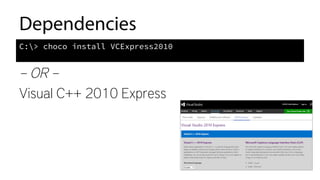
Visual C++ 2010 Express
C:> choco install VCExpress2010
	
  
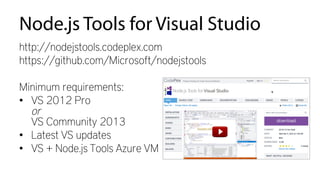
Node.js Tools for Visual Studio
http://nodejstools.codeplex.com
https://github.com/Microsoft/nodejstools
Minimum requirements:
•  VS 2012 Pro
or
VS Community 2013
•  Latest VS updates
•  VS + Node.js Tools Azure VM
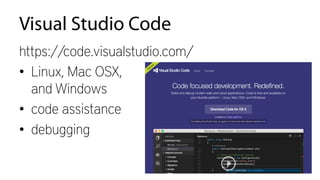
Visual Studio Code
https://code.visualstudio.com/
•  Linux, Mac OSX,
and Windows
•  code assistance
•  debugging
Deploying
•  Don’t include node_modules folder
•  …unless you create builds for specific targets
•  Azure is super-easy
•  Windows
–  iisnode for web apps
–  winser for services
•  Linux – forever
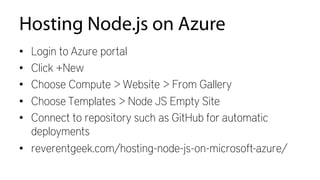
Hosting Node.js on Azure
•  Login to Azure portal
•  Click +New
•  Choose Compute > Website > From Gallery
•  Choose Templates > Node JS Empty Site
•  Connect to repository such as GitHub for automatic
deployments
•  reverentgeek.com/hosting-node-js-on-microsoft-azure/
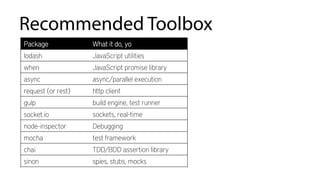
Recommended Toolbox
Package What it do, yo
lodash JavaScript utilities
when JavaScript promise library
async async/parallel execution
request (or rest) http client

gulp build engine, test runner
socket.io sockets, real-time
node-inspector Debugging
mocha test framework
chai TDD/BDD assertion library
sinon spies, stubs, mocks
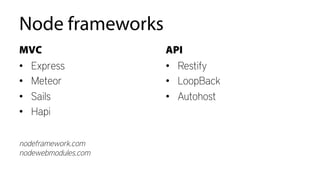
Node frameworks
MVC
•  Express
•  Meteor
•  Sails
•  Hapi
API
•  Restify
•  LoopBack
•  Autohost
nodeframework.com
nodewebmodules.com
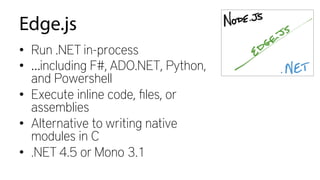
Edge.js
•  Run .NET in-process
•  …including F#, ADO.NET, Python,
and Powershell
•  Execute inline code, files, or
assemblies
•  Alternative to writing native
modules in C
•  .NET 4.5 or Mono 3.1
What can Edge.js do?
•  Leverage existing .NET investment
•  SQL Server (or other DBs)
•  TFS, SharePoint, Exchange, etc.
•  Active Directory
•  Hardware (e.g. camera, microphone,
printer, win32)
•  Video encoding, or other CPU-intensive
work
•  Powershell
.NET + Node.js Integration
•  Edge.js
•  request module to call .NET Web API
•  Messaging (e.g. RabbitMQ, Azure Service Bus)
David Neal
@ReverentGeek
david@reverentgeek.com
reverentgeek.com
Thank You!
Demos + Resources
bit.ly/node-demos

Node.js for .NET Developers

  • 1.
    Node.js  for  .NET  Developers   Speaker:  David  Neal   Moderator:  Alvin  Ashcra<   May  14,  2015   May  14  –  15,  2015   2015   Microso<   MVP  Virtual   Conference  
  • 2.
    Your Presenter David  Neal  -­‐>  reverentgeek.com  -­‐>  @reverentgeek     var  trustMe  =  {      consumes:  ["Bacon",  "Caffeine"],      facialHair:  true,      knowsHowToComputer:  true,      mvp:  "ALM"   }  
  • 3.
    Your Moderator Alvin  Ashcraft  -­‐>  alvinashcraft.com  -­‐>  @alvinashcraft     var  alvin  =  {      title:  "Software  Architect",      yearsExperience:  20,      facialHair:  true,      knowsHowToComputer:  true,      mvp:  ".NET"   }  
  • 4.
    Up Ahead •  WhyNode.js? •  Crash course •  Tools and frameworks •  Integration strategies
  • 5.
    JavaScript… …has won theWeb. – Scott Hanselman
  • 6.
    Anything that canbe written in JavaScript… …will eventually be written in JavaScript – Somebody with incredible powers of observation (go search for“jslinux”)
  • 7.
    JavaScript… …is tragically important. –Douglas Crockford, Author of“JavaScript: The Good Parts”
  • 15.
    Why Node.js? •  Rapidinnovation & delivery •  Developer happiness •  Attract & retain talent •  Performance “Why Node.js is Becoming the Go-To Technology in the Enterprise” – nearform.com
  • 16.
    What’s our story? • ASP.NET MVC, C# •  SQL Server + NHibernate •  JavaScript + JQuery
  • 17.
    What’s our story? • JavaScript •  Recruiting •  Productive, less friction –  Testing –  Microservices –  RabbitMQ, riak, redis •  Cross-platform
  • 19.
    “What is Node.jsused for:The 2015 Node.js Overview Report” – blog.risingstack.com
  • 20.
    Node.js exemplifies… Start withthe simplest solution that works. Do one thing, and do it well.
  • 21.
    Node.js is… •  blazingfast •  highly concurrent •  low-friction •  cross-platform •  modern web server
  • 22.
    Fandango •  dramatically shorterdevelopment cycles •  micro-services architecture •  flexibility in deployment •  easily scalable infrastructure “Fandango Goes Live with Node.js” – nearform.com
  • 23.
    PayPal •  2x fasterdevelopment with fewer developers •  33% fewer lines of code •  40% fewer files •  2x improvement requests/sec •  35% decrease in avg response time
  • 24.
    Walmart •  Black Friday,2013 •  Mobile platform •  200,000,000+ users •  < 1% CPU utilization •  Deployed updates
  • 25.
    Who else isusing Node.js? •  Dow Jones (WSJ) •  eBay •  Groupon •  LinkedIn •  Rdio •  Shutterstock •  The New York Times •  Uber •  Yammer •  Zendesk nodjs.org/industry
  • 26.
    Node.js Use Cases • Single-page apps •  API server (REST, Hypermedia, etc.) •  Real-time, streaming, WebSockets •  Chat, IM, social media •  Dashboards •  Proxy service In other words… the INTERNET
  • 27.
    Installing Node.js 1.  http://nodejs.org 2. Click big, green INSTALL 3.  Run installer – OR – Install using Chocolatey (http://chocolatey.org) C:> choco install nodejs.install  
  • 28.
    Installing Node.js C:> node–v v0.10.38 C:> npm –v 1.4.28  
  • 29.
    Dependencies – OR – Python2.x (https://python.org/downloads/ C:> choco install python2  
  • 30.
    Dependencies – OR – VisualC++ 2010 Express C:> choco install VCExpress2010  
  • 31.
    Node.js Tools forVisual Studio http://nodejstools.codeplex.com https://github.com/Microsoft/nodejstools Minimum requirements: •  VS 2012 Pro or VS Community 2013 •  Latest VS updates •  VS + Node.js Tools Azure VM
  • 32.
    Visual Studio Code https://code.visualstudio.com/ • Linux, Mac OSX, and Windows •  code assistance •  debugging
  • 34.
    Deploying •  Don’t includenode_modules folder •  …unless you create builds for specific targets •  Azure is super-easy •  Windows –  iisnode for web apps –  winser for services •  Linux – forever
  • 35.
    Hosting Node.js onAzure •  Login to Azure portal •  Click +New •  Choose Compute > Website > From Gallery •  Choose Templates > Node JS Empty Site •  Connect to repository such as GitHub for automatic deployments •  reverentgeek.com/hosting-node-js-on-microsoft-azure/
  • 36.
    Recommended Toolbox Package Whatit do, yo lodash JavaScript utilities when JavaScript promise library async async/parallel execution request (or rest) http client gulp build engine, test runner socket.io sockets, real-time node-inspector Debugging mocha test framework chai TDD/BDD assertion library sinon spies, stubs, mocks
  • 37.
    Node frameworks MVC •  Express • Meteor •  Sails •  Hapi API •  Restify •  LoopBack •  Autohost nodeframework.com nodewebmodules.com
  • 38.
    Edge.js •  Run .NETin-process •  …including F#, ADO.NET, Python, and Powershell •  Execute inline code, files, or assemblies •  Alternative to writing native modules in C •  .NET 4.5 or Mono 3.1
  • 39.
    What can Edge.jsdo? •  Leverage existing .NET investment •  SQL Server (or other DBs) •  TFS, SharePoint, Exchange, etc. •  Active Directory •  Hardware (e.g. camera, microphone, printer, win32) •  Video encoding, or other CPU-intensive work •  Powershell
  • 40.
    .NET + Node.jsIntegration •  Edge.js •  request module to call .NET Web API •  Messaging (e.g. RabbitMQ, Azure Service Bus)
  • 42.