0
NGSI-LD Introduction
Jason Fox
Senior Technical Evangelist
FIWARE Foundation
Useful links
What is JSON-LD:
https://www.youtube.com/watch?v=vioCbTo3C-4
JSON-LD Core Markup:
https://www.youtube.com/watch?v=UmvWk_TQ30A
Compaction and Expansion:
https://www.youtube.com/watch?v=Tm3fD89dqRE
JSON-LD Playground & examples
https://json-ld.org/playground/
1
Linked Context Data: NGSI v2 to NGSI-LD
From: https://fiware-datamodels.readthedocs.io/en/latest/ngsi-ld_faq/index.html
▪ NGSI-LD is an evolution of the FIWARE NGSI v2 information model, and has been updated/improved to
support linked data (entity relationships), property graphs and semantics (exploiting the capabilities
offered by JSON-LD). This work has been conducted under the ETSI ISG Context Information
Management initiative.
▪ Creating proper machine-readable Linked Data is fundamental to NGSI-LD.
▪ NGSI-LD Payloads are valid JSON-LD
2
{
"@context": [
"https://fiware.github.io/data-models/context.jsonld",
"https://uri.etsi.org/ngsi-ld/v1/ngsi-ld-core-context.jsonld"
],
"id": "http://dbpedia.org/resource/John_Lennon",
"type": "Person",
"name": {"type": "Property", "value": "John Lennon"},
"born": {"type": "Property", "value": "1940-10-09"},
"spouse": {"type": "Relationship", "object": "http://dbpedia.org/resource/Cynthia_Lennon" }
}
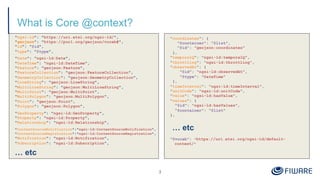
What is Core @context?
"ngsi-ld": "https://uri.etsi.org/ngsi-ld/",
"geojson": "https://purl.org/geojson/vocab#",
"id": "@id",
"type": "@type",
"Date": "ngsi-ld:Date",
"DateTime": "ngsi-ld:DateTime",
"Feature": "geojson:Feature",
"FeatureCollection": "geojson:FeatureCollection",
"GeometryCollection": "geojson:GeometryCollection",
"LineString": "geojson:LineString",
"MultiLineString": "geojson:MultiLineString",
"MultiPoint": "geojson:MultiPoint",
"MultiPolygon": "geojson:MultiPolygon",
"Point": "geojson:Point",
"Polygon": "geojson:Polygon",
"GeoProperty": "ngsi-ld:GeoProperty",
"Property": "ngsi-ld:Property",
"Relationship": "ngsi-ld:Relationship",
"ContextSourceNotification":"ngsi-ld:ContextSourceNotification",
"ContextSourceRegistration":"ngsi-ld:ContextSourceRegistration",
"Notification": "ngsi-ld:Notification",
"Subscription": "ngsi-ld:Subscription",
… etc
3
"coordinates": {
"@container": "@list",
"@id": "geojson:coordinates"
},
"temporalQ": "ngsi-ld:temporalQ",
"throttling": "ngsi-ld:throttling",
"observedAt": {
"@id": "ngsi-ld:observedAt",
"@type": "DateTime"
},
"timeInterval": "ngsi-ld:timeInterval",
"unitCode": "ngsi-ld:unitCode",
"value": "ngsi-ld:hasValue",
"values": {
"@id": "ngsi-ld:hasValues",
"@container": "@list"
},
… etc
"@vocab": "https://uri.etsi.org/ngsi-ld/default-
context/"
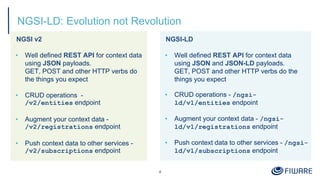
NGSI-LD: Evolution not Revolution
NGSI v2
▪ Well defined REST API for context data
using JSON payloads.
GET, POST and other HTTP verbs do
the things you expect
▪ CRUD operations -
/v2/entities endpoint
▪ Augment your context data -
/v2/registrations endpoint
▪ Push context data to other services -
/v2/subscriptions endpoint
4
NGSI-LD
▪ Well defined REST API for context data
using JSON and JSON-LD payloads.
GET, POST and other HTTP verbs do the
things you expect
▪ CRUD operations - /ngsi-
ld/v1/entities endpoint
▪ Augment your context data - /ngsi-
ld/v1/registrations endpoint
▪ Push context data to other services - /ngsi-
ld/v1/subscriptions endpoint
5
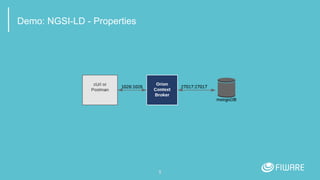
Demo: NGSI-LD - Properties
NGSI-LD Properties: Creating an Entity
NGSI v2
6
NGSI-LD
curl -iX POST 'http://localhost:1026/v2/entities' 
-H 'Content-Type: application/json' 
-d '{
"type": "Store", "id": "store001",
"category": { "type": "Array", "value": ["commercial"]},
"address": { "type": "PostalAddress", "value": {
"streetAddress": "Bornholmer Straße 65",
"addressRegion": "Berlin",
"addressLocality": "Prenzlauer Berg",
"postalCode": "10439"
},
"metadata": {
"verified": { "type": "Boolean","value": true}
}
},
"location": {"type": "geo:json",
"value": {"type": "Point", "coordinates": [13.3986, 52.5547]}
},
"name": {"type": "Text", "value": "Bösebrücke Einkauf"}
}'
curl -iX POST http://localhost:1026/ngsi-ld/v1/entities 
-H 'Content-Type: application/ld+json' 
-d '{
"type": "Building", "id": "urn:ngsi-ld:Building:store001",
"category": { "type": "Property", "value": ["commercial"]},
"address": { "type": "Property"," value": {
"streetAddress": "Bornholmer Straße 65",
"addressRegion": "Berlin",
"addressLocality": "Prenzlauer Berg",
"postalCode": "10439"
},
"verified": { "type": "Property", "value": true }
},
"location": { "type": "GeoProperty",
"value": { "type": "Point", "coordinates": [13.3986, 52.5547]}
},
"name": { "type": "Property", "value": "Bösebrücke Einkauf" },
"@context": [
"https://fiware.github.io/data-models/context.jsonld",
"https://uri.etsi.org/ngsi-ld/v1/ngsi-ld-core-context.jsonld"
]
}'
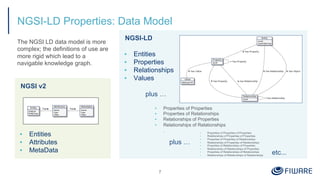
NGSI-LD Properties: Data Model
NGSI v2
▪ Entities
▪ Attributes
▪ MetaData
7
NGSI-LD
▪ Entities
▪ Properties
▪ Relationships
▪ Values
plus …
plus …
etc...
The NGSI LD data model is more
complex; the definitions of use are
more rigid which lead to a
navigable knowledge graph.
▪ Properties of Properties
▪ Properties of Relationships
▪ Relationships of Properties
▪ Relationships of Relationships
. ▪ Properties of Properties of Properties
▪ Relationships of Properties of Properties
▪ Properties of Properties of Relationships
▪ Relationships of Properties of Relationships
▪ Properties of Relationships of Properties
▪ Relationships of Relationships of Properties
▪ Properties of Relationships of Relationships
▪ Relationships of Relationships of Relationships
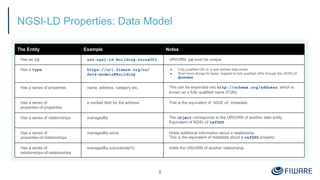
NGSI-LD Properties: Data Model
8
The Entity Example Notes
Has an id urn:ngsi-ld:Building:store001 URI/URN. id must be unique.
Has a type. https://uri.fiware.org/ns/
data-models#Building
● Fully qualified URI of a well defined data model
● Short-hand strings for types, mapped to fully qualified URIs through the JSON-LD
@context.
Has a series of properties name, address, category etc. This can be expanded into http://schema.org/address, which is
known as a fully qualified name (FQN).
Has a series of
properties-of-properties
a verified field for the address This is the equivalent of NGSI v2 metadata
Has a series of relationships managedBy The object corresponds to the URI/URN of another data entity.
Equivalent of NGSI v2 refXXX
Has a series of
properties-of-relationships
managedBy.since Holds additional information about a relationship.
This is the equivalent of metadata about a refXXX property
Has a series of
relationships-of-relationships
managedBy.subordinateTo holds the URI/URN of another relationship.
NGSI-LD Properties: Reading Entity Data as JSON-LD
NGSI-LD
▪ Response is just a JSON payload plus an @context
▪ @context can be passed either in the Link header
or the payload body:
▪ Accept: application/ld+json to include
the @context as a JSON attribute
▪ Accept: application/json returns plain old
JSON objects - @context is passed as a Link header
9
curl -G -X GET 
'http://localhost:1026/ngsi-ld/v1/entities' 
-H 'Link: <https://fiware.github.io/data-models/context.jsonld>;
rel="http://www.w3.org/ns/json-ld#context";
type="application/ld+json"' 
-H 'Accept: application/ld+json' 
-d 'type=Building' 
-d 'options=keyValues'
[
{
"@context": "https://fiware.github.io/data-models/context.jsonld",
"id": "urn:ngsi-ld:Building:store001", "type": "Building",
"address": {
"streetAddress": "Bornholmer Straße 65",
"addressRegion": "Berlin",
"addressLocality": "Prenzlauer Berg",
"postalCode": "10439"
},
"name": "Bösebrücke Einkauf",
"category": “commercial",
"location": {
"type": "Point", "coordinates": [13.3986, 52.5547]
}
}
]
NGSI-LD Properties: What to call a location?
▪ place ?
▪ locatedAt ?
▪ geocoordinate ?
▪ geocoordinates ?
10
With NGSI-LD core @context a location is always https://uri.etsi.org/ngsi-ld/location
Thereafter, with JSON-LD you may map your preferred short name if necessary
NGSI-LD core @context
"@context": {
"ngsi-ld": "https://uri.etsi.org/ngsi-ld/",
"geojson": "https://purl.org/geojson/vocab#",
"id": "@id",
"type": "@type",
"value": "ngsi-ld:hasValue",
... etc.
"GeoProperty": "ngsi-ld:GeoProperty",
"Point": "geojson:Point",
"coordinates": {
"@container": "@list",
"@id": "geojson:coordinates"
},
"location": "https://uri.etsi.org/ngsi-ld/location",
... etc.
}
▪ ubicación ?
▪ standort ?
▪ 置き場所 ?
▪ location ✓
"location": {
"type": "GeoProperty",
"value": {
"type": "Point",
"coordinates": [13.3986, 52.5547]}
}
}
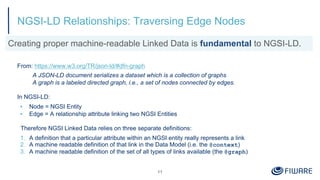
NGSI-LD Relationships: Traversing Edge Nodes
From: https://www.w3.org/TR/json-ld/#dfn-graph
A JSON-LD document serializes a dataset which is a collection of graphs
A graph is a labeled directed graph, i.e., a set of nodes connected by edges.
In NGSI-LD:
▪ Node = NGSI Entity
▪ Edge = A relationship attribute linking two NGSI Entities
Therefore NGSI Linked Data relies on three separate definitions:
1. A definition that a particular attribute within an NGSI entity really represents a link
2. A machine readable definition of that link in the Data Model (i.e. the @context)
3. A machine readable definition of the set of all types of links available (the @graph)
11
Creating proper machine-readable Linked Data is fundamental to NGSI-LD.
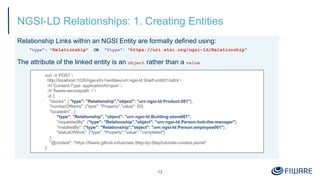
NGSI-LD Relationships: 1. Creating Entities
Relationship Links within an NGSI Entity are formally defined using:
"type": "Relationship" OR "@type": "https://uri.etsi.org/ngsi-ld/Relationship"
The attribute of the linked entity is an object rather than a value
12
curl -X POST 
http://localhost:1026/ngsi-ld/v1/entities/urn:ngsi-ld:Shelf:unit001/attrs 
-H 'Content-Type: application/ld+json' 
-H 'fiware-servicepath: /' 
-d '{
"stocks": { "type": "Relationship","object": "urn:ngsi-ld:Product:001"},
"numberOfItems": {"type": "Property","value": 50},
"locatedIn" : {
"type": "Relationship", "object": "urn:ngsi-ld:Building:store001",
"requestedBy": {"type": "Relationship","object": "urn:ngsi-ld:Person:bob-the-manager"},
"installedBy": {"type": "Relationship","object": "urn:ngsi-ld:Person:employee001"},
"statusOfWork": {"type": "Property","value": "completed"}
},
"@context": "https://fiware.github.io/tutorials.Step-by-Step/tutorials-context.jsonld"
}'
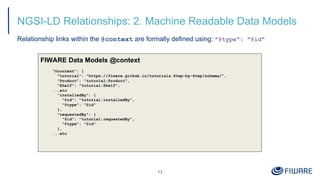
NGSI-LD Relationships: 2. Machine Readable Data Models
Relationship links within the @context are formally defined using: "@type": "@id"
13
FIWARE Data Models @context
"@context": {
"tutorial": "https://fiware.github.io/tutorials.Step-by-Step/schema/",
"Product": "tutorial:Product",
"Shelf": "tutorial:Shelf",
...etc
"installedBy": {
"@id": "tutorial:installedBy",
"@type": "@id"
},
"requestedBy": {
"@id": "tutorial:requestedBy",
"@type": "@id"
},
...etc
NGSI-LD Relationships: 3. Machine Readable Links
14
FIWARE Data Models @graph
"@graph": [
{
"@id": "tutorial:Product",
"@type": "rdfs:Class",
"rdfs:comment": [
{"@language": "en", "@value": "Product is sold in a Store."},
{"@language": "ja", "@value": "製品はストアで販売されている物"}],
"rdfs:label": [{"@language": "en", "@value": "Product"}, {"@language": "ja", "@value": "製品"}],
"rdfs:subClassOf": {"@id": "http://schema.org/Thing"}
},
… etc
{
"@id": "tutorial:requestedBy",
"@type": "https://uri.etsi.org/ngsi-ld/Relationship",
"schema:domainIncludes": [{"@id": "tutorial:Shelf"}, {"@id": "tutorial:StockOrder"}],
"schema:rangeIncludes": [{"@id": "schema:Person"}],
"rdfs:comment": [
{"@language": "en","@value": "Object requested by person."},
{"@language": "ja","@value": "人が要求したオブジェクト"}],
"rdfs:label": [{"@language": "en", "@value": "requested by"},{"@language": "ja", "@value": "要求者"}]
},
]
15
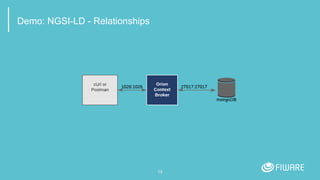
Demo: NGSI-LD - Relationships
Sample Key-Values Payload
NGSI-LD Subscriptions: Creating a Subscription
16
NGSI-LD
{
"id": "urn:ngsi-ld:Notification:60812d06f2ebd727e1c425a8",
"type": "Notification",
"subscriptionId": "urn:ngsi-
ld:Subscription:60812c7bf2ebd727e1c425a4",
"notifiedAt": "2021-04-22T08:00:06.741Z",
"data": [
{
"id": "urn:ngsi-ld:Shelf:unit001",
"type": "Shelf",
"locatedIn": "urn:ngsi-ld:Building:store001",
"numberOfItems": 8,
"stocks": "urn:ngsi-ld:Product:001"
}
]
}
curl -L -X POST 'http://localhost:1026/ngsi-ld/v1/subscriptions/' 
-H 'Content-Type: application/ld+json' 
--data-raw '{
"description": "Notify me of low stock in Store 001",
"type": "Subscription",
"entities": [{"type": "Shelf"}],
"watchedAttributes": ["numberOfItems"],
"q": "numberOfItems<10;locatedIn==urn:ngsi-ld:Building:store001",
"notification": {
"attributes": [ "numberOfItems", "stocks","locatedIn"],
"format": "keyValues",
"endpoint": {
"uri": "http://tutorial:3000/subscription/low-stock-store001",
"accept": "application/json"
}
},
"@context": "https://fiware.github.io/tutorials.Step-by-Step/tutorials-
context.jsonld"
}'
NGSI-LD Registrations: Creating a Registration
NGSI LD
17
curl -L -X POST 'http://localhost:1026/ngsi-ld/v1/csourceRegistrations/' 
-H 'Content-Type: application/json' 
-H 'Link: <https://fiware.github.io/tutorials.Step-by-Step/tutorials-context.jsonld>;
rel="http://www.w3.org/ns/json-ld#context"; type="application/ld+json"' 
--data-raw ' {
"type": "ContextSourceRegistration",
"information": [
{
"entities": [
{
"type": "Building",
"id": "urn:ngsi-ld:Building:store001"
}
],
"properties": [
"tweets"
]
}
],
"endpoint": "http://context-provider:3000/static/tweets"
}'
Note that properties is defined in the
1.1.1 NGSI-LD core context
In 1.3.1, it is due to be replaced with two
separate attributes - propertyNames
and relationshipNames - this change
has been made in order to offer full
GeoJSON-LD support.
Your context broker may or may not
support the updated core context
18
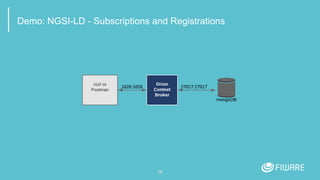
Demo: NGSI-LD - Subscriptions and Registrations
19
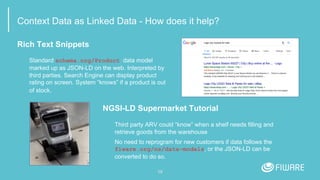
Context Data as Linked Data - How does it help?
Rich Text Snippets
Standard schema.org/Product data model
marked up as JSON-LD on the web. Interpreted by
third parties. Search Engine can display product
rating on screen. System “knows” if a product is out
of stock.
NGSI-LD Supermarket Tutorial
Third party ARV could “know” when a shelf needs filling and
retrieve goods from the warehouse
No need to reprogram for new customers if data follows the
fiware.org/ns/data-models, or the JSON-LD can be
converted to do so.
Thank you!
http://fiware.org
Follow @FIWARE on Twitter

NGSI-LD Introduction

  • 1.
    0 NGSI-LD Introduction Jason Fox SeniorTechnical Evangelist FIWARE Foundation
  • 2.
    Useful links What isJSON-LD: https://www.youtube.com/watch?v=vioCbTo3C-4 JSON-LD Core Markup: https://www.youtube.com/watch?v=UmvWk_TQ30A Compaction and Expansion: https://www.youtube.com/watch?v=Tm3fD89dqRE JSON-LD Playground & examples https://json-ld.org/playground/ 1
  • 3.
    Linked Context Data:NGSI v2 to NGSI-LD From: https://fiware-datamodels.readthedocs.io/en/latest/ngsi-ld_faq/index.html ▪ NGSI-LD is an evolution of the FIWARE NGSI v2 information model, and has been updated/improved to support linked data (entity relationships), property graphs and semantics (exploiting the capabilities offered by JSON-LD). This work has been conducted under the ETSI ISG Context Information Management initiative. ▪ Creating proper machine-readable Linked Data is fundamental to NGSI-LD. ▪ NGSI-LD Payloads are valid JSON-LD 2 { "@context": [ "https://fiware.github.io/data-models/context.jsonld", "https://uri.etsi.org/ngsi-ld/v1/ngsi-ld-core-context.jsonld" ], "id": "http://dbpedia.org/resource/John_Lennon", "type": "Person", "name": {"type": "Property", "value": "John Lennon"}, "born": {"type": "Property", "value": "1940-10-09"}, "spouse": {"type": "Relationship", "object": "http://dbpedia.org/resource/Cynthia_Lennon" } }
  • 4.
    What is Core@context? "ngsi-ld": "https://uri.etsi.org/ngsi-ld/", "geojson": "https://purl.org/geojson/vocab#", "id": "@id", "type": "@type", "Date": "ngsi-ld:Date", "DateTime": "ngsi-ld:DateTime", "Feature": "geojson:Feature", "FeatureCollection": "geojson:FeatureCollection", "GeometryCollection": "geojson:GeometryCollection", "LineString": "geojson:LineString", "MultiLineString": "geojson:MultiLineString", "MultiPoint": "geojson:MultiPoint", "MultiPolygon": "geojson:MultiPolygon", "Point": "geojson:Point", "Polygon": "geojson:Polygon", "GeoProperty": "ngsi-ld:GeoProperty", "Property": "ngsi-ld:Property", "Relationship": "ngsi-ld:Relationship", "ContextSourceNotification":"ngsi-ld:ContextSourceNotification", "ContextSourceRegistration":"ngsi-ld:ContextSourceRegistration", "Notification": "ngsi-ld:Notification", "Subscription": "ngsi-ld:Subscription", … etc 3 "coordinates": { "@container": "@list", "@id": "geojson:coordinates" }, "temporalQ": "ngsi-ld:temporalQ", "throttling": "ngsi-ld:throttling", "observedAt": { "@id": "ngsi-ld:observedAt", "@type": "DateTime" }, "timeInterval": "ngsi-ld:timeInterval", "unitCode": "ngsi-ld:unitCode", "value": "ngsi-ld:hasValue", "values": { "@id": "ngsi-ld:hasValues", "@container": "@list" }, … etc "@vocab": "https://uri.etsi.org/ngsi-ld/default- context/"
  • 5.
    NGSI-LD: Evolution notRevolution NGSI v2 ▪ Well defined REST API for context data using JSON payloads. GET, POST and other HTTP verbs do the things you expect ▪ CRUD operations - /v2/entities endpoint ▪ Augment your context data - /v2/registrations endpoint ▪ Push context data to other services - /v2/subscriptions endpoint 4 NGSI-LD ▪ Well defined REST API for context data using JSON and JSON-LD payloads. GET, POST and other HTTP verbs do the things you expect ▪ CRUD operations - /ngsi- ld/v1/entities endpoint ▪ Augment your context data - /ngsi- ld/v1/registrations endpoint ▪ Push context data to other services - /ngsi- ld/v1/subscriptions endpoint
  • 6.
  • 7.
    NGSI-LD Properties: Creatingan Entity NGSI v2 6 NGSI-LD curl -iX POST 'http://localhost:1026/v2/entities' -H 'Content-Type: application/json' -d '{ "type": "Store", "id": "store001", "category": { "type": "Array", "value": ["commercial"]}, "address": { "type": "PostalAddress", "value": { "streetAddress": "Bornholmer Straße 65", "addressRegion": "Berlin", "addressLocality": "Prenzlauer Berg", "postalCode": "10439" }, "metadata": { "verified": { "type": "Boolean","value": true} } }, "location": {"type": "geo:json", "value": {"type": "Point", "coordinates": [13.3986, 52.5547]} }, "name": {"type": "Text", "value": "Bösebrücke Einkauf"} }' curl -iX POST http://localhost:1026/ngsi-ld/v1/entities -H 'Content-Type: application/ld+json' -d '{ "type": "Building", "id": "urn:ngsi-ld:Building:store001", "category": { "type": "Property", "value": ["commercial"]}, "address": { "type": "Property"," value": { "streetAddress": "Bornholmer Straße 65", "addressRegion": "Berlin", "addressLocality": "Prenzlauer Berg", "postalCode": "10439" }, "verified": { "type": "Property", "value": true } }, "location": { "type": "GeoProperty", "value": { "type": "Point", "coordinates": [13.3986, 52.5547]} }, "name": { "type": "Property", "value": "Bösebrücke Einkauf" }, "@context": [ "https://fiware.github.io/data-models/context.jsonld", "https://uri.etsi.org/ngsi-ld/v1/ngsi-ld-core-context.jsonld" ] }'
  • 8.
    NGSI-LD Properties: DataModel NGSI v2 ▪ Entities ▪ Attributes ▪ MetaData 7 NGSI-LD ▪ Entities ▪ Properties ▪ Relationships ▪ Values plus … plus … etc... The NGSI LD data model is more complex; the definitions of use are more rigid which lead to a navigable knowledge graph. ▪ Properties of Properties ▪ Properties of Relationships ▪ Relationships of Properties ▪ Relationships of Relationships . ▪ Properties of Properties of Properties ▪ Relationships of Properties of Properties ▪ Properties of Properties of Relationships ▪ Relationships of Properties of Relationships ▪ Properties of Relationships of Properties ▪ Relationships of Relationships of Properties ▪ Properties of Relationships of Relationships ▪ Relationships of Relationships of Relationships
  • 9.
    NGSI-LD Properties: DataModel 8 The Entity Example Notes Has an id urn:ngsi-ld:Building:store001 URI/URN. id must be unique. Has a type. https://uri.fiware.org/ns/ data-models#Building ● Fully qualified URI of a well defined data model ● Short-hand strings for types, mapped to fully qualified URIs through the JSON-LD @context. Has a series of properties name, address, category etc. This can be expanded into http://schema.org/address, which is known as a fully qualified name (FQN). Has a series of properties-of-properties a verified field for the address This is the equivalent of NGSI v2 metadata Has a series of relationships managedBy The object corresponds to the URI/URN of another data entity. Equivalent of NGSI v2 refXXX Has a series of properties-of-relationships managedBy.since Holds additional information about a relationship. This is the equivalent of metadata about a refXXX property Has a series of relationships-of-relationships managedBy.subordinateTo holds the URI/URN of another relationship.
  • 10.
    NGSI-LD Properties: ReadingEntity Data as JSON-LD NGSI-LD ▪ Response is just a JSON payload plus an @context ▪ @context can be passed either in the Link header or the payload body: ▪ Accept: application/ld+json to include the @context as a JSON attribute ▪ Accept: application/json returns plain old JSON objects - @context is passed as a Link header 9 curl -G -X GET 'http://localhost:1026/ngsi-ld/v1/entities' -H 'Link: <https://fiware.github.io/data-models/context.jsonld>; rel="http://www.w3.org/ns/json-ld#context"; type="application/ld+json"' -H 'Accept: application/ld+json' -d 'type=Building' -d 'options=keyValues' [ { "@context": "https://fiware.github.io/data-models/context.jsonld", "id": "urn:ngsi-ld:Building:store001", "type": "Building", "address": { "streetAddress": "Bornholmer Straße 65", "addressRegion": "Berlin", "addressLocality": "Prenzlauer Berg", "postalCode": "10439" }, "name": "Bösebrücke Einkauf", "category": “commercial", "location": { "type": "Point", "coordinates": [13.3986, 52.5547] } } ]
  • 11.
    NGSI-LD Properties: Whatto call a location? ▪ place ? ▪ locatedAt ? ▪ geocoordinate ? ▪ geocoordinates ? 10 With NGSI-LD core @context a location is always https://uri.etsi.org/ngsi-ld/location Thereafter, with JSON-LD you may map your preferred short name if necessary NGSI-LD core @context "@context": { "ngsi-ld": "https://uri.etsi.org/ngsi-ld/", "geojson": "https://purl.org/geojson/vocab#", "id": "@id", "type": "@type", "value": "ngsi-ld:hasValue", ... etc. "GeoProperty": "ngsi-ld:GeoProperty", "Point": "geojson:Point", "coordinates": { "@container": "@list", "@id": "geojson:coordinates" }, "location": "https://uri.etsi.org/ngsi-ld/location", ... etc. } ▪ ubicación ? ▪ standort ? ▪ 置き場所 ? ▪ location ✓ "location": { "type": "GeoProperty", "value": { "type": "Point", "coordinates": [13.3986, 52.5547]} } }
  • 12.
    NGSI-LD Relationships: TraversingEdge Nodes From: https://www.w3.org/TR/json-ld/#dfn-graph A JSON-LD document serializes a dataset which is a collection of graphs A graph is a labeled directed graph, i.e., a set of nodes connected by edges. In NGSI-LD: ▪ Node = NGSI Entity ▪ Edge = A relationship attribute linking two NGSI Entities Therefore NGSI Linked Data relies on three separate definitions: 1. A definition that a particular attribute within an NGSI entity really represents a link 2. A machine readable definition of that link in the Data Model (i.e. the @context) 3. A machine readable definition of the set of all types of links available (the @graph) 11 Creating proper machine-readable Linked Data is fundamental to NGSI-LD.
  • 13.
    NGSI-LD Relationships: 1.Creating Entities Relationship Links within an NGSI Entity are formally defined using: "type": "Relationship" OR "@type": "https://uri.etsi.org/ngsi-ld/Relationship" The attribute of the linked entity is an object rather than a value 12 curl -X POST http://localhost:1026/ngsi-ld/v1/entities/urn:ngsi-ld:Shelf:unit001/attrs -H 'Content-Type: application/ld+json' -H 'fiware-servicepath: /' -d '{ "stocks": { "type": "Relationship","object": "urn:ngsi-ld:Product:001"}, "numberOfItems": {"type": "Property","value": 50}, "locatedIn" : { "type": "Relationship", "object": "urn:ngsi-ld:Building:store001", "requestedBy": {"type": "Relationship","object": "urn:ngsi-ld:Person:bob-the-manager"}, "installedBy": {"type": "Relationship","object": "urn:ngsi-ld:Person:employee001"}, "statusOfWork": {"type": "Property","value": "completed"} }, "@context": "https://fiware.github.io/tutorials.Step-by-Step/tutorials-context.jsonld" }'
  • 14.
    NGSI-LD Relationships: 2.Machine Readable Data Models Relationship links within the @context are formally defined using: "@type": "@id" 13 FIWARE Data Models @context "@context": { "tutorial": "https://fiware.github.io/tutorials.Step-by-Step/schema/", "Product": "tutorial:Product", "Shelf": "tutorial:Shelf", ...etc "installedBy": { "@id": "tutorial:installedBy", "@type": "@id" }, "requestedBy": { "@id": "tutorial:requestedBy", "@type": "@id" }, ...etc
  • 15.
    NGSI-LD Relationships: 3.Machine Readable Links 14 FIWARE Data Models @graph "@graph": [ { "@id": "tutorial:Product", "@type": "rdfs:Class", "rdfs:comment": [ {"@language": "en", "@value": "Product is sold in a Store."}, {"@language": "ja", "@value": "製品はストアで販売されている物"}], "rdfs:label": [{"@language": "en", "@value": "Product"}, {"@language": "ja", "@value": "製品"}], "rdfs:subClassOf": {"@id": "http://schema.org/Thing"} }, … etc { "@id": "tutorial:requestedBy", "@type": "https://uri.etsi.org/ngsi-ld/Relationship", "schema:domainIncludes": [{"@id": "tutorial:Shelf"}, {"@id": "tutorial:StockOrder"}], "schema:rangeIncludes": [{"@id": "schema:Person"}], "rdfs:comment": [ {"@language": "en","@value": "Object requested by person."}, {"@language": "ja","@value": "人が要求したオブジェクト"}], "rdfs:label": [{"@language": "en", "@value": "requested by"},{"@language": "ja", "@value": "要求者"}] }, ]
  • 16.
    15 Demo: NGSI-LD -Relationships
  • 17.
    Sample Key-Values Payload NGSI-LDSubscriptions: Creating a Subscription 16 NGSI-LD { "id": "urn:ngsi-ld:Notification:60812d06f2ebd727e1c425a8", "type": "Notification", "subscriptionId": "urn:ngsi- ld:Subscription:60812c7bf2ebd727e1c425a4", "notifiedAt": "2021-04-22T08:00:06.741Z", "data": [ { "id": "urn:ngsi-ld:Shelf:unit001", "type": "Shelf", "locatedIn": "urn:ngsi-ld:Building:store001", "numberOfItems": 8, "stocks": "urn:ngsi-ld:Product:001" } ] } curl -L -X POST 'http://localhost:1026/ngsi-ld/v1/subscriptions/' -H 'Content-Type: application/ld+json' --data-raw '{ "description": "Notify me of low stock in Store 001", "type": "Subscription", "entities": [{"type": "Shelf"}], "watchedAttributes": ["numberOfItems"], "q": "numberOfItems<10;locatedIn==urn:ngsi-ld:Building:store001", "notification": { "attributes": [ "numberOfItems", "stocks","locatedIn"], "format": "keyValues", "endpoint": { "uri": "http://tutorial:3000/subscription/low-stock-store001", "accept": "application/json" } }, "@context": "https://fiware.github.io/tutorials.Step-by-Step/tutorials- context.jsonld" }'
  • 18.
    NGSI-LD Registrations: Creatinga Registration NGSI LD 17 curl -L -X POST 'http://localhost:1026/ngsi-ld/v1/csourceRegistrations/' -H 'Content-Type: application/json' -H 'Link: <https://fiware.github.io/tutorials.Step-by-Step/tutorials-context.jsonld>; rel="http://www.w3.org/ns/json-ld#context"; type="application/ld+json"' --data-raw ' { "type": "ContextSourceRegistration", "information": [ { "entities": [ { "type": "Building", "id": "urn:ngsi-ld:Building:store001" } ], "properties": [ "tweets" ] } ], "endpoint": "http://context-provider:3000/static/tweets" }' Note that properties is defined in the 1.1.1 NGSI-LD core context In 1.3.1, it is due to be replaced with two separate attributes - propertyNames and relationshipNames - this change has been made in order to offer full GeoJSON-LD support. Your context broker may or may not support the updated core context
  • 19.
    18 Demo: NGSI-LD -Subscriptions and Registrations
  • 20.
    19 Context Data asLinked Data - How does it help? Rich Text Snippets Standard schema.org/Product data model marked up as JSON-LD on the web. Interpreted by third parties. Search Engine can display product rating on screen. System “knows” if a product is out of stock. NGSI-LD Supermarket Tutorial Third party ARV could “know” when a shelf needs filling and retrieve goods from the warehouse No need to reprogram for new customers if data follows the fiware.org/ns/data-models, or the JSON-LD can be converted to do so.
  • 21.