NGSI-LD IoT Agents
Jason Fox, Senior Technical Evangelist
FIWARE Foundation
Learning Goals
▪ Review: What is an IoT Agent:
• Why do you need them?
• How do they work with NGSI?
▪ NGSI-LD Measures
▪ NGSI-LD Actuations + Lazy Attributes:
• Registrations
• Subscriptions
▪ Provisioning NGSI-LD Devices:
• Data Models and NGSI-LD @context
• The role of metadata
• GeoJSON and GPS device provisioning
▪ Combining NGSI-v2 Devices with an NGSI-LD Context Broker
1
What is an IoT Agent?
▪ IoT Agents overcome common problems in the IoT domain:
• How can I translate my received measurements into a common standard
regardless of the device used?
• How can I abstract my communications so the users are able to remain
unaware of the device specific protocols?
• How can I map data received in a meaningful manner?
▪ An IoT Agent translates an IoT specific protocol into NSGI (v2 or LD)
▪ Any class of devices with an existing IoT Agent can be considered as
FIWARE-Ready device
▪ For unsupported protocols you can build your own agent.
▪ You only need an IoT Agent if your devices can’t support NGSI interfaces
directly
2
NGSI-LD - Why Linked Data?
My data is useful to me, but is more powerful shared with others
… but what about Conway's law?
Any organization that designs a system (defined broadly) will produce a design whose
structure is a copy of the organization's communication structure.
— Melvin E. Conway
… how can I share data and benefit from other organizations if their
organization “communicates” differently?
3
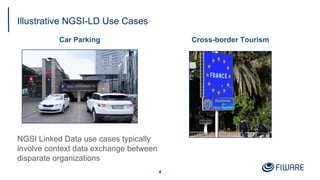
Illustrative NGSI-LD Use Cases
Car Parking
4
Cross-border Tourism
NGSI Linked Data use cases typically
involve context data exchange between
disparate organizations
Configuring an NGSI-LD IoT Agent
Environment Variables
▪ IOTA_CB_NGSI_VERSION = "LD"
▪ IOTA_TIMESTAMP = "true"
▪ IOTA_FALLBACK_TENANT
equivalent to fiware-service
▪ IOTA_FALLBACK_PATH
equivalent to fiware-service-path
▪ IOTA_JSON_LD_CONTEXT
path to @context file (either a single file
or an array of files)
A linked data @context is mandatory for NGSI-LD,and should be made
available publicly.
5
contextBroker: {
host: '192.168.1.1',
port: '1026',
ngsiVersion: 'ld',
jsonLdContext: 'http://context.json-ld',
fallbackTenant: 'openiot',
fallbackPath: '/',
}
config.js
NGSI-LD @context
{
"@context": [
"https://example.com/data-models/context.jsonld",
"https://uri.etsi.org/ngsi-ld/v1/ngsi-ld-core-context.jsonld"
]
}
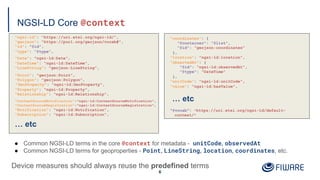
NGSI-LD Core @context
"ngsi-ld": "https://uri.etsi.org/ngsi-ld/",
"geojson": "https://purl.org/geojson/vocab#",
"id": "@id",
"type": "@type",
"Date": "ngsi-ld:Date",
"DateTime": "ngsi-ld:DateTime",
"LineString": "geojson:LineString",
"Point": "geojson:Point",
"Polygon": "geojson:Polygon",
"GeoProperty": "ngsi-ld:GeoProperty",
"Property": "ngsi-ld:Property",
"Relationship": "ngsi-ld:Relationship",
"ContextSourceNotification":"ngsi-ld:ContextSourceNotification",
"ContextSourceRegistration":"ngsi-ld:ContextSourceRegistration",
"Notification": "ngsi-ld:Notification",
"Subscription": "ngsi-ld:Subscription",
… etc
6
"coordinates": {
"@container": "@list",
"@id": "geojson:coordinates"
},
"location": "ngsi-ld:location",
"observedAt": {
"@id": "ngsi-ld:observedAt",
"@type": "DateTime"
},
"unitCode": "ngsi-ld:unitCode",
"value": "ngsi-ld:hasValue",
… etc
"@vocab": "https://uri.etsi.org/ngsi-ld/default-
context/"
● Common NGSI-LD terms in the core @context for metadata - unitCode, observedAt
● Common NGSI-LD terms for geoproperties - Point, LineString, location, coordinates, etc.
Device measures should always reuse the predefined terms
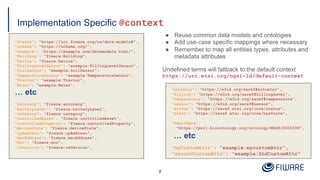
Implementation Specific @context
"fiware": "https://uri.fiware.org/ns/data-models#",
"schema": "https://schema.org/",
"example": "https://example.com/datamodels.html/",
"Building": "fiware:Building",
"Device": "fiware:Device",
"FillingLevelSensor": "example:FillingLevelSensor",
"SoilSensor": "example:SoilSensor",
"TemperatureSensor": "example:TemperatureSensor",
"Tractor": "example:Tractor",
"Water": "example:Water",
… etc
"accuracy": "fiware:accuracy",
"batteryLevel": "fiware:batteryLevel",
"category": "fiware:category",
"controlledAsset": "fiware:controlledAsset",
"controlledProperty": "fiware:controlledProperty",
"deviceState": "fiware:deviceState",
"ipAddress": "fiware:ipAddress",
"macAddress": "fiware:macAddress",
"mcc": "fiware:mcc",
"osVersion": "fiware:osVersion",
7
"actuator": "https://w3id.org/saref#actuator",
"filling": "https://w3id.org/saref#fillingLevel",
"temperature": "https://w3id.org/saref#temperature",
"sensor": "https://w3id.org/saref#sensor",
"status": "https://saref.etsi.org/core/status",
"state": "https://saref.etsi.org/core/hasState",
"heartRate":
"https://purl.bioontology.org/ontology/MESH/D006339",
… etc
"myCustomAttr": "example:mycustomAttr",
"secondCustomAttr": "example:2ndCustomAttr"
● Reuse common data models and ontologies
● Add use-case specific mappings where necessary
● Remember to map all entities types, attributes and
metadata attributes
Undefined terms will fallback to the default context
https://uri.etsi.org/ngsi-ld/default-context
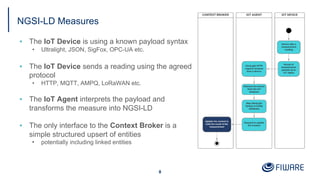
NGSI-LD Measures
▪ The IoT Device is using a known payload syntax
• Ultralight, JSON, SigFox, OPC-UA etc.
▪ The IoT Device sends a reading using the agreed
protocol
• HTTP, MQTT, AMPQ, LoRaWAN etc.
▪ The IoT Agent interprets the payload and
transforms the measure into NGSI-LD
▪ The only interface to the Context Broker is a
simple structured upsert of entities
• potentially including linked entities
8
Measure: “Device X in Building Y has registered 25°C”
NGSI v2 Context Broker equivalent
NGSI-LD Context Broker receives upsert
curl -iX POST
'http://localhost:1026/v2/entities/
urn:ngsi-ld:Device:thermometer1/attrs' 
-H 'Content-Type: application/json' 
-d '{
"temperature": {
"type": "Number",
"value": "25",
"metadata": {
"TimeInstant":{
"type": "DateTime",
"value": "2015-08-05T07:35:01.468Z"
},
"unitCode":{
"type": "String", "value": "CEL"
},
"accuracy":{
"type": "Number", "value": 1
}
},
"controlledAsset": {
"type": "Relationship"
"value": "urn:ngsi-ld:Building:building1"
}
}'
curl -L -X POST 'http://localhost:1026/ngsi-
ld/v1/entityOperations/upsert' 
-H 'Content-Type: application/ld+json' 
-d '[
{
"@context": "http://example.com/context.json-ld",
"id": "urn:ngsi-ld:Device:thermometer1",
"type": "Device"
"temperature": {
"type": "Property",
"value": 25,
“observedAt": "2015-08-05T07:35:01.468Z",
"unitCode": "CEL",
"accuracy":{
"type": "Property", "value": 1
}
},
"controlledAsset": {
"type": "Relationship",
"object": "urn:ngsi-ld:Building:building1"
}
}
]'
Provisioning an NGSI-LD Service Group
/iot/services endpoint defines
common elements across groups
of devices
▪ entity_type, attributes and
static_attributes correspond
to a data model found within
the @context file
▪ attributes and static_attributes
may have associated metadata.
▪ types should be defined as:
• Property
• Relationship
• A native JSON type
• A GeoJSON type
10
curl -s -o /dev/null -X POST 
'http://iot-agent:4041/iot/services' 
-H 'Content-Type: application/json' -H 'fiware-service: openiot' 
-d '{
"services": [
{
"apikey": "321701236",
"cbroker": "http://orion:1026",
"entity_type": "Device",
"resource": "/iot/d",
"protocol": "PDI-IoTA-UltraLight",
"transport": "HTTP",
"timezone": "Europe/Berlin",
"attributes": [
{ "object_id": "t", "name":"temperature", "type": "Float",
"metadata": {"unitCode": {"type": "Property","value": "CEL"}}
}
],
"static_attributes": [
{"name": "description",
"type":"Property", "value": "Thermometer"},
{"name": "category", "type":"Property", "value": ["sensor"]},
{"name": "controlledProperty",
"type": "Property", "value": "temperature"},
{"name": "supportedProtocol",
"type": "Property", "value": ["ul20"]}
]
}
]
}'
Provisioning NGSI-LD device
/iot/devices endpoint defines
additional data for an individual device
▪ attributes and static_attributes
can also be defined at the device level
- the standard rules about types apply
▪ Use link on a static_attribute to
update a linked Entity
11
curl -s -o /dev/null -X POST 
'http://iot-agent:4041/iot/devices' 
-H 'Content-Type: application/json' 
-H 'fiware-service: openiot' 
-H 'fiware-servicepath: /' 
-d '{
"devices": [
{
"device_id": "txhme001xxe",
"entity_name": "urn:ngsi-ld:Device:temperature001",
"entity_type": "Device",
"static_attributes": [
{
"name": "controlledAsset",
"type": "Relationship",
"value": "urn:ngsi-ld:Building:001",
"link": {
"attributes": ["temperature"],
"name": "providedBy",
"type": "Building"
}
}
]
}
]
GPS Measure: “GPS X has moved to location x,y”
With location payloads such as:
▪ As Ultralight String
gps|13.3501,52.5143
▪ As Ultralight Multiple attributes
lng|13.3501|lat|52.5143
▪ JSON as string value:
{"gps": "13.3501,52.5143"}
▪ JSON as array value:
{"gps": [13.3501, 52.5143]}
▪ JSON as GeoJSON:
{
"gps": {
"type": "Point",
"coordinates": [13.3501, 52.5143]
}
}
▪ etc...
12
Context Broker receives an NGSI-LD upsert
curl -L -X POST 'http://localhost:1026/ngsi-
ld/v1/entityOperations/upsert' 
-H 'Content-Type: application/ld+json' 
-d '[
{
"@context": "http://example.com/context.json-ld",
"id": "urn:ngsi-ld:Device:gps1",
"type": "Device"
"location": {
"type": "GeoProperty",
"value": :{
"type": "Point",
"coordinates": [13.3501, 52.5143]
},
“observedAt": "2015-08-05T07:35:01.468Z"
},
"controlledAsset": {
"type": "Relationship",
"object": "urn:ngsi-ld:Tractor:tractor1"
}
}
]'
Provisioning GPS Devices
GPS Provisioning from a single input
▪ Use location as the name of a geolocation attribute
▪ Set type=GeoProperty or any GeoJSON type
▪ Map an attribute object_id to NGSI-LD attribute name
Aliasing Latitude and Longitude as separate inputs
▪ Use location as the name of a geolocation attribute
▪ Set type=GeoProperty or any GeoJSON type
▪ Use expression aliasing to map multiple inputs to a String
▪ Remember GeoJSON uses Lng/Lan format
▪ Will only fire if both latitude and longitude are present in
the payload
All GeoProperty input values are automatically converted into GeoJSON in the NGSI-LD upsert
13
IoT Agent Device Provisioning
{
"object_id": "gps",
"name":"location",
"type": "geo:point"
}
{
"name": "location",
"type": "geo:json",
"expression": "${@lng}, ${@lat}"
}
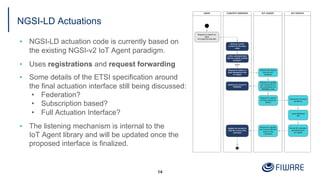
NGSI-LD Actuations
▪ NGSI-LD actuation code is currently based on
the existing NGSI-v2 IoT Agent paradigm.
▪ Uses registrations and request forwarding
▪ Some details of the ETSI specification around
the final actuation interface still being discussed:
• Federation?
• Subscription based?
• Full Actuation Interface?
▪ The listening mechanism is internal to the
IoT Agent library and will be updated once the
proposed interface is finalized.
14
Command provisioning actuation registration (with Multi-tenancy):
“I am responsible for Attribute X”
IoT Agent Device Provisioning
15
Context Broker receives a Registration
curl -L -X POST 'http://localhost:4041/iot/devices' 
-H 'fiware-service: openiot' 
-H 'Content-Type: application/json' 
--data-raw '{
"devices": [
{
"device_id": "water001",
"protocol": "PDI-IoTA-UltraLight",
"transport": "HTTP",
"endpoint": "http://device:3001/iot/water001",
"entity_name": "urn:ngsi-ld:Device:water001",
"entity_type": "Device",
"commands": [
{
"name": "on",
"type": "command"
},
{
"name": "off",
"type": "command"
}
]
}
]
}'
curl -L -X POST 'http://localhost:1026/ngsi-ld/v1/csourceRegistrations' 
-H 'NGSILD-Tenant: openiot' 
-H 'Content-Type: application/ld+json' 
-d '{
"@context": "http://context.json-ld",
"endpoint": "http://iotagent.com",
"information": [
{
"entities": [
{
"id": "urn:ngsi-ld:Device:water001",
"type": "Device"
}
],
"properties": [
"on",
"off"
]
}
],
"type": "ContextSourceRegistration"
}
'
Actuation Request Forwarding (with Multi-tenancy)
Context Broker receives an Actuation
16
IoT Agent receives a forwarded Actuation
curl -L -X PATCH 'http://localhost:1026/ngsi-ld/v1/entities/urn:ngsi-ld:Device:water001/attrs/on' 
-H 'NGSILD-Tenant: openiot' -H 'Content-Type: application/json' 
-H 'Link: <http://context-provider:3000/data-models/ngsi-context.jsonld>; rel="http://www.w3.org/ns/json-ld#context";
type="application/ld+json"' 
--data-raw '{ "type": "Property", "value": " " }'
curl -L -X PATCH 'http://localhost:4041/ngsi-ld/v1/entities/urn:ngsi-ld:Device:water001/attrs/on' 
-H 'NGSILD-Tenant: openiot' -H 'Content-Type: application/json' 
-H 'Link: <http://context-provider:3000/data-models/ngsi-context.jsonld>; rel="http://www.w3.org/ns/json-ld#context";
type="application/ld+json"' 
--data-raw '{ "type": "Property", "value": " "}'
Multitenancy uses NGSILD-Tenant header if found, or the fiware-service header
for backwards compatibility. And uses IOTA_FALLBACK_TENANT as a final backstop.
Combining NGSI-v2 and LD
▪ Mapping NGSI-v2 to NGSI-LD is simple -
just re-use mapping code from within the
IoT Agent library
▪ Use a one-shot subscription to duplicate
existing entities
▪ Ongoing subscription for shadowing
device measures and creating linked data
entities with providedBy and observedAt
metadata attributes
▪ Sample code:
https://github.com/FIWARE/tutorials.Step-by-Step/blob/master/
context-provider/controllers/ngsi-ld/device-convert.js
17
function duplicateDevices(req, res) {
async function copyEntityData(device, index) {
await upsertDeviceEntityAsLD(device);
}
req.body.data.forEach(copyEntityData);
res.status(204).send();
}
function shadowDeviceMeasures(req, res) {
const attrib = req.params.attrib;
async function copyAttributeData(device, index) {
await upsertDeviceEntityAsLD(device);
if (device[attrib]) {
await upsertLinkedAttributeDataAsLD(device,
'controlledAsset', attrib);
}
}
req.body.data.forEach(copyAttributeData);
res.status(204).send();
}
Summary
▪ The IoT Agent Library now supports basic NGSI-LD operation
• Already ported to most IoT Agents. Just upgrade to the latest version of the library
• Some internal actuation mechanisms are still subject to change.
▪ IoT Device provisioning has barely changed from NGSI-v2
• Property, GeoProperty and Relationship are reserved keywords
• Use native JSON types and GeoJSON types whilst provisioning
• Use metadata and avoid meaningless type attributes
• More info: https://iotagent-node-lib.readthedocs.io/
▪ JSON-LD @context makes your data interoperable.
• Ensure your JSON-LD @context is maintained and publicly available
• JSON-LD specification: https://json-ld.org/
• More info: https://github.com/FIWARE/tutorials.Understanding-At-Context
▪ Fallback to using subscriptions and mapping when combining NGSI-v2
Devices with an NGSI-LD Context Broker
18
Thank you!
http://fiware.org
Follow @FIWARE on Twitter

NGSI-LD IoT Agents

  • 1.
    NGSI-LD IoT Agents JasonFox, Senior Technical Evangelist FIWARE Foundation
  • 2.
    Learning Goals ▪ Review:What is an IoT Agent: • Why do you need them? • How do they work with NGSI? ▪ NGSI-LD Measures ▪ NGSI-LD Actuations + Lazy Attributes: • Registrations • Subscriptions ▪ Provisioning NGSI-LD Devices: • Data Models and NGSI-LD @context • The role of metadata • GeoJSON and GPS device provisioning ▪ Combining NGSI-v2 Devices with an NGSI-LD Context Broker 1
  • 3.
    What is anIoT Agent? ▪ IoT Agents overcome common problems in the IoT domain: • How can I translate my received measurements into a common standard regardless of the device used? • How can I abstract my communications so the users are able to remain unaware of the device specific protocols? • How can I map data received in a meaningful manner? ▪ An IoT Agent translates an IoT specific protocol into NSGI (v2 or LD) ▪ Any class of devices with an existing IoT Agent can be considered as FIWARE-Ready device ▪ For unsupported protocols you can build your own agent. ▪ You only need an IoT Agent if your devices can’t support NGSI interfaces directly 2
  • 4.
    NGSI-LD - WhyLinked Data? My data is useful to me, but is more powerful shared with others … but what about Conway's law? Any organization that designs a system (defined broadly) will produce a design whose structure is a copy of the organization's communication structure. — Melvin E. Conway … how can I share data and benefit from other organizations if their organization “communicates” differently? 3
  • 5.
    Illustrative NGSI-LD UseCases Car Parking 4 Cross-border Tourism NGSI Linked Data use cases typically involve context data exchange between disparate organizations
  • 6.
    Configuring an NGSI-LDIoT Agent Environment Variables ▪ IOTA_CB_NGSI_VERSION = "LD" ▪ IOTA_TIMESTAMP = "true" ▪ IOTA_FALLBACK_TENANT equivalent to fiware-service ▪ IOTA_FALLBACK_PATH equivalent to fiware-service-path ▪ IOTA_JSON_LD_CONTEXT path to @context file (either a single file or an array of files) A linked data @context is mandatory for NGSI-LD,and should be made available publicly. 5 contextBroker: { host: '192.168.1.1', port: '1026', ngsiVersion: 'ld', jsonLdContext: 'http://context.json-ld', fallbackTenant: 'openiot', fallbackPath: '/', } config.js NGSI-LD @context { "@context": [ "https://example.com/data-models/context.jsonld", "https://uri.etsi.org/ngsi-ld/v1/ngsi-ld-core-context.jsonld" ] }
  • 7.
    NGSI-LD Core @context "ngsi-ld":"https://uri.etsi.org/ngsi-ld/", "geojson": "https://purl.org/geojson/vocab#", "id": "@id", "type": "@type", "Date": "ngsi-ld:Date", "DateTime": "ngsi-ld:DateTime", "LineString": "geojson:LineString", "Point": "geojson:Point", "Polygon": "geojson:Polygon", "GeoProperty": "ngsi-ld:GeoProperty", "Property": "ngsi-ld:Property", "Relationship": "ngsi-ld:Relationship", "ContextSourceNotification":"ngsi-ld:ContextSourceNotification", "ContextSourceRegistration":"ngsi-ld:ContextSourceRegistration", "Notification": "ngsi-ld:Notification", "Subscription": "ngsi-ld:Subscription", … etc 6 "coordinates": { "@container": "@list", "@id": "geojson:coordinates" }, "location": "ngsi-ld:location", "observedAt": { "@id": "ngsi-ld:observedAt", "@type": "DateTime" }, "unitCode": "ngsi-ld:unitCode", "value": "ngsi-ld:hasValue", … etc "@vocab": "https://uri.etsi.org/ngsi-ld/default- context/" ● Common NGSI-LD terms in the core @context for metadata - unitCode, observedAt ● Common NGSI-LD terms for geoproperties - Point, LineString, location, coordinates, etc. Device measures should always reuse the predefined terms
  • 8.
    Implementation Specific @context "fiware":"https://uri.fiware.org/ns/data-models#", "schema": "https://schema.org/", "example": "https://example.com/datamodels.html/", "Building": "fiware:Building", "Device": "fiware:Device", "FillingLevelSensor": "example:FillingLevelSensor", "SoilSensor": "example:SoilSensor", "TemperatureSensor": "example:TemperatureSensor", "Tractor": "example:Tractor", "Water": "example:Water", … etc "accuracy": "fiware:accuracy", "batteryLevel": "fiware:batteryLevel", "category": "fiware:category", "controlledAsset": "fiware:controlledAsset", "controlledProperty": "fiware:controlledProperty", "deviceState": "fiware:deviceState", "ipAddress": "fiware:ipAddress", "macAddress": "fiware:macAddress", "mcc": "fiware:mcc", "osVersion": "fiware:osVersion", 7 "actuator": "https://w3id.org/saref#actuator", "filling": "https://w3id.org/saref#fillingLevel", "temperature": "https://w3id.org/saref#temperature", "sensor": "https://w3id.org/saref#sensor", "status": "https://saref.etsi.org/core/status", "state": "https://saref.etsi.org/core/hasState", "heartRate": "https://purl.bioontology.org/ontology/MESH/D006339", … etc "myCustomAttr": "example:mycustomAttr", "secondCustomAttr": "example:2ndCustomAttr" ● Reuse common data models and ontologies ● Add use-case specific mappings where necessary ● Remember to map all entities types, attributes and metadata attributes Undefined terms will fallback to the default context https://uri.etsi.org/ngsi-ld/default-context
  • 9.
    NGSI-LD Measures ▪ TheIoT Device is using a known payload syntax • Ultralight, JSON, SigFox, OPC-UA etc. ▪ The IoT Device sends a reading using the agreed protocol • HTTP, MQTT, AMPQ, LoRaWAN etc. ▪ The IoT Agent interprets the payload and transforms the measure into NGSI-LD ▪ The only interface to the Context Broker is a simple structured upsert of entities • potentially including linked entities 8
  • 10.
    Measure: “Device Xin Building Y has registered 25°C” NGSI v2 Context Broker equivalent NGSI-LD Context Broker receives upsert curl -iX POST 'http://localhost:1026/v2/entities/ urn:ngsi-ld:Device:thermometer1/attrs' -H 'Content-Type: application/json' -d '{ "temperature": { "type": "Number", "value": "25", "metadata": { "TimeInstant":{ "type": "DateTime", "value": "2015-08-05T07:35:01.468Z" }, "unitCode":{ "type": "String", "value": "CEL" }, "accuracy":{ "type": "Number", "value": 1 } }, "controlledAsset": { "type": "Relationship" "value": "urn:ngsi-ld:Building:building1" } }' curl -L -X POST 'http://localhost:1026/ngsi- ld/v1/entityOperations/upsert' -H 'Content-Type: application/ld+json' -d '[ { "@context": "http://example.com/context.json-ld", "id": "urn:ngsi-ld:Device:thermometer1", "type": "Device" "temperature": { "type": "Property", "value": 25, “observedAt": "2015-08-05T07:35:01.468Z", "unitCode": "CEL", "accuracy":{ "type": "Property", "value": 1 } }, "controlledAsset": { "type": "Relationship", "object": "urn:ngsi-ld:Building:building1" } } ]'
  • 11.
    Provisioning an NGSI-LDService Group /iot/services endpoint defines common elements across groups of devices ▪ entity_type, attributes and static_attributes correspond to a data model found within the @context file ▪ attributes and static_attributes may have associated metadata. ▪ types should be defined as: • Property • Relationship • A native JSON type • A GeoJSON type 10 curl -s -o /dev/null -X POST 'http://iot-agent:4041/iot/services' -H 'Content-Type: application/json' -H 'fiware-service: openiot' -d '{ "services": [ { "apikey": "321701236", "cbroker": "http://orion:1026", "entity_type": "Device", "resource": "/iot/d", "protocol": "PDI-IoTA-UltraLight", "transport": "HTTP", "timezone": "Europe/Berlin", "attributes": [ { "object_id": "t", "name":"temperature", "type": "Float", "metadata": {"unitCode": {"type": "Property","value": "CEL"}} } ], "static_attributes": [ {"name": "description", "type":"Property", "value": "Thermometer"}, {"name": "category", "type":"Property", "value": ["sensor"]}, {"name": "controlledProperty", "type": "Property", "value": "temperature"}, {"name": "supportedProtocol", "type": "Property", "value": ["ul20"]} ] } ] }'
  • 12.
    Provisioning NGSI-LD device /iot/devicesendpoint defines additional data for an individual device ▪ attributes and static_attributes can also be defined at the device level - the standard rules about types apply ▪ Use link on a static_attribute to update a linked Entity 11 curl -s -o /dev/null -X POST 'http://iot-agent:4041/iot/devices' -H 'Content-Type: application/json' -H 'fiware-service: openiot' -H 'fiware-servicepath: /' -d '{ "devices": [ { "device_id": "txhme001xxe", "entity_name": "urn:ngsi-ld:Device:temperature001", "entity_type": "Device", "static_attributes": [ { "name": "controlledAsset", "type": "Relationship", "value": "urn:ngsi-ld:Building:001", "link": { "attributes": ["temperature"], "name": "providedBy", "type": "Building" } } ] } ]
  • 13.
    GPS Measure: “GPSX has moved to location x,y” With location payloads such as: ▪ As Ultralight String gps|13.3501,52.5143 ▪ As Ultralight Multiple attributes lng|13.3501|lat|52.5143 ▪ JSON as string value: {"gps": "13.3501,52.5143"} ▪ JSON as array value: {"gps": [13.3501, 52.5143]} ▪ JSON as GeoJSON: { "gps": { "type": "Point", "coordinates": [13.3501, 52.5143] } } ▪ etc... 12 Context Broker receives an NGSI-LD upsert curl -L -X POST 'http://localhost:1026/ngsi- ld/v1/entityOperations/upsert' -H 'Content-Type: application/ld+json' -d '[ { "@context": "http://example.com/context.json-ld", "id": "urn:ngsi-ld:Device:gps1", "type": "Device" "location": { "type": "GeoProperty", "value": :{ "type": "Point", "coordinates": [13.3501, 52.5143] }, “observedAt": "2015-08-05T07:35:01.468Z" }, "controlledAsset": { "type": "Relationship", "object": "urn:ngsi-ld:Tractor:tractor1" } } ]'
  • 14.
    Provisioning GPS Devices GPSProvisioning from a single input ▪ Use location as the name of a geolocation attribute ▪ Set type=GeoProperty or any GeoJSON type ▪ Map an attribute object_id to NGSI-LD attribute name Aliasing Latitude and Longitude as separate inputs ▪ Use location as the name of a geolocation attribute ▪ Set type=GeoProperty or any GeoJSON type ▪ Use expression aliasing to map multiple inputs to a String ▪ Remember GeoJSON uses Lng/Lan format ▪ Will only fire if both latitude and longitude are present in the payload All GeoProperty input values are automatically converted into GeoJSON in the NGSI-LD upsert 13 IoT Agent Device Provisioning { "object_id": "gps", "name":"location", "type": "geo:point" } { "name": "location", "type": "geo:json", "expression": "${@lng}, ${@lat}" }
  • 15.
    NGSI-LD Actuations ▪ NGSI-LDactuation code is currently based on the existing NGSI-v2 IoT Agent paradigm. ▪ Uses registrations and request forwarding ▪ Some details of the ETSI specification around the final actuation interface still being discussed: • Federation? • Subscription based? • Full Actuation Interface? ▪ The listening mechanism is internal to the IoT Agent library and will be updated once the proposed interface is finalized. 14
  • 16.
    Command provisioning actuationregistration (with Multi-tenancy): “I am responsible for Attribute X” IoT Agent Device Provisioning 15 Context Broker receives a Registration curl -L -X POST 'http://localhost:4041/iot/devices' -H 'fiware-service: openiot' -H 'Content-Type: application/json' --data-raw '{ "devices": [ { "device_id": "water001", "protocol": "PDI-IoTA-UltraLight", "transport": "HTTP", "endpoint": "http://device:3001/iot/water001", "entity_name": "urn:ngsi-ld:Device:water001", "entity_type": "Device", "commands": [ { "name": "on", "type": "command" }, { "name": "off", "type": "command" } ] } ] }' curl -L -X POST 'http://localhost:1026/ngsi-ld/v1/csourceRegistrations' -H 'NGSILD-Tenant: openiot' -H 'Content-Type: application/ld+json' -d '{ "@context": "http://context.json-ld", "endpoint": "http://iotagent.com", "information": [ { "entities": [ { "id": "urn:ngsi-ld:Device:water001", "type": "Device" } ], "properties": [ "on", "off" ] } ], "type": "ContextSourceRegistration" } '
  • 17.
    Actuation Request Forwarding(with Multi-tenancy) Context Broker receives an Actuation 16 IoT Agent receives a forwarded Actuation curl -L -X PATCH 'http://localhost:1026/ngsi-ld/v1/entities/urn:ngsi-ld:Device:water001/attrs/on' -H 'NGSILD-Tenant: openiot' -H 'Content-Type: application/json' -H 'Link: <http://context-provider:3000/data-models/ngsi-context.jsonld>; rel="http://www.w3.org/ns/json-ld#context"; type="application/ld+json"' --data-raw '{ "type": "Property", "value": " " }' curl -L -X PATCH 'http://localhost:4041/ngsi-ld/v1/entities/urn:ngsi-ld:Device:water001/attrs/on' -H 'NGSILD-Tenant: openiot' -H 'Content-Type: application/json' -H 'Link: <http://context-provider:3000/data-models/ngsi-context.jsonld>; rel="http://www.w3.org/ns/json-ld#context"; type="application/ld+json"' --data-raw '{ "type": "Property", "value": " "}' Multitenancy uses NGSILD-Tenant header if found, or the fiware-service header for backwards compatibility. And uses IOTA_FALLBACK_TENANT as a final backstop.
  • 18.
    Combining NGSI-v2 andLD ▪ Mapping NGSI-v2 to NGSI-LD is simple - just re-use mapping code from within the IoT Agent library ▪ Use a one-shot subscription to duplicate existing entities ▪ Ongoing subscription for shadowing device measures and creating linked data entities with providedBy and observedAt metadata attributes ▪ Sample code: https://github.com/FIWARE/tutorials.Step-by-Step/blob/master/ context-provider/controllers/ngsi-ld/device-convert.js 17 function duplicateDevices(req, res) { async function copyEntityData(device, index) { await upsertDeviceEntityAsLD(device); } req.body.data.forEach(copyEntityData); res.status(204).send(); } function shadowDeviceMeasures(req, res) { const attrib = req.params.attrib; async function copyAttributeData(device, index) { await upsertDeviceEntityAsLD(device); if (device[attrib]) { await upsertLinkedAttributeDataAsLD(device, 'controlledAsset', attrib); } } req.body.data.forEach(copyAttributeData); res.status(204).send(); }
  • 19.
    Summary ▪ The IoTAgent Library now supports basic NGSI-LD operation • Already ported to most IoT Agents. Just upgrade to the latest version of the library • Some internal actuation mechanisms are still subject to change. ▪ IoT Device provisioning has barely changed from NGSI-v2 • Property, GeoProperty and Relationship are reserved keywords • Use native JSON types and GeoJSON types whilst provisioning • Use metadata and avoid meaningless type attributes • More info: https://iotagent-node-lib.readthedocs.io/ ▪ JSON-LD @context makes your data interoperable. • Ensure your JSON-LD @context is maintained and publicly available • JSON-LD specification: https://json-ld.org/ • More info: https://github.com/FIWARE/tutorials.Understanding-At-Context ▪ Fallback to using subscriptions and mapping when combining NGSI-v2 Devices with an NGSI-LD Context Broker 18
  • 20.