Nginx Workshop
        Aftermath
Kiev.PM technical meeting, 16th Feb 2012

             Denis Zhdanov
       denis.zhdanov@gmail.com
Disclaimer
May 29, 2010 - Nginx workshop by Igor Sysoev
was organized by SmartMe (http://www.
smartme.com.ua/nginx-workshop/)
Thanks Igor, thanks SmartMe.
Based on workshop, but Nginx was changed,
so caching and many other docs are on
website now (http://wiki.nginx.org), so I add
some things from me.

"Scooter is ... ? "
Nginx / Apache - why we need what ?
1. Static files
2. Proxying / Slow client (No dialup but Mobile)

Why Apache is bad / Nginx is good - size of
worker.

Apache is prefork / 1 proc/thread per request -
it's too expensive.
Nginx - Proc/thread also, but event driven.
Nginx is fast?
"Nginx is not fast - but scalable", (c) Igor
Sysoev.
Tens and hundreds of 1000's requests per
worker - quite fast, but
Apache can do this also - but with much more
resources.

Nginx also has SCALABLE configuration.
What is it means?
How we can configure Apache ?
1. .htaccess / rewrite rules - ugly, but single
way on shared hostings ( I hope they all gone
now :) )

2. Virtual hosts - but global (default) server
configuration could mess all things.

3. Virtual hosts but default server do nothing
(deny all, for example)
locations
location /images/
location = /
location ^~ /images/ - plain strings, no order

location ~ .php
location ~* .php - regexp rules, ordered

location @php - named
plain vs regexp
location /
location /admin/
                    VS          - no difference !
location /admin/
location /

But regexp is ordered, so ...
location ~* .(gif|jpe?g|png)$ {
           root /var/www/images/;
}
location ~* .php$ {
           fastcgi_pass ...
}


location /images/ {
       root /var/www/images/;
}
location /scripts/ {
       fastcgi_pass ...
}
Real example
location / {

if ($uri ~ ^/login.php$) {
...
}

if ($uri ~ ^/admin/) {
...
}
Nested locations
location /images/ {
      root /var/www/images;
}
location /admin/ {
      location ^/admin*..php$ {
         fastcgi_pass....
      }
}
...
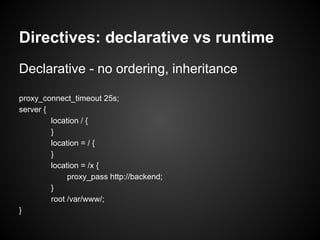
Directives: declarative vs runtime
Declarative - no ordering, inheritance

proxy_connect_timeout 25s;
server {
         location / {
         }
         location = / {
         }
         location = /x {
              proxy_pass http://backend;
         }
         root /var/www/;
}
Runtime directives
Runs every time, no inheritance !

if (....) {
    set ...
    rewrite ...
    break
    return ....
}
Bad examples
location /images/ {
      root /var/www/images/;
      break; # <---- WHY???
}

if (-e $request_filename) {
       expire 1y;
       break; # totally wrong !!
}
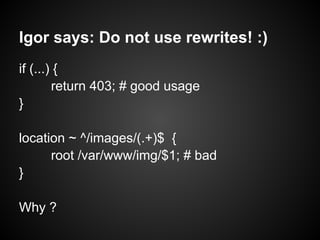
Igor says: Do not use rewrites! :)
if (...) {
        return 403; # good usage
}

location ~ ^/images/(.+)$ {
      root /var/www/img/$1; # bad
}

Why ?
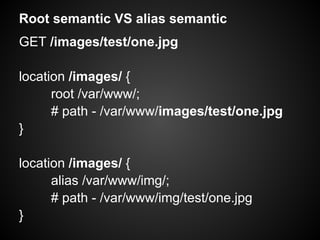
Root semantic VS alias semantic
GET /images/test/one.jpg

location /images/ {
      root /var/www/;
      # path - /var/www/images/test/one.jpg
}

location /images/ {
      alias /var/www/img/;
      # path - /var/www/img/test/one.jpg
}
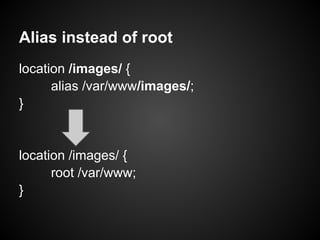
Alias instead of root
location /images/ {
      alias /var/www/images/;
}


location /images/ {
      root /var/www;
}
Alias and root with variables
GET /images/one.jpg

location /images/ {
   root /var/www/$host;
} # real path - /var/www/SITE/images/one.jpg

location ~ ^/images/(.)(.+)$ {
   alias /var/www/img/$1/$1$2;
} # real path - /var/www/img/o/one.jpg

Alias make complete path, no replacement
MUST use $1/$2 if location contains captures
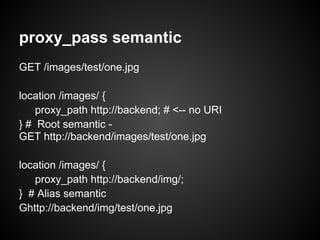
proxy_pass semantic
GET /images/test/one.jpg

location /images/ {
    proxy_path http://backend; # <-- no URI
} # Root semantic -
GET http://backend/images/test/one.jpg

location /images/ {
   proxy_path http://backend/img/;
} # Alias semantic
Ghttp://backend/img/test/one.jpg
proxy_pass with variables
GET /images/one.jpg

location ^/images/(.)(.+)$ {
    proxy_pass http://backend/$1/$1$2;
} # --> http://backend/o/one.jpg
# Alias semantic, but path is replaced

location ^/images/(.).+$ {
    proxy_pass $1; # not part of URI
} # --> http://o/images/one.jpg
# Root semantic
location handlers
proxy_pass, fastcgi_pass, memcached_pass,
empty_gif, flv, stub_status, perl

trailing slash -
random index / index / auto index

no trailing slash -
gzip static / static
Why "if" is bad - it's "location" too
gzip on;
keepalive on;
if ($no_gzip) {
    gzip off; # gzip off
}
if ($no_keepalive) {
    keepalive off; # gzip on, keepalive off
}
# gzip on, keepalive on
Fix - but it's not recommended
gzip on;
keepalive on;
if ($no_gzip) {
     gzip off;
    break;
}
if ($no_keepalive) {
    keepalive off;
    break;
}
Caching
Couple of caveats
from my Apache to Nginx migration
Migration from Apache to Nginx
Apache:
RewriteCond %{HTTP_HOST} ^site.com$ [NC]
RewriteRule ^(.*)$ http://www.site.com/$1 [R=301,L]
# www redirect, common stuff out there

Nginx:
if ($host = 'site.com') {
     rewrite ^(.*)$ http://www.site.com/$1 permanent;
    # MY EYES!!!
}
Right way to do it
Apache:
RewriteCond %{HTTP_HOST} ^site.com$ [NC]
RewriteRule ^(.*)$ http://www.site.com/$1 [R=301,L]
# www redirect, common stuff out there

Nginx:
server {
   server_name site.com;
   rewrite ^ http://www.site.com/$request_uri? permanent;
   # NOT BAD
}
Another common thing
RewriteCond %{REQUEST_FILENAME} -d
RewriteCond %{REQUEST_FILENAME} -f
RewriteRule .* index.php

# right way
location / {
   try files $uri $uri
             index.php$is_args$args;
}
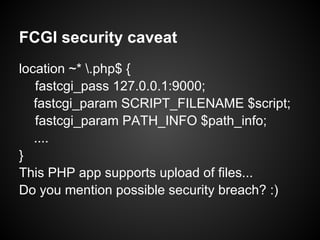
FCGI security caveat
location ~* .php$ {
   fastcgi_pass 127.0.0.1:9000;
   fastcgi_param SCRIPT_FILENAME $script;
   fastcgi_param PATH_INFO $path_info;
   ....
}
This PHP app supports upload of files...
Do you mention possible security breach? :)
PATHINFO links
GET /index.php/article/0001 =>

SCRIPT_NAME = 0001
PATH_INFO = /index.php/article/ - WRONG

Fix pathinfo magic -

SCRIPT_NAME = index.php
PATH_INFO = /article/0001
GET /upload/evil.jpg/notexist.php
SCRIPT_NAME = notexist.php
PATH_INFO = /upload/evil.jpg/

cgi.fix_pathinfo = 1 (yep, it's default) - if
SCRIPT_NAME not found - let's "FIX" it -

SCRIPT_NAME = evil.jpg
PATH_INFO = /notexist.php
Let's RUN evil.jpg ! :)
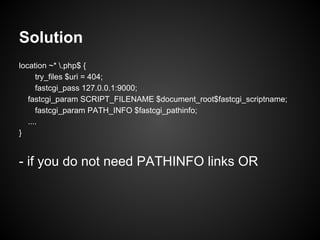
Solution
location ~* .php$ {
      try_files $uri = 404;
      fastcgi_pass 127.0.0.1:9000;
   fastcgi_param SCRIPT_FILENAME $document_root$fastcgi_scriptname;
      fastcgi_param PATH_INFO $fastcgi_pathinfo;
   ....
}


- if you do not need PATHINFO links OR
Use fastcgi_split_path_info
location ~* ^(.+.php)(.*)$ {
   fastcgi_split_path_info ^(.+.php)(.*)$;
     fastcgi_pass 127.0.0.1:9000;
     fastcgi_param SCRIPT_FILENAME $document_root$fastcgi_scriptname;
     fastcgi_param PATH_INFO $fastcgi_pathinfo;
}


GET /index.php/article/0001 =>
SCRIPT_FILENAME = index.php,
PATH_INFO = /article/0001
Please check
http://wiki.nginx.org/Pitfalls - lot of stuff there
Nginx optimization
   Just couple of words
Case 1. Big static files
What is BIG file? Size is >2Mb (mp3, zip, iso etc)
a)RAID - use big stripe size (>128K)
b) output_buffers 1 1m; # need to tune
c) AIO:
Freebsd:
sendfile on;
aio sendfile;
Linux
aio on;
directio on; # required but drops sendfile()
Case 2. Lot of small files
a). There is NO MAGIC
Hot files must reside in RAM cache or else... it
will be slow.

b) Tune open_file_cache
Freebsd: see dirhash, vfs.ufs.dirhash_maxmem
Common highload advices
a) tune hardware and OS - disks, NICs, OS
limitations (open files, limits, network stack etc.)
worker_rlmit_nofile + kern.maxfiles/maxfilesperproc (FreeBSD) + fs.filemax
(Linux)
b) tune workers (number / threads). Start from
CPU or disks numbers.
c) sendfile, tcp_nopush, tcp_nodelay - ?
d) timeouts, keepalive,
reset_timedout_connection on - check
http://calomel.org/nginx.html
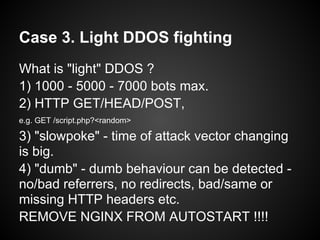
Case 3. Light DDOS fighting
What is "light" DDOS ?
1) 1000 - 5000 - 7000 bots max.
2) HTTP GET/HEAD/POST,
e.g. GET /script.php?<random>

3) "slowpoke" - time of attack vector changing
is big.
4) "dumb" - dumb behaviour can be detected -
no/bad referrers, no redirects, bad/same or
missing HTTP headers etc.
REMOVE NGINX FROM AUTOSTART !!!!
a) "Heavy" (e.g. search) scripts flood
http {
...
limit_req_zone $binary_remote_addr zone=SLOW:10m
rate=1r/s;
# 64byte per record, 16000 record per MB, 503 error if
overflow!
...

location =/search.php {
   limit_req SLOW burst=2;
   proxy_pass ....
}
b) "flooders" detection
error_log /var/log/nginx/error.log;
limit_conn_zone $binary_remote_addr zone=CONN:10m;
...
location =/attacked_url {
    limit_conn CONN 4; #4-8, but beware of proixes!
    ....
}

grep "limiting connections by zone" | grep "/attacked_url" |
awk .. - get list of them and add it to firewall (ipset)
Beware - you can easily "shoot yourself in the foot"!
c) Geo limiting
Compile geoip module with --with-http_geoip_module first.
http {
    geo_country /usr/local/nginx/etc/GeoIP.dat;
    map $geoip_country_code $bad_country {
         default 0;
         include /usr/local/nginx/etc/bad_countries; #
    }
    server {
    ....
    if ($bad_country) { return 403; }

bad_countries:
CN 1;
TZ 1;
...
d) Aggresive caching
"Slow is better than dead"
location=/ { rewrite ^ main.html last; }
# main.html - temporary static page with link to real home
location=/main.html {
     internal;
     root /var/nginx/cache/;
     error_page 404 = /cached$uri;
}
location /cached/ {
     internal;
     alias /var/nginx/cache/;
     proxy_pass http://backend;
     proxy_store_on; proxy_store_temp_path /var/nginx/tmp/;
}
The END
Please check http://wiki.nginx.org - many
          nice hings there. :)
             Questions ?

Nginx Workshop Aftermath

  • 1.
    Nginx Workshop Aftermath Kiev.PM technical meeting, 16th Feb 2012 Denis Zhdanov denis.zhdanov@gmail.com
  • 2.
    Disclaimer May 29, 2010- Nginx workshop by Igor Sysoev was organized by SmartMe (http://www. smartme.com.ua/nginx-workshop/) Thanks Igor, thanks SmartMe. Based on workshop, but Nginx was changed, so caching and many other docs are on website now (http://wiki.nginx.org), so I add some things from me. "Scooter is ... ? "
  • 3.
    Nginx / Apache- why we need what ? 1. Static files 2. Proxying / Slow client (No dialup but Mobile) Why Apache is bad / Nginx is good - size of worker. Apache is prefork / 1 proc/thread per request - it's too expensive. Nginx - Proc/thread also, but event driven.
  • 4.
    Nginx is fast? "Nginxis not fast - but scalable", (c) Igor Sysoev. Tens and hundreds of 1000's requests per worker - quite fast, but Apache can do this also - but with much more resources. Nginx also has SCALABLE configuration. What is it means?
  • 5.
    How we canconfigure Apache ? 1. .htaccess / rewrite rules - ugly, but single way on shared hostings ( I hope they all gone now :) ) 2. Virtual hosts - but global (default) server configuration could mess all things. 3. Virtual hosts but default server do nothing (deny all, for example)
  • 6.
    locations location /images/ location =/ location ^~ /images/ - plain strings, no order location ~ .php location ~* .php - regexp rules, ordered location @php - named
  • 7.
    plain vs regexp location/ location /admin/ VS - no difference ! location /admin/ location / But regexp is ordered, so ...
  • 8.
    location ~* .(gif|jpe?g|png)${ root /var/www/images/; } location ~* .php$ { fastcgi_pass ... } location /images/ { root /var/www/images/; } location /scripts/ { fastcgi_pass ... }
  • 9.
    Real example location /{ if ($uri ~ ^/login.php$) { ... } if ($uri ~ ^/admin/) { ... }
  • 10.
    Nested locations location /images/{ root /var/www/images; } location /admin/ { location ^/admin*..php$ { fastcgi_pass.... } } ...
  • 11.
    Directives: declarative vsruntime Declarative - no ordering, inheritance proxy_connect_timeout 25s; server { location / { } location = / { } location = /x { proxy_pass http://backend; } root /var/www/; }
  • 12.
    Runtime directives Runs everytime, no inheritance ! if (....) { set ... rewrite ... break return .... }
  • 13.
    Bad examples location /images/{ root /var/www/images/; break; # <---- WHY??? } if (-e $request_filename) { expire 1y; break; # totally wrong !! }
  • 14.
    Igor says: Donot use rewrites! :) if (...) { return 403; # good usage } location ~ ^/images/(.+)$ { root /var/www/img/$1; # bad } Why ?
  • 15.
    Root semantic VSalias semantic GET /images/test/one.jpg location /images/ { root /var/www/; # path - /var/www/images/test/one.jpg } location /images/ { alias /var/www/img/; # path - /var/www/img/test/one.jpg }
  • 16.
    Alias instead ofroot location /images/ { alias /var/www/images/; } location /images/ { root /var/www; }
  • 17.
    Alias and rootwith variables GET /images/one.jpg location /images/ { root /var/www/$host; } # real path - /var/www/SITE/images/one.jpg location ~ ^/images/(.)(.+)$ { alias /var/www/img/$1/$1$2; } # real path - /var/www/img/o/one.jpg Alias make complete path, no replacement MUST use $1/$2 if location contains captures
  • 18.
    proxy_pass semantic GET /images/test/one.jpg location/images/ { proxy_path http://backend; # <-- no URI } # Root semantic - GET http://backend/images/test/one.jpg location /images/ { proxy_path http://backend/img/; } # Alias semantic Ghttp://backend/img/test/one.jpg
  • 19.
    proxy_pass with variables GET/images/one.jpg location ^/images/(.)(.+)$ { proxy_pass http://backend/$1/$1$2; } # --> http://backend/o/one.jpg # Alias semantic, but path is replaced location ^/images/(.).+$ { proxy_pass $1; # not part of URI } # --> http://o/images/one.jpg # Root semantic
  • 20.
    location handlers proxy_pass, fastcgi_pass,memcached_pass, empty_gif, flv, stub_status, perl trailing slash - random index / index / auto index no trailing slash - gzip static / static
  • 21.
    Why "if" isbad - it's "location" too gzip on; keepalive on; if ($no_gzip) { gzip off; # gzip off } if ($no_keepalive) { keepalive off; # gzip on, keepalive off } # gzip on, keepalive on
  • 22.
    Fix - butit's not recommended gzip on; keepalive on; if ($no_gzip) { gzip off; break; } if ($no_keepalive) { keepalive off; break; }
  • 23.
  • 24.
    Couple of caveats frommy Apache to Nginx migration
  • 25.
    Migration from Apacheto Nginx Apache: RewriteCond %{HTTP_HOST} ^site.com$ [NC] RewriteRule ^(.*)$ http://www.site.com/$1 [R=301,L] # www redirect, common stuff out there Nginx: if ($host = 'site.com') { rewrite ^(.*)$ http://www.site.com/$1 permanent; # MY EYES!!! }
  • 26.
    Right way todo it Apache: RewriteCond %{HTTP_HOST} ^site.com$ [NC] RewriteRule ^(.*)$ http://www.site.com/$1 [R=301,L] # www redirect, common stuff out there Nginx: server { server_name site.com; rewrite ^ http://www.site.com/$request_uri? permanent; # NOT BAD }
  • 27.
    Another common thing RewriteCond%{REQUEST_FILENAME} -d RewriteCond %{REQUEST_FILENAME} -f RewriteRule .* index.php # right way location / { try files $uri $uri index.php$is_args$args; }
  • 28.
    FCGI security caveat location~* .php$ { fastcgi_pass 127.0.0.1:9000; fastcgi_param SCRIPT_FILENAME $script; fastcgi_param PATH_INFO $path_info; .... } This PHP app supports upload of files... Do you mention possible security breach? :)
  • 29.
    PATHINFO links GET /index.php/article/0001=> SCRIPT_NAME = 0001 PATH_INFO = /index.php/article/ - WRONG Fix pathinfo magic - SCRIPT_NAME = index.php PATH_INFO = /article/0001
  • 30.
    GET /upload/evil.jpg/notexist.php SCRIPT_NAME =notexist.php PATH_INFO = /upload/evil.jpg/ cgi.fix_pathinfo = 1 (yep, it's default) - if SCRIPT_NAME not found - let's "FIX" it - SCRIPT_NAME = evil.jpg PATH_INFO = /notexist.php Let's RUN evil.jpg ! :)
  • 31.
    Solution location ~* .php${ try_files $uri = 404; fastcgi_pass 127.0.0.1:9000; fastcgi_param SCRIPT_FILENAME $document_root$fastcgi_scriptname; fastcgi_param PATH_INFO $fastcgi_pathinfo; .... } - if you do not need PATHINFO links OR
  • 32.
    Use fastcgi_split_path_info location ~*^(.+.php)(.*)$ { fastcgi_split_path_info ^(.+.php)(.*)$; fastcgi_pass 127.0.0.1:9000; fastcgi_param SCRIPT_FILENAME $document_root$fastcgi_scriptname; fastcgi_param PATH_INFO $fastcgi_pathinfo; } GET /index.php/article/0001 => SCRIPT_FILENAME = index.php, PATH_INFO = /article/0001
  • 33.
  • 34.
    Nginx optimization Just couple of words
  • 35.
    Case 1. Bigstatic files What is BIG file? Size is >2Mb (mp3, zip, iso etc) a)RAID - use big stripe size (>128K) b) output_buffers 1 1m; # need to tune c) AIO: Freebsd: sendfile on; aio sendfile; Linux aio on; directio on; # required but drops sendfile()
  • 36.
    Case 2. Lotof small files a). There is NO MAGIC Hot files must reside in RAM cache or else... it will be slow. b) Tune open_file_cache Freebsd: see dirhash, vfs.ufs.dirhash_maxmem
  • 37.
    Common highload advices a)tune hardware and OS - disks, NICs, OS limitations (open files, limits, network stack etc.) worker_rlmit_nofile + kern.maxfiles/maxfilesperproc (FreeBSD) + fs.filemax (Linux) b) tune workers (number / threads). Start from CPU or disks numbers. c) sendfile, tcp_nopush, tcp_nodelay - ? d) timeouts, keepalive, reset_timedout_connection on - check http://calomel.org/nginx.html
  • 38.
    Case 3. LightDDOS fighting What is "light" DDOS ? 1) 1000 - 5000 - 7000 bots max. 2) HTTP GET/HEAD/POST, e.g. GET /script.php?<random> 3) "slowpoke" - time of attack vector changing is big. 4) "dumb" - dumb behaviour can be detected - no/bad referrers, no redirects, bad/same or missing HTTP headers etc. REMOVE NGINX FROM AUTOSTART !!!!
  • 39.
    a) "Heavy" (e.g.search) scripts flood http { ... limit_req_zone $binary_remote_addr zone=SLOW:10m rate=1r/s; # 64byte per record, 16000 record per MB, 503 error if overflow! ... location =/search.php { limit_req SLOW burst=2; proxy_pass .... }
  • 40.
    b) "flooders" detection error_log/var/log/nginx/error.log; limit_conn_zone $binary_remote_addr zone=CONN:10m; ... location =/attacked_url { limit_conn CONN 4; #4-8, but beware of proixes! .... } grep "limiting connections by zone" | grep "/attacked_url" | awk .. - get list of them and add it to firewall (ipset) Beware - you can easily "shoot yourself in the foot"!
  • 41.
    c) Geo limiting Compilegeoip module with --with-http_geoip_module first. http { geo_country /usr/local/nginx/etc/GeoIP.dat; map $geoip_country_code $bad_country { default 0; include /usr/local/nginx/etc/bad_countries; # } server { .... if ($bad_country) { return 403; } bad_countries: CN 1; TZ 1; ...
  • 42.
    d) Aggresive caching "Slowis better than dead" location=/ { rewrite ^ main.html last; } # main.html - temporary static page with link to real home location=/main.html { internal; root /var/nginx/cache/; error_page 404 = /cached$uri; } location /cached/ { internal; alias /var/nginx/cache/; proxy_pass http://backend; proxy_store_on; proxy_store_temp_path /var/nginx/tmp/; }
  • 43.
    The END Please checkhttp://wiki.nginx.org - many nice hings there. :) Questions ?