Welcome to our Keller Williams Montgomeryville Award Winning
team! Our New Associate “Quick Start” Program is designed to help
you get a fast start to your Real Estate career by organizing all of the
initial steps. We are excited to have you with us! Good luck!
KW Quick
Start
Table of Contents
1.
2……………………………………………………….New To KW To-Do List
3……………………………………………………….New Agent To-Do List
4……………………………………………………….Useful Contacts and Websites
5………………………………………………………..ALC Members
6…………………………………………………………Voicemail and Call Forwarding
7………………………………………………………...Texts and Facebook
8………………………………………………………..Download Your Mobile App
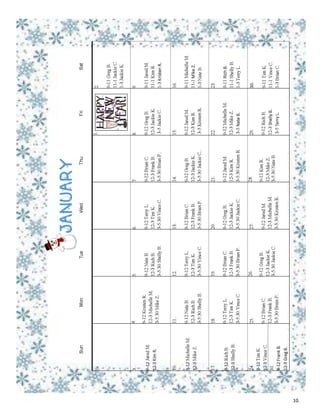
10………………………………………………………..Floor Time Example
11………………………………………………………Quick TREND How-To
13……………………………………………………...Quick TREND Book Showings
15……………………………………………………….KW Intranet
16……………………………………………………….Send Email
18……………………………………………………….eEdge
19……………………………………………………...DotLoop
20……………………………………………………….GCI Calculaation
New to KW To-Do List
 Sign up with Keller Williams Montgomeryville.
 Get your picture to Jennie. (Smile! We can take one here before you leave.)
 **If you have not gone to Harrisburg to get your Real Estate License Number STOP! You
must have this number before you can begin.
 Schedule your first orientation with Jennie. DATE: __________________________
**Don’t forget to bring this packet with you
 Schedule your second orientation with Jennie. DATE: ________________________
**Don’t forget to bring this packet with you
 Call Jason Drissel to set up your first meeting with him. 267-446-7266
 Sign up with TREND
 Sign up with an Association of Realtors
Congratulations! You’re a
new KW Montgomeryville
agent! Turn to the next page
for your New Agent
To-Do List.
**If you have not gone to Harrisburg to get your Real Estate License Number STOP! You must
have this number before you can continue.
2.
 Attend a Meet the Broker Class
 Attend an Office Business Meeting
 Attend an ALC meeting
 Meet all ALC members
 Watch TREND videos
 Order business cards
 www.everythingkw.com
 www.realty-cards.com
 www.bestprintbuy.com
 **Send a proof to Jennie before ordering
 Set up your voicemail and call forwarding (page 6)
 Download your Mobile App
 Update your profile on mykw.kw.com
 Upload an agent photo
 Begin to create your database
 Draft an announcement letter
 Create your basic website
 Attend a Dotloop and Green Sheets class
Sign up to receive office text messages (page 7)
Add us as a friend on Facebook (page 7)
New Agent To-Do List
3.
Useful Contacts and Websites
Andy Goodman—Team Leader
andygoodman@kw.com
215-631-1901 or 610-442-2885
Betty Christensen—Market
Center Administrator
bchristensen@kw.com
215-631-1902
Jason Drissel—Productivity Coach
jdrissel@kw.com
215-631-1939 or 267-446-7266
Lynn Sharer—Broker of Record
Lsharer@kw.com
215-631-1905 or 215-272-0486
Jennie Sherkness—Director of First Impressions and
Agent Services Coordinator
jsherkness@kw.com
215-631-1900 or 267-644-7061
Eric Fishman- Waterstone Mortgage: efishman@watersontmortgage.com 215-280-4371
Jim Natale- Huntingdon Valley Bank: jnatale@huntingdonvalleybank.com 215-872-4625
Greater Montgomery Settlement Services: 215-631-1923
Showing Desk (Appt. Phone): 855-746-9748 we.showingdesk.com
TREND: 1-877-330-9900 trendmls.com
BCAR: 215-956-9176 www.bucksrealtor.com—MCAR: 610-260-9931 www.mcarealtors.org
DotLoop (transaction software): 1-513-257-0551 www.dotloop.com
eEdge: 800-491-4234 or eedgesupport@kw.com
4.
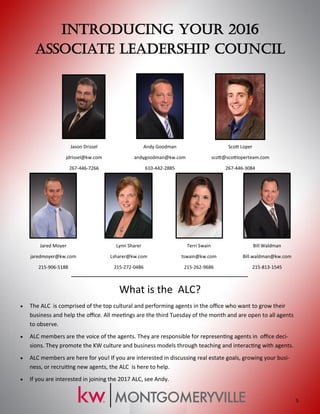
Introducing Your 2016
Associate Leadership Council
Jason Drissel
jdrissel@kw.com
267-446-7266
Andy Goodman
andygoodman@kw.com
610-442-2885
Scott Loper
scott@scottloperteam.com
267-446-3084
Jared Moyer
jaredmoyer@kw.com
215-906-5188
Lynn Sharer
Lsharer@kw.com
215-272-0486
Terri Swain
tswain@kw.com
215-262-9686
Bill Waldman
Bill.waldman@kw.com
215-813-1545
What is the ALC?
 The ALC is comprised of the top cultural and performing agents in the office who want to grow their
business and help the office. All meetings are the third Tuesday of the month and are open to all agents
to observe.
 ALC members are the voice of the agents. They are responsible for representing agents in office deci-
sions. They promote the KW culture and business models through teaching and interacting with agents.
 ALC members are here for you! If you are interested in discussing real estate goals, growing your busi-
ness, or recruiting new agents, the ALC is here to help.
 If you are interested in joining the 2017 ALC, see Andy.
5.
Voicemail and Call Forwarding
Setting Up Your Voicemail
1. Dial 215-631-1985
2. AS SOON AS YOU HEAR A VOICE press ** (yes, that it two stars in a row)
3. Enter your extension, your password, # sign
4. Listen to the voice and follow the directions
*This is how you check your voicemail inbox as well
In the message you record MAKE SURE to tell the caller to press 7 to be forwarded to your cell phone:
“You have reached John Doe from Keller Williams. I am not in the office at the moment, please press 7 now
to be transferred to my cell phone.”
Call Forwarding
To set up call forwarding from the backdoor
1. Dial 215-631-1985
2. AS SOON AS YOU HEAR A VOICE press ** (yes, that it two stars in a row)
3. Enter your extension, your password, # sign
4. 8
5. 8
6. 1
7. 1
8. Enter 9-1 then your cell phone number followed by the # sign
9. # or 1 (depending on whether you want to double check the phone number you entered)
10. IF the voice says that Outbound Transfer is off, press 1. IF the voice says On, you are done.
6.
Checking Voicemail
1. 215-631-1985
2. Press ** as soon as the operator starts talking
3. Enter your extension, password, # all in a row (ex:34567892#)
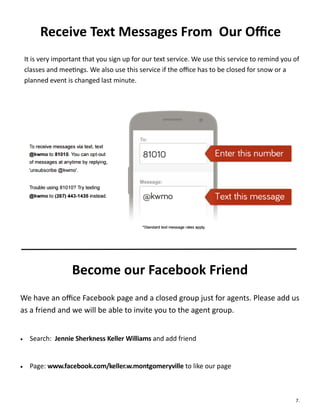
Receive Text Messages From Our Office
It is very important that you sign up for our text service. We use this service to remind you of
classes and meetings. We also use this service if the office has to be closed for snow or a
planned event is changed last minute.
Become our Facebook Friend
We have an office Facebook page and a closed group just for agents. Please add us
as a friend and we will be able to invite you to the agent group.
 Search: Jennie Sherkness Keller Williams and add friend
 Page: www.facebook.com/keller.w.montgomeryville to like our page
7.
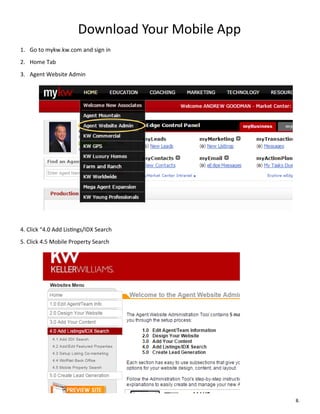
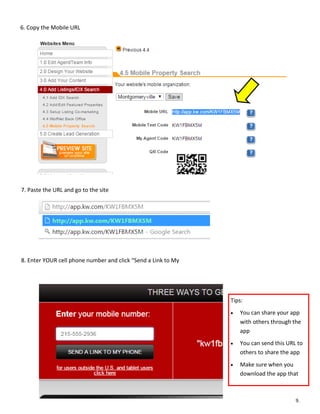
Download Your Mobile App
1. Go to mykw.kw.com and sign in
2. Home Tab
3. Agent Website Admin
4. Click “4.0 Add Listings/IDX Search
5. Click 4.5 Mobile Property Search
8.
6. Copy the Mobile URL
7. Paste the URL and go to the site
8. Enter YOUR cell phone number and click “Send a Link to My
Tips:
 You can share your app
with others through the
app
 You can send this URL to
others to share the app
 Make sure when you
download the app that
9.
10.
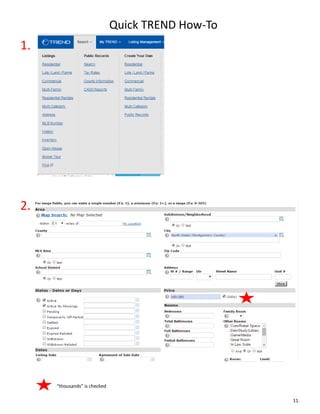
Quick TREND How-To
1.
2.
“thousands” is checked
11.
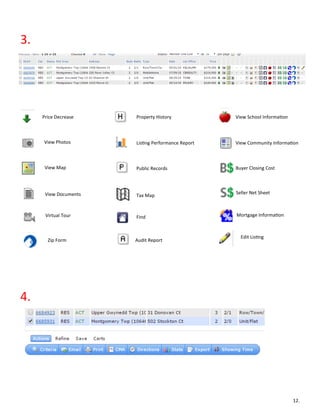
3.
Price Decrease Property History View School Information
View Photos Listing Performance Report View Community Information
View Map Public Records Buyer Closing Cost
View Documents Tax Map
Seller Net Sheet
Virtual Tour Find Mortgage Information
Zip Form Audit Report
Edit Listing
4.
12.
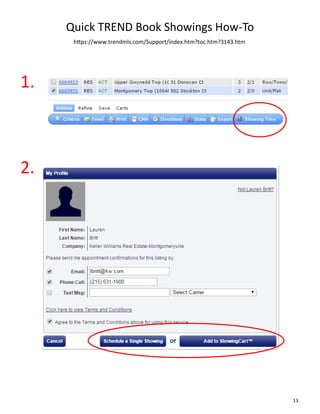
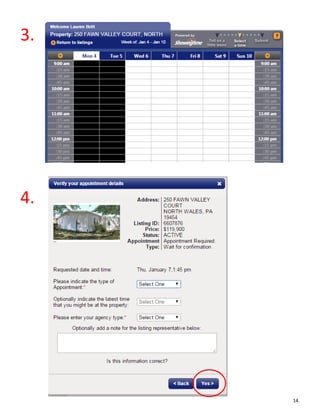
Quick TREND Book Showings How-To
https://www.trendmls.com/Support/index.htm?toc.htm?3143.htm
1.
2.
13.
3.
4.
14.
KW Intranet
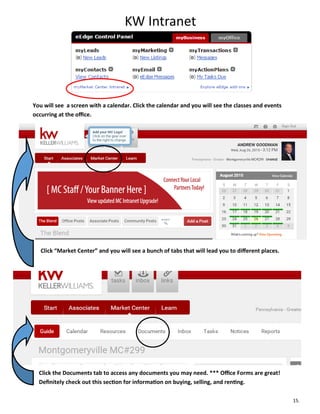
You will see a screen with a calendar. Click the calendar and you will see the classes and events
occurring at the office.
Click “Market Center” and you will see a bunch of tabs that will lead you to different places.
Click the Documents tab to access any documents you may need. *** Office Forms are great!
Definitely check out this section for information on buying, selling, and renting.
15.
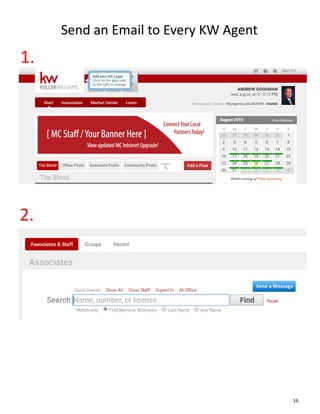
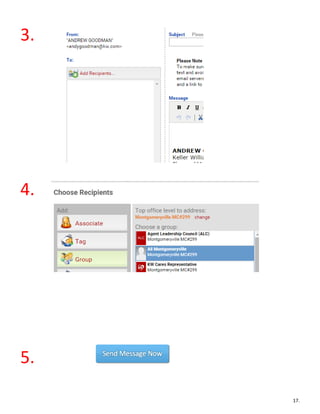
Send an Email to Every KW Agent
1.
2.
16.
3.
4.
5.
17.
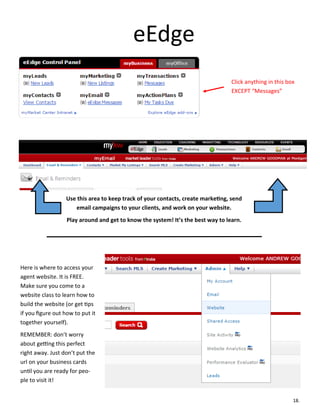
eEdge
Click anything in this box
EXCEPT “Messages”
Use this area to keep track of your contacts, create marketing, send
email campaigns to your clients, and work on your website.
Play around and get to know the system! It’s the best way to learn.
Here is where to access your
agent website. It is FREE.
Make sure you come to a
website class to learn how to
build the website (or get tips
if you figure out how to put it
together yourself).
REMEMBER: don’t worry
about getting this perfect
right away. Just don’t put the
url on your business cards
until you are ready for peo-
ple to visit it!
18.
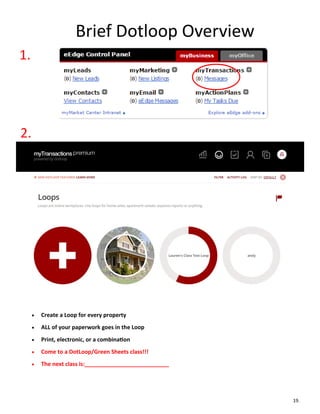
Brief Dotloop Overview
1.
2.
 Create a Loop for every property
 ALL of your paperwork goes in the Loop
 Print, electronic, or a combination
 Come to a DotLoop/Green Sheets class!!!
 The next class is:___________________________
19.
How is my commission check calculated?
+ Gross Commission Split
- 6% KW International Royalty*
- $50 transaction fee
- Any unpaid office invoices
= Your Commission!
How long until I receive my check?
3 business days after receipt of the check and HUD; contingent on all documents
being correctly uploaded to Dotloop and the Green Sheet turned in to Betty.
*Virtually all Real Estate Companies have 5-6% Franchise Royalty. Ours is capped at $3,000 per agent per year.
20.
What to
Expect...
When
You’re
Expecting
21.

New Agent Packet

  • 1.
    Welcome to ourKeller Williams Montgomeryville Award Winning team! Our New Associate “Quick Start” Program is designed to help you get a fast start to your Real Estate career by organizing all of the initial steps. We are excited to have you with us! Good luck! KW Quick Start
  • 2.
    Table of Contents 1. 2……………………………………………………….NewTo KW To-Do List 3……………………………………………………….New Agent To-Do List 4……………………………………………………….Useful Contacts and Websites 5………………………………………………………..ALC Members 6…………………………………………………………Voicemail and Call Forwarding 7………………………………………………………...Texts and Facebook 8………………………………………………………..Download Your Mobile App 10………………………………………………………..Floor Time Example 11………………………………………………………Quick TREND How-To 13……………………………………………………...Quick TREND Book Showings 15……………………………………………………….KW Intranet 16……………………………………………………….Send Email 18……………………………………………………….eEdge 19……………………………………………………...DotLoop 20……………………………………………………….GCI Calculaation
  • 3.
    New to KWTo-Do List  Sign up with Keller Williams Montgomeryville.  Get your picture to Jennie. (Smile! We can take one here before you leave.)  **If you have not gone to Harrisburg to get your Real Estate License Number STOP! You must have this number before you can begin.  Schedule your first orientation with Jennie. DATE: __________________________ **Don’t forget to bring this packet with you  Schedule your second orientation with Jennie. DATE: ________________________ **Don’t forget to bring this packet with you  Call Jason Drissel to set up your first meeting with him. 267-446-7266  Sign up with TREND  Sign up with an Association of Realtors Congratulations! You’re a new KW Montgomeryville agent! Turn to the next page for your New Agent To-Do List. **If you have not gone to Harrisburg to get your Real Estate License Number STOP! You must have this number before you can continue. 2.
  • 4.
     Attend aMeet the Broker Class  Attend an Office Business Meeting  Attend an ALC meeting  Meet all ALC members  Watch TREND videos  Order business cards  www.everythingkw.com  www.realty-cards.com  www.bestprintbuy.com  **Send a proof to Jennie before ordering  Set up your voicemail and call forwarding (page 6)  Download your Mobile App  Update your profile on mykw.kw.com  Upload an agent photo  Begin to create your database  Draft an announcement letter  Create your basic website  Attend a Dotloop and Green Sheets class Sign up to receive office text messages (page 7) Add us as a friend on Facebook (page 7) New Agent To-Do List 3.
  • 5.
    Useful Contacts andWebsites Andy Goodman—Team Leader andygoodman@kw.com 215-631-1901 or 610-442-2885 Betty Christensen—Market Center Administrator bchristensen@kw.com 215-631-1902 Jason Drissel—Productivity Coach jdrissel@kw.com 215-631-1939 or 267-446-7266 Lynn Sharer—Broker of Record Lsharer@kw.com 215-631-1905 or 215-272-0486 Jennie Sherkness—Director of First Impressions and Agent Services Coordinator jsherkness@kw.com 215-631-1900 or 267-644-7061 Eric Fishman- Waterstone Mortgage: efishman@watersontmortgage.com 215-280-4371 Jim Natale- Huntingdon Valley Bank: jnatale@huntingdonvalleybank.com 215-872-4625 Greater Montgomery Settlement Services: 215-631-1923 Showing Desk (Appt. Phone): 855-746-9748 we.showingdesk.com TREND: 1-877-330-9900 trendmls.com BCAR: 215-956-9176 www.bucksrealtor.com—MCAR: 610-260-9931 www.mcarealtors.org DotLoop (transaction software): 1-513-257-0551 www.dotloop.com eEdge: 800-491-4234 or eedgesupport@kw.com 4.
  • 6.
    Introducing Your 2016 AssociateLeadership Council Jason Drissel jdrissel@kw.com 267-446-7266 Andy Goodman andygoodman@kw.com 610-442-2885 Scott Loper scott@scottloperteam.com 267-446-3084 Jared Moyer jaredmoyer@kw.com 215-906-5188 Lynn Sharer Lsharer@kw.com 215-272-0486 Terri Swain tswain@kw.com 215-262-9686 Bill Waldman Bill.waldman@kw.com 215-813-1545 What is the ALC?  The ALC is comprised of the top cultural and performing agents in the office who want to grow their business and help the office. All meetings are the third Tuesday of the month and are open to all agents to observe.  ALC members are the voice of the agents. They are responsible for representing agents in office deci- sions. They promote the KW culture and business models through teaching and interacting with agents.  ALC members are here for you! If you are interested in discussing real estate goals, growing your busi- ness, or recruiting new agents, the ALC is here to help.  If you are interested in joining the 2017 ALC, see Andy. 5.
  • 7.
    Voicemail and CallForwarding Setting Up Your Voicemail 1. Dial 215-631-1985 2. AS SOON AS YOU HEAR A VOICE press ** (yes, that it two stars in a row) 3. Enter your extension, your password, # sign 4. Listen to the voice and follow the directions *This is how you check your voicemail inbox as well In the message you record MAKE SURE to tell the caller to press 7 to be forwarded to your cell phone: “You have reached John Doe from Keller Williams. I am not in the office at the moment, please press 7 now to be transferred to my cell phone.” Call Forwarding To set up call forwarding from the backdoor 1. Dial 215-631-1985 2. AS SOON AS YOU HEAR A VOICE press ** (yes, that it two stars in a row) 3. Enter your extension, your password, # sign 4. 8 5. 8 6. 1 7. 1 8. Enter 9-1 then your cell phone number followed by the # sign 9. # or 1 (depending on whether you want to double check the phone number you entered) 10. IF the voice says that Outbound Transfer is off, press 1. IF the voice says On, you are done. 6. Checking Voicemail 1. 215-631-1985 2. Press ** as soon as the operator starts talking 3. Enter your extension, password, # all in a row (ex:34567892#)
  • 8.
    Receive Text MessagesFrom Our Office It is very important that you sign up for our text service. We use this service to remind you of classes and meetings. We also use this service if the office has to be closed for snow or a planned event is changed last minute. Become our Facebook Friend We have an office Facebook page and a closed group just for agents. Please add us as a friend and we will be able to invite you to the agent group.  Search: Jennie Sherkness Keller Williams and add friend  Page: www.facebook.com/keller.w.montgomeryville to like our page 7.
  • 9.
    Download Your MobileApp 1. Go to mykw.kw.com and sign in 2. Home Tab 3. Agent Website Admin 4. Click “4.0 Add Listings/IDX Search 5. Click 4.5 Mobile Property Search 8.
  • 10.
    6. Copy theMobile URL 7. Paste the URL and go to the site 8. Enter YOUR cell phone number and click “Send a Link to My Tips:  You can share your app with others through the app  You can send this URL to others to share the app  Make sure when you download the app that 9.
  • 11.
  • 12.
  • 13.
    3. Price Decrease PropertyHistory View School Information View Photos Listing Performance Report View Community Information View Map Public Records Buyer Closing Cost View Documents Tax Map Seller Net Sheet Virtual Tour Find Mortgage Information Zip Form Audit Report Edit Listing 4. 12.
  • 14.
    Quick TREND BookShowings How-To https://www.trendmls.com/Support/index.htm?toc.htm?3143.htm 1. 2. 13.
  • 15.
  • 16.
    KW Intranet You willsee a screen with a calendar. Click the calendar and you will see the classes and events occurring at the office. Click “Market Center” and you will see a bunch of tabs that will lead you to different places. Click the Documents tab to access any documents you may need. *** Office Forms are great! Definitely check out this section for information on buying, selling, and renting. 15.
  • 17.
    Send an Emailto Every KW Agent 1. 2. 16.
  • 18.
  • 19.
    eEdge Click anything inthis box EXCEPT “Messages” Use this area to keep track of your contacts, create marketing, send email campaigns to your clients, and work on your website. Play around and get to know the system! It’s the best way to learn. Here is where to access your agent website. It is FREE. Make sure you come to a website class to learn how to build the website (or get tips if you figure out how to put it together yourself). REMEMBER: don’t worry about getting this perfect right away. Just don’t put the url on your business cards until you are ready for peo- ple to visit it! 18.
  • 20.
    Brief Dotloop Overview 1. 2. Create a Loop for every property  ALL of your paperwork goes in the Loop  Print, electronic, or a combination  Come to a DotLoop/Green Sheets class!!!  The next class is:___________________________ 19.
  • 21.
    How is mycommission check calculated? + Gross Commission Split - 6% KW International Royalty* - $50 transaction fee - Any unpaid office invoices = Your Commission! How long until I receive my check? 3 business days after receipt of the check and HUD; contingent on all documents being correctly uploaded to Dotloop and the Green Sheet turned in to Betty. *Virtually all Real Estate Companies have 5-6% Franchise Royalty. Ours is capped at $3,000 per agent per year. 20. What to Expect... When You’re Expecting
  • 22.