Native Script – What you need to be Aware
Agenda
• Overview of Native Script
• Pre-Requisites for Native Script
• Native Script App Folders
• Basic Commands of Native Script
• Native Script Controls
• Demo using Native Script –Play Ground
My Intro
• Baskar Rao
• Senior .Net Consultant with Compunnel Software Group.
• @baskarmib
• https://www.linkedin.com/in/baskarrao-dandlamudi
• baskarrao.dandlamudi@outlook.com
• www.compunnel.com
• https://github.com/baskar3078
Native Script - Overview
• Native Script is free open source framework
for building native IOS and Android Apps.
• Build Cross Platform mobile apps using single
code base.
• Develop Mobile Apps using JavaScript ,
Angular , Typescript and Vue
Why Native Script
• Web Developers with knowledge of HTML,
CSS and JavaScript can use the same to
develop rich native mobile applications.
• Easily develop apps using existing plugins
from npm [Node], Gradle [Android] and IOS
Plugins.
• Easy to learn and develop apps using pre-
defined templates.
Pre-Requisites of Native Script
• Prior Knowledge of HTML, CSS and any one
of scripting language JavaScript , Angular,
Typescript or Vue
• Node.js Server, Command Line Terminal and
Preferred Text IDE Editor
• Android Studio, Android SDK and Android
Emulator, Java SDK
Native Script – App Structure
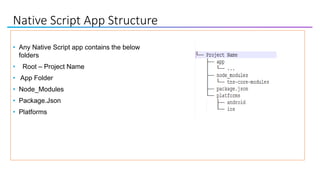
Native Script App Structure
• Any Native Script app contains the below
folders
• Root – Project Name
• App Folder
• Node_Modules
• Package.Json
• Platforms
App Structure
• App Folder
This folder contains all the development
resources like forms, js files
• Node_Modules
This folder contains application npm module
dependencies. The tns-core modules folder
contains Native Script related javascript modules
which can be used to develop features in the
application like http calls, access files etc.
• Package.Json
Details of application and the version of native script
used and other npm modules used in the application.
• Platforms
This folder contains platform-specific code which
Native Script needs to build IOS or Android Apps. This
is mostly generated code by Native Script CLI.
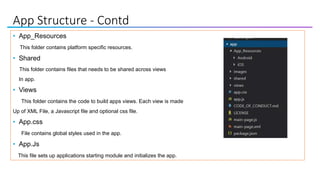
App Structure - Contd
• App_Resources
This folder contains platform specific resources.
• Shared
This folder contains files that needs to be shared across views
In app.
• Views
This folder contains the code to build apps views. Each view is made
Up of XML File, a Javascript file and optional css file.
• App.css
File contains global styles used in the app.
• App.Js
This file sets up applications starting module and initializes the app.
Native Script CLI Basic Commands
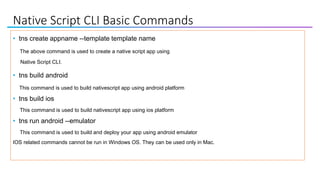
• tns create appname --template template name
The above command is used to create a native script app using
Native Script CLI.
• tns build android
This command is used to build nativescript app using android platform
• tns build ios
This command is used to build nativescript app using ios platform
• tns run android --emulator
This command is used to build and deploy your app using android emulator
IOS related commands cannot be run in Windows OS. They can be used only in Mac.
Native Script Controls
What makes a Native Script View
• Native Script View is comprised of three files.
-- ViewName.xml
-- ViewName.css
-- ViewName.js
• Xml file is used to design the screen layout and screen controls.
• Css file is used to mention css class specific to the view.
• Js file acts as the code behind file similar to aspx.cs for an aspx page.
Native Script View Models
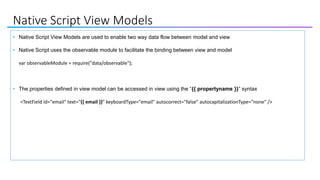
• Native Script View Models are used to enable two way data flow between model and view
• Native Script uses the observable module to facilitate the binding between view and model
var observableModule = require("data/observable");
• The properties defined in view model can be accessed in view using the “{{ propertyname }}” syntax
<TextField id="email" text="{{ email }}" keyboardType="email" autocorrect="false" autocapitalizationType="none" />
Native Script Basic Controls
HTML Control Native Script Control
<div> LayOut – Stack Layout, Grid LayOut, Wrap
LayOut, FlexBox Layout, Dock Layout
<input type="button" value=“Sign In"
onclick=“signIn()">
<Button text=“Sign In" tap="signIn"/>
<label>Click me </label> <Label text="{{ name }}" />
<img src="mdn-logo-sm.png" alt="MDN"> <Image src="res://logo" ></Image>
<input id="email" type="email"> <TextField id="email" text="{{ email }}"
keyboardType="email" autocorrect="false“
autocapitalizationType="none" />
Native Script Basic Controls
TextField
<TextField id="email" text="{{ email }}" keyboardType="email" autocorrect="false“
autocapitalizationType="none" />
• Id – Used to define a unique identifier for the property
• Text – Used to define the text which is binded to the TextField. Use of {{ }} binds it property in viewModel.
• keyboardType – This is used to determine the keyboard layout. Email is used for email fields and Secure is used for
password fields.
Label
<Label text="{{ name }}" horizontalAlignment="left" verticalAlignment="center"/>
• Text – Used to define the text which is binded to the Label. Use of {{ }} binds it property in viewModel.
Native Script Basic Controls
Image
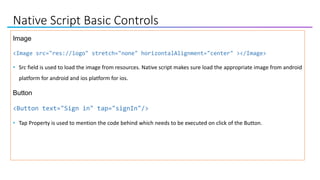
<Image src="res://logo" stretch="none" horizontalAlignment="center" ></Image>
• Src field is used to load the image from resources. Native script makes sure load the appropriate image from android
platform for android and ios platform for ios.
Button
<Button text="Sign in" tap="signIn"/>
• Tap Property is used to mention the code behind which needs to be executed on click of the Button.
Dev Tools
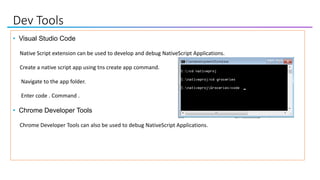
• Visual Studio Code
Native Script extension can be used to develop and debug NativeScript Applications.
Create a native script app using tns create app command.
Navigate to the app folder.
Enter code . Command .
• Chrome Developer Tools
Chrome Developer Tools can also be used to debug NativeScript Applications.
Dev Tools
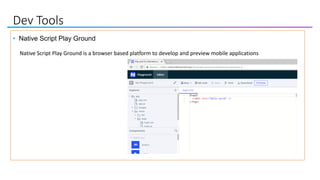
• Native Script Play Ground
Native Script Play Ground is a browser based platform to develop and preview mobile applications
Dev Tools
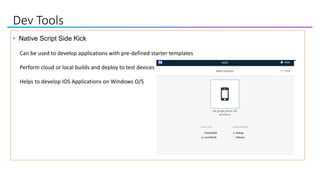
• Native Script Side Kick
Can be used to develop applications with pre-defined starter templates
Perform cloud or local builds and deploy to test devices
Helps to develop IOS Applications on Windows O/S
Walkthrough
• Demo of an existing app using Play Ground
• Demo live sync feature
• Demo how to make API calls using Fetch Module.
The app used in the demo is from Native Script tutorial
Further Resources
• Native Script - Documentation
• Native Script eBook is free book by @brosteins available for download
• Native Script Blog
• Native Script Code Snippets
• Native Script Playground - Browser based development tool
• Native Script Sidekick – Useful for developing IOS apps on Windows Machine
Questions
https://www.linkedin.com/in/baskarrao-dandlamudi
baskarrao.dandlamudi@outlook.com
https://baskarrao.wordpress.com/
Thanks to Atlanta Code Camp team for providing an opportunity to present.

Native Script Atlanta Code Camp

  • 1.
    Native Script –What you need to be Aware
  • 2.
    Agenda • Overview ofNative Script • Pre-Requisites for Native Script • Native Script App Folders • Basic Commands of Native Script • Native Script Controls • Demo using Native Script –Play Ground
  • 3.
    My Intro • BaskarRao • Senior .Net Consultant with Compunnel Software Group. • @baskarmib • https://www.linkedin.com/in/baskarrao-dandlamudi • baskarrao.dandlamudi@outlook.com • www.compunnel.com • https://github.com/baskar3078
  • 4.
    Native Script -Overview • Native Script is free open source framework for building native IOS and Android Apps. • Build Cross Platform mobile apps using single code base. • Develop Mobile Apps using JavaScript , Angular , Typescript and Vue
  • 5.
    Why Native Script •Web Developers with knowledge of HTML, CSS and JavaScript can use the same to develop rich native mobile applications. • Easily develop apps using existing plugins from npm [Node], Gradle [Android] and IOS Plugins. • Easy to learn and develop apps using pre- defined templates.
  • 6.
    Pre-Requisites of NativeScript • Prior Knowledge of HTML, CSS and any one of scripting language JavaScript , Angular, Typescript or Vue • Node.js Server, Command Line Terminal and Preferred Text IDE Editor • Android Studio, Android SDK and Android Emulator, Java SDK
  • 7.
    Native Script –App Structure
  • 8.
    Native Script AppStructure • Any Native Script app contains the below folders • Root – Project Name • App Folder • Node_Modules • Package.Json • Platforms
  • 9.
    App Structure • AppFolder This folder contains all the development resources like forms, js files • Node_Modules This folder contains application npm module dependencies. The tns-core modules folder contains Native Script related javascript modules which can be used to develop features in the application like http calls, access files etc. • Package.Json Details of application and the version of native script used and other npm modules used in the application. • Platforms This folder contains platform-specific code which Native Script needs to build IOS or Android Apps. This is mostly generated code by Native Script CLI.
  • 10.
    App Structure -Contd • App_Resources This folder contains platform specific resources. • Shared This folder contains files that needs to be shared across views In app. • Views This folder contains the code to build apps views. Each view is made Up of XML File, a Javascript file and optional css file. • App.css File contains global styles used in the app. • App.Js This file sets up applications starting module and initializes the app.
  • 11.
    Native Script CLIBasic Commands • tns create appname --template template name The above command is used to create a native script app using Native Script CLI. • tns build android This command is used to build nativescript app using android platform • tns build ios This command is used to build nativescript app using ios platform • tns run android --emulator This command is used to build and deploy your app using android emulator IOS related commands cannot be run in Windows OS. They can be used only in Mac.
  • 12.
  • 13.
    What makes aNative Script View • Native Script View is comprised of three files. -- ViewName.xml -- ViewName.css -- ViewName.js • Xml file is used to design the screen layout and screen controls. • Css file is used to mention css class specific to the view. • Js file acts as the code behind file similar to aspx.cs for an aspx page.
  • 14.
    Native Script ViewModels • Native Script View Models are used to enable two way data flow between model and view • Native Script uses the observable module to facilitate the binding between view and model var observableModule = require("data/observable"); • The properties defined in view model can be accessed in view using the “{{ propertyname }}” syntax <TextField id="email" text="{{ email }}" keyboardType="email" autocorrect="false" autocapitalizationType="none" />
  • 15.
    Native Script BasicControls HTML Control Native Script Control <div> LayOut – Stack Layout, Grid LayOut, Wrap LayOut, FlexBox Layout, Dock Layout <input type="button" value=“Sign In" onclick=“signIn()"> <Button text=“Sign In" tap="signIn"/> <label>Click me </label> <Label text="{{ name }}" /> <img src="mdn-logo-sm.png" alt="MDN"> <Image src="res://logo" ></Image> <input id="email" type="email"> <TextField id="email" text="{{ email }}" keyboardType="email" autocorrect="false“ autocapitalizationType="none" />
  • 16.
    Native Script BasicControls TextField <TextField id="email" text="{{ email }}" keyboardType="email" autocorrect="false“ autocapitalizationType="none" /> • Id – Used to define a unique identifier for the property • Text – Used to define the text which is binded to the TextField. Use of {{ }} binds it property in viewModel. • keyboardType – This is used to determine the keyboard layout. Email is used for email fields and Secure is used for password fields. Label <Label text="{{ name }}" horizontalAlignment="left" verticalAlignment="center"/> • Text – Used to define the text which is binded to the Label. Use of {{ }} binds it property in viewModel.
  • 17.
    Native Script BasicControls Image <Image src="res://logo" stretch="none" horizontalAlignment="center" ></Image> • Src field is used to load the image from resources. Native script makes sure load the appropriate image from android platform for android and ios platform for ios. Button <Button text="Sign in" tap="signIn"/> • Tap Property is used to mention the code behind which needs to be executed on click of the Button.
  • 18.
    Dev Tools • VisualStudio Code Native Script extension can be used to develop and debug NativeScript Applications. Create a native script app using tns create app command. Navigate to the app folder. Enter code . Command . • Chrome Developer Tools Chrome Developer Tools can also be used to debug NativeScript Applications.
  • 19.
    Dev Tools • NativeScript Play Ground Native Script Play Ground is a browser based platform to develop and preview mobile applications
  • 20.
    Dev Tools • NativeScript Side Kick Can be used to develop applications with pre-defined starter templates Perform cloud or local builds and deploy to test devices Helps to develop IOS Applications on Windows O/S
  • 21.
    Walkthrough • Demo ofan existing app using Play Ground • Demo live sync feature • Demo how to make API calls using Fetch Module. The app used in the demo is from Native Script tutorial
  • 22.
    Further Resources • NativeScript - Documentation • Native Script eBook is free book by @brosteins available for download • Native Script Blog • Native Script Code Snippets • Native Script Playground - Browser based development tool • Native Script Sidekick – Useful for developing IOS apps on Windows Machine
  • 23.