Native Script – What you need to be Aware
My Intro
• Baskar Rao
• Senior .Net Consultant with Compunnel Software Group.
• .Net Consultant at Select Sires Inc through Precise Resource.
@baskarmib
https://www.linkedin.com/in/baskarrao-dandlamudi
baskarrao.dandlamudi@outlook.com
www.compunnel.com
https://github.com/baskar3078
Agenda
• Overview of Native Script
• Pre-Requisites for Native Script
• Native Script App Folders
• Basic Commands of Native Script
• Native Script Controls
• Demo using Native Script –Play Ground
Native Script - Overview
• Native Script is free open source framework
for building native IOS and Android Apps.
• Build Cross Platform mobile apps using single
code base.
• Develop Mobile Apps using JavaScript ,
Angular , Typescript and Vue
Pre-Requisites of Native Script
• Prior Knowledge of HTML, CSS and any one
of scripting language JavaScript , Angular,
Typescript or Vue
• Node.js Server, Command Line Terminal and
Preferred Text IDE Editor
• Android Studio, Android SDK and Android
Emulator, Java SDK
Why Native Script
• Web Developers with knowledge of HTML,
CSS and JavaScript can use the same to
develop rich native mobile applications.
• Easily develop apps using existing plugins
from npm [Node], Gradle [Android] and IOS
Plugins.
• Easy to learn and develop apps using pre-
defined templates.
• Angular supports Angular Schematics. One
Code three displays – Web, IOS, Android
Native Script – App Structure
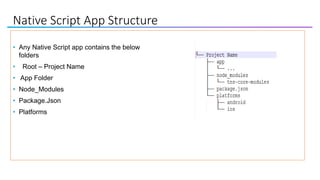
Native Script App Structure
• Any Native Script app contains the below
folders
• Root – Project Name
• App Folder
• Node_Modules
• Package.Json
• Platforms
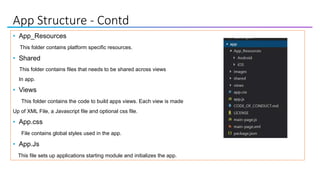
App Structure - Contd
• App_Resources
This folder contains platform specific resources.
• Shared
This folder contains files that needs to be shared across views
In app.
• Views
This folder contains the code to build apps views. Each view is made
Up of XML File, a Javascript file and optional css file.
• App.css
File contains global styles used in the app.
• App.Js
This file sets up applications starting module and initializes the app.
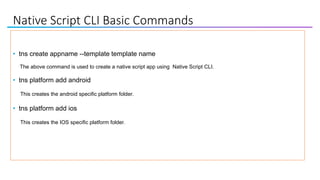
Native Script CLI Basic Commands
• tns create appname --template template name
The above command is used to create a native script app using Native Script CLI.
• tns platform add android
This creates the android specific platform folder.
• tns platform add ios
This creates the IOS specific platform folder.
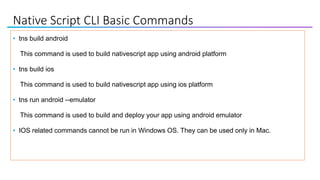
Native Script CLI Basic Commands
• tns build android
This command is used to build nativescript app using android platform
• tns build ios
This command is used to build nativescript app using ios platform
• tns run android --emulator
This command is used to build and deploy your app using android emulator
• IOS related commands cannot be run in Windows OS. They can be used only in Mac.
Native Script CLI Basic Commands
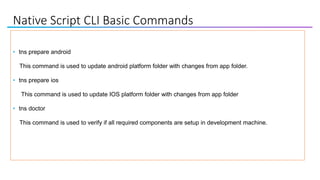
• tns prepare android
This command is used to update android platform folder with changes from app folder.
• tns prepare ios
This command is used to update IOS platform folder with changes from app folder
• tns doctor
This command is used to verify if all required components are setup in development machine.
Native Script CLI Basic Commands
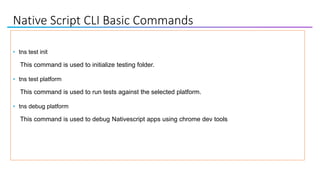
• tns test init
This command is used to initialize testing folder.
• tns test platform
This command is used to run tests against the selected platform.
• tns debug platform
This command is used to debug Nativescript apps using chrome dev tools
Native Script Controls
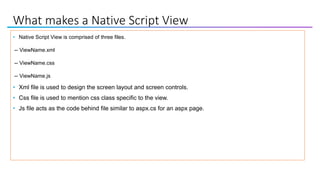
What makes a Native Script View
• Native Script View is comprised of three files.
-- ViewName.xml
-- ViewName.css
-- ViewName.js
• Xml file is used to design the screen layout and screen controls.
• Css file is used to mention css class specific to the view.
• Js file acts as the code behind file similar to aspx.cs for an aspx page.
Native Script View Models
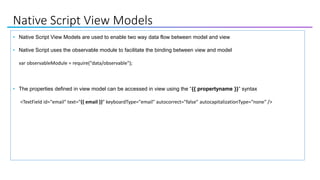
• Native Script View Models are used to enable two way data flow between model and view
• Native Script uses the observable module to facilitate the binding between view and model
var observableModule = require("data/observable");
• The properties defined in view model can be accessed in view using the “{{ propertyname }}” syntax
<TextField id="email" text="{{ email }}" keyboardType="email" autocorrect="false" autocapitalizationType="none" />
Native Script Basic Controls
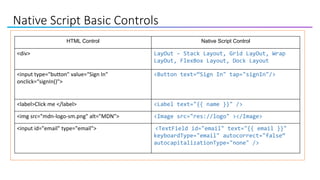
HTML Control Native Script Control
<div> LayOut – Stack Layout, Grid LayOut, Wrap
LayOut, FlexBox Layout, Dock Layout
<input type="button" value=“Sign In"
onclick=“signIn()">
<Button text=“Sign In" tap="signIn"/>
<label>Click me </label> <Label text="{{ name }}" />
<img src="mdn-logo-sm.png" alt="MDN"> <Image src="res://logo" ></Image>
<input id="email" type="email"> <TextField id="email" text="{{ email }}"
keyboardType="email" autocorrect="false“
autocapitalizationType="none" />
Native Script Basic Controls
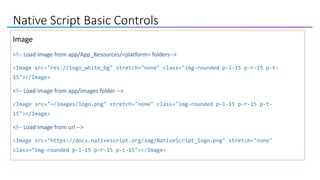
Image
<!-- Load image from app/App_Resources/<platform> folders-->
<Image src="res://logo_white_bg" stretch="none" class="img-rounded p-l-15 p-r-15 p-t-
15"></Image>
<!-- Load image from app/images folder -->
<Image src="~/images/logo.png" stretch="none" class="img-rounded p-l-15 p-r-15 p-t-
15"></Image>
<!-- Load image from url -->
<Image src="https://docs.nativescript.org/img/NativeScript_logo.png" stretch="none"
class="img-rounded p-l-15 p-r-15 p-t-15"></Image>
Native Script Basic Controls
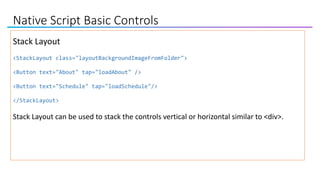
Stack Layout
<StackLayout class="layoutBackgroundImageFromFolder">
<Button text="About" tap="loadAbout" />
<Button text="Schedule" tap="loadSchedule"/>
</StackLayout>
Stack Layout can be used to stack the controls vertical or horizontal similar to <div>.
You guys are Awesome!!!
https://speakerdeck.com/reverentgeek
Dev Tools
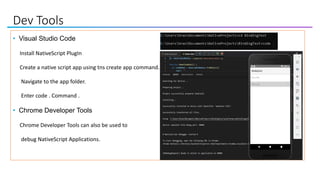
• Visual Studio Code
Install NativeScript PlugIn
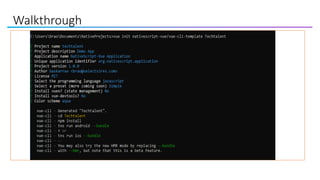
Create a native script app using tns create app command.
Navigate to the app folder.
Enter code . Command .
• Chrome Developer Tools
Chrome Developer Tools can also be used to
debug NativeScript Applications.
Dev Tools
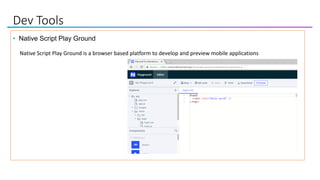
• Native Script Play Ground
Native Script Play Ground is a browser based platform to develop and preview mobile applications
Dev Tools
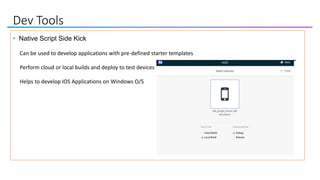
• Native Script Side Kick
Can be used to develop applications with pre-defined starter templates
Perform cloud or local builds and deploy to test devices
Helps to develop IOS Applications on Windows O/S
Dev Tools
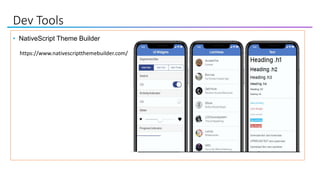
• NativeScript Theme Builder
https://www.nativescriptthemebuilder.com/
Dev Tools
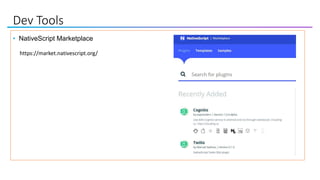
• NativeScript Marketplace
https://market.nativescript.org/
Walkthrough
• Demo of an existing app using Play Ground
• Demo live sync feature
• Demo Hot Module Reload using Visual Studio Code
Walkthrough
Some Tips
• Before finalizing the Framework check if there are samples built in community already.
• Before starting development with NativeScript check if there are official verified plugins which you need to
use.
• Any time stuck during development, deleting the platform folder and perform clean build.
• If Android Emulator does not start as expected after installation of NativeScript , try installing Android
Studio and update Android Emulator through Android Studio.
• Check with NativeScript Community of Developers in Slack Channel for any help during development.
Further Resources
• Native Script - Documentation
• Native Script eBook is free book by @brosteins available for download
• Native Script Blog
• Native Script Code Snippets
• Native Script Playground - Browser based development tool
• Native Script Sidekick – Useful for developing IOS apps on Windows Machine
• Native Script Vue Documentation
• NativeScripting Online Course
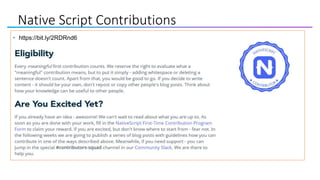
• https://bit.ly/2RDRnd6
Native Script Contributions
Interested in Exploring Vue
https://www.meetup.com/Vue-Columbus/
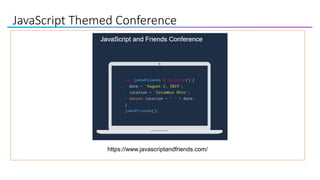
JavaScript Themed Conference
https://www.javascriptandfriends.com/
Questions
https://www.linkedin.com/in/baskarrao-dandlamudi
baskarrao.dandlamudi@outlook.com
https://baskarrao.wordpress.com/
Thanks to Tech Talent South for providing an opportunity to present.

Native Script Overview

  • 1.
    Native Script –What you need to be Aware
  • 2.
    My Intro • BaskarRao • Senior .Net Consultant with Compunnel Software Group. • .Net Consultant at Select Sires Inc through Precise Resource. @baskarmib https://www.linkedin.com/in/baskarrao-dandlamudi baskarrao.dandlamudi@outlook.com www.compunnel.com https://github.com/baskar3078
  • 3.
    Agenda • Overview ofNative Script • Pre-Requisites for Native Script • Native Script App Folders • Basic Commands of Native Script • Native Script Controls • Demo using Native Script –Play Ground
  • 4.
    Native Script -Overview • Native Script is free open source framework for building native IOS and Android Apps. • Build Cross Platform mobile apps using single code base. • Develop Mobile Apps using JavaScript , Angular , Typescript and Vue
  • 5.
    Pre-Requisites of NativeScript • Prior Knowledge of HTML, CSS and any one of scripting language JavaScript , Angular, Typescript or Vue • Node.js Server, Command Line Terminal and Preferred Text IDE Editor • Android Studio, Android SDK and Android Emulator, Java SDK
  • 6.
    Why Native Script •Web Developers with knowledge of HTML, CSS and JavaScript can use the same to develop rich native mobile applications. • Easily develop apps using existing plugins from npm [Node], Gradle [Android] and IOS Plugins. • Easy to learn and develop apps using pre- defined templates. • Angular supports Angular Schematics. One Code three displays – Web, IOS, Android
  • 7.
    Native Script –App Structure
  • 8.
    Native Script AppStructure • Any Native Script app contains the below folders • Root – Project Name • App Folder • Node_Modules • Package.Json • Platforms
  • 9.
    App Structure -Contd • App_Resources This folder contains platform specific resources. • Shared This folder contains files that needs to be shared across views In app. • Views This folder contains the code to build apps views. Each view is made Up of XML File, a Javascript file and optional css file. • App.css File contains global styles used in the app. • App.Js This file sets up applications starting module and initializes the app.
  • 10.
    Native Script CLIBasic Commands • tns create appname --template template name The above command is used to create a native script app using Native Script CLI. • tns platform add android This creates the android specific platform folder. • tns platform add ios This creates the IOS specific platform folder.
  • 11.
    Native Script CLIBasic Commands • tns build android This command is used to build nativescript app using android platform • tns build ios This command is used to build nativescript app using ios platform • tns run android --emulator This command is used to build and deploy your app using android emulator • IOS related commands cannot be run in Windows OS. They can be used only in Mac.
  • 12.
    Native Script CLIBasic Commands • tns prepare android This command is used to update android platform folder with changes from app folder. • tns prepare ios This command is used to update IOS platform folder with changes from app folder • tns doctor This command is used to verify if all required components are setup in development machine.
  • 13.
    Native Script CLIBasic Commands • tns test init This command is used to initialize testing folder. • tns test platform This command is used to run tests against the selected platform. • tns debug platform This command is used to debug Nativescript apps using chrome dev tools
  • 14.
  • 15.
    What makes aNative Script View • Native Script View is comprised of three files. -- ViewName.xml -- ViewName.css -- ViewName.js • Xml file is used to design the screen layout and screen controls. • Css file is used to mention css class specific to the view. • Js file acts as the code behind file similar to aspx.cs for an aspx page.
  • 16.
    Native Script ViewModels • Native Script View Models are used to enable two way data flow between model and view • Native Script uses the observable module to facilitate the binding between view and model var observableModule = require("data/observable"); • The properties defined in view model can be accessed in view using the “{{ propertyname }}” syntax <TextField id="email" text="{{ email }}" keyboardType="email" autocorrect="false" autocapitalizationType="none" />
  • 17.
    Native Script BasicControls HTML Control Native Script Control <div> LayOut – Stack Layout, Grid LayOut, Wrap LayOut, FlexBox Layout, Dock Layout <input type="button" value=“Sign In" onclick=“signIn()"> <Button text=“Sign In" tap="signIn"/> <label>Click me </label> <Label text="{{ name }}" /> <img src="mdn-logo-sm.png" alt="MDN"> <Image src="res://logo" ></Image> <input id="email" type="email"> <TextField id="email" text="{{ email }}" keyboardType="email" autocorrect="false“ autocapitalizationType="none" />
  • 18.
    Native Script BasicControls Image <!-- Load image from app/App_Resources/<platform> folders--> <Image src="res://logo_white_bg" stretch="none" class="img-rounded p-l-15 p-r-15 p-t- 15"></Image> <!-- Load image from app/images folder --> <Image src="~/images/logo.png" stretch="none" class="img-rounded p-l-15 p-r-15 p-t- 15"></Image> <!-- Load image from url --> <Image src="https://docs.nativescript.org/img/NativeScript_logo.png" stretch="none" class="img-rounded p-l-15 p-r-15 p-t-15"></Image>
  • 19.
    Native Script BasicControls Stack Layout <StackLayout class="layoutBackgroundImageFromFolder"> <Button text="About" tap="loadAbout" /> <Button text="Schedule" tap="loadSchedule"/> </StackLayout> Stack Layout can be used to stack the controls vertical or horizontal similar to <div>.
  • 20.
    You guys areAwesome!!! https://speakerdeck.com/reverentgeek
  • 21.
    Dev Tools • VisualStudio Code Install NativeScript PlugIn Create a native script app using tns create app command. Navigate to the app folder. Enter code . Command . • Chrome Developer Tools Chrome Developer Tools can also be used to debug NativeScript Applications.
  • 22.
    Dev Tools • NativeScript Play Ground Native Script Play Ground is a browser based platform to develop and preview mobile applications
  • 23.
    Dev Tools • NativeScript Side Kick Can be used to develop applications with pre-defined starter templates Perform cloud or local builds and deploy to test devices Helps to develop IOS Applications on Windows O/S
  • 24.
    Dev Tools • NativeScriptTheme Builder https://www.nativescriptthemebuilder.com/
  • 25.
    Dev Tools • NativeScriptMarketplace https://market.nativescript.org/
  • 26.
    Walkthrough • Demo ofan existing app using Play Ground • Demo live sync feature • Demo Hot Module Reload using Visual Studio Code
  • 27.
  • 28.
    Some Tips • Beforefinalizing the Framework check if there are samples built in community already. • Before starting development with NativeScript check if there are official verified plugins which you need to use. • Any time stuck during development, deleting the platform folder and perform clean build. • If Android Emulator does not start as expected after installation of NativeScript , try installing Android Studio and update Android Emulator through Android Studio. • Check with NativeScript Community of Developers in Slack Channel for any help during development.
  • 29.
    Further Resources • NativeScript - Documentation • Native Script eBook is free book by @brosteins available for download • Native Script Blog • Native Script Code Snippets • Native Script Playground - Browser based development tool • Native Script Sidekick – Useful for developing IOS apps on Windows Machine • Native Script Vue Documentation • NativeScripting Online Course
  • 30.
  • 31.
    Interested in ExploringVue https://www.meetup.com/Vue-Columbus/
  • 32.
  • 33.