Native Payment - Part III
Before We Begin
✦ Send a build with include source and open the
source in the native IDE then do the implementation
there, once done copy the code back to the native
directory
✦ Be aware of threads. Go into the native thread and
don’t forget to go back to the EDT in the callback!
© Codename One 2017 all rights reserved
final Activity act = AndroidNativeUtil.getActivity();
act.runOnUiThread(new Runnable() {
public void run() {
DropInRequest dropInRequest = new DropInRequest()
.clientToken(param);
AndroidNativeUtil.startActivityForResult(dropInRequest.getIntent(act),
new IntentResultListener() {
public void onActivityResult (int requestCode, int resultCode, Intent data) {
if (resultCode == Activity.RESULT_OK) {
DropInResult result = data.getParcelableExtra(DropInResult.EXTRA_DROP_IN_RESULT);
BraintreePaymentCallback.onPurchaseSuccess(
result.getPaymentMethodNonce().getNonce());
} else if (resultCode == Activity.RESULT_CANCELED) {
BraintreePaymentCallback.onPurchaseCancel();
} else {
Exception error = (Exception)data.getSerializableExtra(DropInActivity.EXTRA_ERROR);
BraintreePaymentCallback.onPurchaseFail(error.toString());
Log.e(error);
Log.sendLog();
}
}
});
}
});
Android
final Activity act = AndroidNativeUtil.getActivity();
act.runOnUiThread(new Runnable() {
public void run() {
DropInRequest dropInRequest = new DropInRequest()
.clientToken(param);
AndroidNativeUtil.startActivityForResult(dropInRequest.getIntent(act),
new IntentResultListener() {
public void onActivityResult (int requestCode, int resultCode, Intent data) {
if (resultCode == Activity.RESULT_OK) {
DropInResult result = data.getParcelableExtra(DropInResult.EXTRA_DROP_IN_RESULT);
BraintreePaymentCallback.onPurchaseSuccess(
result.getPaymentMethodNonce().getNonce());
} else if (resultCode == Activity.RESULT_CANCELED) {
BraintreePaymentCallback.onPurchaseCancel();
} else {
Exception error = (Exception)data.getSerializableExtra(DropInActivity.EXTRA_ERROR);
BraintreePaymentCallback.onPurchaseFail(error.toString());
Log.e(error);
Log.sendLog();
}
}
});
}
});
Android
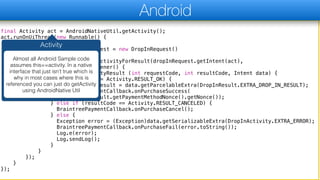
Activity
Almost all Android Sample code
assumes this==activity. In a native
interface that just isn’t true which is
why in most cases where this is
referenced you can just do getActivity
using AndroidNative Util
final Activity act = AndroidNativeUtil.getActivity();
act.runOnUiThread(new Runnable() {
public void run() {
DropInRequest dropInRequest = new DropInRequest()
.clientToken(param);
AndroidNativeUtil.startActivityForResult(dropInRequest.getIntent(act),
new IntentResultListener() {
public void onActivityResult (int requestCode, int resultCode, Intent data) {
if (resultCode == Activity.RESULT_OK) {
DropInResult result = data.getParcelableExtra(DropInResult.EXTRA_DROP_IN_RESULT);
BraintreePaymentCallback.onPurchaseSuccess(
result.getPaymentMethodNonce().getNonce());
} else if (resultCode == Activity.RESULT_CANCELED) {
BraintreePaymentCallback.onPurchaseCancel();
} else {
Exception error = (Exception)data.getSerializableExtra(DropInActivity.EXTRA_ERROR);
BraintreePaymentCallback.onPurchaseFail(error.toString());
Log.e(error);
Log.sendLog();
}
}
});
}
});
Android
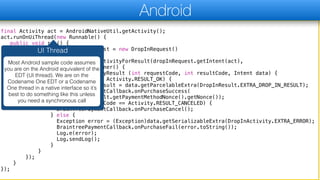
UI Thread
Most Android sample code assumes
you are on the Android equivalent of the
EDT (UI thread). We are on the
Codename One EDT or a Codename
One thread in a native interface so it’s
best to do something like this unless
you need a synchronous call
final Activity act = AndroidNativeUtil.getActivity();
act.runOnUiThread(new Runnable() {
public void run() {
DropInRequest dropInRequest = new DropInRequest()
.clientToken(param);
AndroidNativeUtil.startActivityForResult(dropInRequest.getIntent(act),
new IntentResultListener() {
public void onActivityResult (int requestCode, int resultCode, Intent data) {
if (resultCode == Activity.RESULT_OK) {
DropInResult result = data.getParcelableExtra(DropInResult.EXTRA_DROP_IN_RESULT);
BraintreePaymentCallback.onPurchaseSuccess(
result.getPaymentMethodNonce().getNonce());
} else if (resultCode == Activity.RESULT_CANCELED) {
BraintreePaymentCallback.onPurchaseCancel();
} else {
Exception error = (Exception)data.getSerializableExtra(DropInActivity.EXTRA_ERROR);
BraintreePaymentCallback.onPurchaseFail(error.toString());
Log.e(error);
Log.sendLog();
}
}
});
}
});
Android
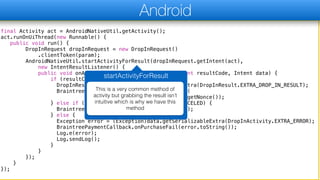
startActivityForResult
This is a very common method of
activity but grabbing the result isn’t
intuitive which is why we have this
method
final Activity act = AndroidNativeUtil.getActivity();
act.runOnUiThread(new Runnable() {
public void run() {
DropInRequest dropInRequest = new DropInRequest()
.clientToken(param);
AndroidNativeUtil.startActivityForResult(dropInRequest.getIntent(act),
new IntentResultListener() {
public void onActivityResult (int requestCode, int resultCode, Intent data) {
if (resultCode == Activity.RESULT_OK) {
DropInResult result = data.getParcelableExtra(DropInResult.EXTRA_DROP_IN_RESULT);
BraintreePaymentCallback.onPurchaseSuccess(
result.getPaymentMethodNonce().getNonce());
} else if (resultCode == Activity.RESULT_CANCELED) {
BraintreePaymentCallback.onPurchaseCancel();
} else {
Exception error = (Exception)data.getSerializableExtra(DropInActivity.EXTRA_ERROR);
BraintreePaymentCallback.onPurchaseFail(error.toString());
Log.e(error);
Log.sendLog();
}
}
});
}
});
Android
Callbacks & API
On Android we can access the
Codename One API directly since it’s all
just Java…
dispatch_async(dispatch_get_main_queue(), ^{
BTDropInRequest *request = [[BTDropInRequest alloc] init];
BTDropInController *dropIn = [[BTDropInController alloc] initWithAuthorization:param request:request
handler:^(BTDropInController * _Nonnull controller, BTDropInResult * _Nullable result, NSError *
_Nullable error) {
if (error != nil) {
com_myrestaurant_app_payment_BraintreePaymentCallback_onPurchaseFail___java_lang_String(CN1_THREAD_GET_ST
ATE_PASS_ARG fromNSString(CN1_THREAD_GET_STATE_PASS_ARG [error localizedDescription]));
} else if (result.cancelled) {
com_myrestaurant_app_payment_BraintreePaymentCallback_onPurchaseCancel__(CN1_THREAD_GET_STATE_PASS_SINGLE
_ARG);
} else {
com_myrestaurant_app_payment_BraintreePaymentCallback_onPurchaseSuccess___java_lang_String(CN1_THREAD_GET
_STATE_PASS_ARG fromNSString(CN1_THREAD_GET_STATE_PASS_ARG result.paymentMethod.nonce));
}
[controller dismissViewControllerAnimated:YES completion:nil];
}];
[[CodenameOne_GLViewController instance] presentViewController:dropIn animated:YES
completion:nil];
});
iOS
dispatch_async(dispatch_get_main_queue(), ^{
BTDropInRequest *request = [[BTDropInRequest alloc] init];
BTDropInController *dropIn = [[BTDropInController alloc] initWithAuthorization:param request:request
handler:^(BTDropInController * _Nonnull controller, BTDropInResult * _Nullable result, NSError *
_Nullable error) {
if (error != nil) {
com_myrestaurant_app_payment_BraintreePaymentCallback_onPurchaseFail___java_lang_String(CN1_THREAD_GET_ST
ATE_PASS_ARG fromNSString(CN1_THREAD_GET_STATE_PASS_ARG [error localizedDescription]));
} else if (result.cancelled) {
com_myrestaurant_app_payment_BraintreePaymentCallback_onPurchaseCancel__(CN1_THREAD_GET_STATE_PASS_SINGLE
_ARG);
} else {
com_myrestaurant_app_payment_BraintreePaymentCallback_onPurchaseSuccess___java_lang_String(CN1_THREAD_GET
_STATE_PASS_ARG fromNSString(CN1_THREAD_GET_STATE_PASS_ARG result.paymentMethod.nonce));
}
[controller dismissViewControllerAnimated:YES completion:nil];
}];
[[CodenameOne_GLViewController instance] presentViewController:dropIn animated:YES
completion:nil];
});
iOS
iOS EDT
iOS is very sensitive to EDT violations.
It’s really important to use it’s main
queue (native EDT) for everything
related to UI
dispatch_async(dispatch_get_main_queue(), ^{
BTDropInRequest *request = [[BTDropInRequest alloc] init];
BTDropInController *dropIn = [[BTDropInController alloc] initWithAuthorization:param request:request
handler:^(BTDropInController * _Nonnull controller, BTDropInResult * _Nullable result, NSError *
_Nullable error) {
if (error != nil) {
com_myrestaurant_app_payment_BraintreePaymentCallback_onPurchaseFail___java_lang_String(CN1_THREAD_GET_ST
ATE_PASS_ARG fromNSString(CN1_THREAD_GET_STATE_PASS_ARG [error localizedDescription]));
} else if (result.cancelled) {
com_myrestaurant_app_payment_BraintreePaymentCallback_onPurchaseCancel__(CN1_THREAD_GET_STATE_PASS_SINGLE
_ARG);
} else {
com_myrestaurant_app_payment_BraintreePaymentCallback_onPurchaseSuccess___java_lang_String(CN1_THREAD_GET
_STATE_PASS_ARG fromNSString(CN1_THREAD_GET_STATE_PASS_ARG result.paymentMethod.nonce));
}
[controller dismissViewControllerAnimated:YES completion:nil];
}];
[[CodenameOne_GLViewController instance] presentViewController:dropIn animated:YES
completion:nil];
});
iOS
Self
Self is the Objective-C equivalent of
this. In the original code self was used
as it was assumed to be a Controller
(commonly used iOS abstraction) when
you need a controller you can use this
syntax
dispatch_async(dispatch_get_main_queue(), ^{
BTDropInRequest *request = [[BTDropInRequest alloc] init];
BTDropInController *dropIn = [[BTDropInController alloc] initWithAuthorization:param request:request
handler:^(BTDropInController * _Nonnull controller, BTDropInResult * _Nullable result, NSError *
_Nullable error) {
if (error != nil) {
com_myrestaurant_app_payment_BraintreePaymentCallback_onPurchaseFail___java_lang_String(CN1_THREAD_GET_ST
ATE_PASS_ARG fromNSString(CN1_THREAD_GET_STATE_PASS_ARG [error localizedDescription]));
} else if (result.cancelled) {
com_myrestaurant_app_payment_BraintreePaymentCallback_onPurchaseCancel__(CN1_THREAD_GET_STATE_PASS_SINGLE
_ARG);
} else {
com_myrestaurant_app_payment_BraintreePaymentCallback_onPurchaseSuccess___java_lang_String(CN1_THREAD_GET
_STATE_PASS_ARG fromNSString(CN1_THREAD_GET_STATE_PASS_ARG result.paymentMethod.nonce));
}
[controller dismissViewControllerAnimated:YES completion:nil];
}];
[[CodenameOne_GLViewController instance] presentViewController:dropIn animated:YES
completion:nil];
});
iOS
Callbacks
Callbacks to Java code are complex
and have a slightly different syntax
when calling to a no-args method but
IDE completion should help…
What did we learn?
✦Native interfaces aren’t trivial, but are doable when
we overcome the pitfalls and use Google
aggressively
✦Error logs on Android are painful and we need to
develop reading skill to go thru them
✦Use native IDE’s to develop the native code and
shorten the back and forth cycles
Thank You!

Native Payment - Part 3.pdf

  • 1.
  • 2.
    Before We Begin ✦Send a build with include source and open the source in the native IDE then do the implementation there, once done copy the code back to the native directory ✦ Be aware of threads. Go into the native thread and don’t forget to go back to the EDT in the callback! © Codename One 2017 all rights reserved
  • 3.
    final Activity act= AndroidNativeUtil.getActivity(); act.runOnUiThread(new Runnable() { public void run() { DropInRequest dropInRequest = new DropInRequest() .clientToken(param); AndroidNativeUtil.startActivityForResult(dropInRequest.getIntent(act), new IntentResultListener() { public void onActivityResult (int requestCode, int resultCode, Intent data) { if (resultCode == Activity.RESULT_OK) { DropInResult result = data.getParcelableExtra(DropInResult.EXTRA_DROP_IN_RESULT); BraintreePaymentCallback.onPurchaseSuccess( result.getPaymentMethodNonce().getNonce()); } else if (resultCode == Activity.RESULT_CANCELED) { BraintreePaymentCallback.onPurchaseCancel(); } else { Exception error = (Exception)data.getSerializableExtra(DropInActivity.EXTRA_ERROR); BraintreePaymentCallback.onPurchaseFail(error.toString()); Log.e(error); Log.sendLog(); } } }); } }); Android
  • 4.
    final Activity act= AndroidNativeUtil.getActivity(); act.runOnUiThread(new Runnable() { public void run() { DropInRequest dropInRequest = new DropInRequest() .clientToken(param); AndroidNativeUtil.startActivityForResult(dropInRequest.getIntent(act), new IntentResultListener() { public void onActivityResult (int requestCode, int resultCode, Intent data) { if (resultCode == Activity.RESULT_OK) { DropInResult result = data.getParcelableExtra(DropInResult.EXTRA_DROP_IN_RESULT); BraintreePaymentCallback.onPurchaseSuccess( result.getPaymentMethodNonce().getNonce()); } else if (resultCode == Activity.RESULT_CANCELED) { BraintreePaymentCallback.onPurchaseCancel(); } else { Exception error = (Exception)data.getSerializableExtra(DropInActivity.EXTRA_ERROR); BraintreePaymentCallback.onPurchaseFail(error.toString()); Log.e(error); Log.sendLog(); } } }); } }); Android Activity Almost all Android Sample code assumes this==activity. In a native interface that just isn’t true which is why in most cases where this is referenced you can just do getActivity using AndroidNative Util
  • 5.
    final Activity act= AndroidNativeUtil.getActivity(); act.runOnUiThread(new Runnable() { public void run() { DropInRequest dropInRequest = new DropInRequest() .clientToken(param); AndroidNativeUtil.startActivityForResult(dropInRequest.getIntent(act), new IntentResultListener() { public void onActivityResult (int requestCode, int resultCode, Intent data) { if (resultCode == Activity.RESULT_OK) { DropInResult result = data.getParcelableExtra(DropInResult.EXTRA_DROP_IN_RESULT); BraintreePaymentCallback.onPurchaseSuccess( result.getPaymentMethodNonce().getNonce()); } else if (resultCode == Activity.RESULT_CANCELED) { BraintreePaymentCallback.onPurchaseCancel(); } else { Exception error = (Exception)data.getSerializableExtra(DropInActivity.EXTRA_ERROR); BraintreePaymentCallback.onPurchaseFail(error.toString()); Log.e(error); Log.sendLog(); } } }); } }); Android UI Thread Most Android sample code assumes you are on the Android equivalent of the EDT (UI thread). We are on the Codename One EDT or a Codename One thread in a native interface so it’s best to do something like this unless you need a synchronous call
  • 6.
    final Activity act= AndroidNativeUtil.getActivity(); act.runOnUiThread(new Runnable() { public void run() { DropInRequest dropInRequest = new DropInRequest() .clientToken(param); AndroidNativeUtil.startActivityForResult(dropInRequest.getIntent(act), new IntentResultListener() { public void onActivityResult (int requestCode, int resultCode, Intent data) { if (resultCode == Activity.RESULT_OK) { DropInResult result = data.getParcelableExtra(DropInResult.EXTRA_DROP_IN_RESULT); BraintreePaymentCallback.onPurchaseSuccess( result.getPaymentMethodNonce().getNonce()); } else if (resultCode == Activity.RESULT_CANCELED) { BraintreePaymentCallback.onPurchaseCancel(); } else { Exception error = (Exception)data.getSerializableExtra(DropInActivity.EXTRA_ERROR); BraintreePaymentCallback.onPurchaseFail(error.toString()); Log.e(error); Log.sendLog(); } } }); } }); Android startActivityForResult This is a very common method of activity but grabbing the result isn’t intuitive which is why we have this method
  • 7.
    final Activity act= AndroidNativeUtil.getActivity(); act.runOnUiThread(new Runnable() { public void run() { DropInRequest dropInRequest = new DropInRequest() .clientToken(param); AndroidNativeUtil.startActivityForResult(dropInRequest.getIntent(act), new IntentResultListener() { public void onActivityResult (int requestCode, int resultCode, Intent data) { if (resultCode == Activity.RESULT_OK) { DropInResult result = data.getParcelableExtra(DropInResult.EXTRA_DROP_IN_RESULT); BraintreePaymentCallback.onPurchaseSuccess( result.getPaymentMethodNonce().getNonce()); } else if (resultCode == Activity.RESULT_CANCELED) { BraintreePaymentCallback.onPurchaseCancel(); } else { Exception error = (Exception)data.getSerializableExtra(DropInActivity.EXTRA_ERROR); BraintreePaymentCallback.onPurchaseFail(error.toString()); Log.e(error); Log.sendLog(); } } }); } }); Android Callbacks & API On Android we can access the Codename One API directly since it’s all just Java…
  • 8.
    dispatch_async(dispatch_get_main_queue(), ^{ BTDropInRequest *request= [[BTDropInRequest alloc] init]; BTDropInController *dropIn = [[BTDropInController alloc] initWithAuthorization:param request:request handler:^(BTDropInController * _Nonnull controller, BTDropInResult * _Nullable result, NSError * _Nullable error) { if (error != nil) { com_myrestaurant_app_payment_BraintreePaymentCallback_onPurchaseFail___java_lang_String(CN1_THREAD_GET_ST ATE_PASS_ARG fromNSString(CN1_THREAD_GET_STATE_PASS_ARG [error localizedDescription])); } else if (result.cancelled) { com_myrestaurant_app_payment_BraintreePaymentCallback_onPurchaseCancel__(CN1_THREAD_GET_STATE_PASS_SINGLE _ARG); } else { com_myrestaurant_app_payment_BraintreePaymentCallback_onPurchaseSuccess___java_lang_String(CN1_THREAD_GET _STATE_PASS_ARG fromNSString(CN1_THREAD_GET_STATE_PASS_ARG result.paymentMethod.nonce)); } [controller dismissViewControllerAnimated:YES completion:nil]; }]; [[CodenameOne_GLViewController instance] presentViewController:dropIn animated:YES completion:nil]; }); iOS
  • 9.
    dispatch_async(dispatch_get_main_queue(), ^{ BTDropInRequest *request= [[BTDropInRequest alloc] init]; BTDropInController *dropIn = [[BTDropInController alloc] initWithAuthorization:param request:request handler:^(BTDropInController * _Nonnull controller, BTDropInResult * _Nullable result, NSError * _Nullable error) { if (error != nil) { com_myrestaurant_app_payment_BraintreePaymentCallback_onPurchaseFail___java_lang_String(CN1_THREAD_GET_ST ATE_PASS_ARG fromNSString(CN1_THREAD_GET_STATE_PASS_ARG [error localizedDescription])); } else if (result.cancelled) { com_myrestaurant_app_payment_BraintreePaymentCallback_onPurchaseCancel__(CN1_THREAD_GET_STATE_PASS_SINGLE _ARG); } else { com_myrestaurant_app_payment_BraintreePaymentCallback_onPurchaseSuccess___java_lang_String(CN1_THREAD_GET _STATE_PASS_ARG fromNSString(CN1_THREAD_GET_STATE_PASS_ARG result.paymentMethod.nonce)); } [controller dismissViewControllerAnimated:YES completion:nil]; }]; [[CodenameOne_GLViewController instance] presentViewController:dropIn animated:YES completion:nil]; }); iOS iOS EDT iOS is very sensitive to EDT violations. It’s really important to use it’s main queue (native EDT) for everything related to UI
  • 10.
    dispatch_async(dispatch_get_main_queue(), ^{ BTDropInRequest *request= [[BTDropInRequest alloc] init]; BTDropInController *dropIn = [[BTDropInController alloc] initWithAuthorization:param request:request handler:^(BTDropInController * _Nonnull controller, BTDropInResult * _Nullable result, NSError * _Nullable error) { if (error != nil) { com_myrestaurant_app_payment_BraintreePaymentCallback_onPurchaseFail___java_lang_String(CN1_THREAD_GET_ST ATE_PASS_ARG fromNSString(CN1_THREAD_GET_STATE_PASS_ARG [error localizedDescription])); } else if (result.cancelled) { com_myrestaurant_app_payment_BraintreePaymentCallback_onPurchaseCancel__(CN1_THREAD_GET_STATE_PASS_SINGLE _ARG); } else { com_myrestaurant_app_payment_BraintreePaymentCallback_onPurchaseSuccess___java_lang_String(CN1_THREAD_GET _STATE_PASS_ARG fromNSString(CN1_THREAD_GET_STATE_PASS_ARG result.paymentMethod.nonce)); } [controller dismissViewControllerAnimated:YES completion:nil]; }]; [[CodenameOne_GLViewController instance] presentViewController:dropIn animated:YES completion:nil]; }); iOS Self Self is the Objective-C equivalent of this. In the original code self was used as it was assumed to be a Controller (commonly used iOS abstraction) when you need a controller you can use this syntax
  • 11.
    dispatch_async(dispatch_get_main_queue(), ^{ BTDropInRequest *request= [[BTDropInRequest alloc] init]; BTDropInController *dropIn = [[BTDropInController alloc] initWithAuthorization:param request:request handler:^(BTDropInController * _Nonnull controller, BTDropInResult * _Nullable result, NSError * _Nullable error) { if (error != nil) { com_myrestaurant_app_payment_BraintreePaymentCallback_onPurchaseFail___java_lang_String(CN1_THREAD_GET_ST ATE_PASS_ARG fromNSString(CN1_THREAD_GET_STATE_PASS_ARG [error localizedDescription])); } else if (result.cancelled) { com_myrestaurant_app_payment_BraintreePaymentCallback_onPurchaseCancel__(CN1_THREAD_GET_STATE_PASS_SINGLE _ARG); } else { com_myrestaurant_app_payment_BraintreePaymentCallback_onPurchaseSuccess___java_lang_String(CN1_THREAD_GET _STATE_PASS_ARG fromNSString(CN1_THREAD_GET_STATE_PASS_ARG result.paymentMethod.nonce)); } [controller dismissViewControllerAnimated:YES completion:nil]; }]; [[CodenameOne_GLViewController instance] presentViewController:dropIn animated:YES completion:nil]; }); iOS Callbacks Callbacks to Java code are complex and have a slightly different syntax when calling to a no-args method but IDE completion should help…
  • 12.
    What did welearn? ✦Native interfaces aren’t trivial, but are doable when we overcome the pitfalls and use Google aggressively ✦Error logs on Android are painful and we need to develop reading skill to go thru them ✦Use native IDE’s to develop the native code and shorten the back and forth cycles
  • 13.