Creating a Netflix Clone
I
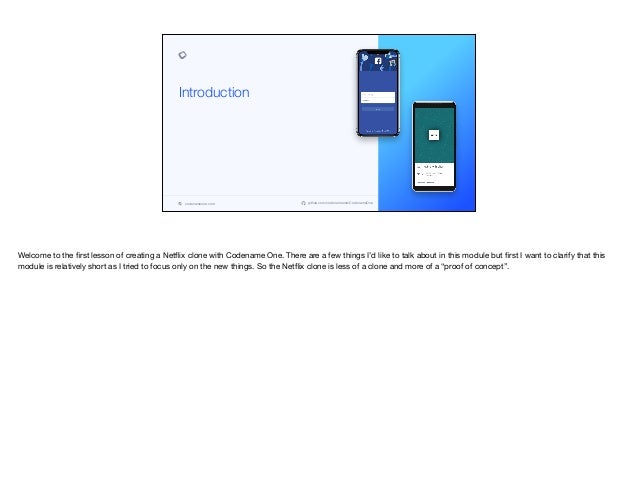
Welcome to the first lesson of creating a Netflix clone with Codename One. There are a few things I’d like to talk about in this module but first I want to clarify that this
module is relatively short as I tried to focus only on the new things. So the Netflix clone is less of a clone and more of a “proof of concept”.
codenameone.com github.com/codenameone/CodenameOne
Introduction
Welcome to the first lesson of creating a Netflix clone with Codename One. There are a few things I’d like to talk about in this module but first I want to clarify that this
module is relatively short as I tried to focus only on the new things. So the Netflix clone is less of a clone and more of a “proof of concept”.
codenameone.com github.com/codenameone/CodenameOne
Introduction
This module is different
This clone is simpler
Focus is on UI programming (not modelling)
Secondary focus on better Spring Boot backend
Welcome to the first lesson of creating a Netflix clone with Codename One. There are a few things I’d like to talk about in this module but first I want to clarify that this
module is relatively short as I tried to focus only on the new things. So the Netflix clone is less of a clone and more of a “proof of concept”.

The clone is much simpler in scope and functionality when compared to previous modules. This is intentional. I don’t want to repeat things that were better covered in the
Facebook or Uber tutorials but I do want to cover new things.

I placed most of the focus on the nuances of the Netflix UI

But I also placed some focus on different approaches for working with Spring Boot. I think these will prove valuable as we go back and look at the stuff we did in the
previous modules.
codenameone.com github.com/codenameone/CodenameOne
Netflix/Video Challenges
Video platforms have different challenges
Main complexity is scale
The videos should be generated statically
You can leverage great pre-existing work done by tools such as FFMPEG
Scale of the files can be achieved easily with CDNs such as cloudflare
But first let's talk about the complexities of video platforms. Technically they aren’t very complex. In fact they are remarkably simple for the most part

The biggest problem faced by Netflix is scale and that only matters when you reach Netflix levels of scale

Videos in platforms like Netflix are generated statically before the first request is made. That effectively means the servers just serve ready made files and don’t do
complex runtime work

There are great tools that pre-process video files such as FFMPEG. These tools can be used as native libraries in the server or as command line tools. Most Netflix clones
just pre-generate all the video files in the various resolutions/bitrate options then the work amounts to picking the right video URL

The video URLs can be further scaled using pre-existing content delivery networks (also known as CDNs). We specifically use cloudflare at Codename One but any CDN
would do.
codenameone.com github.com/codenameone/CodenameOne
We Won’t Cover Video Hosting/Managing
This is a complex subject that has no mobile aspect
It’s done statically “offline”
It can be done by a different micro-service
We won’t cover authentication/multi-user etc. as we covered them before
Once we remove those our server becomes ridiculously trivial…
We didn’t cover CDN, hosting and literally all of the complexity in the server here. We also don’t cover anything related to video processing. That’s server logic that falls
way outside the scope of a mobile tutorial.

Furthermore, a lot of this work can be done completely outside of the server as a separate tool that updates the URLs/database. 

Video hosting can be done as a separate micro-service and mostly hidden from our main backend logic.

As a result the content of the application will be mostly hardcoded. This is important as there’s an IP issue with distributing a clone of content which we don’t want to get
into.

We also won’t implement the multi-user and authentication portions of the app. We covered all of that rather well in the Uber clone and there’s no point in going into this
again.

Once all of this is removed the server is ridiculously trivial
codenameone.com github.com/codenameone/CodenameOne
Client Skeleton
The same applies to the client UI
We only implemented a trivial skeleton UI
Most of the other functionality was covered in modules such as the Facebook clone
For video playback I chose to use the native playback mode
Most of this applies to the client UI too. We covered almost all of this before so the Netflix clone is a rehash of many of these ideas with a new coat of paint.

The UI is trivial and includes only two forms both of which are only partially implemented. There’s no reason to go deeper as there source application isn’t very
complicated to begin with.

You can use the Facebook clone as a reference to a more elaborate UI. Once the CSS is in place implementing the missing functionality in a Netflix clone becomes trivial.

But there’s on big omission, I chose to use the native player
codenameone.com github.com/codenameone/CodenameOne
Native Playback vs. Lightweight Playback
With native playback the native OS takes care of everything (seek, pause, fullscreen etc.)
In lightweight mode we need to position the video playback view and manage everything
Native is better for quickly getting started
Lightweight gives you more control e.g. you can even place custom closed captions on the video
I will create a separate module covering lightweight video playback and its customisation options
Native video playback is actually pretty great, it handles everything we need in terms of UI for the video player.

The problem starts when that mode isn’t enough. Say we want more control over the behaviour of the playback code, we can’t do much in that mode. Our control is very
limited. 

However, native playback is pretty much a turn-key solution for video playback.

That’s why we picked it, it’s a great tool for getting started.

Lightweight is more error prone and powerful. A good example is closed captions which we can implement manually in lightweight mode by literally placing labels on top
of the playing video. That’s very powerful…

I will create a separate module that will cover lightweight video playback, it should be easy to adapt the playback code to make use of that approach.
codenameone.com github.com/codenameone/CodenameOne
Final Results
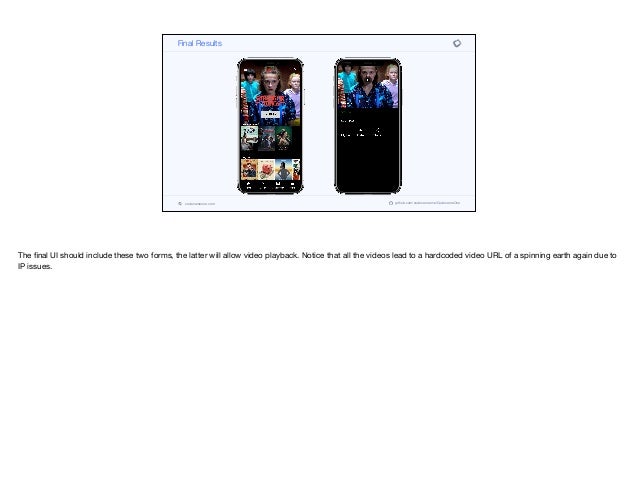
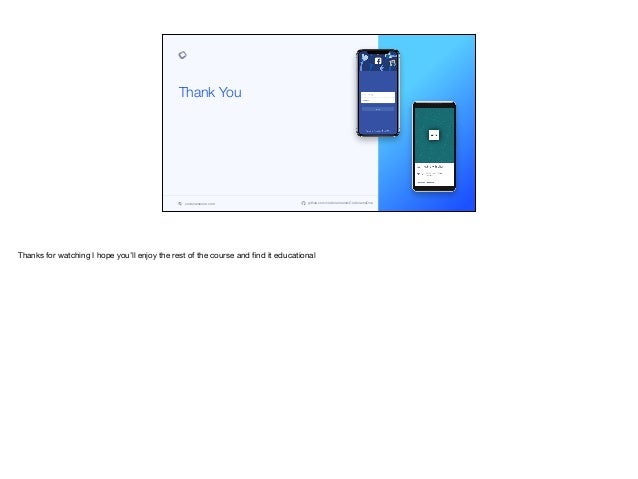
The final UI should include these two forms, the latter will allow video playback. Notice that all the videos lead to a hardcoded video URL of a spinning earth again due to
IP issues.
codenameone.com github.com/codenameone/CodenameOne
Thank You
Thanks for watching I hope you’ll enjoy the rest of the course and find it educational
Thank You
Thanks for watching I hope you’ll enjoy the rest of the course and find it educational

create-netflix-clone-01-introduction_transcript.pdf

  • 1.
    Creating a NetflixClone I Welcome to the first lesson of creating a Netflix clone with Codename One. There are a few things I’d like to talk about in this module but first I want to clarify that this module is relatively short as I tried to focus only on the new things. So the Netflix clone is less of a clone and more of a “proof of concept”.
  • 2.
    codenameone.com github.com/codenameone/CodenameOne Introduction Welcome tothe first lesson of creating a Netflix clone with Codename One. There are a few things I’d like to talk about in this module but first I want to clarify that this module is relatively short as I tried to focus only on the new things. So the Netflix clone is less of a clone and more of a “proof of concept”.
  • 3.
    codenameone.com github.com/codenameone/CodenameOne Introduction This moduleis different This clone is simpler Focus is on UI programming (not modelling) Secondary focus on better Spring Boot backend Welcome to the first lesson of creating a Netflix clone with Codename One. There are a few things I’d like to talk about in this module but first I want to clarify that this module is relatively short as I tried to focus only on the new things. So the Netflix clone is less of a clone and more of a “proof of concept”. The clone is much simpler in scope and functionality when compared to previous modules. This is intentional. I don’t want to repeat things that were better covered in the Facebook or Uber tutorials but I do want to cover new things. I placed most of the focus on the nuances of the Netflix UI But I also placed some focus on different approaches for working with Spring Boot. I think these will prove valuable as we go back and look at the stuff we did in the previous modules.
  • 4.
    codenameone.com github.com/codenameone/CodenameOne Netflix/Video Challenges Videoplatforms have different challenges Main complexity is scale The videos should be generated statically You can leverage great pre-existing work done by tools such as FFMPEG Scale of the files can be achieved easily with CDNs such as cloudflare But first let's talk about the complexities of video platforms. Technically they aren’t very complex. In fact they are remarkably simple for the most part The biggest problem faced by Netflix is scale and that only matters when you reach Netflix levels of scale Videos in platforms like Netflix are generated statically before the first request is made. That effectively means the servers just serve ready made files and don’t do complex runtime work There are great tools that pre-process video files such as FFMPEG. These tools can be used as native libraries in the server or as command line tools. Most Netflix clones just pre-generate all the video files in the various resolutions/bitrate options then the work amounts to picking the right video URL The video URLs can be further scaled using pre-existing content delivery networks (also known as CDNs). We specifically use cloudflare at Codename One but any CDN would do.
  • 5.
    codenameone.com github.com/codenameone/CodenameOne We Won’tCover Video Hosting/Managing This is a complex subject that has no mobile aspect It’s done statically “offline” It can be done by a different micro-service We won’t cover authentication/multi-user etc. as we covered them before Once we remove those our server becomes ridiculously trivial… We didn’t cover CDN, hosting and literally all of the complexity in the server here. We also don’t cover anything related to video processing. That’s server logic that falls way outside the scope of a mobile tutorial. Furthermore, a lot of this work can be done completely outside of the server as a separate tool that updates the URLs/database. Video hosting can be done as a separate micro-service and mostly hidden from our main backend logic. As a result the content of the application will be mostly hardcoded. This is important as there’s an IP issue with distributing a clone of content which we don’t want to get into. We also won’t implement the multi-user and authentication portions of the app. We covered all of that rather well in the Uber clone and there’s no point in going into this again. Once all of this is removed the server is ridiculously trivial
  • 6.
    codenameone.com github.com/codenameone/CodenameOne Client Skeleton Thesame applies to the client UI We only implemented a trivial skeleton UI Most of the other functionality was covered in modules such as the Facebook clone For video playback I chose to use the native playback mode Most of this applies to the client UI too. We covered almost all of this before so the Netflix clone is a rehash of many of these ideas with a new coat of paint. The UI is trivial and includes only two forms both of which are only partially implemented. There’s no reason to go deeper as there source application isn’t very complicated to begin with. You can use the Facebook clone as a reference to a more elaborate UI. Once the CSS is in place implementing the missing functionality in a Netflix clone becomes trivial. But there’s on big omission, I chose to use the native player
  • 7.
    codenameone.com github.com/codenameone/CodenameOne Native Playbackvs. Lightweight Playback With native playback the native OS takes care of everything (seek, pause, fullscreen etc.) In lightweight mode we need to position the video playback view and manage everything Native is better for quickly getting started Lightweight gives you more control e.g. you can even place custom closed captions on the video I will create a separate module covering lightweight video playback and its customisation options Native video playback is actually pretty great, it handles everything we need in terms of UI for the video player. The problem starts when that mode isn’t enough. Say we want more control over the behaviour of the playback code, we can’t do much in that mode. Our control is very limited. However, native playback is pretty much a turn-key solution for video playback. That’s why we picked it, it’s a great tool for getting started. Lightweight is more error prone and powerful. A good example is closed captions which we can implement manually in lightweight mode by literally placing labels on top of the playing video. That’s very powerful… I will create a separate module that will cover lightweight video playback, it should be easy to adapt the playback code to make use of that approach.
  • 8.
    codenameone.com github.com/codenameone/CodenameOne Final Results Thefinal UI should include these two forms, the latter will allow video playback. Notice that all the videos lead to a hardcoded video URL of a spinning earth again due to IP issues.
  • 9.
    codenameone.com github.com/codenameone/CodenameOne Thank You Thanksfor watching I hope you’ll enjoy the rest of the course and find it educational
  • 10.
    Thank You Thanks forwatching I hope you’ll enjoy the rest of the course and find it educational
  • 11.
    Thanks for watchingI hope you’ll enjoy the rest of the course and find it educational