National Aeronautics and Space Administration
www.nasa.gov
Overview of The New Cabeus Cluster
(Part 1 of the Cabeus Training)
Mar. 12, 2024
NASA Advanced Supercomputing (NAS) Division
NASA High End Computing Capability
Cabeus Cluster
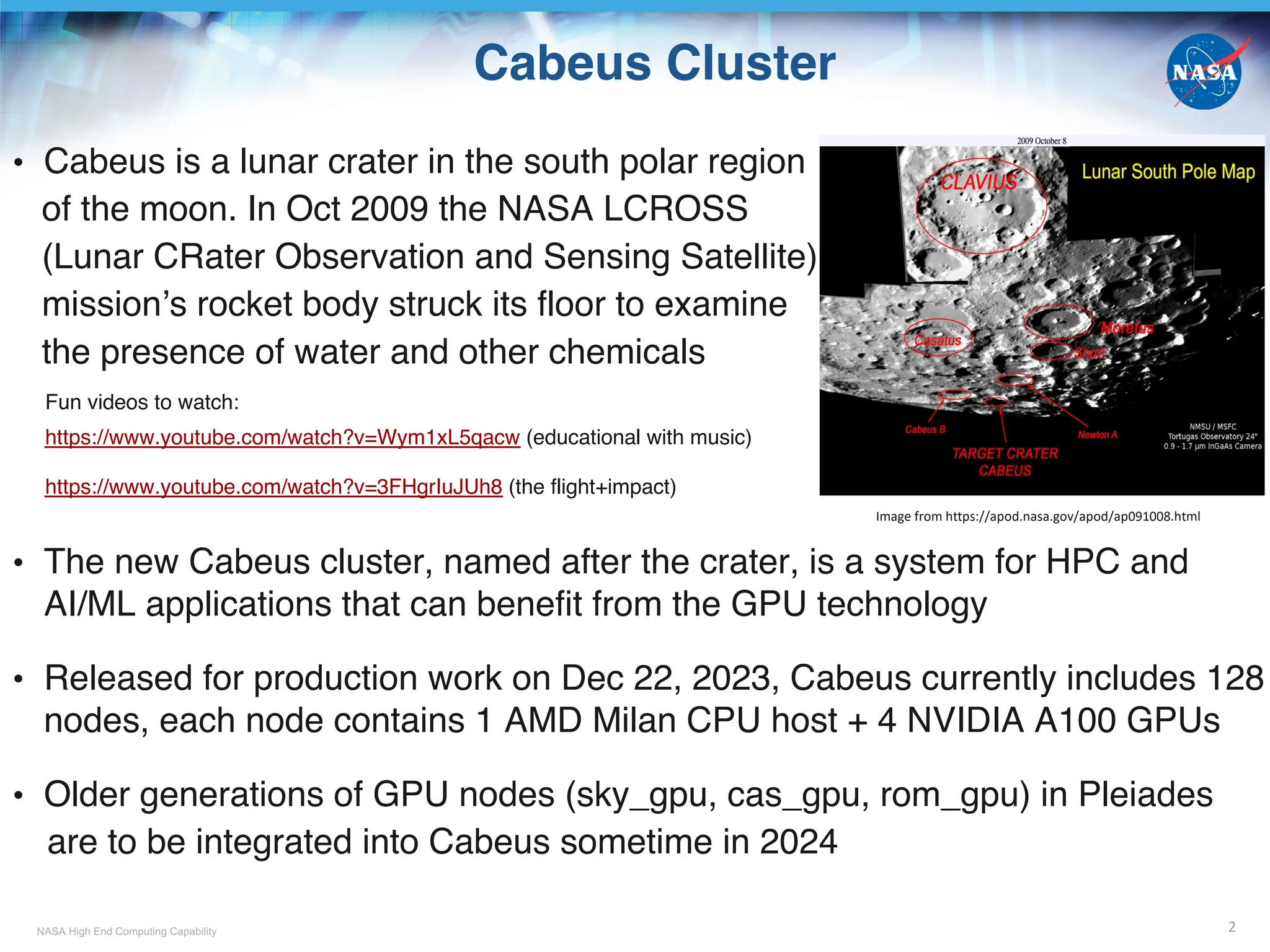
• Cabeus is a lunar crater in the south polar region
of the moon. In Oct 2009 the NASA LCROSS
(Lunar CRater Observation and Sensing Satellite)
mission’s rocket body struck its floor to examine
the presence of water and other chemicals
Fun videos to watch:
https://www.youtube.com/watch?v=Wym1xL5qacw (educational with music)
https://www.youtube.com/watch?v=3FHgrIuJUh8 (the flight+impact)
• The new Cabeus cluster, named after the crater, is a system for HPC and
AI/ML applications that can benefit from the GPU technology
• Released for production work on Dec 22, 2023, Cabeus currently includes 128
nodes, each node contains 1 AMD Milan CPU host + 4 NVIDIA A100 GPUs
• Older generations of GPU nodes (sky_gpu, cas_gpu, rom_gpu) in Pleiades
are to be integrated into Cabeus sometime in 2024
2
Image from https://apod.nasa.gov/apod/ap091008.html
NASA High End Computing Capability
Topics
• Part 1: Overview on the New Cabeus Cluster
- Cabeus Hardware Resources
- PBS Jobs Sharing GPU Nodes
- SBU Charging
• Part 2: Programming and Building HPC Applications
for Running on One Nvidia GPU
- Programming
§ Methods Recommended by Nvidia
§ CPU Offloading to GPU
§ Explicit and Implicit Data Movement
- Building
§ Compute Capability
§ CUDA Toolkit and Driver 3
NASA High End Computing Capability
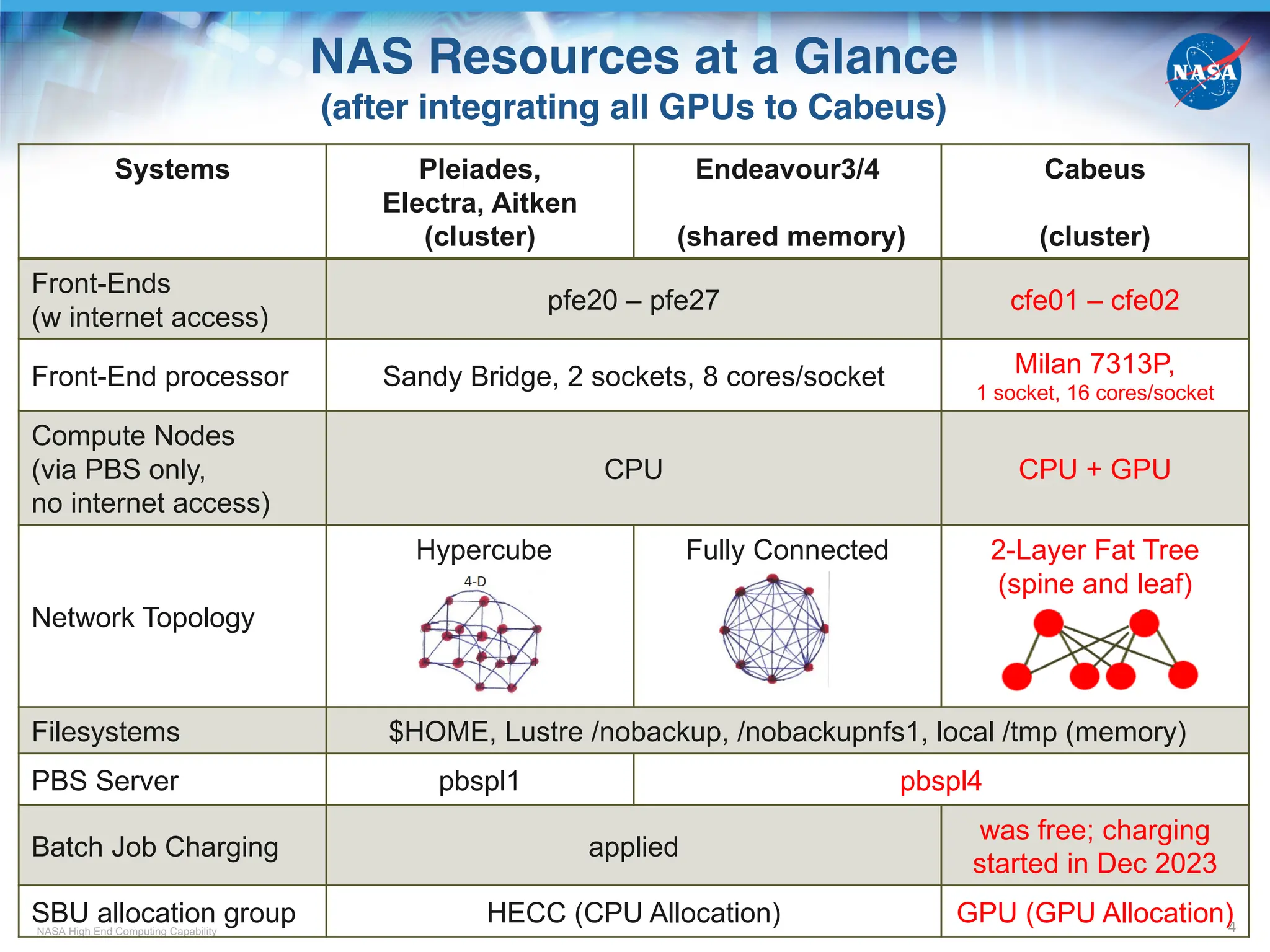
NAS Resources at a Glance
(after integrating all GPUs to Cabeus)
4
Systems Pleiades,
Electra, Aitken
(cluster)
Endeavour3/4
(shared memory)
Cabeus
(cluster)
Front-Ends
(w internet access)
pfe20 – pfe27 cfe01 – cfe02
Front-End processor Sandy Bridge, 2 sockets, 8 cores/socket Milan 7313P,
1 socket, 16 cores/socket
Compute Nodes
(via PBS only,
no internet access)
CPU CPU + GPU
Network Topology
Hypercube Fully Connected 2-Layer Fat Tree
(spine and leaf)
Filesystems $HOME, Lustre /nobackup, /nobackupnfs1, local /tmp (memory)
PBS Server pbspl1 pbspl4
Batch Job Charging applied
was free; charging
started in Dec 2023
SBU allocation group HECC (CPU Allocation) GPU (GPU Allocation)
NASA High End Computing Capability
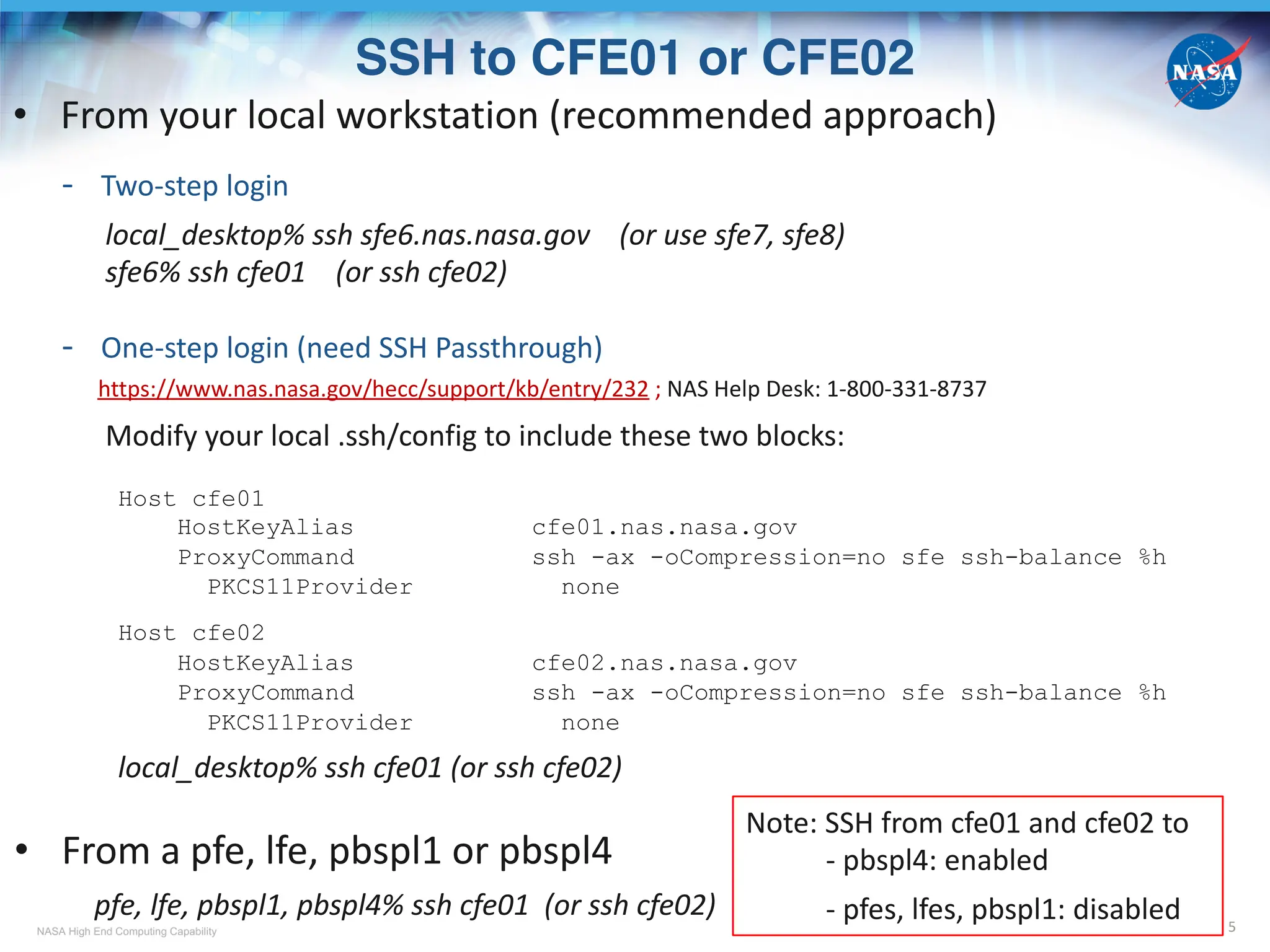
SSH to CFE01 or CFE02
5
• From your local workstation (recommended approach)
- Two-step login
local_desktop% ssh sfe6.nas.nasa.gov (or use sfe7, sfe8)
sfe6% ssh cfe01 (or ssh cfe02)
- One-step login (need SSH Passthrough)
https://www.nas.nasa.gov/hecc/support/kb/entry/232 ; NAS Help Desk: 1-800-331-8737
Modify your local .ssh/config to include these two blocks:
Host cfe01
HostKeyAlias cfe01.nas.nasa.gov
ProxyCommand ssh -ax -oCompression=no sfe ssh-balance %h
PKCS11Provider none
Host cfe02
HostKeyAlias cfe02.nas.nasa.gov
ProxyCommand ssh -ax -oCompression=no sfe ssh-balance %h
PKCS11Provider none
local_desktop% ssh cfe01 (or ssh cfe02)
• From a pfe, lfe, pbspl1 or pbspl4
pfe, lfe, pbspl1, pbspl4% ssh cfe01 (or ssh cfe02)
Note: SSH from cfe01 and cfe02 to
- pbspl4: enabled
- pfes, lfes, pbspl1: disabled
NASA High End Computing Capability
NAS GPU Compute Nodes
6
CPU Host +
GPU Device
Milan +
4 A100*
Rome +
8 A100
Cascade +
4 V100#
Skylake +
4 V100
Skylake +
8 V100
model type
in PBS& mil_a100
rom_gpu ->
rom_a100_8
cas_gpu ->
cas_v100
sky_gpu ->
sky_v100
sky_gpu ->
sky_v100_8
# of nodes 128 2 38 17 2
hostname
cb[01-5,8-9]n[01-12],
cb[06-07]n[01-10],
cb[10-12]n[01-08]
r101i5n[0-1]
r101i2n[0-17],
r101i3n[0-15],
r101i4n[0-3]
r101i0n[0-11,14-15],
r101i1n[0-2]
r101i0n[12-13]
# of CPU
socket/node
1
(EPYC 7763)
2
(EPYC 7742)
2
(Platinum 8268)
2
(Gold 6154)
2
(Gold 6154)
# of CPU physical
cores/node 64 128 48 36 36
CPU Host
Memory/node
256 GB -> 512 GBa
(DDR4 b)
512 GB
(DDR4)
384 GB
(DDR4)
384 GB
(DDR4)
384 GB
(DDR4)
# of GPU
cards/node
4 A100 8 A100 4 V100 4 V100 8 V100
GPU Device
Memory per
GPU card
80 GB
(HBM2e g
)
40 GB
(HBM2e)
32 GB
(HBM2)
32 GB
(HBM2)
32 GB
(HBM2)
* Nvidia Ampere GPU
# Nvidia Volta GPU
& Except for mil_a100, new model types in red not yet in effect
a Host memory doubled as of Feb 22, 2024
b DDR4: Double Data Rate 4
g HBM: High Bandwidth Memory
NASA High End Computing Capability
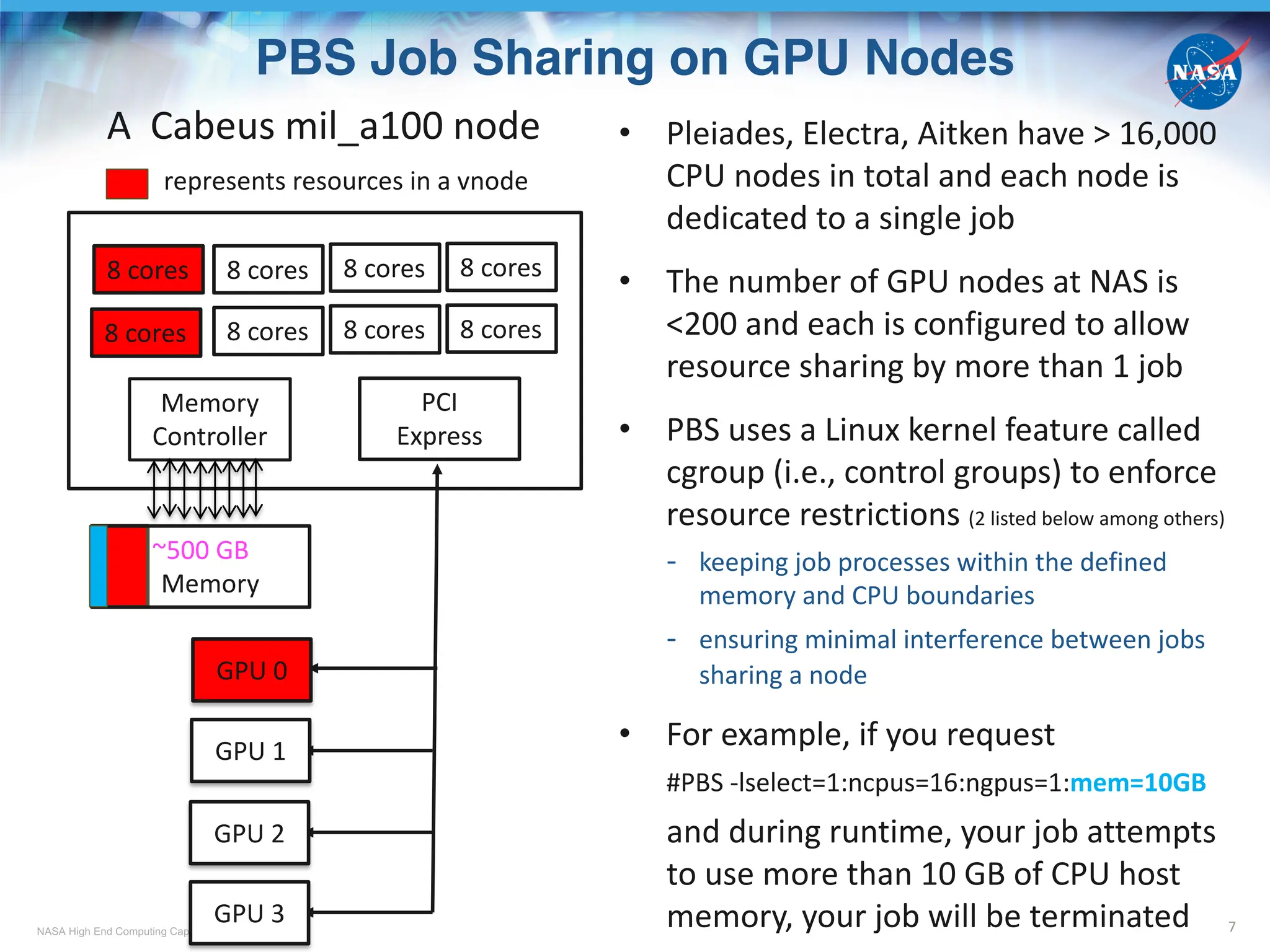
PBS Job Sharing on GPU Nodes
7
• Pleiades, Electra, Aitken have > 16,000
CPU nodes in total and each node is
dedicated to a single job
• The number of GPU nodes at NAS is
<200 and each is configured to allow
resource sharing by more than 1 job
• PBS uses a Linux kernel feature called
cgroup (i.e., control groups) to enforce
resource restrictions (2 listed below among others)
- keeping job processes within the defined
memory and CPU boundaries
- ensuring minimal interference between jobs
sharing a node
• For example, if you request
#PBS -lselect=1:ncpus=16:ngpus=1:mem=10GB
and during runtime, your job attempts
to use more than 10 GB of CPU host
memory, your job will be terminated
PCI
Express
~500 GB
Memory
Memory
Controller
GPU 1
GPU 2
GPU 3
GPU 0
8 cores
8 cores
8 cores
8 cores
8 cores
8 cores
8 cores
8 cores
A Cabeus mil_a100 node
represents resources in a vnode
NASA High End Computing Capability
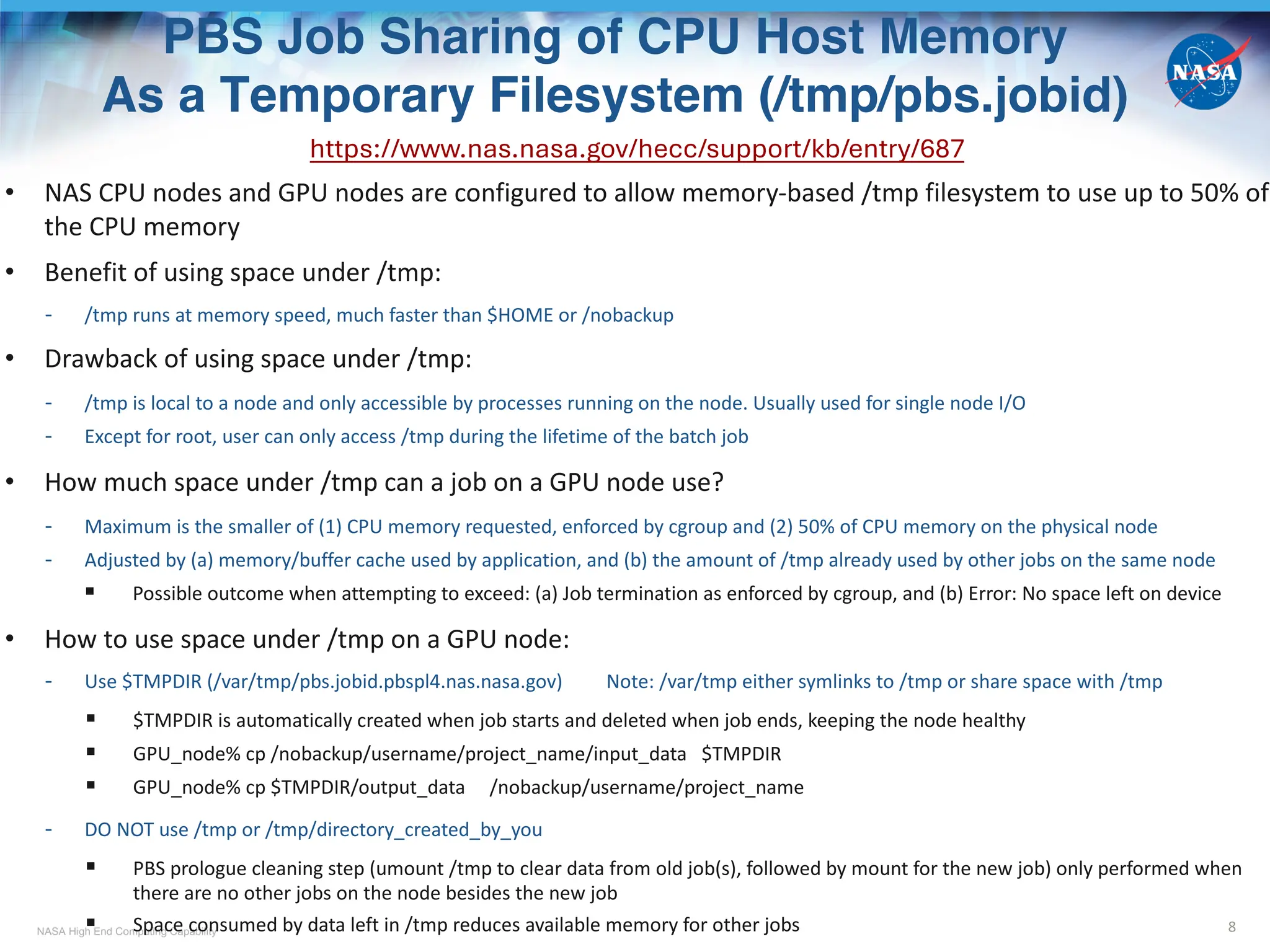
PBS Job Sharing of CPU Host Memory
As a Temporary Filesystem (/tmp/pbs.jobid)
8
https://www.nas.nasa.gov/hecc/support/kb/entry/687
• NAS CPU nodes and GPU nodes are configured to allow memory-based /tmp filesystem to use up to 50% of
the CPU memory
• Benefit of using space under /tmp:
- /tmp runs at memory speed, much faster than $HOME or /nobackup
• Drawback of using space under /tmp:
- /tmp is local to a node and only accessible by processes running on the node. Usually used for single node I/O
- Except for root, user can only access /tmp during the lifetime of the batch job
• How much space under /tmp can a job on a GPU node use?
- Maximum is the smaller of (1) CPU memory requested, enforced by cgroup and (2) 50% of CPU memory on the physical node
- Adjusted by (a) memory/buffer cache used by application, and (b) the amount of /tmp already used by other jobs on the same node
§ Possible outcome when attempting to exceed: (a) Job termination as enforced by cgroup, and (b) Error: No space left on device
• How to use space under /tmp on a GPU node:
- Use $TMPDIR (/var/tmp/pbs.jobid.pbspl4.nas.nasa.gov) Note: /var/tmp either symlinks to /tmp or share space with /tmp
§ $TMPDIR is automatically created when job starts and deleted when job ends, keeping the node healthy
§ GPU_node% cp /nobackup/username/project_name/input_data $TMPDIR
§ GPU_node% cp $TMPDIR/output_data /nobackup/username/project_name
- DO NOT use /tmp or /tmp/directory_created_by_you
§ PBS prologue cleaning step (umount /tmp to clear data from old job(s), followed by mount for the new job) only performed when
there are no other jobs on the node besides the new job
§ Space consumed by data left in /tmp reduces available memory for other jobs
NASA High End Computing Capability
Vnode and PBS Job Placement
9
• A host = a physical node, e.g. r101i0n12, cb12n02
• A vnode = a virtual node, denoted with hostname + [], can be
a host, a socket, or a fraction of a socket (configured via PBS)
- For older GPU nodes (such as rom_gpu, cas_gpu, sky_gpu) prior to the integration
to Cabeus
a vnode = 1 socket (see upper graph)
e.g., r101i0n12[0]: 4 GPUs, 18 physical cores, ~190 GB CPU host memory
- For Cabeus mil_a100 nodes, and older GPU nodes after the integration?
a vnode = 1 GPU card + 1/4 CPU cores + 1/4 CPU memory
(for a physical node with 4 GPU cards, see lower graph)
e.g., cb12n02[0]: 1 GPU, 16 physical cores, ~125 GB CPU host memory
• #PBS –lplace=[arrangement]:[sharing]
A socket as a vnode
A GPU + some CPU
and memory as a vnode
Some choices for arrangement:
free : place job on any vnode(s)
pack : all chunks
(the –lselect number)
are taken from one host
scatter: only one chunk
is taken from a host
Some choices for sharing
shared: this job can share
with other jobs
the vnodes chosen
excl: only this job can use
the vnodes chosen
• #PBS –lselect=1:ngpus=1:ncpus=12:mem=10GB, -lplace=free:excl
- Excluded from use by other jobs: 1 whole vnode (1 GPU, 16 CPU cores, ~125 GB CPU memory)
- Assigned and enforced by cgroup for this job: partial vnode (1 GPU, 12 CPU cores, 10 GB CPU memory)
NASA High End Computing Capability
Effect of PBS Job Placement
on Resource Assignment and Sharing
10
#PBS –lselect=2:ngpus=1:ncpus=16:mem=140GB:model=mil_a100 -lplace=x:y
x:y cfe,pfe,pbspl4,pbspl1% qstat –[x]f jobid.pbspl4.nas.nasa.gov | grep exec_vnode
scatter:shared
(cb10n02[2]:mem=132092928kb*:ngpus=1:ncpus=16 + cb10n02[0]:mem=14707712kb^) +
(cb05n11[2]:mem=132092928kb:ngpus=1:ncpus=16 + cb05n11[1]:mem=14707712kb)
Vnodes cb10n02[0] and cb05n11[1] have unassigned GPUs which can be used by other jobs. Current job occupies 2 GPUs
scatter:excl
(cb10n02[2]:mem=132092928kb:ngpus=1:ncpus=16 + cb10n02[0]:mem=14707712kb) +
(cb05n11[2]:mem=132092928kb:ngpus=1:ncpus=16 + cb05n11[1]:mem=14707712kb)
Vnodes cb10n02[0] and cb05n11[1] have unassigned GPUs but excluded for other jobs. Current job occupies 4 GPUs, but
only 2 GPUs can be used by the job, the other two will be idle
pack:shared
(cb02n12[0]:mem=131246080kb:ngpus=1:ncpus=16 + cb02n12[2]:mem=15554560kb) +
(cb02n12[2]:mem=116538368kb$
:ngpus=1:ncpus=16 + cb02n12[1]:mem=30262272kb#
)
Vnodes cb02n12[3] (not assigned to this job) and cb02n12[1] have unassigned GPUs which can be used by other jobs.
Current job occupies 2 GPUs
pack:excl
(cb03n07[2]:mem=132092928kb:ngpus=1:ncpus=16 + cb03n07[3]:mem=14707712kb) +
(cb03n07[3]:mem=117371904kb:ngpus=1:ncpus=16 + cb03n07[1]:mem=29428736kb)
Vnode cb03n07[1] has an unassigned GPU but excluded for other jobs. Current job occupies 3 GPUs, but only 2 GPUs can
be used by the job, the GPU in cb03n07[1] will be idle. Vnode cb03n07[0] can be assigned to other jobs.
Note: Different colors represent different vnodes
* 132092928kb = ~ 126 GiB $ 116538368kb = ~ 111 GiB
^ 14707712kb = ~ 14 GiB # 30262272kb = ~ 29 GiB
NASA High End Computing Capability
SBU Charging for Using GPU Resources
11
• SBU charging for GPU nodes is based on # of GPU cards “occupied” by a job
• GPU SBU rate per hour (subject to change)
* Assuming change of vnode definition to become 1 GPU + ¼ or 1/8 CPU cores + ¼ or 1/8 memory depending on the node type
• A successful job submission requires
- An SBU allocation specifically for GPUs for the Group-ID (GID, e.g., a1234) you want to use
New GPU projects should create a request for GPU allocations via https://request.hec.nasa.gov
- Positive remaining value of the allocation
pfe, cfe, pbspl1 or pbspl4% acct_ytd [a1234]
Linear
Fiscal YTD Project
Project Host/Group Year Used % Used Limit Remain Usage Exp Date
-------- ------------- ------ ----------- --------- ----------- ---------- ------- ------------
a1234 gpu 2024 5407.459 47.63 11352.000 5944.541 168.80 09/30/24
- The GID is added to the Access Control List (ACL) of the PBS queue to be submitted to; done by NAS
cfe or pbspl4% qstat –fQ gpu_normal | grep acl_groups
acl_groups = a1234, a1235, ….
• Use command acct_query to check SBUs charged to each job (-o) for using mil_a100
pfe, cfe, pbspl1 or pbspl4% acct_query –u username –p gid –olow –c cabeus_MA –b 03/11/24
Note: SBU accounting data usually is available within a few hours after a job is completed
Model type SBU rate per node SBU rate per vnode
mil_a100 37.86 37.86/4
rom_a100_8* 75.72 75.72/8
cas_v100* 27.04 27.04/4
sky_v100* 27.04 27.04/4
sky_v100_8* 54.08 54.08/8
NASA High End Computing Capability
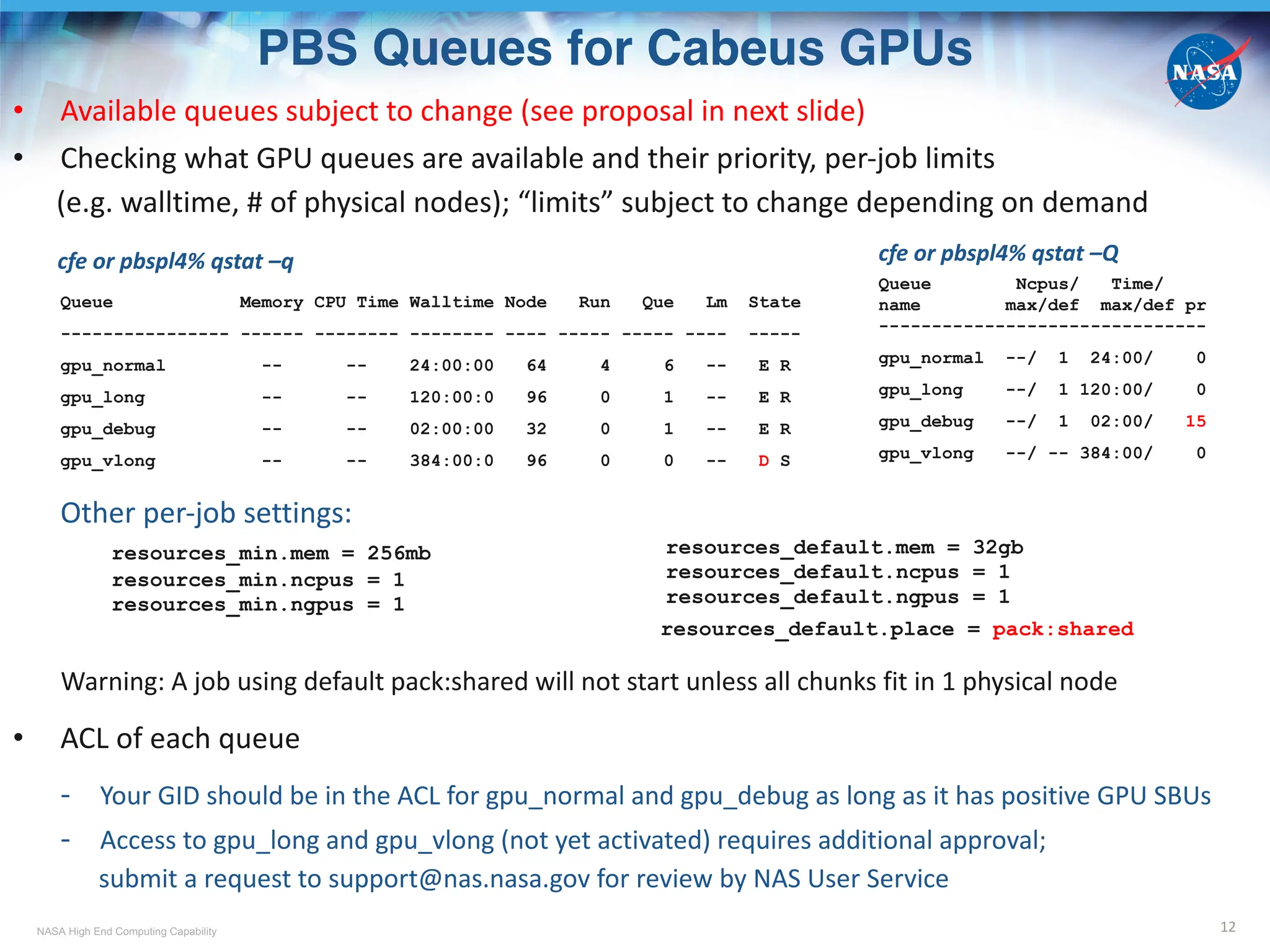
PBS Queues for Cabeus GPUs
12
• Available queues subject to change (see proposal in next slide)
• Checking what GPU queues are available and their priority, per-job limits
(e.g. walltime, # of physical nodes); “limits” subject to change depending on demand
cfe or pbspl4% qstat –q
Queue Memory CPU Time Walltime Node Run Que Lm State
---------------- ------ -------- -------- ---- ----- ----- ---- -----
gpu_normal -- -- 24:00:00 64 4 6 -- E R
gpu_long -- -- 120:00:0 96 0 1 -- E R
gpu_debug -- -- 02:00:00 32 0 1 -- E R
gpu_vlong -- -- 384:00:0 96 0 0 -- D S
Other per-job settings:
resources_min.mem = 256mb
resources_min.ncpus = 1
resources_min.ngpus = 1
resources_default.place = pack:shared
Warning: A job using default pack:shared will not start unless all chunks fit in 1 physical node
• ACL of each queue
- Your GID should be in the ACL for gpu_normal and gpu_debug as long as it has positive GPU SBUs
- Access to gpu_long and gpu_vlong (not yet activated) requires additional approval;
submit a request to support@nas.nasa.gov for review by NAS User Service
resources_default.mem = 32gb
resources_default.ncpus = 1
resources_default.ngpus = 1
cfe or pbspl4% qstat –Q
Queue Ncpus/ Time/
name max/def max/def pr
-------------------------------
gpu_normal --/ 1 24:00/ 0
gpu_long --/ 1 120:00/ 0
gpu_debug --/ 1 02:00/ 15
gpu_vlong --/ -- 384:00/ 0
NASA High End Computing Capability
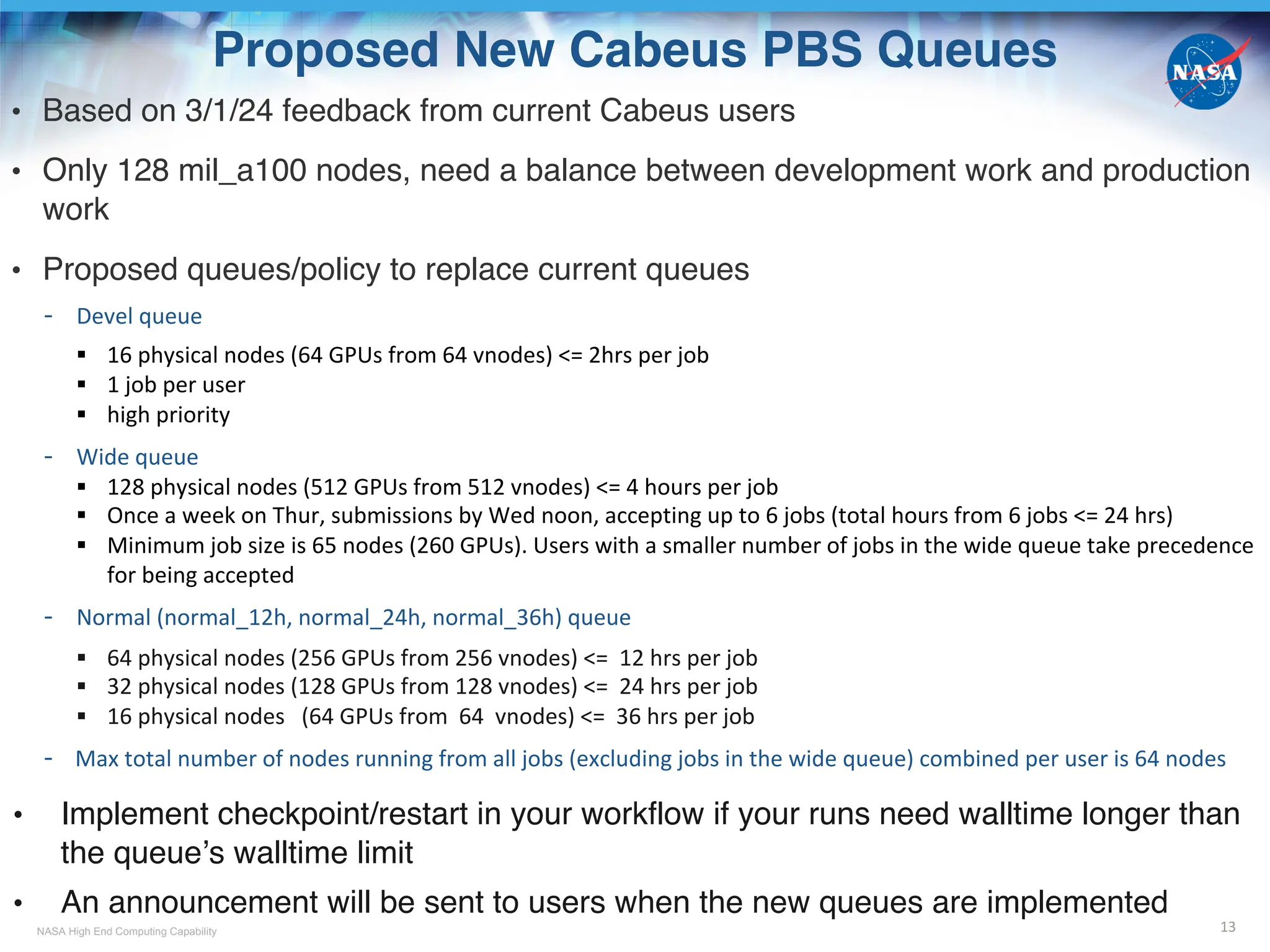
Proposed New Cabeus PBS Queues
• Based on 3/1/24 feedback from current Cabeus users
• Only 128 mil_a100 nodes, need a balance between development work and production
work
• Proposed queues/policy to replace current queues
- Devel queue
§ 16 physical nodes (64 GPUs from 64 vnodes) <= 2hrs per job
§ 1 job per user
§ high priority
- Wide queue
§ 128 physical nodes (512 GPUs from 512 vnodes) <= 4 hours per job
§ Once a week on Thur, submissions by Wed noon, accepting up to 6 jobs (total hours from 6 jobs <= 24 hrs)
§ Minimum job size is 65 nodes (260 GPUs). Users with a smaller number of jobs in the wide queue take precedence
for being accepted
- Normal (normal_12h, normal_24h, normal_36h) queue
§ 64 physical nodes (256 GPUs from 256 vnodes) <= 12 hrs per job
§ 32 physical nodes (128 GPUs from 128 vnodes) <= 24 hrs per job
§ 16 physical nodes (64 GPUs from 64 vnodes) <= 36 hrs per job
- Max total number of nodes running from all jobs (excluding jobs in the wide queue) combined per user is 64 nodes
• Implement checkpoint/restart in your workflow if your runs need walltime longer than
the queue’s walltime limit
• An announcement will be sent to users when the new queues are implemented
13
NASA High End Computing Capability
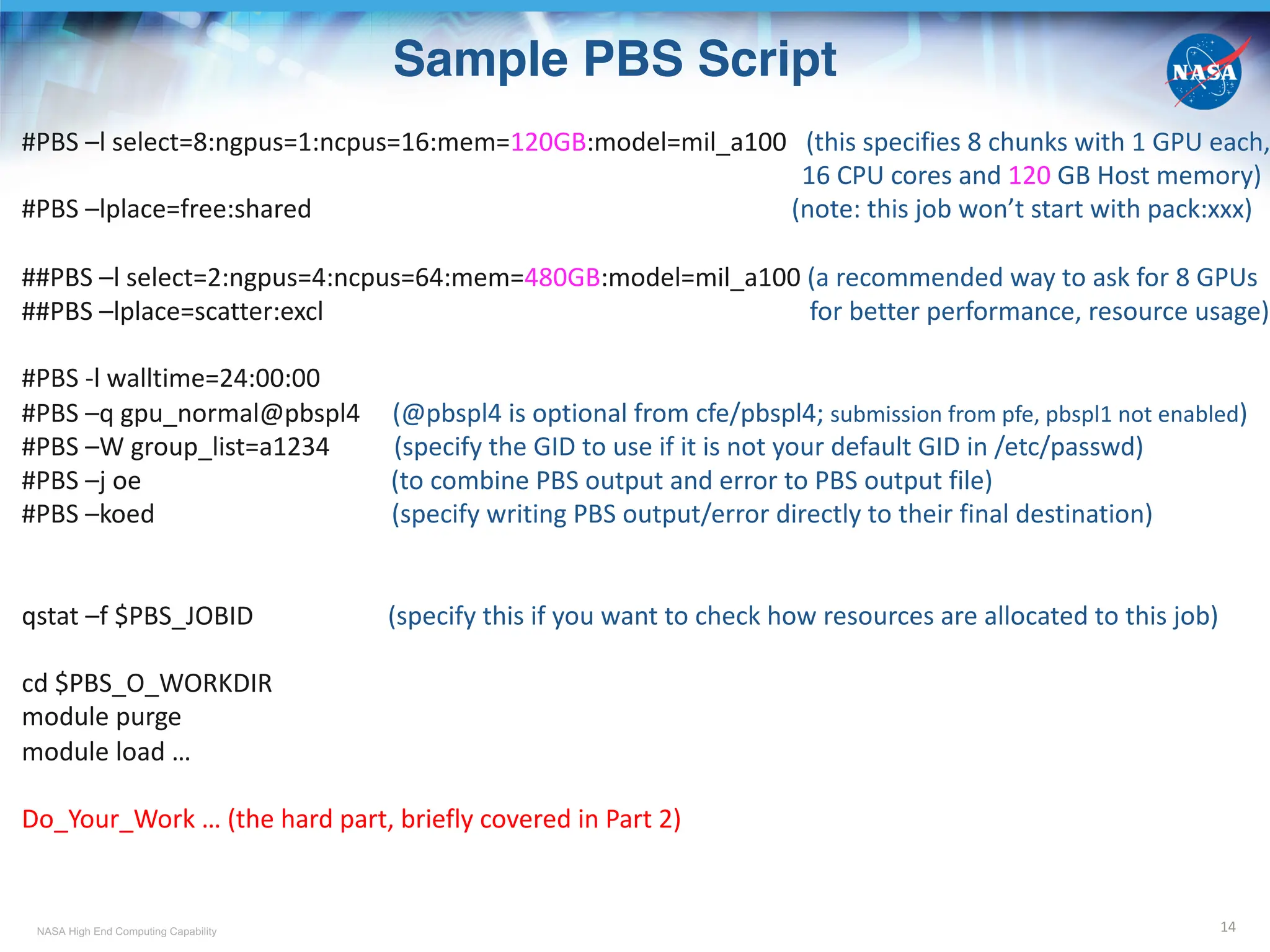
Sample PBS Script
14
#PBS –l select=8:ngpus=1:ncpus=16:mem=120GB:model=mil_a100 (this specifies 8 chunks with 1 GPU each,
16 CPU cores and 120 GB Host memory)
#PBS –lplace=free:shared (note: this job won’t start with pack:xxx)
##PBS –l select=2:ngpus=4:ncpus=64:mem=480GB:model=mil_a100 (a recommended way to ask for 8 GPUs
##PBS –lplace=scatter:excl for better performance, resource usage)
#PBS -l walltime=24:00:00
#PBS –q gpu_normal@pbspl4 (@pbspl4 is optional from cfe/pbspl4; submission from pfe, pbspl1 not enabled)
#PBS –W group_list=a1234 (specify the GID to use if it is not your default GID in /etc/passwd)
#PBS –j oe (to combine PBS output and error to PBS output file)
#PBS –koed (specify writing PBS output/error directly to their final destination)
qstat –f $PBS_JOBID (specify this if you want to check how resources are allocated to this job)
cd $PBS_O_WORKDIR
module purge
module load …
Do_Your_Work … (the hard part, briefly covered in Part 2)
NASA High End Computing Capability 15
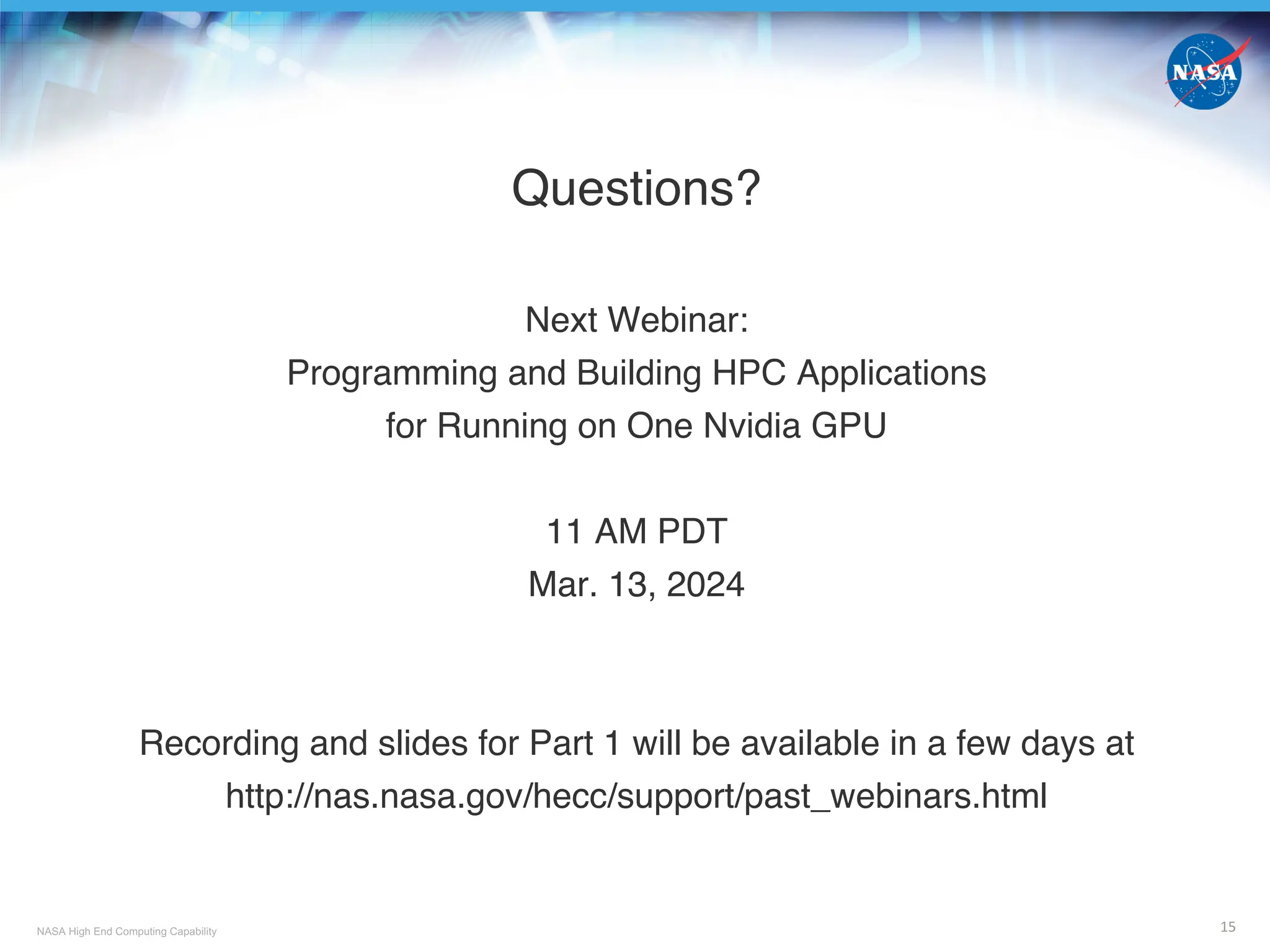
Questions?
Next Webinar:
Programming and Building HPC Applications
for Running on One Nvidia GPU
11 AM PDT
Mar. 13, 2024
Recording and slides for Part 1 will be available in a few days at
http://nas.nasa.gov/hecc/support/past_webinars.html

NASA Advanced Supercomputing (NAS) Division - Overview of The New Cabeus Cluster - Cabeus_Training_Part_1

  • 1.
    National Aeronautics andSpace Administration www.nasa.gov Overview of The New Cabeus Cluster (Part 1 of the Cabeus Training) Mar. 12, 2024 NASA Advanced Supercomputing (NAS) Division
  • 2.
    NASA High EndComputing Capability Cabeus Cluster • Cabeus is a lunar crater in the south polar region of the moon. In Oct 2009 the NASA LCROSS (Lunar CRater Observation and Sensing Satellite) mission’s rocket body struck its floor to examine the presence of water and other chemicals Fun videos to watch: https://www.youtube.com/watch?v=Wym1xL5qacw (educational with music) https://www.youtube.com/watch?v=3FHgrIuJUh8 (the flight+impact) • The new Cabeus cluster, named after the crater, is a system for HPC and AI/ML applications that can benefit from the GPU technology • Released for production work on Dec 22, 2023, Cabeus currently includes 128 nodes, each node contains 1 AMD Milan CPU host + 4 NVIDIA A100 GPUs • Older generations of GPU nodes (sky_gpu, cas_gpu, rom_gpu) in Pleiades are to be integrated into Cabeus sometime in 2024 2 Image from https://apod.nasa.gov/apod/ap091008.html
  • 3.
    NASA High EndComputing Capability Topics • Part 1: Overview on the New Cabeus Cluster - Cabeus Hardware Resources - PBS Jobs Sharing GPU Nodes - SBU Charging • Part 2: Programming and Building HPC Applications for Running on One Nvidia GPU - Programming § Methods Recommended by Nvidia § CPU Offloading to GPU § Explicit and Implicit Data Movement - Building § Compute Capability § CUDA Toolkit and Driver 3
  • 4.
    NASA High EndComputing Capability NAS Resources at a Glance (after integrating all GPUs to Cabeus) 4 Systems Pleiades, Electra, Aitken (cluster) Endeavour3/4 (shared memory) Cabeus (cluster) Front-Ends (w internet access) pfe20 – pfe27 cfe01 – cfe02 Front-End processor Sandy Bridge, 2 sockets, 8 cores/socket Milan 7313P, 1 socket, 16 cores/socket Compute Nodes (via PBS only, no internet access) CPU CPU + GPU Network Topology Hypercube Fully Connected 2-Layer Fat Tree (spine and leaf) Filesystems $HOME, Lustre /nobackup, /nobackupnfs1, local /tmp (memory) PBS Server pbspl1 pbspl4 Batch Job Charging applied was free; charging started in Dec 2023 SBU allocation group HECC (CPU Allocation) GPU (GPU Allocation)
  • 5.
    NASA High EndComputing Capability SSH to CFE01 or CFE02 5 • From your local workstation (recommended approach) - Two-step login local_desktop% ssh sfe6.nas.nasa.gov (or use sfe7, sfe8) sfe6% ssh cfe01 (or ssh cfe02) - One-step login (need SSH Passthrough) https://www.nas.nasa.gov/hecc/support/kb/entry/232 ; NAS Help Desk: 1-800-331-8737 Modify your local .ssh/config to include these two blocks: Host cfe01 HostKeyAlias cfe01.nas.nasa.gov ProxyCommand ssh -ax -oCompression=no sfe ssh-balance %h PKCS11Provider none Host cfe02 HostKeyAlias cfe02.nas.nasa.gov ProxyCommand ssh -ax -oCompression=no sfe ssh-balance %h PKCS11Provider none local_desktop% ssh cfe01 (or ssh cfe02) • From a pfe, lfe, pbspl1 or pbspl4 pfe, lfe, pbspl1, pbspl4% ssh cfe01 (or ssh cfe02) Note: SSH from cfe01 and cfe02 to - pbspl4: enabled - pfes, lfes, pbspl1: disabled
  • 6.
    NASA High EndComputing Capability NAS GPU Compute Nodes 6 CPU Host + GPU Device Milan + 4 A100* Rome + 8 A100 Cascade + 4 V100# Skylake + 4 V100 Skylake + 8 V100 model type in PBS& mil_a100 rom_gpu -> rom_a100_8 cas_gpu -> cas_v100 sky_gpu -> sky_v100 sky_gpu -> sky_v100_8 # of nodes 128 2 38 17 2 hostname cb[01-5,8-9]n[01-12], cb[06-07]n[01-10], cb[10-12]n[01-08] r101i5n[0-1] r101i2n[0-17], r101i3n[0-15], r101i4n[0-3] r101i0n[0-11,14-15], r101i1n[0-2] r101i0n[12-13] # of CPU socket/node 1 (EPYC 7763) 2 (EPYC 7742) 2 (Platinum 8268) 2 (Gold 6154) 2 (Gold 6154) # of CPU physical cores/node 64 128 48 36 36 CPU Host Memory/node 256 GB -> 512 GBa (DDR4 b) 512 GB (DDR4) 384 GB (DDR4) 384 GB (DDR4) 384 GB (DDR4) # of GPU cards/node 4 A100 8 A100 4 V100 4 V100 8 V100 GPU Device Memory per GPU card 80 GB (HBM2e g ) 40 GB (HBM2e) 32 GB (HBM2) 32 GB (HBM2) 32 GB (HBM2) * Nvidia Ampere GPU # Nvidia Volta GPU & Except for mil_a100, new model types in red not yet in effect a Host memory doubled as of Feb 22, 2024 b DDR4: Double Data Rate 4 g HBM: High Bandwidth Memory
  • 7.
    NASA High EndComputing Capability PBS Job Sharing on GPU Nodes 7 • Pleiades, Electra, Aitken have > 16,000 CPU nodes in total and each node is dedicated to a single job • The number of GPU nodes at NAS is <200 and each is configured to allow resource sharing by more than 1 job • PBS uses a Linux kernel feature called cgroup (i.e., control groups) to enforce resource restrictions (2 listed below among others) - keeping job processes within the defined memory and CPU boundaries - ensuring minimal interference between jobs sharing a node • For example, if you request #PBS -lselect=1:ncpus=16:ngpus=1:mem=10GB and during runtime, your job attempts to use more than 10 GB of CPU host memory, your job will be terminated PCI Express ~500 GB Memory Memory Controller GPU 1 GPU 2 GPU 3 GPU 0 8 cores 8 cores 8 cores 8 cores 8 cores 8 cores 8 cores 8 cores A Cabeus mil_a100 node represents resources in a vnode
  • 8.
    NASA High EndComputing Capability PBS Job Sharing of CPU Host Memory As a Temporary Filesystem (/tmp/pbs.jobid) 8 https://www.nas.nasa.gov/hecc/support/kb/entry/687 • NAS CPU nodes and GPU nodes are configured to allow memory-based /tmp filesystem to use up to 50% of the CPU memory • Benefit of using space under /tmp: - /tmp runs at memory speed, much faster than $HOME or /nobackup • Drawback of using space under /tmp: - /tmp is local to a node and only accessible by processes running on the node. Usually used for single node I/O - Except for root, user can only access /tmp during the lifetime of the batch job • How much space under /tmp can a job on a GPU node use? - Maximum is the smaller of (1) CPU memory requested, enforced by cgroup and (2) 50% of CPU memory on the physical node - Adjusted by (a) memory/buffer cache used by application, and (b) the amount of /tmp already used by other jobs on the same node § Possible outcome when attempting to exceed: (a) Job termination as enforced by cgroup, and (b) Error: No space left on device • How to use space under /tmp on a GPU node: - Use $TMPDIR (/var/tmp/pbs.jobid.pbspl4.nas.nasa.gov) Note: /var/tmp either symlinks to /tmp or share space with /tmp § $TMPDIR is automatically created when job starts and deleted when job ends, keeping the node healthy § GPU_node% cp /nobackup/username/project_name/input_data $TMPDIR § GPU_node% cp $TMPDIR/output_data /nobackup/username/project_name - DO NOT use /tmp or /tmp/directory_created_by_you § PBS prologue cleaning step (umount /tmp to clear data from old job(s), followed by mount for the new job) only performed when there are no other jobs on the node besides the new job § Space consumed by data left in /tmp reduces available memory for other jobs
  • 9.
    NASA High EndComputing Capability Vnode and PBS Job Placement 9 • A host = a physical node, e.g. r101i0n12, cb12n02 • A vnode = a virtual node, denoted with hostname + [], can be a host, a socket, or a fraction of a socket (configured via PBS) - For older GPU nodes (such as rom_gpu, cas_gpu, sky_gpu) prior to the integration to Cabeus a vnode = 1 socket (see upper graph) e.g., r101i0n12[0]: 4 GPUs, 18 physical cores, ~190 GB CPU host memory - For Cabeus mil_a100 nodes, and older GPU nodes after the integration? a vnode = 1 GPU card + 1/4 CPU cores + 1/4 CPU memory (for a physical node with 4 GPU cards, see lower graph) e.g., cb12n02[0]: 1 GPU, 16 physical cores, ~125 GB CPU host memory • #PBS –lplace=[arrangement]:[sharing] A socket as a vnode A GPU + some CPU and memory as a vnode Some choices for arrangement: free : place job on any vnode(s) pack : all chunks (the –lselect number) are taken from one host scatter: only one chunk is taken from a host Some choices for sharing shared: this job can share with other jobs the vnodes chosen excl: only this job can use the vnodes chosen • #PBS –lselect=1:ngpus=1:ncpus=12:mem=10GB, -lplace=free:excl - Excluded from use by other jobs: 1 whole vnode (1 GPU, 16 CPU cores, ~125 GB CPU memory) - Assigned and enforced by cgroup for this job: partial vnode (1 GPU, 12 CPU cores, 10 GB CPU memory)
  • 10.
    NASA High EndComputing Capability Effect of PBS Job Placement on Resource Assignment and Sharing 10 #PBS –lselect=2:ngpus=1:ncpus=16:mem=140GB:model=mil_a100 -lplace=x:y x:y cfe,pfe,pbspl4,pbspl1% qstat –[x]f jobid.pbspl4.nas.nasa.gov | grep exec_vnode scatter:shared (cb10n02[2]:mem=132092928kb*:ngpus=1:ncpus=16 + cb10n02[0]:mem=14707712kb^) + (cb05n11[2]:mem=132092928kb:ngpus=1:ncpus=16 + cb05n11[1]:mem=14707712kb) Vnodes cb10n02[0] and cb05n11[1] have unassigned GPUs which can be used by other jobs. Current job occupies 2 GPUs scatter:excl (cb10n02[2]:mem=132092928kb:ngpus=1:ncpus=16 + cb10n02[0]:mem=14707712kb) + (cb05n11[2]:mem=132092928kb:ngpus=1:ncpus=16 + cb05n11[1]:mem=14707712kb) Vnodes cb10n02[0] and cb05n11[1] have unassigned GPUs but excluded for other jobs. Current job occupies 4 GPUs, but only 2 GPUs can be used by the job, the other two will be idle pack:shared (cb02n12[0]:mem=131246080kb:ngpus=1:ncpus=16 + cb02n12[2]:mem=15554560kb) + (cb02n12[2]:mem=116538368kb$ :ngpus=1:ncpus=16 + cb02n12[1]:mem=30262272kb# ) Vnodes cb02n12[3] (not assigned to this job) and cb02n12[1] have unassigned GPUs which can be used by other jobs. Current job occupies 2 GPUs pack:excl (cb03n07[2]:mem=132092928kb:ngpus=1:ncpus=16 + cb03n07[3]:mem=14707712kb) + (cb03n07[3]:mem=117371904kb:ngpus=1:ncpus=16 + cb03n07[1]:mem=29428736kb) Vnode cb03n07[1] has an unassigned GPU but excluded for other jobs. Current job occupies 3 GPUs, but only 2 GPUs can be used by the job, the GPU in cb03n07[1] will be idle. Vnode cb03n07[0] can be assigned to other jobs. Note: Different colors represent different vnodes * 132092928kb = ~ 126 GiB $ 116538368kb = ~ 111 GiB ^ 14707712kb = ~ 14 GiB # 30262272kb = ~ 29 GiB
  • 11.
    NASA High EndComputing Capability SBU Charging for Using GPU Resources 11 • SBU charging for GPU nodes is based on # of GPU cards “occupied” by a job • GPU SBU rate per hour (subject to change) * Assuming change of vnode definition to become 1 GPU + ¼ or 1/8 CPU cores + ¼ or 1/8 memory depending on the node type • A successful job submission requires - An SBU allocation specifically for GPUs for the Group-ID (GID, e.g., a1234) you want to use New GPU projects should create a request for GPU allocations via https://request.hec.nasa.gov - Positive remaining value of the allocation pfe, cfe, pbspl1 or pbspl4% acct_ytd [a1234] Linear Fiscal YTD Project Project Host/Group Year Used % Used Limit Remain Usage Exp Date -------- ------------- ------ ----------- --------- ----------- ---------- ------- ------------ a1234 gpu 2024 5407.459 47.63 11352.000 5944.541 168.80 09/30/24 - The GID is added to the Access Control List (ACL) of the PBS queue to be submitted to; done by NAS cfe or pbspl4% qstat –fQ gpu_normal | grep acl_groups acl_groups = a1234, a1235, …. • Use command acct_query to check SBUs charged to each job (-o) for using mil_a100 pfe, cfe, pbspl1 or pbspl4% acct_query –u username –p gid –olow –c cabeus_MA –b 03/11/24 Note: SBU accounting data usually is available within a few hours after a job is completed Model type SBU rate per node SBU rate per vnode mil_a100 37.86 37.86/4 rom_a100_8* 75.72 75.72/8 cas_v100* 27.04 27.04/4 sky_v100* 27.04 27.04/4 sky_v100_8* 54.08 54.08/8
  • 12.
    NASA High EndComputing Capability PBS Queues for Cabeus GPUs 12 • Available queues subject to change (see proposal in next slide) • Checking what GPU queues are available and their priority, per-job limits (e.g. walltime, # of physical nodes); “limits” subject to change depending on demand cfe or pbspl4% qstat –q Queue Memory CPU Time Walltime Node Run Que Lm State ---------------- ------ -------- -------- ---- ----- ----- ---- ----- gpu_normal -- -- 24:00:00 64 4 6 -- E R gpu_long -- -- 120:00:0 96 0 1 -- E R gpu_debug -- -- 02:00:00 32 0 1 -- E R gpu_vlong -- -- 384:00:0 96 0 0 -- D S Other per-job settings: resources_min.mem = 256mb resources_min.ncpus = 1 resources_min.ngpus = 1 resources_default.place = pack:shared Warning: A job using default pack:shared will not start unless all chunks fit in 1 physical node • ACL of each queue - Your GID should be in the ACL for gpu_normal and gpu_debug as long as it has positive GPU SBUs - Access to gpu_long and gpu_vlong (not yet activated) requires additional approval; submit a request to support@nas.nasa.gov for review by NAS User Service resources_default.mem = 32gb resources_default.ncpus = 1 resources_default.ngpus = 1 cfe or pbspl4% qstat –Q Queue Ncpus/ Time/ name max/def max/def pr ------------------------------- gpu_normal --/ 1 24:00/ 0 gpu_long --/ 1 120:00/ 0 gpu_debug --/ 1 02:00/ 15 gpu_vlong --/ -- 384:00/ 0
  • 13.
    NASA High EndComputing Capability Proposed New Cabeus PBS Queues • Based on 3/1/24 feedback from current Cabeus users • Only 128 mil_a100 nodes, need a balance between development work and production work • Proposed queues/policy to replace current queues - Devel queue § 16 physical nodes (64 GPUs from 64 vnodes) <= 2hrs per job § 1 job per user § high priority - Wide queue § 128 physical nodes (512 GPUs from 512 vnodes) <= 4 hours per job § Once a week on Thur, submissions by Wed noon, accepting up to 6 jobs (total hours from 6 jobs <= 24 hrs) § Minimum job size is 65 nodes (260 GPUs). Users with a smaller number of jobs in the wide queue take precedence for being accepted - Normal (normal_12h, normal_24h, normal_36h) queue § 64 physical nodes (256 GPUs from 256 vnodes) <= 12 hrs per job § 32 physical nodes (128 GPUs from 128 vnodes) <= 24 hrs per job § 16 physical nodes (64 GPUs from 64 vnodes) <= 36 hrs per job - Max total number of nodes running from all jobs (excluding jobs in the wide queue) combined per user is 64 nodes • Implement checkpoint/restart in your workflow if your runs need walltime longer than the queue’s walltime limit • An announcement will be sent to users when the new queues are implemented 13
  • 14.
    NASA High EndComputing Capability Sample PBS Script 14 #PBS –l select=8:ngpus=1:ncpus=16:mem=120GB:model=mil_a100 (this specifies 8 chunks with 1 GPU each, 16 CPU cores and 120 GB Host memory) #PBS –lplace=free:shared (note: this job won’t start with pack:xxx) ##PBS –l select=2:ngpus=4:ncpus=64:mem=480GB:model=mil_a100 (a recommended way to ask for 8 GPUs ##PBS –lplace=scatter:excl for better performance, resource usage) #PBS -l walltime=24:00:00 #PBS –q gpu_normal@pbspl4 (@pbspl4 is optional from cfe/pbspl4; submission from pfe, pbspl1 not enabled) #PBS –W group_list=a1234 (specify the GID to use if it is not your default GID in /etc/passwd) #PBS –j oe (to combine PBS output and error to PBS output file) #PBS –koed (specify writing PBS output/error directly to their final destination) qstat –f $PBS_JOBID (specify this if you want to check how resources are allocated to this job) cd $PBS_O_WORKDIR module purge module load … Do_Your_Work … (the hard part, briefly covered in Part 2)
  • 15.
    NASA High EndComputing Capability 15 Questions? Next Webinar: Programming and Building HPC Applications for Running on One Nvidia GPU 11 AM PDT Mar. 13, 2024 Recording and slides for Part 1 will be available in a few days at http://nas.nasa.gov/hecc/support/past_webinars.html