Using MySQL in the Cloud 
Copyright © 2014 Oracle and/or its affiliates. All rights reserved. | 
Matt Lord 
MySQL Product Manager 
Morgan Tocker 
MySQL Community Manager
Safe Harbor Statement 
The following is intended to outline our general product direction. It is intended for 
information purposes only, and may not be incorporated into any contract. It is not a 
commitment to deliver any material, code, or functionality, and should not be relied upon 
in making purchasing decisions. The development, release, and timing of any features or 
functionality described for Oracle’s products remains at the sole discretion of Oracle. 
Copyright © 2014 Oracle and/or its affiliates. All rights reserved. | 
3
Using MySQL in the Cloud : Agenda 
Introduction to the Cloud 
How MySQL Fits in 
MySQL and OpenStack 
MySQL and Amazon Web Services 
Conclusion 
Copyright © 2014 Oracle and/or its affiliates. All rights reserved. | 
4 
1 
2 
3 
4 
5
Introduction to the Cloud 
Copyright © 2014 Oracle and/or its affiliates. All rights reserved. | 
5
Introduction to the Cloud 
Just what is it? 
• Method of delivering computing resources as a service 
– Shared resources are provided to computers and other devices as a utility 
– Provided over the network 
• Shared resources used to achieve coherence and economies of scale 
– Avoid up front infrastructure costs 
– Elastic provisioning allows for scaling up or down based on demand 
• Metered pricing 
– Only pay for the resources that you use 
Copyright © 2014 Oracle and/or its affiliates. All rights reserved. | 
6
Introduction to the Cloud 
Common Terms 
• IaaS : providing virtualized access to physical infrastructure 
• PaaS : providing a complete platform to run applications on 
• SaaS : providing remote access to individual software applications 
• XaaS : providing anything (X) as a service 
• Private Cloud : an internal cloud used solely by your organization 
• Public Cloud : a multi-tenant cloud available to anyone 
– Support Virtual Private Clouds (your resources are logically and/or physically isolated) 
• Hybrid Cloud : your own private cloud, augmented by a public one 
Copyright © 2014 Oracle and/or its affiliates. All rights reserved. | 
7
Introduction to the Cloud 
Why? 
• Agility 
– Virtually infinite resources available on-demand 
– Integrated orchestration and automation 
• Lower costs 
– No upfront capital investment 
– Pay only for what you actually use 
• Big Data / Cloud-based analytics 
– Detailed analytics tools are built-in 
• Deployment options: public, private, virtual private, hybrid 
Copyright © 2014 Oracle and/or its affiliates. All rights reserved. | 
8
Copyright © 2014 Oracle and/or its affiliates. All rights reserved. | 
Introduction to the Cloud 
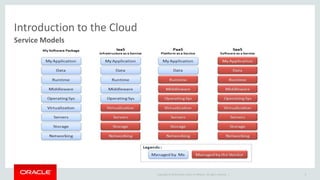
Service Models 
9
Copyright © 2014 Oracle and/or its affiliates. All rights reserved. | 
Introduction to the Cloud 
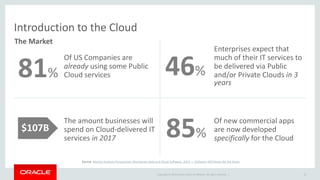
Of US Companies are 
already using some Public 
Cloud services 
Enterprises expect that 
much of their IT services to 
be delivered via Public 
and/or Private Clouds in 3 
years 
The amount businesses will 
spend on Cloud-delivered IT 
services in 2017 
Of new commercial apps 
are now developed 
specifically for the Cloud 
10 
46% 
The Market 
81% 
$107B 
85% 
Source: Market Analysis Perspective: Worldwide SaaS and Cloud Software, 2013 — Software Will Never Be the Same
Introduction to the Cloud 
Provider Landscape 
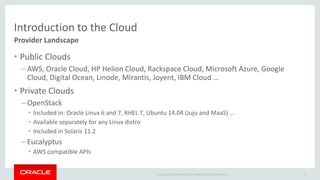
• Public Clouds 
– AWS, Oracle Cloud, HP Helion Cloud, Rackspace Cloud, Microsoft Azure, Google 
Cloud, Digital Ocean, Linode, Mirantis, Joyent, IBM Cloud … 
Copyright © 2014 Oracle and/or its affiliates. All rights reserved. | 
• Private Clouds 
– OpenStack 
• Included in: Oracle Linux 6 and 7, RHEL 7, Ubuntu 14.04 (Juju and MaaS) … 
• Available separately for any Linux distro 
• Included in Solaris 11.2 
– Eucalyptus 
• AWS compatible APIs 
11
Copyright © 2014 Oracle and/or its affiliates. All rights reserved. | 
How MySQL 
Fits in 
12
SaaS 
Hosting IaaS, PaaS 
Copyright © 2014 Oracle and/or its affiliates. All rights reserved. | 13 
How MySQL Fits in 
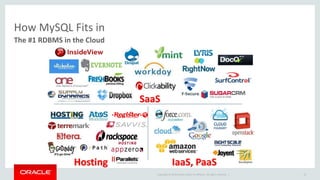
The #1 RDBMS in the Cloud
How MySQL Fits in 
Ubiquity in the Cloud 
• MySQL is the most popular DBaaS engine 
– The most popular engine on Amazon RDS and Google Cloud SQL 
– The default engine for OpenStack Trove 
• Including HP Helion Cloud Relational Database and Rackspace Cloud Database 
• MySQL is used in many of the most popular SaaS offerings 
– SugarCRM, Dropbox, Rightnow, Evernote, and many more … 
• MySQL is a core piece of the Cloud technology stack 
– The default backing store for OpenStack data 
• Including the OpenStack based Public Clouds: HP Helion, Rackspace, Mirantis, … 
Copyright © 2014 Oracle and/or its affiliates. All rights reserved. | 
14
Copyright © 2014 Oracle and/or its affiliates. All rights reserved. | 
How MySQL Fits in 
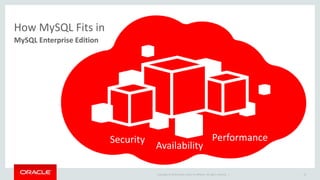
MySQL Enterprise Edition 
15 
Security Performance 
Availability
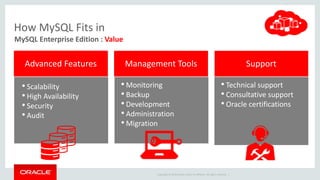
Advanced Features Management Tools Support 
Copyright © 2014 Oracle and/or its affiliates. All rights reserved. | 
• Scalability 
• High Availability 
• Security 
• Audit 
• Monitoring 
• Backup 
• Development 
• Administration 
• Migration 
• Technical support 
• Consultative support 
• Oracle certifications 
How MySQL Fits in 
MySQL Enterprise Edition : Value
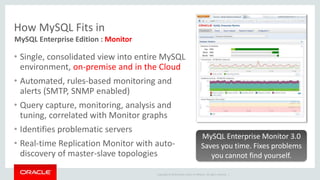
• Single, consolidated view into entire MySQL 
environment, on-premise and in the Cloud 
• Automated, rules-based monitoring and 
alerts (SMTP, SNMP enabled) 
• Query capture, monitoring, analysis and 
tuning, correlated with Monitor graphs 
• Identifies problematic servers 
• Real-time Replication Monitor with auto-discovery 
of master-slave topologies 
MySQL Enterprise Monitor 3.0 
Saves you time. Fixes problems 
you cannot find yourself. 
Copyright © 2014 Oracle and/or its affiliates. All rights reserved. | 
How MySQL Fits in 
MySQL Enterprise Edition : Monitor
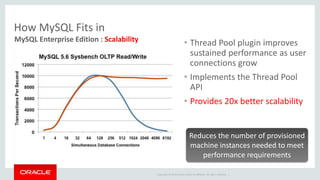
• Thread Pool plugin improves 
sustained performance as user 
connections grow 
• Implements the Thread Pool 
API 
• Provides 20x better scalability 
Reduces the number of provisioned 
machine instances needed to meet 
performance requirements 
Copyright © 2014 Oracle and/or its affiliates. All rights reserved. | 
How MySQL Fits in 
MySQL Enterprise Edition : Scalability
How MySQL Fits in 
MySQL Enterprise Edition : Audit 
• Out-of-the-box logging of connections, logins, and query 
• User defined policies for filtering, and log rotation 
• Dynamically enabled, disabled: no server restart 
• XML-based audit stream per Oracle Audit Vault spec 
• Easily implemented via MySQL 5.6 Audit API 
Copyright © 2014 Oracle and/or its affiliates. All rights reserved. | 
19 
Adds regulatory compliance to 
MySQL applications (HIPAA, 
Sarbanes-Oxley, PCI, etc.)
How MySQL Fits in 
MySQL Enterprise Edition : High Availability 
• HA with MySQL Fabric (recommended) 
• Oracle VM Templates for MySQL 
• HA with DRBD and Linux Clustering 
• HA with Solaris Clustering 
• HA with Windows Failover Clustering 
• HA with Oracle Clusterware Plugin 
Copyright © 2014 Oracle and/or its affiliates. All rights reserved. | 
20 
Range of options to make your 
Cloud-based MySQL applications 
deployments Highly Available
How MySQL Fits in 
MySQL Enterprise Edition : Security 
• Encryption and masking 
– MySQL Encryption libraries (including AES256) 
– SSL enabled communication 
• Access control 
– MySQL Enterprise authentication (PAM, Windows, etc.) 
• Auditing and Monitoring 
– MySQL security advisors 
– Oracle Audit Vault 
• Oracle Database Firewall 
Security is the #1 concern in the 
Copyright © 2014 Oracle and/or its affiliates. All rights reserved. | 
21 
Cloud
Copyright © 2014 Oracle and/or its affiliates. All rights reserved. | 
How MySQL Fits in 
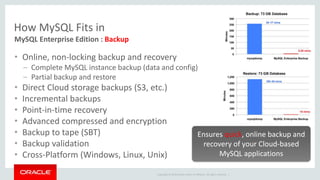
MySQL Enterprise Edition : Backup 
• Online, non-locking backup and recovery 
– Complete MySQL instance backup (data and config) 
– Partial backup and restore 
• Direct Cloud storage backups (S3, etc.) 
• Incremental backups 
• Point-in-time recovery 
• Advanced compressed and encryption 
• Backup to tape (SBT) 
• Backup validation 
• Cross-Platform (Windows, Linux, Unix) 
Ensures quick, online backup and 
recovery of your Cloud-based 
MySQL applications
Copyright © 2014 Oracle and/or its affiliates. All rights reserved. | 
How MySQL Fits in 
MySQL Enterprise Edition : Support 
• Largest MySQL engineering and support organization 
• Backed by the MySQL developers 
• World-class support, in 29 languages 
• Hot fixes & maintenance releases 
• 24x7x365 
• Unlimited incidents 
• Consultative support 
• Global scale and reach 
Get immediate help for any MySQL 
issue, plus expert advice
Copyright © 2014 Oracle and/or its affiliates. All rights reserved. | 
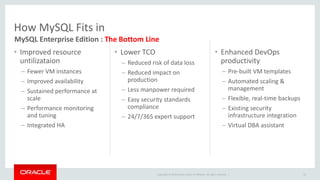
• Improved resource 
untilizataion 
– Fewer VM instances 
– Improved availability 
– Sustained performance at 
scale 
– Performance monitoring 
and tuning 
– Integrated HA 
• Lower TCO 
– Reduced risk of data loss 
– Reduced impact on 
production 
– Less manpower required 
– Easy security standards 
compliance 
– 24/7/365 expert support 
• Enhanced DevOps 
productivity 
– Pre-built VM templates 
– Automated scaling & 
management 
– Flexible, real-time backups 
– Existing security 
infrastructure integration 
– Virtual DBA assistant 
24 
How MySQL Fits in 
MySQL Enterprise Edition : The Bottom Line
Copyright © 2014 Oracle and/or its affiliates. All rights reserved. | 
MySQL and 
OpenStack 
25
Copyright © 2014 Oracle and/or its affiliates. All rights reserved. | 
MySQL and OpenStack 
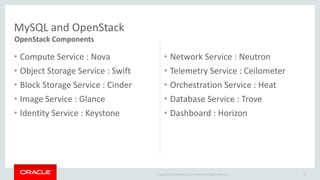
• Compute Service : Nova 
• Object Storage Service : Swift 
• Block Storage Service : Cinder 
• Image Service : Glance 
• Identity Service : Keystone 
• Network Service : Neutron 
• Telemetry Service : Ceilometer 
• Orchestration Service : Heat 
• Database Service : Trove 
• Dashboard : Horizon 
26 
OpenStack Components
MySQL and OpenStack 
Core Tools 
• Python 
– The language used throughout OpenStack 
• Puppet 
– Default (Chef and Juju are also common) tool used for installation, setup, 
instrumentation, orchestration, and automation 
• MySQL 
– The default backing store for OpenStack data 
• Open vSwitch 
– The default tool used for the software defined networking (SDN) in Neutron 
Copyright © 2014 Oracle and/or its affiliates. All rights reserved. | 
27
MySQL and OpenStack 
Installing MySQL 
• Standard MySQL distributions and methods 
– http://dev.mysql.com/downloads/ 
– https://edelivery.oracle.com/ 
• MySQL Linux repos (recommended, includes related tools) 
– http://dev.mysql.com/downloads/repo/ 
• Your vendor repositories 
• You can do this one time in your virtual machine image 
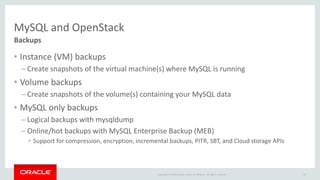
– Including MEM, MEB, WorkBench, Fabric, Utilities, Connectors, etc. 
Copyright © 2014 Oracle and/or its affiliates. All rights reserved. | 
28
MySQL and OpenStack 
Setting up MySQL as a Service 
• Install Trove on the controller node using RedStack 
– http://docs.openstack.org/developer/trove/dev/install.html 
• Install Trove manually 
– http://docs.openstack.org/developer/trove/dev/manual_install.html 
• Still a bit “raw” and very much in flux today 
– Has great potential for the future 
– But probably best to stick with a typical MySQL install today 
Copyright © 2014 Oracle and/or its affiliates. All rights reserved. | 
29
MySQL and OpenStack 
Backups 
• Instance (VM) backups 
– Create snapshots of the virtual machine(s) where MySQL is running 
• Volume backups 
– Create snapshots of the volume(s) containing your MySQL data 
• MySQL only backups 
– Logical backups with mysqldump 
– Online/hot backups with MySQL Enterprise Backup (MEB) 
• Support for compression, encryption, incremental backups, PITR, SBT, and Cloud storage APIs 
Copyright © 2014 Oracle and/or its affiliates. All rights reserved. | 
30
Copyright © 2014 Oracle and/or its affiliates. All rights reserved. | 
MySQL and OpenStack 
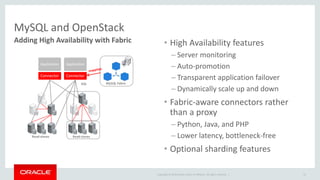
Adding High Availability with Fabric 
31 
MySQL Fabric 
Application 
Connector 
Application 
Read-slaves 
SQL 
Read-slaves 
Connector 
• High Availability features 
– Server monitoring 
– Auto-promotion 
– Transparent application failover 
– Dynamically scale up and down 
• Fabric-aware connectors rather 
than a proxy 
– Python, Java, and PHP 
– Lower latency, bottleneck-free 
• Optional sharding features
Copyright © 2014 Oracle and/or its affiliates. All rights reserved. | 
MySQL and OpenStack 
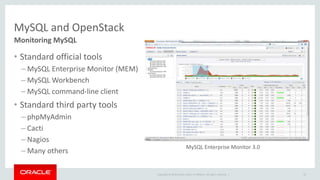
Monitoring MySQL 
• Standard official tools 
– MySQL Enterprise Monitor (MEM) 
– MySQL Workbench 
– MySQL command-line client 
• Standard third party tools 
– phpMyAdmin 
– Cacti 
– Nagios 
– Many others 
32 
MySQL Enterprise Monitor 3.0
Copyright © 2014 Oracle and/or its affiliates. All rights reserved. | 
MySQL and OpenStack 
33 
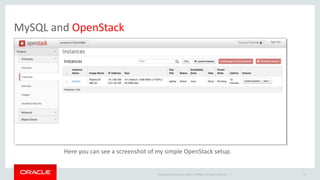
Here you can see a screenshot of my simple OpenStack setup.
Copyright © 2014 Oracle and/or its affiliates. All rights reserved. | 
MySQL and OpenStack 
Here you can see a screenshot of 
connecting to the running virtual 
machine instance (seen in the previous 
screenshot), and logging into MySQL. 
I previously installed MySQL 5.6 there 
using our official YUM repo: 
1) yum install 
http://dev.mysql.com/get/mysql-community- 
release-fc20-5.noarch.rpm 
2) yum install mysql-community* 
3) systemctl start mysqld.service 
34 
gonzo:~ matt$ ssh -i ~/.ssh/id_rsa fedora@8.21.28.102 
Last login: Wed Jul 9 02:24:12 2014 from 75.97.214.133.res-cmts. 
sth3.ptd.net 
[fedora@fedora1 ~]$ mysql 
Welcome to the MySQL monitor. Commands end with ; or g. 
Your MySQL connection id is 4 
Server version: 5.6.19 MySQL Community Server (GPL) 
Copyright (c) 2000, 2014, Oracle and/or its affiliates. All rights reserved. 
Oracle is a registered trademark of Oracle Corporation and/or its 
affiliates. Other names may be trademarks of their respective 
owners. 
Type 'help;' or 'h' for help. Type 'c' to clear the current input statement. 
mysql>
Copyright © 2014 Oracle and/or its affiliates. All rights reserved. | 
MySQL and 
Amazon Web Services 
35
MySQL on Amazon Web Services 
Using Elastic Compute Cloud (EC2) 
Using Relational Database Service (RDS) 
Copyright © 2014 Oracle and/or its affiliates. All rights reserved. | 
36 
1 
2
Using EC2 
The Short Version 
• Pick an instance type 
• Choose your favorite Linux distribution 
• Install MySQL 
• Optionally Setup Replication 
• Setup a Backup 
Copyright © 2014 Oracle and/or its affiliates. All rights reserved. | 
37 
EC2 is raw compute instances. 
Approach not substantially 
different from regular 
deployments.
Copyright © 2014 Oracle and/or its affiliates. All rights reserved. | 
Pick an Instance Type 
• Amazon has substantially more 
hardware options available than 
2006 
• Common choice for Databases is R3 
High Memory 
• Some workloads may better suit I2 
Storage Optimized, HS1 High 
Storage or C3 Compute Optimized 
38
Chose Your Favorite Linux Distribution 
• Yum Based 
– CentOS 
– Red Hat 
– Amazon Linux 
• Deb Based 
– Debian 
– Ubuntu 
Copyright © 2014 Oracle and/or its affiliates. All rights reserved. | 
39
Install MySQL 
Same Steps as Described for OpenStack 
• MySQL 5.6 recommended for all new installations 
• For MySQL Community Server: 
– Available from official yum and apt repositories 
• For MySQL Enterprise Server: 
– Subscription useful on EC2 (Enterprise Monitor, Backup) 
– Available for download from Oracle eDelivery 
Copyright © 2014 Oracle and/or its affiliates. All rights reserved. | 
40
Setup Replication 
AWS Presents Great HA Opportunities 
• Availability Zones (AZs) have physical isolation in the 
same geography. 
• Regions are different geographies. 
• Amazon recommends that applications be built to 
survive an AZ outage. 
– Easy to achieve. 
– Setup slaves in a different AZ from master. 
Copyright © 2014 Oracle and/or its affiliates. All rights reserved. | 
41
Copyright © 2014 Oracle and/or its affiliates. All rights reserved. | 
Setup a Backup 
–mysqldump 
– MySQL Enterprise Backup 
• Better option for larger databases 
• Now supports saving to S3! 
– EBS Snapshot 
42 
Standard Methods Apply
MySQL on Amazon Web Services 
Using Elastic Compute Cloud (EC2) 
Using Relational Database Service (RDS) 
Copyright © 2014 Oracle and/or its affiliates. All rights reserved. | 
43 
1 
2
Copyright © 2014 Oracle and/or its affiliates. All rights reserved. | 
RDS 
• A managed service offering hosted MySQL. 
• Amazon takes care of backups, replication & software patching. 
• Offers MySQL Versions: 
– 5.1 
– 5.5 
– 5.6 
44 
‘Relational Database Service’
Copyright © 2014 Oracle and/or its affiliates. All rights reserved. | 
Locked Down 
• Root access not provided. 
• Edits to my.cnf configuration via an 
API or Web Console 
– Not all settings are configurable 
– Can’t set innodb_io_capacity or change to 
Row Based Replication 
45 
Amazon is the DBA
Does Not Offer MySQL Enterprise Edition Features 
Copyright © 2014 Oracle and/or its affiliates. All rights reserved. | 
– MySQL Enterprise Monitor 
• Find and fix expensive queries as they are 
introduced. 
• Real-time performance monitoring and alerts. 
– MySQL Enterprise Backup 
• Low impact 
• Built-in verification while copying data. 
46
Copyright © 2014 Oracle and/or its affiliates. All rights reserved. | 
Dedicated DBAs 
• May have a preference for EC2- 
based MySQL 
• Existing tooling DBAs have built 
may require SUPER privileges 
• Finer level of configuration 
• Comfort-zone of understanding 
what’s happening ‘under the hood’ 
for each operation 
– For example, if clicking “add storage” 
will I restart the MySQL server? 
– Useful to provide projections. 
47
Copyright © 2014 Oracle and/or its affiliates. All rights reserved. | 
Migration Path 
• In RDS with MySQL 5.6 this can now be 
done without downtime: 
– Using the mysqlbinlog client program, 
continually dump binary logs 
– Run a mysqldump to backup and restore 
– Apply missing binary logs until caught up 
• Caveat: Slower than Enterprise Backup 
or Snapshot (not supported). 
48 
In and out of RDS
Copyright © 2014 Oracle and/or its affiliates. All rights reserved. | 
Conclusion 
• RDS 
– Simple entry point to MySQL 
Community Edition 
– Uses latest MySQL 5.6 
• EC2 
– Allows full control over environment 
– Supports MySQL Enterprise Edition 
– May be preferred by seasoned DBAs 
and for more demanding deployments. 
49
Using MySQL in the Cloud

Using MySQL in the Cloud

  • 2.
    Using MySQL inthe Cloud Copyright © 2014 Oracle and/or its affiliates. All rights reserved. | Matt Lord MySQL Product Manager Morgan Tocker MySQL Community Manager
  • 3.
    Safe Harbor Statement The following is intended to outline our general product direction. It is intended for information purposes only, and may not be incorporated into any contract. It is not a commitment to deliver any material, code, or functionality, and should not be relied upon in making purchasing decisions. The development, release, and timing of any features or functionality described for Oracle’s products remains at the sole discretion of Oracle. Copyright © 2014 Oracle and/or its affiliates. All rights reserved. | 3
  • 4.
    Using MySQL inthe Cloud : Agenda Introduction to the Cloud How MySQL Fits in MySQL and OpenStack MySQL and Amazon Web Services Conclusion Copyright © 2014 Oracle and/or its affiliates. All rights reserved. | 4 1 2 3 4 5
  • 5.
    Introduction to theCloud Copyright © 2014 Oracle and/or its affiliates. All rights reserved. | 5
  • 6.
    Introduction to theCloud Just what is it? • Method of delivering computing resources as a service – Shared resources are provided to computers and other devices as a utility – Provided over the network • Shared resources used to achieve coherence and economies of scale – Avoid up front infrastructure costs – Elastic provisioning allows for scaling up or down based on demand • Metered pricing – Only pay for the resources that you use Copyright © 2014 Oracle and/or its affiliates. All rights reserved. | 6
  • 7.
    Introduction to theCloud Common Terms • IaaS : providing virtualized access to physical infrastructure • PaaS : providing a complete platform to run applications on • SaaS : providing remote access to individual software applications • XaaS : providing anything (X) as a service • Private Cloud : an internal cloud used solely by your organization • Public Cloud : a multi-tenant cloud available to anyone – Support Virtual Private Clouds (your resources are logically and/or physically isolated) • Hybrid Cloud : your own private cloud, augmented by a public one Copyright © 2014 Oracle and/or its affiliates. All rights reserved. | 7
  • 8.
    Introduction to theCloud Why? • Agility – Virtually infinite resources available on-demand – Integrated orchestration and automation • Lower costs – No upfront capital investment – Pay only for what you actually use • Big Data / Cloud-based analytics – Detailed analytics tools are built-in • Deployment options: public, private, virtual private, hybrid Copyright © 2014 Oracle and/or its affiliates. All rights reserved. | 8
  • 9.
    Copyright © 2014Oracle and/or its affiliates. All rights reserved. | Introduction to the Cloud Service Models 9
  • 10.
    Copyright © 2014Oracle and/or its affiliates. All rights reserved. | Introduction to the Cloud Of US Companies are already using some Public Cloud services Enterprises expect that much of their IT services to be delivered via Public and/or Private Clouds in 3 years The amount businesses will spend on Cloud-delivered IT services in 2017 Of new commercial apps are now developed specifically for the Cloud 10 46% The Market 81% $107B 85% Source: Market Analysis Perspective: Worldwide SaaS and Cloud Software, 2013 — Software Will Never Be the Same
  • 11.
    Introduction to theCloud Provider Landscape • Public Clouds – AWS, Oracle Cloud, HP Helion Cloud, Rackspace Cloud, Microsoft Azure, Google Cloud, Digital Ocean, Linode, Mirantis, Joyent, IBM Cloud … Copyright © 2014 Oracle and/or its affiliates. All rights reserved. | • Private Clouds – OpenStack • Included in: Oracle Linux 6 and 7, RHEL 7, Ubuntu 14.04 (Juju and MaaS) … • Available separately for any Linux distro • Included in Solaris 11.2 – Eucalyptus • AWS compatible APIs 11
  • 12.
    Copyright © 2014Oracle and/or its affiliates. All rights reserved. | How MySQL Fits in 12
  • 13.
    SaaS Hosting IaaS,PaaS Copyright © 2014 Oracle and/or its affiliates. All rights reserved. | 13 How MySQL Fits in The #1 RDBMS in the Cloud
  • 14.
    How MySQL Fitsin Ubiquity in the Cloud • MySQL is the most popular DBaaS engine – The most popular engine on Amazon RDS and Google Cloud SQL – The default engine for OpenStack Trove • Including HP Helion Cloud Relational Database and Rackspace Cloud Database • MySQL is used in many of the most popular SaaS offerings – SugarCRM, Dropbox, Rightnow, Evernote, and many more … • MySQL is a core piece of the Cloud technology stack – The default backing store for OpenStack data • Including the OpenStack based Public Clouds: HP Helion, Rackspace, Mirantis, … Copyright © 2014 Oracle and/or its affiliates. All rights reserved. | 14
  • 15.
    Copyright © 2014Oracle and/or its affiliates. All rights reserved. | How MySQL Fits in MySQL Enterprise Edition 15 Security Performance Availability
  • 16.
    Advanced Features ManagementTools Support Copyright © 2014 Oracle and/or its affiliates. All rights reserved. | • Scalability • High Availability • Security • Audit • Monitoring • Backup • Development • Administration • Migration • Technical support • Consultative support • Oracle certifications How MySQL Fits in MySQL Enterprise Edition : Value
  • 17.
    • Single, consolidatedview into entire MySQL environment, on-premise and in the Cloud • Automated, rules-based monitoring and alerts (SMTP, SNMP enabled) • Query capture, monitoring, analysis and tuning, correlated with Monitor graphs • Identifies problematic servers • Real-time Replication Monitor with auto-discovery of master-slave topologies MySQL Enterprise Monitor 3.0 Saves you time. Fixes problems you cannot find yourself. Copyright © 2014 Oracle and/or its affiliates. All rights reserved. | How MySQL Fits in MySQL Enterprise Edition : Monitor
  • 18.
    • Thread Poolplugin improves sustained performance as user connections grow • Implements the Thread Pool API • Provides 20x better scalability Reduces the number of provisioned machine instances needed to meet performance requirements Copyright © 2014 Oracle and/or its affiliates. All rights reserved. | How MySQL Fits in MySQL Enterprise Edition : Scalability
  • 19.
    How MySQL Fitsin MySQL Enterprise Edition : Audit • Out-of-the-box logging of connections, logins, and query • User defined policies for filtering, and log rotation • Dynamically enabled, disabled: no server restart • XML-based audit stream per Oracle Audit Vault spec • Easily implemented via MySQL 5.6 Audit API Copyright © 2014 Oracle and/or its affiliates. All rights reserved. | 19 Adds regulatory compliance to MySQL applications (HIPAA, Sarbanes-Oxley, PCI, etc.)
  • 20.
    How MySQL Fitsin MySQL Enterprise Edition : High Availability • HA with MySQL Fabric (recommended) • Oracle VM Templates for MySQL • HA with DRBD and Linux Clustering • HA with Solaris Clustering • HA with Windows Failover Clustering • HA with Oracle Clusterware Plugin Copyright © 2014 Oracle and/or its affiliates. All rights reserved. | 20 Range of options to make your Cloud-based MySQL applications deployments Highly Available
  • 21.
    How MySQL Fitsin MySQL Enterprise Edition : Security • Encryption and masking – MySQL Encryption libraries (including AES256) – SSL enabled communication • Access control – MySQL Enterprise authentication (PAM, Windows, etc.) • Auditing and Monitoring – MySQL security advisors – Oracle Audit Vault • Oracle Database Firewall Security is the #1 concern in the Copyright © 2014 Oracle and/or its affiliates. All rights reserved. | 21 Cloud
  • 22.
    Copyright © 2014Oracle and/or its affiliates. All rights reserved. | How MySQL Fits in MySQL Enterprise Edition : Backup • Online, non-locking backup and recovery – Complete MySQL instance backup (data and config) – Partial backup and restore • Direct Cloud storage backups (S3, etc.) • Incremental backups • Point-in-time recovery • Advanced compressed and encryption • Backup to tape (SBT) • Backup validation • Cross-Platform (Windows, Linux, Unix) Ensures quick, online backup and recovery of your Cloud-based MySQL applications
  • 23.
    Copyright © 2014Oracle and/or its affiliates. All rights reserved. | How MySQL Fits in MySQL Enterprise Edition : Support • Largest MySQL engineering and support organization • Backed by the MySQL developers • World-class support, in 29 languages • Hot fixes & maintenance releases • 24x7x365 • Unlimited incidents • Consultative support • Global scale and reach Get immediate help for any MySQL issue, plus expert advice
  • 24.
    Copyright © 2014Oracle and/or its affiliates. All rights reserved. | • Improved resource untilizataion – Fewer VM instances – Improved availability – Sustained performance at scale – Performance monitoring and tuning – Integrated HA • Lower TCO – Reduced risk of data loss – Reduced impact on production – Less manpower required – Easy security standards compliance – 24/7/365 expert support • Enhanced DevOps productivity – Pre-built VM templates – Automated scaling & management – Flexible, real-time backups – Existing security infrastructure integration – Virtual DBA assistant 24 How MySQL Fits in MySQL Enterprise Edition : The Bottom Line
  • 25.
    Copyright © 2014Oracle and/or its affiliates. All rights reserved. | MySQL and OpenStack 25
  • 26.
    Copyright © 2014Oracle and/or its affiliates. All rights reserved. | MySQL and OpenStack • Compute Service : Nova • Object Storage Service : Swift • Block Storage Service : Cinder • Image Service : Glance • Identity Service : Keystone • Network Service : Neutron • Telemetry Service : Ceilometer • Orchestration Service : Heat • Database Service : Trove • Dashboard : Horizon 26 OpenStack Components
  • 27.
    MySQL and OpenStack Core Tools • Python – The language used throughout OpenStack • Puppet – Default (Chef and Juju are also common) tool used for installation, setup, instrumentation, orchestration, and automation • MySQL – The default backing store for OpenStack data • Open vSwitch – The default tool used for the software defined networking (SDN) in Neutron Copyright © 2014 Oracle and/or its affiliates. All rights reserved. | 27
  • 28.
    MySQL and OpenStack Installing MySQL • Standard MySQL distributions and methods – http://dev.mysql.com/downloads/ – https://edelivery.oracle.com/ • MySQL Linux repos (recommended, includes related tools) – http://dev.mysql.com/downloads/repo/ • Your vendor repositories • You can do this one time in your virtual machine image – Including MEM, MEB, WorkBench, Fabric, Utilities, Connectors, etc. Copyright © 2014 Oracle and/or its affiliates. All rights reserved. | 28
  • 29.
    MySQL and OpenStack Setting up MySQL as a Service • Install Trove on the controller node using RedStack – http://docs.openstack.org/developer/trove/dev/install.html • Install Trove manually – http://docs.openstack.org/developer/trove/dev/manual_install.html • Still a bit “raw” and very much in flux today – Has great potential for the future – But probably best to stick with a typical MySQL install today Copyright © 2014 Oracle and/or its affiliates. All rights reserved. | 29
  • 30.
    MySQL and OpenStack Backups • Instance (VM) backups – Create snapshots of the virtual machine(s) where MySQL is running • Volume backups – Create snapshots of the volume(s) containing your MySQL data • MySQL only backups – Logical backups with mysqldump – Online/hot backups with MySQL Enterprise Backup (MEB) • Support for compression, encryption, incremental backups, PITR, SBT, and Cloud storage APIs Copyright © 2014 Oracle and/or its affiliates. All rights reserved. | 30
  • 31.
    Copyright © 2014Oracle and/or its affiliates. All rights reserved. | MySQL and OpenStack Adding High Availability with Fabric 31 MySQL Fabric Application Connector Application Read-slaves SQL Read-slaves Connector • High Availability features – Server monitoring – Auto-promotion – Transparent application failover – Dynamically scale up and down • Fabric-aware connectors rather than a proxy – Python, Java, and PHP – Lower latency, bottleneck-free • Optional sharding features
  • 32.
    Copyright © 2014Oracle and/or its affiliates. All rights reserved. | MySQL and OpenStack Monitoring MySQL • Standard official tools – MySQL Enterprise Monitor (MEM) – MySQL Workbench – MySQL command-line client • Standard third party tools – phpMyAdmin – Cacti – Nagios – Many others 32 MySQL Enterprise Monitor 3.0
  • 33.
    Copyright © 2014Oracle and/or its affiliates. All rights reserved. | MySQL and OpenStack 33 Here you can see a screenshot of my simple OpenStack setup.
  • 34.
    Copyright © 2014Oracle and/or its affiliates. All rights reserved. | MySQL and OpenStack Here you can see a screenshot of connecting to the running virtual machine instance (seen in the previous screenshot), and logging into MySQL. I previously installed MySQL 5.6 there using our official YUM repo: 1) yum install http://dev.mysql.com/get/mysql-community- release-fc20-5.noarch.rpm 2) yum install mysql-community* 3) systemctl start mysqld.service 34 gonzo:~ matt$ ssh -i ~/.ssh/id_rsa fedora@8.21.28.102 Last login: Wed Jul 9 02:24:12 2014 from 75.97.214.133.res-cmts. sth3.ptd.net [fedora@fedora1 ~]$ mysql Welcome to the MySQL monitor. Commands end with ; or g. Your MySQL connection id is 4 Server version: 5.6.19 MySQL Community Server (GPL) Copyright (c) 2000, 2014, Oracle and/or its affiliates. All rights reserved. Oracle is a registered trademark of Oracle Corporation and/or its affiliates. Other names may be trademarks of their respective owners. Type 'help;' or 'h' for help. Type 'c' to clear the current input statement. mysql>
  • 35.
    Copyright © 2014Oracle and/or its affiliates. All rights reserved. | MySQL and Amazon Web Services 35
  • 36.
    MySQL on AmazonWeb Services Using Elastic Compute Cloud (EC2) Using Relational Database Service (RDS) Copyright © 2014 Oracle and/or its affiliates. All rights reserved. | 36 1 2
  • 37.
    Using EC2 TheShort Version • Pick an instance type • Choose your favorite Linux distribution • Install MySQL • Optionally Setup Replication • Setup a Backup Copyright © 2014 Oracle and/or its affiliates. All rights reserved. | 37 EC2 is raw compute instances. Approach not substantially different from regular deployments.
  • 38.
    Copyright © 2014Oracle and/or its affiliates. All rights reserved. | Pick an Instance Type • Amazon has substantially more hardware options available than 2006 • Common choice for Databases is R3 High Memory • Some workloads may better suit I2 Storage Optimized, HS1 High Storage or C3 Compute Optimized 38
  • 39.
    Chose Your FavoriteLinux Distribution • Yum Based – CentOS – Red Hat – Amazon Linux • Deb Based – Debian – Ubuntu Copyright © 2014 Oracle and/or its affiliates. All rights reserved. | 39
  • 40.
    Install MySQL SameSteps as Described for OpenStack • MySQL 5.6 recommended for all new installations • For MySQL Community Server: – Available from official yum and apt repositories • For MySQL Enterprise Server: – Subscription useful on EC2 (Enterprise Monitor, Backup) – Available for download from Oracle eDelivery Copyright © 2014 Oracle and/or its affiliates. All rights reserved. | 40
  • 41.
    Setup Replication AWSPresents Great HA Opportunities • Availability Zones (AZs) have physical isolation in the same geography. • Regions are different geographies. • Amazon recommends that applications be built to survive an AZ outage. – Easy to achieve. – Setup slaves in a different AZ from master. Copyright © 2014 Oracle and/or its affiliates. All rights reserved. | 41
  • 42.
    Copyright © 2014Oracle and/or its affiliates. All rights reserved. | Setup a Backup –mysqldump – MySQL Enterprise Backup • Better option for larger databases • Now supports saving to S3! – EBS Snapshot 42 Standard Methods Apply
  • 43.
    MySQL on AmazonWeb Services Using Elastic Compute Cloud (EC2) Using Relational Database Service (RDS) Copyright © 2014 Oracle and/or its affiliates. All rights reserved. | 43 1 2
  • 44.
    Copyright © 2014Oracle and/or its affiliates. All rights reserved. | RDS • A managed service offering hosted MySQL. • Amazon takes care of backups, replication & software patching. • Offers MySQL Versions: – 5.1 – 5.5 – 5.6 44 ‘Relational Database Service’
  • 45.
    Copyright © 2014Oracle and/or its affiliates. All rights reserved. | Locked Down • Root access not provided. • Edits to my.cnf configuration via an API or Web Console – Not all settings are configurable – Can’t set innodb_io_capacity or change to Row Based Replication 45 Amazon is the DBA
  • 46.
    Does Not OfferMySQL Enterprise Edition Features Copyright © 2014 Oracle and/or its affiliates. All rights reserved. | – MySQL Enterprise Monitor • Find and fix expensive queries as they are introduced. • Real-time performance monitoring and alerts. – MySQL Enterprise Backup • Low impact • Built-in verification while copying data. 46
  • 47.
    Copyright © 2014Oracle and/or its affiliates. All rights reserved. | Dedicated DBAs • May have a preference for EC2- based MySQL • Existing tooling DBAs have built may require SUPER privileges • Finer level of configuration • Comfort-zone of understanding what’s happening ‘under the hood’ for each operation – For example, if clicking “add storage” will I restart the MySQL server? – Useful to provide projections. 47
  • 48.
    Copyright © 2014Oracle and/or its affiliates. All rights reserved. | Migration Path • In RDS with MySQL 5.6 this can now be done without downtime: – Using the mysqlbinlog client program, continually dump binary logs – Run a mysqldump to backup and restore – Apply missing binary logs until caught up • Caveat: Slower than Enterprise Backup or Snapshot (not supported). 48 In and out of RDS
  • 49.
    Copyright © 2014Oracle and/or its affiliates. All rights reserved. | Conclusion • RDS – Simple entry point to MySQL Community Edition – Uses latest MySQL 5.6 • EC2 – Allows full control over environment – Supports MySQL Enterprise Edition – May be preferred by seasoned DBAs and for more demanding deployments. 49

Editor's Notes

  • #3 This is a Title Slide with Picture and Logo slide ideal for including a picture and partner or product logo with a brief title, subtitle and presenter information. To customize this slide with your own picture: Right-click the slide area and choose Format Background from the pop-up menu. From the Fill menu, click Picture and texture fill. Under Insert from: click File. Locate your new picture and click Insert. To Replace the LOGO on this sample slide: Right-click the sample LOGO and choose Change Picture. Navigate to the location where the new logo is stored, select desired logo file and click on the Open button to replace the sample logo.
  • #4 This is a Safe Harbor Front slide, one of two Safe Harbor Statement slides included in this template. One of the Safe Harbor slides must be used if your presentation covers material affected by Oracle’s Revenue Recognition Policy To learn more about this policy, e-mail: Revrec-americasiebc_us@oracle.com For internal communication, Safe Harbor Statements are not required. However, there is an applicable disclaimer (Exhibit E) that should be used, found in the Oracle Revenue Recognition Policy for Future Product Communications. Copy and paste this link into a web browser, to find out more information.   http://my.oracle.com/site/fin/gfo/GlobalProcesses/cnt452504.pdf For all external communications such as press release, roadmaps, PowerPoint presentations, Safe Harbor Statements are required. You can refer to the link mentioned above to find out additional information/disclaimers required depending on your audience.
  • #12 Juju is Ubuntu’s orchestration tool, used in place of puppet (Chef is also a non-default option with OpenStack). MaaS == Metal as a Service. Solaris 11.2 bundles OpenStack Havana.
  • #28 Puppet is simply the default automation and orchestration tool. You can also use Chef and other tools. Ubuntu uses Juju, for example.
  • #41 Online DDL for InnoDB Replication with GTIDs Subquery Optimizations Performance Schema
  • #46 RBR important for removing locking
  • #48 Example I found: Click the button to expand storage Not easy to see progress Detail is removed: unsure if a MySQL restart is needed