Copyright © 2013, Oracle and/or its affiliates. All rights reserved.1
Copyright © 2013, Oracle and/or its affiliates. All rights reserved.2
MySQL Enterprise Backup:
Introduction and Working
with Oracle Secure Backup
Sanjay Manwani – MySQL India Director
Donna Cooksey - Principal Product Manager
Copyright © 2013, Oracle and/or its affiliates. All rights reserved.4
Program Agenda
 Understanding Backup
 MySQL Enterprise Backup (MEB)
 Oracle Secure Backup
 Backup Strategy
Copyright © 2013, Oracle and/or its affiliates. All rights reserved.5
Understanding Backup
Copyright © 2013, Oracle and/or its affiliates. All rights reserved.6
Why Backup is important
 Audits
 Disasters
 Is HA setup a backup ?
 Is LVM a backup ?
Copyright © 2013, Oracle and/or its affiliates. All rights reserved.7
Types of Backup and Tools for these types
 Logical
– Mysqldump
– Mysqldbexport/import
 Physical
– MySQL Enterprise Backup (MEB)
Copyright © 2013, Oracle and/or its affiliates. All rights reserved.8
Logical Backup
 Advantages
– Easy of use - simple commands allow you to easily backup and restore
– Good for small database or tables – minimum impact on backup and
restore performance
– Flexibility – logical backup allows you to choose what you want to backup
and not backup. Change the scripts to restore partially etc.
– Readability - Good assurance that database files are not corrupt - all the
data is read and it is read using standard SQL queries.
Collection of SQL Queries to recreate the database
Copyright © 2013, Oracle and/or its affiliates. All rights reserved.9
Logical Backup
 Disadvantages
– Not an online solution - write operations are locked while performing the
backup, thereby blocking use of the database.
– Poor performance for larger databases – backup and especially restore
times are very slow for larger databases.
– No incremental backup – all backups are full backups, can be time
consuming and require more storage.
Collection of SQL Queries to recreate the database
Copyright © 2013, Oracle and/or its affiliates. All rights reserved.10
Physical Backup (MEB)
 Advantages
– Performance –faster for backups and faster for restore
– Flexible – support for incremental backups, partial backups, backup
compression, point in time recovery and more.
– Archival Backups – suitable archival format for historical purposes
– Scalable – performance is near linear for larger databases.
– Consistent – delivers consistent point in time recovery
Copy of the internal files that constitute the MySQL database
Copyright © 2013, Oracle and/or its affiliates. All rights reserved.11
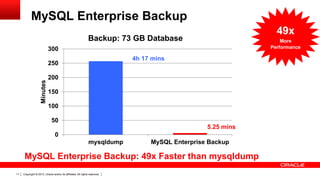
MySQL Enterprise Backup
4h 17 mins
5.25 mins
0
50
100
150
200
250
300
mysqldump MySQL Enterprise Backup
Minutes
Backup: 73 GB Database
MySQL Enterprise Backup: 49x Faster than mysqldump
49x
More
Performance
Copyright © 2013, Oracle and/or its affiliates. All rights reserved.12
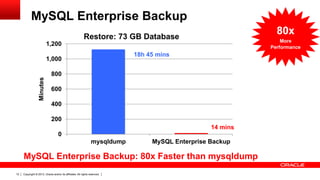
MySQL Enterprise Backup
MySQL Enterprise Backup: 80x Faster than mysqldump
18h 45 mins
14 mins
0
200
400
600
800
1,000
1,200
mysqldump MySQL Enterprise Backup
Minutes
Restore: 73 GB Database
80x
More
Performance
Copyright © 2013, Oracle and/or its affiliates. All rights reserved.13
MySQL Enterprise Backup
Copyright © 2013, Oracle and/or its affiliates. All rights reserved.14
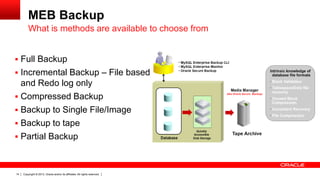
MEB Backup
 Full Backup
 Incremental Backup – File based
and Redo log only
 Compressed Backup
 Backup to Single File/Image
 Backup to tape
 Partial Backup
What is methods are available to choose from
Copyright © 2013, Oracle and/or its affiliates. All rights reserved.15
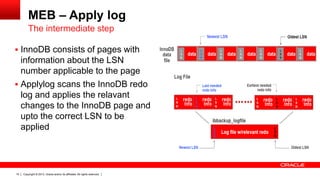
MEB – Apply log
 InnoDB consists of pages with
information about the LSN
number applicable to the page
 Applylog scans the InnoDB redo
log and applies the relavant
changes to the InnoDB page and
upto the correct LSN to be
applied
The intermediate step
Copyright © 2013, Oracle and/or its affiliates. All rights reserved.16
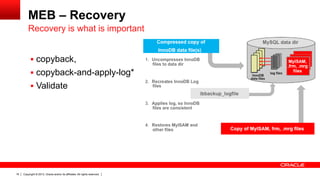
MEB – Recovery
 copyback,
 copyback-and-apply-log*
 Validate
Recovery is what is important
Copyright © 2013, Oracle and/or its affiliates. All rights reserved.17
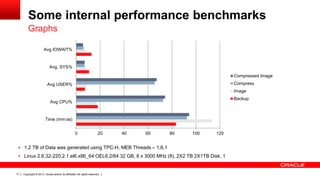
Some internal performance benchmarks
 1.2 TB of Data was generated using TPC-H, MEB Threads – 1,6,1
 Linux 2.6.32-220.2.1.el6.x86_64 OEL6.2/64 32 GB, 8 x 3000 MHz (8), 2X2 TB 2X1TB Disk, 1
Graphs
0 20 40 60 80 100 120
Time (mm:ss)
Avg CPU%
Avg USER%
Avg. SYS%
Avg IOWAIT%
Compressed Image
Compress
Image
Backup
Copyright © 2013, Oracle and/or its affiliates. All rights reserved.18
Workbench
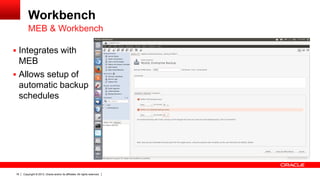
MEB & Workbench
 Integrates with
MEB
 Allows setup of
automatic backup
schedules
Copyright © 2013, Oracle and/or its affiliates. All rights reserved.19
Workbench
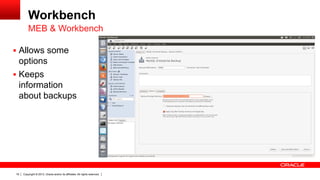
MEB & Workbench
 Allows some
options
 Keeps
information
about backups
Copyright © 2013, Oracle and/or its affiliates. All rights reserved.20
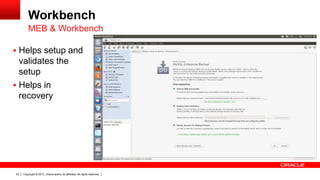
Workbench
MEB & Workbench
 Helps setup and
validates the
setup
 Helps in
recovery
Copyright © 2013, Oracle and/or its affiliates. All rights reserved.21
What’s New in MEB 3.9
 New! Single Step
– Restore directly.
 New! Selective
– Leverages TTS
– Great for large tables
 New! Skip Unused Pages
– Reduces space
 New! Full Instance
– Config/Settings/…
 Continuous progress
– %, Bytes, Status
 Monitor disk space
– Optional action : Warn & Retry, Abort,
Remove
Copyright © 2013, Oracle and/or its affiliates. All rights reserved.22
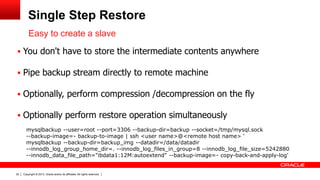
Single Step Restore
 You don't have to store the intermediate contents anywhere
 Pipe backup stream directly to remote machine
 Optionally, perform compression /decompression on the fly
 Optionally perform restore operation simultaneously
Easy to create a slave
mysqlbackup --user=root --port=3306 --backup-dir=backup --socket=/tmp/mysql.sock
--backup-image=- backup-to-image | ssh <user name>@<remote host name> ‘
mysqlbackup --backup-dir=backup_img --datadir=/data/datadir
--innodb_log_group_home_dir=. --innodb_log_files_in_group=8 --innodb_log_file_size=5242880
--innodb_data_file_path="ibdata1:12M:autoextend" --backup-image=- copy-back-and-apply-log'
Copyright © 2013, Oracle and/or its affiliates. All rights reserved.23
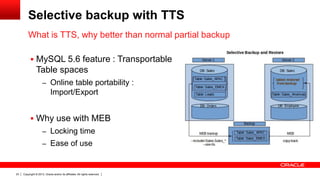
Selective backup with TTS
 MySQL 5.6 feature : Transportable
Table spaces
– Online table portability :
Import/Export
 Why use with MEB
– Locking time
– Ease of use
What is TTS, why better than normal partial backup
Copyright © 2013, Oracle and/or its affiliates. All rights reserved.24
Skip Unused pages
 InnoDB files don’t shrink
 A small DB has many unused pages
 There is a performance penalty
Cleaning up before a backup
Copyright © 2013, Oracle and/or its affiliates. All rights reserved.25
Blogs to read
 Backing up selective innodb tables using MEB.
 How to restore directly on a remote machine from the backup stream
 Skip Unused Pages with MySQL Enterprise Backup 3.9.0
 MySQL Enterprise Backup 3.9.0 – An Insight
 MEB : The journey so far 2010-2013
 Truly Parallel backup (MySQL Enterprise Backup 3.8 and later)
https://blogs.oracle.com/mysqlenterprisebackup/
Copyright © 2013, Oracle and/or its affiliates. All rights reserved.26
Oracle Secure Backup
Copyright © 2013, Oracle and/or its affiliates. All rights reserved.27
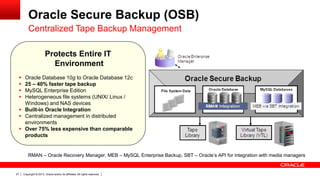
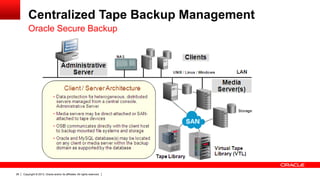
Oracle Secure Backup (OSB)
Centralized Tape Backup Management
RMAN – Oracle Recovery Manager, MEB – MySQL Enterprise Backup, SBT – Oracle’s API for integration with media managers
Protects Entire IT
Environment
 Oracle Database 10g to Oracle Database 12c
 25 – 40% faster tape backup
 MySQL Enterprise Edition
 Heterogeneous file systems (UNIX/ Linux /
Windows) and NAS devices
 Built-in Oracle Integration
 Centralized management in distributed
environments
 Over 75% less expensive than comparable
products
Copyright © 2013, Oracle and/or its affiliates. All rights reserved.28
Centralized Tape Backup Management
Oracle Secure Backup
Copyright © 2013, Oracle and/or its affiliates. All rights reserved.29
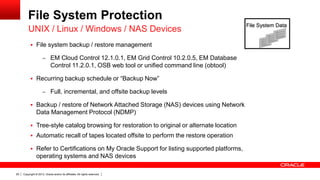
File System Protection
 File system backup / restore management
– EM Cloud Control 12.1.0.1, EM Grid Control 10.2.0.5, EM Database
Control 11.2.0.1, OSB web tool or unified command line (obtool)
 Recurring backup schedule or “Backup Now”
– Full, incremental, and offsite backup levels
 Backup / restore of Network Attached Storage (NAS) devices using Network
Data Management Protocol (NDMP)
 Tree-style catalog browsing for restoration to original or alternate location
 Automatic recall of tapes located offsite to perform the restore operation
 Refer to Certifications on My Oracle Support for listing supported platforms,
operating systems and NAS devices
UNIX / Linux / Windows / NAS Devices
File System Data
Copyright © 2013, Oracle and/or its affiliates. All rights reserved.30
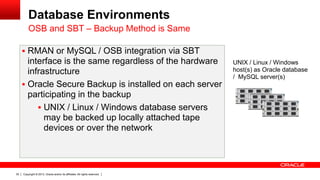
Database Environments
OSB and SBT – Backup Method is Same
 RMAN or MySQL / OSB integration via SBT
interface is the same regardless of the hardware
infrastructure
 Oracle Secure Backup is installed on each server
participating in the backup
 UNIX / Linux / Windows database servers
may be backed up locally attached tape
devices or over the network
UNIX / Linux / Windows
host(s) as Oracle database
/ MySQL server(s)
Copyright © 2013, Oracle and/or its affiliates. All rights reserved.31
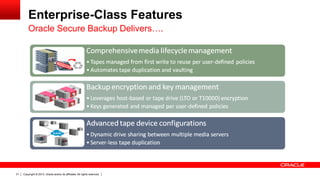
Enterprise-Class Features
Oracle Secure Backup Delivers….
Copyright © 2013, Oracle and/or its affiliates. All rights reserved.32
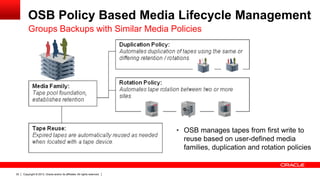
OSB Policy Based Media Lifecycle Management
Groups Backups with Similar Media Policies
• OSB manages tapes from first write to
reuse based on user-defined media
families, duplication and rotation policies
Copyright © 2013, Oracle and/or its affiliates. All rights reserved.33
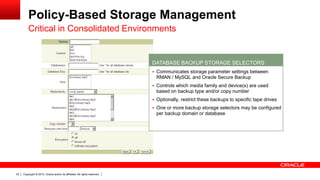
Policy-Based Storage Management
Critical in Consolidated Environments
 Communicates storage parameter settings between
RMAN / MySQL and Oracle Secure Backup
 Controls which media family and device(s) are used
based on backup type and/or copy number
 Optionally, restrict these backups to specific tape drives
 One or more backup storage selectors may be configured
per backup domain or database
DATABASE BACKUP STORAGE SELECTORS
Copyright © 2013, Oracle and/or its affiliates. All rights reserved.34
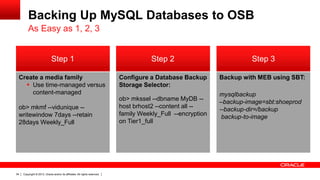
Backing Up MySQL Databases to OSB
As Easy as 1, 2, 3
Backup with MEB using SBT:
mysqlbackup
–backup-image=sbt:shoeprod
--backup-dir=/backup
backup-to-image
Step 2Step 1 Step 3
Configure a Database Backup
Storage Selector:
ob> mkssel --dbname MyDB --
host brhost2 --content all --
family Weekly_Full --encryption
on Tier1_full
Create a media family
 Use time-managed versus
content-managed
ob> mkmf --vidunique --
writewindow 7days --retain
28days Weekly_Full
Copyright © 2013, Oracle and/or its affiliates. All rights reserved.35
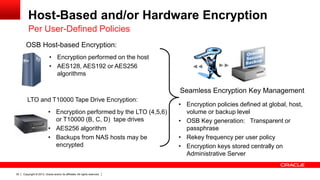
Host-Based and/or Hardware Encryption
Per User-Defined Policies
OSB Host-based Encryption:
• Encryption performed on the host
• AES128, AES192 or AES256
algorithms
LTO and T10000 Tape Drive Encryption:
• Encryption performed by the LTO (4,5,6)
or T10000 (B, C, D) tape drives
• AES256 algorithm
• Backups from NAS hosts may be
encrypted
Seamless Encryption Key Management
• Encryption policies defined at global, host,
volume or backup level
• OSB Key generation: Transparent or
passphrase
• Rekey frequency per user policy
• Encryption keys stored centrally on
Administrative Server
Copyright © 2013, Oracle and/or its affiliates. All rights reserved.36
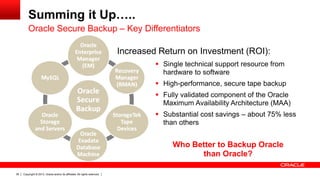
Summing it Up…..
Oracle Secure Backup – Key Differentiators
 Single technical support resource from
hardware to software
 High-performance, secure tape backup
 Fully validated component of the Oracle
Maximum Availability Architecture (MAA)
 Substantial cost savings – about 75% less
than others
Increased Return on Investment (ROI):
Who Better to Backup Oracle
than Oracle?
Copyright © 2013, Oracle and/or its affiliates. All rights reserved.37
Oracle Secure Backup Resources
 Oracle Secure Backup on OTN:
– www.oracle.com/goto/osb
 Oracle University Class:
– http://education.oracle.com/pls/web_prod-plq-
dad/db_pages.getCourseDesc?dc=D50313GC10
 Maximum Availability Architecture (MAA) Exadata backup white paper:
http://www.oracle.com/technetwork/database/features/availability/maa-tech-wp-sundbm-
backup-11202-183503.pdf
Copyright © 2013, Oracle and/or its affiliates. All rights reserved.38
Backup Strategy
Copyright © 2013, Oracle and/or its affiliates. All rights reserved.39
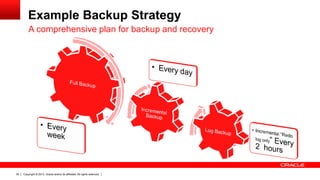
Example Backup Strategy
A comprehensive plan for backup and recovery
Copyright © 2013, Oracle and/or its affiliates. All rights reserved.40
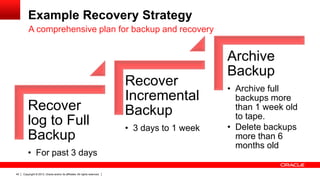
Example Recovery Strategy
A comprehensive plan for backup and recovery
Recover
log to Full
Backup
• For past 3 days
Recover
Incremental
Backup
• 3 days to 1 week
Archive
Backup
• Archive full
backups more
than 1 week old
to tape.
• Delete backups
more than 6
months old
Copyright © 2013, Oracle and/or its affiliates. All rights reserved.41
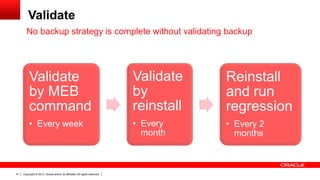
Validate
No backup strategy is complete without validating backup
Validate
by MEB
command
• Every week
Validate
by
reinstall
• Every
month
Reinstall
and run
regression
• Every 2
months
Copyright © 2013, Oracle and/or its affiliates. All rights reserved.42
References
 MySQL Enterprise Backup: Product Information
– www.mysql.com/products/enterprise/backup.html
 MySQL Enterprise Backup Team Blog
– https://blogs.oracle.com/mysqlenterprisebackup/
 MySQL Enterprise Backup: Documentation
– dev.mysql.com/doc/mysql-enterprise-backup/3.9/en/index.html
 How Do I get it
– https://edelivery.oracle.com
 Support and patches (My Oracle Support = MOS)
– https://support.oracle.com
Copyright © 2013, Oracle and/or its affiliates. All rights reserved.43
Copyright © 2013, Oracle and/or its affiliates. All rights reserved.44

MySQL Enterprise Backup & Oracle Secure Backup

  • 1.
    Copyright © 2013,Oracle and/or its affiliates. All rights reserved.1
  • 2.
    Copyright © 2013,Oracle and/or its affiliates. All rights reserved.2
  • 3.
    MySQL Enterprise Backup: Introductionand Working with Oracle Secure Backup Sanjay Manwani – MySQL India Director Donna Cooksey - Principal Product Manager
  • 4.
    Copyright © 2013,Oracle and/or its affiliates. All rights reserved.4 Program Agenda  Understanding Backup  MySQL Enterprise Backup (MEB)  Oracle Secure Backup  Backup Strategy
  • 5.
    Copyright © 2013,Oracle and/or its affiliates. All rights reserved.5 Understanding Backup
  • 6.
    Copyright © 2013,Oracle and/or its affiliates. All rights reserved.6 Why Backup is important  Audits  Disasters  Is HA setup a backup ?  Is LVM a backup ?
  • 7.
    Copyright © 2013,Oracle and/or its affiliates. All rights reserved.7 Types of Backup and Tools for these types  Logical – Mysqldump – Mysqldbexport/import  Physical – MySQL Enterprise Backup (MEB)
  • 8.
    Copyright © 2013,Oracle and/or its affiliates. All rights reserved.8 Logical Backup  Advantages – Easy of use - simple commands allow you to easily backup and restore – Good for small database or tables – minimum impact on backup and restore performance – Flexibility – logical backup allows you to choose what you want to backup and not backup. Change the scripts to restore partially etc. – Readability - Good assurance that database files are not corrupt - all the data is read and it is read using standard SQL queries. Collection of SQL Queries to recreate the database
  • 9.
    Copyright © 2013,Oracle and/or its affiliates. All rights reserved.9 Logical Backup  Disadvantages – Not an online solution - write operations are locked while performing the backup, thereby blocking use of the database. – Poor performance for larger databases – backup and especially restore times are very slow for larger databases. – No incremental backup – all backups are full backups, can be time consuming and require more storage. Collection of SQL Queries to recreate the database
  • 10.
    Copyright © 2013,Oracle and/or its affiliates. All rights reserved.10 Physical Backup (MEB)  Advantages – Performance –faster for backups and faster for restore – Flexible – support for incremental backups, partial backups, backup compression, point in time recovery and more. – Archival Backups – suitable archival format for historical purposes – Scalable – performance is near linear for larger databases. – Consistent – delivers consistent point in time recovery Copy of the internal files that constitute the MySQL database
  • 11.
    Copyright © 2013,Oracle and/or its affiliates. All rights reserved.11 MySQL Enterprise Backup 4h 17 mins 5.25 mins 0 50 100 150 200 250 300 mysqldump MySQL Enterprise Backup Minutes Backup: 73 GB Database MySQL Enterprise Backup: 49x Faster than mysqldump 49x More Performance
  • 12.
    Copyright © 2013,Oracle and/or its affiliates. All rights reserved.12 MySQL Enterprise Backup MySQL Enterprise Backup: 80x Faster than mysqldump 18h 45 mins 14 mins 0 200 400 600 800 1,000 1,200 mysqldump MySQL Enterprise Backup Minutes Restore: 73 GB Database 80x More Performance
  • 13.
    Copyright © 2013,Oracle and/or its affiliates. All rights reserved.13 MySQL Enterprise Backup
  • 14.
    Copyright © 2013,Oracle and/or its affiliates. All rights reserved.14 MEB Backup  Full Backup  Incremental Backup – File based and Redo log only  Compressed Backup  Backup to Single File/Image  Backup to tape  Partial Backup What is methods are available to choose from
  • 15.
    Copyright © 2013,Oracle and/or its affiliates. All rights reserved.15 MEB – Apply log  InnoDB consists of pages with information about the LSN number applicable to the page  Applylog scans the InnoDB redo log and applies the relavant changes to the InnoDB page and upto the correct LSN to be applied The intermediate step
  • 16.
    Copyright © 2013,Oracle and/or its affiliates. All rights reserved.16 MEB – Recovery  copyback,  copyback-and-apply-log*  Validate Recovery is what is important
  • 17.
    Copyright © 2013,Oracle and/or its affiliates. All rights reserved.17 Some internal performance benchmarks  1.2 TB of Data was generated using TPC-H, MEB Threads – 1,6,1  Linux 2.6.32-220.2.1.el6.x86_64 OEL6.2/64 32 GB, 8 x 3000 MHz (8), 2X2 TB 2X1TB Disk, 1 Graphs 0 20 40 60 80 100 120 Time (mm:ss) Avg CPU% Avg USER% Avg. SYS% Avg IOWAIT% Compressed Image Compress Image Backup
  • 18.
    Copyright © 2013,Oracle and/or its affiliates. All rights reserved.18 Workbench MEB & Workbench  Integrates with MEB  Allows setup of automatic backup schedules
  • 19.
    Copyright © 2013,Oracle and/or its affiliates. All rights reserved.19 Workbench MEB & Workbench  Allows some options  Keeps information about backups
  • 20.
    Copyright © 2013,Oracle and/or its affiliates. All rights reserved.20 Workbench MEB & Workbench  Helps setup and validates the setup  Helps in recovery
  • 21.
    Copyright © 2013,Oracle and/or its affiliates. All rights reserved.21 What’s New in MEB 3.9  New! Single Step – Restore directly.  New! Selective – Leverages TTS – Great for large tables  New! Skip Unused Pages – Reduces space  New! Full Instance – Config/Settings/…  Continuous progress – %, Bytes, Status  Monitor disk space – Optional action : Warn & Retry, Abort, Remove
  • 22.
    Copyright © 2013,Oracle and/or its affiliates. All rights reserved.22 Single Step Restore  You don't have to store the intermediate contents anywhere  Pipe backup stream directly to remote machine  Optionally, perform compression /decompression on the fly  Optionally perform restore operation simultaneously Easy to create a slave mysqlbackup --user=root --port=3306 --backup-dir=backup --socket=/tmp/mysql.sock --backup-image=- backup-to-image | ssh <user name>@<remote host name> ‘ mysqlbackup --backup-dir=backup_img --datadir=/data/datadir --innodb_log_group_home_dir=. --innodb_log_files_in_group=8 --innodb_log_file_size=5242880 --innodb_data_file_path="ibdata1:12M:autoextend" --backup-image=- copy-back-and-apply-log'
  • 23.
    Copyright © 2013,Oracle and/or its affiliates. All rights reserved.23 Selective backup with TTS  MySQL 5.6 feature : Transportable Table spaces – Online table portability : Import/Export  Why use with MEB – Locking time – Ease of use What is TTS, why better than normal partial backup
  • 24.
    Copyright © 2013,Oracle and/or its affiliates. All rights reserved.24 Skip Unused pages  InnoDB files don’t shrink  A small DB has many unused pages  There is a performance penalty Cleaning up before a backup
  • 25.
    Copyright © 2013,Oracle and/or its affiliates. All rights reserved.25 Blogs to read  Backing up selective innodb tables using MEB.  How to restore directly on a remote machine from the backup stream  Skip Unused Pages with MySQL Enterprise Backup 3.9.0  MySQL Enterprise Backup 3.9.0 – An Insight  MEB : The journey so far 2010-2013  Truly Parallel backup (MySQL Enterprise Backup 3.8 and later) https://blogs.oracle.com/mysqlenterprisebackup/
  • 26.
    Copyright © 2013,Oracle and/or its affiliates. All rights reserved.26 Oracle Secure Backup
  • 27.
    Copyright © 2013,Oracle and/or its affiliates. All rights reserved.27 Oracle Secure Backup (OSB) Centralized Tape Backup Management RMAN – Oracle Recovery Manager, MEB – MySQL Enterprise Backup, SBT – Oracle’s API for integration with media managers Protects Entire IT Environment  Oracle Database 10g to Oracle Database 12c  25 – 40% faster tape backup  MySQL Enterprise Edition  Heterogeneous file systems (UNIX/ Linux / Windows) and NAS devices  Built-in Oracle Integration  Centralized management in distributed environments  Over 75% less expensive than comparable products
  • 28.
    Copyright © 2013,Oracle and/or its affiliates. All rights reserved.28 Centralized Tape Backup Management Oracle Secure Backup
  • 29.
    Copyright © 2013,Oracle and/or its affiliates. All rights reserved.29 File System Protection  File system backup / restore management – EM Cloud Control 12.1.0.1, EM Grid Control 10.2.0.5, EM Database Control 11.2.0.1, OSB web tool or unified command line (obtool)  Recurring backup schedule or “Backup Now” – Full, incremental, and offsite backup levels  Backup / restore of Network Attached Storage (NAS) devices using Network Data Management Protocol (NDMP)  Tree-style catalog browsing for restoration to original or alternate location  Automatic recall of tapes located offsite to perform the restore operation  Refer to Certifications on My Oracle Support for listing supported platforms, operating systems and NAS devices UNIX / Linux / Windows / NAS Devices File System Data
  • 30.
    Copyright © 2013,Oracle and/or its affiliates. All rights reserved.30 Database Environments OSB and SBT – Backup Method is Same  RMAN or MySQL / OSB integration via SBT interface is the same regardless of the hardware infrastructure  Oracle Secure Backup is installed on each server participating in the backup  UNIX / Linux / Windows database servers may be backed up locally attached tape devices or over the network UNIX / Linux / Windows host(s) as Oracle database / MySQL server(s)
  • 31.
    Copyright © 2013,Oracle and/or its affiliates. All rights reserved.31 Enterprise-Class Features Oracle Secure Backup Delivers….
  • 32.
    Copyright © 2013,Oracle and/or its affiliates. All rights reserved.32 OSB Policy Based Media Lifecycle Management Groups Backups with Similar Media Policies • OSB manages tapes from first write to reuse based on user-defined media families, duplication and rotation policies
  • 33.
    Copyright © 2013,Oracle and/or its affiliates. All rights reserved.33 Policy-Based Storage Management Critical in Consolidated Environments  Communicates storage parameter settings between RMAN / MySQL and Oracle Secure Backup  Controls which media family and device(s) are used based on backup type and/or copy number  Optionally, restrict these backups to specific tape drives  One or more backup storage selectors may be configured per backup domain or database DATABASE BACKUP STORAGE SELECTORS
  • 34.
    Copyright © 2013,Oracle and/or its affiliates. All rights reserved.34 Backing Up MySQL Databases to OSB As Easy as 1, 2, 3 Backup with MEB using SBT: mysqlbackup –backup-image=sbt:shoeprod --backup-dir=/backup backup-to-image Step 2Step 1 Step 3 Configure a Database Backup Storage Selector: ob> mkssel --dbname MyDB -- host brhost2 --content all -- family Weekly_Full --encryption on Tier1_full Create a media family  Use time-managed versus content-managed ob> mkmf --vidunique -- writewindow 7days --retain 28days Weekly_Full
  • 35.
    Copyright © 2013,Oracle and/or its affiliates. All rights reserved.35 Host-Based and/or Hardware Encryption Per User-Defined Policies OSB Host-based Encryption: • Encryption performed on the host • AES128, AES192 or AES256 algorithms LTO and T10000 Tape Drive Encryption: • Encryption performed by the LTO (4,5,6) or T10000 (B, C, D) tape drives • AES256 algorithm • Backups from NAS hosts may be encrypted Seamless Encryption Key Management • Encryption policies defined at global, host, volume or backup level • OSB Key generation: Transparent or passphrase • Rekey frequency per user policy • Encryption keys stored centrally on Administrative Server
  • 36.
    Copyright © 2013,Oracle and/or its affiliates. All rights reserved.36 Summing it Up….. Oracle Secure Backup – Key Differentiators  Single technical support resource from hardware to software  High-performance, secure tape backup  Fully validated component of the Oracle Maximum Availability Architecture (MAA)  Substantial cost savings – about 75% less than others Increased Return on Investment (ROI): Who Better to Backup Oracle than Oracle?
  • 37.
    Copyright © 2013,Oracle and/or its affiliates. All rights reserved.37 Oracle Secure Backup Resources  Oracle Secure Backup on OTN: – www.oracle.com/goto/osb  Oracle University Class: – http://education.oracle.com/pls/web_prod-plq- dad/db_pages.getCourseDesc?dc=D50313GC10  Maximum Availability Architecture (MAA) Exadata backup white paper: http://www.oracle.com/technetwork/database/features/availability/maa-tech-wp-sundbm- backup-11202-183503.pdf
  • 38.
    Copyright © 2013,Oracle and/or its affiliates. All rights reserved.38 Backup Strategy
  • 39.
    Copyright © 2013,Oracle and/or its affiliates. All rights reserved.39 Example Backup Strategy A comprehensive plan for backup and recovery
  • 40.
    Copyright © 2013,Oracle and/or its affiliates. All rights reserved.40 Example Recovery Strategy A comprehensive plan for backup and recovery Recover log to Full Backup • For past 3 days Recover Incremental Backup • 3 days to 1 week Archive Backup • Archive full backups more than 1 week old to tape. • Delete backups more than 6 months old
  • 41.
    Copyright © 2013,Oracle and/or its affiliates. All rights reserved.41 Validate No backup strategy is complete without validating backup Validate by MEB command • Every week Validate by reinstall • Every month Reinstall and run regression • Every 2 months
  • 42.
    Copyright © 2013,Oracle and/or its affiliates. All rights reserved.42 References  MySQL Enterprise Backup: Product Information – www.mysql.com/products/enterprise/backup.html  MySQL Enterprise Backup Team Blog – https://blogs.oracle.com/mysqlenterprisebackup/  MySQL Enterprise Backup: Documentation – dev.mysql.com/doc/mysql-enterprise-backup/3.9/en/index.html  How Do I get it – https://edelivery.oracle.com  Support and patches (My Oracle Support = MOS) – https://support.oracle.com
  • 43.
    Copyright © 2013,Oracle and/or its affiliates. All rights reserved.43
  • 44.
    Copyright © 2013,Oracle and/or its affiliates. All rights reserved.44