MYSQL DATA TYPES
http://www.mysqltutorial.org/mysql-
copy-database/
Create and Connect Database
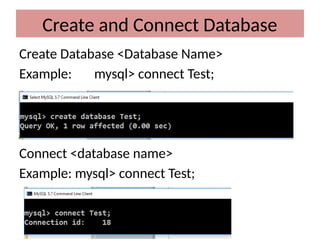
Create Database <Database Name>
Example: mysql> connect Test;
Connect <database name>
Example: mysql> connect Test;
MYSQL DATA TYPES
MySQL BIT
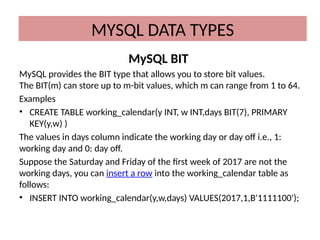
MySQL provides the BIT type that allows you to store bit values.
The BIT(m) can store up to m-bit values, which m can range from 1 to 64.
Examples
• CREATE TABLE working_calendar(y INT, w INT,days BIT(7), PRIMARY
KEY(y,w) )
The values in days column indicate the working day or day off i.e., 1:
working day and 0: day off.
Suppose the Saturday and Friday of the first week of 2017 are not the
working days, you can insert a row into the working_calendar table as
follows:
• INSERT INTO working_calendar(y,w,days) VALUES(2017,1,B'1111100');
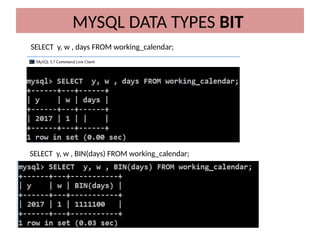
SELECT y, w , days FROM working_calendar;
MYSQL DATA TYPES BIT
SELECT y, w , BIN(days) FROM working_calendar;
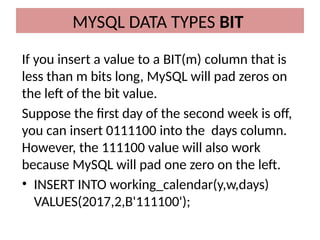
If you insert a value to a BIT(m) column that is
less than m bits long, MySQL will pad zeros on
the left of the bit value.
Suppose the first day of the second week is off,
you can insert 0111100 into the days column.
However, the 111100 value will also work
because MySQL will pad one zero on the left.
• INSERT INTO working_calendar(y,w,days)
VALUES(2017,2,B'111100');
MYSQL DATA TYPES BIT
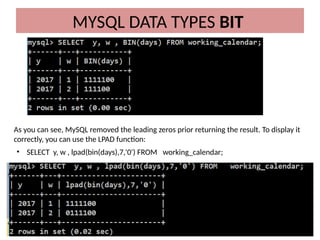
As you can see, MySQL removed the leading zeros prior returning the result. To display it
correctly, you can use the LPAD function:
• SELECT y, w , lpad(bin(days),7,'0') FROM working_calendar;
MySQL does not have built-in Boolean type.
However, it uses TINYINT(1) instead. To make it more
convenient, MySQL provides BOOLEAN or BOOL as
the synonym of TINYINT(1).
In MySQL, zero is considered as false, and non-zero
value is considered as true. To use Boolean literals,
you use the constants TRUE and FALSE that evaluate
to 1 and 0 respectively. See the following example:
MYSQL DATA TYPES
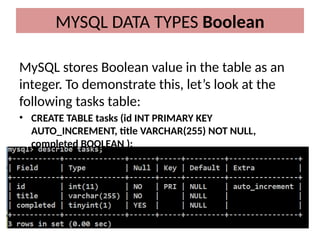
MySQL stores Boolean value in the table as an
integer. To demonstrate this, let’s look at the
following tasks table:
• CREATE TABLE tasks (id INT PRIMARY KEY
AUTO_INCREMENT, title VARCHAR(255) NOT NULL,
completed BOOLEAN );
MYSQL DATA TYPES Boolean
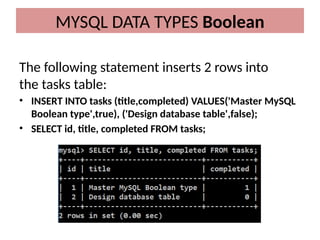
The following statement inserts 2 rows into
the tasks table:
• INSERT INTO tasks (title,completed) VALUES('Master MySQL
Boolean type',true), ('Design database table',false);
• SELECT id, title, completed FROM tasks;
MYSQL DATA TYPES Boolean
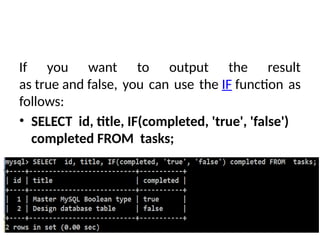
If you want to output the result
as true and false, you can use the IF function as
follows:
• SELECT id, title, IF(completed, 'true', 'false')
completed FROM tasks;
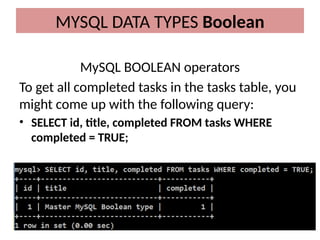
MySQL BOOLEAN operators
To get all completed tasks in the tasks table, you
might come up with the following query:
• SELECT id, title, completed FROM tasks WHERE
completed = TRUE;
MYSQL DATA TYPES Boolean
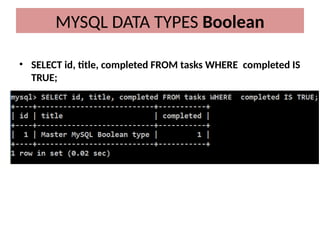
• SELECT id, title, completed FROM tasks WHERE completed IS
TRUE;
MYSQL DATA TYPES Boolean
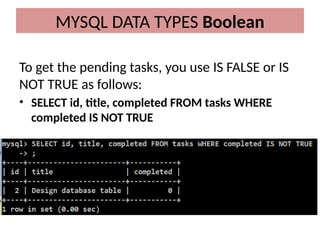
To get the pending tasks, you use IS FALSE or IS
NOT TRUE as follows:
• SELECT id, title, completed FROM tasks WHERE
completed IS NOT TRUE
MYSQL DATA TYPES Boolean
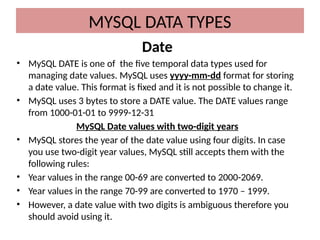
Date
• MySQL DATE is one of the five temporal data types used for
managing date values. MySQL uses yyyy-mm-dd format for storing
a date value. This format is fixed and it is not possible to change it.
• MySQL uses 3 bytes to store a DATE value. The DATE values range
from 1000-01-01 to 9999-12-31
MySQL Date values with two-digit years
• MySQL stores the year of the date value using four digits. In case
you use two-digit year values, MySQL still accepts them with the
following rules:
• Year values in the range 00-69 are converted to 2000-2069.
• Year values in the range 70-99 are converted to 1970 – 1999.
• However, a date value with two digits is ambiguous therefore you
should avoid using it.
MYSQL DATA TYPES
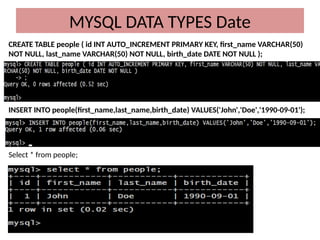
CREATE TABLE people ( id INT AUTO_INCREMENT PRIMARY KEY, first_name VARCHAR(50)
NOT NULL, last_name VARCHAR(50) NOT NULL, birth_date DATE NOT NULL );
INSERT INTO people(first_name,last_name,birth_date) VALUES('John','Doe','1990-09-01');
Select * from people;
MYSQL DATA TYPES Date
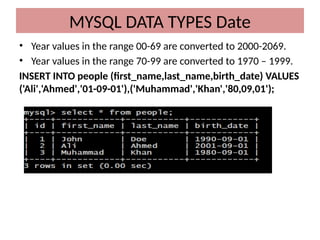
• Year values in the range 00-69 are converted to 2000-2069.
• Year values in the range 70-99 are converted to 1970 – 1999.
INSERT INTO people (first_name,last_name,birth_date) VALUES
('Ali','Ahmed','01-09-01'),('Muhammad','Khan','80,09,01');
MYSQL DATA TYPES Date
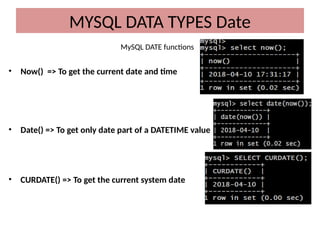
MySQL DATE functions
• Now() => To get the current date and time
• Date() => To get only date part of a DATETIME value
• CURDATE() => To get the current system date
MYSQL DATA TYPES Date
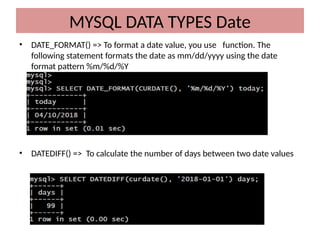
• DATE_FORMAT() => To format a date value, you use function. The
following statement formats the date as mm/dd/yyyy using the date
format pattern %m/%d/%Y
• DATEDIFF() => To calculate the number of days between two date values
MYSQL DATA TYPES Date
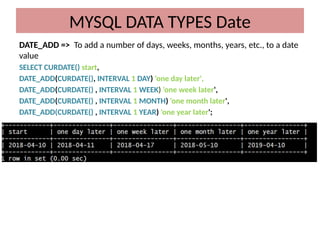
DATE_ADD => To add a number of days, weeks, months, years, etc., to a date
value
SELECT CURDATE() start,
DATE_ADD(CURDATE(), INTERVAL 1 DAY) 'one day later',
DATE_ADD(CURDATE() , INTERVAL 1 WEEK) 'one week later',
DATE_ADD(CURDATE() , INTERVAL 1 MONTH) 'one month later',
DATE_ADD(CURDATE() , INTERVAL 1 YEAR) 'one year later';
MYSQL DATA TYPES Date
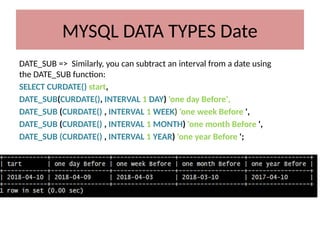
DATE_SUB => Similarly, you can subtract an interval from a date using
the DATE_SUB function:
SELECT CURDATE() start,
DATE_SUB(CURDATE(), INTERVAL 1 DAY) 'one day Before',
DATE_SUB (CURDATE() , INTERVAL 1 WEEK) 'one week Before ',
DATE_SUB (CURDATE() , INTERVAL 1 MONTH) 'one month Before ',
DATE_SUB (CURDATE() , INTERVAL 1 YEAR) 'one year Before ';
MYSQL DATA TYPES Date
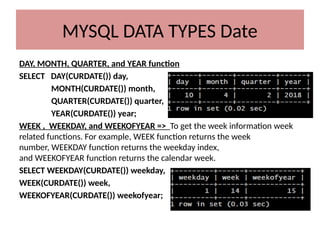
DAY, MONTH, QUARTER, and YEAR function
SELECT DAY(CURDATE()) day,
MONTH(CURDATE()) month,
QUARTER(CURDATE()) quarter,
YEAR(CURDATE()) year;
WEEK , WEEKDAY, and WEEKOFYEAR => To get the week information week
related functions. For example, WEEK function returns the week
number, WEEKDAY function returns the weekday index,
and WEEKOFYEAR function returns the calendar week.
SELECT WEEKDAY(CURDATE()) weekday,
WEEK(CURDATE()) week,
WEEKOFYEAR(CURDATE()) weekofyear;
MYSQL DATA TYPES Date
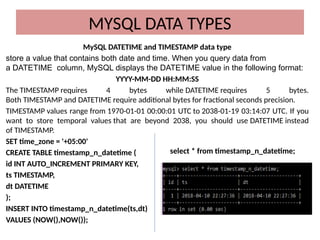
MySQL DATETIME and TIMESTAMP data type
store a value that contains both date and time. When you query data from
a DATETIME column, MySQL displays the DATETIME value in the following format:
YYYY-MM-DD HH:MM:SS
The TIMESTAMP requires 4 bytes while DATETIME requires 5 bytes.
Both TIMESTAMP and DATETIME require additional bytes for fractional seconds precision.
TIMESTAMP values range from 1970-01-01 00:00:01 UTC to 2038-01-19 03:14:07 UTC. If you
want to store temporal values that are beyond 2038, you should use DATETIME instead
of TIMESTAMP.
SET time_zone = '+05:00'
CREATE TABLE timestamp_n_datetime (
id INT AUTO_INCREMENT PRIMARY KEY,
ts TIMESTAMP,
dt DATETIME
);
INSERT INTO timestamp_n_datetime(ts,dt)
VALUES (NOW(),NOW());
MYSQL DATA TYPES
select * from timestamp_n_datetime;
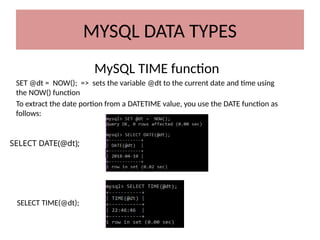
MySQL TIME function
SET @dt = NOW(); => sets the variable @dt to the current date and time using
the NOW() function
To extract the date portion from a DATETIME value, you use the DATE function as
follows:
SELECT TIME(@dt);
SELECT DATE(@dt);
MYSQL DATA TYPES
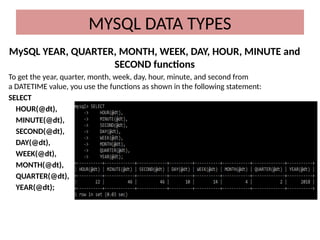
MySQL YEAR, QUARTER, MONTH, WEEK, DAY, HOUR, MINUTE and
SECOND functions
To get the year, quarter, month, week, day, hour, minute, and second from
a DATETIME value, you use the functions as shown in the following statement:
SELECT
HOUR(@dt),
MINUTE(@dt),
SECOND(@dt),
DAY(@dt),
WEEK(@dt),
MONTH(@dt),
QUARTER(@dt),
YEAR(@dt);
MYSQL DATA TYPES
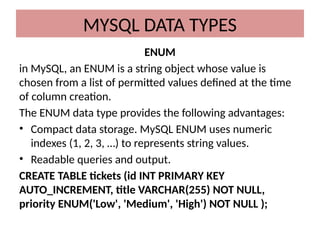
ENUM
in MySQL, an ENUM is a string object whose value is
chosen from a list of permitted values defined at the time
of column creation.
The ENUM data type provides the following advantages:
• Compact data storage. MySQL ENUM uses numeric
indexes (1, 2, 3, …) to represents string values.
• Readable queries and output.
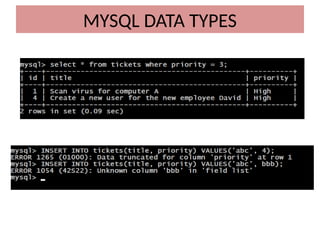
CREATE TABLE tickets (id INT PRIMARY KEY
AUTO_INCREMENT, title VARCHAR(255) NOT NULL,
priority ENUM('Low', 'Medium', 'High') NOT NULL );
MYSQL DATA TYPES
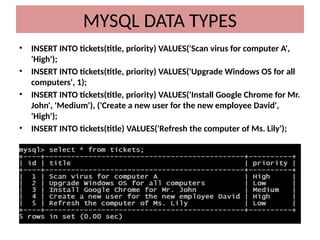
• INSERT INTO tickets(title, priority) VALUES('Scan virus for computer A',
'High');
• INSERT INTO tickets(title, priority) VALUES('Upgrade Windows OS for all
computers', 1);
• INSERT INTO tickets(title, priority) VALUES('Install Google Chrome for Mr.
John', 'Medium'), ('Create a new user for the new employee David',
'High');
• INSERT INTO tickets(title) VALUES('Refresh the computer of Ms. Lily');
MYSQL DATA TYPES
MYSQL DATA TYPES
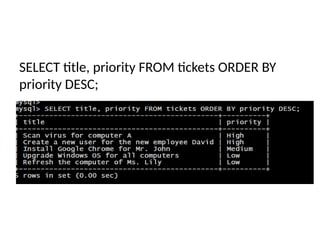
SELECT title, priority FROM tickets ORDER BY
priority DESC;

MYSQL DATA TYPES for newbies helpful.pptx

  • 1.
  • 2.
    Create and ConnectDatabase Create Database <Database Name> Example: mysql> connect Test; Connect <database name> Example: mysql> connect Test;
  • 3.
    MYSQL DATA TYPES MySQLBIT MySQL provides the BIT type that allows you to store bit values. The BIT(m) can store up to m-bit values, which m can range from 1 to 64. Examples • CREATE TABLE working_calendar(y INT, w INT,days BIT(7), PRIMARY KEY(y,w) ) The values in days column indicate the working day or day off i.e., 1: working day and 0: day off. Suppose the Saturday and Friday of the first week of 2017 are not the working days, you can insert a row into the working_calendar table as follows: • INSERT INTO working_calendar(y,w,days) VALUES(2017,1,B'1111100');
  • 4.
    SELECT y, w, days FROM working_calendar; MYSQL DATA TYPES BIT SELECT y, w , BIN(days) FROM working_calendar;
  • 5.
    If you inserta value to a BIT(m) column that is less than m bits long, MySQL will pad zeros on the left of the bit value. Suppose the first day of the second week is off, you can insert 0111100 into the days column. However, the 111100 value will also work because MySQL will pad one zero on the left. • INSERT INTO working_calendar(y,w,days) VALUES(2017,2,B'111100'); MYSQL DATA TYPES BIT
  • 6.
    MYSQL DATA TYPESBIT As you can see, MySQL removed the leading zeros prior returning the result. To display it correctly, you can use the LPAD function: • SELECT y, w , lpad(bin(days),7,'0') FROM working_calendar;
  • 7.
    MySQL does nothave built-in Boolean type. However, it uses TINYINT(1) instead. To make it more convenient, MySQL provides BOOLEAN or BOOL as the synonym of TINYINT(1). In MySQL, zero is considered as false, and non-zero value is considered as true. To use Boolean literals, you use the constants TRUE and FALSE that evaluate to 1 and 0 respectively. See the following example: MYSQL DATA TYPES
  • 8.
    MySQL stores Booleanvalue in the table as an integer. To demonstrate this, let’s look at the following tasks table: • CREATE TABLE tasks (id INT PRIMARY KEY AUTO_INCREMENT, title VARCHAR(255) NOT NULL, completed BOOLEAN ); MYSQL DATA TYPES Boolean
  • 9.
    The following statementinserts 2 rows into the tasks table: • INSERT INTO tasks (title,completed) VALUES('Master MySQL Boolean type',true), ('Design database table',false); • SELECT id, title, completed FROM tasks; MYSQL DATA TYPES Boolean
  • 10.
    If you wantto output the result as true and false, you can use the IF function as follows: • SELECT id, title, IF(completed, 'true', 'false') completed FROM tasks;
  • 11.
    MySQL BOOLEAN operators Toget all completed tasks in the tasks table, you might come up with the following query: • SELECT id, title, completed FROM tasks WHERE completed = TRUE; MYSQL DATA TYPES Boolean
  • 12.
    • SELECT id,title, completed FROM tasks WHERE completed IS TRUE; MYSQL DATA TYPES Boolean
  • 13.
    To get thepending tasks, you use IS FALSE or IS NOT TRUE as follows: • SELECT id, title, completed FROM tasks WHERE completed IS NOT TRUE MYSQL DATA TYPES Boolean
  • 14.
    Date • MySQL DATEis one of the five temporal data types used for managing date values. MySQL uses yyyy-mm-dd format for storing a date value. This format is fixed and it is not possible to change it. • MySQL uses 3 bytes to store a DATE value. The DATE values range from 1000-01-01 to 9999-12-31 MySQL Date values with two-digit years • MySQL stores the year of the date value using four digits. In case you use two-digit year values, MySQL still accepts them with the following rules: • Year values in the range 00-69 are converted to 2000-2069. • Year values in the range 70-99 are converted to 1970 – 1999. • However, a date value with two digits is ambiguous therefore you should avoid using it. MYSQL DATA TYPES
  • 15.
    CREATE TABLE people( id INT AUTO_INCREMENT PRIMARY KEY, first_name VARCHAR(50) NOT NULL, last_name VARCHAR(50) NOT NULL, birth_date DATE NOT NULL ); INSERT INTO people(first_name,last_name,birth_date) VALUES('John','Doe','1990-09-01'); Select * from people; MYSQL DATA TYPES Date
  • 16.
    • Year valuesin the range 00-69 are converted to 2000-2069. • Year values in the range 70-99 are converted to 1970 – 1999. INSERT INTO people (first_name,last_name,birth_date) VALUES ('Ali','Ahmed','01-09-01'),('Muhammad','Khan','80,09,01'); MYSQL DATA TYPES Date
  • 17.
    MySQL DATE functions •Now() => To get the current date and time • Date() => To get only date part of a DATETIME value • CURDATE() => To get the current system date MYSQL DATA TYPES Date
  • 18.
    • DATE_FORMAT() =>To format a date value, you use function. The following statement formats the date as mm/dd/yyyy using the date format pattern %m/%d/%Y • DATEDIFF() => To calculate the number of days between two date values MYSQL DATA TYPES Date
  • 19.
    DATE_ADD => Toadd a number of days, weeks, months, years, etc., to a date value SELECT CURDATE() start, DATE_ADD(CURDATE(), INTERVAL 1 DAY) 'one day later', DATE_ADD(CURDATE() , INTERVAL 1 WEEK) 'one week later', DATE_ADD(CURDATE() , INTERVAL 1 MONTH) 'one month later', DATE_ADD(CURDATE() , INTERVAL 1 YEAR) 'one year later'; MYSQL DATA TYPES Date
  • 20.
    DATE_SUB => Similarly,you can subtract an interval from a date using the DATE_SUB function: SELECT CURDATE() start, DATE_SUB(CURDATE(), INTERVAL 1 DAY) 'one day Before', DATE_SUB (CURDATE() , INTERVAL 1 WEEK) 'one week Before ', DATE_SUB (CURDATE() , INTERVAL 1 MONTH) 'one month Before ', DATE_SUB (CURDATE() , INTERVAL 1 YEAR) 'one year Before '; MYSQL DATA TYPES Date
  • 21.
    DAY, MONTH, QUARTER,and YEAR function SELECT DAY(CURDATE()) day, MONTH(CURDATE()) month, QUARTER(CURDATE()) quarter, YEAR(CURDATE()) year; WEEK , WEEKDAY, and WEEKOFYEAR => To get the week information week related functions. For example, WEEK function returns the week number, WEEKDAY function returns the weekday index, and WEEKOFYEAR function returns the calendar week. SELECT WEEKDAY(CURDATE()) weekday, WEEK(CURDATE()) week, WEEKOFYEAR(CURDATE()) weekofyear; MYSQL DATA TYPES Date
  • 22.
    MySQL DATETIME andTIMESTAMP data type store a value that contains both date and time. When you query data from a DATETIME column, MySQL displays the DATETIME value in the following format: YYYY-MM-DD HH:MM:SS The TIMESTAMP requires 4 bytes while DATETIME requires 5 bytes. Both TIMESTAMP and DATETIME require additional bytes for fractional seconds precision. TIMESTAMP values range from 1970-01-01 00:00:01 UTC to 2038-01-19 03:14:07 UTC. If you want to store temporal values that are beyond 2038, you should use DATETIME instead of TIMESTAMP. SET time_zone = '+05:00' CREATE TABLE timestamp_n_datetime ( id INT AUTO_INCREMENT PRIMARY KEY, ts TIMESTAMP, dt DATETIME ); INSERT INTO timestamp_n_datetime(ts,dt) VALUES (NOW(),NOW()); MYSQL DATA TYPES select * from timestamp_n_datetime;
  • 23.
    MySQL TIME function SET@dt = NOW(); => sets the variable @dt to the current date and time using the NOW() function To extract the date portion from a DATETIME value, you use the DATE function as follows: SELECT TIME(@dt); SELECT DATE(@dt); MYSQL DATA TYPES
  • 24.
    MySQL YEAR, QUARTER,MONTH, WEEK, DAY, HOUR, MINUTE and SECOND functions To get the year, quarter, month, week, day, hour, minute, and second from a DATETIME value, you use the functions as shown in the following statement: SELECT HOUR(@dt), MINUTE(@dt), SECOND(@dt), DAY(@dt), WEEK(@dt), MONTH(@dt), QUARTER(@dt), YEAR(@dt); MYSQL DATA TYPES
  • 25.
    ENUM in MySQL, anENUM is a string object whose value is chosen from a list of permitted values defined at the time of column creation. The ENUM data type provides the following advantages: • Compact data storage. MySQL ENUM uses numeric indexes (1, 2, 3, …) to represents string values. • Readable queries and output. CREATE TABLE tickets (id INT PRIMARY KEY AUTO_INCREMENT, title VARCHAR(255) NOT NULL, priority ENUM('Low', 'Medium', 'High') NOT NULL ); MYSQL DATA TYPES
  • 26.
    • INSERT INTOtickets(title, priority) VALUES('Scan virus for computer A', 'High'); • INSERT INTO tickets(title, priority) VALUES('Upgrade Windows OS for all computers', 1); • INSERT INTO tickets(title, priority) VALUES('Install Google Chrome for Mr. John', 'Medium'), ('Create a new user for the new employee David', 'High'); • INSERT INTO tickets(title) VALUES('Refresh the computer of Ms. Lily'); MYSQL DATA TYPES
  • 27.
  • 28.
    SELECT title, priorityFROM tickets ORDER BY priority DESC;