MULE ESB- Munit
1
Objectives
 Learn about Munit
2
Test Driven Development with MUnit
Why Testing ?
 Iterate comfortably
 Tests act as descriptors of application-interaction
 Fast root cause analysis
 Less time debugging
 Confidence in your work
3
Test Driven Development
4
• Software development process that relies on repetitions of very short
development cycles
1. Write an initially failing test that defines desired behavior
2. Write the smallest / simplest solution to make the test pass
3. Re-run the test and verify it passes
4. Refactor into new code to acceptable standards
5. Repeat
Tools for testing
5
• JUnit
– Most used Java framework to write repeatable tests
– Requires a mocking framework such as Mockito to perform unit tests
• MUnit
– Mule testing framework
– Rich feature set built in, including mocking
– Written in XML or Java
– Test suites written in MUnit and JUnit can be included in Maven builds
• Supports continuous integration
About MUnit
6
• Testing framework that allows you to easily build automated tests for
your integrations and APIs
– Create your Mule test by writing Mule code
– Create your Mule test by writing Java code
• Fully integrated with Anypoint Studio, allowing you to create, design
and run MUnit tests just like you would Mule applications
• Fully integrated with Maven
– libraries are available within MuleSoft public nexus
– Placed as a test scope within Maven dependencies
– Triggered on the test phase
– Works with surefire-reports
Munit use-
7
• Integration
– Write test flows in Mule and/or Java code: Engage quickly
– Fully integrated with Maven: MUnit tests can be added to CI process
– Fully integrated with Surefire: Allows the generation of Surefire reports
• Mocking
– Selected inbound endpoints: i.e. AMQP, JMS, FTP
– Selected message processors: i.e. by defining the namespace and
name
(jira:create-group)
– Mock outbound endpoints: Enabling complete encapsulation of the
flow unit test
MUnit – Anypoint Studio integration
8
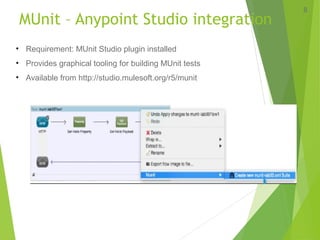
• Requirement: MUnit Studio plugin installed
• Provides graphical tooling for building MUnit tests
• Available from http://studio.mulesoft.org/r5/munit

Mule esb munit

  • 1.
  • 2.
  • 3.
    Test Driven Developmentwith MUnit Why Testing ?  Iterate comfortably  Tests act as descriptors of application-interaction  Fast root cause analysis  Less time debugging  Confidence in your work 3
  • 4.
    Test Driven Development 4 •Software development process that relies on repetitions of very short development cycles 1. Write an initially failing test that defines desired behavior 2. Write the smallest / simplest solution to make the test pass 3. Re-run the test and verify it passes 4. Refactor into new code to acceptable standards 5. Repeat
  • 5.
    Tools for testing 5 •JUnit – Most used Java framework to write repeatable tests – Requires a mocking framework such as Mockito to perform unit tests • MUnit – Mule testing framework – Rich feature set built in, including mocking – Written in XML or Java – Test suites written in MUnit and JUnit can be included in Maven builds • Supports continuous integration
  • 6.
    About MUnit 6 • Testingframework that allows you to easily build automated tests for your integrations and APIs – Create your Mule test by writing Mule code – Create your Mule test by writing Java code • Fully integrated with Anypoint Studio, allowing you to create, design and run MUnit tests just like you would Mule applications • Fully integrated with Maven – libraries are available within MuleSoft public nexus – Placed as a test scope within Maven dependencies – Triggered on the test phase – Works with surefire-reports
  • 7.
    Munit use- 7 • Integration –Write test flows in Mule and/or Java code: Engage quickly – Fully integrated with Maven: MUnit tests can be added to CI process – Fully integrated with Surefire: Allows the generation of Surefire reports • Mocking – Selected inbound endpoints: i.e. AMQP, JMS, FTP – Selected message processors: i.e. by defining the namespace and name (jira:create-group) – Mock outbound endpoints: Enabling complete encapsulation of the flow unit test
  • 8.
    MUnit – AnypointStudio integration 8 • Requirement: MUnit Studio plugin installed • Provides graphical tooling for building MUnit tests • Available from http://studio.mulesoft.org/r5/munit