Silverlight 2 "Tricks with the browser" Mike Taulty Developer & Platform Group Microsoft Ltd [email_address]   http://www.mtaulty.com  (/DevWeek.zip)
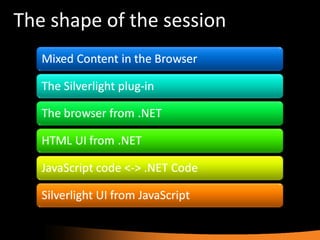
The shape of the session
Where we are up to
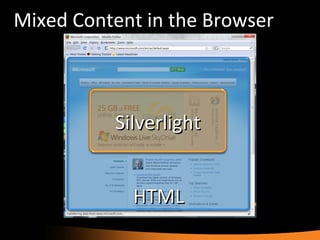
Mixed Content in the Browser HTML Silverlight
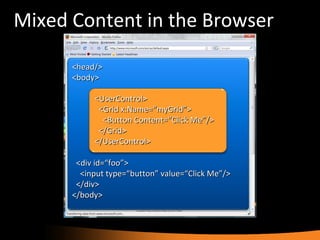
Mixed Content in the Browser <head/> <body> <div id=“foo”> <input type=“button” value=“Click Me”/> </div> </body> <UserControl> <Grid x:Name=“myGrid”> <Button Content=“Click Me”/> </Grid> </UserControl>
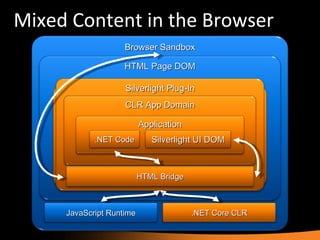
Mixed Content in the Browser Browser Sandbox JavaScript Runtime .NET Core CLR HTML Page DOM <body> <object id=“silverlightPlugIn1” type=&quot;application/x-silverlight-2&quot;> <param  name=&quot;source&quot;  value=&quot;myApp.xap&quot;/> </object> </body> Silverlight Plug-In HTML Bridge CLR App Domain Application .NET Code Silverlight UI DOM
Where we are up to
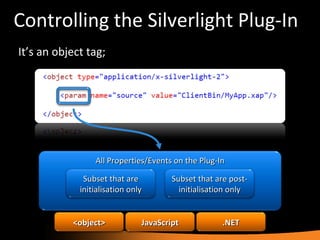
Controlling the Silverlight Plug-In It’s an object tag; All Properties/Events on the Plug-In Subset that are initialisation only Subset that are post-initialisation only <object> JavaScript .NET
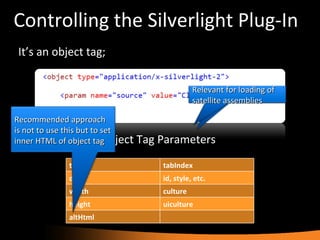
Controlling the Silverlight Plug-In It’s an object tag; Standard HTML Object Tag Parameters type tabIndex data id, style, etc. width culture height uiculture altHtml Recommended approach is not to use this but to set inner HTML of object tag Relevant for loading of satellite assemblies
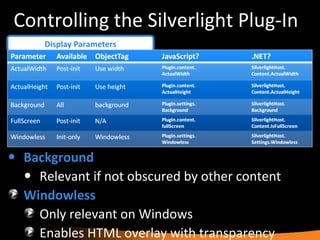
Controlling the Silverlight Plug-In Display Parameters Background   Relevant if not obscured by other content Windowless Only relevant on Windows Enables HTML overlay with transparency
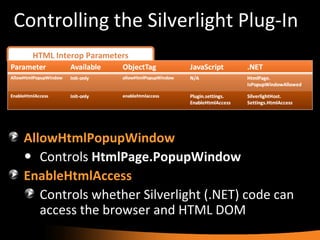
Controlling the Silverlight Plug-In HTML Interop Parameters AllowHtmlPopupWindow Controls  HtmlPage.PopupWindow EnableHtmlAccess Controls whether Silverlight (.NET) code can access the browser and HTML DOM
Controlling the Silverlight Plug-In Debugging/Analysis Parameters EnableRedrawRegions Visually highlight which areas are being re-painted
Controlling the Silverlight Plug-In Plugin Parameters AutoUpgrade   &   MinRuntimeVersion Only make sense together IsLoaded After XAML has loaded but before  OnLoad  event
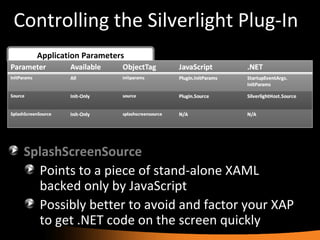
Controlling the Silverlight Plug-In Application Parameters SplashScreenSource Points to a piece of stand-alone XAML backed only by JavaScript Possibly better to avoid and factor your XAP to get .NET code on the screen quickly
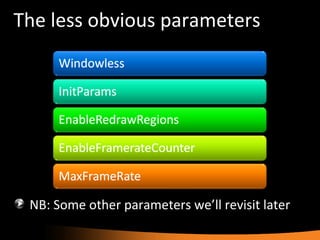
The less obvious parameters NB: Some other parameters we’ll revisit later
Controlling the Plug-In
Where we are up to
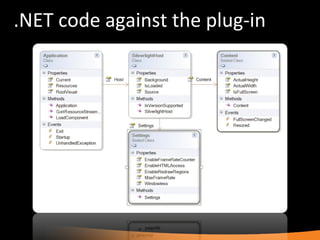
.NET code against the plug-in
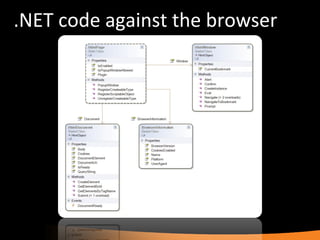
.NET code against the browser
.NET against the browser
Where we are up to
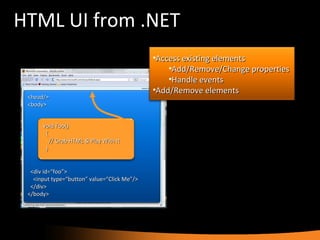
HTML UI from .NET <head/> <body> <div id=“foo”> <input type=“button” value=“Click Me”/> </div> </body> void Foo() { // Grab HTML & Play With It } Access existing elements Add/Remove/Change properties Handle events Add/Remove elements
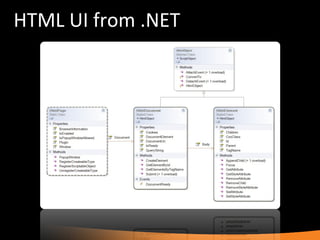
HTML UI from .NET
HTML UI from .NET
Where we are up to
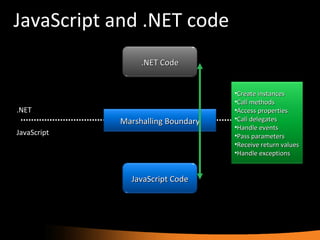
JavaScript and .NET code JavaScript .NET Marshalling Boundary .NET Code JavaScript Code Create instances Call methods Access properties Call delegates Handle events Pass parameters Receive return values Handle exceptions
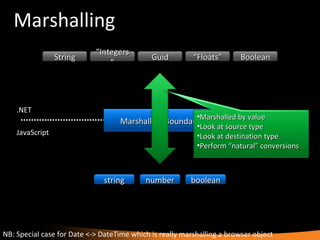
Marshalling JavaScript .NET NB: Special case for Date <-> DateTime which is really marshalling a browser object Marshalling Boundary string number boolean String “ Integers” Guid Boolean “ Floats” Marshalled by value Look at source type Look at destination type Perform “natural” conversions
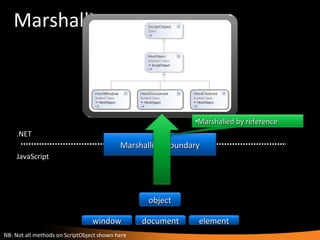
Marshalling JavaScript .NET NB: Not all methods on ScriptObject shown here Marshalling Boundary object window document element Marshalled by reference
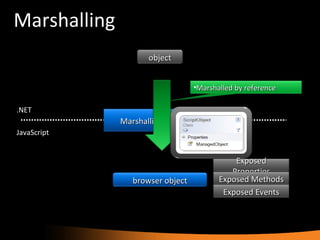
Marshalling JavaScript .NET Marshalling Boundary browser object object Marshalled by reference Exposed Properties Exposed Methods Exposed Events
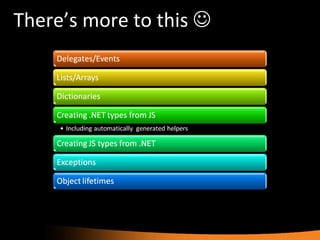
There’s more to this  
Tour of .NET <-> JavaScript
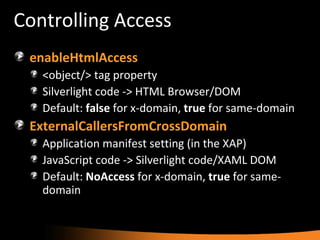
Controlling Access enableHtmlAccess <object/> tag property Silverlight code -> HTML Browser/DOM Default:  false  for x-domain,  true  for same-domain ExternalCallersFromCrossDomain Application manifest setting (in the XAP) JavaScript code -> Silverlight code/XAML DOM Default:  NoAccess  for x-domain,  true  for same-domain
Where we are up to
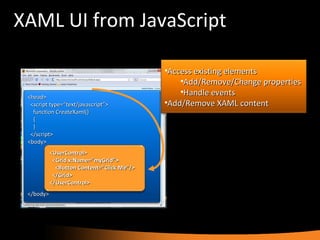
XAML UI from JavaScript <head> <script type=“text/javascript”> function CreateXaml() { } </script> <body> </body> Access existing elements Add/Remove/Change properties Handle events Add/Remove XAML content <UserControl> <Grid x:Name=“myGrid”> <Button Content=“Click Me”/> </Grid> </UserControl>
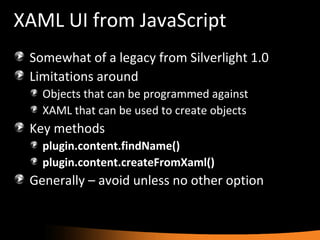
XAML UI from JavaScript Somewhat of a legacy from Silverlight 1.0 Limitations around Objects that can be programmed against XAML that can be used to create objects Key methods plugin.content.findName() plugin.content.createFromXaml() Generally – avoid unless no other option
XAML UI from JavaScript
Resources The one-stop-shop http://www.silverlight.net   The best blog post on the topic Wilco Bauwer on Silverlight Interop The somewhat obfuscated MSDN docs JavaScript API for Silverlight HTML Bridge: Interaction between HTML and .NET
Silverlight 2 &quot;Tricks with the browser&quot; Mike Taulty Developer & Platform Group Microsoft Ltd [email_address]   http://www.mtaulty.com  (/DevWeek.zip)
© 2008 Microsoft Corporation. All rights reserved. Microsoft, Windows, Windows Vista and other product names are or may be registered trademarks and/or trademarks in the U.S. and/or other countries. The information herein is for informational purposes only and represents the current view of Microsoft Corporation as of the date of this presentation.  Because Microsoft must respond to changing market conditions, it should not be interpreted to be a commitment on the part of Microsoft, and Microsoft cannot guarantee the accuracy of any information provided after the date of this presentation.  MICROSOFT MAKES NO WARRANTIES, EXPRESS, IMPLIED OR STATUTORY, AS TO THE INFORMATION IN THIS PRESENTATION.

MTaulty_DevWeek_Silverlight

  • 1.
    Silverlight 2 &quot;Trickswith the browser&quot; Mike Taulty Developer & Platform Group Microsoft Ltd [email_address] http://www.mtaulty.com (/DevWeek.zip)
  • 2.
    The shape ofthe session
  • 3.
  • 4.
    Mixed Content inthe Browser HTML Silverlight
  • 5.
    Mixed Content inthe Browser <head/> <body> <div id=“foo”> <input type=“button” value=“Click Me”/> </div> </body> <UserControl> <Grid x:Name=“myGrid”> <Button Content=“Click Me”/> </Grid> </UserControl>
  • 6.
    Mixed Content inthe Browser Browser Sandbox JavaScript Runtime .NET Core CLR HTML Page DOM <body> <object id=“silverlightPlugIn1” type=&quot;application/x-silverlight-2&quot;> <param name=&quot;source&quot; value=&quot;myApp.xap&quot;/> </object> </body> Silverlight Plug-In HTML Bridge CLR App Domain Application .NET Code Silverlight UI DOM
  • 7.
  • 8.
    Controlling the SilverlightPlug-In It’s an object tag; All Properties/Events on the Plug-In Subset that are initialisation only Subset that are post-initialisation only <object> JavaScript .NET
  • 9.
    Controlling the SilverlightPlug-In It’s an object tag; Standard HTML Object Tag Parameters type tabIndex data id, style, etc. width culture height uiculture altHtml Recommended approach is not to use this but to set inner HTML of object tag Relevant for loading of satellite assemblies
  • 10.
    Controlling the SilverlightPlug-In Display Parameters Background Relevant if not obscured by other content Windowless Only relevant on Windows Enables HTML overlay with transparency
  • 11.
    Controlling the SilverlightPlug-In HTML Interop Parameters AllowHtmlPopupWindow Controls HtmlPage.PopupWindow EnableHtmlAccess Controls whether Silverlight (.NET) code can access the browser and HTML DOM
  • 12.
    Controlling the SilverlightPlug-In Debugging/Analysis Parameters EnableRedrawRegions Visually highlight which areas are being re-painted
  • 13.
    Controlling the SilverlightPlug-In Plugin Parameters AutoUpgrade & MinRuntimeVersion Only make sense together IsLoaded After XAML has loaded but before OnLoad event
  • 14.
    Controlling the SilverlightPlug-In Application Parameters SplashScreenSource Points to a piece of stand-alone XAML backed only by JavaScript Possibly better to avoid and factor your XAP to get .NET code on the screen quickly
  • 15.
    The less obviousparameters NB: Some other parameters we’ll revisit later
  • 16.
  • 17.
  • 18.
    .NET code againstthe plug-in
  • 19.
    .NET code againstthe browser
  • 20.
  • 21.
  • 22.
    HTML UI from.NET <head/> <body> <div id=“foo”> <input type=“button” value=“Click Me”/> </div> </body> void Foo() { // Grab HTML & Play With It } Access existing elements Add/Remove/Change properties Handle events Add/Remove elements
  • 23.
  • 24.
  • 25.
  • 26.
    JavaScript and .NETcode JavaScript .NET Marshalling Boundary .NET Code JavaScript Code Create instances Call methods Access properties Call delegates Handle events Pass parameters Receive return values Handle exceptions
  • 27.
    Marshalling JavaScript .NETNB: Special case for Date <-> DateTime which is really marshalling a browser object Marshalling Boundary string number boolean String “ Integers” Guid Boolean “ Floats” Marshalled by value Look at source type Look at destination type Perform “natural” conversions
  • 28.
    Marshalling JavaScript .NETNB: Not all methods on ScriptObject shown here Marshalling Boundary object window document element Marshalled by reference
  • 29.
    Marshalling JavaScript .NETMarshalling Boundary browser object object Marshalled by reference Exposed Properties Exposed Methods Exposed Events
  • 30.
  • 31.
    Tour of .NET<-> JavaScript
  • 32.
    Controlling Access enableHtmlAccess<object/> tag property Silverlight code -> HTML Browser/DOM Default: false for x-domain, true for same-domain ExternalCallersFromCrossDomain Application manifest setting (in the XAP) JavaScript code -> Silverlight code/XAML DOM Default: NoAccess for x-domain, true for same-domain
  • 33.
  • 34.
    XAML UI fromJavaScript <head> <script type=“text/javascript”> function CreateXaml() { } </script> <body> </body> Access existing elements Add/Remove/Change properties Handle events Add/Remove XAML content <UserControl> <Grid x:Name=“myGrid”> <Button Content=“Click Me”/> </Grid> </UserControl>
  • 35.
    XAML UI fromJavaScript Somewhat of a legacy from Silverlight 1.0 Limitations around Objects that can be programmed against XAML that can be used to create objects Key methods plugin.content.findName() plugin.content.createFromXaml() Generally – avoid unless no other option
  • 36.
    XAML UI fromJavaScript
  • 37.
    Resources The one-stop-shophttp://www.silverlight.net The best blog post on the topic Wilco Bauwer on Silverlight Interop The somewhat obfuscated MSDN docs JavaScript API for Silverlight HTML Bridge: Interaction between HTML and .NET
  • 38.
    Silverlight 2 &quot;Trickswith the browser&quot; Mike Taulty Developer & Platform Group Microsoft Ltd [email_address] http://www.mtaulty.com (/DevWeek.zip)
  • 39.
    © 2008 MicrosoftCorporation. All rights reserved. Microsoft, Windows, Windows Vista and other product names are or may be registered trademarks and/or trademarks in the U.S. and/or other countries. The information herein is for informational purposes only and represents the current view of Microsoft Corporation as of the date of this presentation. Because Microsoft must respond to changing market conditions, it should not be interpreted to be a commitment on the part of Microsoft, and Microsoft cannot guarantee the accuracy of any information provided after the date of this presentation. MICROSOFT MAKES NO WARRANTIES, EXPRESS, IMPLIED OR STATUTORY, AS TO THE INFORMATION IN THIS PRESENTATION.

Editor's Notes

  • #2 06/08/09 15:52 © 2007 Microsoft Corporation. All rights reserved. Microsoft, Windows, Windows Vista and other product names are or may be registered trademarks and/or trademarks in the U.S. and/or other countries. The information herein is for informational purposes only and represents the current view of Microsoft Corporation as of the date of this presentation. Because Microsoft must respond to changing market conditions, it should not be interpreted to be a commitment on the part of Microsoft, and Microsoft cannot guarantee the accuracy of any information provided after the date of this presentation. MICROSOFT MAKES NO WARRANTIES, EXPRESS, IMPLIED OR STATUTORY, AS TO THE INFORMATION IN THIS PRESENTATION.