
Let’s develop Android apps using MOTODEV Studio for Android Eric Cloninger Senior Product Manager Motorola, Inc.
Hit the Ground Running Exercise due diligence  Make smart design choices Play nice with others Participate in the community Use the right tool(s) for the job #adevinar
Work with Motorola before, during, and after the development phase Participate in the Motorola App Accelerator Program developer.motorola.com /app-accelerator/ Provides early access to tools, SDK add-ons, technical specifications and documentation under NDA Localization services  Members-only support forums Alternate delivery channels for your app Virtual device lab Exercise due diligence #adevinar
Make smart design choices Do less with less Fully understand the Android application life cycle Use new APIs intelligently Keep workflows as simple as possible Design for fat fingers (and other edge cases) Smart layouts work on every phone The NDK causes as many problems as it solves Utilize the MOTODEV web site for technical specs, design ideas, and developer support developer.motorola.com   #adevinar
Play nice with others Show that your app is fast (even when it isn’t) Save your preferences quickly Let the phone ring It’s everyone’s battery Support rotation correctly Follow Google’s Best Practices developer.android.com/guide/practices/design/index.html   #adevinar
Participate in the community Get help, give help Google Groups  android-beginners ,  android-developers ,  android-discuss MOTODEV Community community.developer.motorola.com Local User Groups Where to contribute Google (OS/Tools) Eclipse Foundation (Tools & SDKs) Pulsar, JDT, CDT, Sequoyah OpenIntents (Components) #adevinar
Use the Right Tool(s) for the Job MOTODEV  Studio   for Android™ #adevinar
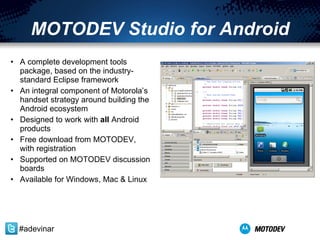
MOTODEV Studio for Android A complete development tools package, based on the industry-standard Eclipse framework An integral component of Motorola’s handset strategy around building the Android ecosystem Designed to work with  all  Android products Free download from MOTODEV, with registration Supported on MOTODEV discussion boards Available for Windows, Mac & Linux #adevinar
MOTODEV Studio vs. Eclipse MOTODEV Studio  is  the Eclipse IDE Eclipse projects open in Studio (and vice versa) Includes the Google plugins for Android development Strong emphasis on supporting the full development life cycle and the Android developer ecosystem  Support for Motorola handsets Useful features not found in Eclipse or Google plugins #adevinar
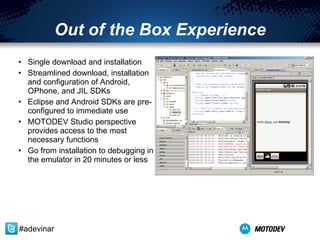
Out of the Box Experience Single download and installation Streamlined download, installation and configuration of Android, OPhone, and JIL SDKs Eclipse and Android SDKs are pre-configured to immediate use MOTODEV Studio perspective provides access to the most necessary functions Go from installation to debugging in the emulator in 20 minutes or less #adevinar
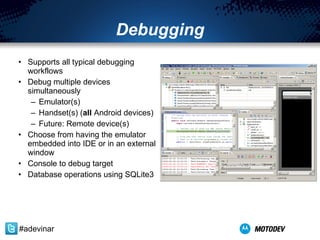
Debugging Supports all typical debugging workflows Debug multiple devices simultaneously Emulator(s) Handset(s) ( all  Android devices) Future: Remote device(s) Choose from having the emulator embedded into IDE or in an external window Console to debug target Database operations using SQLite3 #adevinar
Future directions The fine print… This page contains of forward looking statements. All items subject to change without notice. 1.2 version in mid-March Improve database management and localization tools Improve embedded emulator speed and performance Domain-specific tools (enterprise, games, multimedia) Static code analysis (e.g. permission scanning) Run-time diagnostic tools (profiling, code coverage) Better UI design tools Support for 64-bit OS (Windows 7, Ubuntu) Debugging of remote devices …  your ideas  … #adevinar
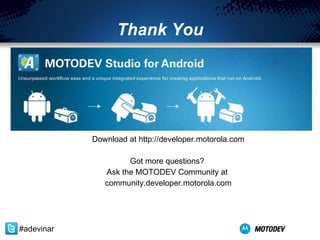
Thank You Download at  developer.motorola.com Got more questions?  Ask the MOTODEV Community at  community.developer.motorola.com Twitter Hashtag:  # adevinar

MOTODEV Studio for Android

  • 1.
    Let’s develop Androidapps using MOTODEV Studio for Android Eric Cloninger Senior Product Manager Motorola, Inc.
  • 2.
    Hit the GroundRunning Exercise due diligence Make smart design choices Play nice with others Participate in the community Use the right tool(s) for the job #adevinar
  • 3.
    Work with Motorolabefore, during, and after the development phase Participate in the Motorola App Accelerator Program developer.motorola.com /app-accelerator/ Provides early access to tools, SDK add-ons, technical specifications and documentation under NDA Localization services Members-only support forums Alternate delivery channels for your app Virtual device lab Exercise due diligence #adevinar
  • 4.
    Make smart designchoices Do less with less Fully understand the Android application life cycle Use new APIs intelligently Keep workflows as simple as possible Design for fat fingers (and other edge cases) Smart layouts work on every phone The NDK causes as many problems as it solves Utilize the MOTODEV web site for technical specs, design ideas, and developer support developer.motorola.com #adevinar
  • 5.
    Play nice withothers Show that your app is fast (even when it isn’t) Save your preferences quickly Let the phone ring It’s everyone’s battery Support rotation correctly Follow Google’s Best Practices developer.android.com/guide/practices/design/index.html #adevinar
  • 6.
    Participate in thecommunity Get help, give help Google Groups android-beginners , android-developers , android-discuss MOTODEV Community community.developer.motorola.com Local User Groups Where to contribute Google (OS/Tools) Eclipse Foundation (Tools & SDKs) Pulsar, JDT, CDT, Sequoyah OpenIntents (Components) #adevinar
  • 7.
    Use the RightTool(s) for the Job MOTODEV Studio for Android™ #adevinar
  • 8.
    MOTODEV Studio forAndroid A complete development tools package, based on the industry-standard Eclipse framework An integral component of Motorola’s handset strategy around building the Android ecosystem Designed to work with all Android products Free download from MOTODEV, with registration Supported on MOTODEV discussion boards Available for Windows, Mac & Linux #adevinar
  • 9.
    MOTODEV Studio vs.Eclipse MOTODEV Studio is the Eclipse IDE Eclipse projects open in Studio (and vice versa) Includes the Google plugins for Android development Strong emphasis on supporting the full development life cycle and the Android developer ecosystem Support for Motorola handsets Useful features not found in Eclipse or Google plugins #adevinar
  • 10.
    Out of theBox Experience Single download and installation Streamlined download, installation and configuration of Android, OPhone, and JIL SDKs Eclipse and Android SDKs are pre-configured to immediate use MOTODEV Studio perspective provides access to the most necessary functions Go from installation to debugging in the emulator in 20 minutes or less #adevinar
  • 11.
    Debugging Supports alltypical debugging workflows Debug multiple devices simultaneously Emulator(s) Handset(s) ( all Android devices) Future: Remote device(s) Choose from having the emulator embedded into IDE or in an external window Console to debug target Database operations using SQLite3 #adevinar
  • 12.
    Future directions Thefine print… This page contains of forward looking statements. All items subject to change without notice. 1.2 version in mid-March Improve database management and localization tools Improve embedded emulator speed and performance Domain-specific tools (enterprise, games, multimedia) Static code analysis (e.g. permission scanning) Run-time diagnostic tools (profiling, code coverage) Better UI design tools Support for 64-bit OS (Windows 7, Ubuntu) Debugging of remote devices … your ideas … #adevinar
  • 13.
    Thank You Downloadat developer.motorola.com Got more questions? Ask the MOTODEV Community at community.developer.motorola.com Twitter Hashtag: # adevinar