Presented By:
Swantika Gupta
Software Consultant
Morpheus - Cypher
for Apache Spark
Agenda
Why are we discussing Morpheus?
The Property Graph Model
Introduction to Cypher
Cypher Syntax
Hello Morpheus
Demo
Why are we discussing Morpheus?
● Graphs are coming to Spark !
● Neo4j’s OpenSource project - Morpheus, previously called as Cypher for Apache Spark
(CAPS), brings Property Graph and it’s querying language Cypher as an external plugin to
Spark
● Apache Spark accepted the proposal to add Morpheus as a core spark component, under the
name SparkGraph to Spark 3.0
● Interoperability between SparkSQL for tabular use cases and Cypher querying for graph use
cases.
The Property Graph Model
● Property Graphs are an extension to the elementary Graphs.
● Along with Nodes and relationships, Property Graphs have labels and key-value property pairs
on the entities - nodes and edges.
● Nodes : Basic Entity in graph
○ Holds any number of key-value pairs as node properties
○ Tagged with Labels, representing their roles in our domain
● Relationships : Directed, named connections between two node entities.
○ Has a start node, an end node, a direction and a type
○ Can have properties as key-value pairs.
● Nodes and Relationships together form a powerful piece - Pattern
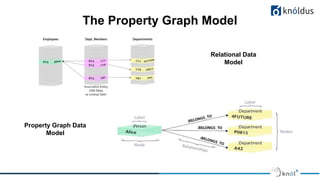
The Property Graph Model
Relational Data
Model
Property Graph Data
Model
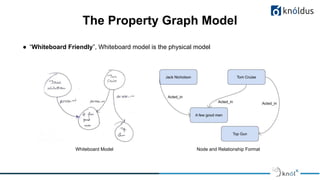
The Property Graph Model
● “Whiteboard Friendly”, Whiteboard model is the physical model
Node and Relationship FormatWhiteboard Model
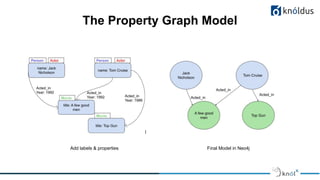
The Property Graph Model
Final Model in Neo4jAdd labels & properties
Introduction to Cypher
● Neo4j’s Graph Query Language
● Declarative, SQL-inspired
● Allows use of ASCII-Art Syntax to write queries for the graph
● Describes visual patterns in graph
● Heavily based on patterns and is designed to recognize various versions of patterns of nodes
and relationships.
● Key Inspiration for ISO Project creating a Standard GQL
● Cypher uses ASCII-Art to create patterns
( p:Person {name:'Gloria Foster'} ) - [ a:ACTED_IN ] -> (m:Movie{name:’The Matrix
Reloaded’})
● For Nodes: Represented using Parentheses
○ ( ) or ( p ), where p is a variable
○ (p: Person), p is a variable representing a Person node
● For Relationships: Represented using -->, <--, --
○ -[:Acted_in]->, specifies the type of relationship to search for
○ -[rel:Acted_in]->, rel is the variable name to the relationship
● For Node or Relationship Properties:
○ (p:Person {name:”Jennifer”}), a person node ‘p’ with name “Jennifer”
○ -[rel:Acted_in {year:”2012”}]->, an Acted_in relationship ‘rel’ between 2 nodes with year 2012
Cypher Syntax
Reserved Keywords to depict actions in a pattern
● MATCH : Searches for a node, relationship, property, label or pattern in a graph database
○ Similar to SQL’s “SELECT”
● RETURN : Specifies what values or results should be returned by the cypher query
○ Return nodes, relationships, properties, patterns
● MATCH and RETURN together form the most important property of Cypher and Property
Graphs, Pattern Matching
Cypher Syntax
● Find all nodes with label ‘Person’:
MATCH (p:Person) RETURN p
● Find a node with label ‘Person’ and name ‘Hugh Jackman’
MATCH (p:Person{name:’Hugh Jackman’}) RETURN p
● Find the movie node in which a ‘Person’ node with name ‘Hugh Jackman’ worked
MATCH (p:Person{name:’Hugh Jackman’}) -[:ACTED_IN]-> (m:Movie) RETURN m
● Find the name of the movie in which the ‘Person’ node with name ‘Hugh Jackman’ worked
MATCH (p:Person{name:’Hugh Jackman’}) -[:ACTED_IN]-> (m:Movie) RETURN m.name
● Find the name of the movies in which ‘Hugh Jackman’ acted in year 2010
MATCH (p:Person{name:’Hugh Jackman’}) -[:ACTED_IN{year:2008}]-> (m:Movie)
RETURN m.name
Cypher Syntax
● CREATE : Inserts a node, relationship or pattern inside the graph DB
MATCH (p:Person {name:’Jack Nicholson’})
MATCH (m:Movie{name:’A few good men’})
CREATE p -[rel:ACTED_IN]-> m
● SET : Modifies an existing property of a node or a relationship
MATCH (p:Person{name:’Jack Nicholson’}) SET p.birthdate = date(‘1937-04-22’)
● DELETE : Deletes a node or a relationship
MATCH (p:Person{name:’Jack Nicholson’}) DELETE p
● DETACH DELETE : Deletes a node and its relationship with any other node
MATCH (p:Person{name:’Jack Nicholson’}) DETACH DELETE p
Cypher Syntax
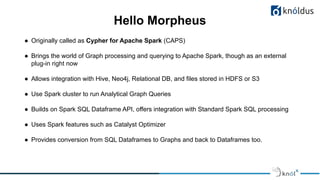
● Originally called as Cypher for Apache Spark (CAPS)
● Brings the world of Graph processing and querying to Apache Spark, though as an external
plug-in right now
● Allows integration with Hive, Neo4j, Relational DB, and files stored in HDFS or S3
● Use Spark cluster to run Analytical Graph Queries
● Builds on Spark SQL Dataframe API, offers integration with Standard Spark SQL processing
● Uses Spark features such as Catalyst Optimizer
● Provides conversion from SQL Dataframes to Graphs and back to Dataframes too.
Hello Morpheus
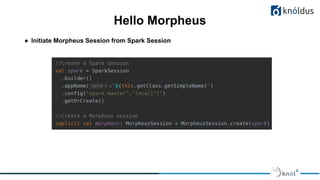
● Initiate Morpheus Session from Spark Session
Hello Morpheus
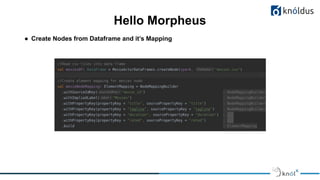
● Create Nodes from Dataframe and it’s Mapping
Hello Morpheus
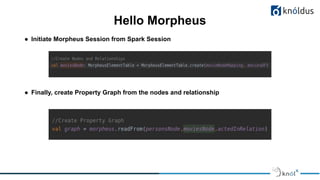
● Initiate Morpheus Session from Spark Session
● Finally, create Property Graph from the nodes and relationship
Hello Morpheus
Demo
Thank You !
Get in touch with us:
Lorem Studio, Lord Building
D4456, LA, USA

Morpheus - Cypher for Apache Spark

  • 1.
    Presented By: Swantika Gupta SoftwareConsultant Morpheus - Cypher for Apache Spark
  • 2.
    Agenda Why are wediscussing Morpheus? The Property Graph Model Introduction to Cypher Cypher Syntax Hello Morpheus Demo
  • 3.
    Why are wediscussing Morpheus? ● Graphs are coming to Spark ! ● Neo4j’s OpenSource project - Morpheus, previously called as Cypher for Apache Spark (CAPS), brings Property Graph and it’s querying language Cypher as an external plugin to Spark ● Apache Spark accepted the proposal to add Morpheus as a core spark component, under the name SparkGraph to Spark 3.0 ● Interoperability between SparkSQL for tabular use cases and Cypher querying for graph use cases.
  • 4.
    The Property GraphModel ● Property Graphs are an extension to the elementary Graphs. ● Along with Nodes and relationships, Property Graphs have labels and key-value property pairs on the entities - nodes and edges. ● Nodes : Basic Entity in graph ○ Holds any number of key-value pairs as node properties ○ Tagged with Labels, representing their roles in our domain ● Relationships : Directed, named connections between two node entities. ○ Has a start node, an end node, a direction and a type ○ Can have properties as key-value pairs. ● Nodes and Relationships together form a powerful piece - Pattern
  • 5.
    The Property GraphModel Relational Data Model Property Graph Data Model
  • 6.
    The Property GraphModel ● “Whiteboard Friendly”, Whiteboard model is the physical model Node and Relationship FormatWhiteboard Model
  • 7.
    The Property GraphModel Final Model in Neo4jAdd labels & properties
  • 8.
    Introduction to Cypher ●Neo4j’s Graph Query Language ● Declarative, SQL-inspired ● Allows use of ASCII-Art Syntax to write queries for the graph ● Describes visual patterns in graph ● Heavily based on patterns and is designed to recognize various versions of patterns of nodes and relationships. ● Key Inspiration for ISO Project creating a Standard GQL
  • 9.
    ● Cypher usesASCII-Art to create patterns ( p:Person {name:'Gloria Foster'} ) - [ a:ACTED_IN ] -> (m:Movie{name:’The Matrix Reloaded’}) ● For Nodes: Represented using Parentheses ○ ( ) or ( p ), where p is a variable ○ (p: Person), p is a variable representing a Person node ● For Relationships: Represented using -->, <--, -- ○ -[:Acted_in]->, specifies the type of relationship to search for ○ -[rel:Acted_in]->, rel is the variable name to the relationship ● For Node or Relationship Properties: ○ (p:Person {name:”Jennifer”}), a person node ‘p’ with name “Jennifer” ○ -[rel:Acted_in {year:”2012”}]->, an Acted_in relationship ‘rel’ between 2 nodes with year 2012 Cypher Syntax
  • 10.
    Reserved Keywords todepict actions in a pattern ● MATCH : Searches for a node, relationship, property, label or pattern in a graph database ○ Similar to SQL’s “SELECT” ● RETURN : Specifies what values or results should be returned by the cypher query ○ Return nodes, relationships, properties, patterns ● MATCH and RETURN together form the most important property of Cypher and Property Graphs, Pattern Matching Cypher Syntax
  • 11.
    ● Find allnodes with label ‘Person’: MATCH (p:Person) RETURN p ● Find a node with label ‘Person’ and name ‘Hugh Jackman’ MATCH (p:Person{name:’Hugh Jackman’}) RETURN p ● Find the movie node in which a ‘Person’ node with name ‘Hugh Jackman’ worked MATCH (p:Person{name:’Hugh Jackman’}) -[:ACTED_IN]-> (m:Movie) RETURN m ● Find the name of the movie in which the ‘Person’ node with name ‘Hugh Jackman’ worked MATCH (p:Person{name:’Hugh Jackman’}) -[:ACTED_IN]-> (m:Movie) RETURN m.name ● Find the name of the movies in which ‘Hugh Jackman’ acted in year 2010 MATCH (p:Person{name:’Hugh Jackman’}) -[:ACTED_IN{year:2008}]-> (m:Movie) RETURN m.name Cypher Syntax
  • 12.
    ● CREATE :Inserts a node, relationship or pattern inside the graph DB MATCH (p:Person {name:’Jack Nicholson’}) MATCH (m:Movie{name:’A few good men’}) CREATE p -[rel:ACTED_IN]-> m ● SET : Modifies an existing property of a node or a relationship MATCH (p:Person{name:’Jack Nicholson’}) SET p.birthdate = date(‘1937-04-22’) ● DELETE : Deletes a node or a relationship MATCH (p:Person{name:’Jack Nicholson’}) DELETE p ● DETACH DELETE : Deletes a node and its relationship with any other node MATCH (p:Person{name:’Jack Nicholson’}) DETACH DELETE p Cypher Syntax
  • 13.
    ● Originally calledas Cypher for Apache Spark (CAPS) ● Brings the world of Graph processing and querying to Apache Spark, though as an external plug-in right now ● Allows integration with Hive, Neo4j, Relational DB, and files stored in HDFS or S3 ● Use Spark cluster to run Analytical Graph Queries ● Builds on Spark SQL Dataframe API, offers integration with Standard Spark SQL processing ● Uses Spark features such as Catalyst Optimizer ● Provides conversion from SQL Dataframes to Graphs and back to Dataframes too. Hello Morpheus
  • 14.
    ● Initiate MorpheusSession from Spark Session Hello Morpheus
  • 15.
    ● Create Nodesfrom Dataframe and it’s Mapping Hello Morpheus
  • 16.
    ● Initiate MorpheusSession from Spark Session ● Finally, create Property Graph from the nodes and relationship Hello Morpheus
  • 17.
  • 18.
    Thank You ! Getin touch with us: Lorem Studio, Lord Building D4456, LA, USA