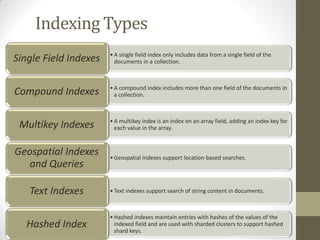
Indexing Types
•A singlefield index only includes data from a single field of the
documents in a collection.
Single Field Indexes
•A compound index includes more than one field of the documents in
a collection.
Compound Indexes
•A multikey index is an index on an array field, adding an index key for
each value in the array.
Multikey Indexes
•Geospatial indexes support location-based searches.
Geospatial Indexes
and Queries
•Text indexes support search of string content in documents.
Text Indexes
•Hashed indexes maintain entries with hashes of the values of the
indexed field and are used with sharded clusters to support hashed
shard keys.
Hashed Index
4.
Index Properties
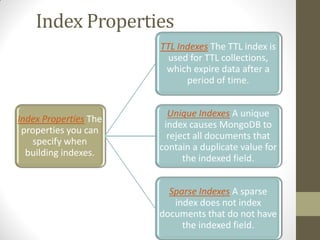
Index PropertiesThe
properties you can
specify when
building indexes.
TTL Indexes The TTL index is
used for TTL collections,
which expire data after a
period of time.
Unique Indexes A unique
index causes MongoDB to
reject all documents that
contain a duplicate value for
the indexed field.
Sparse Indexes A sparse
index does not index
documents that do not have
the indexed field.
5.
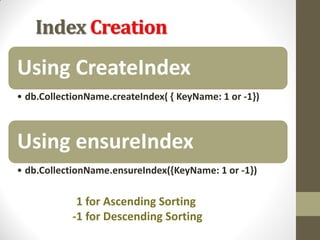
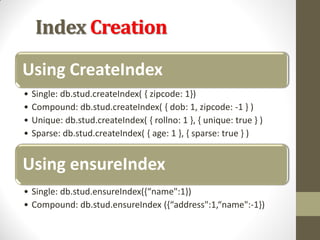
Index Creation
Using CreateIndex
•db.CollectionName.createIndex( { KeyName: 1 or -1})
Using ensureIndex
• db.CollectionName.ensureIndex({KeyName: 1 or -1})
1 for Ascending Sorting
-1 for Descending Sorting
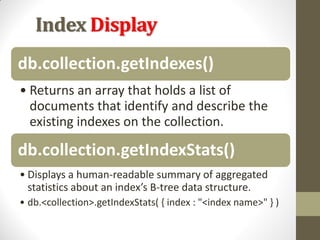
Index Display
db.collection.getIndexes()
• Returnsan array that holds a list of
documents that identify and describe the
existing indexes on the collection.
db.collection.getIndexStats()
• Displays a human-readable summary of aggregated
statistics about an index’s B-tree data structure.
• db.<collection>.getIndexStats( { index : "<index name>" } )
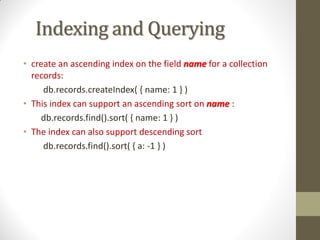
Indexing and Querying
•create an ascending index on the field name for a collection
records:
db.records.createIndex( { name: 1 } )
• This index can support an ascending sort on name :
db.records.find().sort( { name: 1 } )
• The index can also support descending sort
db.records.find().sort( { a: -1 } )
10.
Indexing and Querying
db.stud.findOne({rno:2} ), using index {rno:1}
db.stud.find ( {rno:5} ), using index {rno:1}
db.stud.find( {rno:{$in:[2,3]}} ), using index {rno:1}
db.stud.find( {age:{$gt:15}} ), using index {age:1}
db.stud.find( {age :{$gt:2,$lt:5}} ), using index {age :1}
db.stud.count( {age:19} ) using index {age:1}
db.stud.distinct( {branch: “Computer”} ) using index
{branch:1}
11.
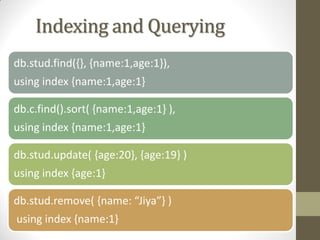
Indexing and Querying
db.stud.find({},{name:1,age:1}),
using index {name:1,age:1}
db.c.find().sort( {name:1,age:1} ),
using index {name:1,age:1}
db.stud.update( {age:20}, {age:19} )
using index {age:1}
db.stud.remove( {name: “Jiya”} )
using index {name:1}
12.
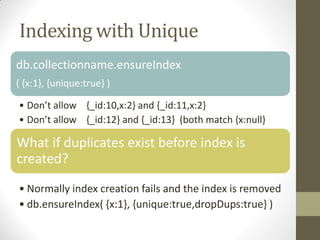
Indexing with Unique
db.collectionname.ensureIndex
({x:1}, {unique:true} )
• Don’t allow {_id:10,x:2} and {_id:11,x:2}
• Don’t allow {_id:12} and {_id:13} (both match {x:null}
What if duplicates exist before index is
created?
• Normally index creation fails and the index is removed
• db.ensureIndex( {x:1}, {unique:true,dropDups:true} )
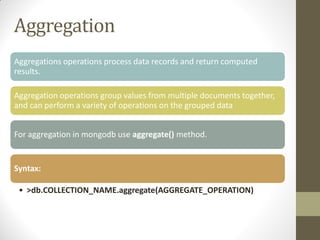
Aggregation
Aggregations operations processdata records and return computed
results.
Aggregation operations group values from multiple documents together,
and can perform a variety of operations on the grouped data
For aggregation in mongodb use aggregate() method.
Syntax:
• >db.COLLECTION_NAME.aggregate(AGGREGATE_OPERATION)
15.
Aggregation
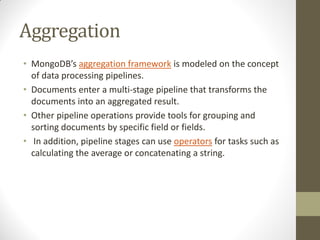
• MongoDB’s aggregationframework is modeled on the concept
of data processing pipelines.
• Documents enter a multi-stage pipeline that transforms the
documents into an aggregated result.
• Other pipeline operations provide tools for grouping and
sorting documents by specific field or fields.
• In addition, pipeline stages can use operators for tasks such as
calculating the average or concatenating a string.
16.
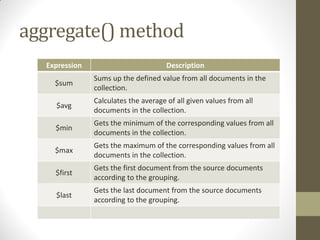
Expression Description
$sum
Sums upthe defined value from all documents in the
collection.
$avg
Calculates the average of all given values from all
documents in the collection.
$min
Gets the minimum of the corresponding values from all
documents in the collection.
$max
Gets the maximum of the corresponding values from all
documents in the collection.
$first
Gets the first document from the source documents
according to the grouping.
$last
Gets the last document from the source documents
according to the grouping.
aggregate() method
17.
Pipeline Concept
There isa set of possible
stages and each of those is
taken as a set of documents
as an input and produces a
resulting set of documents
18.
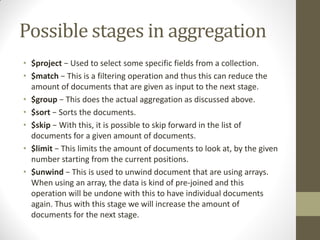
Possible stages inaggregation
• $project − Used to select some specific fields from a collection.
• $match − This is a filtering operation and thus this can reduce the
amount of documents that are given as input to the next stage.
• $group − This does the actual aggregation as discussed above.
• $sort − Sorts the documents.
• $skip − With this, it is possible to skip forward in the list of
documents for a given amount of documents.
• $limit − This limits the amount of documents to look at, by the given
number starting from the current positions.
• $unwind − This is used to unwind document that are using arrays.
When using an array, the data is kind of pre-joined and this
operation will be undone with this to have individual documents
again. Thus with this stage we will increase the amount of
documents for the next stage.
SUM()- Example 3
db.student.aggregate
([{$match: {subject:"OSD"}},
{$group:{_id:null,count:{$sum:1}}}]);
SQL Equivalent Query
Select subject, count(*) from student
group by subject
having subject=“OSD”
Unwind()
If following documentis their in collection(Array)
• db.student.insert({rollno:9,name:"Anavi",marks:[80,30,50]});
Using Unwind the above document will be
unwinded into 3 different document
• db.student.aggregate([{$unwind:"$marks"}])


![Indexing and Querying
db.stud.findOne( {rno:2} ), using index {rno:1}
db.stud.find ( {rno:5} ), using index {rno:1}
db.stud.find( {rno:{$in:[2,3]}} ), using index {rno:1}
db.stud.find( {age:{$gt:15}} ), using index {age:1}
db.stud.find( {age :{$gt:2,$lt:5}} ), using index {age :1}
db.stud.count( {age:19} ) using index {age:1}
db.stud.distinct( {branch: “Computer”} ) using index
{branch:1}](https://image.slidesharecdn.com/3-260202061348-fdaddd9d/85/Mongoose-DB-tuition-for-tutorial-as-you-o-10-320.jpg)

![MIN()
db.student.aggregate
([{$group : {_id : "$subject",
marks : {$min : "$marks"}}}]);
SQL Equivalent Query
Select subject, min(marks) from student
group by subject](https://image.slidesharecdn.com/3-260202061348-fdaddd9d/85/Mongoose-DB-tuition-for-tutorial-as-you-o-20-320.jpg)
![MAX()
db.student.aggregate
([{$group : {_id : "$subject",
marks : {$max : "$marks"}}}]);
SQL Equivalent Query
Select subject, max(marks) from student
group by subject](https://image.slidesharecdn.com/3-260202061348-fdaddd9d/85/Mongoose-DB-tuition-for-tutorial-as-you-o-21-320.jpg)
![AVG()
db.student.aggregate
([{$group : {_id : "$subject",
marks : {$avg : "$marks"}}}]);
SQL Equivalent Query
Select subject, avg(marks) from student
group by subject](https://image.slidesharecdn.com/3-260202061348-fdaddd9d/85/Mongoose-DB-tuition-for-tutorial-as-you-o-22-320.jpg)
![FIRST()
db.student.aggregate
([{$group : {_id : "$subject",
marks : {$first : "$marks"}}}]);](https://image.slidesharecdn.com/3-260202061348-fdaddd9d/85/Mongoose-DB-tuition-for-tutorial-as-you-o-23-320.jpg)
![LAST()
db.student.aggregate
([{$group : {_id : "$subject",
marks : {$last : "$marks"}}}]);](https://image.slidesharecdn.com/3-260202061348-fdaddd9d/85/Mongoose-DB-tuition-for-tutorial-as-you-o-24-320.jpg)
![SUM()-Example 1
db.student.aggregate
([{$group : {_id : "$subject",
marks : {$sum : "$marks"}}}]);
SQL Equivalent Query
Select subject, sum(marks) from student
group by subject](https://image.slidesharecdn.com/3-260202061348-fdaddd9d/85/Mongoose-DB-tuition-for-tutorial-as-you-o-25-320.jpg)
![SUM(): Example 2
db.student.aggregate
([{$group : {_id : "$subject",
Count: {$sum : 1}}}]);
SQL Equivalent Query
Select subject, count(*) from student
group by subject](https://image.slidesharecdn.com/3-260202061348-fdaddd9d/85/Mongoose-DB-tuition-for-tutorial-as-you-o-26-320.jpg)
![$match
db.student.aggregate
([{ $match: {subject:"OSD"}}])
db.student.aggregate
([{ $match: {subject:"OSD"}},
{$group:{_id:null,count:{$sum:1}}}]);](https://image.slidesharecdn.com/3-260202061348-fdaddd9d/85/Mongoose-DB-tuition-for-tutorial-as-you-o-27-320.jpg)
![SUM()- Example 3
db.student.aggregate
([{ $match: {subject:"OSD"}},
{$group:{_id:null,count:{$sum:1}}}]);
SQL Equivalent Query
Select subject, count(*) from student
group by subject
having subject=“OSD”](https://image.slidesharecdn.com/3-260202061348-fdaddd9d/85/Mongoose-DB-tuition-for-tutorial-as-you-o-28-320.jpg)
![Limit() & Skip()
db.student.aggregate
([{ $match: {subject:"OSD"}},
{$limit:1}]);
db.student.aggregate
([{ $match: {subject:"OSD"}},
{$skip:1}]);](https://image.slidesharecdn.com/3-260202061348-fdaddd9d/85/Mongoose-DB-tuition-for-tutorial-as-you-o-29-320.jpg)
![Sort()
db.student.aggregate
([{ $match: {subject:"OSD"}},
{$sort:{marks:-1}}]);
db.student.aggregate
([{ $match: {subject:"OSD"}},
{$sort:{marks:1}}]);](https://image.slidesharecdn.com/3-260202061348-fdaddd9d/85/Mongoose-DB-tuition-for-tutorial-as-you-o-30-320.jpg)
![Unwind()
If following document is their in collection(Array)
• db.student.insert({rollno:9,name:"Anavi",marks:[80,30,50]});
Using Unwind the above document will be
unwinded into 3 different document
• db.student.aggregate([{$unwind:"$marks"}])](https://image.slidesharecdn.com/3-260202061348-fdaddd9d/85/Mongoose-DB-tuition-for-tutorial-as-you-o-31-320.jpg)