Using a Documentfor _id
● _id field of a document need not be a scalar value.
● It can be a json document by itself
Example:
db.xyz.insert({_id:{name:'ramesh',gender:'m'},profession:"Trainer"})
7.
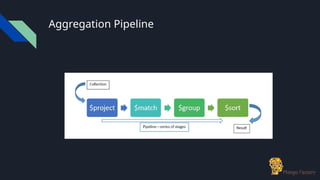
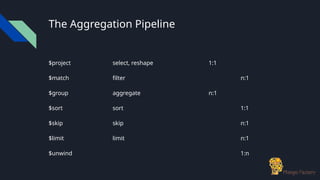
Aggregation Expressions
$sum -used for sum & count
$avg
$min
$max
$addToSet - used along with arrays
$push - used along with arrays
$first - used along with sort
$last - used along with sort
8.
Using $sum
● Toget sum:
db.zips.aggregate([{
$group:
{ _id:"$state",
"population":{$sum:"$pop"}
}
}])
● To get count use {$sum:1}
9.
Using $avg
● Toget average
db.zips.aggregate([{
$group:
{ _id:"$state",
"average_pop":{$avg:"$pop"}
}
}])
10.
Using $addToSet
● Noparallel in sql world
● Creates an array of values based on the aggregation key.
db.zips.aggregate([{
$group:
{ _id:"$city","postal_codes":
{$addToSet:"$_id"}
}
}])
● Are both the _id fields same?
11.
Using $push
● $pushworks like $addToSet
● It does not check for duplicates
db.zips.aggregate([{
$group:
{ _id:"$city","postal_codes":
{$push:"$_id"}
}
}])
12.
Using $max
● Helpsyou find the maximum value
db.zips.aggregate([{
$group:
{
"_id":"$state",
"pop":{$max:"$pop"}
}
}])
13.
Using $min
● Helpsyou find the minimum value
db.zips.aggregate([{
$group:
{
"_id":"$state",
"pop":{$min:"$pop"}
}
}])
14.
Double Grouping
● Unlikein the sql world you can do double grouping
db.class.aggregate([{
$group:{ _id:{a:"$a", b:"$b"},
c:{$max:"$c"}}},
{$group:{ _id:"$_id.a",
c:{$min:"$c"}}
}])
15.
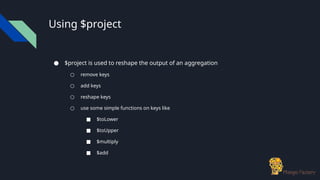
Using $project
● $projectis used to reshape the output of an aggregation
○ remove keys
○ add keys
○ reshape keys
○ use some simple functions on keys like
■ $toLower
■ $toUpper
■ $multiply
■ $add
Using $match
● $matchworks pretty much like find
db.zips.aggregate([{
$match:
{
pop:{$gt:200000}
}
}])
18.
Using $sort
● Canbe used before or after the $group
● Can be used multiple times
● Can be a memory hog
db.zips.aggregate([
{$sort:{state:-1}}
])
db.zips.aggregate([
{$sort:{state:1,city:1}}
])
19.
$skip and $limit
●work exactly the same way as they work with find
● Almost always used along with $sort
● $skip comes first then comes $limit.
db.zips.aggregate([
{$sort:{state:1,city:1}},
{$skip:10},
{$limit:5}
])
$first and $last
●Used to pick up the first or the last of the grouped values
db.class.aggregate([
{$match:{a:0}},
{$sort:{c:-1}},
{$group:{_id:"$a", c:{$first:"$c"}}}
])
pick only the first
document under the
grouping
22.
$unwind
● Think ofit as an opposite to $push
● Used to process elements in the array, by creating 1 to many documents
● Example:
○ Document before unwind
{animal:"Cow",eats:["grass","leaves","bananas"]}
○ Document after unwind
{animal:"Cow",eats:"grass"}
{animal:"Cow",eats:"leaves"}
{animal:"Cow",eats:"bananas"}
● Beware of document explosion
23.
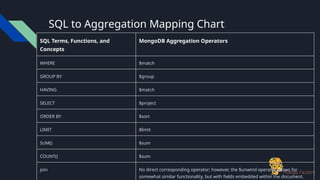
SQL to AggregationMapping Chart
SQL Terms, Functions, and
Concepts
MongoDB Aggregation Operators
WHERE $match
GROUP BY $group
HAVING $match
SELECT $project
ORDER BY $sort
LIMIT $limit
SUM() $sum
COUNT() $sum
join No direct corresponding operator; however, the $unwind operator allows for
somewhat similar functionality, but with fields embedded within the document.
24.
SQL vs MongoDBAggregation
● The SQL examples assume two tables, orders and order_lineitem that join by the
order_lineitem.order_id and the orders.id columns.
● The MongoDB examples assume one collection orders that contain documents of
the following prototype:
{
cust_id: "abc123",
ord_date: ISODate("2012-11-02T17:04:11.102Z"),
status: 'A',
price: 50,
items: [ { sku: "xxx", qty: 25, price: 1 },
{ sku: "yyy", qty: 25, price: 1 } ]
}
25.
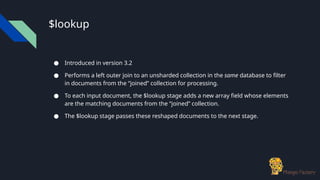
$lookup
● Introduced inversion 3.2
● Performs a left outer join to an unsharded collection in the same database to filter
in documents from the “joined” collection for processing.
● To each input document, the $lookup stage adds a new array field whose elements
are the matching documents from the “joined” collection.
● The $lookup stage passes these reshaped documents to the next stage.
SQL vs MongoDBAggregation
● The MongoDB statements prefix the names of the fields from the documents in
the collection orders with a $ character when they appear as operands to the
aggregation operations.
SQL Example MongoDB Example Description
SELECT COUNT(*) AS count
FROM orders
db.orders.aggregate( [
{ $group: { _id: null,
count: { $sum: 1 } } }
] )
Count all records from orders
SELECT SUM(price) AS total
FROM orders
db.orders.aggregate( [
{ $group: { _id: null,
total: { $sum:
"$price" } } }
] )
Sum the price field from orders
28.
SQL vs MongoDBAggregation
SQL Example MongoDB Example Description
SELECT cust_id,
SUM(price) AS total
FROM orders
GROUP BY cust_id
db.orders.aggregate( [
{ $group: { _id: "$cust_id",
total: { $sum:
"$price" } } }
] )
For each unique cust_id, sum the
price field.
SELECT cust_id,
SUM(price) AS total
FROM orders
GROUP BY cust_id
ORDER BY total
db.orders.aggregate( [
{ $group: { _id: "$cust_id",
total: { $sum:
"$price" } } },
{ $sort: { total: 1 } }
] )
For each unique cust_id, sum the
price field, results sorted by sum.
SELECT cust_id,
ord_date,
SUM(price) AS total
FROM orders
GROUP BY cust_id, ord_date
db.orders.aggregate( [
{ $group: { _id: { cust_id:
"$cust_id",
ord_date: "$ord_date" },
total: { $sum:
"$price" } } }
] )
For each unique cust_id, ord_date
grouping, sum the price field.
29.
Limitations of MongoDBAggregations
● Limited to 16MB
● Cannot use more than 10% of the memory on the host machine.


![Simple Group by
db.products.aggregate([
{$group:
{
"_id":"$category",
"num_of_products":{$sum:1}
}
}
])](https://image.slidesharecdn.com/mongodbaggregation-251021170606-36474ba9/85/MongoDB-Aggregation-for-beginners-learning-pptx-3-320.jpg)
![Compound Aggregation
db.products.aggregate([
{$group:
{
_id:{"maker" : "$manufacturer,
"cat" : "$category"},
"num_of_products":{$sum:1}
}
}
])](https://image.slidesharecdn.com/mongodbaggregation-251021170606-36474ba9/85/MongoDB-Aggregation-for-beginners-learning-pptx-5-320.jpg)

![Using $sum
● To get sum:
db.zips.aggregate([{
$group:
{ _id:"$state",
"population":{$sum:"$pop"}
}
}])
● To get count use {$sum:1}](https://image.slidesharecdn.com/mongodbaggregation-251021170606-36474ba9/85/MongoDB-Aggregation-for-beginners-learning-pptx-8-320.jpg)
![Using $avg
● To get average
db.zips.aggregate([{
$group:
{ _id:"$state",
"average_pop":{$avg:"$pop"}
}
}])](https://image.slidesharecdn.com/mongodbaggregation-251021170606-36474ba9/85/MongoDB-Aggregation-for-beginners-learning-pptx-9-320.jpg)
![Using $addToSet
● No parallel in sql world
● Creates an array of values based on the aggregation key.
db.zips.aggregate([{
$group:
{ _id:"$city","postal_codes":
{$addToSet:"$_id"}
}
}])
● Are both the _id fields same?](https://image.slidesharecdn.com/mongodbaggregation-251021170606-36474ba9/85/MongoDB-Aggregation-for-beginners-learning-pptx-10-320.jpg)
![Using $push
● $push works like $addToSet
● It does not check for duplicates
db.zips.aggregate([{
$group:
{ _id:"$city","postal_codes":
{$push:"$_id"}
}
}])](https://image.slidesharecdn.com/mongodbaggregation-251021170606-36474ba9/85/MongoDB-Aggregation-for-beginners-learning-pptx-11-320.jpg)
![Using $max
● Helps you find the maximum value
db.zips.aggregate([{
$group:
{
"_id":"$state",
"pop":{$max:"$pop"}
}
}])](https://image.slidesharecdn.com/mongodbaggregation-251021170606-36474ba9/85/MongoDB-Aggregation-for-beginners-learning-pptx-12-320.jpg)
![Using $min
● Helps you find the minimum value
db.zips.aggregate([{
$group:
{
"_id":"$state",
"pop":{$min:"$pop"}
}
}])](https://image.slidesharecdn.com/mongodbaggregation-251021170606-36474ba9/85/MongoDB-Aggregation-for-beginners-learning-pptx-13-320.jpg)
![Double Grouping
● Unlike in the sql world you can do double grouping
db.class.aggregate([{
$group:{ _id:{a:"$a", b:"$b"},
c:{$max:"$c"}}},
{$group:{ _id:"$_id.a",
c:{$min:"$c"}}
}])](https://image.slidesharecdn.com/mongodbaggregation-251021170606-36474ba9/85/MongoDB-Aggregation-for-beginners-learning-pptx-14-320.jpg)
![Using $project
● Example
db.products.aggregate([
{
$project:{
_id:0,
'maker':{$toLower:"$manufacturer"},
'details':{'category':"$category",
'price':{"$multiply":["$price",10]},
'item':'$name'}
}
}])
omit '_id' field
rename '$manufacturer'
to maker and convert to
lowercase
create a new
document
'details'
rename '$name' to
item
multiply '$price' with 10](https://image.slidesharecdn.com/mongodbaggregation-251021170606-36474ba9/85/MongoDB-Aggregation-for-beginners-learning-pptx-16-320.jpg)
![Using $match
● $match works pretty much like find
db.zips.aggregate([{
$match:
{
pop:{$gt:200000}
}
}])](https://image.slidesharecdn.com/mongodbaggregation-251021170606-36474ba9/85/MongoDB-Aggregation-for-beginners-learning-pptx-17-320.jpg)
![Using $sort
● Can be used before or after the $group
● Can be used multiple times
● Can be a memory hog
db.zips.aggregate([
{$sort:{state:-1}}
])
db.zips.aggregate([
{$sort:{state:1,city:1}}
])](https://image.slidesharecdn.com/mongodbaggregation-251021170606-36474ba9/85/MongoDB-Aggregation-for-beginners-learning-pptx-18-320.jpg)
![$skip and $limit
● work exactly the same way as they work with find
● Almost always used along with $sort
● $skip comes first then comes $limit.
db.zips.aggregate([
{$sort:{state:1,city:1}},
{$skip:10},
{$limit:5}
])](https://image.slidesharecdn.com/mongodbaggregation-251021170606-36474ba9/85/MongoDB-Aggregation-for-beginners-learning-pptx-19-320.jpg)
![Example of a Pipelined Aggregate
db.zips.aggregate([
{$match:
{
state:"NY"
}
},
{$group:
{
_id: "$city",
population: {$sum:"$pop"},
}
},
{$project:
{
_id: 0,
city: "$_id",
population: 1,
}
},
{$sort:
{
population:-1
}
},
{$skip: 10},
{$limit: 5}
])](https://image.slidesharecdn.com/mongodbaggregation-251021170606-36474ba9/85/MongoDB-Aggregation-for-beginners-learning-pptx-20-320.jpg)
![$first and $last
● Used to pick up the first or the last of the grouped values
db.class.aggregate([
{$match:{a:0}},
{$sort:{c:-1}},
{$group:{_id:"$a", c:{$first:"$c"}}}
])
pick only the first
document under the
grouping](https://image.slidesharecdn.com/mongodbaggregation-251021170606-36474ba9/85/MongoDB-Aggregation-for-beginners-learning-pptx-21-320.jpg)
![$unwind
● Think of it as an opposite to $push
● Used to process elements in the array, by creating 1 to many documents
● Example:
○ Document before unwind
{animal:"Cow",eats:["grass","leaves","bananas"]}
○ Document after unwind
{animal:"Cow",eats:"grass"}
{animal:"Cow",eats:"leaves"}
{animal:"Cow",eats:"bananas"}
● Beware of document explosion](https://image.slidesharecdn.com/mongodbaggregation-251021170606-36474ba9/85/MongoDB-Aggregation-for-beginners-learning-pptx-22-320.jpg)
![SQL vs MongoDB Aggregation
● The SQL examples assume two tables, orders and order_lineitem that join by the
order_lineitem.order_id and the orders.id columns.
● The MongoDB examples assume one collection orders that contain documents of
the following prototype:
{
cust_id: "abc123",
ord_date: ISODate("2012-11-02T17:04:11.102Z"),
status: 'A',
price: 50,
items: [ { sku: "xxx", qty: 25, price: 1 },
{ sku: "yyy", qty: 25, price: 1 } ]
}](https://image.slidesharecdn.com/mongodbaggregation-251021170606-36474ba9/85/MongoDB-Aggregation-for-beginners-learning-pptx-24-320.jpg)
![$lookup - Single Equality Join
db.orders.aggregate([
{
$lookup:
{
from: "inventory",
localField: "item",
foreignField: "sku",
as: "inventory_docs"
}
}
])](https://image.slidesharecdn.com/mongodbaggregation-251021170606-36474ba9/85/MongoDB-Aggregation-for-beginners-learning-pptx-26-320.jpg)
![SQL vs MongoDB Aggregation
● The MongoDB statements prefix the names of the fields from the documents in
the collection orders with a $ character when they appear as operands to the
aggregation operations.
SQL Example MongoDB Example Description
SELECT COUNT(*) AS count
FROM orders
db.orders.aggregate( [
{ $group: { _id: null,
count: { $sum: 1 } } }
] )
Count all records from orders
SELECT SUM(price) AS total
FROM orders
db.orders.aggregate( [
{ $group: { _id: null,
total: { $sum:
"$price" } } }
] )
Sum the price field from orders](https://image.slidesharecdn.com/mongodbaggregation-251021170606-36474ba9/85/MongoDB-Aggregation-for-beginners-learning-pptx-27-320.jpg)
![SQL vs MongoDB Aggregation
SQL Example MongoDB Example Description
SELECT cust_id,
SUM(price) AS total
FROM orders
GROUP BY cust_id
db.orders.aggregate( [
{ $group: { _id: "$cust_id",
total: { $sum:
"$price" } } }
] )
For each unique cust_id, sum the
price field.
SELECT cust_id,
SUM(price) AS total
FROM orders
GROUP BY cust_id
ORDER BY total
db.orders.aggregate( [
{ $group: { _id: "$cust_id",
total: { $sum:
"$price" } } },
{ $sort: { total: 1 } }
] )
For each unique cust_id, sum the
price field, results sorted by sum.
SELECT cust_id,
ord_date,
SUM(price) AS total
FROM orders
GROUP BY cust_id, ord_date
db.orders.aggregate( [
{ $group: { _id: { cust_id:
"$cust_id",
ord_date: "$ord_date" },
total: { $sum:
"$price" } } }
] )
For each unique cust_id, ord_date
grouping, sum the price field.](https://image.slidesharecdn.com/mongodbaggregation-251021170606-36474ba9/85/MongoDB-Aggregation-for-beginners-learning-pptx-28-320.jpg)



![제 23회 보아즈(BOAZ) 빅데이터 컨퍼런스 - [MBOAX] : ABSA를 활용한 소비자 반응 분석 기반 운영 효율화 대시보드 설계](https://cdn.slidesharecdn.com/ss_thumbnails/3-1boaz23rdconferencemboax-260203102709-9d519923-thumbnail.jpg?width=640&height=640&fit=bounds)


![7.__Developing_a_Research_Proposal[1].pptx](https://cdn.slidesharecdn.com/ss_thumbnails/7-260131073037-df92dd7d-thumbnail.jpg?width=640&height=640&fit=bounds)
