Algorithm
An algorithm is a procedure or formula for solving a problem.
An algorithm is define as a complete , unambiguous , finite number of
logical steps for solving a specified problem.
Algorithms are used for calculation, data processing, and many other
fields.
Each algorithm is a list of well-defined instructions for completing a
task.Starting from an initial state(START), the instructions describe a
computation that proceeds through a well-defined series of successive
states, eventually terminating in a final ending state (STOP).
Guidelines for construct an
algorithm
 It should begin with start statement
 Given problem should be broken down into simple
and meaningful steps
 Steps should be numbered sequentially
 Steps should be descriptive and written in simple
English
 Last step should be end statement
Eg: Algorithm to average of n numbers
Step 1 : start
Step 2 : Read value of n
Step 3 Read n numbers
Step 4 : add these n numbers
Step 5 : divide the sum by n to get average
Step 6 : print the average
Step 7 : Stop
Properties:
Finiteness: - an algorithm terminates after a finite
numbers of steps.
 Definiteness: - each step in algorithm is unambiguous.
This means that the action specified by the step cannot be
interpreted (explain the meaning of) in multiple ways &
can be performed without any confusion.
 Input:- an algorithm accepts zero or more inputs
Output:- it produces at least one output.
 Effectiveness:- it consists of basic instructions
that are realizable. This means that the
instructions can be performed by using the given
inputs in a finite amount of time.
flowchart
A diagrammatic representation of sequential steps of
solution of problem consisting standard block symbols
being link together by directional arrows are called
flowchart.
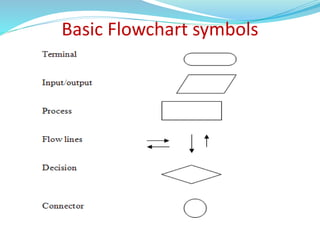
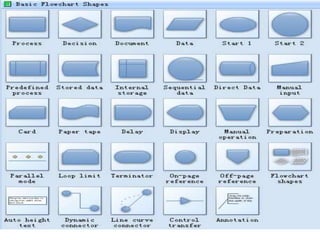
Basic Flowchart symbols
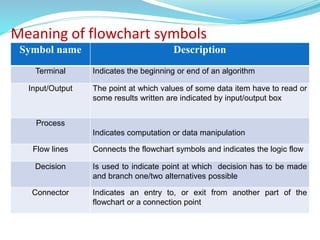
Meaning of flowchart symbols
Symbol name Description
Terminal Indicates the beginning or end of an algorithm
Input/Output The point at which values of some data item have to read or
some results written are indicated by input/output box
Process
Indicates computation or data manipulation
Flow lines Connects the flowchart symbols and indicates the logic flow
Decision Is used to indicate point at which decision has to be made
and branch one/two alternatives possible
Connector Indicates an entry to, or exit from another part of the
flowchart or a connection point
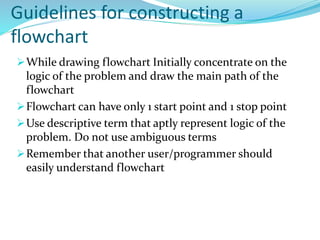
Guidelines for constructing a
flowchart
While drawing flowchart Initially concentrate on the
logic of the problem and draw the main path of the
flowchart
Flowchart can have only 1 start point and 1 stop point
Use descriptive term that aptly represent logic of the
problem. Do not use ambiguous terms
Remember that another user/programmer should
easily understand flowchart
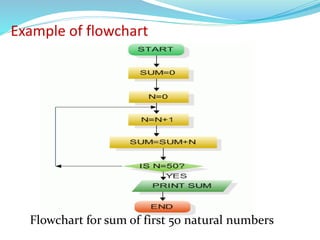
Example of flowchart
Flowchart for sum of first 50 natural numbers
Importance/ benefits of flowcharts
 Communication: Flowcharts are better way of
communicating the logic of a system to all concerned.
 Effective analysis: With the help of flowchart, problem can
be analyzed in more effective way.
 Proper documentation: Program flowcharts serve as a good
program documentation, which is needed for various
purposes.
 Efficient Coding: The flowcharts act as a guide or blueprint
during the systems analysis and program development
phase.
 Proper Debugging: The flowchart helps in
debugging process.
 Efficient Program Maintenance: The maintenance
of operating program becomes easy with the help
of flowchart. It helps the programmer to put
efforts more efficiently on that part
LIMITATIONS OF USING FLOWCHARTS
 Complex logic: Sometimes, the program logic is
quite complicated. In that case, flowchart becomes
complex and clumsy.
 Alterations and Modifications: If alterations are
required the flowchart may require re-drawing
completely.
 Reproduction: As the flowchart symbols cannot be
typed, reproduction of flowchart becomes a
problem.
 The essentials of what is done can easily be lost in
the technical details of how it is done.
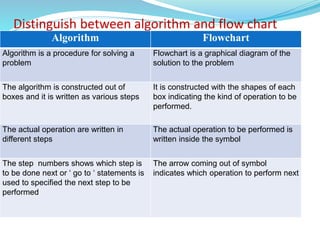
Distinguish between algorithm and flow chart
Algorithm Flowchart
Algorithm is a procedure for solving a
problem
Flowchart is a graphical diagram of the
solution to the problem
The algorithm is constructed out of
boxes and it is written as various steps
It is constructed with the shapes of each
box indicating the kind of operation to be
performed.
The actual operation are written in
different steps
The actual operation to be performed is
written inside the symbol
The step numbers shows which step is
to be done next or ‘ go to ‘ statements is
used to specified the next step to be
performed
The arrow coming out of symbol
indicates which operation to perform next
Structured programming concept
Structured programming is a concept in which a large program can
be divided in to small modules and can be solved each module one by
one.
Computer programming in which the statements are organized in a
specific manner to minimize error or misinterpretation.
Principles of structured programming are
Structuring of control flow
Decompose a program into portions or modules
Program design using Top down or bottom up approach
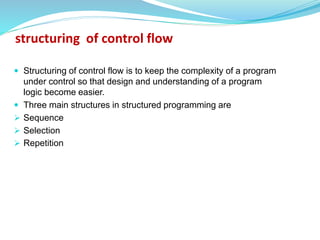
 Structuring of control flow is to keep the complexity of a program
under control so that design and understanding of a program
logic become easier.
 Three main structures in structured programming are
 Sequence
 Selection
 Repetition
structuring of control flow
Sequence logic
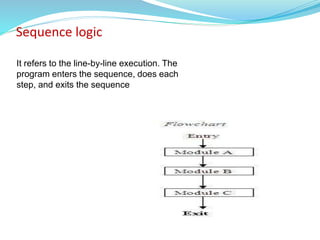
It refers to the line-by-line execution. The
program enters the sequence, does each
step, and exits the sequence
Selection logic
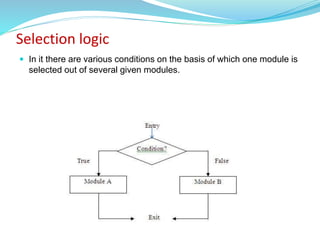
 In it there are various conditions on the basis of which one module is
selected out of several given modules.
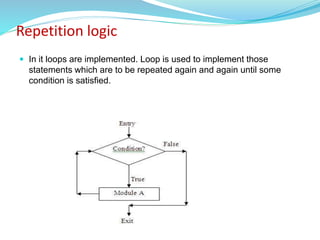
Repetition logic
 In it loops are implemented. Loop is used to implement those
statements which are to be repeated again and again until some
condition is satisfied.
Modular programming
Modular programming is a programming strategy where a program is
divided into segment called modules.
A module is a unit or entity that is responsible for a single task or routine.
module consisting of series of program instructions or statements in some
programming language
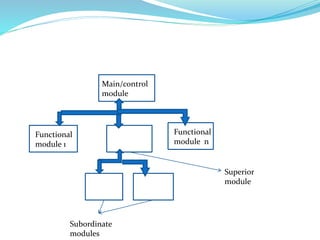
Program using this approach consisting of a main module called control
module and number of functional modules
A module may also decomposed into subordinate modules representing a
sub task.
 A module that control subordinate modules is also known as superior
module
 Superior module does not include codes of subordinate modules .
superior module calls subordinate modules for execution
 Subordinate modules also referred as called module and superior
module as calling module.
Main/control
module
Functional
module 1
Functional
module n
Subordinate
modules
Superior
module
Advantages of modular programming
Modularization has several benefits, especially on large and complex
programs:
 Divide work for multiple programmers.
 Reuse code-modules can be re-used in several projects
changing the implementation details of a modules does not require to
modify the clients using them as far as the interface does not change;
faster re-compilation, as only the modules that have been modified
are actually re-compiled;
self-documenting, as the interface specifies all that we need to know
to use the module;
easier debugging, as modules dependencies are clearly specified and
every module can be tested separately;
The program can be solved in two ways they are:
 Top down programming
 Bottom up Programming
Top down and bottom up approach
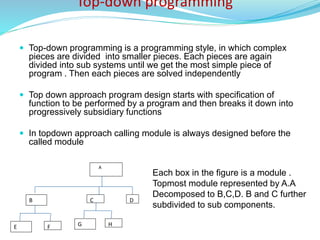
Top-down programming
 Top-down programming is a programming style, in which complex
pieces are divided into smaller pieces. Each pieces are again
divided into sub systems until we get the most simple piece of
program . Then each pieces are solved independently
 Top down approach program design starts with specification of
function to be performed by a program and then breaks it down into
progressively subsidiary functions
 In topdown approach calling module is always designed before the
called module
D
B
A
C
E F G H
Each box in the figure is a module .
Topmost module represented by A.A
Decomposed to B,C,D. B and C further
subdivided to sub components.
It initiates human tendancy to solve a problem by outlining broad
concepts first and then subsequently going into detail
Development of module can take place in parallel.
Separating the low level work from the higher level objects leads to a
modular design.
Very less time consuming (Each programmers are involved only a part
of the big project)
Very optimized way of processing. (Each programmers have to apply
their own knowledge and experience to their parts (modules), so our
project will become an optimized one )
Advantages of top-down programming
Disadvantages of top-down programming
Top-down programming complicates testing. Noting executable exists
until the very late in the development, so in order to test what has been
done so far, one must write stubs. (Stubs are software programs which
act as a module and give the output as given by an actual
product/software.)
top-down programming tends to generate modules that are very
specific to the application that is being written, thus not very reusable.
The implementation cost is likely to be higher.
Bottom-up approach
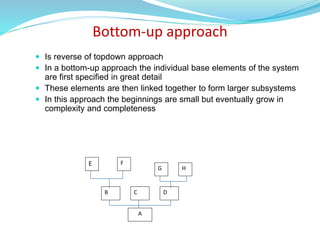
 Is reverse of topdown approach
 In a bottom-up approach the individual base elements of the system
are first specified in great detail
 These elements are then linked together to form larger subsystems
 In this approach the beginnings are small but eventually grow in
complexity and completeness
A
F
E
B C D
H
G
Advantages of Bottom up programming
The advantages of using a bottom-up approach to software testing is the fact that
there is no need for stubs.
bottom-up design yields programs which are smaller and more agile. A shorter
program doesn't have to be divided into so many components, and fewer
components means programs which are easier to read or modify. Fewer
components also means fewer connections between components, and thus less
chance for errors there.
errors in critical modules are found earlier
major functions and processing are tested earlier.
Bottom-up design promotes code re-use.
Disadvantages of bottom up programming
A disadvantage of bottom-up design is that it is not focused on specific
requirements. a program designed from the bottom up may not exactly fit
the given problem.
High quality bottom-up solutions prove very hard to construct
Components may be coded without having a clear idea of how they link
to other
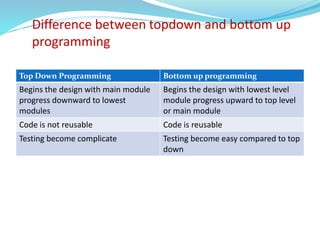
Difference between topdown and bottom up
programming
Top Down Programming Bottom up programming
Begins the design with main module
progress downward to lowest
modules
Begins the design with lowest level
module progress upward to top level
or main module
Code is not reusable Code is reusable
Testing become complicate Testing become easy compared to top
down
Programming
 A program is a sequence of instructions written to perform a
specified task.
 programming is the process of designing, writing, testing,
debugging / troubleshooting, and maintaining the source code of
computer programs.
 source code is a text written in a programming language.
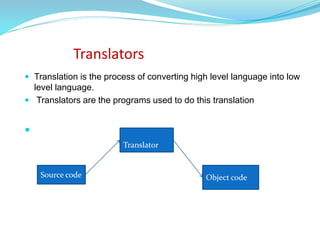
Translators
 Translation is the process of converting high level language into low
level language.
 Translators are the programs used to do this translation

Translator
Source code Object code
Two types of translators are
 Compilers
 Interpreters
 Computer programs written in any language other than machine
language must be either interpreted or compiled.
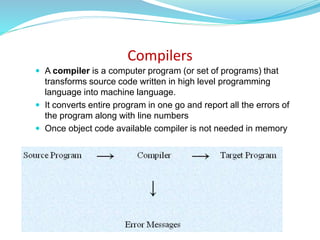
Compilers
 A compiler is a computer program (or set of programs) that
transforms source code written in high level programming
language into machine language.
 It converts entire program in one go and report all the errors of
the program along with line numbers
 Once object code available compiler is not needed in memory
Interpreter
 In computer science, an interpreter is a program which translates
one statement of a high level language program into machine code
and Executes it .
 if there is any error in any line it reports it at the same time and
program execution cannot resume until the error is rectified.
 Interpreter must always present in memory every time program
executed as every time program is run it is first interpreted then
executed
 BASIC and LISP are especially designed to be executed by an
interpreter.
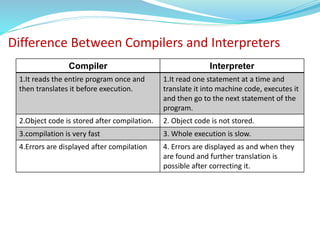
Difference Between Compilers and Interpreters
Compiler Interpreter
1.It reads the entire program once and
then translates it before execution.
1.It read one statement at a time and
translate it into machine code, executes it
and then go to the next statement of the
program.
2.Object code is stored after compilation. 2. Object code is not stored.
3.compilation is very fast 3. Whole execution is slow.
4.Errors are displayed after compilation 4. Errors are displayed as and when they
are found and further translation is
possible after correcting it.
Introduction to C language
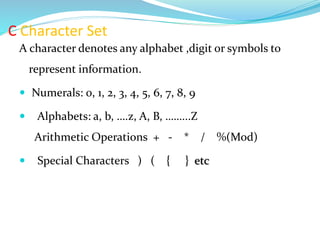
C Character Set
A character denotes any alphabet ,digit or symbols to
represent information.
 Numerals: 0, 1, 2, 3, 4, 5, 6, 7, 8, 9
 Alphabets: a, b, ….z, A, B, ……...Z
Arithmetic Operations + - * / %(Mod)
 Special Characters ) ( { } etc
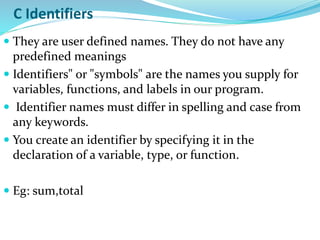
C Identifiers
 They are user defined names. They do not have any
predefined meanings
 Identifiers" or "symbols" are the names you supply for
variables, functions, and labels in our program.
 Identifier names must differ in spelling and case from
any keywords.
 You create an identifier by specifying it in the
declaration of a variable, type, or function.
 Eg: sum,total
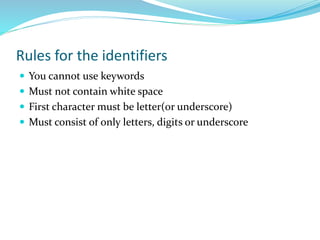
Rules for the identifiers
 You cannot use keywords
 Must not contain white space
 First character must be letter(or underscore)
 Must consist of only letters, digits or underscore
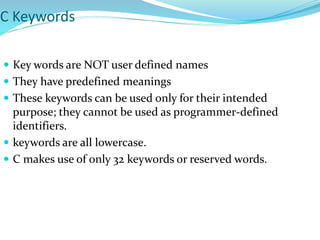
C Keywords
 Key words are NOT user defined names
 They have predefined meanings
 These keywords can be used only for their intended
purpose; they cannot be used as programmer-defined
identifiers.
 keywords are all lowercase.
 C makes use of only 32 keywords or reserved words.
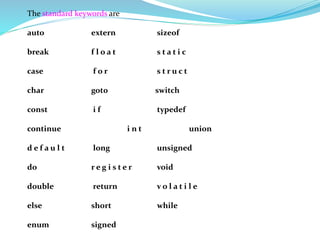
The standard keywords are
auto extern sizeof
break f l o a t s t a t i c
case f o r s t r u c t
char got0 switch
const i f typedef
continue i n t union
d e f a u l t long unsigned
do r e g i s t e r void
double return v o l a t i l e
else short while
enum signed
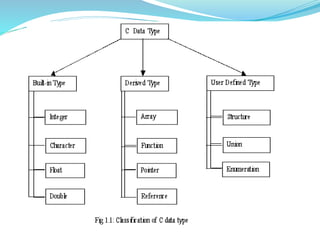
Data Types
C supports several different types of data, each of
which may be represented differently within the
computer’s memory.
Data types allow programmer to select type of data
appropriate to the needs of the application as well as
the machine.
Int type
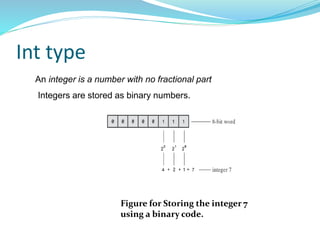
Figure for Storing the integer 7
using a binary code.
An integer is a number with no fractional part
Integers are stored as binary numbers.
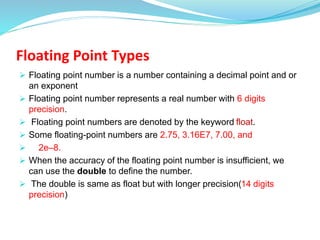
Floating Point Types
 Floating point number is a number containing a decimal point and or
an exponent
 Floating point number represents a real number with 6 digits
precision.
 Floating point numbers are denoted by the keyword float.
 Some floating-point numbers are 2.75, 3.16E7, 7.00, and
 2e–8.
 When the accuracy of the floating point number is insufficient, we
can use the double to define the number.
 The double is same as float but with longer precision(14 digits
precision)
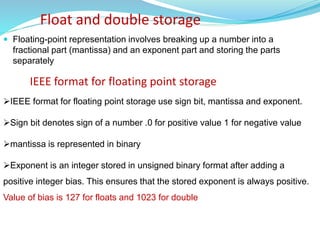
Float and double storage
 Floating-point representation involves breaking up a number into a
fractional part (mantissa) and an exponent part and storing the parts
separately
IEEE format for floating point storage use sign bit, mantissa and exponent.
Sign bit denotes sign of a number .0 for positive value 1 for negative value
mantissa is represented in binary
Exponent is an integer stored in unsigned binary format after adding a
positive integer bias. This ensures that the stored exponent is always positive.
Value of bias is 127 for floats and 1023 for double
IEEE format for floating point storage
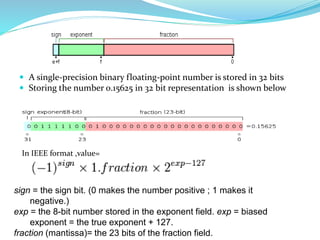
 A single-precision binary floating-point number is stored in 32 bits
 Storing the number 0.15625 in 32 bit representation is shown below
In IEEE format ,value=
sign = the sign bit. (0 makes the number positive ; 1 makes it
negative.)
exp = the 8-bit number stored in the exponent field. exp = biased
exponent = the true exponent + 127.
fraction (mantissa)= the 23 bits of the fraction field.
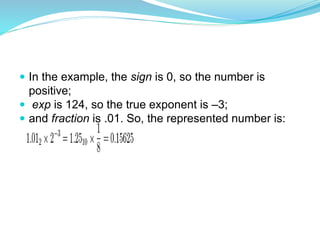
 In the example, the sign is 0, so the number is
positive;
 exp is 124, so the true exponent is –3;
 and fraction is .01. So, the represented number is:
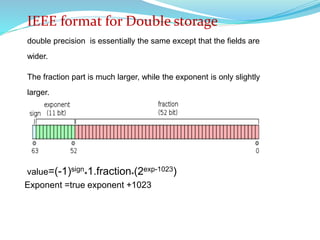
value=(-1)sign
*1.fraction*(2exp-1023)
Exponent =true exponent +1023
IEEE format for Double storage
double precision is essentially the same except that the fields are
wider.
The fraction part is much larger, while the exponent is only slightly
larger.
Character Type
 A single character can be defined as a character(char) type of
data.
 Characters are usually stored in 1 byte of internal storage.
Void Type
 Void type has no values
 Used to specify type of function
 Type of function is said to be void when it does not return any
values to the calling function
 The qualifiers define the amount of storage allocated to
the variable.
4 data type qualifiers are available in c
 short
 long
 signed
Unsigned
size qualifiers- Short and long
Sign qualifiers-Signed and unsigned
Points to be noted
All of these modifiers can be applied to base type int
Signed and unsigned can be apply to base type char
Long can be apply for double
When basetype omitted from declaration int is assumed
Data type qualifiers(data type modifiers)
A short int may require less memory than an ordinary int or it may
require the same amount of memory as an ordinary int , but it will never
exceed an ordinary int in word length.
a long int may require the same amount of memory as an ordinary int or it
may require more memory, but it will never be less than an ordinary int.
A signed integer use one bit for storing sign and rest 15 bits for
number. Sign bit is 0 for positive number and 1 for negative
Unsigned numbers are always positive and consume all the bits for the
magnitude of the number
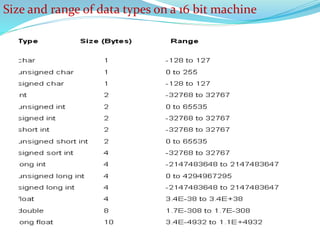
Size and range of data types on a 16 bit machine
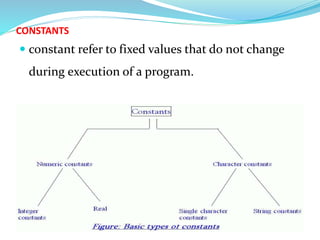
CONSTANTS
 constant refer to fixed values that do not change
during execution of a program.
Integer and floating-point constants represent numbers. They are
often referred to collectively as numeric-type constants.
1. Commas and blank spaces cannot be included within the constant.
2. The constant can be preceded by a minus (-) sign if desired.
3. The value of a constant cannot exceed specified minimum and maximum bounds.
rules apply to all numeric-type constants.
1. Integer Constants:
 An integer constant is an integer-valued number. it consists of a
sequence of digits .
 C allows 3 types of integer constants
decimal (base 10 )
octal (base 8)
hexadecimal (base 16).
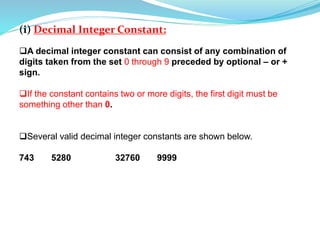
(i) Decimal Integer Constant:
A decimal integer constant can consist of any combination of
digits taken from the set 0 through 9 preceded by optional – or +
sign.
If the constant contains two or more digits, the first digit must be
something other than 0.
Several valid decimal integer constants are shown below.
743 5280 32760 9999
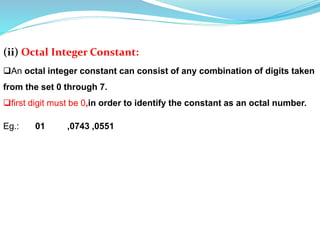
(ii) Octal Integer Constant:
An octal integer constant can consist of any combination of digits taken
from the set 0 through 7.
first digit must be 0,in order to identify the constant as an octal number.
Eg.: 01 ,0743 ,0551
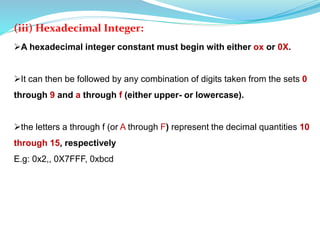
(iii) Hexadecimal Integer:
A hexadecimal integer constant must begin with either ox or 0X.
It can then be followed by any combination of digits taken from the sets 0
through 9 and a through f (either upper- or lowercase).
the letters a through f (or A through F) represent the decimal quantities 10
through 15, respectively
E.g: 0x2,, 0X7FFF, 0xbcd
Floating point Constant(Real constants)
 A floating-point constant is a base 10 number that contains either a
decimal point or an exponent (or both).
 floating point constants can be expressed in two forms
 Decimal notation
 Exponential notation
 A floating point constant in decimal notation Having whole number
followed by decimal point and fractional part with optional + or –
sign.
 Examples +867.9, -26.9876
In exponential form, the real constant is represented as two parts.
General form of floating point constant in exponential form is
mantissa e exponent
 The part before the ‘e’ is the ‘mantissa’, and the one following ‘e’ is the
‘exponent’.
Mantissa is either a real number expressed in decimal notation or an
integer.
Exponent is an integer number with optional plus or minus sign.
 1.6667E+8, 0.006e-3
Single Character constant
A character constant is a single character, enclosed in single
quotation marks.
Eg: ’B’, ’?’, ’3’
Character constants have integer values known as ASCII
values(example ‘A’ have the value 65)
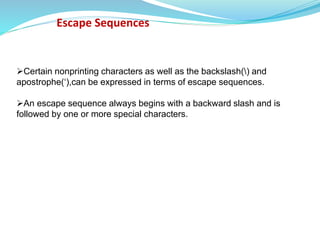
Escape Sequences
Certain nonprinting characters as well as the backslash() and
apostrophe(‘),can be expressed in terms of escape sequences.
An escape sequence always begins with a backward slash and is
followed by one or more special characters.
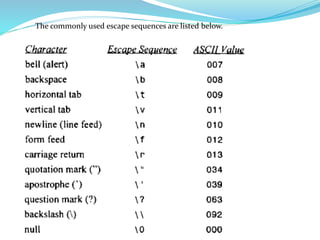
The commonly used escape sequences are listed below.
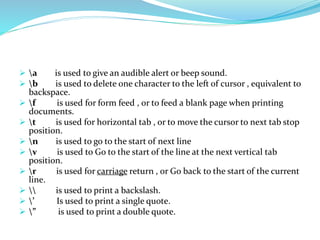
 a is used to give an audible alert or beep sound.
 b is used to delete one character to the left of cursor , equivalent to
backspace.
 f is used for form feed , or to feed a blank page when printing
documents.
 t is used for horizontal tab , or to move the cursor to next tab stop
position.
 n is used to go to the start of next line
 v is used to Go to the start of the line at the next vertical tab
position.
 r is used for carriage return , or Go back to the start of the current
line.
  is used to print a backslash.
 ’ Is used to print a single quote.
 ” is used to print a double quote.
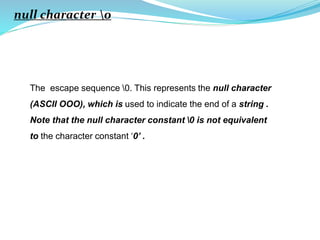
null character 0
The escape sequence 0. This represents the null character
(ASCII OOO), which is used to indicate the end of a string .
Note that the null character constant 0 is not equivalent
to the character constant ‘0’ .
String Constants
A string constant is a sequence of characters enclosed in double
quotation marks.
Eg: "green" "Washington, D.C. 20005H “ “270-32-3456“
C Variables
 A variable is an identifier that is used to represent a single data item; i.e a
numerical quantity or a character constant.
 A variable may take different values at different times during the execution.
However datatype associated with the variable cannot change.
 It is a good practice to choice a meaningful variable names.
 For example average , total
Rules for Constructing Variable Names
1. They must begin with a letter or underscore.
2. the maximum allowable length of a variable name is 31
characters. However length should not be normally more than
8 characters.
3. Uppercase and lowercase are significant. That is, the
variable Amount is not the same as amount or AMOUNT.
4. It should not be a keyword.
5. White space is not allowed.
ARRAYS
An array is an identifier that refers to a collection of data items that all
have the same name.
 The data items must all be of the same type (e.g., all integers, all
characters, etc.).
The individual data items are represented by their corresponding array-
elements
The individual array elements are distinguished from one another by the
value that is assigned to a subscript or index .
The subscript associated with each element in an array is shown in
square braces.
Value of subscript for first element is 0,second element is 1 and so on.
For example
A is 5 element array.
First element referred by A[0],second by A[1],last element by A[4]
For an n-element array, the subscripts will range from 0 to n-1
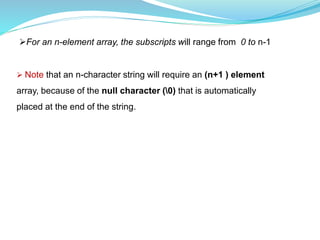
 Note that an n-character string will require an (n+1 ) element
array, because of the null character (0) that is automatically
placed at the end of the string.
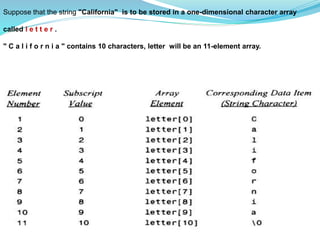
Suppose that the string "California" is to be stored in a one-dimensional character array
called l e t t e r .
" C a l i f o r n i a " contains 10 characters, letter will be an 11-element array.
DECLARATIONS
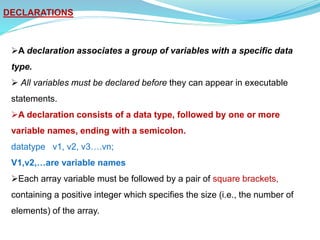
A declaration associates a group of variables with a specific data
type.
 All variables must be declared before they can appear in executable
statements.
A declaration consists of a data type, followed by one or more
variable names, ending with a semicolon.
datatype v1, v2, v3….vn;
V1,v2,…are variable names
Each array variable must be followed by a pair of square brackets,
containing a positive integer which specifies the size (i.e., the number of
elements) of the array.
example of type declarations
i n t a, b ;
f l o a t ro ot ;
char f l a g , t e x t [ 8 0 ] ;
a and b are declared to be integer variables
root is a floating-point variable
f l a g is a char-type variable and
t e x t is an 80-element, char-type array.
We can use type qualifiers in variable declaration like short int
a, b
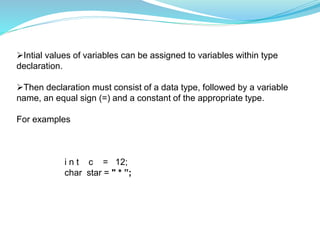
Intial values of variables can be assigned to variables within type
declaration.
Then declaration must consist of a data type, followed by a variable
name, an equal sign (=) and a constant of the appropriate type.
For examples
i n t c = 12;
char star = " * ”;
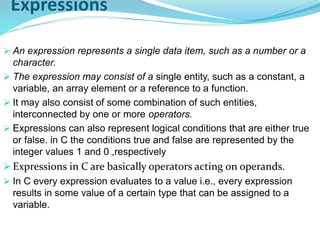
Expressions
 An expression represents a single data item, such as a number or a
character.
 The expression may consist of a single entity, such as a constant, a
variable, an array element or a reference to a function.
 It may also consist of some combination of such entities,
interconnected by one or more operators.
 Expressions can also represent logical conditions that are either true
or false. in C the conditions true and false are represented by the
integer values 1 and 0 ,respectively
 Expressions in C are basically operators acting on operands.
 In C every expression evaluates to a value i.e., every expression
results in some value of a certain type that can be assigned to a
variable.
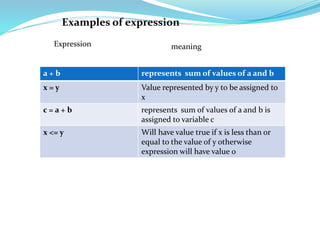
Examples of expression
a + b represents sum of values of a and b
x = y Value represented by y to be assigned to
x
c = a + b represents sum of values of a and b is
assigned to variable c
x <= y Will have value true if x is less than or
equal to the value of y otherwise
expression will have value 0
Expression meaning
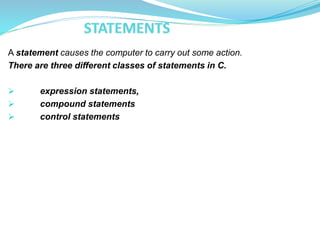
A statement causes the computer to carry out some action.
There are three different classes of statements in C.
 expression statements,
 compound statements
 control statements
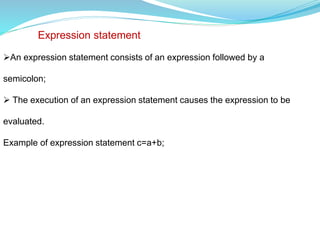
An expression statement consists of an expression followed by a
semicolon;
 The execution of an expression statement causes the expression to be
evaluated.
Example of expression statement c=a+b;
Expression statement
compound statement
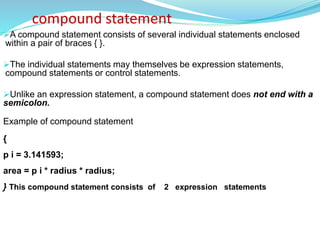
A compound statement consists of several individual statements enclosed
within a pair of braces { }.
The individual statements may themselves be expression statements,
compound statements or control statements.
Unlike an expression statement, a compound statement does not end with a
semicolon.
Example of compound statement
{
p i = 3.141593;
area = p i * radius * radius;
} This compound statement consists of 2 expression statements
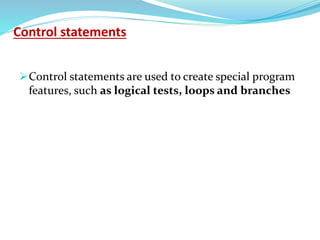
Control statements
Control statements are used to create special program
features, such as logical tests, loops and branches
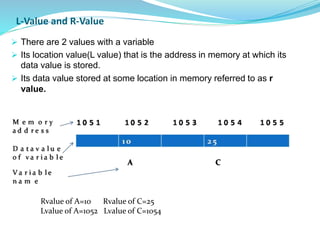
L-Value and R-Value
 There are 2 values with a variable
 Its location value(L value) that is the address in memory at which its
data value is stored.
 Its data value stored at some location in memory referred to as r
value.
Rvalue of A=10 Rvalue of C=25
Lvalue of A=1052 Lvalue of C=1054
Lvalue is an expression to which you can assign a value.
 L value and R value refer to on the left and right side of the assignment
operator.
 The Lvalue concept refers to the requirement that the operand on the left
side of the assignment operator is modifiable, usually a variable.
 l-values can be made nonmodifiable by using the const keyword;
Rvalue concept pulls or fetches the value of the expression or operand on
the right side of the assignment operator.
l-values are r-values but not all r-values are l-values.
consider a=b;
b,on the right hand of assignment operator is the quantity to be found at
the address associated with b i.e an rvalue
a ,on the left hand side is assigned an value stored in the address
associated with b so a is an lvalue
Assignment operation deposits b’s rvalue at a’s lvalue
SYMBOLIC CONSTANTS
A symbolic constant is a name that substitutes for a sequence of characters.
a symbolic constant allows a name to appear in place of a numeric constant,
a character constant or a string. When a program is compiled, each occurrence
of a symbolic constant is replaced by its corresponding character sequence.
Symbolic constants are usually defined at the beginning of a program.
General format of symbolic constant is
#define name text
Name symbolic name typically written in uppercase letters
Text represents sequence of characters that is associated with the
symbolic name.
Text does not end with a semicolon
example
#define PI 3.141593
the symbolic names are written in uppercase, to distinguish
them from ordinary C identifiers.
It is much easier to change the value of a single symbolic
constant than to change every occurrence of some numerical
constant that may appear in several places within the program.

module1 new c programming for begginers.pptx

  • 1.
    Algorithm An algorithm isa procedure or formula for solving a problem. An algorithm is define as a complete , unambiguous , finite number of logical steps for solving a specified problem. Algorithms are used for calculation, data processing, and many other fields. Each algorithm is a list of well-defined instructions for completing a task.Starting from an initial state(START), the instructions describe a computation that proceeds through a well-defined series of successive states, eventually terminating in a final ending state (STOP).
  • 2.
    Guidelines for constructan algorithm  It should begin with start statement  Given problem should be broken down into simple and meaningful steps  Steps should be numbered sequentially  Steps should be descriptive and written in simple English  Last step should be end statement
  • 3.
    Eg: Algorithm toaverage of n numbers Step 1 : start Step 2 : Read value of n Step 3 Read n numbers Step 4 : add these n numbers Step 5 : divide the sum by n to get average Step 6 : print the average Step 7 : Stop
  • 4.
    Properties: Finiteness: - analgorithm terminates after a finite numbers of steps.  Definiteness: - each step in algorithm is unambiguous. This means that the action specified by the step cannot be interpreted (explain the meaning of) in multiple ways & can be performed without any confusion.  Input:- an algorithm accepts zero or more inputs
  • 5.
    Output:- it producesat least one output.  Effectiveness:- it consists of basic instructions that are realizable. This means that the instructions can be performed by using the given inputs in a finite amount of time.
  • 6.
    flowchart A diagrammatic representationof sequential steps of solution of problem consisting standard block symbols being link together by directional arrows are called flowchart.
  • 7.
  • 9.
    Meaning of flowchartsymbols Symbol name Description Terminal Indicates the beginning or end of an algorithm Input/Output The point at which values of some data item have to read or some results written are indicated by input/output box Process Indicates computation or data manipulation Flow lines Connects the flowchart symbols and indicates the logic flow Decision Is used to indicate point at which decision has to be made and branch one/two alternatives possible Connector Indicates an entry to, or exit from another part of the flowchart or a connection point
  • 10.
    Guidelines for constructinga flowchart While drawing flowchart Initially concentrate on the logic of the problem and draw the main path of the flowchart Flowchart can have only 1 start point and 1 stop point Use descriptive term that aptly represent logic of the problem. Do not use ambiguous terms Remember that another user/programmer should easily understand flowchart
  • 11.
    Example of flowchart Flowchartfor sum of first 50 natural numbers
  • 12.
    Importance/ benefits offlowcharts  Communication: Flowcharts are better way of communicating the logic of a system to all concerned.  Effective analysis: With the help of flowchart, problem can be analyzed in more effective way.  Proper documentation: Program flowcharts serve as a good program documentation, which is needed for various purposes.  Efficient Coding: The flowcharts act as a guide or blueprint during the systems analysis and program development phase.
  • 13.
     Proper Debugging:The flowchart helps in debugging process.  Efficient Program Maintenance: The maintenance of operating program becomes easy with the help of flowchart. It helps the programmer to put efforts more efficiently on that part
  • 14.
    LIMITATIONS OF USINGFLOWCHARTS  Complex logic: Sometimes, the program logic is quite complicated. In that case, flowchart becomes complex and clumsy.  Alterations and Modifications: If alterations are required the flowchart may require re-drawing completely.  Reproduction: As the flowchart symbols cannot be typed, reproduction of flowchart becomes a problem.  The essentials of what is done can easily be lost in the technical details of how it is done.
  • 15.
    Distinguish between algorithmand flow chart Algorithm Flowchart Algorithm is a procedure for solving a problem Flowchart is a graphical diagram of the solution to the problem The algorithm is constructed out of boxes and it is written as various steps It is constructed with the shapes of each box indicating the kind of operation to be performed. The actual operation are written in different steps The actual operation to be performed is written inside the symbol The step numbers shows which step is to be done next or ‘ go to ‘ statements is used to specified the next step to be performed The arrow coming out of symbol indicates which operation to perform next
  • 16.
    Structured programming concept Structuredprogramming is a concept in which a large program can be divided in to small modules and can be solved each module one by one. Computer programming in which the statements are organized in a specific manner to minimize error or misinterpretation. Principles of structured programming are Structuring of control flow Decompose a program into portions or modules Program design using Top down or bottom up approach
  • 17.
     Structuring ofcontrol flow is to keep the complexity of a program under control so that design and understanding of a program logic become easier.  Three main structures in structured programming are  Sequence  Selection  Repetition structuring of control flow
  • 18.
    Sequence logic It refersto the line-by-line execution. The program enters the sequence, does each step, and exits the sequence
  • 19.
    Selection logic  Init there are various conditions on the basis of which one module is selected out of several given modules.
  • 20.
    Repetition logic  Init loops are implemented. Loop is used to implement those statements which are to be repeated again and again until some condition is satisfied.
  • 21.
    Modular programming Modular programmingis a programming strategy where a program is divided into segment called modules. A module is a unit or entity that is responsible for a single task or routine. module consisting of series of program instructions or statements in some programming language Program using this approach consisting of a main module called control module and number of functional modules A module may also decomposed into subordinate modules representing a sub task.
  • 22.
     A modulethat control subordinate modules is also known as superior module  Superior module does not include codes of subordinate modules . superior module calls subordinate modules for execution  Subordinate modules also referred as called module and superior module as calling module.
  • 23.
  • 24.
    Advantages of modularprogramming Modularization has several benefits, especially on large and complex programs:  Divide work for multiple programmers.  Reuse code-modules can be re-used in several projects changing the implementation details of a modules does not require to modify the clients using them as far as the interface does not change; faster re-compilation, as only the modules that have been modified are actually re-compiled; self-documenting, as the interface specifies all that we need to know to use the module; easier debugging, as modules dependencies are clearly specified and every module can be tested separately;
  • 25.
    The program canbe solved in two ways they are:  Top down programming  Bottom up Programming Top down and bottom up approach
  • 26.
    Top-down programming  Top-downprogramming is a programming style, in which complex pieces are divided into smaller pieces. Each pieces are again divided into sub systems until we get the most simple piece of program . Then each pieces are solved independently  Top down approach program design starts with specification of function to be performed by a program and then breaks it down into progressively subsidiary functions  In topdown approach calling module is always designed before the called module D B A C E F G H Each box in the figure is a module . Topmost module represented by A.A Decomposed to B,C,D. B and C further subdivided to sub components.
  • 27.
    It initiates humantendancy to solve a problem by outlining broad concepts first and then subsequently going into detail Development of module can take place in parallel. Separating the low level work from the higher level objects leads to a modular design. Very less time consuming (Each programmers are involved only a part of the big project) Very optimized way of processing. (Each programmers have to apply their own knowledge and experience to their parts (modules), so our project will become an optimized one ) Advantages of top-down programming
  • 28.
    Disadvantages of top-downprogramming Top-down programming complicates testing. Noting executable exists until the very late in the development, so in order to test what has been done so far, one must write stubs. (Stubs are software programs which act as a module and give the output as given by an actual product/software.) top-down programming tends to generate modules that are very specific to the application that is being written, thus not very reusable. The implementation cost is likely to be higher.
  • 29.
    Bottom-up approach  Isreverse of topdown approach  In a bottom-up approach the individual base elements of the system are first specified in great detail  These elements are then linked together to form larger subsystems  In this approach the beginnings are small but eventually grow in complexity and completeness A F E B C D H G
  • 30.
    Advantages of Bottomup programming The advantages of using a bottom-up approach to software testing is the fact that there is no need for stubs. bottom-up design yields programs which are smaller and more agile. A shorter program doesn't have to be divided into so many components, and fewer components means programs which are easier to read or modify. Fewer components also means fewer connections between components, and thus less chance for errors there. errors in critical modules are found earlier major functions and processing are tested earlier. Bottom-up design promotes code re-use.
  • 31.
    Disadvantages of bottomup programming A disadvantage of bottom-up design is that it is not focused on specific requirements. a program designed from the bottom up may not exactly fit the given problem. High quality bottom-up solutions prove very hard to construct Components may be coded without having a clear idea of how they link to other
  • 32.
    Difference between topdownand bottom up programming Top Down Programming Bottom up programming Begins the design with main module progress downward to lowest modules Begins the design with lowest level module progress upward to top level or main module Code is not reusable Code is reusable Testing become complicate Testing become easy compared to top down
  • 33.
    Programming  A programis a sequence of instructions written to perform a specified task.  programming is the process of designing, writing, testing, debugging / troubleshooting, and maintaining the source code of computer programs.  source code is a text written in a programming language.
  • 34.
    Translators  Translation isthe process of converting high level language into low level language.  Translators are the programs used to do this translation  Translator Source code Object code
  • 35.
    Two types oftranslators are  Compilers  Interpreters  Computer programs written in any language other than machine language must be either interpreted or compiled.
  • 36.
    Compilers  A compileris a computer program (or set of programs) that transforms source code written in high level programming language into machine language.  It converts entire program in one go and report all the errors of the program along with line numbers  Once object code available compiler is not needed in memory
  • 37.
    Interpreter  In computerscience, an interpreter is a program which translates one statement of a high level language program into machine code and Executes it .  if there is any error in any line it reports it at the same time and program execution cannot resume until the error is rectified.  Interpreter must always present in memory every time program executed as every time program is run it is first interpreted then executed  BASIC and LISP are especially designed to be executed by an interpreter.
  • 38.
    Difference Between Compilersand Interpreters Compiler Interpreter 1.It reads the entire program once and then translates it before execution. 1.It read one statement at a time and translate it into machine code, executes it and then go to the next statement of the program. 2.Object code is stored after compilation. 2. Object code is not stored. 3.compilation is very fast 3. Whole execution is slow. 4.Errors are displayed after compilation 4. Errors are displayed as and when they are found and further translation is possible after correcting it.
  • 39.
  • 40.
    C Character Set Acharacter denotes any alphabet ,digit or symbols to represent information.  Numerals: 0, 1, 2, 3, 4, 5, 6, 7, 8, 9  Alphabets: a, b, ….z, A, B, ……...Z Arithmetic Operations + - * / %(Mod)  Special Characters ) ( { } etc
  • 41.
    C Identifiers  Theyare user defined names. They do not have any predefined meanings  Identifiers" or "symbols" are the names you supply for variables, functions, and labels in our program.  Identifier names must differ in spelling and case from any keywords.  You create an identifier by specifying it in the declaration of a variable, type, or function.  Eg: sum,total
  • 42.
    Rules for theidentifiers  You cannot use keywords  Must not contain white space  First character must be letter(or underscore)  Must consist of only letters, digits or underscore
  • 43.
    C Keywords  Keywords are NOT user defined names  They have predefined meanings  These keywords can be used only for their intended purpose; they cannot be used as programmer-defined identifiers.  keywords are all lowercase.  C makes use of only 32 keywords or reserved words.
  • 44.
    The standard keywordsare auto extern sizeof break f l o a t s t a t i c case f o r s t r u c t char got0 switch const i f typedef continue i n t union d e f a u l t long unsigned do r e g i s t e r void double return v o l a t i l e else short while enum signed
  • 45.
    Data Types C supportsseveral different types of data, each of which may be represented differently within the computer’s memory. Data types allow programmer to select type of data appropriate to the needs of the application as well as the machine.
  • 47.
    Int type Figure forStoring the integer 7 using a binary code. An integer is a number with no fractional part Integers are stored as binary numbers.
  • 48.
    Floating Point Types Floating point number is a number containing a decimal point and or an exponent  Floating point number represents a real number with 6 digits precision.  Floating point numbers are denoted by the keyword float.  Some floating-point numbers are 2.75, 3.16E7, 7.00, and  2e–8.  When the accuracy of the floating point number is insufficient, we can use the double to define the number.  The double is same as float but with longer precision(14 digits precision)
  • 49.
    Float and doublestorage  Floating-point representation involves breaking up a number into a fractional part (mantissa) and an exponent part and storing the parts separately IEEE format for floating point storage use sign bit, mantissa and exponent. Sign bit denotes sign of a number .0 for positive value 1 for negative value mantissa is represented in binary Exponent is an integer stored in unsigned binary format after adding a positive integer bias. This ensures that the stored exponent is always positive. Value of bias is 127 for floats and 1023 for double IEEE format for floating point storage
  • 50.
     A single-precisionbinary floating-point number is stored in 32 bits  Storing the number 0.15625 in 32 bit representation is shown below In IEEE format ,value= sign = the sign bit. (0 makes the number positive ; 1 makes it negative.) exp = the 8-bit number stored in the exponent field. exp = biased exponent = the true exponent + 127. fraction (mantissa)= the 23 bits of the fraction field.
  • 51.
     In theexample, the sign is 0, so the number is positive;  exp is 124, so the true exponent is –3;  and fraction is .01. So, the represented number is:
  • 52.
    value=(-1)sign *1.fraction*(2exp-1023) Exponent =true exponent+1023 IEEE format for Double storage double precision is essentially the same except that the fields are wider. The fraction part is much larger, while the exponent is only slightly larger.
  • 53.
    Character Type  Asingle character can be defined as a character(char) type of data.  Characters are usually stored in 1 byte of internal storage.
  • 54.
    Void Type  Voidtype has no values  Used to specify type of function  Type of function is said to be void when it does not return any values to the calling function
  • 55.
     The qualifiersdefine the amount of storage allocated to the variable. 4 data type qualifiers are available in c  short  long  signed Unsigned size qualifiers- Short and long Sign qualifiers-Signed and unsigned Points to be noted All of these modifiers can be applied to base type int Signed and unsigned can be apply to base type char Long can be apply for double When basetype omitted from declaration int is assumed Data type qualifiers(data type modifiers)
  • 56.
    A short intmay require less memory than an ordinary int or it may require the same amount of memory as an ordinary int , but it will never exceed an ordinary int in word length. a long int may require the same amount of memory as an ordinary int or it may require more memory, but it will never be less than an ordinary int. A signed integer use one bit for storing sign and rest 15 bits for number. Sign bit is 0 for positive number and 1 for negative Unsigned numbers are always positive and consume all the bits for the magnitude of the number
  • 57.
    Size and rangeof data types on a 16 bit machine
  • 58.
    CONSTANTS  constant referto fixed values that do not change during execution of a program.
  • 59.
    Integer and floating-pointconstants represent numbers. They are often referred to collectively as numeric-type constants. 1. Commas and blank spaces cannot be included within the constant. 2. The constant can be preceded by a minus (-) sign if desired. 3. The value of a constant cannot exceed specified minimum and maximum bounds. rules apply to all numeric-type constants.
  • 60.
    1. Integer Constants: An integer constant is an integer-valued number. it consists of a sequence of digits .  C allows 3 types of integer constants decimal (base 10 ) octal (base 8) hexadecimal (base 16).
  • 61.
    (i) Decimal IntegerConstant: A decimal integer constant can consist of any combination of digits taken from the set 0 through 9 preceded by optional – or + sign. If the constant contains two or more digits, the first digit must be something other than 0. Several valid decimal integer constants are shown below. 743 5280 32760 9999
  • 62.
    (ii) Octal IntegerConstant: An octal integer constant can consist of any combination of digits taken from the set 0 through 7. first digit must be 0,in order to identify the constant as an octal number. Eg.: 01 ,0743 ,0551
  • 63.
    (iii) Hexadecimal Integer: Ahexadecimal integer constant must begin with either ox or 0X. It can then be followed by any combination of digits taken from the sets 0 through 9 and a through f (either upper- or lowercase). the letters a through f (or A through F) represent the decimal quantities 10 through 15, respectively E.g: 0x2,, 0X7FFF, 0xbcd
  • 64.
    Floating point Constant(Realconstants)  A floating-point constant is a base 10 number that contains either a decimal point or an exponent (or both).  floating point constants can be expressed in two forms  Decimal notation  Exponential notation
  • 65.
     A floatingpoint constant in decimal notation Having whole number followed by decimal point and fractional part with optional + or – sign.  Examples +867.9, -26.9876
  • 66.
    In exponential form,the real constant is represented as two parts. General form of floating point constant in exponential form is mantissa e exponent  The part before the ‘e’ is the ‘mantissa’, and the one following ‘e’ is the ‘exponent’. Mantissa is either a real number expressed in decimal notation or an integer. Exponent is an integer number with optional plus or minus sign.  1.6667E+8, 0.006e-3
  • 67.
    Single Character constant Acharacter constant is a single character, enclosed in single quotation marks. Eg: ’B’, ’?’, ’3’ Character constants have integer values known as ASCII values(example ‘A’ have the value 65)
  • 68.
    Escape Sequences Certain nonprintingcharacters as well as the backslash() and apostrophe(‘),can be expressed in terms of escape sequences. An escape sequence always begins with a backward slash and is followed by one or more special characters.
  • 69.
    The commonly usedescape sequences are listed below.
  • 70.
     a isused to give an audible alert or beep sound.  b is used to delete one character to the left of cursor , equivalent to backspace.  f is used for form feed , or to feed a blank page when printing documents.  t is used for horizontal tab , or to move the cursor to next tab stop position.  n is used to go to the start of next line  v is used to Go to the start of the line at the next vertical tab position.  r is used for carriage return , or Go back to the start of the current line.  is used to print a backslash.  ’ Is used to print a single quote.  ” is used to print a double quote.
  • 71.
    null character 0 Theescape sequence 0. This represents the null character (ASCII OOO), which is used to indicate the end of a string . Note that the null character constant 0 is not equivalent to the character constant ‘0’ .
  • 72.
    String Constants A stringconstant is a sequence of characters enclosed in double quotation marks. Eg: "green" "Washington, D.C. 20005H “ “270-32-3456“
  • 73.
    C Variables  Avariable is an identifier that is used to represent a single data item; i.e a numerical quantity or a character constant.  A variable may take different values at different times during the execution. However datatype associated with the variable cannot change.  It is a good practice to choice a meaningful variable names.  For example average , total
  • 74.
    Rules for ConstructingVariable Names 1. They must begin with a letter or underscore. 2. the maximum allowable length of a variable name is 31 characters. However length should not be normally more than 8 characters. 3. Uppercase and lowercase are significant. That is, the variable Amount is not the same as amount or AMOUNT. 4. It should not be a keyword. 5. White space is not allowed.
  • 75.
    ARRAYS An array isan identifier that refers to a collection of data items that all have the same name.  The data items must all be of the same type (e.g., all integers, all characters, etc.). The individual data items are represented by their corresponding array- elements
  • 76.
    The individual arrayelements are distinguished from one another by the value that is assigned to a subscript or index . The subscript associated with each element in an array is shown in square braces. Value of subscript for first element is 0,second element is 1 and so on. For example A is 5 element array. First element referred by A[0],second by A[1],last element by A[4]
  • 77.
    For an n-elementarray, the subscripts will range from 0 to n-1  Note that an n-character string will require an (n+1 ) element array, because of the null character (0) that is automatically placed at the end of the string.
  • 78.
    Suppose that thestring "California" is to be stored in a one-dimensional character array called l e t t e r . " C a l i f o r n i a " contains 10 characters, letter will be an 11-element array.
  • 79.
    DECLARATIONS A declaration associatesa group of variables with a specific data type.  All variables must be declared before they can appear in executable statements. A declaration consists of a data type, followed by one or more variable names, ending with a semicolon. datatype v1, v2, v3….vn; V1,v2,…are variable names Each array variable must be followed by a pair of square brackets, containing a positive integer which specifies the size (i.e., the number of elements) of the array.
  • 80.
    example of typedeclarations i n t a, b ; f l o a t ro ot ; char f l a g , t e x t [ 8 0 ] ; a and b are declared to be integer variables root is a floating-point variable f l a g is a char-type variable and t e x t is an 80-element, char-type array. We can use type qualifiers in variable declaration like short int a, b
  • 81.
    Intial values ofvariables can be assigned to variables within type declaration. Then declaration must consist of a data type, followed by a variable name, an equal sign (=) and a constant of the appropriate type. For examples i n t c = 12; char star = " * ”;
  • 82.
    Expressions  An expressionrepresents a single data item, such as a number or a character.  The expression may consist of a single entity, such as a constant, a variable, an array element or a reference to a function.  It may also consist of some combination of such entities, interconnected by one or more operators.  Expressions can also represent logical conditions that are either true or false. in C the conditions true and false are represented by the integer values 1 and 0 ,respectively  Expressions in C are basically operators acting on operands.  In C every expression evaluates to a value i.e., every expression results in some value of a certain type that can be assigned to a variable.
  • 83.
    Examples of expression a+ b represents sum of values of a and b x = y Value represented by y to be assigned to x c = a + b represents sum of values of a and b is assigned to variable c x <= y Will have value true if x is less than or equal to the value of y otherwise expression will have value 0 Expression meaning
  • 84.
    A statement causesthe computer to carry out some action. There are three different classes of statements in C.  expression statements,  compound statements  control statements
  • 85.
    An expression statementconsists of an expression followed by a semicolon;  The execution of an expression statement causes the expression to be evaluated. Example of expression statement c=a+b; Expression statement
  • 86.
    compound statement A compoundstatement consists of several individual statements enclosed within a pair of braces { }. The individual statements may themselves be expression statements, compound statements or control statements. Unlike an expression statement, a compound statement does not end with a semicolon. Example of compound statement { p i = 3.141593; area = p i * radius * radius; } This compound statement consists of 2 expression statements
  • 87.
    Control statements Control statementsare used to create special program features, such as logical tests, loops and branches
  • 88.
    L-Value and R-Value There are 2 values with a variable  Its location value(L value) that is the address in memory at which its data value is stored.  Its data value stored at some location in memory referred to as r value. Rvalue of A=10 Rvalue of C=25 Lvalue of A=1052 Lvalue of C=1054
  • 89.
    Lvalue is anexpression to which you can assign a value.  L value and R value refer to on the left and right side of the assignment operator.  The Lvalue concept refers to the requirement that the operand on the left side of the assignment operator is modifiable, usually a variable.  l-values can be made nonmodifiable by using the const keyword; Rvalue concept pulls or fetches the value of the expression or operand on the right side of the assignment operator. l-values are r-values but not all r-values are l-values.
  • 90.
    consider a=b; b,on theright hand of assignment operator is the quantity to be found at the address associated with b i.e an rvalue a ,on the left hand side is assigned an value stored in the address associated with b so a is an lvalue Assignment operation deposits b’s rvalue at a’s lvalue
  • 91.
    SYMBOLIC CONSTANTS A symbolicconstant is a name that substitutes for a sequence of characters. a symbolic constant allows a name to appear in place of a numeric constant, a character constant or a string. When a program is compiled, each occurrence of a symbolic constant is replaced by its corresponding character sequence. Symbolic constants are usually defined at the beginning of a program.
  • 92.
    General format ofsymbolic constant is #define name text Name symbolic name typically written in uppercase letters Text represents sequence of characters that is associated with the symbolic name. Text does not end with a semicolon example #define PI 3.141593
  • 93.
    the symbolic namesare written in uppercase, to distinguish them from ordinary C identifiers. It is much easier to change the value of a single symbolic constant than to change every occurrence of some numerical constant that may appear in several places within the program.