Boolean Algebra and Logic Circuits-
COMBINATIONAL LOGIC
Module 3
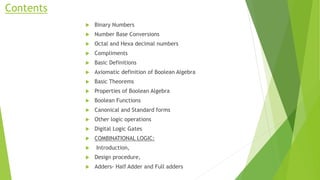
Contents
 Binary Numbers
 Number Base Conversions
 Octal and Hexa decimal numbers
 Compliments
 Basic Definitions
 Axiomatic definition of Boolean Algebra
 Basic Theorems
 Properties of Boolean Algebra
 Boolean Functions
 Canonical and Standard forms
 Other logic operations
 Digital Logic Gates
 COMBINATIONAL LOGIC:
 Introduction,
 Design procedure,
 Adders- Half Adder and Full adders
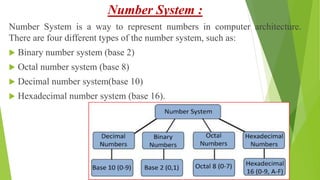
Number System :
Number System is a way to represent numbers in computer architecture.
There are four different types of the number system, such as:
 Binary number system (base 2)
 Octal number system (base 8)
 Decimal number system(base 10)
 Hexadecimal number system (base 16).
 In the number system, each number is represented
by its base.
 If the base is 2 it is a binary number,
 If the base is 8 it is an octal number,
 If the base is 10, then it is called decimal number
system and
 If the base is 16, it is part of the hexadecimal
number system.
Binary Number System
 Binary number system is used to define a number in binary
system. Binary system is used to represent a number in terms of
two numbers only, 0 and 1.
 The binary number system is used commonly by computer
languages like Java, C++.
 As the computer only understands binary language that is 0 or
1, all inputs given to a computer are decoded by it into series of
0's or 1's to process it further.
Octal Number System
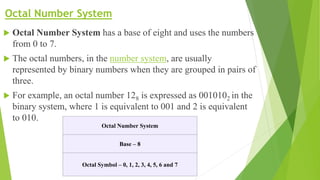
 Octal Number System has a base of eight and uses the numbers
from 0 to 7.
 The octal numbers, in the number system, are usually
represented by binary numbers when they are grouped in pairs of
three.
 For example, an octal number 128 is expressed as 0010102 in the
binary system, where 1 is equivalent to 001 and 2 is equivalent
to 010.
Octal Number System
Base – 8
Octal Symbol – 0, 1, 2, 3, 4, 5, 6 and 7
Decimal Number System
 In the decimal number system, the numbers are represented with base 10.
 The way of denoting the decimal numbers with base 10 is also termed as decimal
notation.
 This number system is widely used in computer applications.
 It is also called the base-10 number system which consists of 10 digits, such as,
0,1,2,3,4,5,6,7,8,9.
 Each digit in the decimal system has a position and every digit is ten times more
significant than the previous digit.
 Suppose, 25 is a decimal number, then 2 is ten times more than 5.
 Some examples of decimal numbers are:-
 (12)10, (345)10, (119)10, (200)10, (313.9)10
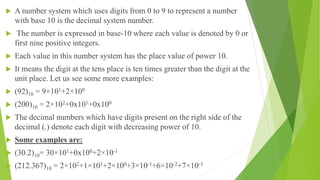
 A number system which uses digits from 0 to 9 to represent a number
with base 10 is the decimal system number.
 The number is expressed in base-10 where each value is denoted by 0 or
first nine positive integers.
 Each value in this number system has the place value of power 10.
 It means the digit at the tens place is ten times greater than the digit at the
unit place. Let us see some more examples:
 (92)10 = 9×101+2×100
 (200)10 = 2×10²+0x101+0x100
 The decimal numbers which have digits present on the right side of the
decimal (.) denote each digit with decreasing power of 10.
 Some examples are:
 (30.2)10= 30×101+0x100+2×10⁻¹
 (212.367)10 = 2×10²+1×101+2×100+3×10⁻¹+6×10⁻²+7×10⁻³
Hexadecimal Number System
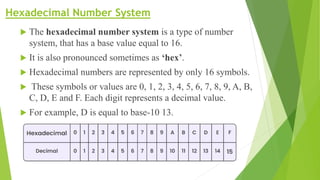
 The hexadecimal number system is a type of number
system, that has a base value equal to 16.
 It is also pronounced sometimes as ‘hex’.
 Hexadecimal numbers are represented by only 16 symbols.
 These symbols or values are 0, 1, 2, 3, 4, 5, 6, 7, 8, 9, A, B,
C, D, E and F. Each digit represents a decimal value.
 For example, D is equal to base-10 13.
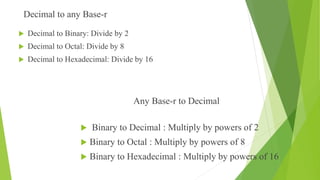
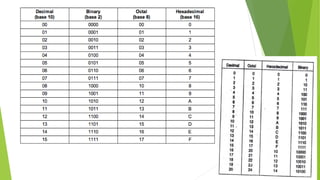
Decimal to any Base-r
 Decimal to Binary: Divide by 2
 Decimal to Octal: Divide by 8
 Decimal to Hexadecimal: Divide by 16
Any Base-r to Decimal
 Binary to Decimal : Multiply by powers of 2
 Binary to Octal : Multiply by powers of 8
 Binary to Hexadecimal : Multiply by powers of 16
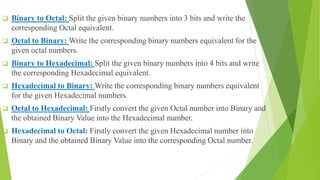
 Binary to Octal: Split the given binary numbers into 3 bits and write the
corresponding Octal equivalent.
 Octal to Binary: Write the corresponding binary numbers equivalent for the
given octal numbers.
 Binary to Hexadecimal: Split the given binary numbers into 4 bits and write
the corresponding Hexadecimal equivalent.
 Hexadecimal to Binary: Write the corresponding binary numbers equivalent
for the given Hexadecimal numbers.
 Octal to Hexadecimal: Firstly convert the given Octal number into Binary and
the obtained Binary Value into the Hexadecimal number.
 Hexadecimal to Octal: Firstly convert the given Hexadecimal number into
Binary and the obtained Binary Value into the corresponding Octal number.
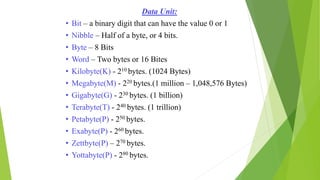
Data Unit:
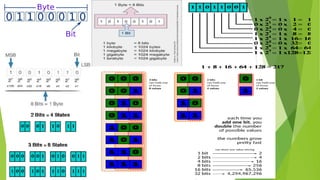
• Bit – a binary digit that can have the value 0 or 1
• Nibble – Half of a byte, or 4 bits.
• Byte – 8 Bits
• Word – Two bytes or 16 Bites
• Kilobyte(K) - 210 bytes. (1024 Bytes)
• Megabyte(M) - 220 bytes.(1 million – 1,048,576 Bytes)
• Gigabyte(G) - 230 bytes. (1 billion)
• Terabyte(T) - 240 bytes. (1 trillion)
• Petabyte(P) - 250 bytes.
• Exabyte(P) - 260 bytes.
• Zettbyte(P) – 270 bytes.
• Yottabyte(P) - 280 bytes.
module 3,Boolean algebra and logic circuits .pptx

module 3,Boolean algebra and logic circuits .pptx

  • 1.
    Boolean Algebra andLogic Circuits- COMBINATIONAL LOGIC Module 3
  • 2.
    Contents  Binary Numbers Number Base Conversions  Octal and Hexa decimal numbers  Compliments  Basic Definitions  Axiomatic definition of Boolean Algebra  Basic Theorems  Properties of Boolean Algebra  Boolean Functions  Canonical and Standard forms  Other logic operations  Digital Logic Gates  COMBINATIONAL LOGIC:  Introduction,  Design procedure,  Adders- Half Adder and Full adders
  • 3.
    Number System : NumberSystem is a way to represent numbers in computer architecture. There are four different types of the number system, such as:  Binary number system (base 2)  Octal number system (base 8)  Decimal number system(base 10)  Hexadecimal number system (base 16).
  • 4.
     In thenumber system, each number is represented by its base.  If the base is 2 it is a binary number,  If the base is 8 it is an octal number,  If the base is 10, then it is called decimal number system and  If the base is 16, it is part of the hexadecimal number system.
  • 5.
    Binary Number System Binary number system is used to define a number in binary system. Binary system is used to represent a number in terms of two numbers only, 0 and 1.  The binary number system is used commonly by computer languages like Java, C++.  As the computer only understands binary language that is 0 or 1, all inputs given to a computer are decoded by it into series of 0's or 1's to process it further.
  • 6.
    Octal Number System Octal Number System has a base of eight and uses the numbers from 0 to 7.  The octal numbers, in the number system, are usually represented by binary numbers when they are grouped in pairs of three.  For example, an octal number 128 is expressed as 0010102 in the binary system, where 1 is equivalent to 001 and 2 is equivalent to 010. Octal Number System Base – 8 Octal Symbol – 0, 1, 2, 3, 4, 5, 6 and 7
  • 7.
    Decimal Number System In the decimal number system, the numbers are represented with base 10.  The way of denoting the decimal numbers with base 10 is also termed as decimal notation.  This number system is widely used in computer applications.  It is also called the base-10 number system which consists of 10 digits, such as, 0,1,2,3,4,5,6,7,8,9.  Each digit in the decimal system has a position and every digit is ten times more significant than the previous digit.  Suppose, 25 is a decimal number, then 2 is ten times more than 5.  Some examples of decimal numbers are:-  (12)10, (345)10, (119)10, (200)10, (313.9)10
  • 8.
     A numbersystem which uses digits from 0 to 9 to represent a number with base 10 is the decimal system number.  The number is expressed in base-10 where each value is denoted by 0 or first nine positive integers.  Each value in this number system has the place value of power 10.  It means the digit at the tens place is ten times greater than the digit at the unit place. Let us see some more examples:  (92)10 = 9×101+2×100  (200)10 = 2×10²+0x101+0x100  The decimal numbers which have digits present on the right side of the decimal (.) denote each digit with decreasing power of 10.  Some examples are:  (30.2)10= 30×101+0x100+2×10⁻¹  (212.367)10 = 2×10²+1×101+2×100+3×10⁻¹+6×10⁻²+7×10⁻³
  • 9.
    Hexadecimal Number System The hexadecimal number system is a type of number system, that has a base value equal to 16.  It is also pronounced sometimes as ‘hex’.  Hexadecimal numbers are represented by only 16 symbols.  These symbols or values are 0, 1, 2, 3, 4, 5, 6, 7, 8, 9, A, B, C, D, E and F. Each digit represents a decimal value.  For example, D is equal to base-10 13.
  • 11.
    Decimal to anyBase-r  Decimal to Binary: Divide by 2  Decimal to Octal: Divide by 8  Decimal to Hexadecimal: Divide by 16 Any Base-r to Decimal  Binary to Decimal : Multiply by powers of 2  Binary to Octal : Multiply by powers of 8  Binary to Hexadecimal : Multiply by powers of 16
  • 12.
     Binary toOctal: Split the given binary numbers into 3 bits and write the corresponding Octal equivalent.  Octal to Binary: Write the corresponding binary numbers equivalent for the given octal numbers.  Binary to Hexadecimal: Split the given binary numbers into 4 bits and write the corresponding Hexadecimal equivalent.  Hexadecimal to Binary: Write the corresponding binary numbers equivalent for the given Hexadecimal numbers.  Octal to Hexadecimal: Firstly convert the given Octal number into Binary and the obtained Binary Value into the Hexadecimal number.  Hexadecimal to Octal: Firstly convert the given Hexadecimal number into Binary and the obtained Binary Value into the corresponding Octal number.
  • 13.
    Data Unit: • Bit– a binary digit that can have the value 0 or 1 • Nibble – Half of a byte, or 4 bits. • Byte – 8 Bits • Word – Two bytes or 16 Bites • Kilobyte(K) - 210 bytes. (1024 Bytes) • Megabyte(M) - 220 bytes.(1 million – 1,048,576 Bytes) • Gigabyte(G) - 230 bytes. (1 billion) • Terabyte(T) - 240 bytes. (1 trillion) • Petabyte(P) - 250 bytes. • Exabyte(P) - 260 bytes. • Zettbyte(P) – 270 bytes. • Yottabyte(P) - 280 bytes.