Department of CSE- Data Science
MODULE-1
Introduction
Department of CSE- Data Science
Contents
 Data Communications
Networks
Network Types
 Networks Models
 Protocol Layering
 TCP/IP Protocol suite
 The OSI model
 Introduction to Physical Layer: Transmission media
 Guided Media
 Unguided Media: Wireless.
 Switching: Packet Switching and its types.
Department of CSE- Data Science
Data Communications
 The term telecommunication means communication at a distance.
 The word data refers to information presented in whatever form is agreed upon by the
parties creating and using the data.
 Data communications are the exchange of data between two devices via some form of
transmission medium such as a wire cable.
Department of CSE- Data Science
Characteristics of data communication system
 Delivery : The system must deliver data to the correct destination .
 Accuracy :The system must deliver the data accurately.
 Timeliness: The system must deliver data in a timely manner. Data delivered late are
useless.
 Jitter: Jitter refers to variation in the packet arrival time. For example, Video packets
are sent every 30 ms . If some of the packets arrive with 30-ms delay and others with
40-ms delay, an uneven quality in the video is the result.
Department of CSE- Data Science
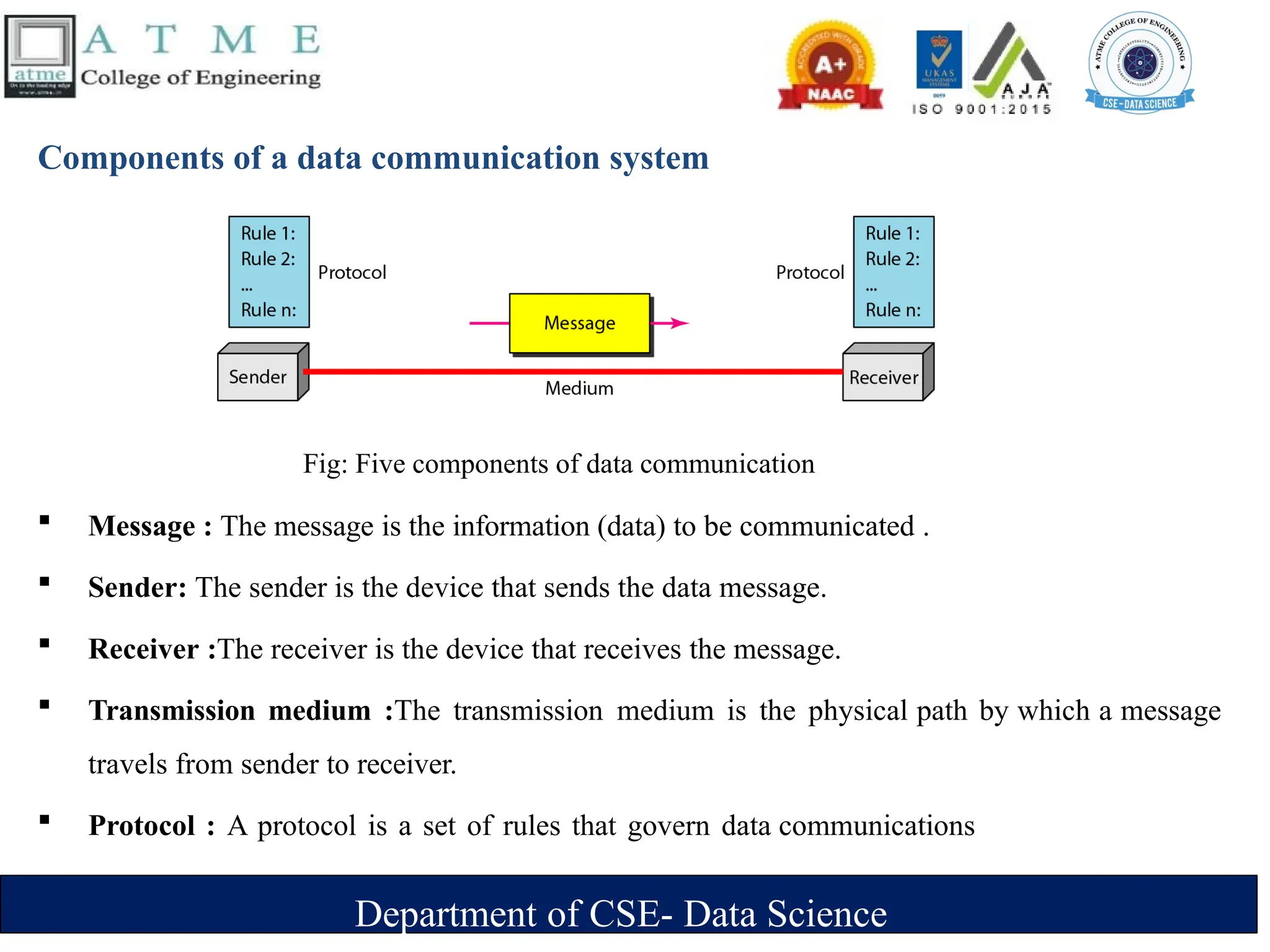
Components of a data communication system
Fig: Five components of data communication
 Message : The message is the information (data) to be communicated .
 Sender: The sender is the device that sends the data message.
 Receiver :The receiver is the device that receives the message.
 Transmission medium :The transmission medium is the physical path by which a message
travels from sender to receiver.
 Protocol : A protocol is a set of rules that govern data communications
Department of CSE- Data Science
Data Representation
 Text
‣Represented as bit pattern (sequence of bits 0s or 1s)
‣Different set of bit pattern used to represent symbols or characters.
‣Each set is called code
‣Process of representing symbols is called encoding
‣Ex: ASCII,UNICODE
 Numbers
‣ Represented as bit pattern
‣ Directly converted to binary form
 Audio
‣ Recording or broadcasting of sound or music.
‣ Continuous not discrete
Department of CSE- Data Science
 Video
‣ Recording or broadcasting of picture or a movie
‣ Produced as :
‣ Continuous entity [TV camera]
‣ Combination of images-discrete entity
 Images
‣ Represented as bit pattern
‣ Image is divided into matrix of pixels(smallest element of an image)
‣ Each pixel is assigned a bit pattern (size and value of pattern depend on image)
‣ Ex: black and white dots (chessboard) -1 bit pattern is enough to represent a pixel, gray
scale- 2 bit pattern.
‣ Several methods to represent colour images : RGB,YCM
Department of CSE- Data Science
Data Flow
 Communication between two devices can be
1.Simplex
2.Half-duplex
3.Full-duplex
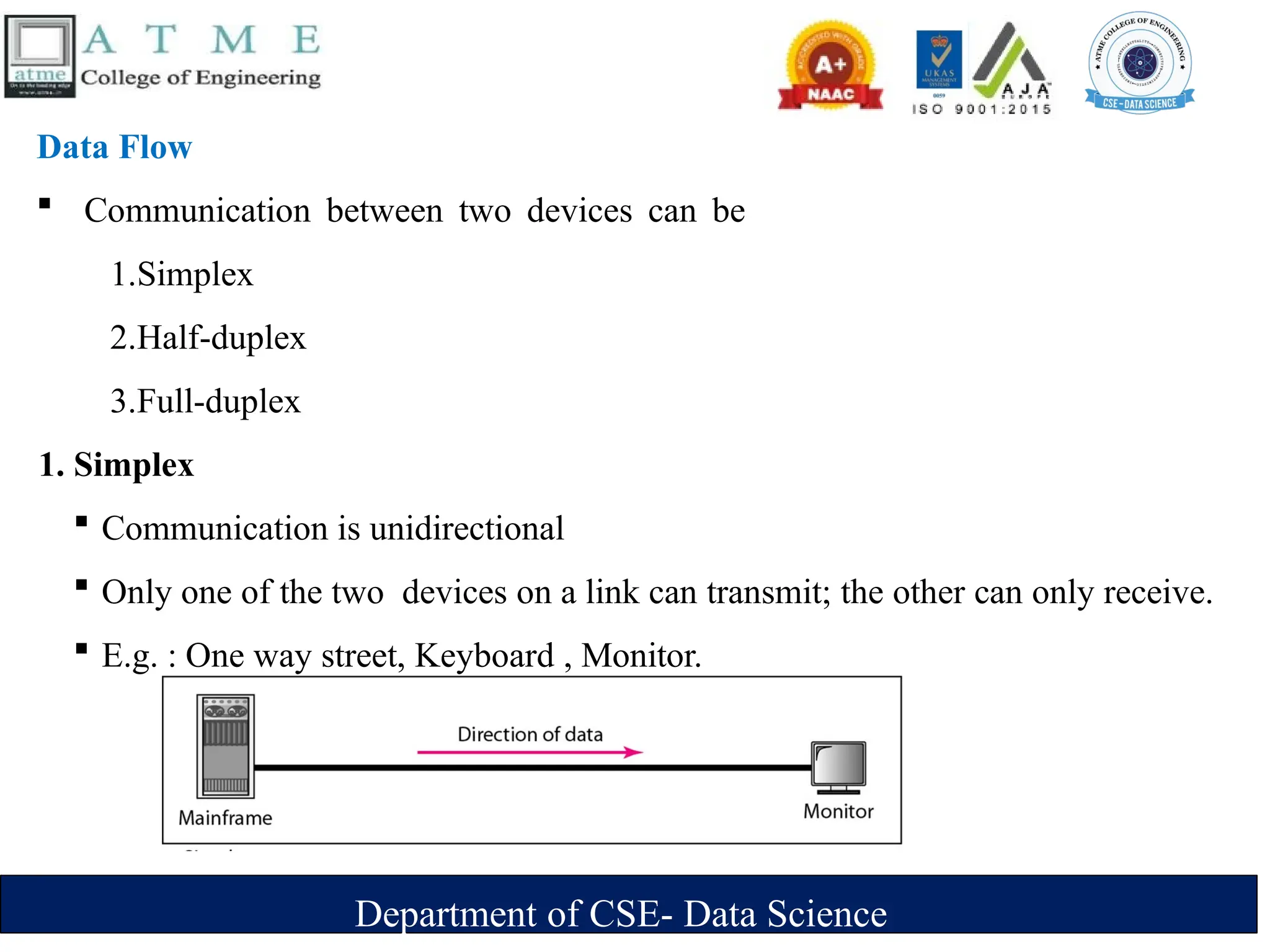
1. Simplex
 Communication is unidirectional
 Only one of the two devices on a link can transmit; the other can only receive.
 E.g. : One way street, Keyboard , Monitor.
Department of CSE- Data Science
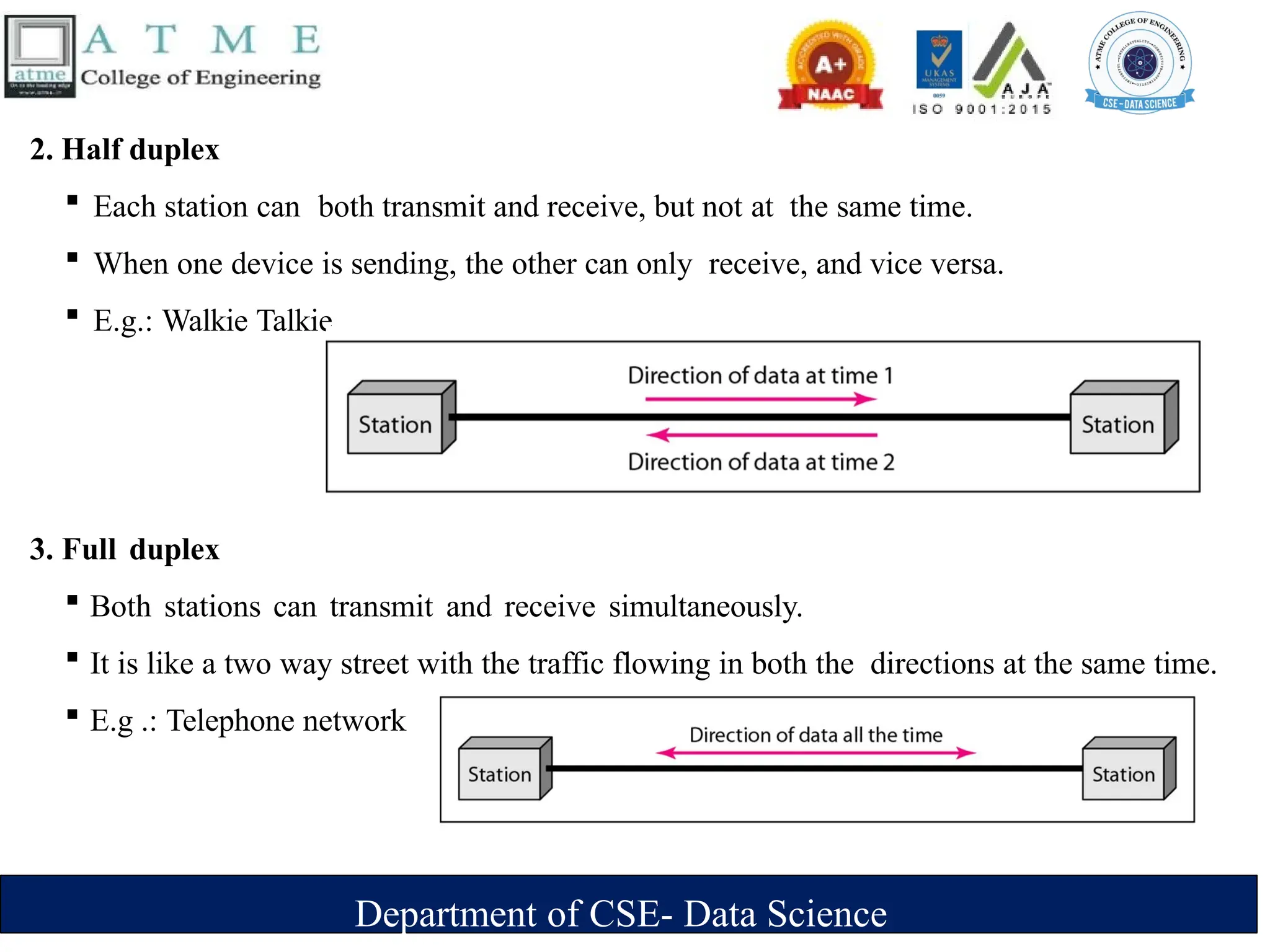
2. Half duplex
 Each station can both transmit and receive, but not at the same time.
 When one device is sending, the other can only receive, and vice versa.
 E.g.: Walkie Talkie.
3. Full duplex
 Both stations can transmit and receive simultaneously.
 It is like a two way street with the traffic flowing in both the directions at the same time.
 E.g .: Telephone network
Department of CSE- Data Science
Networks
 A network is a set of devices (often referred to as nodes) connected by
communication links.
 A node can be a computer, printer, or any other device capable of sending and/or
receiving data generated by other nodes on the network.
 A link can be a cable, air, optical fiber, or any medium which can transport a signal
carrying information.
Department of CSE- Data Science
Network Criteria
1. Performance
 Measured using:
‣ Transit time: time taken to travel a message from one device to another.
‣ Response time: time elapsed between enquiry and response.
 Depends on following factors:
‣ Number of users
‣ Type of transmission medium
‣ Efficiency of software
 Evaluated by 2 networking metrics:
‣ Throughput (high)
‣ Delay (small)
Department of CSE- Data Science
2. Reliability
 Measured by
‣ Frequency of failure.
‣ Time taken to recover from a network failure.
‣ Network robustness in a disaster.
3. Security
 Protecting data from unauthorized access, damage and development.
 Implementing policies and procedures for recovery from breaches and data losses.
Department of CSE- Data Science
Physical Structures
Type of Connection
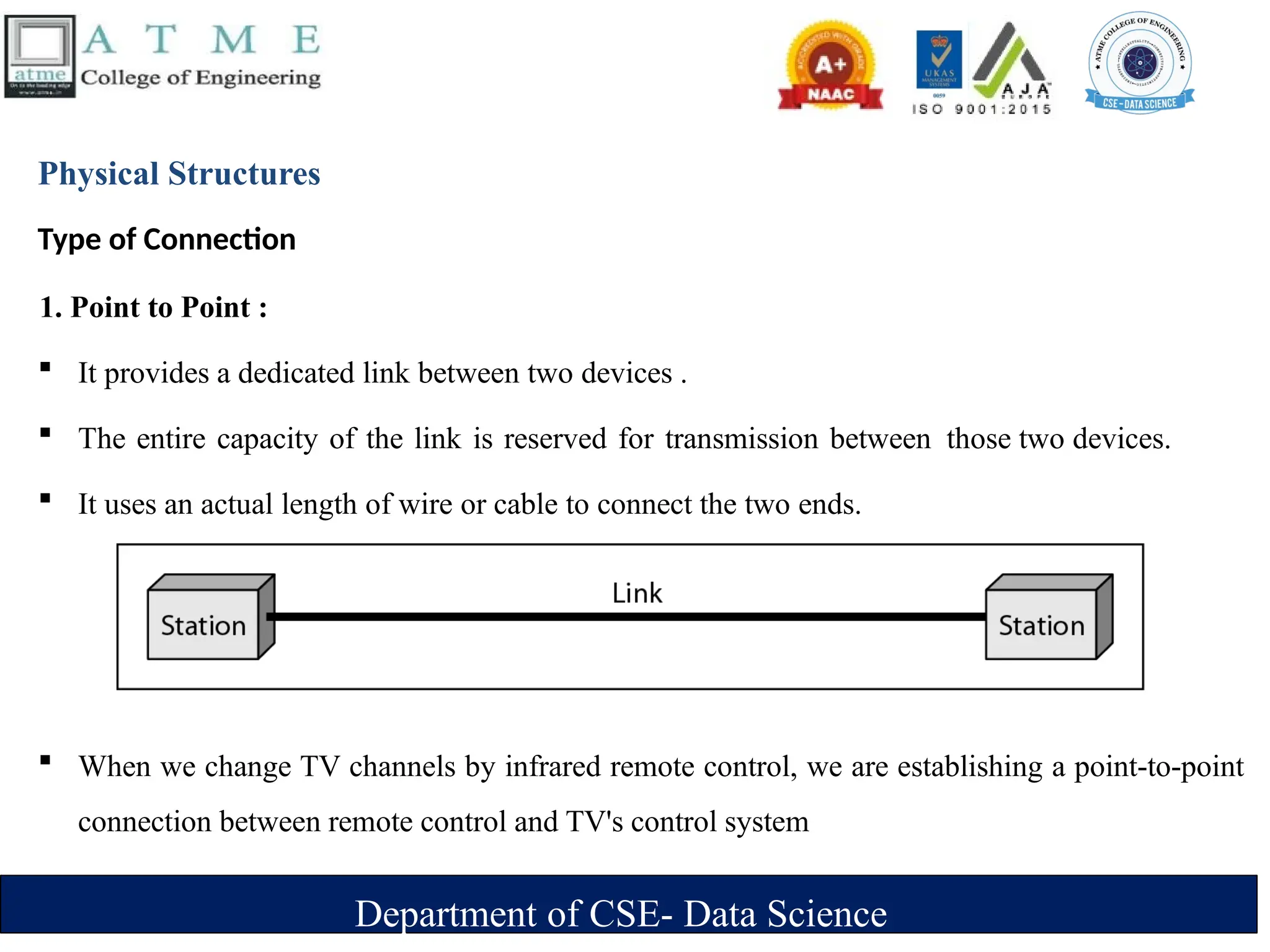
1. Point to Point :
 It provides a dedicated link between two devices .
 The entire capacity of the link is reserved for transmission between those two devices.
 It uses an actual length of wire or cable to connect the two ends.
 When we change TV channels by infrared remote control, we are establishing a point-to-point
connection between remote control and TV's control system
Department of CSE- Data Science
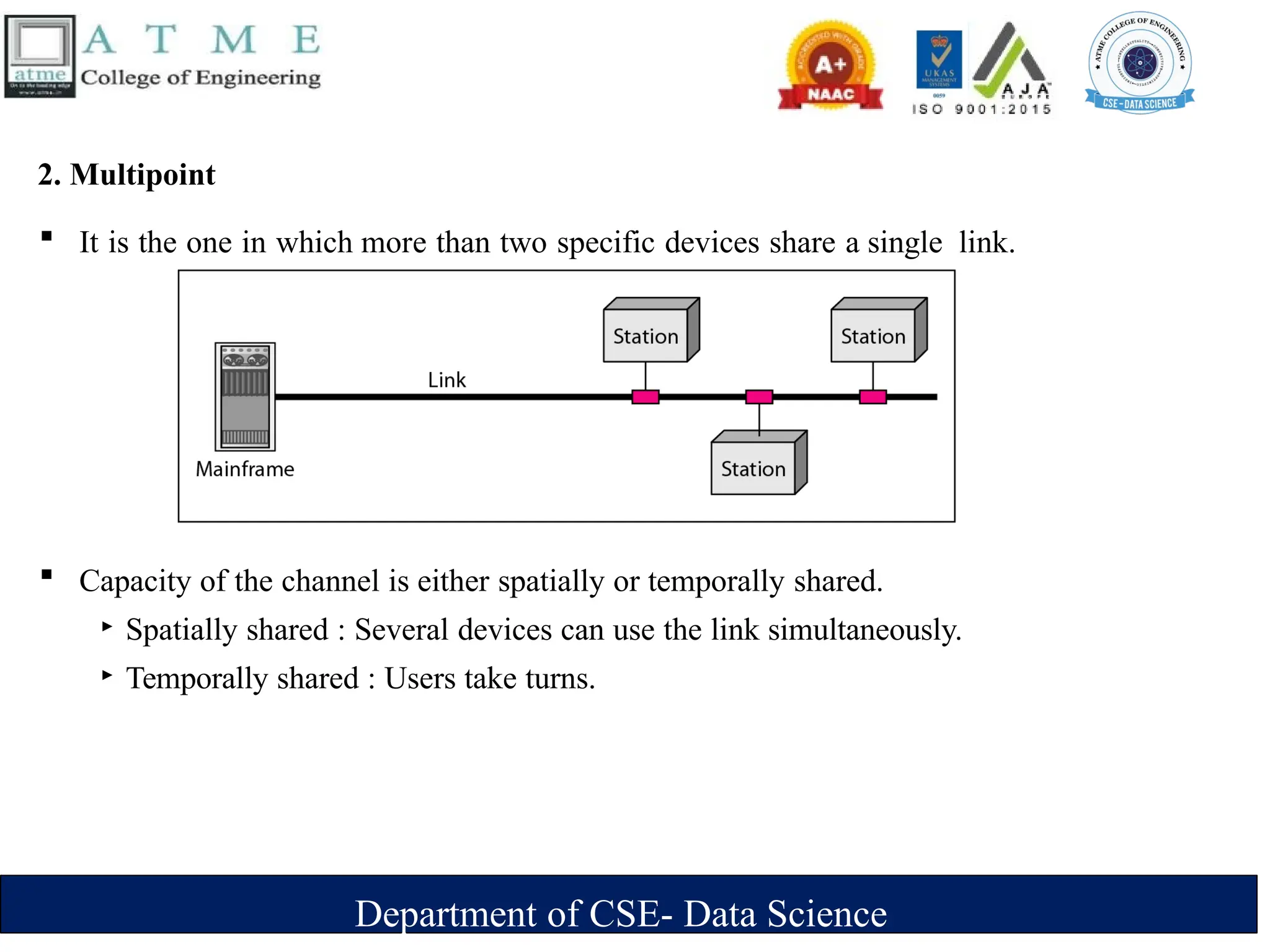
2. Multipoint
 It is the one in which more than two specific devices share a single link.
 Capacity of the channel is either spatially or temporally shared.
‣ Spatially shared : Several devices can use the link simultaneously.
‣ Temporally shared : Users take turns.
Department of CSE- Data Science
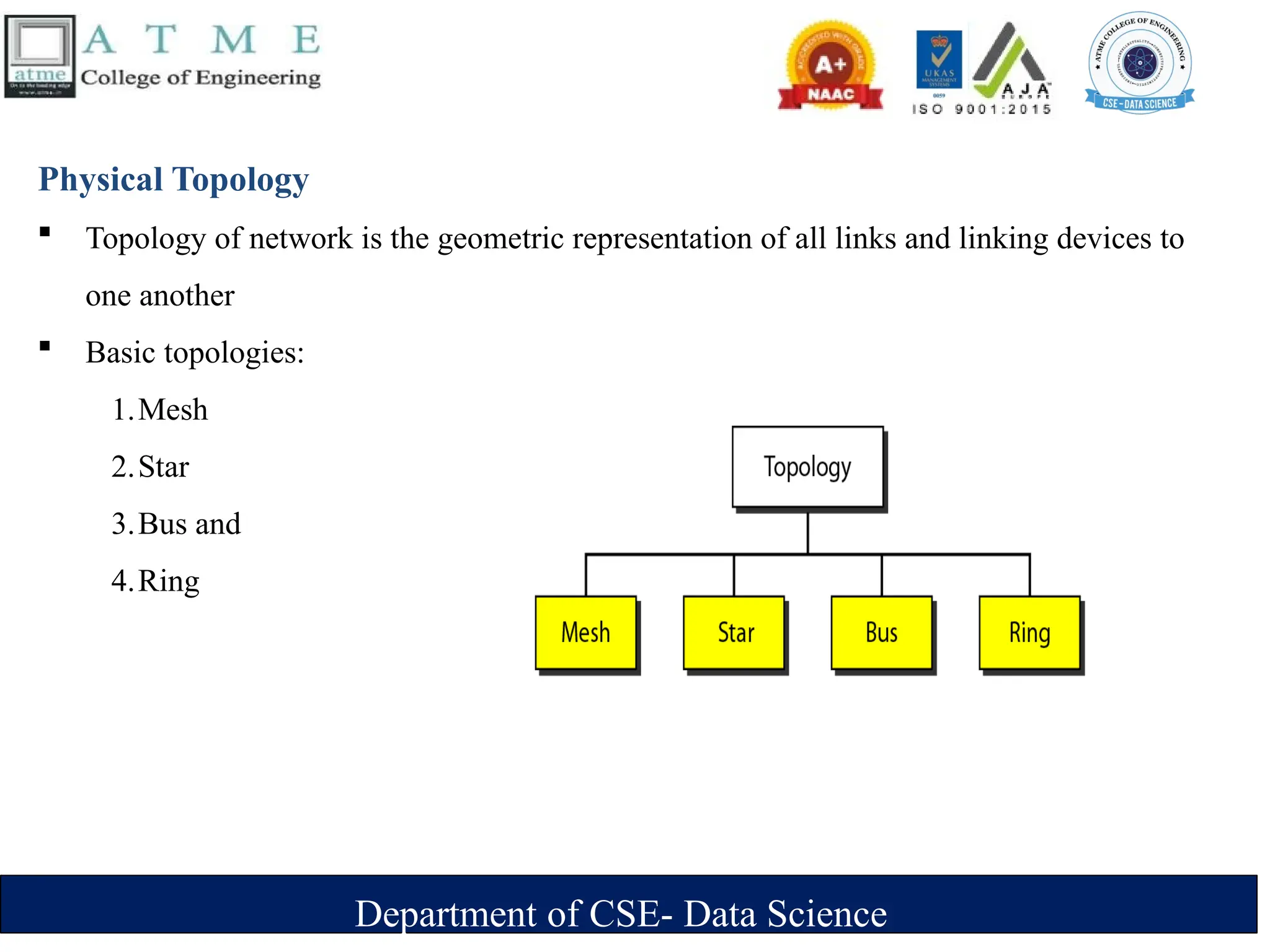
Physical Topology
 Topology of network is the geometric representation of all links and linking devices to
one another
 Basic topologies:
1.Mesh
2.Star
3.Bus and
4.Ring
Department of CSE- Data Science
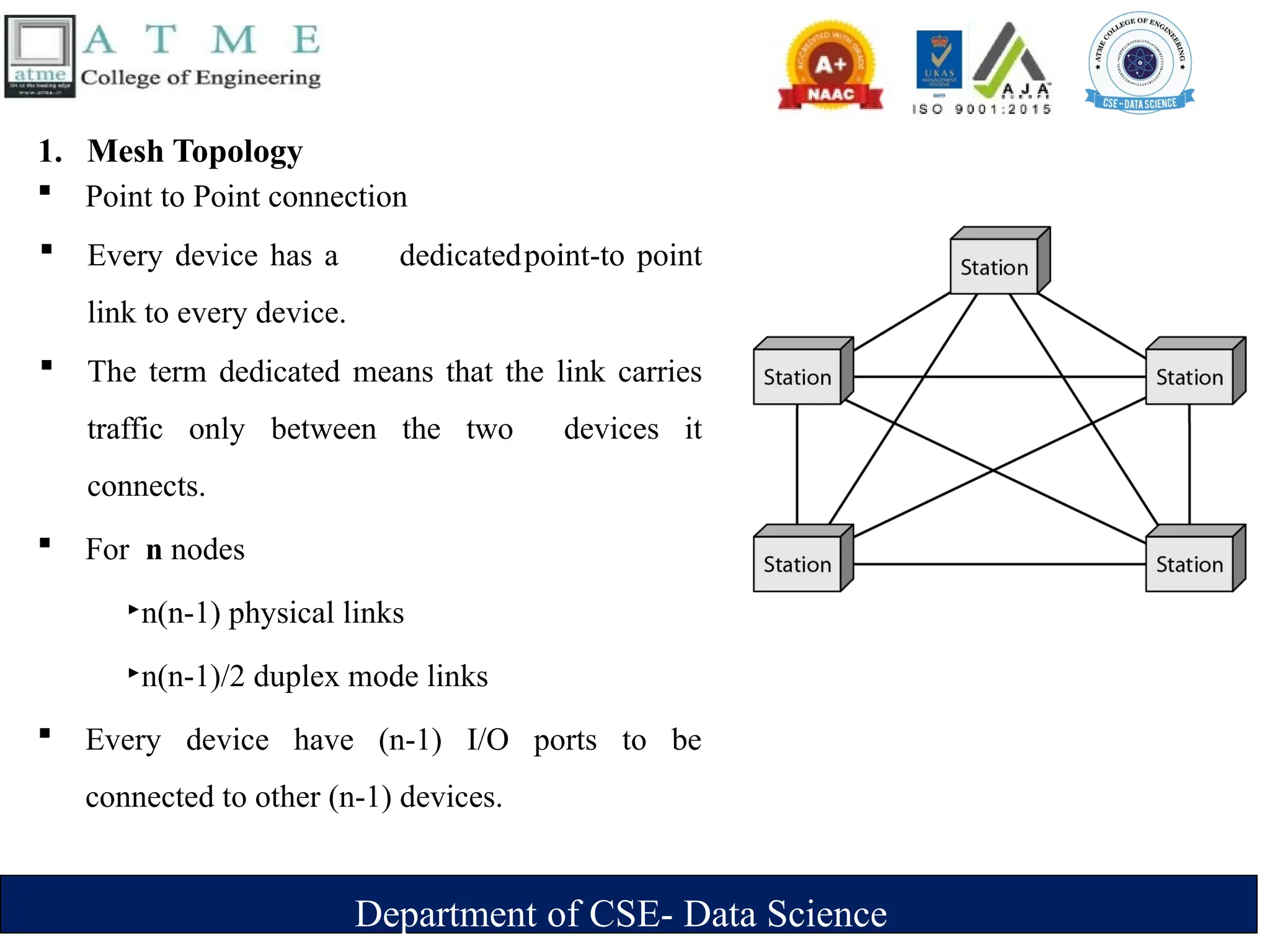
1. Mesh Topology
 Point to Point connection
 Every device has a dedicatedpoint-to point
link to every device.
 The term dedicated means that the link carries
traffic only between the two devices it
connects.
 For n nodes
‣n(n-1) physical links
‣n(n-1)/2 duplex mode links
 Every device have (n-1) I/O ports to be
connected to other (n-1) devices.
Department of CSE- Data Science
 Advantages:
‣ A mesh topology is robust. If one link becomes unusable, it does not incapacitate the
entire system.
‣ Point-to-point links make fault identification and fault isolation easy.
‣ Privacy or security : When every message travels along a dedicated line, only the
intended recipient sees it.
 Disadvantages:
‣ Difficult installation and reconfiguration.
‣ Bulk of wiring occupies more space than available space.
‣ Hardware required to connect each link is expensive.
 Practical example: connection of telephone regional offices in which each regional office
needs to be connected to every other regional office.
Department of CSE- Data Science
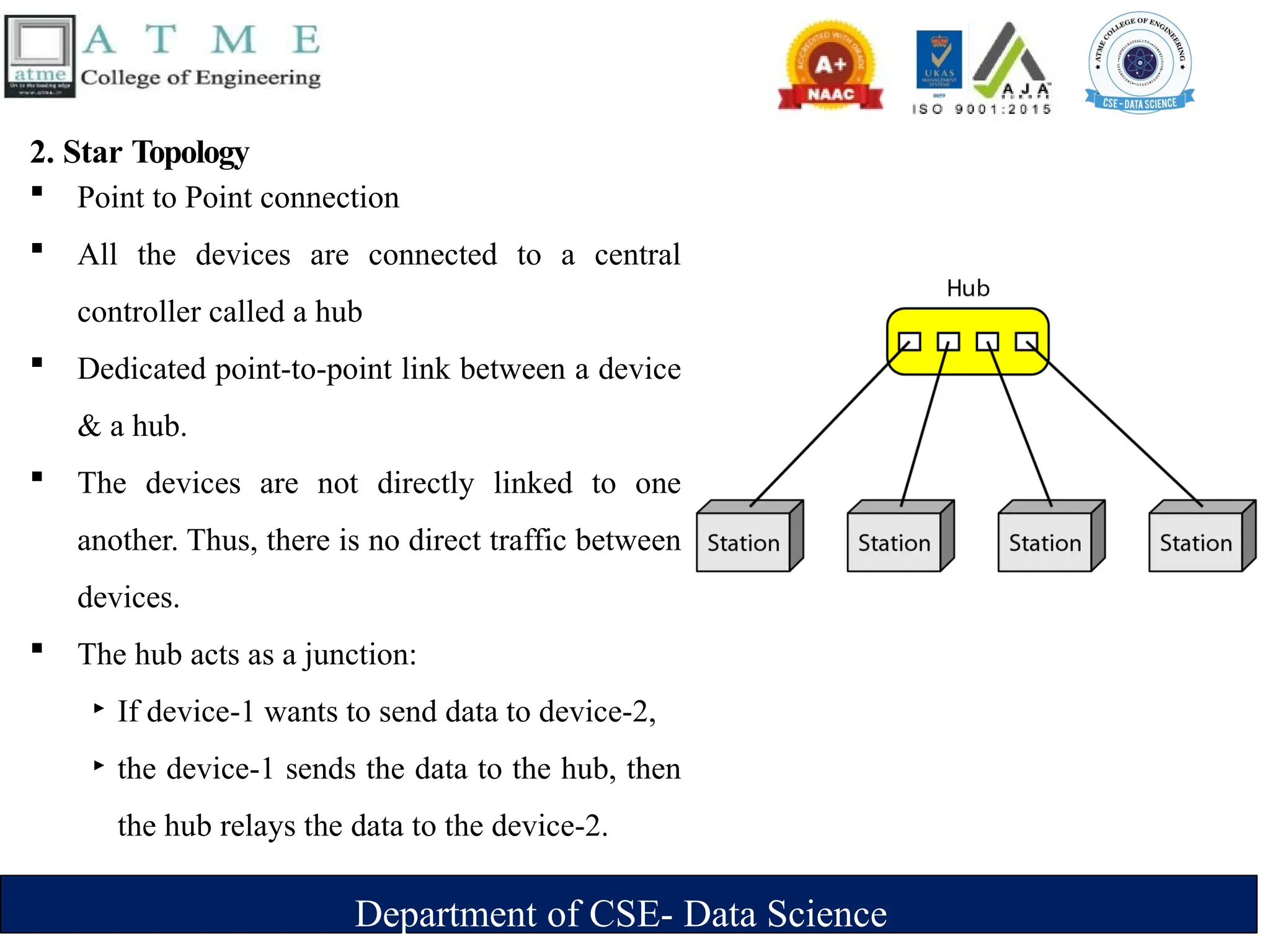
2. Star Topology
 Point to Point connection
 All the devices are connected to a central
controller called a hub
 Dedicated point-to-point link between a device
& a hub.
 The devices are not directly linked to one
another. Thus, there is no direct traffic between
devices.
 The hub acts as a junction:
‣ If device-1 wants to send data to device-2,
‣ the device-1 sends the data to the hub, then
the hub relays the data to the device-2.
Department of CSE- Data Science
 Advantages:
‣ A star topology is less expensive than a mesh topology. Each device needs only
one link and one I/O port to connect it to any number of others.
‣ Easy to install and reconfigure.
‣ Requires less cabling, less expensive than mesh topology.
‣ Robustness: If one link fails, only that link is affected. All other links
remain active. As a result fault identification and fault isolation becomes easy.
 Disadvantages :
‣ Dependency of whole topology on one single point, the hub.
 Example : Local area network
Department of CSE- Data Science
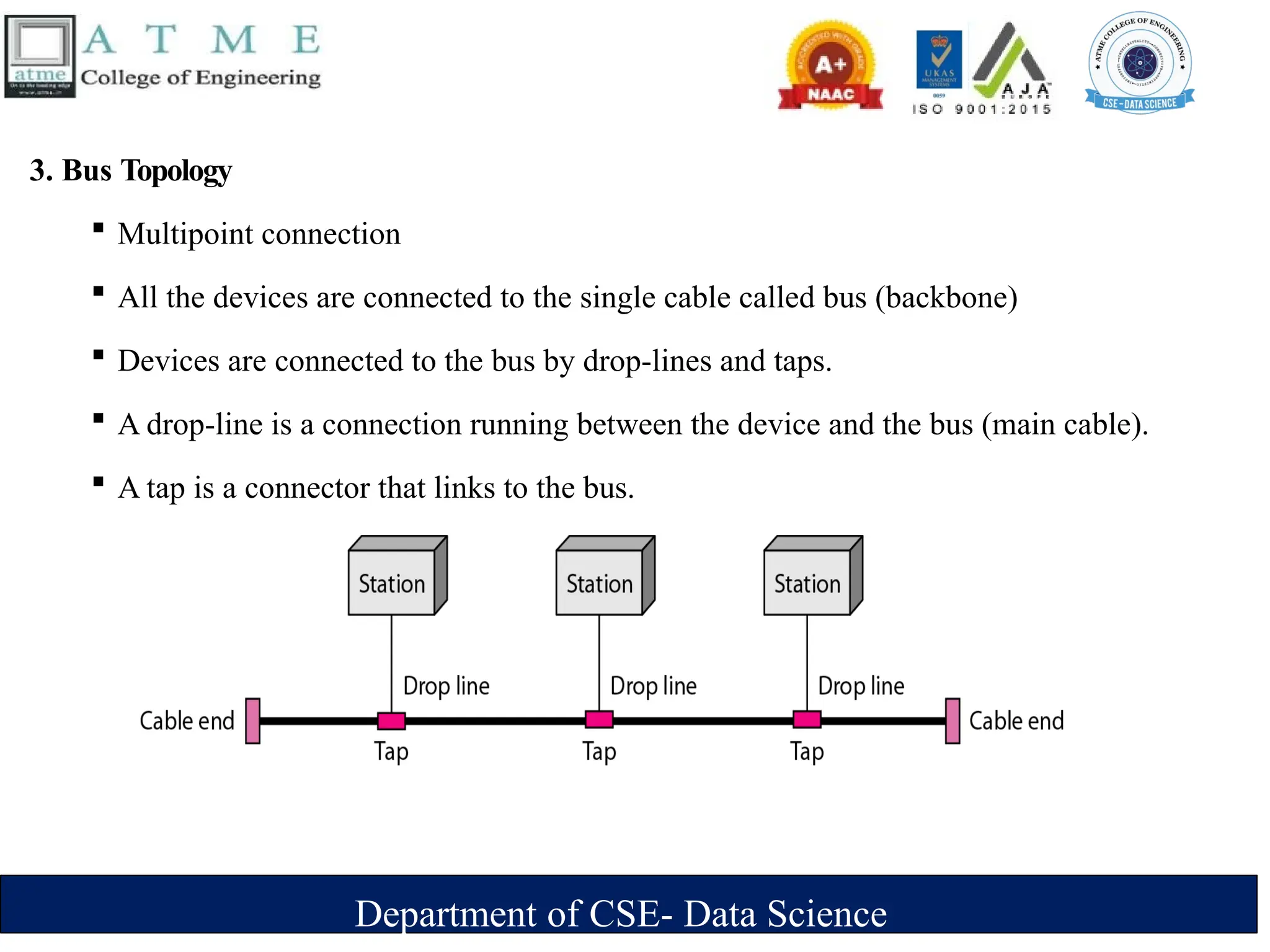
3. Bus Topology
 Multipoint connection
 All the devices are connected to the single cable called bus (backbone)
 Devices are connected to the bus by drop-lines and taps.
 A drop-line is a connection running between the device and the bus (main cable).
 A tap is a connector that links to the bus.
Department of CSE- Data Science
 As a signal travels along the backbone, some of its energy is transformed into heat.
 As a result there is a limit on the number of taps a bus can support and on the distance
between those taps.
 Advantages:
‣ Ease of installation : Backbone cable can be laid along the most path, then connected
to the nodes and drop lines.
‣ Cable required is the least compared to mesh/star topologies.
‣ Redundancy is eliminated : Only the backbone cable stretches through the entire
facility.
Department of CSE- Data Science
 Disadvantages:
‣ Signal reflection at the taps can cause degradation in quality
‣ A fault/break in the cable stops all transmission.
‣ There is a limit on
-Cable length
- Number of nodes that can be connected.
‣ Security is very low because all the devices receive the data sent from the source.
 Example
 It is used to implement the basic Ethernet network.
Department of CSE- Data Science
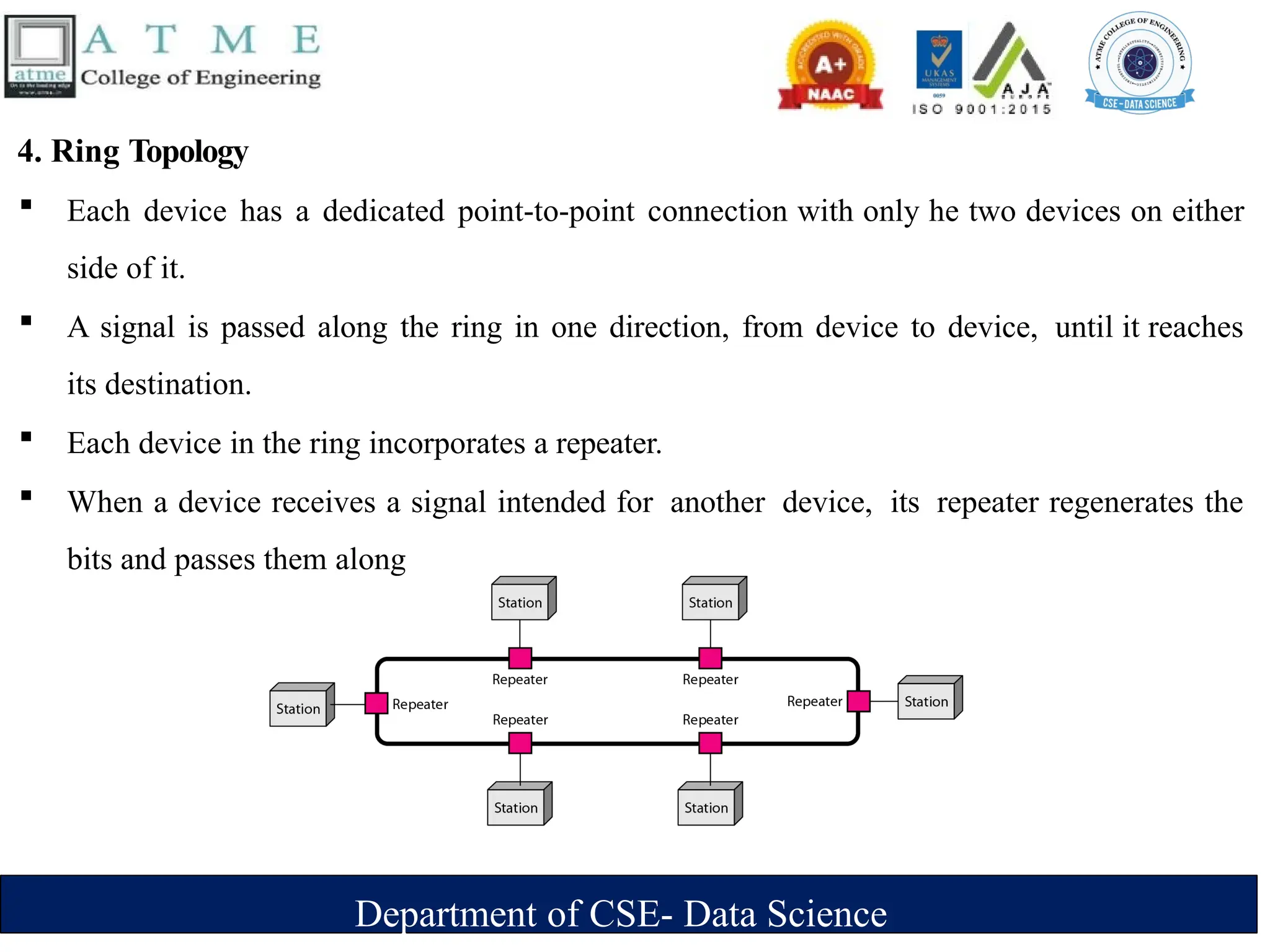
4. Ring Topology
 Each device has a dedicated point-to-point connection with only he two devices on either
side of it.
 A signal is passed along the ring in one direction, from device to device, until it reaches
its destination.
 Each device in the ring incorporates a repeater.
 When a device receives a signal intended for another device, its repeater regenerates the
bits and passes them along
Department of CSE- Data Science
 Advantages
‣ Easy installation and reconfiguration. To add/delete a device, requires changing only 2
connections
‣ Fault isolation is simplified. If one device does not receive a signal within a specified
period, it can issue an alarm. The alarm alerts the network-operator to the problem and
its location
‣ Congestion reduced: Because all the traffic flows in only one direction.
 Disadvantages
‣ Unidirectional traffic
‣ A fault in the ring/device stops all transmission.
- The above 2 drawbacks can be overcome by using dual ring.
‣ There is a limit on
- Cable length
- Number of nodes that can be connected.
‣ Slower: Each data must pass through all the devices between source and destination.
 Example: Used in industrial control systems, metropolitan area networks, and office
networks
Department of CSE- Data Science
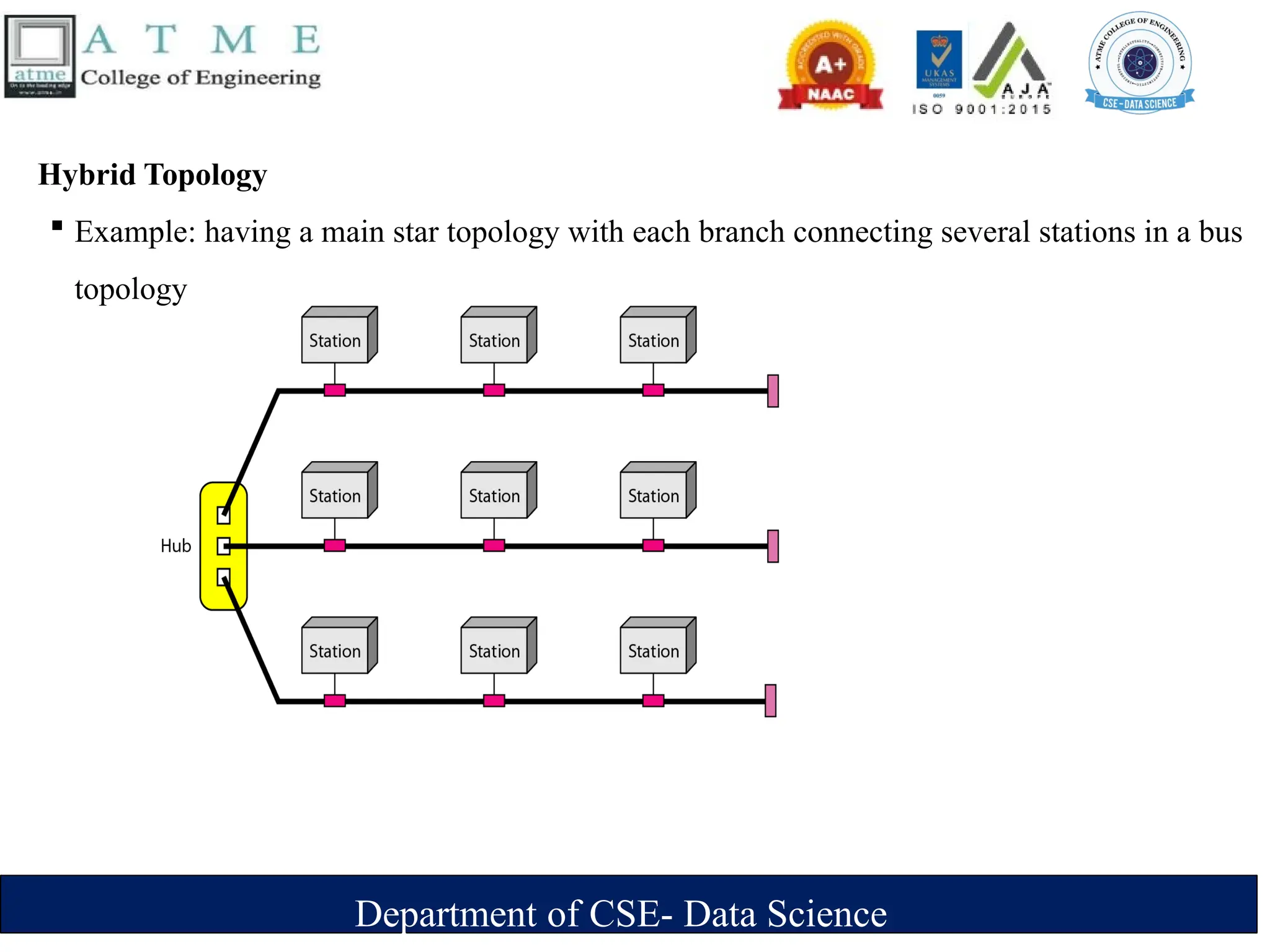
Hybrid Topology
 Example: having a main star topology with each branch connecting several stations in a bus
topology
Department of CSE- Data Science
Categories of Networks
 Network Category depends on its size
1.Local Area Networks (LANs)
2.Wide Area Networks (WANs)
3.Metropolitan Area Networks (MANs)
Department of CSE- Data Science
1. Local Area Networks (LANs)
 It is privately owned and links the devices in a single office, building, or campus.
 LAN can be as simple as two PCs and a printer in someone's home office. Its size is
limited to a few kilometers.
 LANs are designed to allow resources to be shared between personal computers or
workstations.
 The resources to be shared can include hardware (e.g., a printer),software (e.g., an
application program).
Department of CSE- Data Science
 Advantages:
‣ Resource Sharing: Computer resources like printers and hard disks can be shared by all
devices on the network.
‣ Expansion: Nowadays, LANs are connected to WANs to create communication at a wider
level.
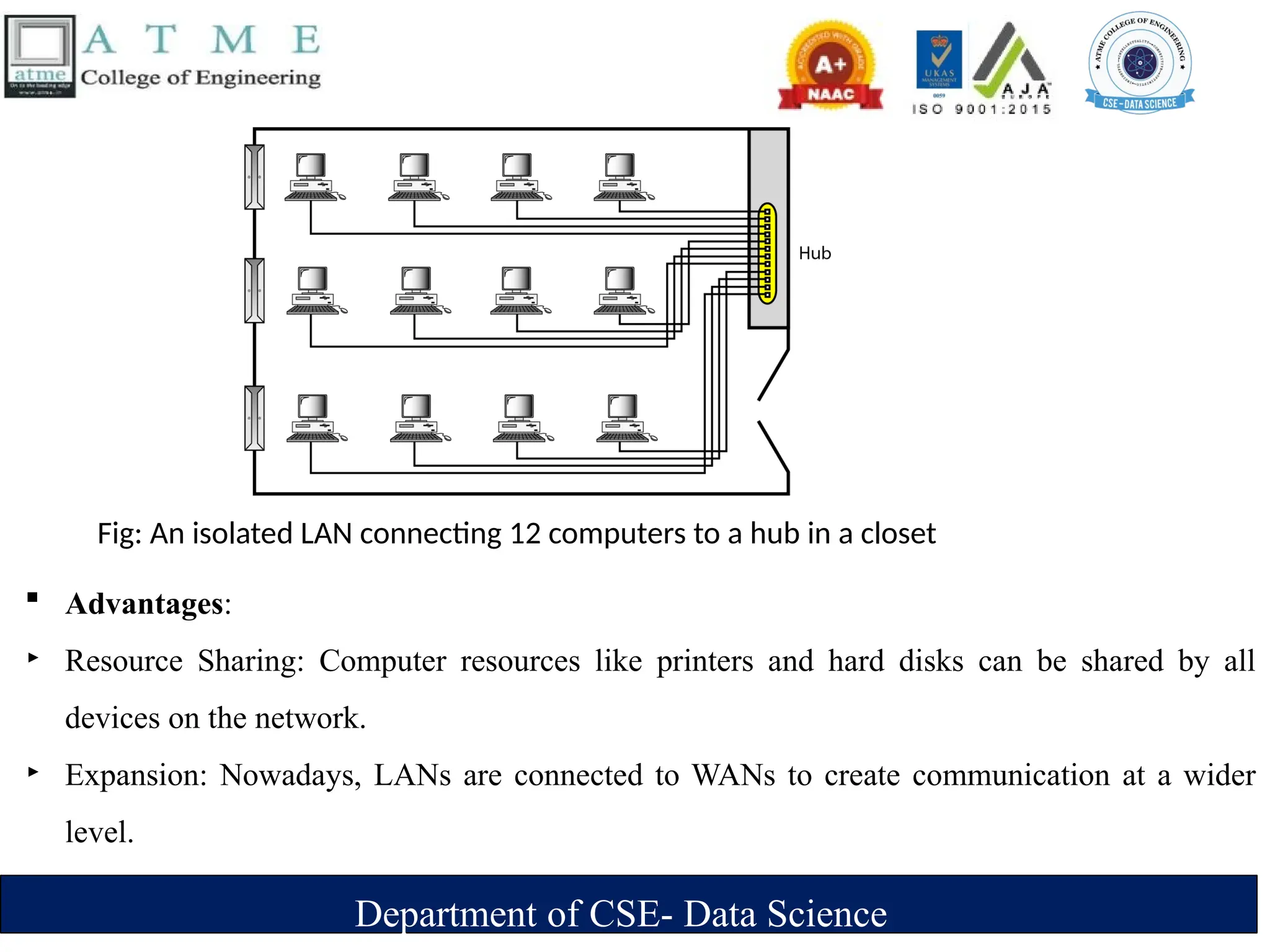
Fig: An isolated LAN connecting 12 computers to a hub in a closet
 Disadvantages
‣ Limited distance: Local area networks are used only in buildings or apartment
complexes it cannot be occupied in bigger areas.
‣ Installing LAN is expensive: It is expensive to establish a LAN. Here specialized
software is essential to install a server. Communication hardware such as hubs,
switches, routers, and cables are expensive to buy.
‣ Limited scalability: LANs are limited in terms of the number of devices that can be
connected to them. As the number of devices increases, the network can become
slow and congested.
‣ Single point of failure: LANs typically have a single point of failure, such as a
central server. If this server fails, the entire network can go down.
‣ Maintenance and management: LANs require regular maintenance and
management to ensure optimal performance. This can be time-consuming and
costly.
Department of CSE- Data Science
2.Wide Area Networks (WAN)
 It provides long-distance transmission of data, image, audio, and video information over
large geographic areas that comprise a country, a continent or even the whole world.
Two types of WAN:
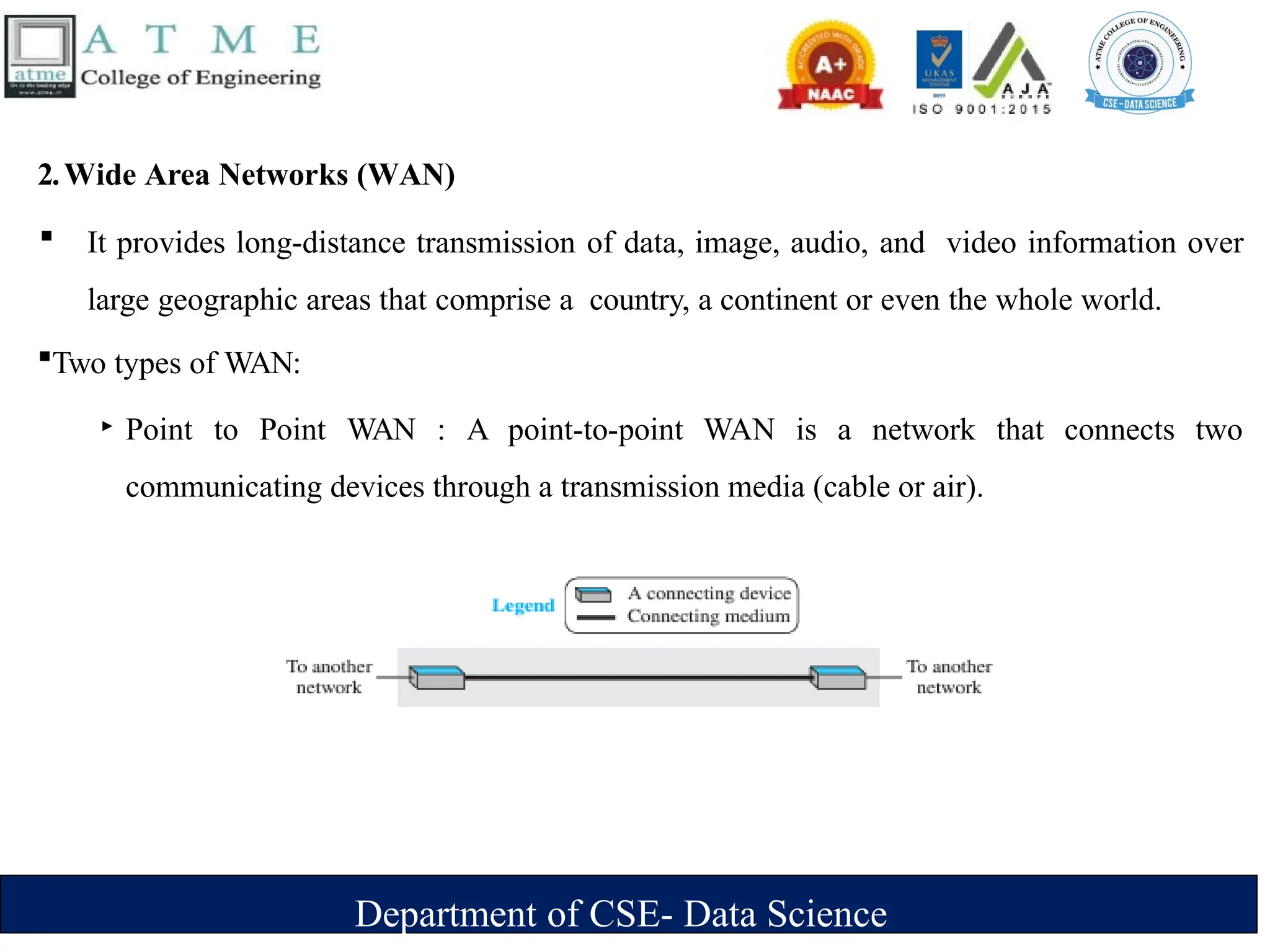
‣ Point to Point WAN : A point-to-point WAN is a network that connects two
communicating devices through a transmission media (cable or air).
Department of CSE- Data Science
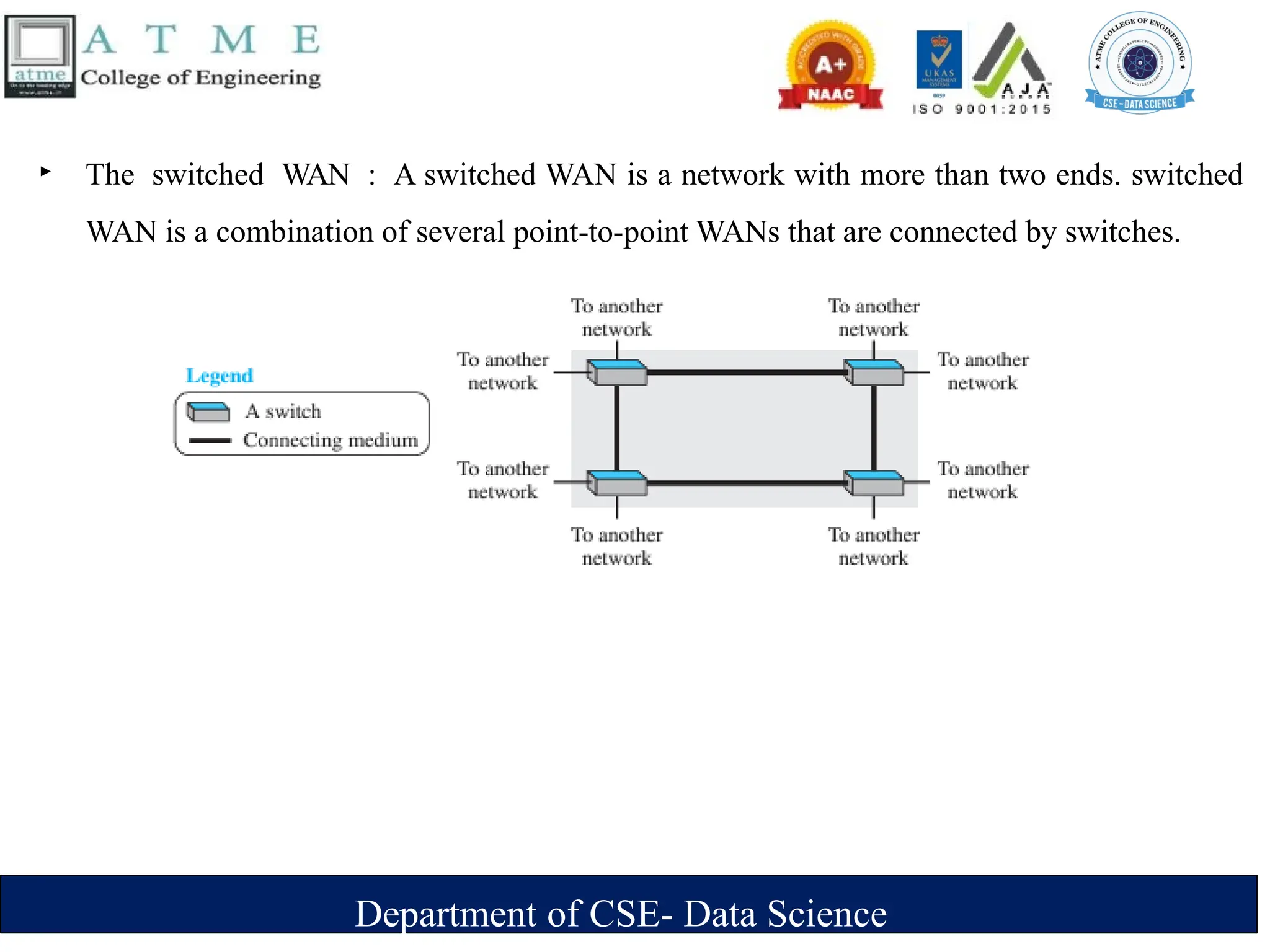
‣ The switched WAN : A switched WAN is a network with more than two ends. switched
WAN is a combination of several point-to-point WANs that are connected by switches.
Department of CSE- Data Science
Internetwork
 A network of networks is called an internet. ( inter-network)
 As an example, assume that an organization has two offices, one on the east coast and
the other on the west coast.
 Each office has a LAN that allows all employees in the office to communicate with each
other.
 To make the communication between employees at different offices possible, the
management leases a point-to-point dedicated WAN from a service provider, such as a
telephone company, and connects the two LANs.
 Now the company has an internetwork, or a private internet. Communication between
offices is now possible.
Department of CSE- Data Science
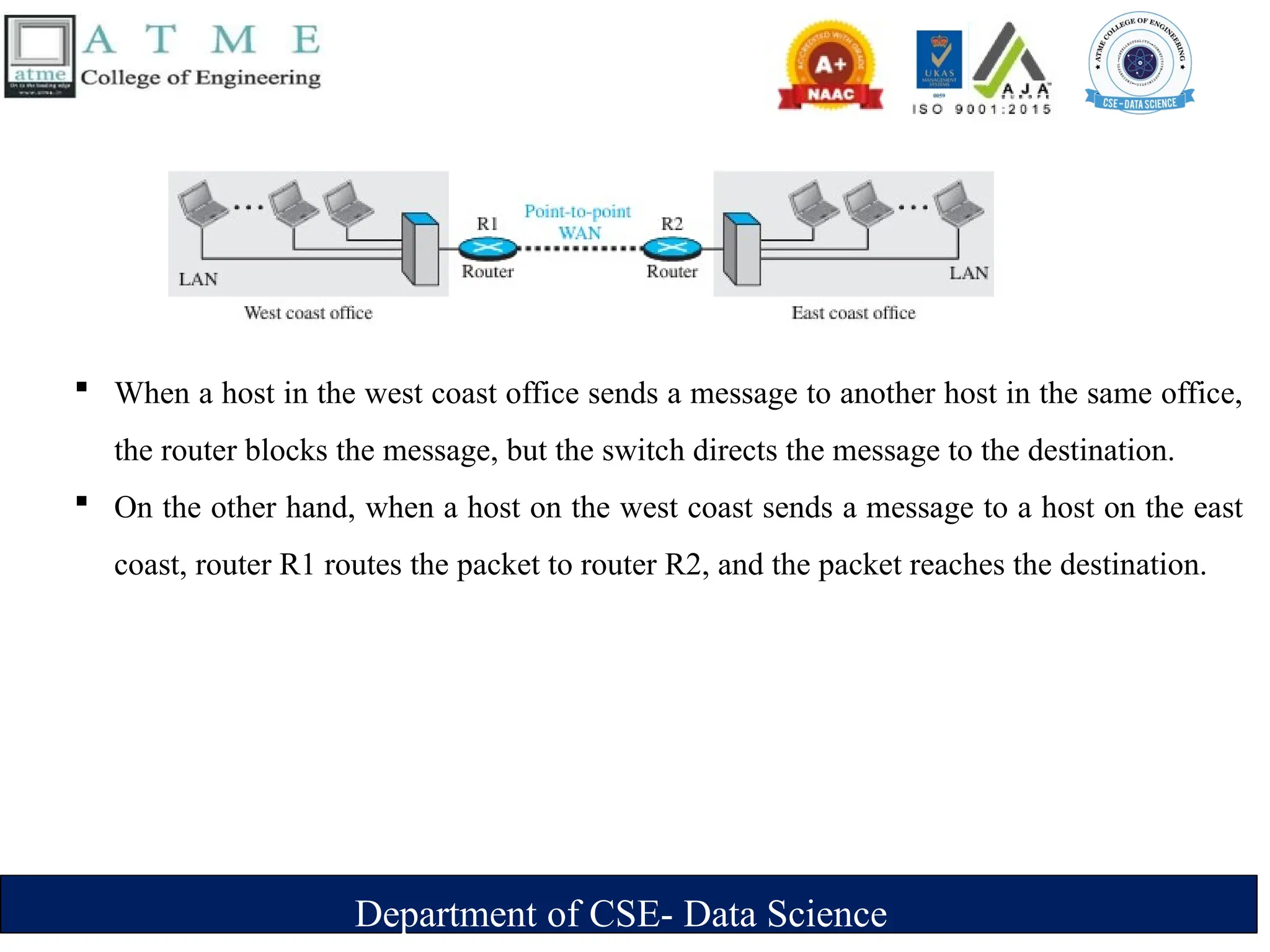
 When a host in the west coast office sends a message to another host in the same office,
the router blocks the message, but the switch directs the message to the destination.
 On the other hand, when a host on the west coast sends a message to a host on the east
coast, router R1 routes the packet to router R2, and the packet reaches the destination.
Department of CSE- Data Science
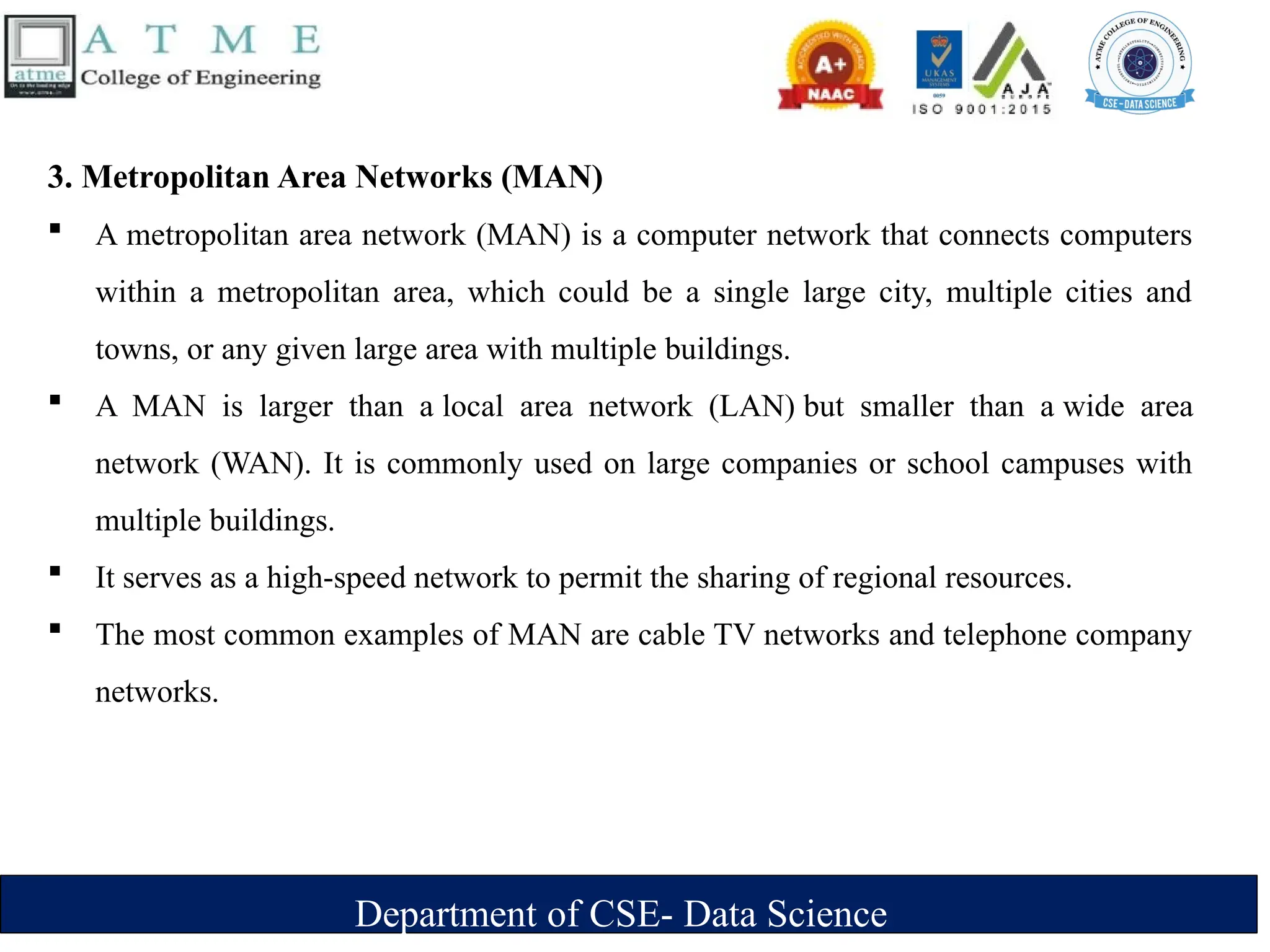
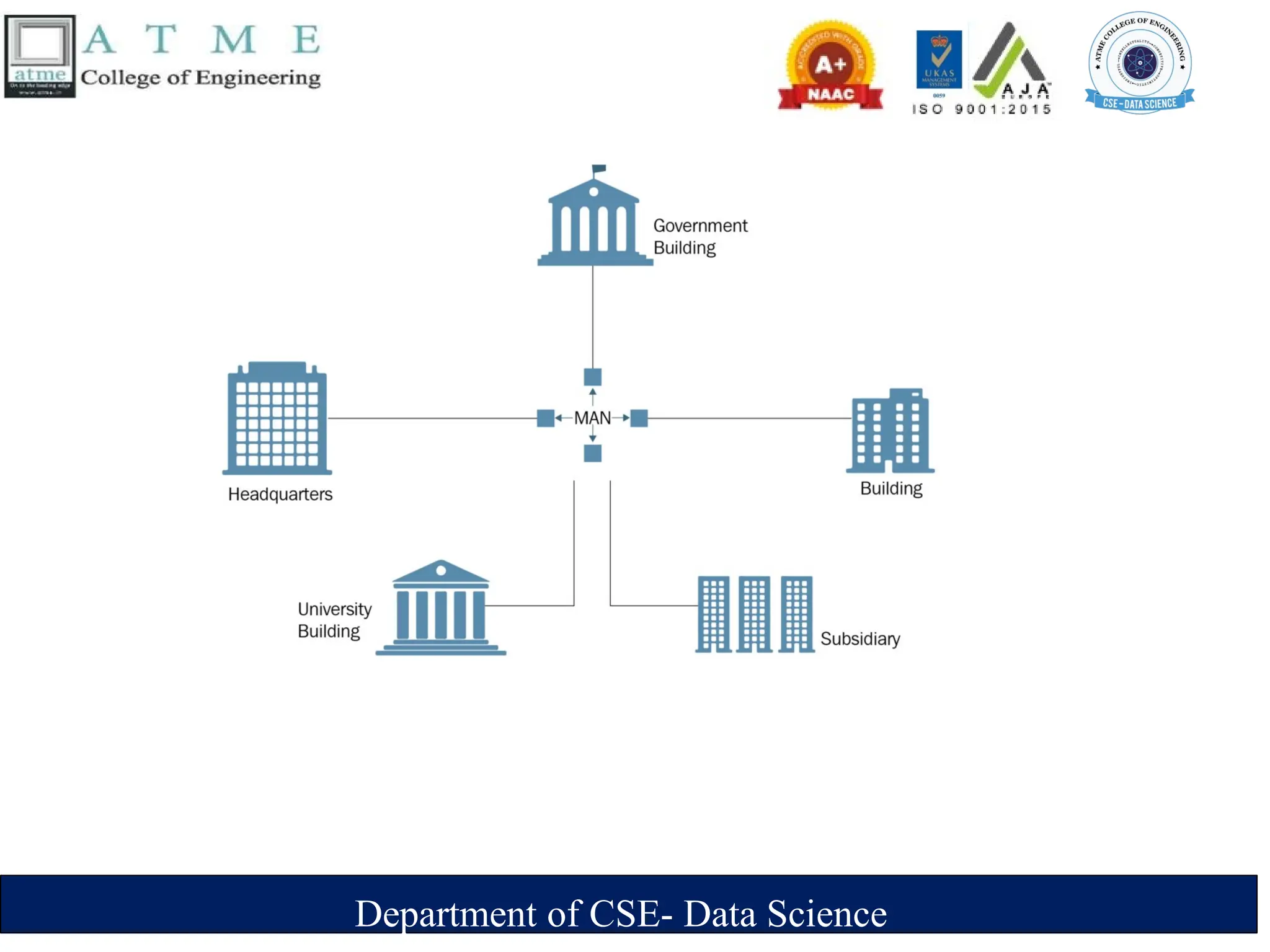
3. Metropolitan Area Networks (MAN)
 A metropolitan area network (MAN) is a computer network that connects computers
within a metropolitan area, which could be a single large city, multiple cities and
towns, or any given large area with multiple buildings.
 A MAN is larger than a local area network (LAN) but smaller than a wide area
network (WAN). It is commonly used on large companies or school campuses with
multiple buildings.
 It serves as a high-speed network to permit the sharing of regional resources.
 The most common examples of MAN are cable TV networks and telephone company
networks.
Department of CSE- Data Science
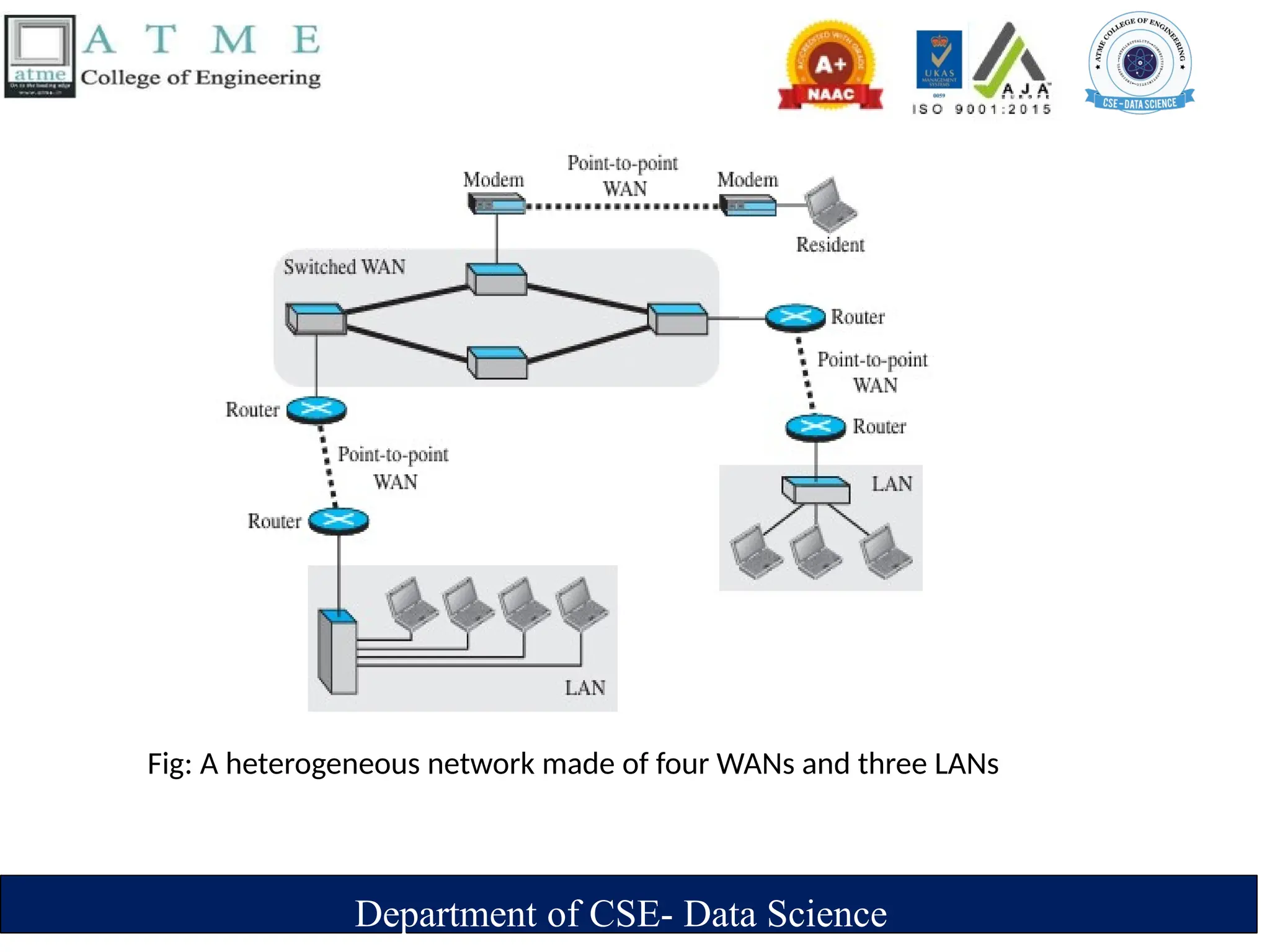
Fig: A heterogeneous network made of four WANs and three LANs
Department of CSE- Data Science
.
Switching
 An internet is a switched network in which a switch connects at least two links together.
 A switch needs to forward data from a network to another network when required.
 The two most common types of switched networks are
1.circuit-switched
2.packet-switched networks.
1. Circuit-Switched Network
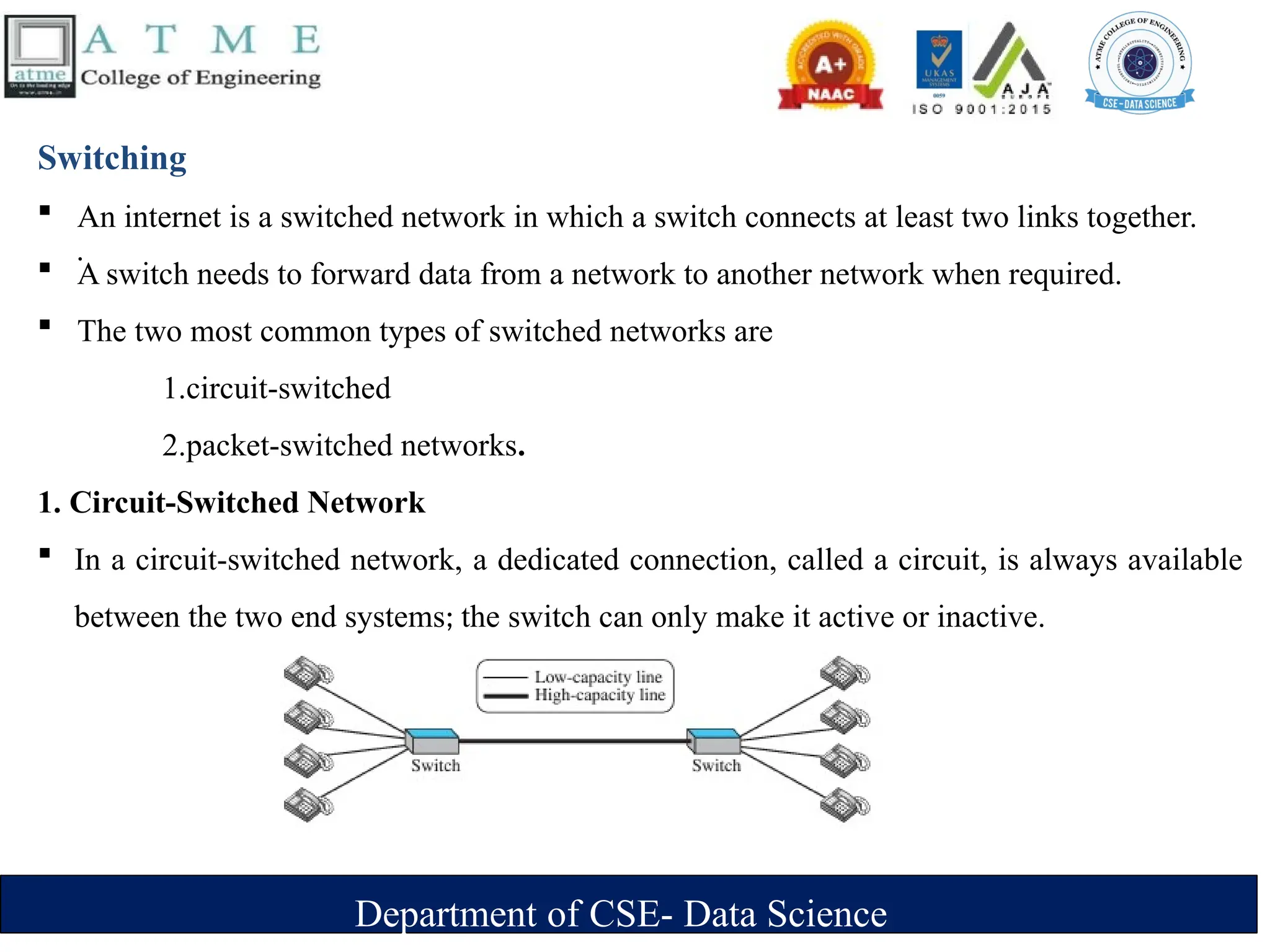
 In a circuit-switched network, a dedicated connection, called a circuit, is always available
between the two end systems; the switch can only make it active or inactive.
Department of CSE- Data Science
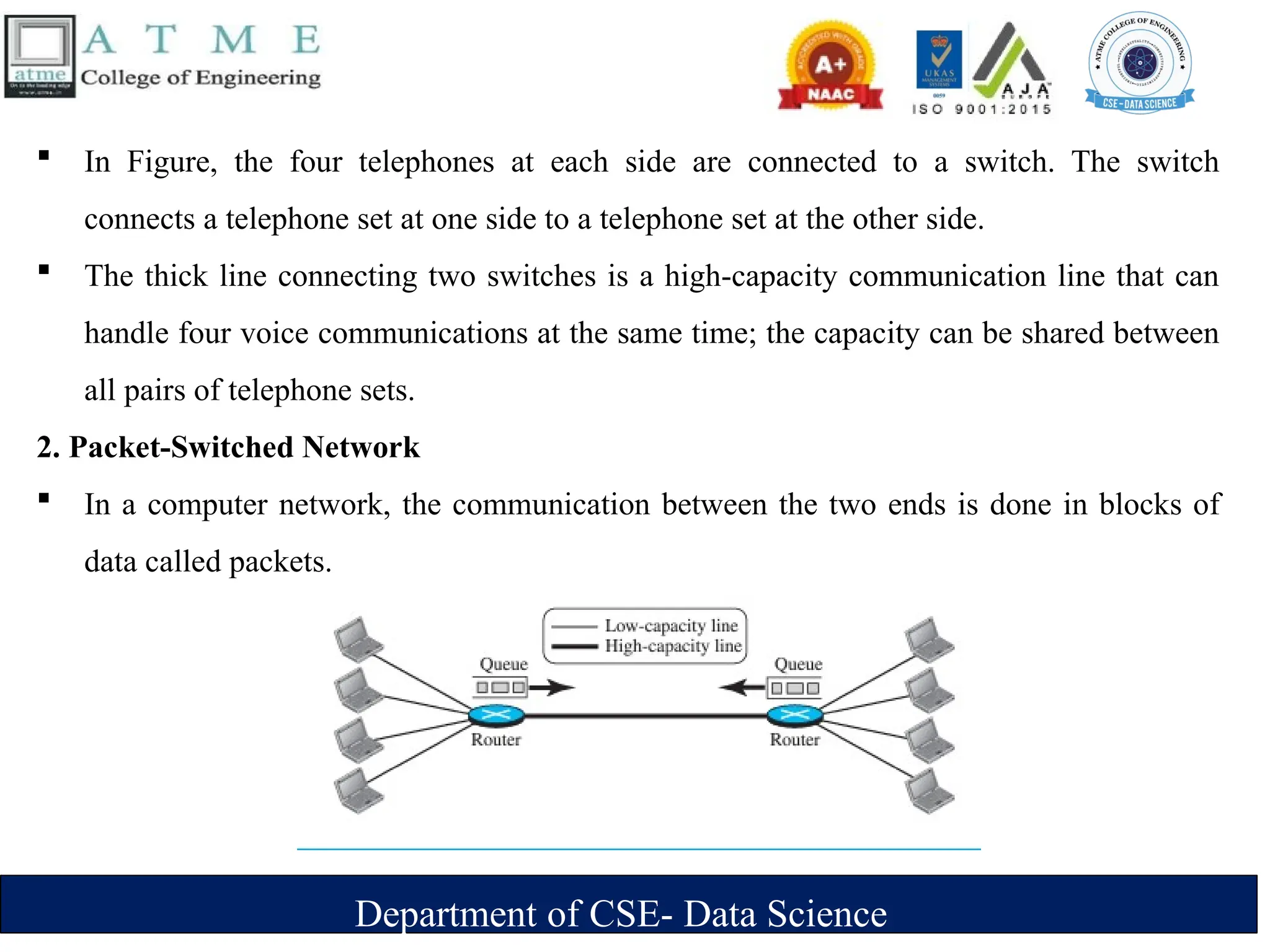
 In Figure, the four telephones at each side are connected to a switch. The switch
connects a telephone set at one side to a telephone set at the other side.
 The thick line connecting two switches is a high-capacity communication line that can
handle four voice communications at the same time; the capacity can be shared between
all pairs of telephone sets.
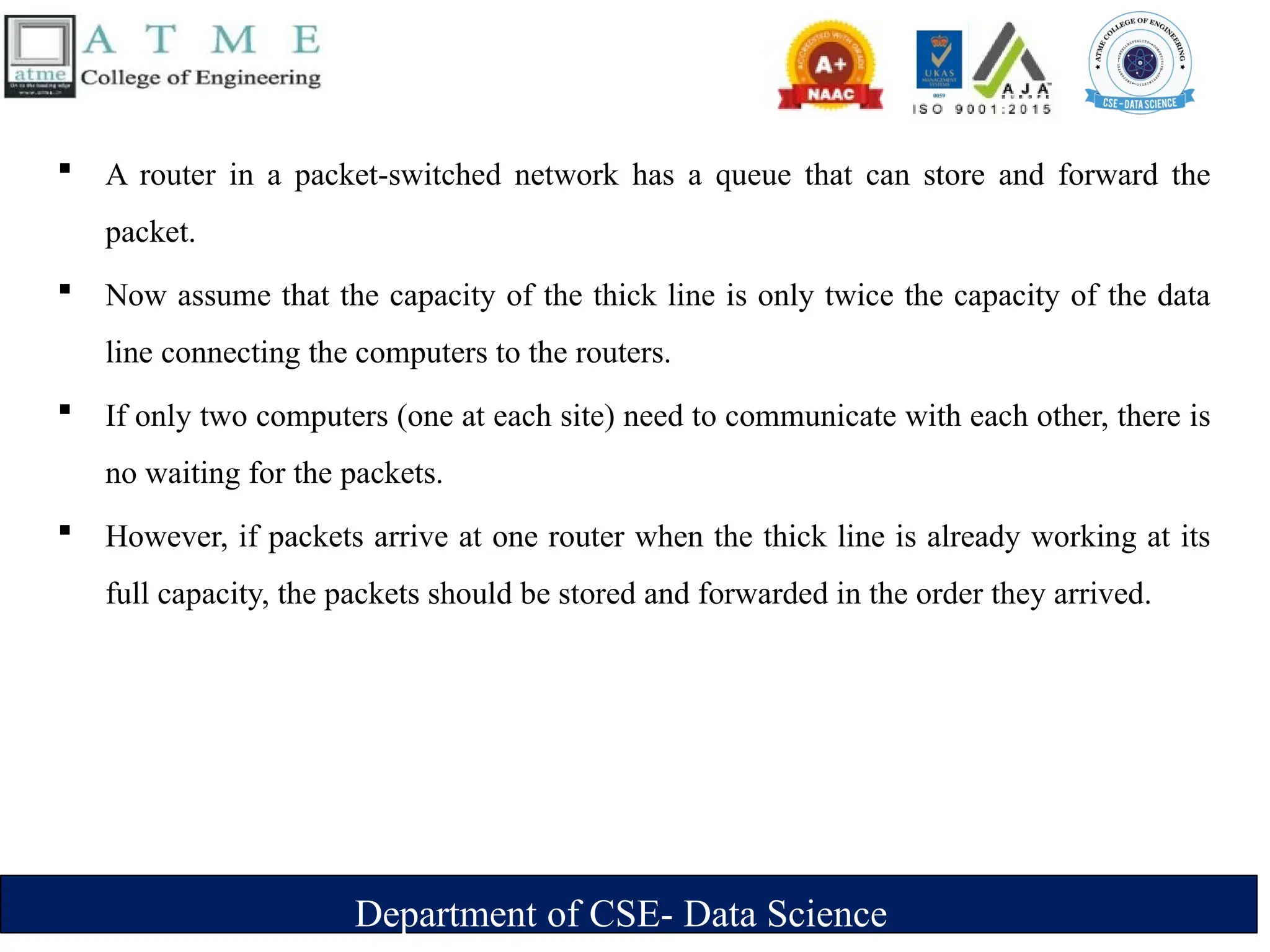
2. Packet-Switched Network
 In a computer network, the communication between the two ends is done in blocks of
data called packets.
Department of CSE- Data Science
 A router in a packet-switched network has a queue that can store and forward the
packet.
 Now assume that the capacity of the thick line is only twice the capacity of the data
line connecting the computers to the routers.
 If only two computers (one at each site) need to communicate with each other, there is
no waiting for the packets.
 However, if packets arrive at one router when the thick line is already working at its
full capacity, the packets should be stored and forwarded in the order they arrived.
Department of CSE- Data Science
The Internet
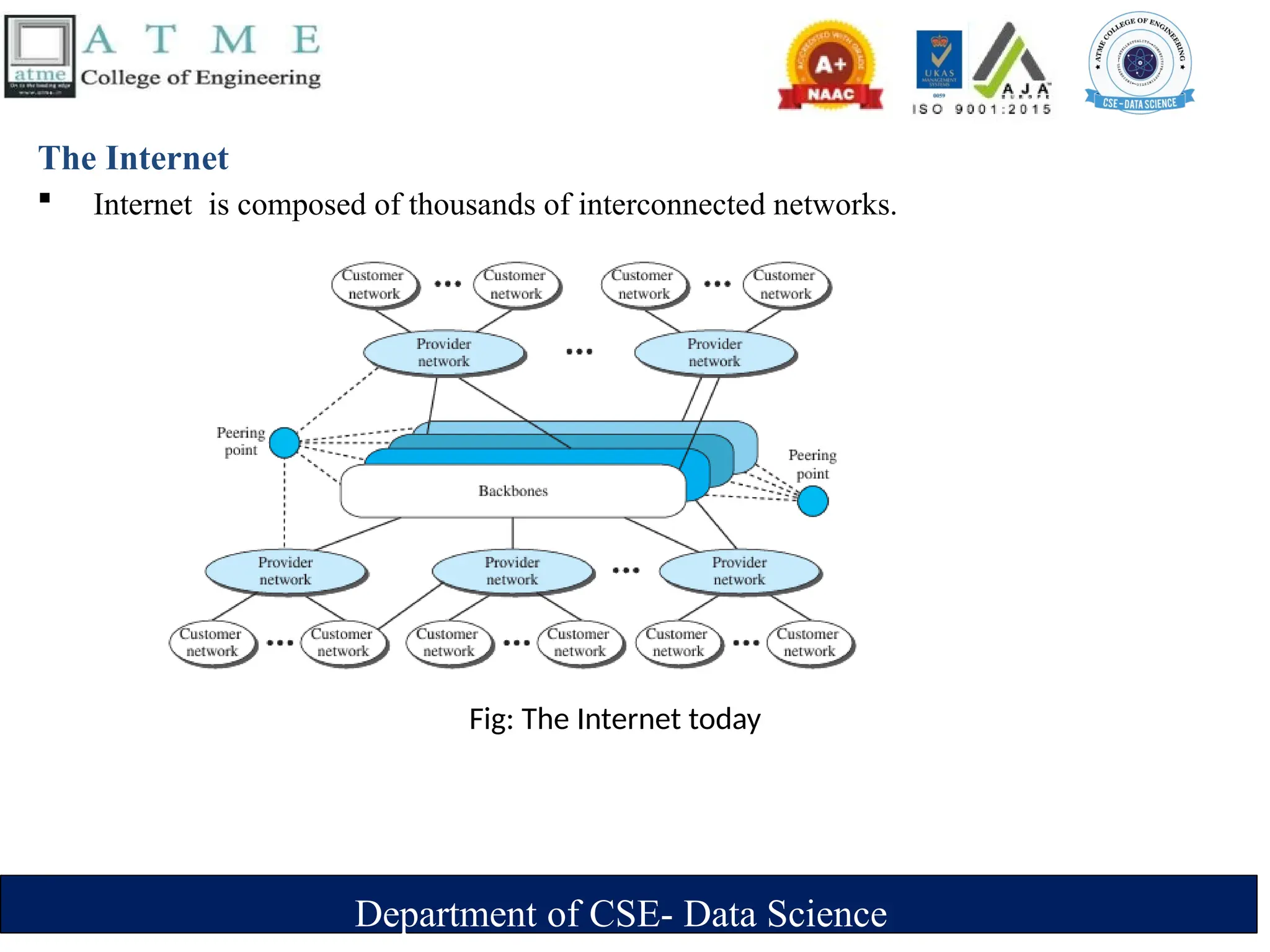
 Internet is composed of thousands of interconnected networks.
Fig: The Internet today
Department of CSE- Data Science
 At the top level, the backbones are large networks owned by some communication
companies such as Sprint, Verizon (MCI), AT&T, and NTT. The backbone networks
are connected through some complex switching systems, called peering points.
 At the second level, there are smaller networks, called provider networks, that use the
services of the backbones for a fee.
 The provider networks are connected to backbones and sometimes to other provider
networks. The customer networks are networks at the edge of the Internet that actually
use the services provided by the Internet.
 They pay fees to provider networks for receiving services. Backbones and provider
networks are also called Internet Service Providers (ISPs).
 The backbones are often referred to as international ISPs; the provider networks are
often referred to as national or regional ISPs.
Department of CSE- Data Science
Accessing the Internet
1. Using Telephone Networks
 Dial up Service : To the telephone line add a modem that converts data to voice. But it is very slow
when line used for internet connection.
 DSL Service : Telephone companies have upgraded their telephone lines to provide higher speed internet
services .
2. Using Cable Networks
 The cable companies have been upgrading their cable networks to provide internet connection. But
speed varies depending on the number of neighbors that use the same cable.
3. Using Wireless Networks
 A household or small business can be connected to the internet through a wireless LAN.
4. Direct Connection to the internet
 A large organization can become a local ISP and be connected to internet.
Department of CSE- Data Science
Network Models
Protocol Layering
 A protocol defines the rules that both the sender and receiver and all intermediate
devices need to follow to be able to communicate effectively.
 When communication is
‣ Simple -only one simple protocol.
‣ complex, we need to divide the task b/w different layers. We need a protocol at each
layer, or protocol layering.
 Elements of a Protocol
‣ Syntax
– Structure or format of the data
– Indicates how to read the bits - field delineation
‣ Semantics
– Interprets the meaning of the bits
– Knows which fields define what action
‣ Timing
– When data should be sent and what
– Speed at which data should be sent or speed at which it is being received.
Department of CSE- Data Science
Scenarios
First Scenario
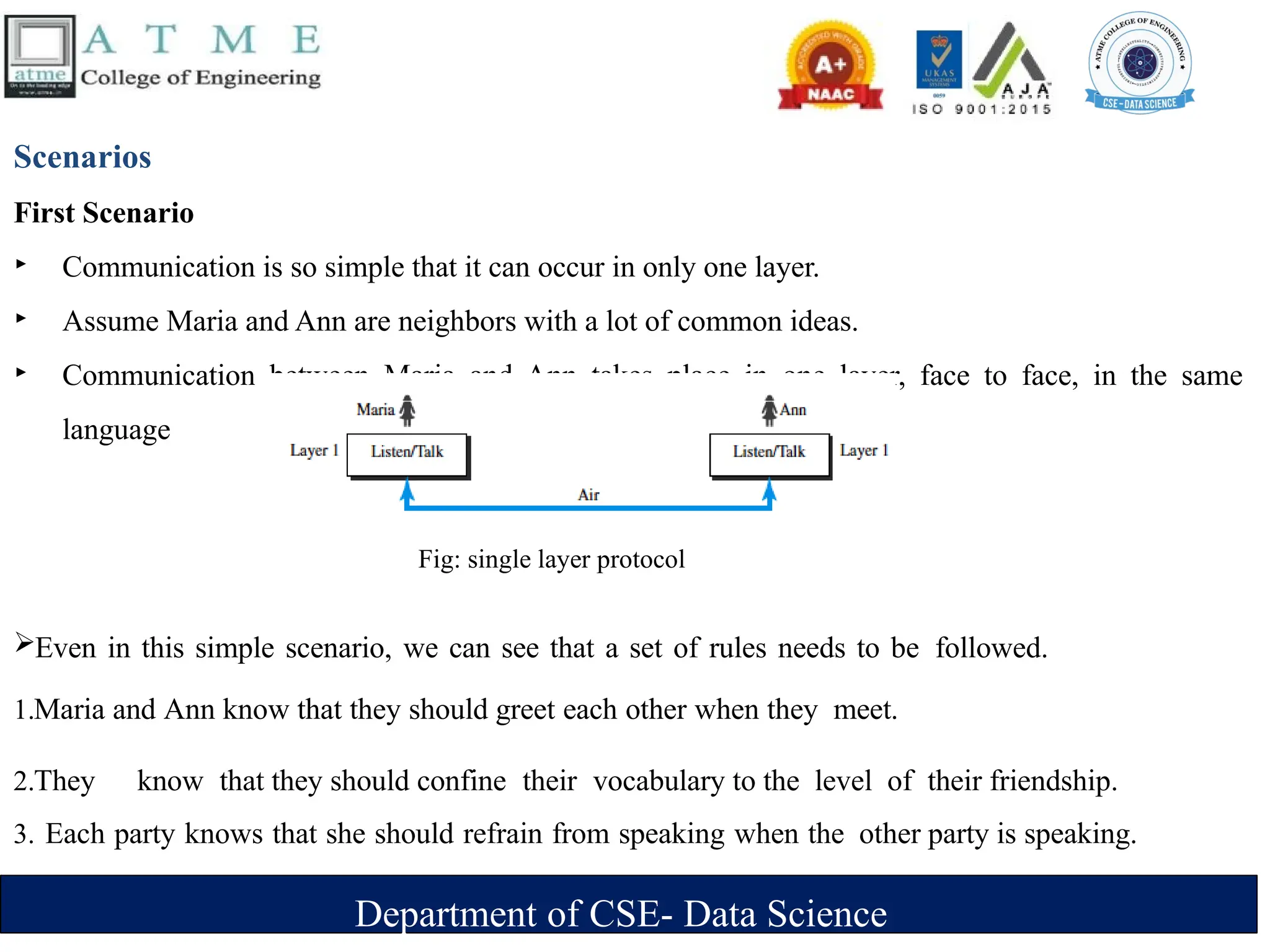
‣ Communication is so simple that it can occur in only one layer.
‣ Assume Maria and Ann are neighbors with a lot of common ideas.
‣ Communication between Maria and Ann takes place in one layer, face to face, in the same
language
Even in this simple scenario, we can see that a set of rules needs to be followed.
1.Maria and Ann know that they should greet each other when they meet.
2.They know that they should confine their vocabulary to the level of their friendship.
3. Each party knows that she should refrain from speaking when the other party is speaking.
Fig: single layer protocol
Department of CSE- Data Science
Second Scenario
 Assume that Ann is offered a higher-level position in her company, but needs to move to
another branch located in a city very far from Maria.
 The two friends still want to continue their communication and exchange ideas because
they have come up with an innovative project to start a new business when they both
retire.
They decide to continue their conversation using regular mail through the post office.
They do not want their ideas to be revealed by other people if the letters are
intercepted. They agree on an encryption/decryption technique
 Now we can say that the communication between Maria and Ann takes place in
three layers
Department of CSE- Data Science
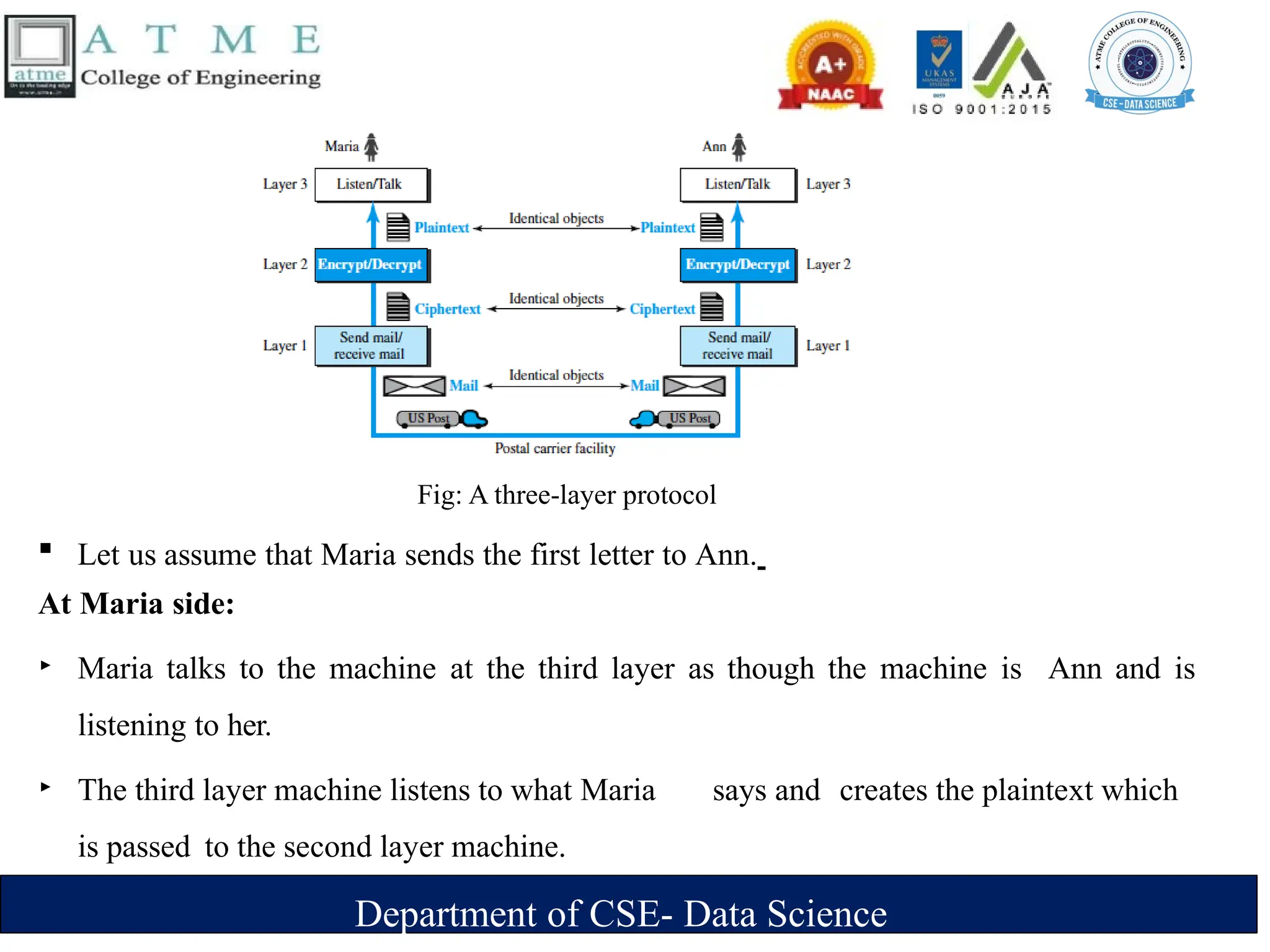
Fig: A three-layer protocol
 Let us assume that Maria sends the first letter to Ann.
At Maria side:
‣ Maria talks to the machine at the third layer as though the machine is Ann and is
listening to her.
‣ The third layer machine listens to what Maria says and creates the plaintext which
is passed to the second layer machine.
Department of CSE- Data Science
‣ The second layer machine takes the plaintext, encrypts it, and creates the ciphertext, which
is passed to the first layer machine.
‣ The first layer machine, presumably a robot, takes the ciphertext , puts it in an envelope, adds
the sender and receiver addresses, and mails it.
At Ann’s side
‣ The first layer machine picks up the letter from Ann’s mail box, recognizing the letter
from Maria by the sender address.
‣ The machine takes out the ciphertext from the envelope and delivers it to the second
layer machine.
‣ The second layer machine decrypts the message, creates the plaintext and passes the
plaintext to the third-layer machine.
‣ The third layer machine takes the plaintext and reads it as though Maria is speaking.
Department of CSE- Data Science
‣ Protocol layering enables us to divide a complex task into several smaller and
simpler tasks.
‣ For example, in Figure 2.2, we could have used only one machine to do the job of all
three machines. However, if Maria and Ann decide that the encryption/ decryption
done by the machine is not enough to protect their secrecy, they would have to
change the whole machine.
‣ In the present situation, they need to change only the second layer machine; the other
two can remain the same. This is referred to as modularity.
‣ Modularity in this case means independent layers.
‣ A layer (module) can be defined as a black box with inputs and outputs, without
concern about how inputs are changed to outputs
Department of CSE- Data Science
Advantages of protocol layering
 Allows to separate the services from the implementation.
‣ A layer needs to be able to receive a set of services from the lower layer and to give
the services to the upper layer; we don’t care about how the layer is implemented.
‣ For example, Maria may decide not to buy the machine (robot) for the first layer; she can
do the job herself. As long as Maria can do the tasks provided by the first layer, in both
directions, the communication system works.
 Reduces the complexity at the intermediate system
‣ Communication does not always use only two end systems; there are intermediate
systems that need only some layers, but not all layers.
‣ If we did not use protocol layering, we would have to make each intermediate
system as complex as the end systems, which makes the expensive.
Department of CSE- Data Science
Principles of Protocol Layering
First Principle
 The first principle dictates that if we want bidirectional communication, we need to make each layer
so that it is able to perform two opposite tasks, one in each direction.
 For example, the third layer task is to listen (in one direction) and talk (in the other direction). The
second layer needs to be able to encrypt and decrypt. The first layer needs to send and receive
mail.
Second Principle
 The second principle that we need to follow in protocol layering is that the two objects under
each layer at both sites should be identical.
 For example, the object under layer 3 at both sites should be a plaintext letter. The object under
layer 2 at both sites should be a ciphertext letter. The object under layer 1 at both sites should
be a piece of mail.
Department of CSE- Data Science
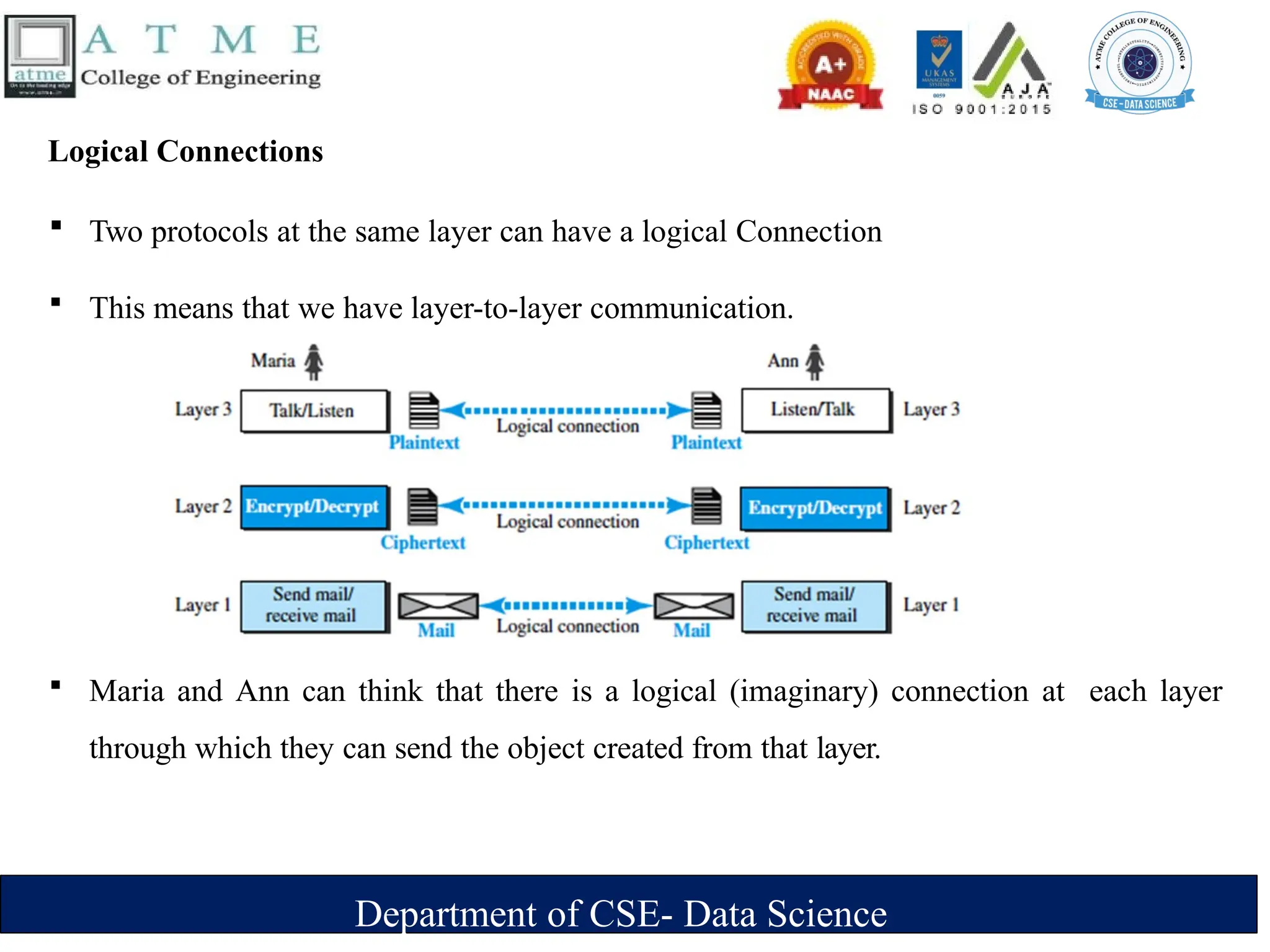
Logical Connections
 Two protocols at the same layer can have a logical Connection
 This means that we have layer-to-layer communication.
 Maria and Ann can think that there is a logical (imaginary) connection at each layer
through which they can send the object created from that layer.
Department of CSE- Data Science
TCP/IP PROTOCOL SUITE
 TCP/IP is a protocol-suite used in the Internet today.
 Protocol-suite refers a set of protocols organized in different layers.
 It is a hierarchical protocol made up of interactive modules, each of which provides a
specific functionality.
 The term hierarchical means that each upper level protocol is supported by the
services provided by one or more lower level protocols.
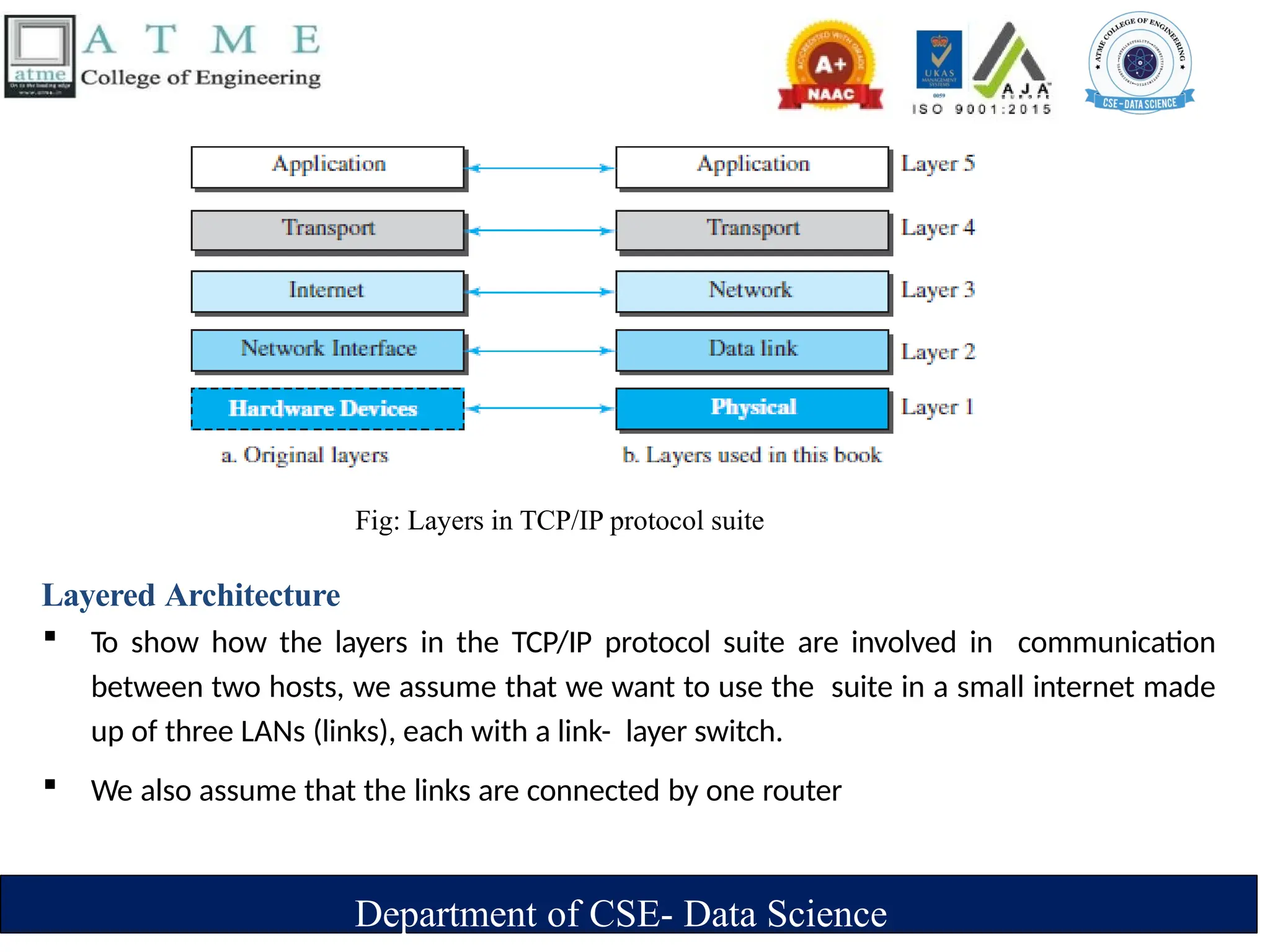
 TCP/IP is thought of as a five-layer model.
Department of CSE- Data Science
Layered Architecture
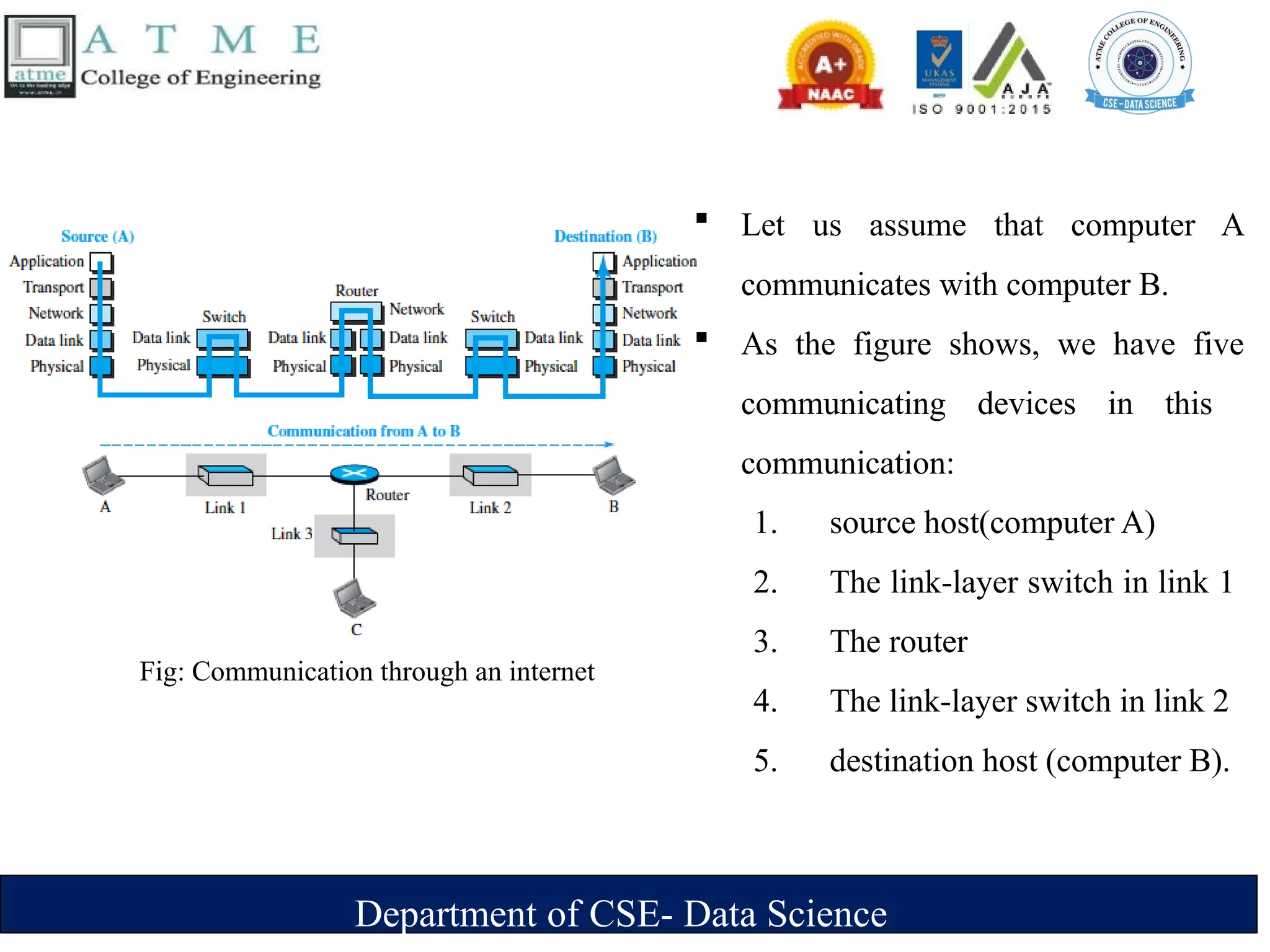
 To show how the layers in the TCP/IP protocol suite are involved in communication
between two hosts, we assume that we want to use the suite in a small internet made
up of three LANs (links), each with a link- layer switch.
 We also assume that the links are connected by one router
Fig: Layers in TCP/IP protocol suite
Department of CSE- Data Science
 Let us assume that computer A
communicates with computer B.
 As the figure shows, we have five
communicating devices in this
communication:
1. source host(computer A)
2. The link-layer switch in link 1
3. The router
4. The link-layer switch in link 2
5. destination host (computer B).
Fig: Communication through an internet
Department of CSE- Data Science
 Each device is involved with a set of layers depending on the role of the
device in the internet.
 The two hosts are involved in all five layers
 The source host needs to create a message in the application layer and send it
down the layers so that it is physically sent to the destination host.
 The destination host needs to receive the communication at the physical layer
and then deliver it through the other layers to the application layer.
 The router is involved in only three layers; link-layer switch in a link is
involved only in two layers, data-link and physical.
Department of CSE- Data Science
Layers in the TCP/IP Protocol Suite
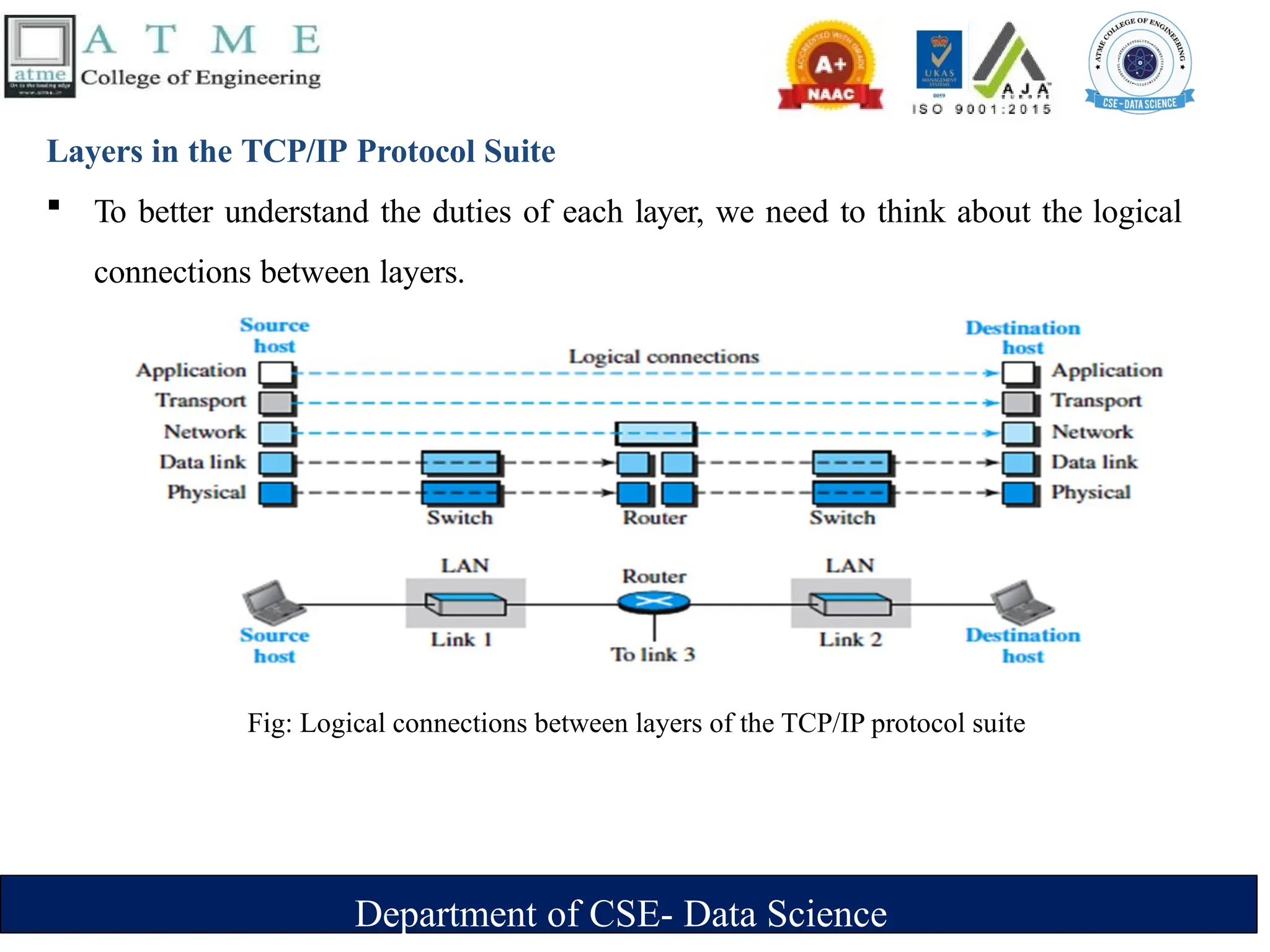
 To better understand the duties of each layer, we need to think about the logical
connections between layers.
Fig: Logical connections between layers of the TCP/IP protocol suite
Department of CSE- Data Science
 The duty of the application, transport, and network layers is end-to- end.
 The duty of the data-link and physical layers is hop-to-hop, in which a hop is a host
or router.
 The domain of duty of the top three layers is the internet, and the domain of duty of
the two lower layers is the link.
 Another way of thinking of the logical connections is to think about the data unit
created from each layer.
 In the top three layers, the data unit (packets) should not be changed by any
router or link-layer switch.
 In the bottom two layers, the packet created by the host is changed only by the
routers, not by the link-layer switches.
Department of CSE- Data Science
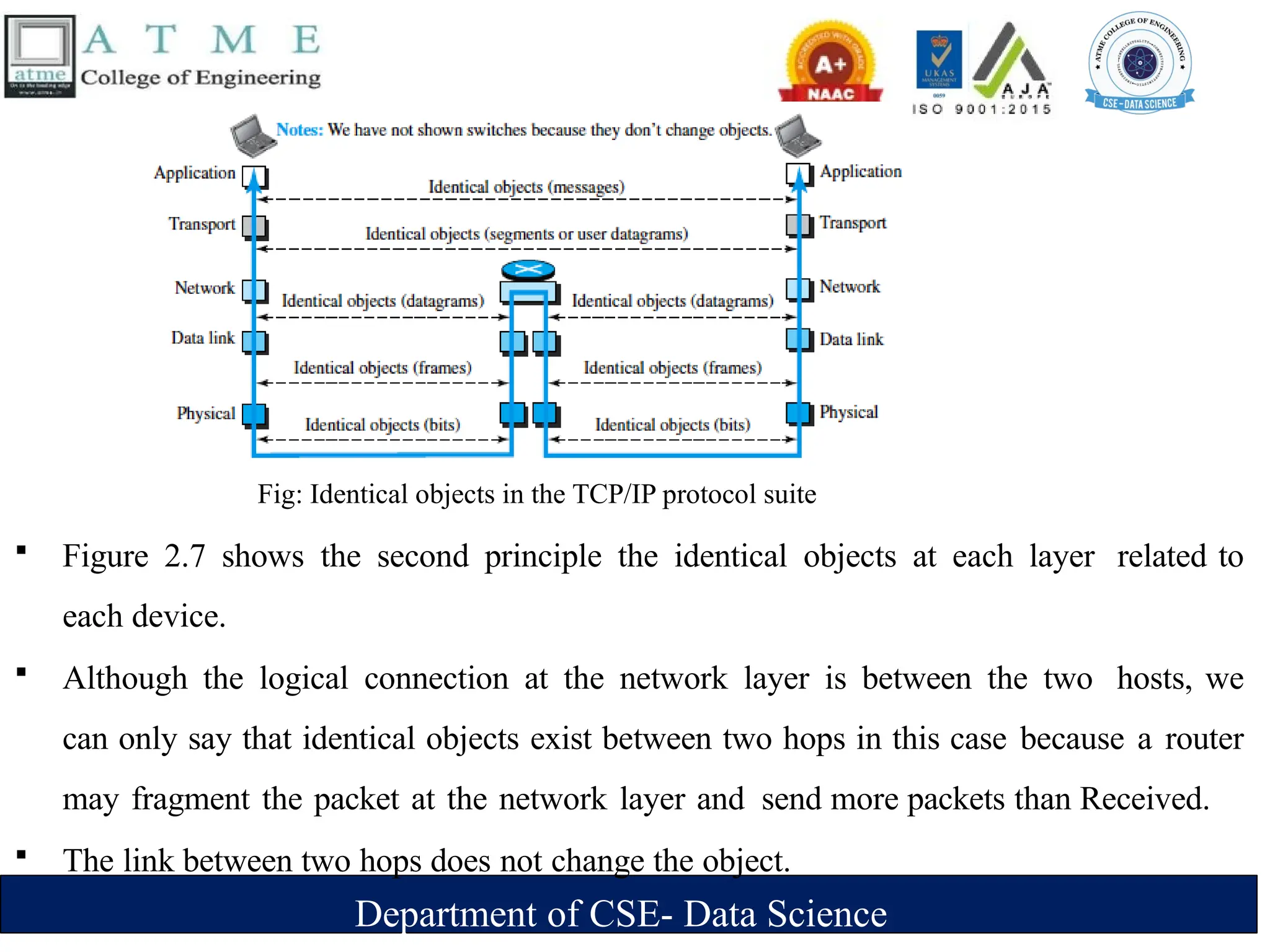
Fig: Identical objects in the TCP/IP protocol suite
 Figure 2.7 shows the second principle the identical objects at each layer related to
each device.
 Although the logical connection at the network layer is between the two hosts, we
can only say that identical objects exist between two hops in this case because a router
may fragment the packet at the network layer and send more packets than Received.
 The link between two hops does not change the object.
Department of CSE- Data Science
Description of each Layer
Physical Layer
 The lowest level in the TCP/IP protocol suite, responsible for
carrying individual bits in a frame across the link
 Two devices are connected by a transmission medium (cable or air).
 The transmission medium does not carry bits; it carries
electricalor optical signals. So the bits received in a frame from the data-link layer
are transformed and sent through the transmission media.
Department of CSE- Data Science
Data-link Layer
 Responsible for taking the datagram and moving it across the
link.
 Internet is made up of several links (LANs and WANs) connected
by routers. There may be several overlapping sets of links that a
datagram can travel from the host to the destination.
 The routers are responsible for choosing the best links. When the
next link to travel is determined by the router, the data-link layer
is responsible for taking the datagram and moving it across the
link.
 The link can be a wired LAN with a link-layer switch, a wireless
LAN, a wired WAN, or a wireless WAN.
 TCP/IP does not define any specific protocol for the data-link
layer. It supports all the standard and proprietary protocols.
 The data-link layer takes a datagram and encapsulates it in a
packet called a frame.
 Each link-layer protocol may provide a different service. Some
link-layer protocols provide complete error detection and
correction, some provide only error correction
Department of CSE- Data Science
Network Layer
 Responsible for creating a connection between the source computer and the
destination computer.
Responsible for host-to-host communication and routing the packet through
possible routes.
 The network layer in the Internet includes the main protocol, Internet Protocol (IP),
‣ defines the format of the packet, called a datagram at the network layer.
‣ defines the format and the structure of addresses used in this layer.
‣ responsible for routing a packet from its source to its destination, which is achieved by each
router forwarding the datagram to the next router in its path.
 IP is a connectionless protocol that provides no flow control, no error control, and no congestion
control services. This means that if any of theses services is required for an application, the
application should rely only on the transport-layer protocol.
Department of CSE- Data Science
The network layer also includes unicast (one-to-one) and multicast (one-to-many) routing
protocols.
 A routing protocol does not take part in but it creates forwarding tables for routers to help them in the
routing process.
 The network layer also has some auxiliary protocols that help IP in its delivery and routing tasks.
‣ The Internet Control Message Protocol (ICMP)- helps IP to report some problems when routing a
packet.
‣ The Internet Group Management Protocol (IGMP)-helps IP in multitasking.
‣ The Dynamic Host Configuration Protocol (DHCP)-helps IP to get the network-layer address for
a host.
‣ The Address Resolution Protocol (ARP)-IP to find the link-layer address of a host or a router
when its network-layer address is given.
Department of CSE- Data Science
Transport Layer
 Responsible for giving services to the application layer: to get a message from an application
program running on the source host encapsulates it in a transport layer packet (called a segment
or a user datagram and deliver it to the corresponding application program on the
destination host through the logical connection
 The logical connection at the transport layer is also end-to-end.
 There are a few transport-layer protocols in the Internet, each designed for some specific task.
 Transmission Control Protocol (TCP)
‣ connection-oriented protocol that first establishes a logical connection between transport
layers at two hosts before transferring data.
‣ creates a logical pipe between two TCPs for transferring a stream of bytes.
‣ provides flow control, error control and congestion
Department of CSE- Data Science
 User Datagram Protocol (UDP)
‣ Connectionless protocol that transmits user datagrams without first creating a
logical connection
‣ each user datagram is an independent entity without being related to the previous
or the next one
‣ does not provide flow, error, or congestion control
‣ simplicity, which means small overhead, is attractive to an application
program that needs to send short messages and cannot afford the retransmission of
the packets involved in TCP, when a packet is corrupted or lost.
 Stream Control Transmission Protocol (SCTP)
‣ designed to respond to new applications that are emerging in the multimedia.
Department of CSE- Data Science
Application Layer
 The logical connection between the two application layers is end to- end.
 The two application layers exchange messages between each other as though there were a
bridge between the two layers.
 Communication at the application layer is between two processes (two programs running at
this layer).
 To communicate, a process sends a request to the other process and receives a response.
 Process-to-process communication is the duty of the application layer.
 The application layer in the Internet includes many predefined protocols, but a user can also
create a pair of processes to be run at the two hosts.
 The Hypertext Transfer Protocol (HTTP) : accessing the World Wide Web (WWW).
Department of CSE- Data Science
 The Simple Mail Transfer Protocol (SMTP): e-mail service.
 The File Transfer Protocol (FTP): File Transfer.
 The Terminal Network (TELNET) and Secure Shell (SSH): Remote login
 The Simple Network Management Internet at global and local levels
 The Domain Name System (DNS): to find the network-layer address of a computer
 The Internet Group Management Protocol (IGMP): to collect membership in a group.
Department of CSE- Data Science
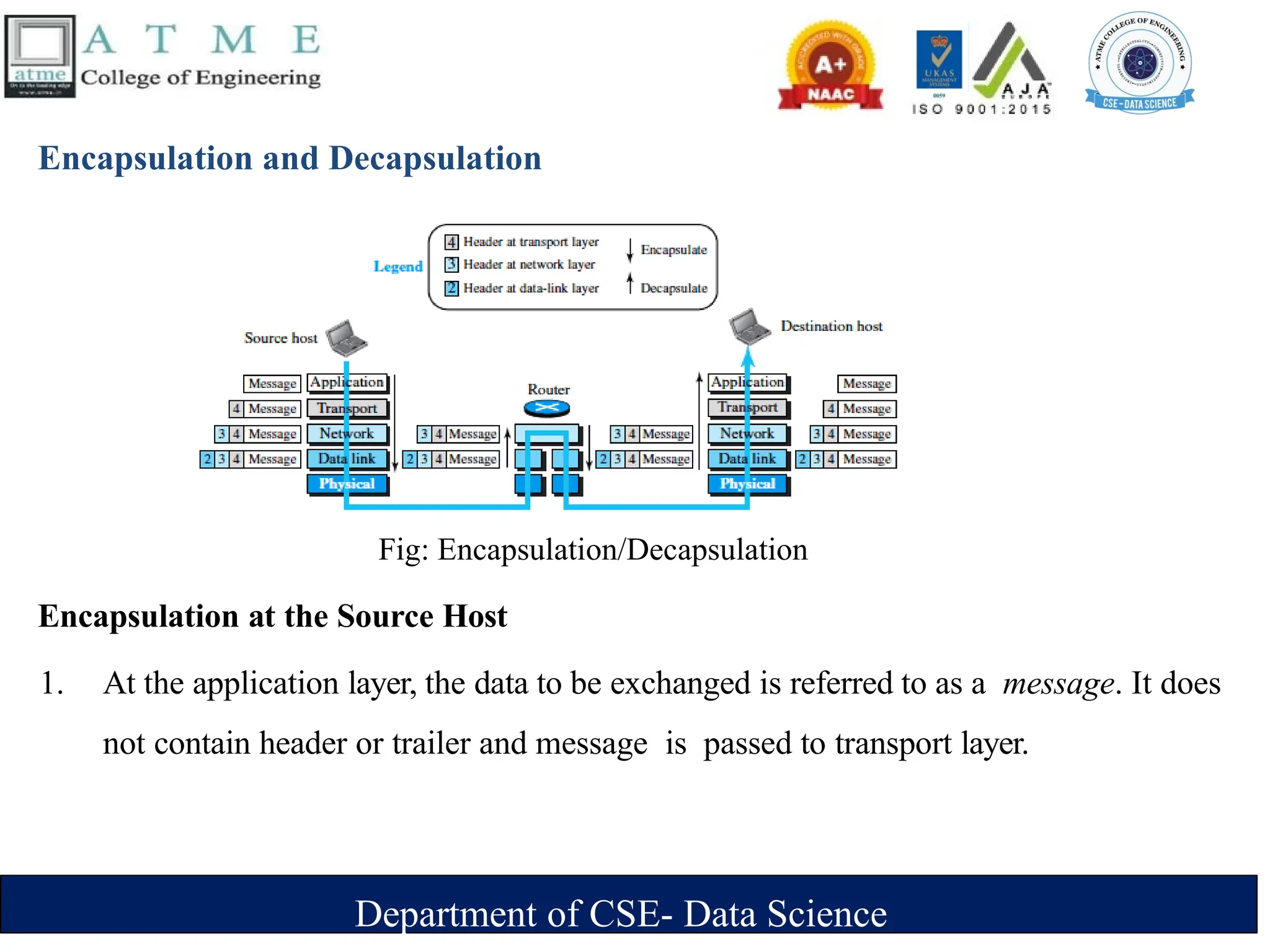
Encapsulation and Decapsulation
Encapsulation at the Source Host
1. At the application layer, the data to be exchanged is referred to as a message. It does
not contain header or trailer and message is passed to transport layer.
Fig: Encapsulation/Decapsulation
Department of CSE- Data Science
2. The transport layer takes the message as the payload, the load that the transport layer should
take care of. It adds the transport layer header to the payload, which contains the identifiers
of the source and destination application programs plus some more information that is
needed for the end-to end delivery of the message, such as information needed for flow,
error control, or congestion control. The result is the transport-layer packet, which is called
the segment(in TCP) and the user datagram (in UDP). The transport layer then passes the
packet to the network layer.
3. The network layer takes the transport-layer packet as data or payload and adds its own
header to the payload. The header contains the addresses of the source and destination hosts
and some more information used for error checking of the header, fragmentation
information, and so on. The result is the network- layer packet, called a datagram. The
network layer then passes the packet to the data-link layer.
Department of CSE- Data Science
4. The data-link layer takes the network-layer packet as data or payload and adds its own
header, which contains the link-layer addresses of the host or the next hop (the router). The
result is the link-layer packet, which is called a frame. The frame is passed to the physical
layer for transmission.
Decapsulation and Encapsulation at the Router
At the router, we have both decapsulation and encapsulation because the router
is connected to two or more links.
1. After the set of bits are delivered to the data-link layer, this layer decapsulates the
datagram from the frame and passes it to the network layer.
Department of CSE- Data Science
2. The network layer only inspects the source and destination addresses in the datagram
header and consults its forwarding table to find the next hop to which the datagram is
to be delivered. The contents of the datagram should not be changed by the network
layer in the router unless there is a need to fragment the datagram if it is too big to
be passed through the next link. The datagram is then passed to the data-link layer of
the next link.
3. The data-link layer of the next link encapsulates the datagram in a frame and
passes it to the physical layer for transmission.
Department of CSE- Data Science
Decapsulation at the Destination Host
 At the destination host, each layer only decapsulates the packet received, removes the
payload, and delivers the payload to the next- higher layer protocol until the message
reaches the application layer.
 decapsulation in the host involves error checking.
Addressing
 we have logical communication between pairs of layers in this model.
Any communication that involves two parties needs two addresses: source address
and destination address.
 Although it looks as if we need five pairs of addresses, one pair per layer, we normally have
only four because the physical layer does not need addresses; the unit of data exchange at the
physical layer is a bit, which definitely cannot have an address.
Department of CSE- Data Science
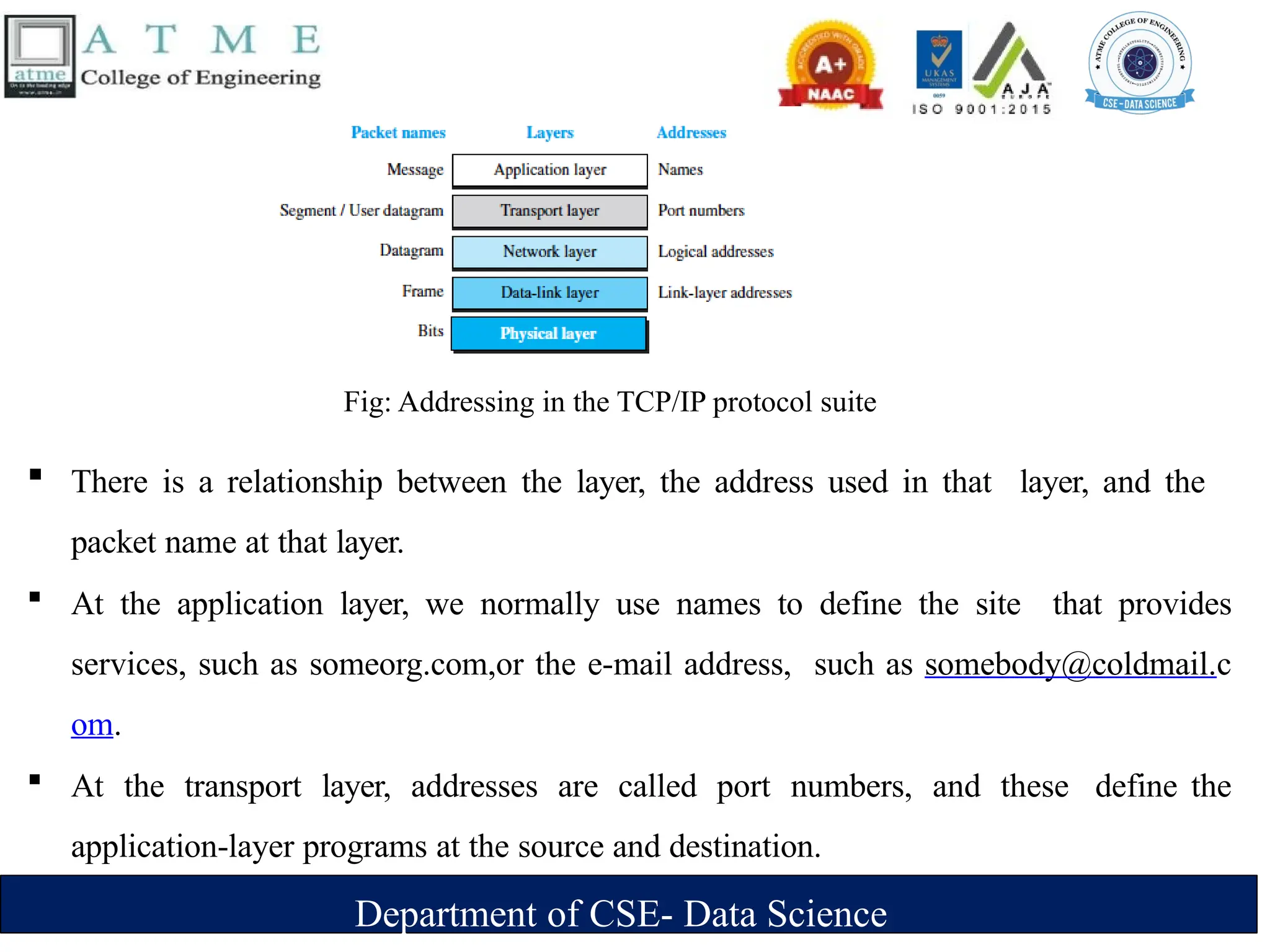
Fig: Addressing in the TCP/IP protocol suite
 There is a relationship between the layer, the address used in that layer, and the
packet name at that layer.
 At the application layer, we normally use names to define the site that provides
services, such as someorg.com,or the e-mail address, such as somebody@coldmail.c
om.
 At the transport layer, addresses are called port numbers, and these define the
application-layer programs at the source and destination.
Department of CSE- Data Science
 Port numbers are local addresses that distinguish between several programs running at
the same time.
At the network-layer, the addresses are global, with the whole Internet as the scope.
 A network-layer address uniquely defines the connection of a device to the Internet.
 The link-layer addresses, sometimes called MAC addresses, are locally defined
addresses, each of which defines a specific host or router in a network (LAN or
WAN).
Multiplexing and Demultiplexing
 Since the TCP/IP protocol suite uses several protocols at some layers, we can say that
we have multiplexing at the source and demultiplexing at the destination.
Department of CSE- Data Science
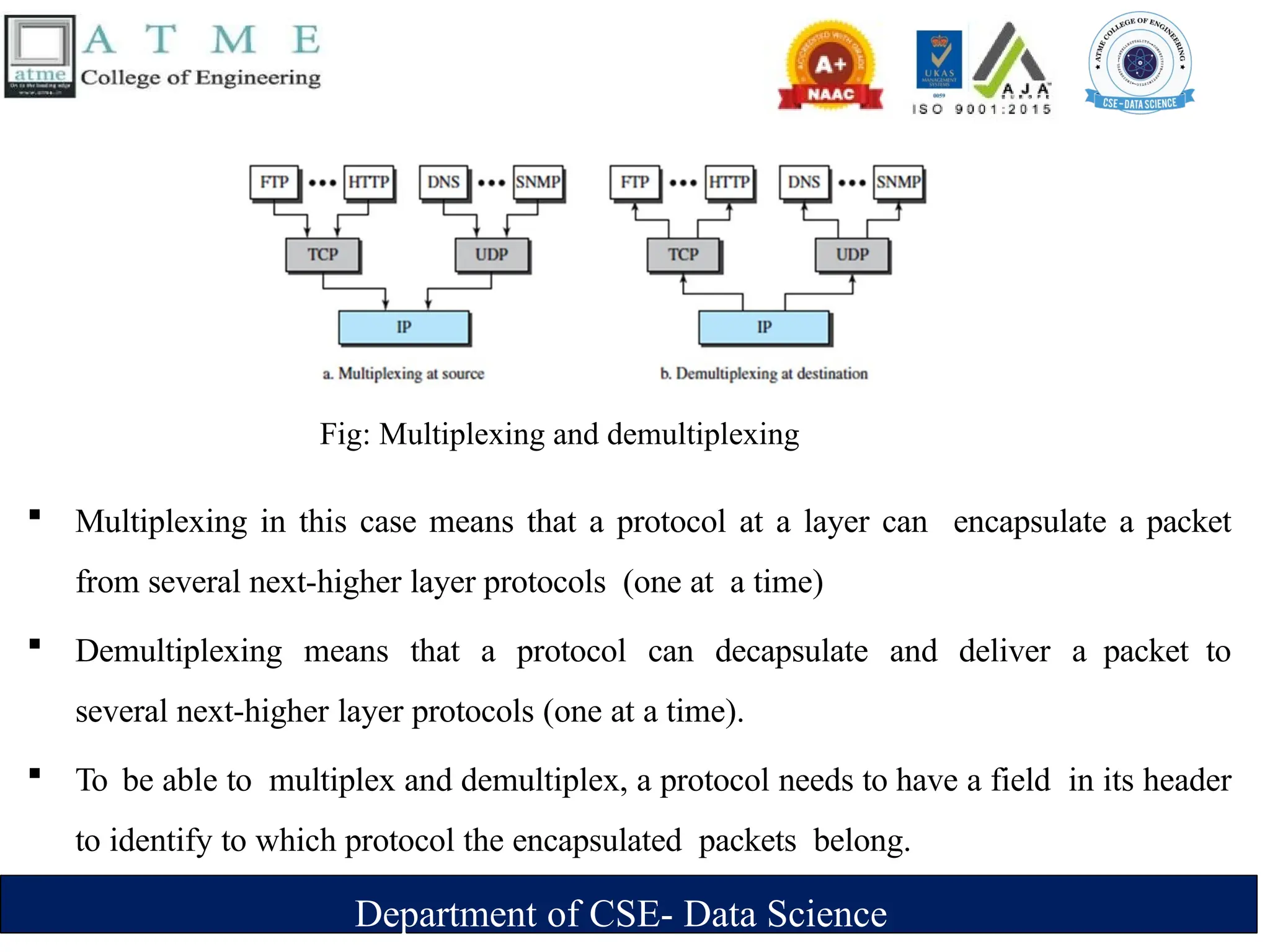
Fig: Multiplexing and demultiplexing
 Multiplexing in this case means that a protocol at a layer can encapsulate a packet
from several next-higher layer protocols (one at a time)
 Demultiplexing means that a protocol can decapsulate and deliver a packet to
several next-higher layer protocols (one at a time).
 To be able to multiplex and demultiplex, a protocol needs to have a field in its header
to identify to which protocol the encapsulated packets belong.
Department of CSE- Data Science
 At the transport layer, either UDP or TCP can accept a message from several
application-layer protocols.
 At the network layer, IP can accept a segment from TCP or a user datagram from
UDP.
 IP can also accept a packet from other protocols such as ICMP, IGMP, and so on.
 At the data-link layer, a frame may carry the payload coming from IP or other
protocols such as ARP
Department of CSE- Data Science
The OSI Model
 The International Organization for Standardization (ISO) is a multinational body
dedicated to worldwide agreement on international standards.
 An ISO standard that covers all aspects of network communications is the Open
Systems Interconnection (OSI) model. It was first introduced in the late 1970s.
 ISO is the organization; OSI is the model.
 An open system is a set of protocols that allows any two different systems to
communicate regardless of their underlying architecture.
 The purpose of the OSI model is to show how to facilitate communication between
different systems without requiring changes to the logic of the underlying
hardware and software.
Department of CSE- Data Science
 The OSI model is not a protocol; it is a model for understanding and designing a network
architecture that is flexible, robust, and interoperable.
 The OSI model was intended to be the basis for the creation of the protocols in the OSI stack.
 The OSI model is a layered framework for the design of network systems that allows
communication between all types of computer systems.
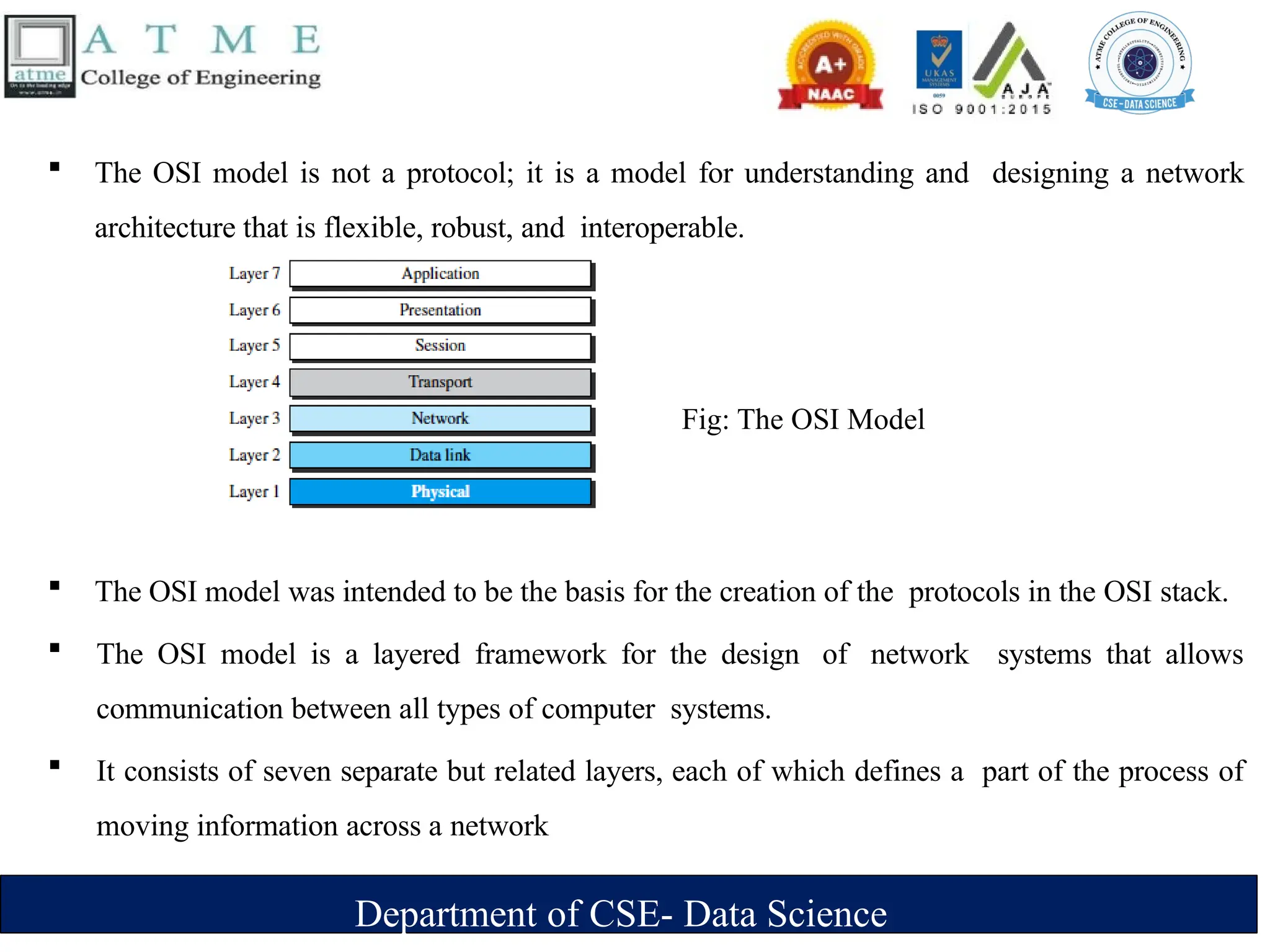
 It consists of seven separate but related layers, each of which defines a part of the process of
moving information across a network
Fig: The OSI Model
Department of CSE- Data Science
OSI versus TCP/IP
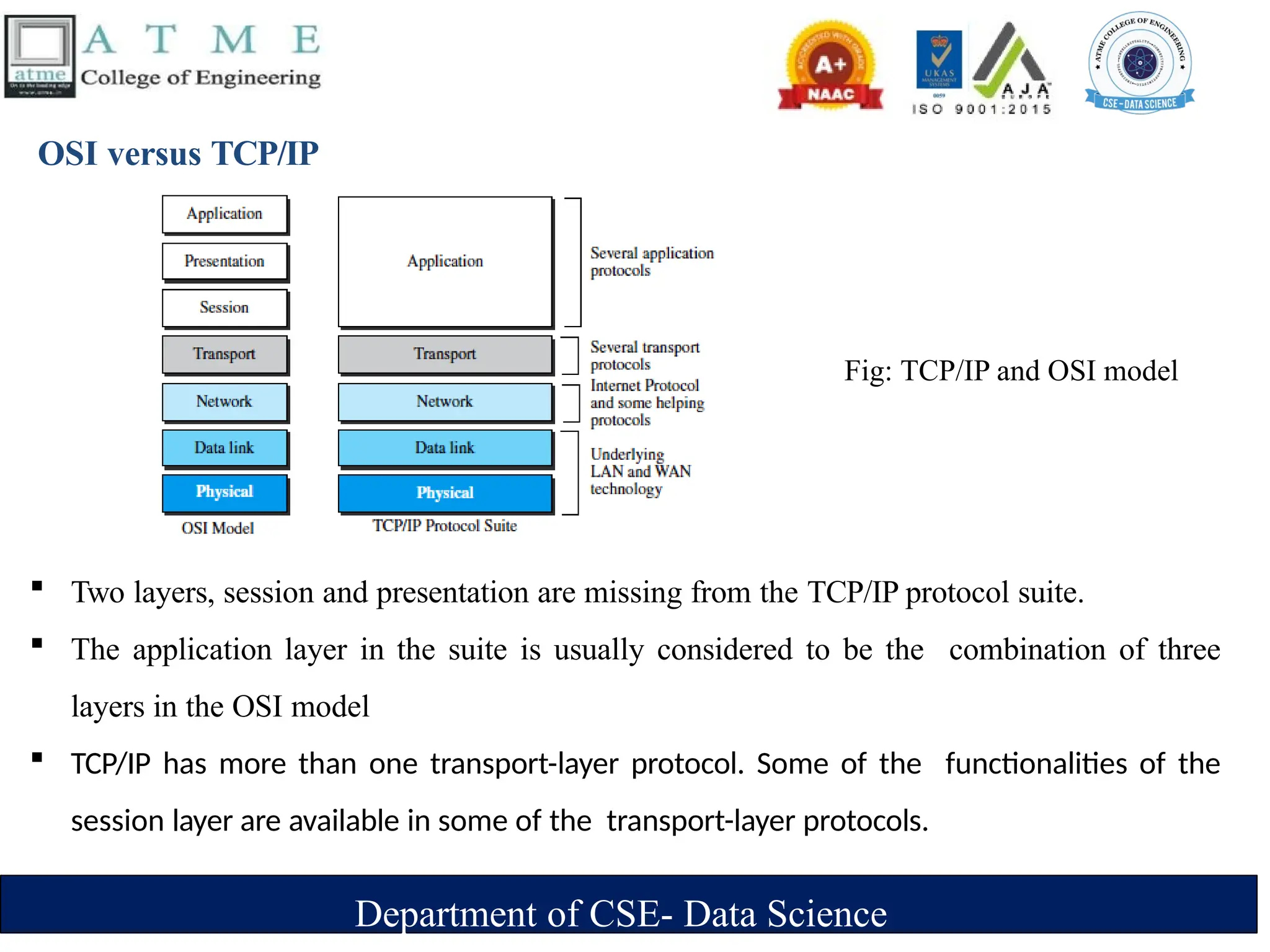
Fig: TCP/IP and OSI model
 Two layers, session and presentation are missing from the TCP/IP protocol suite.
 The application layer in the suite is usually considered to be the combination of three
layers in the OSI model
 TCP/IP has more than one transport-layer protocol. Some of the functionalities of the
session layer are available in some of the transport-layer protocols.
Department of CSE- Data Science
 The application layer is not only one piece of software. Many applications can be
developed at this layer.
 If some of the functionalities mentioned in the session and presentation layers are needed for a
particular application, they can be included in the development of that piece of software.
Lack of OSI Model’s Success
 OSI was completed when TCP/IP was fully in place and a lot of time and money had
been spent on the suite; changing it would cost a lot.
 Some layers in the OSI model were never fully defined.
 For example, although the services provided by the presentation and the session
layers were listed in the document, actual protocols for these two layers were not fully
defined, nor were they fully described, and the corresponding software was not fully
developed.
 when OSI was implemented by an organization in a different application, it did not
show a high enough level of performance to entice the Internet authority to switch
from the TCP/IP protocol suite to the OSI model.
Department of CSE- Data Science
Introduction to Physical Layer
Department of CSE- Data Science

Module-1_Introduction to Data Communications.pptx

  • 1.
    Department of CSE-Data Science MODULE-1 Introduction
  • 2.
    Department of CSE-Data Science Contents  Data Communications Networks Network Types  Networks Models  Protocol Layering  TCP/IP Protocol suite  The OSI model  Introduction to Physical Layer: Transmission media  Guided Media  Unguided Media: Wireless.  Switching: Packet Switching and its types.
  • 3.
    Department of CSE-Data Science Data Communications  The term telecommunication means communication at a distance.  The word data refers to information presented in whatever form is agreed upon by the parties creating and using the data.  Data communications are the exchange of data between two devices via some form of transmission medium such as a wire cable.
  • 4.
    Department of CSE-Data Science Characteristics of data communication system  Delivery : The system must deliver data to the correct destination .  Accuracy :The system must deliver the data accurately.  Timeliness: The system must deliver data in a timely manner. Data delivered late are useless.  Jitter: Jitter refers to variation in the packet arrival time. For example, Video packets are sent every 30 ms . If some of the packets arrive with 30-ms delay and others with 40-ms delay, an uneven quality in the video is the result.
  • 5.
    Department of CSE-Data Science Components of a data communication system Fig: Five components of data communication  Message : The message is the information (data) to be communicated .  Sender: The sender is the device that sends the data message.  Receiver :The receiver is the device that receives the message.  Transmission medium :The transmission medium is the physical path by which a message travels from sender to receiver.  Protocol : A protocol is a set of rules that govern data communications
  • 6.
    Department of CSE-Data Science Data Representation  Text ‣Represented as bit pattern (sequence of bits 0s or 1s) ‣Different set of bit pattern used to represent symbols or characters. ‣Each set is called code ‣Process of representing symbols is called encoding ‣Ex: ASCII,UNICODE  Numbers ‣ Represented as bit pattern ‣ Directly converted to binary form  Audio ‣ Recording or broadcasting of sound or music. ‣ Continuous not discrete
  • 7.
    Department of CSE-Data Science  Video ‣ Recording or broadcasting of picture or a movie ‣ Produced as : ‣ Continuous entity [TV camera] ‣ Combination of images-discrete entity  Images ‣ Represented as bit pattern ‣ Image is divided into matrix of pixels(smallest element of an image) ‣ Each pixel is assigned a bit pattern (size and value of pattern depend on image) ‣ Ex: black and white dots (chessboard) -1 bit pattern is enough to represent a pixel, gray scale- 2 bit pattern. ‣ Several methods to represent colour images : RGB,YCM
  • 8.
    Department of CSE-Data Science Data Flow  Communication between two devices can be 1.Simplex 2.Half-duplex 3.Full-duplex 1. Simplex  Communication is unidirectional  Only one of the two devices on a link can transmit; the other can only receive.  E.g. : One way street, Keyboard , Monitor.
  • 9.
    Department of CSE-Data Science 2. Half duplex  Each station can both transmit and receive, but not at the same time.  When one device is sending, the other can only receive, and vice versa.  E.g.: Walkie Talkie. 3. Full duplex  Both stations can transmit and receive simultaneously.  It is like a two way street with the traffic flowing in both the directions at the same time.  E.g .: Telephone network
  • 10.
    Department of CSE-Data Science Networks  A network is a set of devices (often referred to as nodes) connected by communication links.  A node can be a computer, printer, or any other device capable of sending and/or receiving data generated by other nodes on the network.  A link can be a cable, air, optical fiber, or any medium which can transport a signal carrying information.
  • 11.
    Department of CSE-Data Science Network Criteria 1. Performance  Measured using: ‣ Transit time: time taken to travel a message from one device to another. ‣ Response time: time elapsed between enquiry and response.  Depends on following factors: ‣ Number of users ‣ Type of transmission medium ‣ Efficiency of software  Evaluated by 2 networking metrics: ‣ Throughput (high) ‣ Delay (small)
  • 12.
    Department of CSE-Data Science 2. Reliability  Measured by ‣ Frequency of failure. ‣ Time taken to recover from a network failure. ‣ Network robustness in a disaster. 3. Security  Protecting data from unauthorized access, damage and development.  Implementing policies and procedures for recovery from breaches and data losses.
  • 13.
    Department of CSE-Data Science Physical Structures Type of Connection 1. Point to Point :  It provides a dedicated link between two devices .  The entire capacity of the link is reserved for transmission between those two devices.  It uses an actual length of wire or cable to connect the two ends.  When we change TV channels by infrared remote control, we are establishing a point-to-point connection between remote control and TV's control system
  • 14.
    Department of CSE-Data Science 2. Multipoint  It is the one in which more than two specific devices share a single link.  Capacity of the channel is either spatially or temporally shared. ‣ Spatially shared : Several devices can use the link simultaneously. ‣ Temporally shared : Users take turns.
  • 15.
    Department of CSE-Data Science Physical Topology  Topology of network is the geometric representation of all links and linking devices to one another  Basic topologies: 1.Mesh 2.Star 3.Bus and 4.Ring
  • 16.
    Department of CSE-Data Science 1. Mesh Topology  Point to Point connection  Every device has a dedicatedpoint-to point link to every device.  The term dedicated means that the link carries traffic only between the two devices it connects.  For n nodes ‣n(n-1) physical links ‣n(n-1)/2 duplex mode links  Every device have (n-1) I/O ports to be connected to other (n-1) devices.
  • 17.
    Department of CSE-Data Science  Advantages: ‣ A mesh topology is robust. If one link becomes unusable, it does not incapacitate the entire system. ‣ Point-to-point links make fault identification and fault isolation easy. ‣ Privacy or security : When every message travels along a dedicated line, only the intended recipient sees it.  Disadvantages: ‣ Difficult installation and reconfiguration. ‣ Bulk of wiring occupies more space than available space. ‣ Hardware required to connect each link is expensive.  Practical example: connection of telephone regional offices in which each regional office needs to be connected to every other regional office.
  • 18.
    Department of CSE-Data Science 2. Star Topology  Point to Point connection  All the devices are connected to a central controller called a hub  Dedicated point-to-point link between a device & a hub.  The devices are not directly linked to one another. Thus, there is no direct traffic between devices.  The hub acts as a junction: ‣ If device-1 wants to send data to device-2, ‣ the device-1 sends the data to the hub, then the hub relays the data to the device-2.
  • 19.
    Department of CSE-Data Science  Advantages: ‣ A star topology is less expensive than a mesh topology. Each device needs only one link and one I/O port to connect it to any number of others. ‣ Easy to install and reconfigure. ‣ Requires less cabling, less expensive than mesh topology. ‣ Robustness: If one link fails, only that link is affected. All other links remain active. As a result fault identification and fault isolation becomes easy.  Disadvantages : ‣ Dependency of whole topology on one single point, the hub.  Example : Local area network
  • 20.
    Department of CSE-Data Science 3. Bus Topology  Multipoint connection  All the devices are connected to the single cable called bus (backbone)  Devices are connected to the bus by drop-lines and taps.  A drop-line is a connection running between the device and the bus (main cable).  A tap is a connector that links to the bus.
  • 21.
    Department of CSE-Data Science  As a signal travels along the backbone, some of its energy is transformed into heat.  As a result there is a limit on the number of taps a bus can support and on the distance between those taps.  Advantages: ‣ Ease of installation : Backbone cable can be laid along the most path, then connected to the nodes and drop lines. ‣ Cable required is the least compared to mesh/star topologies. ‣ Redundancy is eliminated : Only the backbone cable stretches through the entire facility.
  • 22.
    Department of CSE-Data Science  Disadvantages: ‣ Signal reflection at the taps can cause degradation in quality ‣ A fault/break in the cable stops all transmission. ‣ There is a limit on -Cable length - Number of nodes that can be connected. ‣ Security is very low because all the devices receive the data sent from the source.  Example  It is used to implement the basic Ethernet network.
  • 23.
    Department of CSE-Data Science 4. Ring Topology  Each device has a dedicated point-to-point connection with only he two devices on either side of it.  A signal is passed along the ring in one direction, from device to device, until it reaches its destination.  Each device in the ring incorporates a repeater.  When a device receives a signal intended for another device, its repeater regenerates the bits and passes them along
  • 24.
    Department of CSE-Data Science  Advantages ‣ Easy installation and reconfiguration. To add/delete a device, requires changing only 2 connections ‣ Fault isolation is simplified. If one device does not receive a signal within a specified period, it can issue an alarm. The alarm alerts the network-operator to the problem and its location ‣ Congestion reduced: Because all the traffic flows in only one direction.  Disadvantages ‣ Unidirectional traffic ‣ A fault in the ring/device stops all transmission. - The above 2 drawbacks can be overcome by using dual ring. ‣ There is a limit on - Cable length - Number of nodes that can be connected. ‣ Slower: Each data must pass through all the devices between source and destination.  Example: Used in industrial control systems, metropolitan area networks, and office networks
  • 25.
    Department of CSE-Data Science Hybrid Topology  Example: having a main star topology with each branch connecting several stations in a bus topology
  • 26.
    Department of CSE-Data Science Categories of Networks  Network Category depends on its size 1.Local Area Networks (LANs) 2.Wide Area Networks (WANs) 3.Metropolitan Area Networks (MANs)
  • 27.
    Department of CSE-Data Science 1. Local Area Networks (LANs)  It is privately owned and links the devices in a single office, building, or campus.  LAN can be as simple as two PCs and a printer in someone's home office. Its size is limited to a few kilometers.  LANs are designed to allow resources to be shared between personal computers or workstations.  The resources to be shared can include hardware (e.g., a printer),software (e.g., an application program).
  • 28.
    Department of CSE-Data Science  Advantages: ‣ Resource Sharing: Computer resources like printers and hard disks can be shared by all devices on the network. ‣ Expansion: Nowadays, LANs are connected to WANs to create communication at a wider level. Fig: An isolated LAN connecting 12 computers to a hub in a closet
  • 29.
     Disadvantages ‣ Limiteddistance: Local area networks are used only in buildings or apartment complexes it cannot be occupied in bigger areas. ‣ Installing LAN is expensive: It is expensive to establish a LAN. Here specialized software is essential to install a server. Communication hardware such as hubs, switches, routers, and cables are expensive to buy. ‣ Limited scalability: LANs are limited in terms of the number of devices that can be connected to them. As the number of devices increases, the network can become slow and congested. ‣ Single point of failure: LANs typically have a single point of failure, such as a central server. If this server fails, the entire network can go down. ‣ Maintenance and management: LANs require regular maintenance and management to ensure optimal performance. This can be time-consuming and costly.
  • 30.
    Department of CSE-Data Science 2.Wide Area Networks (WAN)  It provides long-distance transmission of data, image, audio, and video information over large geographic areas that comprise a country, a continent or even the whole world. Two types of WAN: ‣ Point to Point WAN : A point-to-point WAN is a network that connects two communicating devices through a transmission media (cable or air).
  • 31.
    Department of CSE-Data Science ‣ The switched WAN : A switched WAN is a network with more than two ends. switched WAN is a combination of several point-to-point WANs that are connected by switches.
  • 32.
    Department of CSE-Data Science Internetwork  A network of networks is called an internet. ( inter-network)  As an example, assume that an organization has two offices, one on the east coast and the other on the west coast.  Each office has a LAN that allows all employees in the office to communicate with each other.  To make the communication between employees at different offices possible, the management leases a point-to-point dedicated WAN from a service provider, such as a telephone company, and connects the two LANs.  Now the company has an internetwork, or a private internet. Communication between offices is now possible.
  • 33.
    Department of CSE-Data Science  When a host in the west coast office sends a message to another host in the same office, the router blocks the message, but the switch directs the message to the destination.  On the other hand, when a host on the west coast sends a message to a host on the east coast, router R1 routes the packet to router R2, and the packet reaches the destination.
  • 34.
    Department of CSE-Data Science 3. Metropolitan Area Networks (MAN)  A metropolitan area network (MAN) is a computer network that connects computers within a metropolitan area, which could be a single large city, multiple cities and towns, or any given large area with multiple buildings.  A MAN is larger than a local area network (LAN) but smaller than a wide area network (WAN). It is commonly used on large companies or school campuses with multiple buildings.  It serves as a high-speed network to permit the sharing of regional resources.  The most common examples of MAN are cable TV networks and telephone company networks.
  • 35.
    Department of CSE-Data Science
  • 36.
    Department of CSE-Data Science Fig: A heterogeneous network made of four WANs and three LANs
  • 37.
    Department of CSE-Data Science . Switching  An internet is a switched network in which a switch connects at least two links together.  A switch needs to forward data from a network to another network when required.  The two most common types of switched networks are 1.circuit-switched 2.packet-switched networks. 1. Circuit-Switched Network  In a circuit-switched network, a dedicated connection, called a circuit, is always available between the two end systems; the switch can only make it active or inactive.
  • 38.
    Department of CSE-Data Science  In Figure, the four telephones at each side are connected to a switch. The switch connects a telephone set at one side to a telephone set at the other side.  The thick line connecting two switches is a high-capacity communication line that can handle four voice communications at the same time; the capacity can be shared between all pairs of telephone sets. 2. Packet-Switched Network  In a computer network, the communication between the two ends is done in blocks of data called packets.
  • 39.
    Department of CSE-Data Science  A router in a packet-switched network has a queue that can store and forward the packet.  Now assume that the capacity of the thick line is only twice the capacity of the data line connecting the computers to the routers.  If only two computers (one at each site) need to communicate with each other, there is no waiting for the packets.  However, if packets arrive at one router when the thick line is already working at its full capacity, the packets should be stored and forwarded in the order they arrived.
  • 40.
    Department of CSE-Data Science The Internet  Internet is composed of thousands of interconnected networks. Fig: The Internet today
  • 41.
    Department of CSE-Data Science  At the top level, the backbones are large networks owned by some communication companies such as Sprint, Verizon (MCI), AT&T, and NTT. The backbone networks are connected through some complex switching systems, called peering points.  At the second level, there are smaller networks, called provider networks, that use the services of the backbones for a fee.  The provider networks are connected to backbones and sometimes to other provider networks. The customer networks are networks at the edge of the Internet that actually use the services provided by the Internet.  They pay fees to provider networks for receiving services. Backbones and provider networks are also called Internet Service Providers (ISPs).  The backbones are often referred to as international ISPs; the provider networks are often referred to as national or regional ISPs.
  • 42.
    Department of CSE-Data Science Accessing the Internet 1. Using Telephone Networks  Dial up Service : To the telephone line add a modem that converts data to voice. But it is very slow when line used for internet connection.  DSL Service : Telephone companies have upgraded their telephone lines to provide higher speed internet services . 2. Using Cable Networks  The cable companies have been upgrading their cable networks to provide internet connection. But speed varies depending on the number of neighbors that use the same cable. 3. Using Wireless Networks  A household or small business can be connected to the internet through a wireless LAN. 4. Direct Connection to the internet  A large organization can become a local ISP and be connected to internet.
  • 43.
    Department of CSE-Data Science Network Models Protocol Layering  A protocol defines the rules that both the sender and receiver and all intermediate devices need to follow to be able to communicate effectively.  When communication is ‣ Simple -only one simple protocol. ‣ complex, we need to divide the task b/w different layers. We need a protocol at each layer, or protocol layering.  Elements of a Protocol ‣ Syntax – Structure or format of the data – Indicates how to read the bits - field delineation ‣ Semantics – Interprets the meaning of the bits – Knows which fields define what action ‣ Timing – When data should be sent and what – Speed at which data should be sent or speed at which it is being received.
  • 44.
    Department of CSE-Data Science Scenarios First Scenario ‣ Communication is so simple that it can occur in only one layer. ‣ Assume Maria and Ann are neighbors with a lot of common ideas. ‣ Communication between Maria and Ann takes place in one layer, face to face, in the same language Even in this simple scenario, we can see that a set of rules needs to be followed. 1.Maria and Ann know that they should greet each other when they meet. 2.They know that they should confine their vocabulary to the level of their friendship. 3. Each party knows that she should refrain from speaking when the other party is speaking. Fig: single layer protocol
  • 45.
    Department of CSE-Data Science Second Scenario  Assume that Ann is offered a higher-level position in her company, but needs to move to another branch located in a city very far from Maria.  The two friends still want to continue their communication and exchange ideas because they have come up with an innovative project to start a new business when they both retire. They decide to continue their conversation using regular mail through the post office. They do not want their ideas to be revealed by other people if the letters are intercepted. They agree on an encryption/decryption technique  Now we can say that the communication between Maria and Ann takes place in three layers
  • 46.
    Department of CSE-Data Science Fig: A three-layer protocol  Let us assume that Maria sends the first letter to Ann. At Maria side: ‣ Maria talks to the machine at the third layer as though the machine is Ann and is listening to her. ‣ The third layer machine listens to what Maria says and creates the plaintext which is passed to the second layer machine.
  • 47.
    Department of CSE-Data Science ‣ The second layer machine takes the plaintext, encrypts it, and creates the ciphertext, which is passed to the first layer machine. ‣ The first layer machine, presumably a robot, takes the ciphertext , puts it in an envelope, adds the sender and receiver addresses, and mails it. At Ann’s side ‣ The first layer machine picks up the letter from Ann’s mail box, recognizing the letter from Maria by the sender address. ‣ The machine takes out the ciphertext from the envelope and delivers it to the second layer machine. ‣ The second layer machine decrypts the message, creates the plaintext and passes the plaintext to the third-layer machine. ‣ The third layer machine takes the plaintext and reads it as though Maria is speaking.
  • 48.
    Department of CSE-Data Science ‣ Protocol layering enables us to divide a complex task into several smaller and simpler tasks. ‣ For example, in Figure 2.2, we could have used only one machine to do the job of all three machines. However, if Maria and Ann decide that the encryption/ decryption done by the machine is not enough to protect their secrecy, they would have to change the whole machine. ‣ In the present situation, they need to change only the second layer machine; the other two can remain the same. This is referred to as modularity. ‣ Modularity in this case means independent layers. ‣ A layer (module) can be defined as a black box with inputs and outputs, without concern about how inputs are changed to outputs
  • 49.
    Department of CSE-Data Science Advantages of protocol layering  Allows to separate the services from the implementation. ‣ A layer needs to be able to receive a set of services from the lower layer and to give the services to the upper layer; we don’t care about how the layer is implemented. ‣ For example, Maria may decide not to buy the machine (robot) for the first layer; she can do the job herself. As long as Maria can do the tasks provided by the first layer, in both directions, the communication system works.  Reduces the complexity at the intermediate system ‣ Communication does not always use only two end systems; there are intermediate systems that need only some layers, but not all layers. ‣ If we did not use protocol layering, we would have to make each intermediate system as complex as the end systems, which makes the expensive.
  • 50.
    Department of CSE-Data Science Principles of Protocol Layering First Principle  The first principle dictates that if we want bidirectional communication, we need to make each layer so that it is able to perform two opposite tasks, one in each direction.  For example, the third layer task is to listen (in one direction) and talk (in the other direction). The second layer needs to be able to encrypt and decrypt. The first layer needs to send and receive mail. Second Principle  The second principle that we need to follow in protocol layering is that the two objects under each layer at both sites should be identical.  For example, the object under layer 3 at both sites should be a plaintext letter. The object under layer 2 at both sites should be a ciphertext letter. The object under layer 1 at both sites should be a piece of mail.
  • 51.
    Department of CSE-Data Science Logical Connections  Two protocols at the same layer can have a logical Connection  This means that we have layer-to-layer communication.  Maria and Ann can think that there is a logical (imaginary) connection at each layer through which they can send the object created from that layer.
  • 52.
    Department of CSE-Data Science TCP/IP PROTOCOL SUITE  TCP/IP is a protocol-suite used in the Internet today.  Protocol-suite refers a set of protocols organized in different layers.  It is a hierarchical protocol made up of interactive modules, each of which provides a specific functionality.  The term hierarchical means that each upper level protocol is supported by the services provided by one or more lower level protocols.  TCP/IP is thought of as a five-layer model.
  • 53.
    Department of CSE-Data Science Layered Architecture  To show how the layers in the TCP/IP protocol suite are involved in communication between two hosts, we assume that we want to use the suite in a small internet made up of three LANs (links), each with a link- layer switch.  We also assume that the links are connected by one router Fig: Layers in TCP/IP protocol suite
  • 54.
    Department of CSE-Data Science  Let us assume that computer A communicates with computer B.  As the figure shows, we have five communicating devices in this communication: 1. source host(computer A) 2. The link-layer switch in link 1 3. The router 4. The link-layer switch in link 2 5. destination host (computer B). Fig: Communication through an internet
  • 55.
    Department of CSE-Data Science  Each device is involved with a set of layers depending on the role of the device in the internet.  The two hosts are involved in all five layers  The source host needs to create a message in the application layer and send it down the layers so that it is physically sent to the destination host.  The destination host needs to receive the communication at the physical layer and then deliver it through the other layers to the application layer.  The router is involved in only three layers; link-layer switch in a link is involved only in two layers, data-link and physical.
  • 56.
    Department of CSE-Data Science Layers in the TCP/IP Protocol Suite  To better understand the duties of each layer, we need to think about the logical connections between layers. Fig: Logical connections between layers of the TCP/IP protocol suite
  • 57.
    Department of CSE-Data Science  The duty of the application, transport, and network layers is end-to- end.  The duty of the data-link and physical layers is hop-to-hop, in which a hop is a host or router.  The domain of duty of the top three layers is the internet, and the domain of duty of the two lower layers is the link.  Another way of thinking of the logical connections is to think about the data unit created from each layer.  In the top three layers, the data unit (packets) should not be changed by any router or link-layer switch.  In the bottom two layers, the packet created by the host is changed only by the routers, not by the link-layer switches.
  • 58.
    Department of CSE-Data Science Fig: Identical objects in the TCP/IP protocol suite  Figure 2.7 shows the second principle the identical objects at each layer related to each device.  Although the logical connection at the network layer is between the two hosts, we can only say that identical objects exist between two hops in this case because a router may fragment the packet at the network layer and send more packets than Received.  The link between two hops does not change the object.
  • 59.
    Department of CSE-Data Science Description of each Layer Physical Layer  The lowest level in the TCP/IP protocol suite, responsible for carrying individual bits in a frame across the link  Two devices are connected by a transmission medium (cable or air).  The transmission medium does not carry bits; it carries electricalor optical signals. So the bits received in a frame from the data-link layer are transformed and sent through the transmission media.
  • 60.
    Department of CSE-Data Science Data-link Layer  Responsible for taking the datagram and moving it across the link.  Internet is made up of several links (LANs and WANs) connected by routers. There may be several overlapping sets of links that a datagram can travel from the host to the destination.  The routers are responsible for choosing the best links. When the next link to travel is determined by the router, the data-link layer is responsible for taking the datagram and moving it across the link.  The link can be a wired LAN with a link-layer switch, a wireless LAN, a wired WAN, or a wireless WAN.  TCP/IP does not define any specific protocol for the data-link layer. It supports all the standard and proprietary protocols.  The data-link layer takes a datagram and encapsulates it in a packet called a frame.  Each link-layer protocol may provide a different service. Some link-layer protocols provide complete error detection and correction, some provide only error correction
  • 61.
    Department of CSE-Data Science Network Layer  Responsible for creating a connection between the source computer and the destination computer. Responsible for host-to-host communication and routing the packet through possible routes.  The network layer in the Internet includes the main protocol, Internet Protocol (IP), ‣ defines the format of the packet, called a datagram at the network layer. ‣ defines the format and the structure of addresses used in this layer. ‣ responsible for routing a packet from its source to its destination, which is achieved by each router forwarding the datagram to the next router in its path.  IP is a connectionless protocol that provides no flow control, no error control, and no congestion control services. This means that if any of theses services is required for an application, the application should rely only on the transport-layer protocol.
  • 62.
    Department of CSE-Data Science The network layer also includes unicast (one-to-one) and multicast (one-to-many) routing protocols.  A routing protocol does not take part in but it creates forwarding tables for routers to help them in the routing process.  The network layer also has some auxiliary protocols that help IP in its delivery and routing tasks. ‣ The Internet Control Message Protocol (ICMP)- helps IP to report some problems when routing a packet. ‣ The Internet Group Management Protocol (IGMP)-helps IP in multitasking. ‣ The Dynamic Host Configuration Protocol (DHCP)-helps IP to get the network-layer address for a host. ‣ The Address Resolution Protocol (ARP)-IP to find the link-layer address of a host or a router when its network-layer address is given.
  • 63.
    Department of CSE-Data Science Transport Layer  Responsible for giving services to the application layer: to get a message from an application program running on the source host encapsulates it in a transport layer packet (called a segment or a user datagram and deliver it to the corresponding application program on the destination host through the logical connection  The logical connection at the transport layer is also end-to-end.  There are a few transport-layer protocols in the Internet, each designed for some specific task.  Transmission Control Protocol (TCP) ‣ connection-oriented protocol that first establishes a logical connection between transport layers at two hosts before transferring data. ‣ creates a logical pipe between two TCPs for transferring a stream of bytes. ‣ provides flow control, error control and congestion
  • 64.
    Department of CSE-Data Science  User Datagram Protocol (UDP) ‣ Connectionless protocol that transmits user datagrams without first creating a logical connection ‣ each user datagram is an independent entity without being related to the previous or the next one ‣ does not provide flow, error, or congestion control ‣ simplicity, which means small overhead, is attractive to an application program that needs to send short messages and cannot afford the retransmission of the packets involved in TCP, when a packet is corrupted or lost.  Stream Control Transmission Protocol (SCTP) ‣ designed to respond to new applications that are emerging in the multimedia.
  • 65.
    Department of CSE-Data Science Application Layer  The logical connection between the two application layers is end to- end.  The two application layers exchange messages between each other as though there were a bridge between the two layers.  Communication at the application layer is between two processes (two programs running at this layer).  To communicate, a process sends a request to the other process and receives a response.  Process-to-process communication is the duty of the application layer.  The application layer in the Internet includes many predefined protocols, but a user can also create a pair of processes to be run at the two hosts.  The Hypertext Transfer Protocol (HTTP) : accessing the World Wide Web (WWW).
  • 66.
    Department of CSE-Data Science  The Simple Mail Transfer Protocol (SMTP): e-mail service.  The File Transfer Protocol (FTP): File Transfer.  The Terminal Network (TELNET) and Secure Shell (SSH): Remote login  The Simple Network Management Internet at global and local levels  The Domain Name System (DNS): to find the network-layer address of a computer  The Internet Group Management Protocol (IGMP): to collect membership in a group.
  • 67.
    Department of CSE-Data Science Encapsulation and Decapsulation Encapsulation at the Source Host 1. At the application layer, the data to be exchanged is referred to as a message. It does not contain header or trailer and message is passed to transport layer. Fig: Encapsulation/Decapsulation
  • 68.
    Department of CSE-Data Science 2. The transport layer takes the message as the payload, the load that the transport layer should take care of. It adds the transport layer header to the payload, which contains the identifiers of the source and destination application programs plus some more information that is needed for the end-to end delivery of the message, such as information needed for flow, error control, or congestion control. The result is the transport-layer packet, which is called the segment(in TCP) and the user datagram (in UDP). The transport layer then passes the packet to the network layer. 3. The network layer takes the transport-layer packet as data or payload and adds its own header to the payload. The header contains the addresses of the source and destination hosts and some more information used for error checking of the header, fragmentation information, and so on. The result is the network- layer packet, called a datagram. The network layer then passes the packet to the data-link layer.
  • 69.
    Department of CSE-Data Science 4. The data-link layer takes the network-layer packet as data or payload and adds its own header, which contains the link-layer addresses of the host or the next hop (the router). The result is the link-layer packet, which is called a frame. The frame is passed to the physical layer for transmission. Decapsulation and Encapsulation at the Router At the router, we have both decapsulation and encapsulation because the router is connected to two or more links. 1. After the set of bits are delivered to the data-link layer, this layer decapsulates the datagram from the frame and passes it to the network layer.
  • 70.
    Department of CSE-Data Science 2. The network layer only inspects the source and destination addresses in the datagram header and consults its forwarding table to find the next hop to which the datagram is to be delivered. The contents of the datagram should not be changed by the network layer in the router unless there is a need to fragment the datagram if it is too big to be passed through the next link. The datagram is then passed to the data-link layer of the next link. 3. The data-link layer of the next link encapsulates the datagram in a frame and passes it to the physical layer for transmission.
  • 71.
    Department of CSE-Data Science Decapsulation at the Destination Host  At the destination host, each layer only decapsulates the packet received, removes the payload, and delivers the payload to the next- higher layer protocol until the message reaches the application layer.  decapsulation in the host involves error checking. Addressing  we have logical communication between pairs of layers in this model. Any communication that involves two parties needs two addresses: source address and destination address.  Although it looks as if we need five pairs of addresses, one pair per layer, we normally have only four because the physical layer does not need addresses; the unit of data exchange at the physical layer is a bit, which definitely cannot have an address.
  • 72.
    Department of CSE-Data Science Fig: Addressing in the TCP/IP protocol suite  There is a relationship between the layer, the address used in that layer, and the packet name at that layer.  At the application layer, we normally use names to define the site that provides services, such as someorg.com,or the e-mail address, such as somebody@coldmail.c om.  At the transport layer, addresses are called port numbers, and these define the application-layer programs at the source and destination.
  • 73.
    Department of CSE-Data Science  Port numbers are local addresses that distinguish between several programs running at the same time. At the network-layer, the addresses are global, with the whole Internet as the scope.  A network-layer address uniquely defines the connection of a device to the Internet.  The link-layer addresses, sometimes called MAC addresses, are locally defined addresses, each of which defines a specific host or router in a network (LAN or WAN). Multiplexing and Demultiplexing  Since the TCP/IP protocol suite uses several protocols at some layers, we can say that we have multiplexing at the source and demultiplexing at the destination.
  • 74.
    Department of CSE-Data Science Fig: Multiplexing and demultiplexing  Multiplexing in this case means that a protocol at a layer can encapsulate a packet from several next-higher layer protocols (one at a time)  Demultiplexing means that a protocol can decapsulate and deliver a packet to several next-higher layer protocols (one at a time).  To be able to multiplex and demultiplex, a protocol needs to have a field in its header to identify to which protocol the encapsulated packets belong.
  • 75.
    Department of CSE-Data Science  At the transport layer, either UDP or TCP can accept a message from several application-layer protocols.  At the network layer, IP can accept a segment from TCP or a user datagram from UDP.  IP can also accept a packet from other protocols such as ICMP, IGMP, and so on.  At the data-link layer, a frame may carry the payload coming from IP or other protocols such as ARP
  • 76.
    Department of CSE-Data Science The OSI Model  The International Organization for Standardization (ISO) is a multinational body dedicated to worldwide agreement on international standards.  An ISO standard that covers all aspects of network communications is the Open Systems Interconnection (OSI) model. It was first introduced in the late 1970s.  ISO is the organization; OSI is the model.  An open system is a set of protocols that allows any two different systems to communicate regardless of their underlying architecture.  The purpose of the OSI model is to show how to facilitate communication between different systems without requiring changes to the logic of the underlying hardware and software.
  • 77.
    Department of CSE-Data Science  The OSI model is not a protocol; it is a model for understanding and designing a network architecture that is flexible, robust, and interoperable.  The OSI model was intended to be the basis for the creation of the protocols in the OSI stack.  The OSI model is a layered framework for the design of network systems that allows communication between all types of computer systems.  It consists of seven separate but related layers, each of which defines a part of the process of moving information across a network Fig: The OSI Model
  • 78.
    Department of CSE-Data Science OSI versus TCP/IP Fig: TCP/IP and OSI model  Two layers, session and presentation are missing from the TCP/IP protocol suite.  The application layer in the suite is usually considered to be the combination of three layers in the OSI model  TCP/IP has more than one transport-layer protocol. Some of the functionalities of the session layer are available in some of the transport-layer protocols.
  • 79.
    Department of CSE-Data Science  The application layer is not only one piece of software. Many applications can be developed at this layer.  If some of the functionalities mentioned in the session and presentation layers are needed for a particular application, they can be included in the development of that piece of software. Lack of OSI Model’s Success  OSI was completed when TCP/IP was fully in place and a lot of time and money had been spent on the suite; changing it would cost a lot.  Some layers in the OSI model were never fully defined.  For example, although the services provided by the presentation and the session layers were listed in the document, actual protocols for these two layers were not fully defined, nor were they fully described, and the corresponding software was not fully developed.  when OSI was implemented by an organization in a different application, it did not show a high enough level of performance to entice the Internet authority to switch from the TCP/IP protocol suite to the OSI model.
  • 80.
    Department of CSE-Data Science Introduction to Physical Layer
  • 81.
    Department of CSE-Data Science
  • 82.
    Department of CSE-Data Science
  • 83.
    Department of CSE-Data Science
  • 84.
    Department of CSE-Data Science
  • 85.
    Department of CSE-Data Science
  • 86.
    Department of CSE-Data Science
  • 87.
    Department of CSE-Data Science
  • 88.
    Department of CSE-Data Science
  • 89.
    Department of CSE-Data Science
  • 90.
    Department of CSE-Data Science
  • 91.
    Department of CSE-Data Science
  • 92.
    Department of CSE-Data Science
  • 93.
    Department of CSE-Data Science