Oracle Application Development Framework (Oracle ADF)
MTADF-001
Course Outline MTADF-001
2 | P a g e
Copyrights: Meteortechs® Consulting and Trainings 2014
Course Objectives
This course is aimed at developers who want to build Java EE applications using Oracle
ADF. Learn to use Oracle JDeveloper 11g to build, test and deploy an end-to-end web
application.
 Expose the data model in a web application with a rich ADF Faces user interface
 Create JSF pages
 Use rich client components in JSF pages
 Add validation to ADF applications
 Secure Web applications
 Build and customize a data model by using ADF Business Components
What you will learn
What Benefits to You:
Simplify application development in your organization to increase productivity.
Become more efficient at building Java EE applications using Oracle ADF
(innovative yet mature Java EE development framework) and deploy an end-to-
end web application.
Build & Deploy
The data model is built with ADF Business Components and the user interface with
ADF Faces. During this course, you'll learn to build each part of the application
with the Fusion technology stack and then deploy it to WebLogic Server.
Java EE
Java EE is a standard, robust, scalable and secure platform that forms the basis for
many of today’s enterprise applications. Oracle Application Development
Framework (Oracle ADF) is an innovative, yet mature Java EE development
framework that is directly supported and enabled by Oracle JDeveloper 11g.
Oracle ADF
Oracle ADF simplifies Java EE development by minimizing the need to write code
that implements the application’s infrastructure. Allowing developers to focus on
the features of the actual application.
Course Outline MTADF-001
3 | P a g e
Copyrights: Meteortechs® Consulting and Trainings 2014
Audience
Application Developers
J2EE Developer
Java Developer
Java EE Developer
Suggested Prerequisites
Familiarity with JDeveloper
Familiarity with XML concepts
Familiarity with basic Java
Course Topics
1. Introduction to ADF
2. Installations
a. Weblogic, Databases, RCU and ADF installation over Linux or Windows
b. VM settings
3. Getting Started with JDeveloper
a. Listing JDeveloper benefits for application development
b. Using the features of the JDeveloper IDE
c. Defining IDE preferences
d. Creating applications, projects, and connections in JDeveloper
4. MVC Architecture
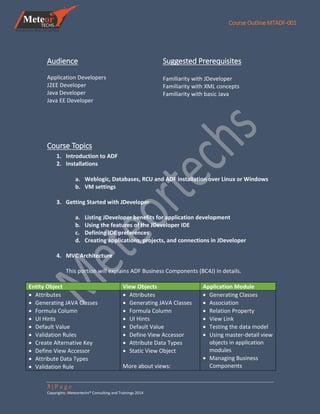
This portion will explains ADF Business Components (BC4J) in details.
Entity Object View Objects Application Module
 Attributes
 Generating JAVA Classes
 Formula Column
 UI Hints
 Default Value
 Validation Rules
 Create Alternative Key
 Define View Accessor
 Attribute Data Types
 Validation Rule
 Attributes
 Generating JAVA Classes
 Formula Column
 UI Hints
 Default Value
 Define View Accessor
 Attribute Data Types
 Static View Object
More about views:
 Generating Classes
 Association
 Relation Property
 View Link
 Testing the data model
 Using master-detail view
objects in application
modules
 Managing Business
Components
Course Outline MTADF-001
4 | P a g e
Copyrights: Meteortechs® Consulting and Trainings 2014
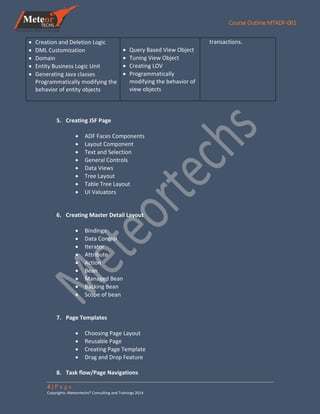
 Creation and Deletion Logic
 DML Customization
 Domain
 Entity Business Logic Unit
 Generating Java classes
Programmatically modifying the
behavior of entity objects
 Query Based View Object
 Tuning View Object
 Creating LOV
 Programmatically
modifying the behavior of
view objects
transactions.
5. Creating JSF Page
 ADF Faces Components
 Layout Component
 Text and Selection
 General Controls
 Data Views
 Tree Layout
 Table Tree Layout
 UI Valuators
6. Creating Master Detail Layout
 Bindings
 Data Control
 Iterator
 Attribute
 Action
 Bean
 Managed Bean
 Backing Bean
 Scope of bean
7. Page Templates
 Choosing Page Layout
 Reusable Page
 Creating Page Template
 Drag and Drop Feature
8. Task flow/Page Navigations
Course Outline MTADF-001
5 | P a g e
Copyrights: Meteortechs® Consulting and Trainings 2014
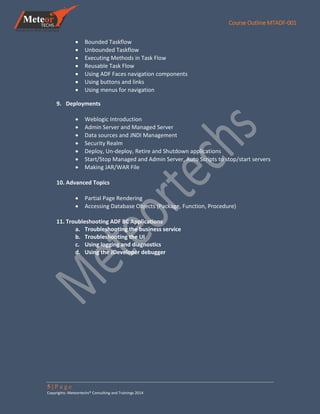
 Bounded Taskflow
 Unbounded Taskflow
 Executing Methods in Task Flow
 Reusable Task Flow
 Using ADF Faces navigation components
 Using buttons and links
 Using menus for navigation
9. Deployments
 Weblogic Introduction
 Admin Server and Managed Server
 Data sources and JNDI Management
 Security Realm
 Deploy, Un-deploy, Retire and Shutdown applications
 Start/Stop Managed and Admin Server, Auto Scripts to stop/start servers
 Making JAR/WAR File
10. Advanced Topics
 Partial Page Rendering
 Accessing Database Objects (Package, Function, Procedure)
11. Troubleshooting ADF BC Applications
a. Troubleshooting the business service
b. Troubleshooting the UI
c. Using logging and diagnostics
d. Using the JDeveloper debugger

Mt ADF 001 adf-course outlines

  • 1.
    Oracle Application DevelopmentFramework (Oracle ADF) MTADF-001
  • 2.
    Course Outline MTADF-001 2| P a g e Copyrights: Meteortechs® Consulting and Trainings 2014 Course Objectives This course is aimed at developers who want to build Java EE applications using Oracle ADF. Learn to use Oracle JDeveloper 11g to build, test and deploy an end-to-end web application.  Expose the data model in a web application with a rich ADF Faces user interface  Create JSF pages  Use rich client components in JSF pages  Add validation to ADF applications  Secure Web applications  Build and customize a data model by using ADF Business Components What you will learn What Benefits to You: Simplify application development in your organization to increase productivity. Become more efficient at building Java EE applications using Oracle ADF (innovative yet mature Java EE development framework) and deploy an end-to- end web application. Build & Deploy The data model is built with ADF Business Components and the user interface with ADF Faces. During this course, you'll learn to build each part of the application with the Fusion technology stack and then deploy it to WebLogic Server. Java EE Java EE is a standard, robust, scalable and secure platform that forms the basis for many of today’s enterprise applications. Oracle Application Development Framework (Oracle ADF) is an innovative, yet mature Java EE development framework that is directly supported and enabled by Oracle JDeveloper 11g. Oracle ADF Oracle ADF simplifies Java EE development by minimizing the need to write code that implements the application’s infrastructure. Allowing developers to focus on the features of the actual application.
  • 3.
    Course Outline MTADF-001 3| P a g e Copyrights: Meteortechs® Consulting and Trainings 2014 Audience Application Developers J2EE Developer Java Developer Java EE Developer Suggested Prerequisites Familiarity with JDeveloper Familiarity with XML concepts Familiarity with basic Java Course Topics 1. Introduction to ADF 2. Installations a. Weblogic, Databases, RCU and ADF installation over Linux or Windows b. VM settings 3. Getting Started with JDeveloper a. Listing JDeveloper benefits for application development b. Using the features of the JDeveloper IDE c. Defining IDE preferences d. Creating applications, projects, and connections in JDeveloper 4. MVC Architecture This portion will explains ADF Business Components (BC4J) in details. Entity Object View Objects Application Module  Attributes  Generating JAVA Classes  Formula Column  UI Hints  Default Value  Validation Rules  Create Alternative Key  Define View Accessor  Attribute Data Types  Validation Rule  Attributes  Generating JAVA Classes  Formula Column  UI Hints  Default Value  Define View Accessor  Attribute Data Types  Static View Object More about views:  Generating Classes  Association  Relation Property  View Link  Testing the data model  Using master-detail view objects in application modules  Managing Business Components
  • 4.
    Course Outline MTADF-001 4| P a g e Copyrights: Meteortechs® Consulting and Trainings 2014  Creation and Deletion Logic  DML Customization  Domain  Entity Business Logic Unit  Generating Java classes Programmatically modifying the behavior of entity objects  Query Based View Object  Tuning View Object  Creating LOV  Programmatically modifying the behavior of view objects transactions. 5. Creating JSF Page  ADF Faces Components  Layout Component  Text and Selection  General Controls  Data Views  Tree Layout  Table Tree Layout  UI Valuators 6. Creating Master Detail Layout  Bindings  Data Control  Iterator  Attribute  Action  Bean  Managed Bean  Backing Bean  Scope of bean 7. Page Templates  Choosing Page Layout  Reusable Page  Creating Page Template  Drag and Drop Feature 8. Task flow/Page Navigations
  • 5.
    Course Outline MTADF-001 5| P a g e Copyrights: Meteortechs® Consulting and Trainings 2014  Bounded Taskflow  Unbounded Taskflow  Executing Methods in Task Flow  Reusable Task Flow  Using ADF Faces navigation components  Using buttons and links  Using menus for navigation 9. Deployments  Weblogic Introduction  Admin Server and Managed Server  Data sources and JNDI Management  Security Realm  Deploy, Un-deploy, Retire and Shutdown applications  Start/Stop Managed and Admin Server, Auto Scripts to stop/start servers  Making JAR/WAR File 10. Advanced Topics  Partial Page Rendering  Accessing Database Objects (Package, Function, Procedure) 11. Troubleshooting ADF BC Applications a. Troubleshooting the business service b. Troubleshooting the UI c. Using logging and diagnostics d. Using the JDeveloper debugger