Mobile Website on Drupal Computer in Library March 23, 2011 Shian Chang Georgetown University
Agenda History Approaches Mobile Services Drupal  Future Plan
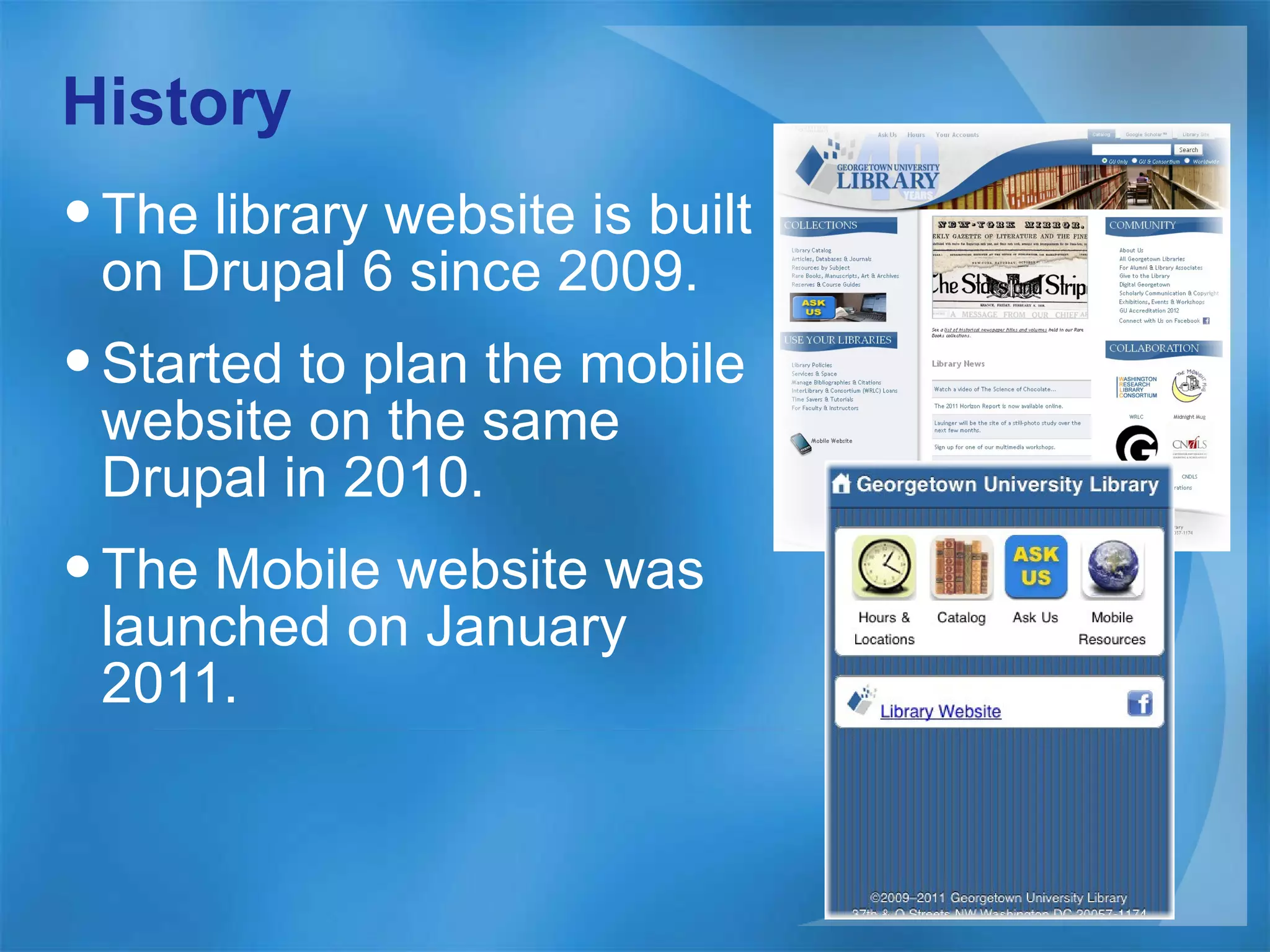
History The library website is built on Drupal 6 since 2009. Started to plan the mobile website on the same Drupal in 2010. The Mobile website was launched on January 2011.
Approaches Develop a mobile web (not iPhone nor Android app) Build on the same Drupal of the main library website Build a framework for easily adding mobile content Share the data with the main library website
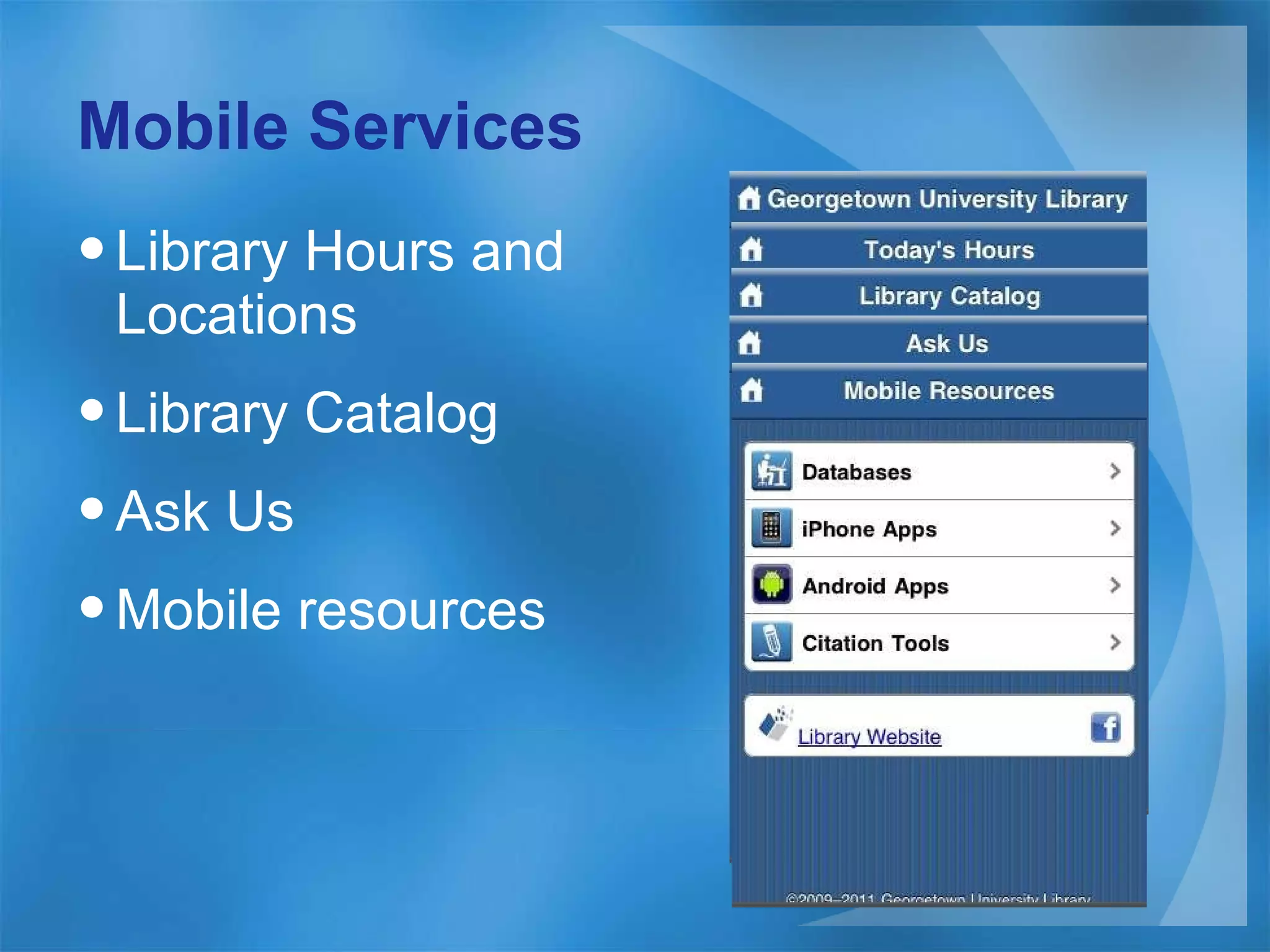
Mobile Services Library Hours and Locations Library Catalog Ask Us Mobile resources
Drupal Drupal module and Theme Mobile Page Basic Mobile view Basic Other Mobile Pages
Drupal Module and Theme Install Mobile Tool module and iWebkit theme. Enable iWebkit theme and configure it. Configure Mobile Tool Configure <library-home>/mobile/* to be mobile pages Switch to iWebkit theme for all path of <library-home>/mobile/* Demo (Mobile Tool Configuration)
Mobile Page Basic iWebkit Framework Mobile Page Framework Mobile Page Content Mobile Page Path
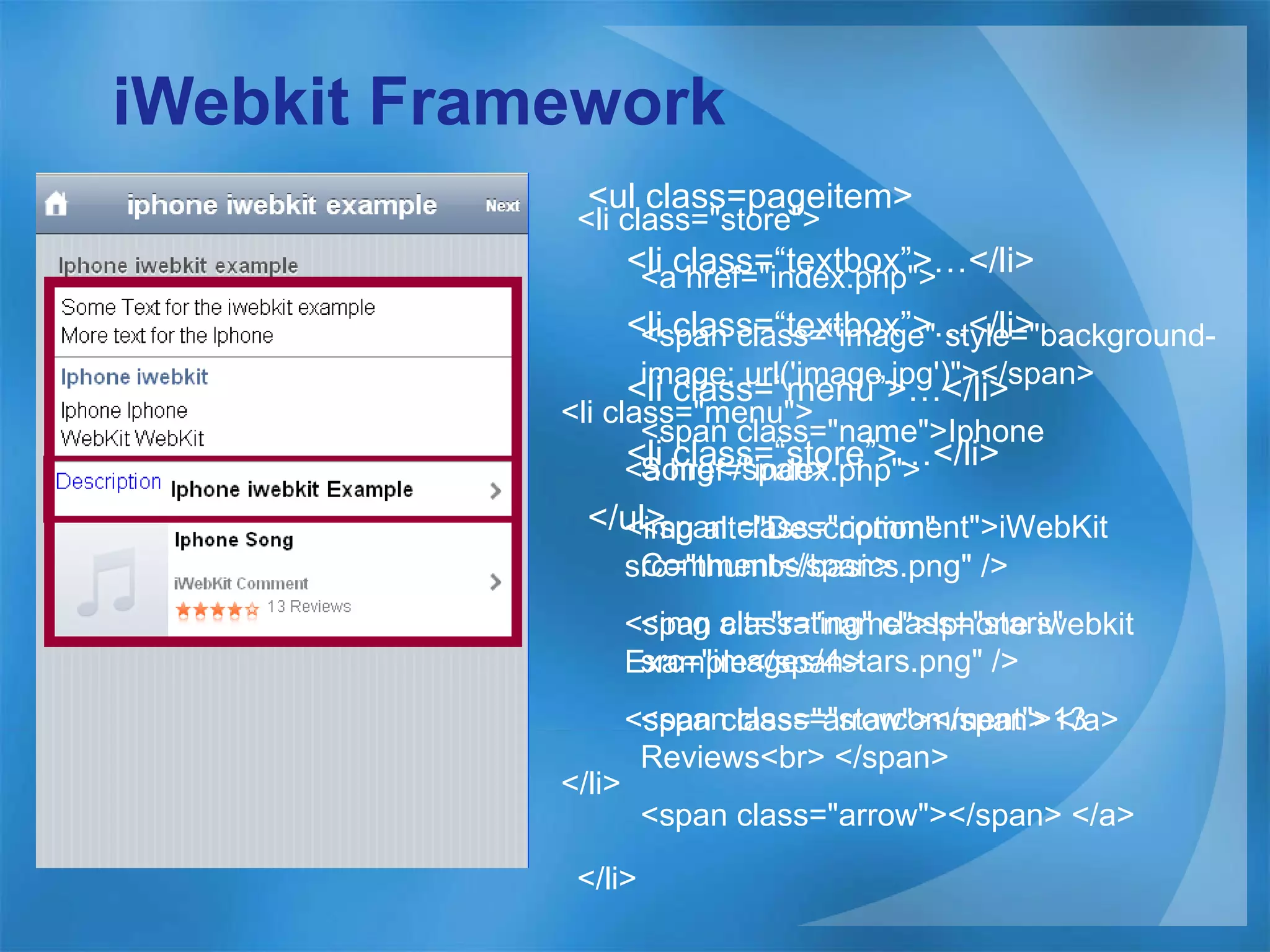
iWebkit Framework <ul class=pageitem> <li class=“textbox”>…</li> <li class=“textbox”>…</li> <li class=“menu”>…</li> <li class=“store”>…</li> </ul> <li class=&quot;menu&quot;>  <a href=&quot;index.php&quot;>  <img alt=&quot;Description&quot; src=&quot;thumbs/basics.png&quot; /> <span class=&quot;name&quot;>Iphone iwebkit Example</span>  <span class=&quot;arrow&quot;></span> </a>  </li>   <li class=&quot;store&quot;>  <a href=&quot;index.php&quot;>  <span class=&quot;image&quot; style=&quot;background-image: url('image.jpg')&quot;></span>  <span class=&quot;name&quot;>Iphone Song</span>  <span class=&quot;comment&quot;>iWebKit Comment</span>  <img alt=&quot;rating&quot; class=&quot;stars&quot; src=&quot;images/4stars.png&quot; />  <span class=&quot;starcomment&quot;>13 Reviews<br> </span>  <span class=&quot;arrow&quot;></span> </a>  </li>
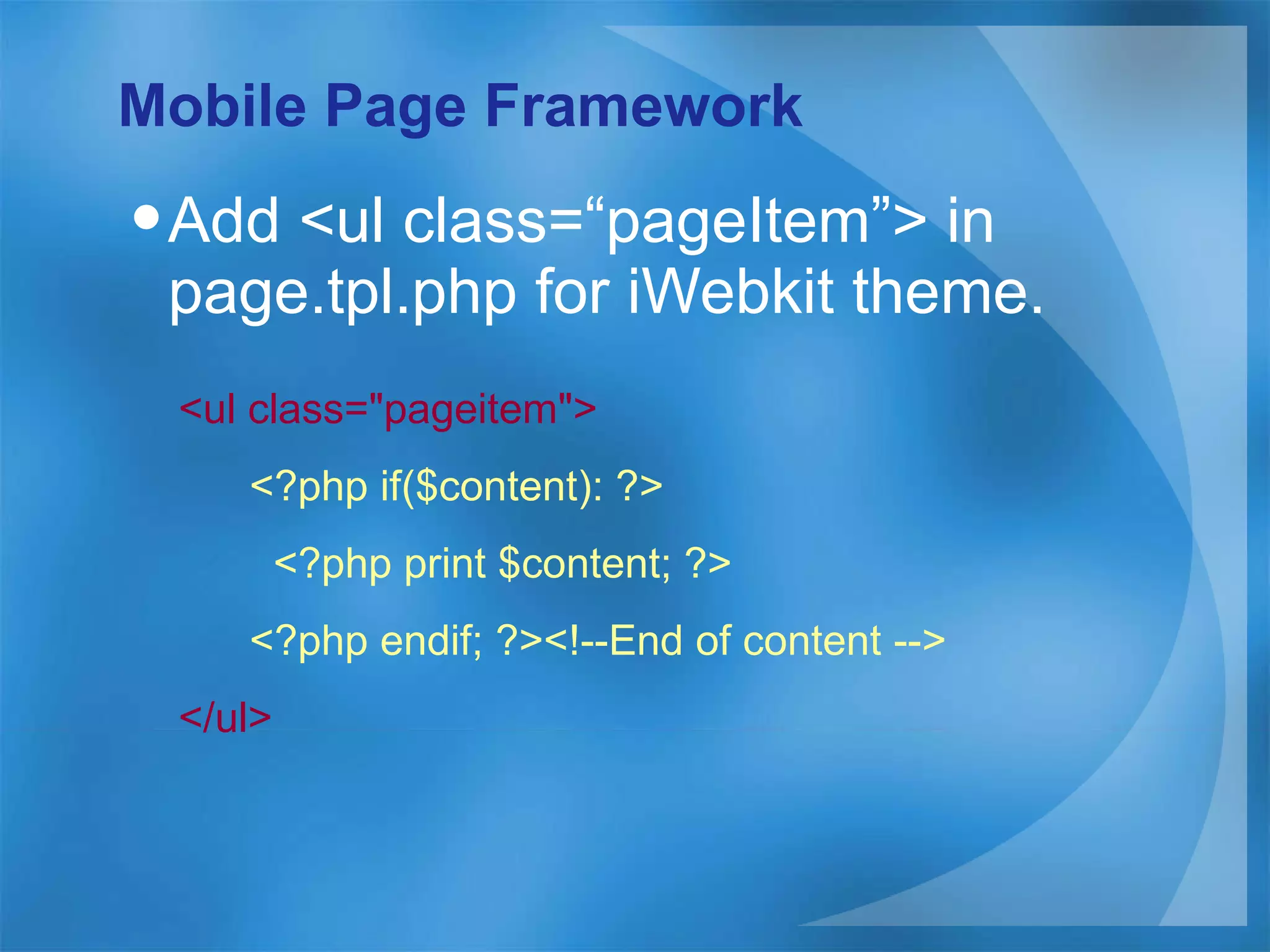
Mobile Page Framework Add <ul class=“pageItem”> in page.tpl.php for iWebkit theme. <ul class=&quot;pageitem&quot;> <?php if($content): ?> <?php print $content; ?> <?php endif; ?><!--End of content --> </ul>
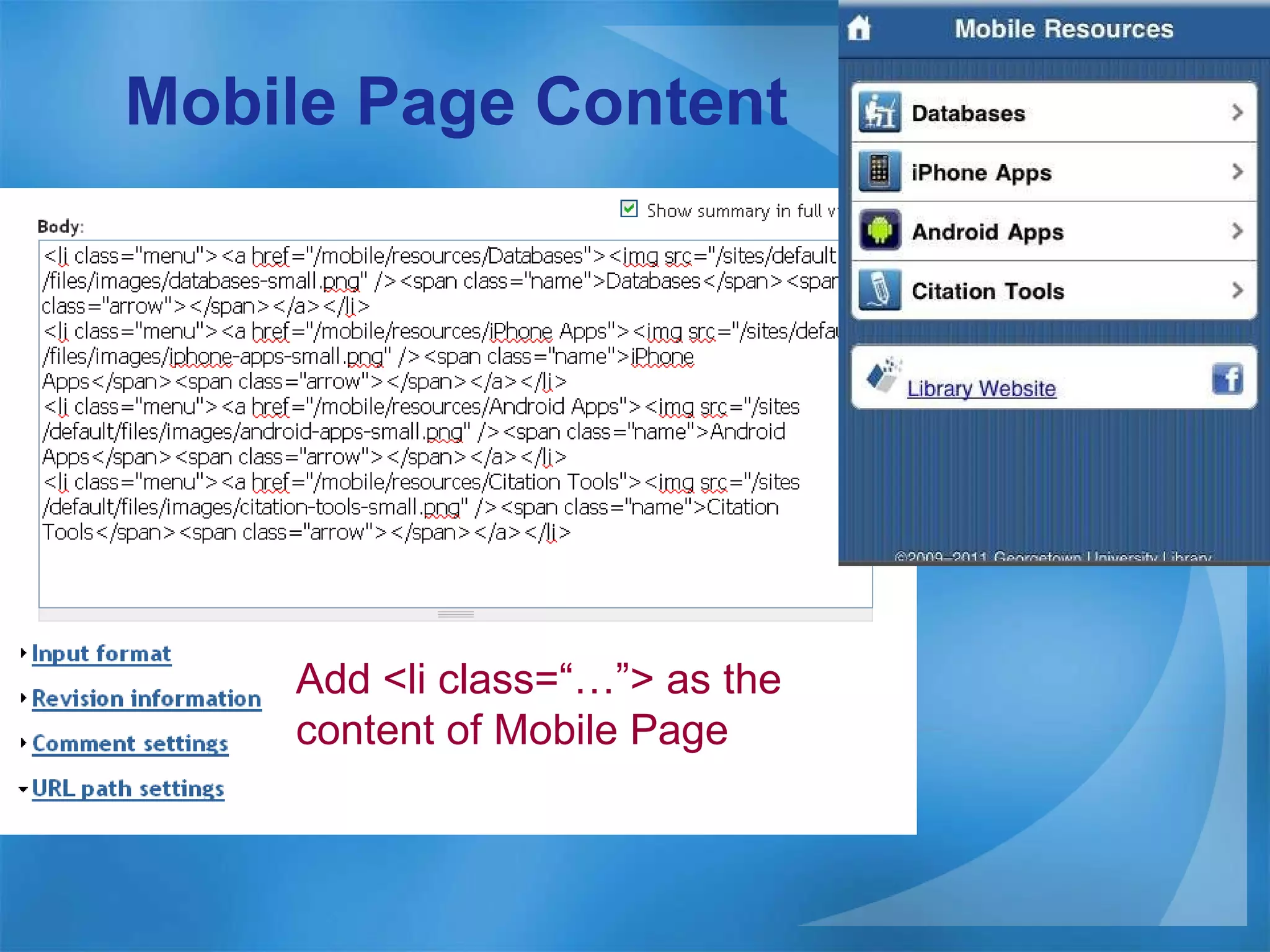
Mobile Page Content  Add <li class=“…”> as the content of Mobile Page
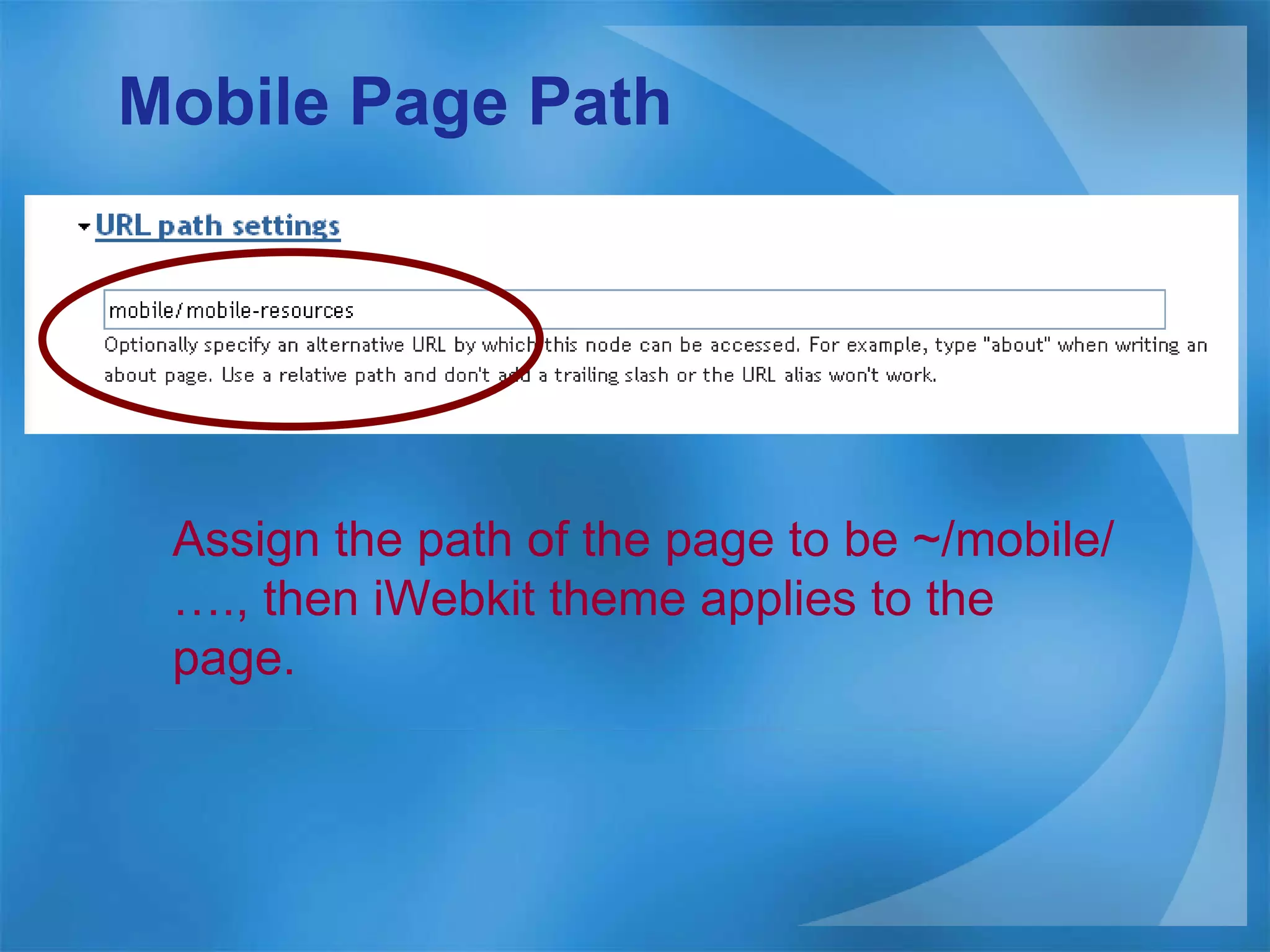
Mobile Page Path Assign the path of the page to be ~/mobile/…., then iWebkit theme applies to the page.
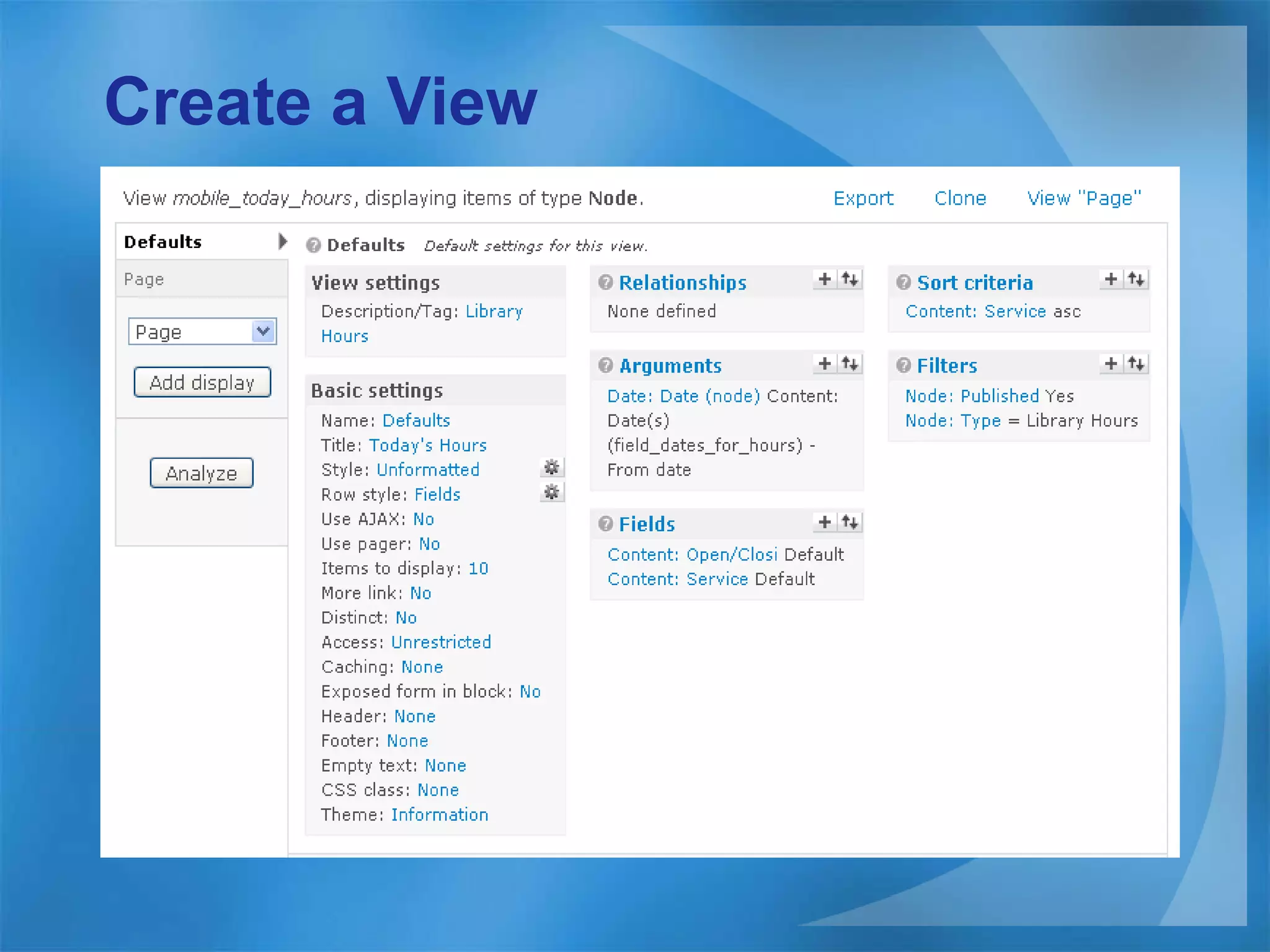
Mobile View Basic Create a view  Customize Fields in the view Theme field in view as need View page path
Create a View
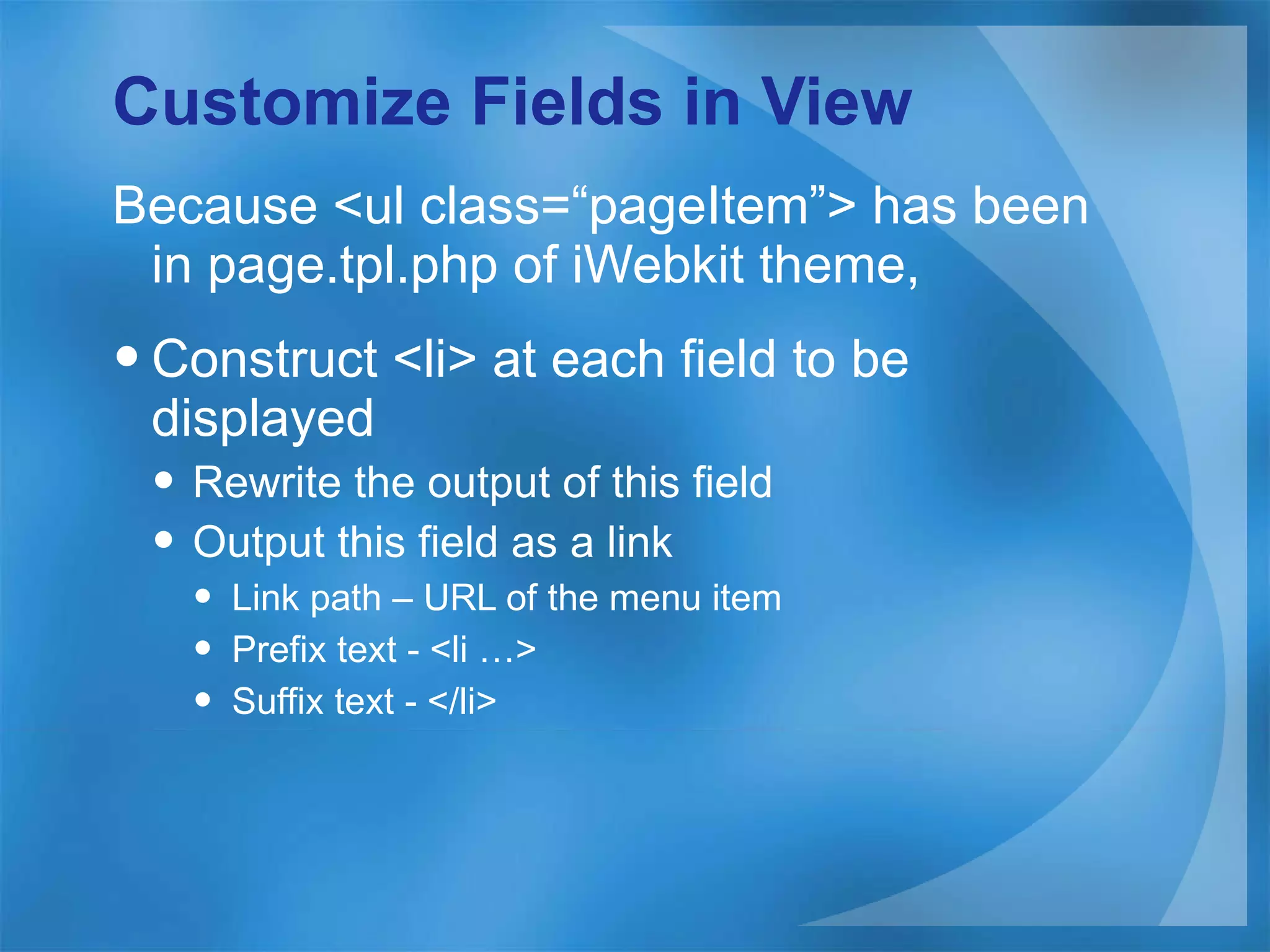
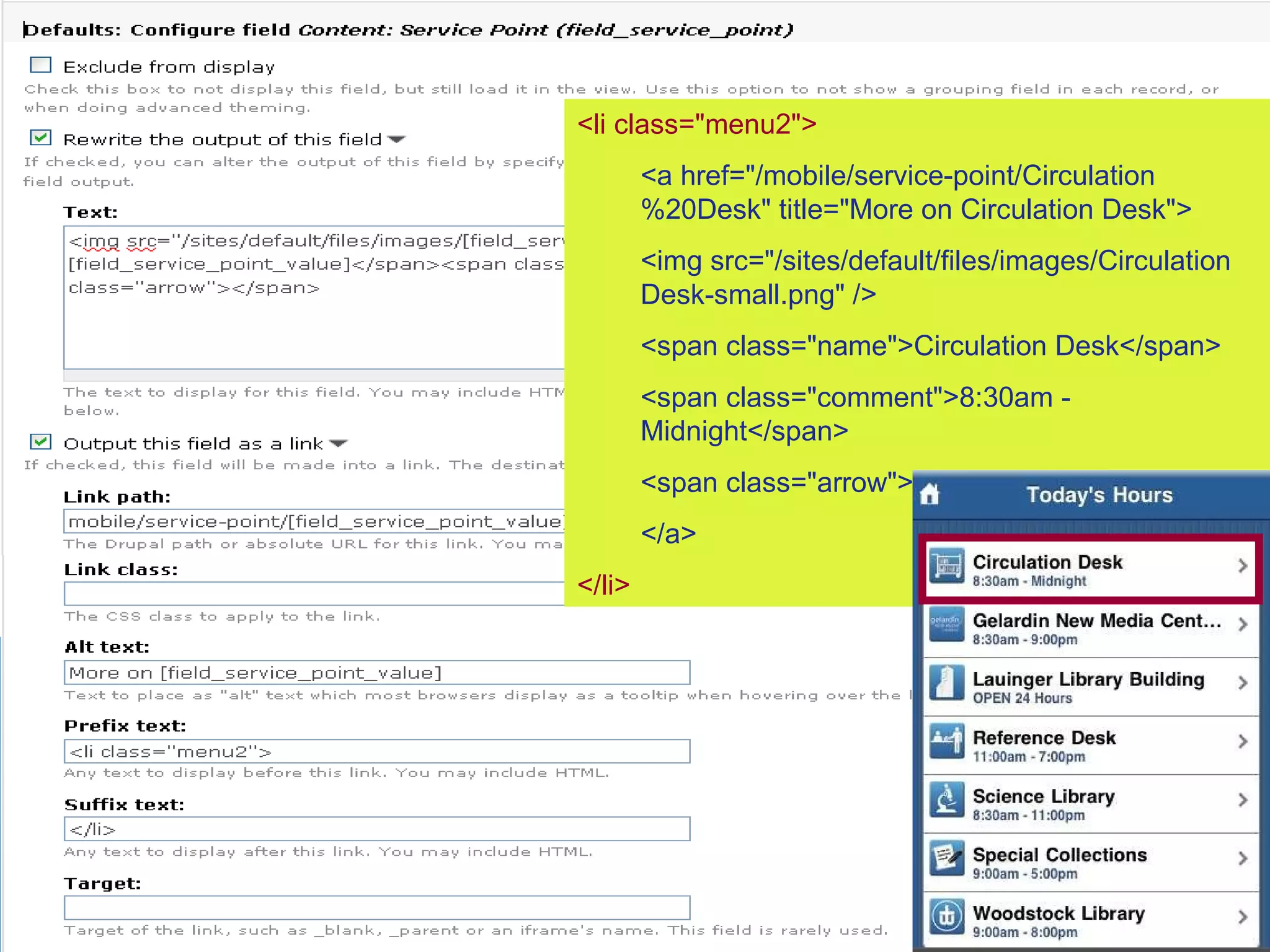
Customize Fields in View Because <ul class=“ pageItem ” > has been in page.tpl.php of iWebkit theme, Construct <li> at each field to be displayed Rewrite the output of this field Output this field as a link Link path – URL of the menu item Prefix text - <li …> Suffix text - </li>
<li class=&quot;menu2&quot;> <a href=&quot;/mobile/service-point/Circulation%20Desk&quot; title=&quot;More on Circulation Desk&quot;>  <img src=&quot;/sites/default/files/images/Circulation Desk-small.png&quot; /> <span class=&quot;name&quot;>Circulation Desk</span> <span class=&quot;comment&quot;>8:30am - Midnight</span> <span class=&quot;arrow&quot;></span> </a> </li>
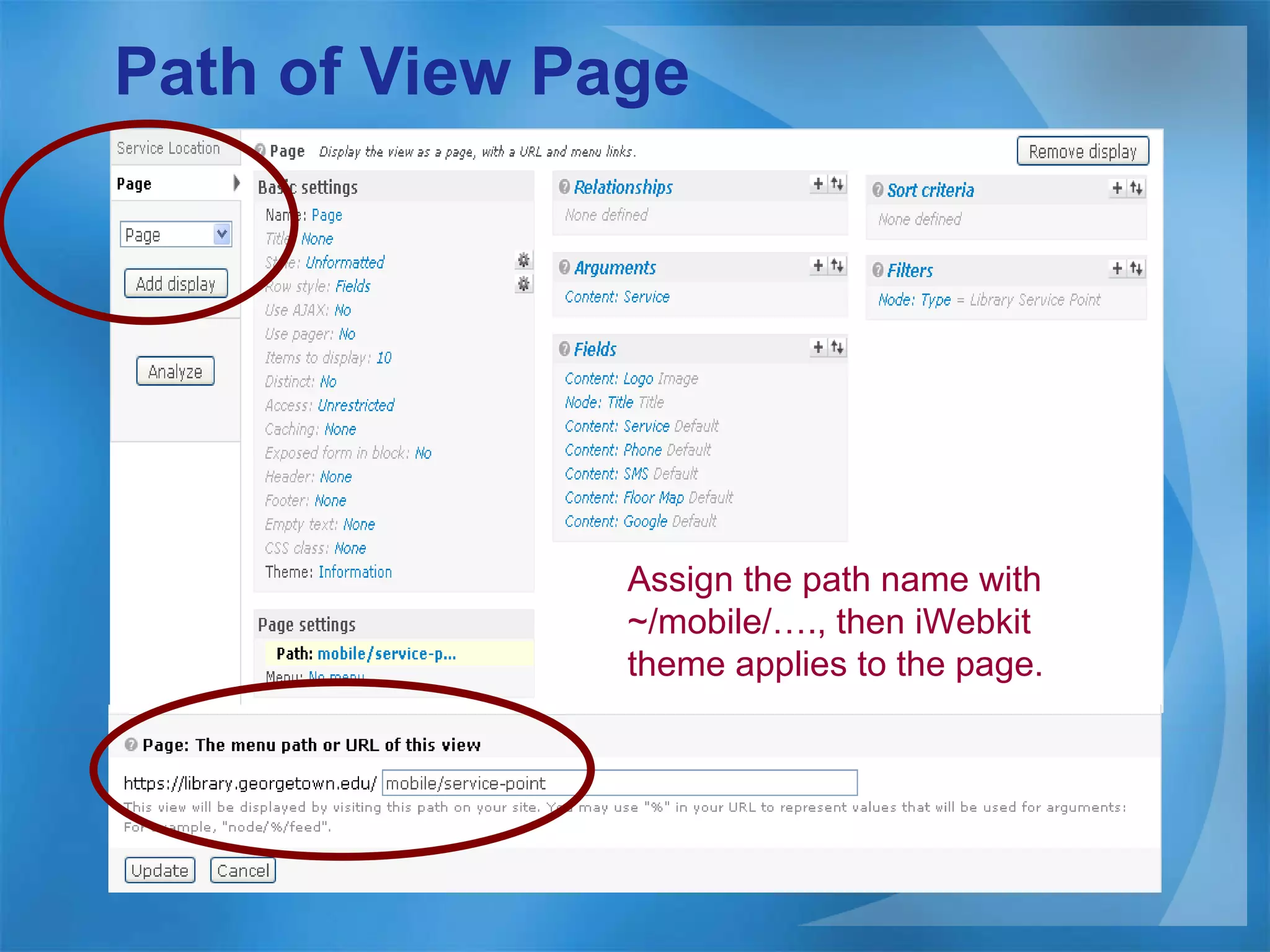
Path of View Page Assign the path name with ~/mobile/…., then iWebkit theme applies to the page.
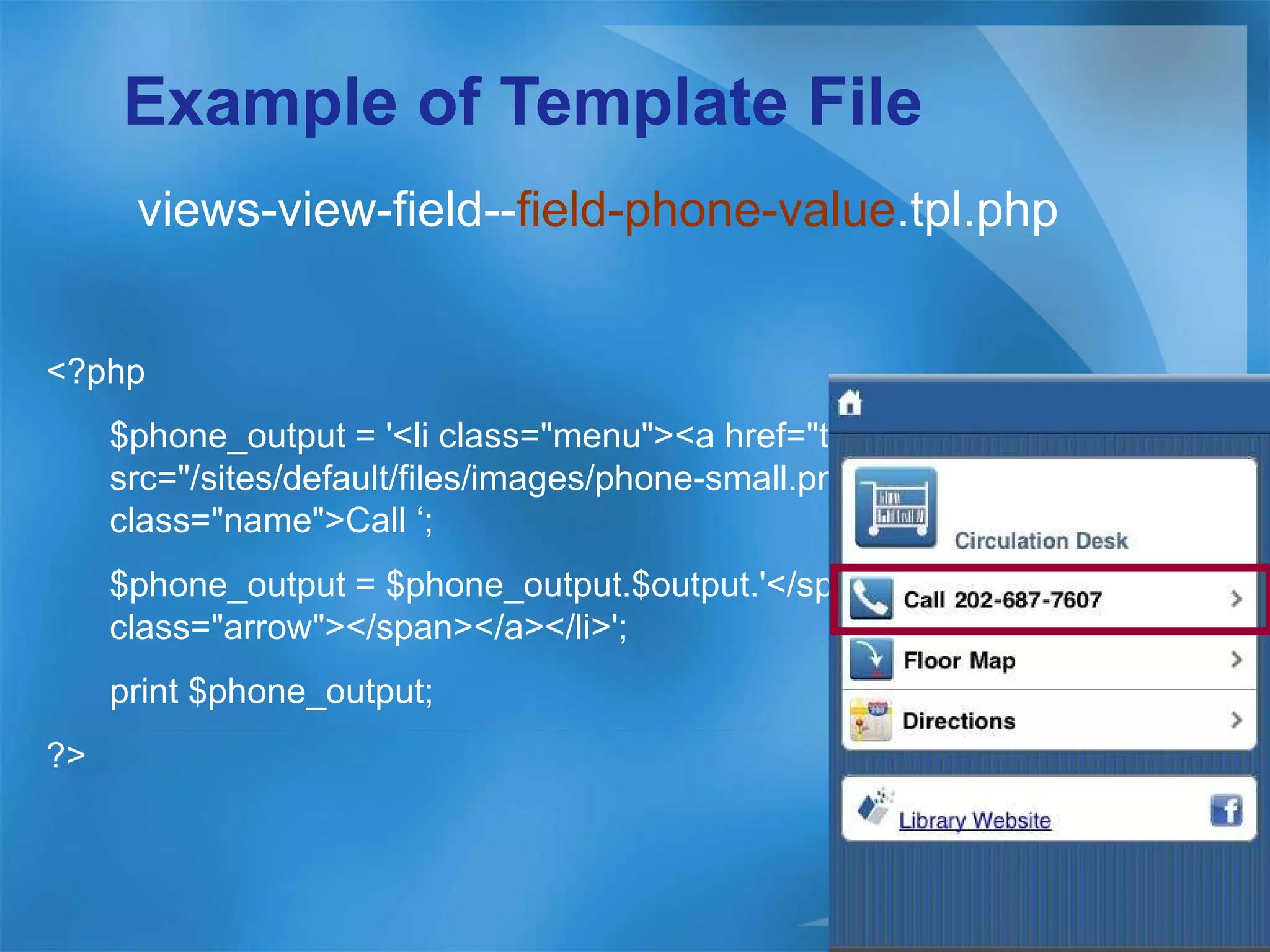
Theme Field in View Create a template file at ~/sites/all/theme/iwebkit directory. Make the file name as views-view-field-- [field-name] .tpl.php The template file overwrites the views-view-field.tpl.php (default template).
Example of Template File views-view-field-- field-phone-value .tpl.php <?php  $phone_output = '<li class=&quot;menu&quot;><a href=&quot;tel:'.$output.'&quot;><img src=&quot;/sites/default/files/images/phone-small.png&quot; /><span class=&quot;name&quot;>Call ‘; $phone_output = $phone_output.$output.'</span><span class=&quot;arrow&quot;></span></a></li>'; print $phone_output;  ?>
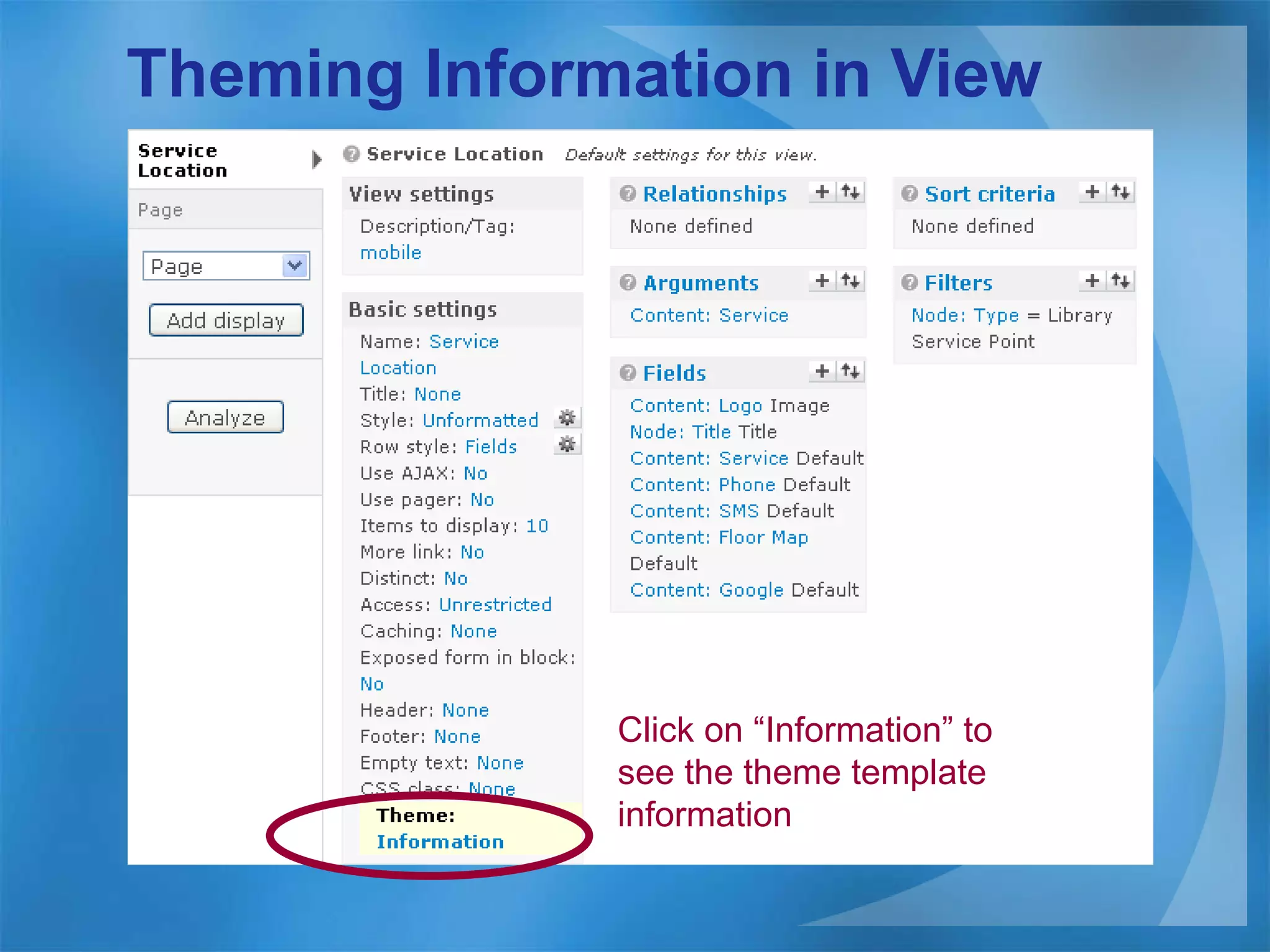
Theming Information in View Click on “Information” to see the theme template information
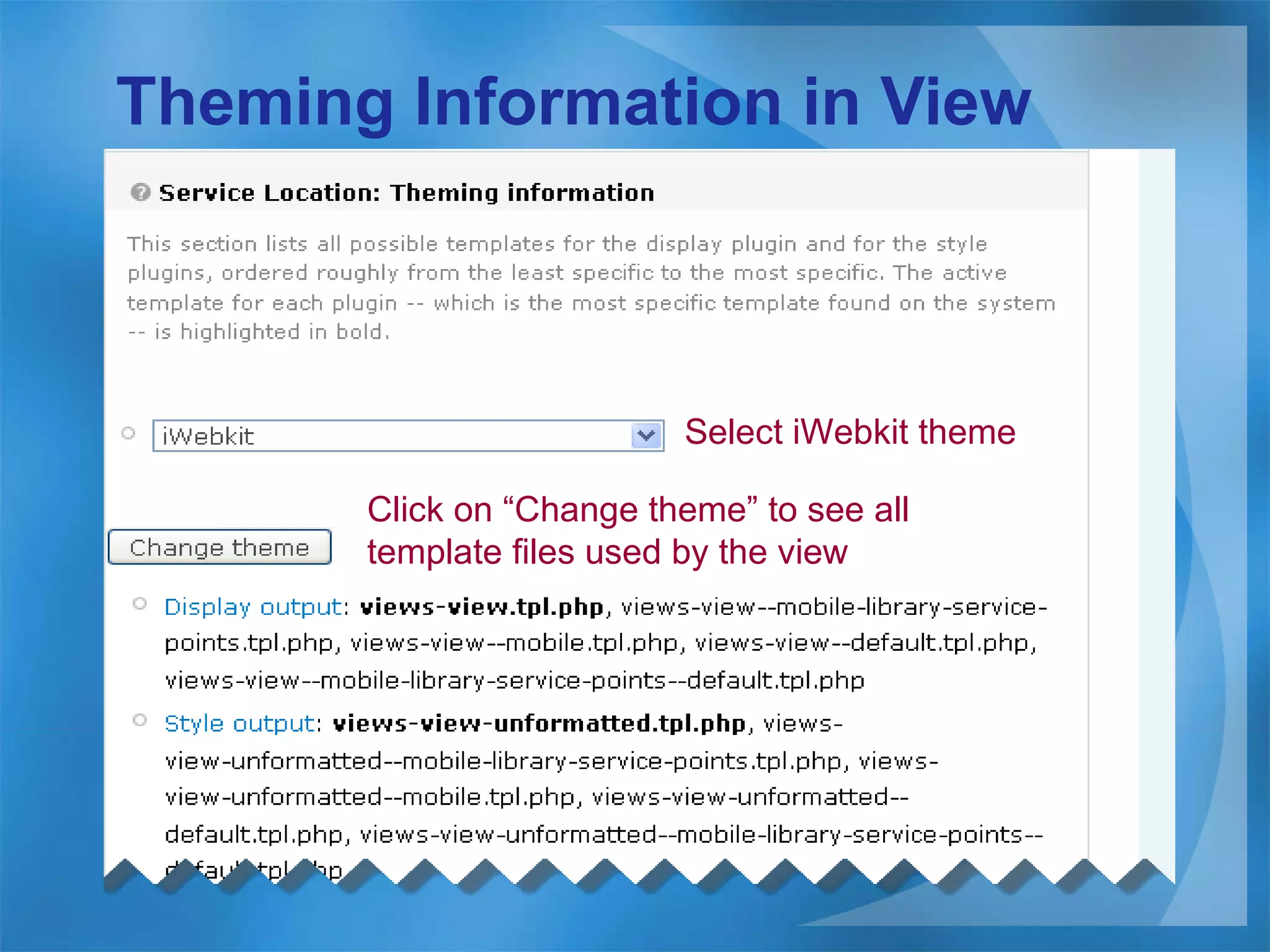
Theming Information in View Select iWebkit theme Click on “Change theme” to see all template files used by the view
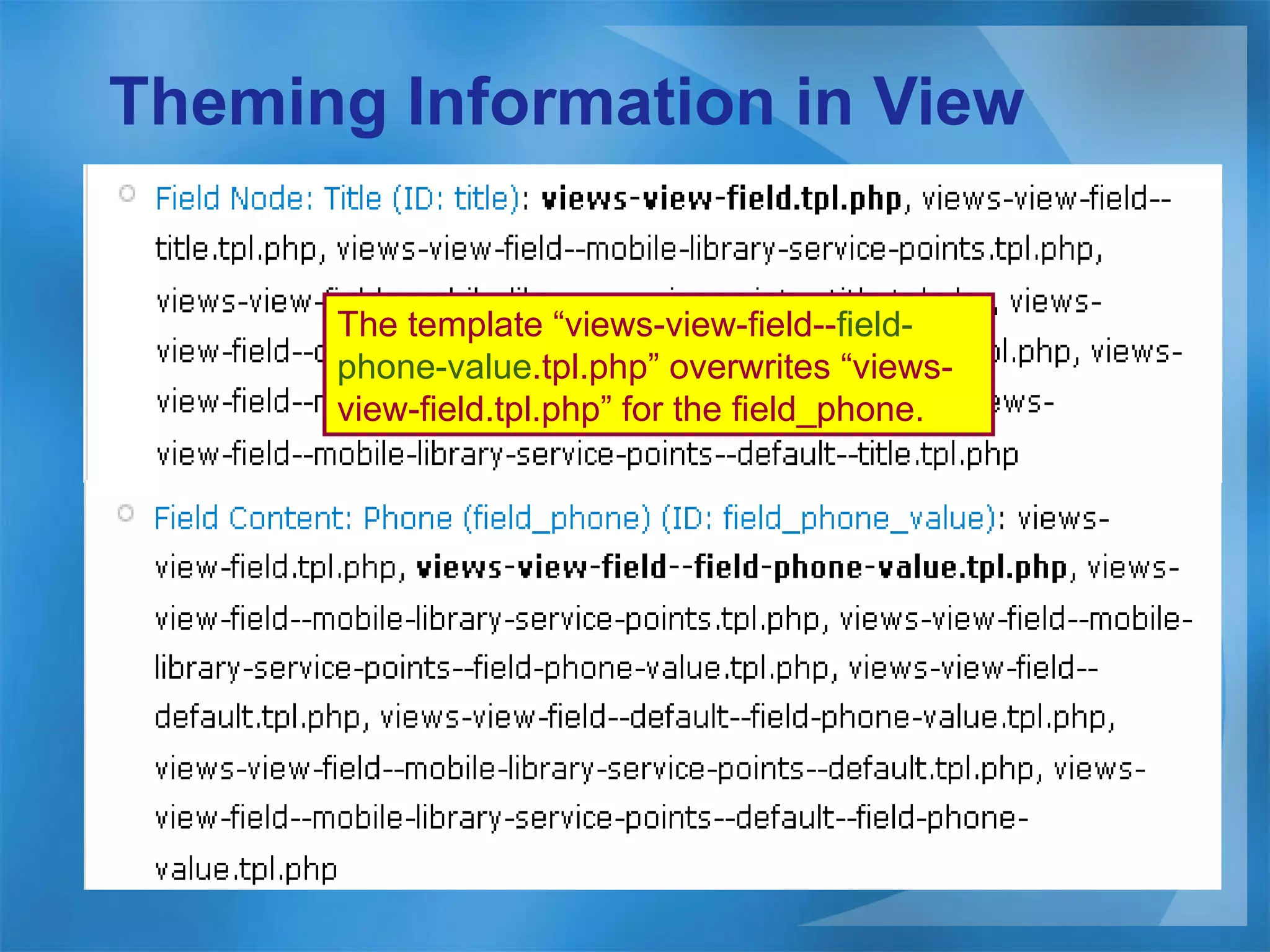
Theming Information in View The template “views-view-field-- field-phone-value .tpl.php” overwrites “views-view-field.tpl.php” for the field_phone.
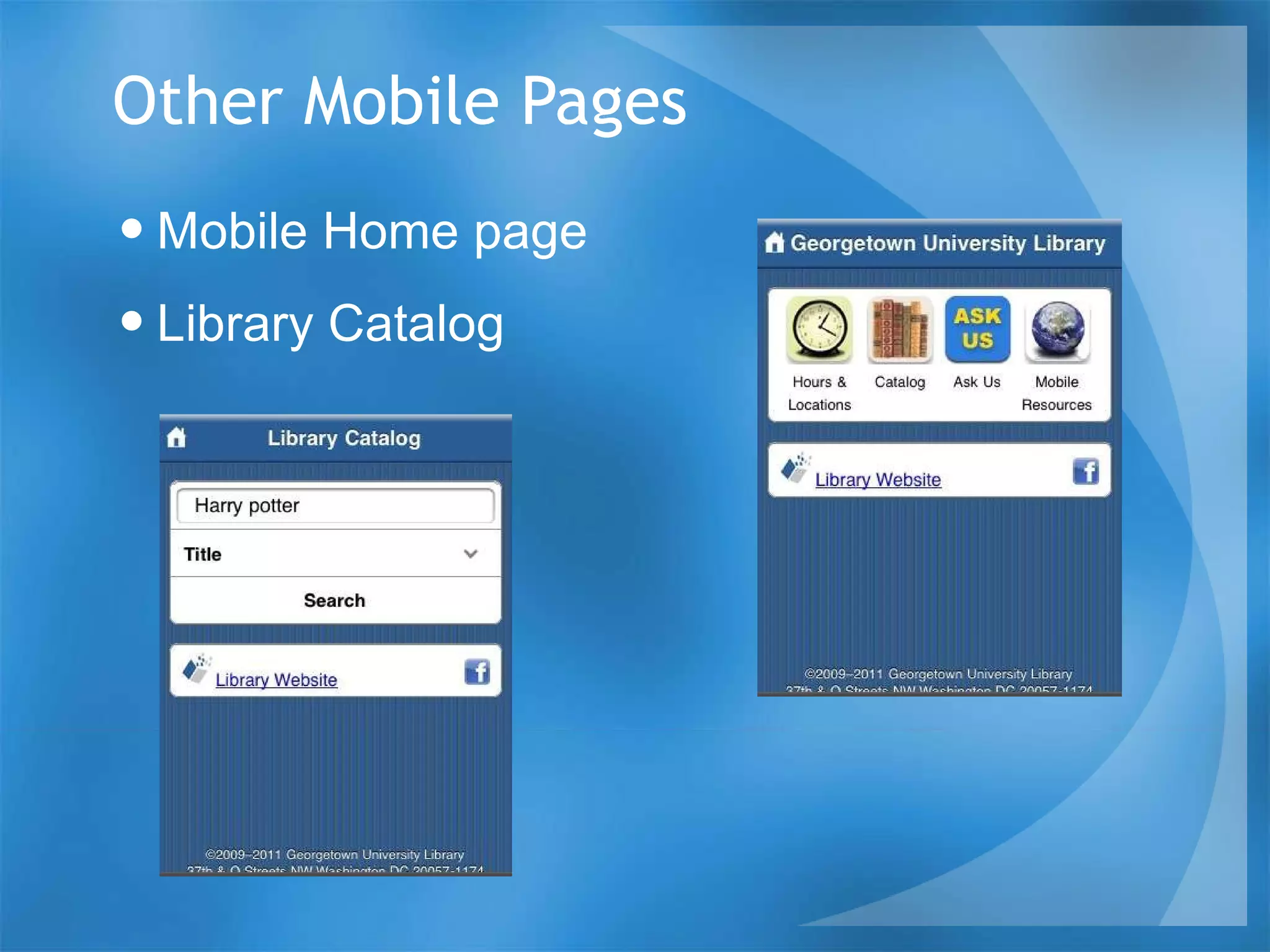
Other Mobile Pages Mobile Home page Library Catalog
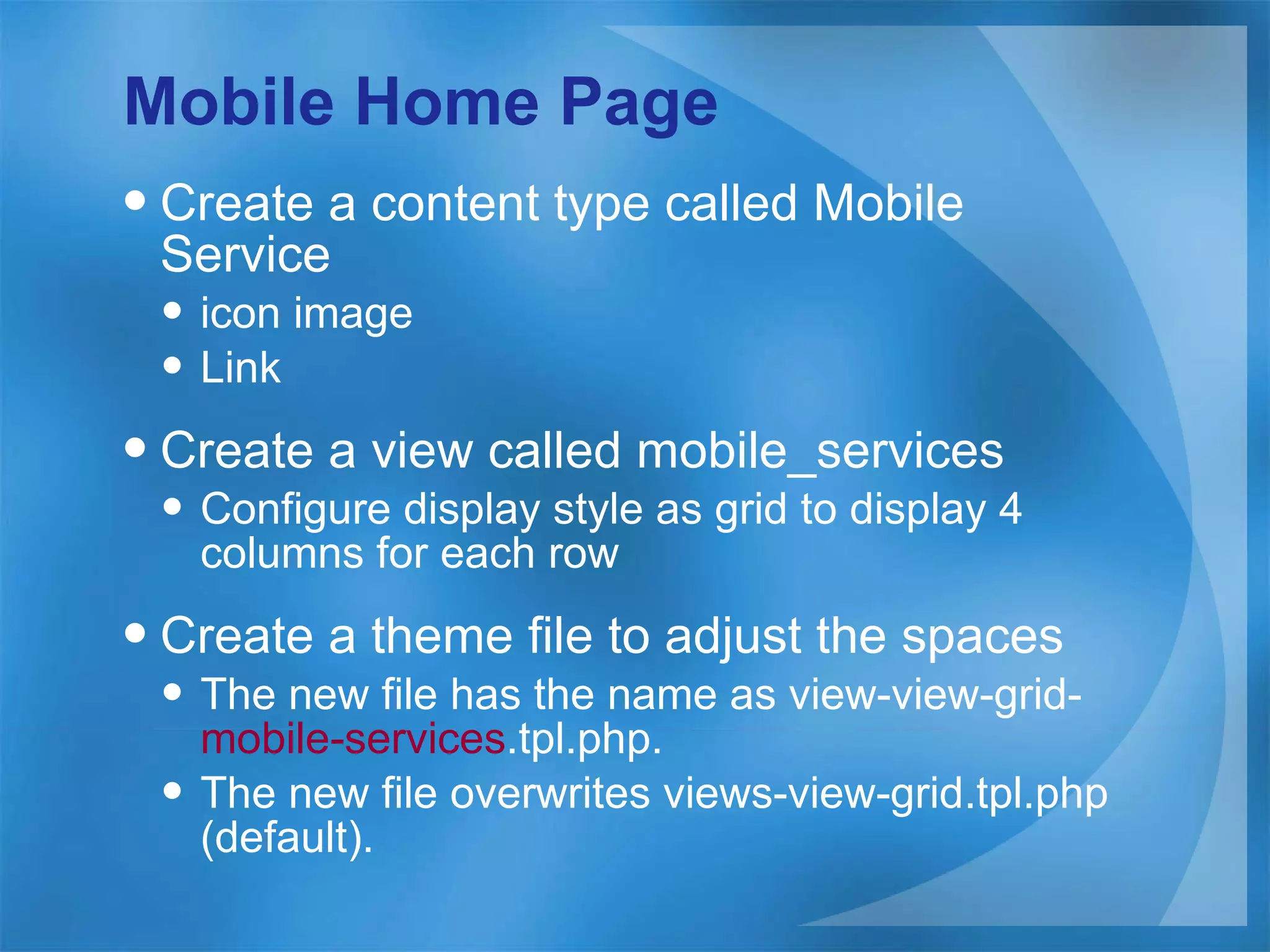
Mobile Home Page Create a content type called Mobile Service icon image Link Create a view called mobile_services Configure display style as grid to display 4 columns for each row Create a theme file to adjust the spaces The new file has the name as view-view-grid- mobile-services .tpl.php. The new file overwrites views-view-grid.tpl.php (default).
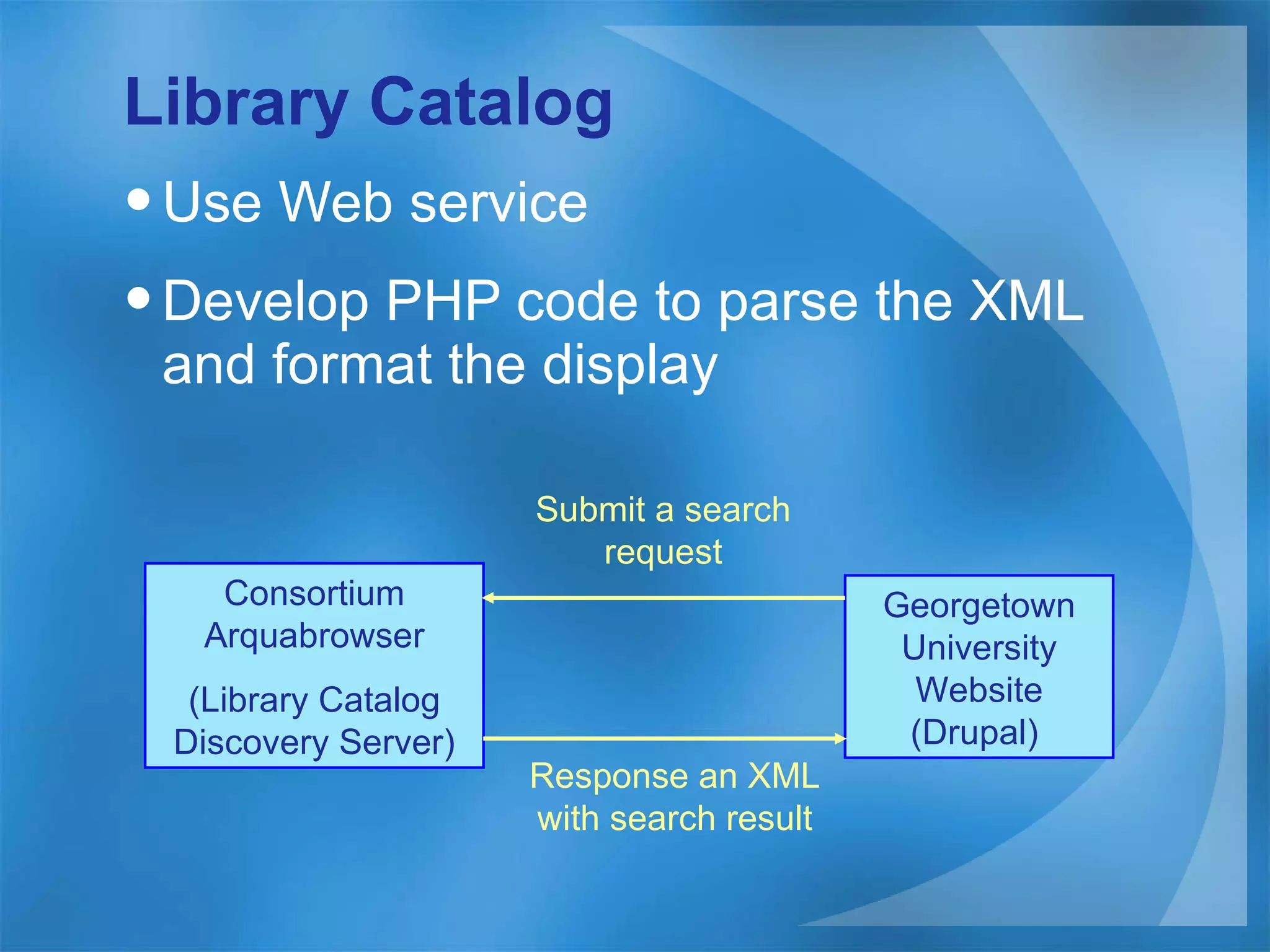
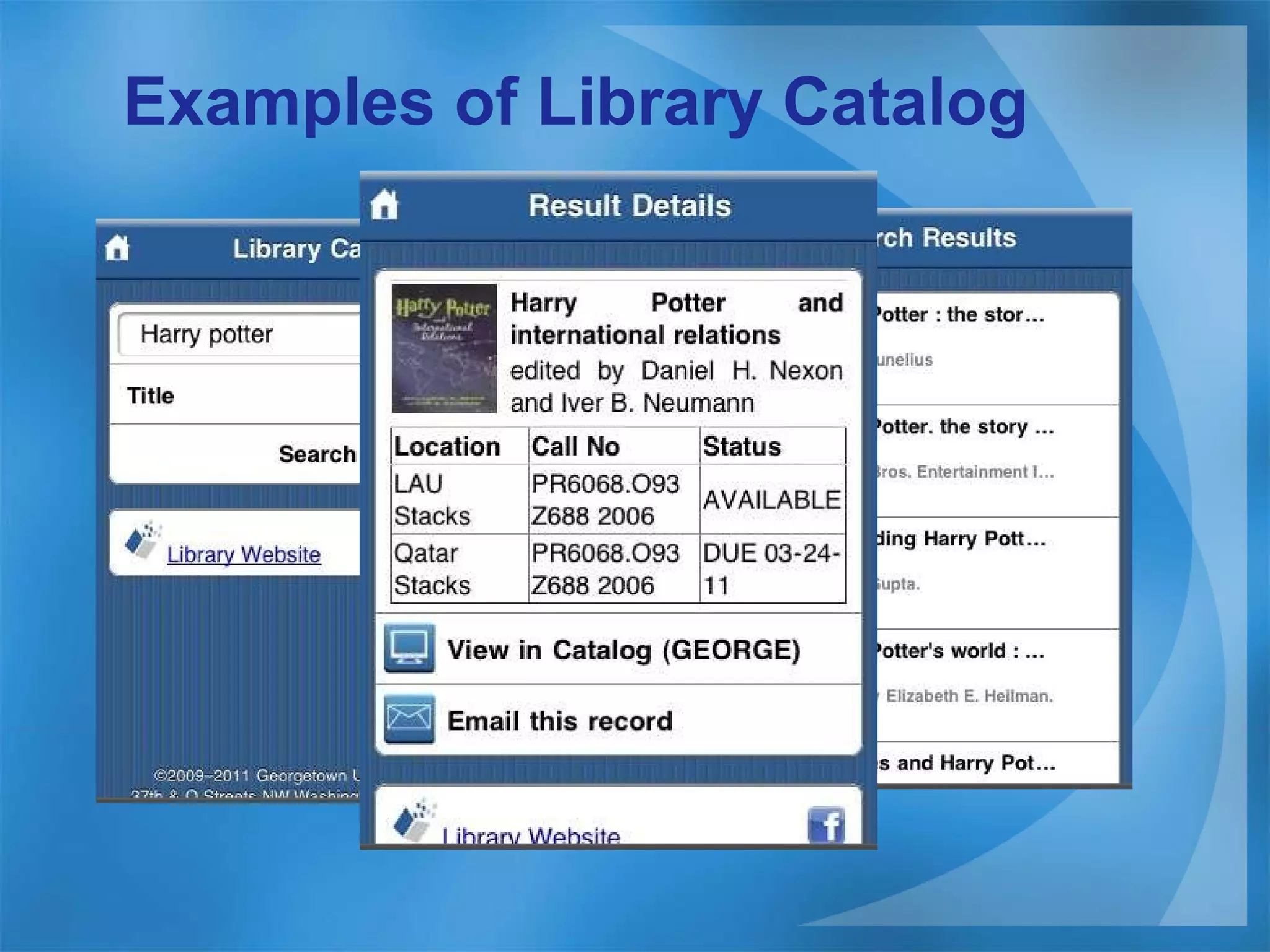
Library Catalog  Use Web service Develop PHP code to parse the XML and format the display Consortium Arquabrowser (Library Catalog Discovery Server) Georgetown University Website (Drupal)  Submit a search request Response an XML with search result
Examples of Library Catalog
Future Plan Add more mobile services such as “My Account”. Add SMS capability and integrate with LibraryH3lp. Improve Library Catalog with access to other libraries in our consortium.
Question? Georgetown University Mobile site:  http://library.georgetown.edu/mobile Georgetown University Website:  http://library.georgetown.edu   Drupal iWebkit:  http://drupal.org/project/iwebkit Drupal Mobile Tool:   http://drupal.org/project/mobile_tools   Thank You ! Shian Chang (slc72@georgetown.edu)

Mobile library on drupal cil2011

  • 1.
    Mobile Website onDrupal Computer in Library March 23, 2011 Shian Chang Georgetown University
  • 2.
    Agenda History ApproachesMobile Services Drupal Future Plan
  • 3.
    History The librarywebsite is built on Drupal 6 since 2009. Started to plan the mobile website on the same Drupal in 2010. The Mobile website was launched on January 2011.
  • 4.
    Approaches Develop amobile web (not iPhone nor Android app) Build on the same Drupal of the main library website Build a framework for easily adding mobile content Share the data with the main library website
  • 5.
    Mobile Services LibraryHours and Locations Library Catalog Ask Us Mobile resources
  • 6.
    Drupal Drupal moduleand Theme Mobile Page Basic Mobile view Basic Other Mobile Pages
  • 7.
    Drupal Module andTheme Install Mobile Tool module and iWebkit theme. Enable iWebkit theme and configure it. Configure Mobile Tool Configure <library-home>/mobile/* to be mobile pages Switch to iWebkit theme for all path of <library-home>/mobile/* Demo (Mobile Tool Configuration)
  • 8.
    Mobile Page BasiciWebkit Framework Mobile Page Framework Mobile Page Content Mobile Page Path
  • 9.
    iWebkit Framework <ulclass=pageitem> <li class=“textbox”>…</li> <li class=“textbox”>…</li> <li class=“menu”>…</li> <li class=“store”>…</li> </ul> <li class=&quot;menu&quot;> <a href=&quot;index.php&quot;> <img alt=&quot;Description&quot; src=&quot;thumbs/basics.png&quot; /> <span class=&quot;name&quot;>Iphone iwebkit Example</span> <span class=&quot;arrow&quot;></span> </a> </li> <li class=&quot;store&quot;> <a href=&quot;index.php&quot;> <span class=&quot;image&quot; style=&quot;background-image: url('image.jpg')&quot;></span> <span class=&quot;name&quot;>Iphone Song</span> <span class=&quot;comment&quot;>iWebKit Comment</span> <img alt=&quot;rating&quot; class=&quot;stars&quot; src=&quot;images/4stars.png&quot; /> <span class=&quot;starcomment&quot;>13 Reviews<br> </span> <span class=&quot;arrow&quot;></span> </a> </li>
  • 10.
    Mobile Page FrameworkAdd <ul class=“pageItem”> in page.tpl.php for iWebkit theme. <ul class=&quot;pageitem&quot;> <?php if($content): ?> <?php print $content; ?> <?php endif; ?><!--End of content --> </ul>
  • 11.
    Mobile Page Content Add <li class=“…”> as the content of Mobile Page
  • 12.
    Mobile Page PathAssign the path of the page to be ~/mobile/…., then iWebkit theme applies to the page.
  • 13.
    Mobile View BasicCreate a view Customize Fields in the view Theme field in view as need View page path
  • 14.
  • 15.
    Customize Fields inView Because <ul class=“ pageItem ” > has been in page.tpl.php of iWebkit theme, Construct <li> at each field to be displayed Rewrite the output of this field Output this field as a link Link path – URL of the menu item Prefix text - <li …> Suffix text - </li>
  • 16.
    <li class=&quot;menu2&quot;> <ahref=&quot;/mobile/service-point/Circulation%20Desk&quot; title=&quot;More on Circulation Desk&quot;> <img src=&quot;/sites/default/files/images/Circulation Desk-small.png&quot; /> <span class=&quot;name&quot;>Circulation Desk</span> <span class=&quot;comment&quot;>8:30am - Midnight</span> <span class=&quot;arrow&quot;></span> </a> </li>
  • 17.
    Path of ViewPage Assign the path name with ~/mobile/…., then iWebkit theme applies to the page.
  • 18.
    Theme Field inView Create a template file at ~/sites/all/theme/iwebkit directory. Make the file name as views-view-field-- [field-name] .tpl.php The template file overwrites the views-view-field.tpl.php (default template).
  • 19.
    Example of TemplateFile views-view-field-- field-phone-value .tpl.php <?php $phone_output = '<li class=&quot;menu&quot;><a href=&quot;tel:'.$output.'&quot;><img src=&quot;/sites/default/files/images/phone-small.png&quot; /><span class=&quot;name&quot;>Call ‘; $phone_output = $phone_output.$output.'</span><span class=&quot;arrow&quot;></span></a></li>'; print $phone_output; ?>
  • 20.
    Theming Information inView Click on “Information” to see the theme template information
  • 21.
    Theming Information inView Select iWebkit theme Click on “Change theme” to see all template files used by the view
  • 22.
    Theming Information inView The template “views-view-field-- field-phone-value .tpl.php” overwrites “views-view-field.tpl.php” for the field_phone.
  • 23.
    Other Mobile PagesMobile Home page Library Catalog
  • 24.
    Mobile Home PageCreate a content type called Mobile Service icon image Link Create a view called mobile_services Configure display style as grid to display 4 columns for each row Create a theme file to adjust the spaces The new file has the name as view-view-grid- mobile-services .tpl.php. The new file overwrites views-view-grid.tpl.php (default).
  • 25.
    Library Catalog Use Web service Develop PHP code to parse the XML and format the display Consortium Arquabrowser (Library Catalog Discovery Server) Georgetown University Website (Drupal) Submit a search request Response an XML with search result
  • 26.
  • 27.
    Future Plan Addmore mobile services such as “My Account”. Add SMS capability and integrate with LibraryH3lp. Improve Library Catalog with access to other libraries in our consortium.
  • 28.
    Question? Georgetown UniversityMobile site: http://library.georgetown.edu/mobile Georgetown University Website: http://library.georgetown.edu Drupal iWebkit: http://drupal.org/project/iwebkit Drupal Mobile Tool: http://drupal.org/project/mobile_tools Thank You ! Shian Chang (slc72@georgetown.edu)