Mobile Direct Marketing

Scott M. Alexander
President
Marketing Enablement
Summary
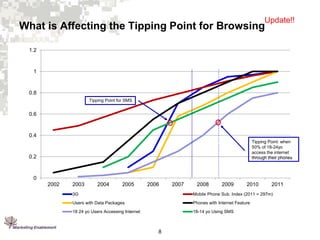
1. Mobile browsing and application use is a growing segment of the mobile
industry. Currently, 7% of all mobile phone users access the internet
through their mobile device, with 15% of 18-24 year olds accessing. It is
forecast that by end of 2008, 18-24 yrs accessing the internet through
mobile devices will be above 40%.
2. Mobile devices in the mobile environment do not play by the same rules as
the desktop. This is not all due to the lack of standards, but due to the highly
varying needs of the mobile user.
3. The differing capabilities of low-end mobile phones, high-end smart phones,
and alternative devices also lead to a variable environment.
4. Marketing Enablement has developed a mobile develop framework and a
set of best practices focused on user access, information architecture,
content and design of mobile browsing applications.

2
Food for Thought!
•
•
•
•
•

2.8 billion wireless phones globally
84 million households in US own at least one phone
You can reach a wider audience than the billion computers globally
Mobile phones are growing faster (85% HH penetration by 2010) than
computers (79% HH penetration by 2010)
People carry their mobile phones every where they go and are depending
on them more and more for answering questions and accomplishing tasks

3

Source: Wireless intelligence, 2007
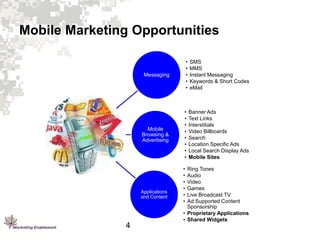
Mobile Marketing Opportunities

Messaging

•
•
•
•
•

SMS
MMS
Instant Messaging
Keywords & Short Codes
eMail

Mobile
Browsing &
Advertising

•
•
•
•
•
•
•
•

Banner Ads
Text Links
Interstitials
Video Billboards
Search
Location Specific Ads
Local Search Display Ads
Mobile Sites

Applications
and Content

4

•
•
•
•
•
•

Ring Tones
Audio
Video
Games
Live Broadcast TV
Ad Supported Content
Sponsorship
• Proprietary Applications
• Shared Widgets
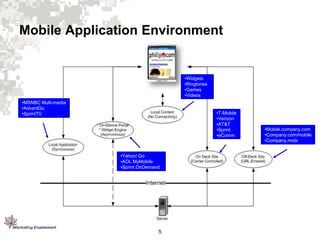
Mobile Application Environment

•Widgets
•Ringtones
•Games
•Videos
•MSNBC Multi-media
•AdvantGo
•SprintTV

•T-Mobile
•Verizon
•AT&T
•Sprint
•eComm

•Yahoo! Go
•AOL MyMobile
•Sprint OnDemand

5

•Mobile.company.com
•Company.com/mobile
•Company.mobi
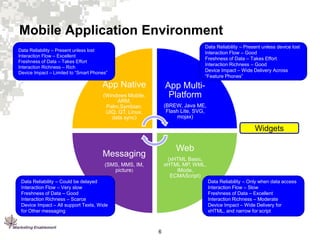
Mobile Application Environment
Data Reliability – Present unless device lost
Interaction Flow – Good
Freshness of Data – Takes Effort
Interaction Richness – Good
Device Impact – Wide Delivery Across
“Feature Phones”

Data Reliability – Present unless lost
Interaction Flow – Excellent
Freshness of Data – Takes Effort
Interaction Richness – Rich
Device Impact – Limited to “Smart Phones”

App Native

App MultiPlatform

(Windows Mobile,
ARM,
Palm,Symbian,
UIQ, QT, Linux,
data sync)

(BREW, Java ME,
Flash Lite, SVG,
mojax)

Widgets

Web

Messaging

(xHTML Basic,
xHTML MP, WML,
iMode,
ECMAScript)

(SMS, MMS, IM,
picture)
Data Reliability – Could be delayed
Interaction Flow – Very slow
Freshness of Data – Good
Interaction Richness – Scarce
Device Impact – All support Texts, Wide
for Other messaging

Data Reliability – Only when data access
Interaction Flow – Slow
Freshness of Data – Excellent
Interaction Richness – Moderate
Device Impact – Wide Delivery for
xHTML, and narrow for script

6
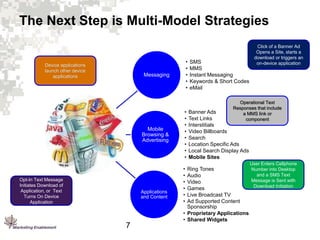
The Next Step is Multi-Model Strategies

Device applications
launch other device
applications

•
•
•
•
•

Messaging

Mobile
Browsing &
Advertising

Opt-In Text Message
Initiates Download of
Application, or Text
Turns On Device
Application

Applications
and Content

7

•
•
•
•
•
•
•
•
•
•
•
•
•
•

SMS
MMS
Instant Messaging
Keywords & Short Codes
eMail

Click of a Banner Ad
Opens a Site, starts a
download or triggers an
on-device application

Operational Text
Responses that include
a MMS link or
component

Banner Ads
Text Links
Interstitials
Video Billboards
Search
Location Specific Ads
Local Search Display Ads
Mobile Sites

Ring Tones
Audio
Video
Games
Live Broadcast TV
Ad Supported Content
Sponsorship
• Proprietary Applications
• Shared Widgets

User Enters Cellphone
Number into Desktop
and a SMS Text
Message is Sent with
Download Initiation
Update!!

What is Affecting the Tipping Point for Browsing
1.2

1

0.8
Tipping Point for SMS

0.6

0.4
Tipping Point: when
50% of 18-24yo
access the internet
through their phones

0.2

0
2002

2003

2004

2005

2006

2007

2008

2009

2010

2011

3G

Mobile Phone Sub. Index (2011 = 297m)

Users with Data Packages

Phones with Internet Feature

18 24 yo Users Accessing Internet

18-14 yo Using SMS

8
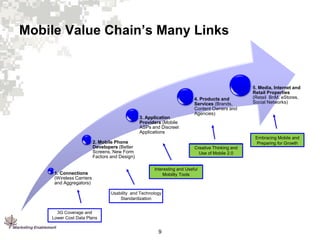
Mobile Value Chain’s Many Links

3. Application
Providers (Mobile
ASPs and Discreet
Applications

Embracing Mobile and
Preparing for Growth

2. Mobile Phone
Developers (Better
Screens, New Form
Factors and Design)

1. Connections
(Wireless Carriers
and Aggregators)

4. Products and
Services (Brands,
Content Owners and
Agencies)

5. Media, Internet and
Retail Properties
(Retail BnM, eStores,
Social Networks)

Creative Thinking and
Use of Mobile 2.0

Interesting and Useful
Mobility Tools

Usability and Technology
Standardization
3G Coverage and
Lower Cost Data Plans

9
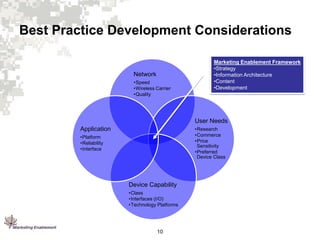
Best Practice Development Considerations

Network
•Speed
•Wireless Carrier
•Quality

Marketing Enablement Framework
•Strategy
•Information Architecture
•Content
•Development

User Needs
•Research
•Commerce
•Price
Sensitivity
•Preferred
Device Class

Application
•Platform
•Reliability
•Interface

Device Capability
•Class
•Interfaces (I/O)
•Technology Platforms

10
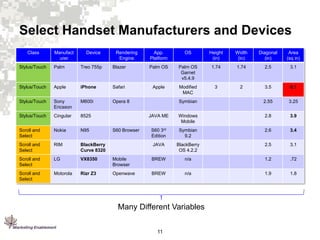
Select Handset Manufacturers and Devices
Class

Manufact
urer

Device

Rendering
Engine

App.
Platform

OS

Height
(in)

Width
(in)

Diagonal
(in)

Area
(sq in)

Stylus/Touch

Palm

Treo 755p

Blazer

Palm OS

Palm OS
Garnet
v5.4.9

1.74

1.74

2.5

3.1

Stylus/Touch

Apple

iPhone

Safari

Apple

Modified
MAC

3

2

3.5

6.1

Stylus/Touch

Sony
Ericsson

M600i

Opera 8

Symbian

2.55

3.25

Stylus/Touch

Cingular

8525

JAVA ME

Windows
Mobile

2.8

3.9

Scroll and
Select

Nokia

N95

S60 3rd
Edition

Symbian
9.2

2.6

3.4

Scroll and
Select

RIM

BlackBerry
Curve 8320

JAVA

BlackBerry
OS 4.2.2

2.5

3.1

Scroll and
Select

LG

VX8350

Mobile
Browser

BREW

n/a

1.2

.72

Scroll and
Select

Motorola

Rizr Z3

Openwave

BREW

n/a

1.9

1.8

S60 Browser

Many Different Variables
11
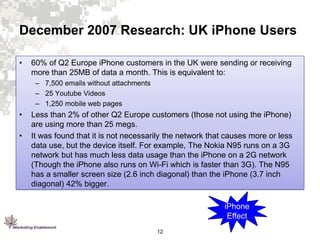
December 2007 Research: UK iPhone Users
•

60% of Q2 Europe iPhone customers in the UK were sending or receiving
more than 25MB of data a month. This is equivalent to:
– 7,500 emails without attachments
– 25 Youtube Videos
– 1,250 mobile web pages

•
•

Less than 2% of other Q2 Europe customers (those not using the iPhone)
are using more than 25 megs.
It was found that it is not necessarily the network that causes more or less
data use, but the device itself. For example, The Nokia N95 runs on a 3G
network but has much less data usage than the iPhone on a 2G network
(Though the iPhone also runs on Wi-Fi which is faster than 3G). The N95
has a smaller screen size (2.6 inch diagonal) than the iPhone (3.7 inch
diagonal) 42% bigger.
iPhone
Effect
12
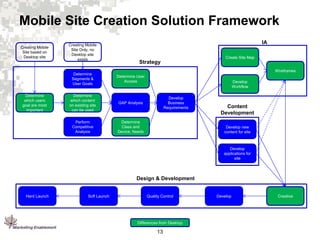
Mobile Site Creation Solution Framework
Creating Mobile
Site based on
Desktop site

Creating Mobile
Site Only, no
Desktop site
exists

IA
Create Site Map

Strategy
Wireframes

Determine
Segments &
User Goals
Determine
which content
on existing site
can be used

GAP Analysis

Perform
Competitive
Analysis

Determine
which users
goal are most
important

Determine User
Access

Determine
Class and
Device, Needs

Develop
Workflow
Develop
Business
Requirements

Content
Development
Develop new
content for site

Develop
applications for
site

Design & Development

Hard Launch

Soft Launch

Quality Control

Differences from Desktop

13

Develop

Creative

Mobile Direct Marketing

  • 1.
    Mobile Direct Marketing ScottM. Alexander President Marketing Enablement
  • 2.
    Summary 1. Mobile browsingand application use is a growing segment of the mobile industry. Currently, 7% of all mobile phone users access the internet through their mobile device, with 15% of 18-24 year olds accessing. It is forecast that by end of 2008, 18-24 yrs accessing the internet through mobile devices will be above 40%. 2. Mobile devices in the mobile environment do not play by the same rules as the desktop. This is not all due to the lack of standards, but due to the highly varying needs of the mobile user. 3. The differing capabilities of low-end mobile phones, high-end smart phones, and alternative devices also lead to a variable environment. 4. Marketing Enablement has developed a mobile develop framework and a set of best practices focused on user access, information architecture, content and design of mobile browsing applications. 2
  • 3.
    Food for Thought! • • • • • 2.8billion wireless phones globally 84 million households in US own at least one phone You can reach a wider audience than the billion computers globally Mobile phones are growing faster (85% HH penetration by 2010) than computers (79% HH penetration by 2010) People carry their mobile phones every where they go and are depending on them more and more for answering questions and accomplishing tasks 3 Source: Wireless intelligence, 2007
  • 4.
    Mobile Marketing Opportunities Messaging • • • • • SMS MMS InstantMessaging Keywords & Short Codes eMail Mobile Browsing & Advertising • • • • • • • • Banner Ads Text Links Interstitials Video Billboards Search Location Specific Ads Local Search Display Ads Mobile Sites Applications and Content 4 • • • • • • Ring Tones Audio Video Games Live Broadcast TV Ad Supported Content Sponsorship • Proprietary Applications • Shared Widgets
  • 5.
    Mobile Application Environment •Widgets •Ringtones •Games •Videos •MSNBCMulti-media •AdvantGo •SprintTV •T-Mobile •Verizon •AT&T •Sprint •eComm •Yahoo! Go •AOL MyMobile •Sprint OnDemand 5 •Mobile.company.com •Company.com/mobile •Company.mobi
  • 6.
    Mobile Application Environment DataReliability – Present unless device lost Interaction Flow – Good Freshness of Data – Takes Effort Interaction Richness – Good Device Impact – Wide Delivery Across “Feature Phones” Data Reliability – Present unless lost Interaction Flow – Excellent Freshness of Data – Takes Effort Interaction Richness – Rich Device Impact – Limited to “Smart Phones” App Native App MultiPlatform (Windows Mobile, ARM, Palm,Symbian, UIQ, QT, Linux, data sync) (BREW, Java ME, Flash Lite, SVG, mojax) Widgets Web Messaging (xHTML Basic, xHTML MP, WML, iMode, ECMAScript) (SMS, MMS, IM, picture) Data Reliability – Could be delayed Interaction Flow – Very slow Freshness of Data – Good Interaction Richness – Scarce Device Impact – All support Texts, Wide for Other messaging Data Reliability – Only when data access Interaction Flow – Slow Freshness of Data – Excellent Interaction Richness – Moderate Device Impact – Wide Delivery for xHTML, and narrow for script 6
  • 7.
    The Next Stepis Multi-Model Strategies Device applications launch other device applications • • • • • Messaging Mobile Browsing & Advertising Opt-In Text Message Initiates Download of Application, or Text Turns On Device Application Applications and Content 7 • • • • • • • • • • • • • • SMS MMS Instant Messaging Keywords & Short Codes eMail Click of a Banner Ad Opens a Site, starts a download or triggers an on-device application Operational Text Responses that include a MMS link or component Banner Ads Text Links Interstitials Video Billboards Search Location Specific Ads Local Search Display Ads Mobile Sites Ring Tones Audio Video Games Live Broadcast TV Ad Supported Content Sponsorship • Proprietary Applications • Shared Widgets User Enters Cellphone Number into Desktop and a SMS Text Message is Sent with Download Initiation
  • 8.
    Update!! What is Affectingthe Tipping Point for Browsing 1.2 1 0.8 Tipping Point for SMS 0.6 0.4 Tipping Point: when 50% of 18-24yo access the internet through their phones 0.2 0 2002 2003 2004 2005 2006 2007 2008 2009 2010 2011 3G Mobile Phone Sub. Index (2011 = 297m) Users with Data Packages Phones with Internet Feature 18 24 yo Users Accessing Internet 18-14 yo Using SMS 8
  • 9.
    Mobile Value Chain’sMany Links 3. Application Providers (Mobile ASPs and Discreet Applications Embracing Mobile and Preparing for Growth 2. Mobile Phone Developers (Better Screens, New Form Factors and Design) 1. Connections (Wireless Carriers and Aggregators) 4. Products and Services (Brands, Content Owners and Agencies) 5. Media, Internet and Retail Properties (Retail BnM, eStores, Social Networks) Creative Thinking and Use of Mobile 2.0 Interesting and Useful Mobility Tools Usability and Technology Standardization 3G Coverage and Lower Cost Data Plans 9
  • 10.
    Best Practice DevelopmentConsiderations Network •Speed •Wireless Carrier •Quality Marketing Enablement Framework •Strategy •Information Architecture •Content •Development User Needs •Research •Commerce •Price Sensitivity •Preferred Device Class Application •Platform •Reliability •Interface Device Capability •Class •Interfaces (I/O) •Technology Platforms 10
  • 11.
    Select Handset Manufacturersand Devices Class Manufact urer Device Rendering Engine App. Platform OS Height (in) Width (in) Diagonal (in) Area (sq in) Stylus/Touch Palm Treo 755p Blazer Palm OS Palm OS Garnet v5.4.9 1.74 1.74 2.5 3.1 Stylus/Touch Apple iPhone Safari Apple Modified MAC 3 2 3.5 6.1 Stylus/Touch Sony Ericsson M600i Opera 8 Symbian 2.55 3.25 Stylus/Touch Cingular 8525 JAVA ME Windows Mobile 2.8 3.9 Scroll and Select Nokia N95 S60 3rd Edition Symbian 9.2 2.6 3.4 Scroll and Select RIM BlackBerry Curve 8320 JAVA BlackBerry OS 4.2.2 2.5 3.1 Scroll and Select LG VX8350 Mobile Browser BREW n/a 1.2 .72 Scroll and Select Motorola Rizr Z3 Openwave BREW n/a 1.9 1.8 S60 Browser Many Different Variables 11
  • 12.
    December 2007 Research:UK iPhone Users • 60% of Q2 Europe iPhone customers in the UK were sending or receiving more than 25MB of data a month. This is equivalent to: – 7,500 emails without attachments – 25 Youtube Videos – 1,250 mobile web pages • • Less than 2% of other Q2 Europe customers (those not using the iPhone) are using more than 25 megs. It was found that it is not necessarily the network that causes more or less data use, but the device itself. For example, The Nokia N95 runs on a 3G network but has much less data usage than the iPhone on a 2G network (Though the iPhone also runs on Wi-Fi which is faster than 3G). The N95 has a smaller screen size (2.6 inch diagonal) than the iPhone (3.7 inch diagonal) 42% bigger. iPhone Effect 12
  • 13.
    Mobile Site CreationSolution Framework Creating Mobile Site based on Desktop site Creating Mobile Site Only, no Desktop site exists IA Create Site Map Strategy Wireframes Determine Segments & User Goals Determine which content on existing site can be used GAP Analysis Perform Competitive Analysis Determine which users goal are most important Determine User Access Determine Class and Device, Needs Develop Workflow Develop Business Requirements Content Development Develop new content for site Develop applications for site Design & Development Hard Launch Soft Launch Quality Control Differences from Desktop 13 Develop Creative