How-to Guide for Exercise – Estimated AWS Costs
Resources and How to Cancel Your Account (Week 1,
Unit 6)
INTRODUCTION
The optional exercises for the Introduction to SAP Fiori UX course will incur charges from AMAZON.
These charges are not from SAP and consequently the openSAP authors do not have final answers
for how the billing works. Instead, we have some links and suggestions based on our experiences that we
can provide to you.
ESTIMATED AWS COSTS HELPFUL LINKS
Monthly Calculator
http://calculator.s3.amazonaws.com/index.html
Amazon EC2
http://aws.amazon.com/ec2/pricing/
Amazon EC2 FAQs
http://aws.amazon.com/ec2/faqs/
Especially read the Billing section
If you have specific billing questions I suggest you google the question or contact AWS. There is a lot of
information on AWS and how they bill on the internet. This guide provides you with all the knowledge the
openSAP for this course has on the topic, additional questions we won’t be able to answer.
Contact AWS
https://aws.amazon.com/contact-us/
SUGGESTION TO REDUCE COSTS:
Note: Since I am not an Amazon employee these suggestions are not guarantees.
Set aside time for the exercises and complete them in one time frame, when you’re finished terminate your
instance.
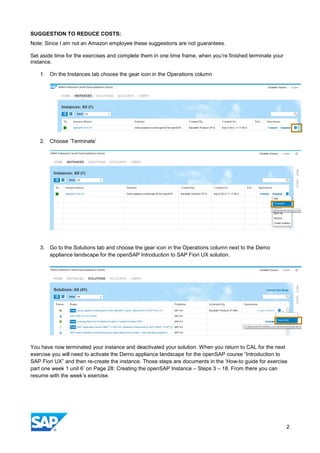
1. On the Instances tab choose the gear icon in the Operations column
2. Choose ‘Terminate’
3. Go to the Solutions tab and choose the gear icon in the Operations column next to the Demo
appliance landscape for the openSAP Introduction to SAP Fiori UX solution.
You have now terminated your instance and deactivated your solution. When you return to CAL for the next
exercise you will need to activate the Demo appliance landscape for the openSAP course “Introduction to
SAP Fiori UX” and then re-create the instance. Those steps are documents in the ‘How-to guide for exercise
part one week 1 unit 6’ on Page 28: Creating the openSAP Instance – Steps 3 – 18. From there you can
resume with the week’s exercise.
2
HOW TO CANCEL YOUR AWS ACCOUNT – ONLY DO THIS AFTER YOU’RE FINISHED WITH ALL
EXERCISES
Note: CAL is free and there are free solutions offered by SAP. Since there are no costs incurred with your
CAL account we do not think it is necessary to cancel it. AWS does incur costs so you will need to cancel
your account.
The cancellation steps are detailed in the FAQ:
https://aws.amazon.com/premiumsupport/faqs/
How do I cancel my AWS Support Subscription
If you still incur charges after canceling your account you need to contact AWS Customer Service.
SAP cannot help with this.
3
www.sap.com
© 2014 SAP SE or an SAP affiliate company. All rights reserved.
No part of this publication may be reproduced or transmitted in any form
or for any purpose without the express permission of SAP SE or an SAP
affiliate company.
SAP and other SAP products and services mentioned herein as well as their
respective logos are trademarks or registered trademarks of SAP SE (or an
SAP affiliate company) in Germany and other countries. Please see
http://www.sap.com/corporate-en/legal/copyright/index.epx#trademark for
additional trademark information and notices. Some software products
marketed by SAP SE and its distributors contain proprietary software
components of other software vendors.
National product specifications may vary.
These materials are provided by SAP SE or an SAP affiliate company for
informational purposes only, without representation or warranty of any kind,
and SAP SE or its affiliated companies shall not be liable for errors or
omissions with respect to the materials. The only warranties for SAP SE or
SAP affiliate company products and services are those that are set forth in
the express warranty statements accompanying such products and services,
if any. Nothing herein should be construed as constituting an additional
warranty.
In particular, SAP SE or its affiliated companies have no obligation to pursue
any course of business outlined in this document or any related presentation,
or to develop or release any functionality mentioned therein. This document,
or any related presentation, and SAP SE’s or its affiliated companies’
strategy and possible future developments, products, and/or platform
directions and functionality are all subject to change and may be changed by
SAP SE or its affiliated companies at any time for any reason without notice.
The information in this document is not a commitment, promise, or legal
obligation to deliver any material, code, or functionality. All forward-looking
statements are subject to various risks and uncertainties that could cause
actual results to differ materially from expectations. Readers are cautioned
not to place undue reliance on these forward-looking statements, which
speak only as of their dates, and they should not be relied upon in making
purchasing decisions.

mnewrlnewr

  • 1.
    How-to Guide forExercise – Estimated AWS Costs Resources and How to Cancel Your Account (Week 1, Unit 6) INTRODUCTION The optional exercises for the Introduction to SAP Fiori UX course will incur charges from AMAZON. These charges are not from SAP and consequently the openSAP authors do not have final answers for how the billing works. Instead, we have some links and suggestions based on our experiences that we can provide to you. ESTIMATED AWS COSTS HELPFUL LINKS Monthly Calculator http://calculator.s3.amazonaws.com/index.html Amazon EC2 http://aws.amazon.com/ec2/pricing/ Amazon EC2 FAQs http://aws.amazon.com/ec2/faqs/ Especially read the Billing section If you have specific billing questions I suggest you google the question or contact AWS. There is a lot of information on AWS and how they bill on the internet. This guide provides you with all the knowledge the openSAP for this course has on the topic, additional questions we won’t be able to answer. Contact AWS https://aws.amazon.com/contact-us/
  • 2.
    SUGGESTION TO REDUCECOSTS: Note: Since I am not an Amazon employee these suggestions are not guarantees. Set aside time for the exercises and complete them in one time frame, when you’re finished terminate your instance. 1. On the Instances tab choose the gear icon in the Operations column 2. Choose ‘Terminate’ 3. Go to the Solutions tab and choose the gear icon in the Operations column next to the Demo appliance landscape for the openSAP Introduction to SAP Fiori UX solution. You have now terminated your instance and deactivated your solution. When you return to CAL for the next exercise you will need to activate the Demo appliance landscape for the openSAP course “Introduction to SAP Fiori UX” and then re-create the instance. Those steps are documents in the ‘How-to guide for exercise part one week 1 unit 6’ on Page 28: Creating the openSAP Instance – Steps 3 – 18. From there you can resume with the week’s exercise. 2
  • 3.
    HOW TO CANCELYOUR AWS ACCOUNT – ONLY DO THIS AFTER YOU’RE FINISHED WITH ALL EXERCISES Note: CAL is free and there are free solutions offered by SAP. Since there are no costs incurred with your CAL account we do not think it is necessary to cancel it. AWS does incur costs so you will need to cancel your account. The cancellation steps are detailed in the FAQ: https://aws.amazon.com/premiumsupport/faqs/ How do I cancel my AWS Support Subscription If you still incur charges after canceling your account you need to contact AWS Customer Service. SAP cannot help with this. 3
  • 4.
    www.sap.com © 2014 SAPSE or an SAP affiliate company. All rights reserved. No part of this publication may be reproduced or transmitted in any form or for any purpose without the express permission of SAP SE or an SAP affiliate company. SAP and other SAP products and services mentioned herein as well as their respective logos are trademarks or registered trademarks of SAP SE (or an SAP affiliate company) in Germany and other countries. Please see http://www.sap.com/corporate-en/legal/copyright/index.epx#trademark for additional trademark information and notices. Some software products marketed by SAP SE and its distributors contain proprietary software components of other software vendors. National product specifications may vary. These materials are provided by SAP SE or an SAP affiliate company for informational purposes only, without representation or warranty of any kind, and SAP SE or its affiliated companies shall not be liable for errors or omissions with respect to the materials. The only warranties for SAP SE or SAP affiliate company products and services are those that are set forth in the express warranty statements accompanying such products and services, if any. Nothing herein should be construed as constituting an additional warranty. In particular, SAP SE or its affiliated companies have no obligation to pursue any course of business outlined in this document or any related presentation, or to develop or release any functionality mentioned therein. This document, or any related presentation, and SAP SE’s or its affiliated companies’ strategy and possible future developments, products, and/or platform directions and functionality are all subject to change and may be changed by SAP SE or its affiliated companies at any time for any reason without notice. The information in this document is not a commitment, promise, or legal obligation to deliver any material, code, or functionality. All forward-looking statements are subject to various risks and uncertainties that could cause actual results to differ materially from expectations. Readers are cautioned not to place undue reliance on these forward-looking statements, which speak only as of their dates, and they should not be relied upon in making purchasing decisions.