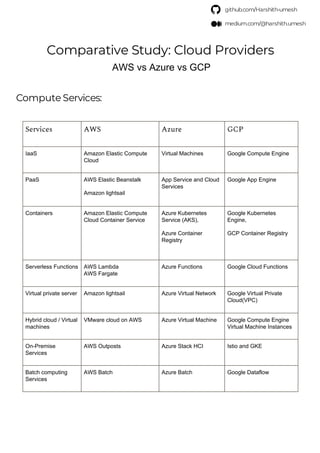
Services AWS Azure GCP
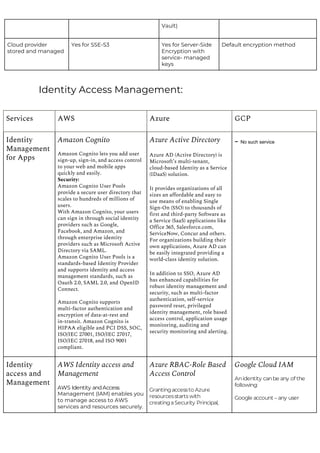
IaaS Amazon Elastic Compute
Cloud
Virtual Machines Google Compute Engine
PaaS AWS Elastic Beanstalk
Amazon lightsail
App Service and Cloud
Services
Google App Engine
Containers Amazon Elastic Compute
Cloud Container Service
Azure Kubernetes
Service (AKS),
Azure Container
Registry
Google Kubernetes
Engine,
GCP Container Registry
Serverless Functions AWS Lambda
AWS Fargate
Azure Functions Google Cloud Functions
Virtual private server Amazon lightsail Azure Virtual Network Google Virtual Private
Cloud(VPC)
Hybrid cloud / Virtual
machines
VMware cloud on AWS Azure Virtual Machine Google Compute Engine
Virtual Machine Instances
On-Premise
Services
AWS Outposts Azure Stack HCI Istio and GKE
Batch computing
Services
AWS Batch Azure Batch Google Dataflow
Compute Services:
Comparative Study: Cloud Providers
AWS vs Azure vs GCP
github.com/Harshith-umesh
medium.com/@harshith.umesh
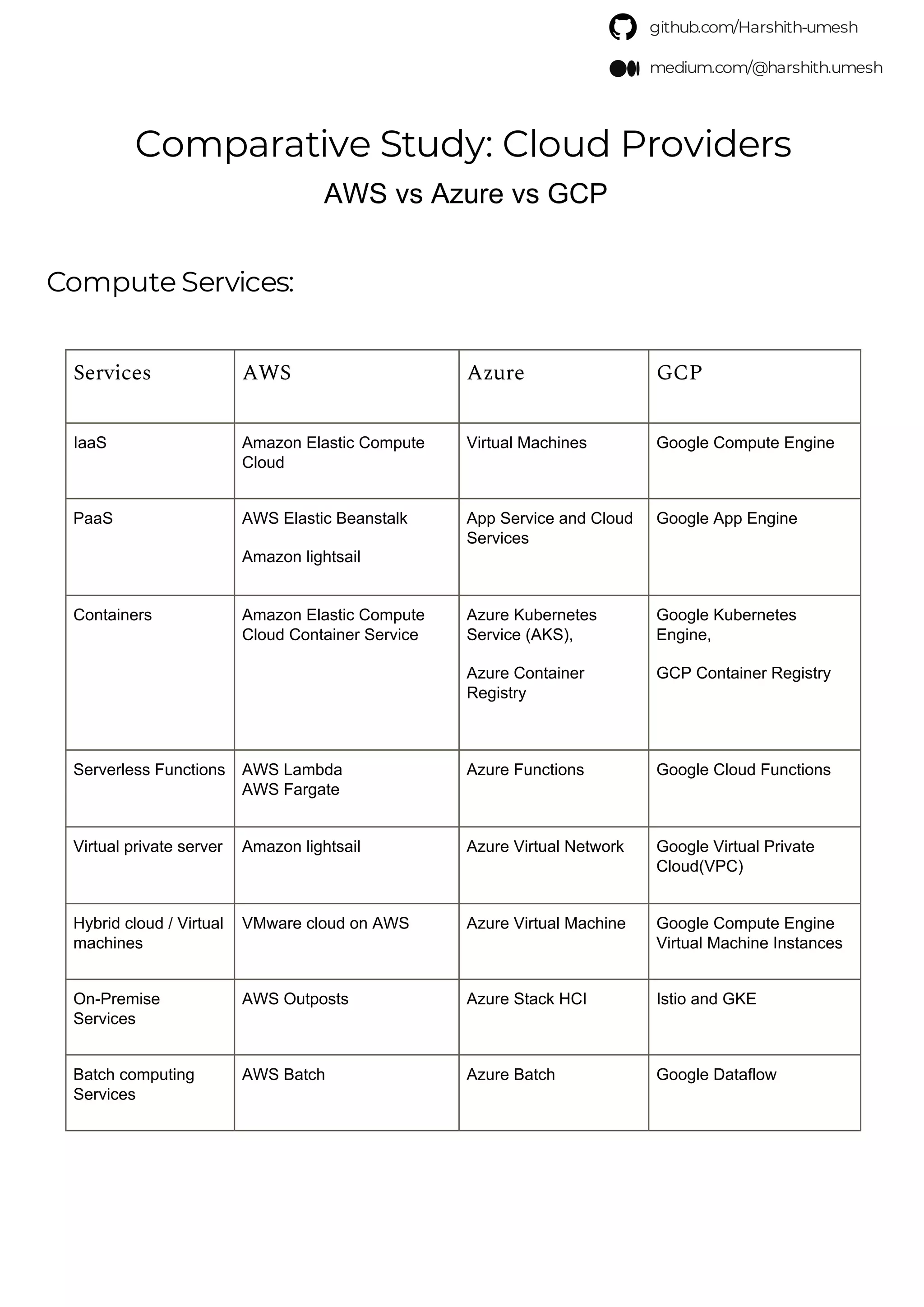
Networking Services
Services AWS Azure GCP
Virtual Network Amazon Virtual Private
Cloud (VPC)
Virtual Networks
(VNets)
Virtual Private Cloud
Elastic Load Balancer Elastic Load Balancer Load Balancer Google Cloud Load
Balancing
Peering Direct Connect ExpressRoute Google Cloud Interconnect
DNS Amazon Route 53 Azure DNS Google Cloud DNS
Monitor and control
Microservices
AWS App Mesh Azure Monitoring Google Monitoring and
Trace
Content delivery network
(CDN)
Amazon Cloudfront Azure CDN Google Cloud CDN
API Manager Amazon API Gateway Azure API
Management
Google Apigee
Database Services:
Services AWS Azure GCP
RDBMS Amazon Aurora
Amazon RDS
SQL Database Google Cloud SQL
NoSQL: Key–Value Amazon DynamoDB Table Storage Google Cloud Datastore
Google Cloud Bigtable
NoSQL: Indexed Amazon SimpleDB Azure Cosmos DB Google Cloud Datastore
In-memory caching
system
Amazon ElastiCache Azure cache for Redis Google MemoryStore
Data Warehousing Amazon Red-shift Azure SQL Data
Warehouse
Google BigQuery
Database Migration
Service
AWS Data migration service Azure Database Migration
Service
GCP Database Migration
Time Series Database Amazon Timestream Azure Time Series Insights Google TimeSeries
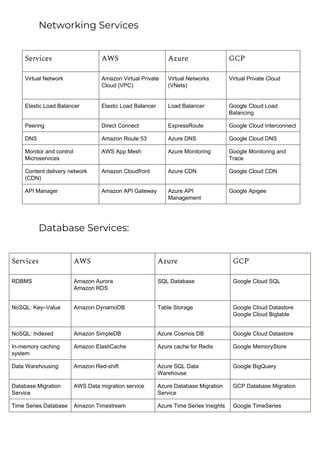
Storage Services:
Storage AWS Azure GCP
File System Amazon Elastic file
system(EFS)
Security​-There are three main
levels of access controls to
consider when it comes to EFS
file systems.
1.IAM permissions for API calls
2.Security groups for EC2
instances
3.Network File System-level
users, groups, and permissions
Amazon groups play a critical
role in establishing network
connectivity
between EC2 instances and
EFS file systems.. security
groups act as firewalls and
enforce rules.
Azure Files -
Security​ -
Fine grained access control
to Azure Files is granted by
assigning file share using
Azure Active Directory
Domain Services.
The steps are :
1.Enable Azure AD DS
authentication over SMB for
your storage account.
2.Assign access permissions
for a share to an Azure AD
identity
3.Configure NTFS
permissions over SMB for
directories and files.
4.Mount an Azure FileShare
from a domain joined VM.
Cloud Filestore -
Security​- In a Filestore
instance, only root users
on connected clients have
read/write access to the
file share.
You grant access to
Filestore operations by
granting Cloud Identity
and Access Management
(IAM) roles to users​.
IAM permissions only
control access to Filestore
operations, like creating a
Filestore instance. Access
to operations on the
Filestore file share, like
read or execute, are
determined by Linux
permissions.
You can use the Filestore
Editor and Filestore
Viewer roles to grant
Filestore permissions to
users. If you prefer, you
can also use ​primitive
roles​ for this purpose.
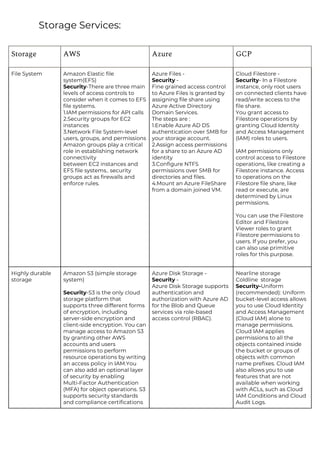
Highly durable
storage
Amazon S3 (simple storage
system)
Security​-S3 is the only cloud
storage platform that
supports three different forms
of encryption, including
server-side encryption and
client-side encryption. You can
manage access to Amazon S3
by granting other AWS
accounts and users
permissions to perform
resource operations by writing
an access policy in IAM.You
can also add an optional layer
of security by enabling
Multi-Factor Authentication
(MFA) for object operations. S3
supports security standards
and compliance certifications
Azure Disk Storage -
Security​ -
Azure Disk Storage supports
authentication and
authorization with Azure AD
for the Blob and Queue
services via role-based
access control (RBAC).
Nearline storage
Coldline storage
Security-​Uniform
(recommended): ​Uniform
bucket-level access​ allows
you to use ​Cloud Identity
and Access Management
(Cloud IAM)​ alone to
manage permissions.
Cloud IAM applies
permissions to all the
objects contained inside
the bucket or groups of
objects with common
name prefixes. Cloud IAM
also allows you to use
features that are not
available when working
with ACLs, such as ​Cloud
IAM Conditions​ and Cloud
Audit Logs.
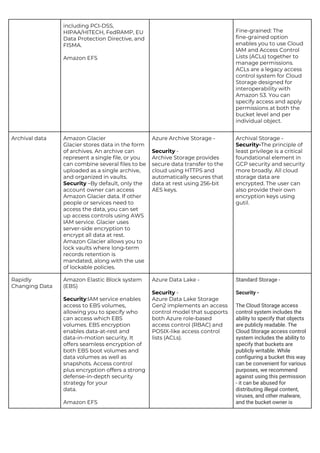
including PCI-DSS,
HIPAA/HITECH, FedRAMP, EU
Data Protection Directive, and
FISMA.
Amazon EFS
Fine-grained: The
fine-grained option
enables you to use Cloud
IAM and ​Access Control
Lists (ACLs)​ together to
manage permissions.
ACLs are a legacy access
control system for Cloud
Storage designed for
interoperability with
Amazon S3. You can
specify access and apply
permissions at both the
bucket level and per
individual object.
Archival data Amazon Glacier
Glacier stores data in the form
of archives. An archive can
represent a single file, or you
can combine several files to be
uploaded as a single archive,
and organized in vaults.
Security​ –By default, only the
account owner can access
Amazon Glacier data. If other
people or services need to
access the data, you can set
up access controls using AWS
IAM service. Glacier uses
server-side encryption to
encrypt all data at rest.
Amazon Glacier allows you to
lock vaults where long-term
records retention is
mandated, along with the use
of lockable policies.
Azure Archive Storage -
Security​ -
Archive Storage provides
secure data transfer to the
cloud using HTTPS and
automatically secures that
data at rest using 256-bit
AES keys.
Archival Storage -
Security-​The principle of
least privilege is a critical
foundational element in
GCP security and security
more broadly.​ ​All cloud
storage data are
encrypted. The user can
also provide their own
encryption keys using
gutil.
Rapidly
Changing Data
Amazon Elastic Block system
(EBS)
Security​:IAM service enables
access to EBS volumes,
allowing you to specify who
can access which EBS
volumes. EBS encryption
enables data-at-rest and
data-in-motion security. It
offers seamless encryption of
both EBS boot volumes and
data volumes as well as
snapshots. Access control
plus encryption offers a strong
defense-in-depth security
strategy for your
data.
Amazon EFS
Azure Data Lake -
Security​ -
Azure Data Lake Storage
Gen2 implements an access
control model that supports
both Azure role-based
access control (RBAC) and
POSIX-like access control
lists (ACLs).
Standard Storage -
Security -
The Cloud Storage access
control system includes the
ability to specify that objects
are publicly readable. The
Cloud Storage access control
system includes the ability to
specify that buckets are
publicly writable. While
configuring a bucket this way
can be convenient for various
purposes, we recommend
against using this permission
- it can be abused for
distributing illegal content,
viruses, and other malware,
and the bucket owner is
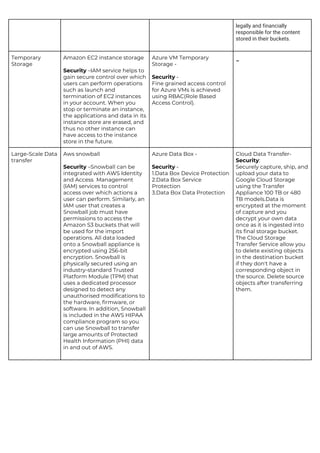
legally and financially
responsible for the content
stored in their buckets.
Temporary
Storage
Amazon EC2 instance storage
Security​ ​–IAM service helps to
gain secure control over which
users can perform operations
such as launch and
termination of EC2 instances
in your account. When you
stop or terminate an instance,
the applications and data in its
instance store are erased, and
thus no other instance can
have access to the instance
store in the future.
Azure VM Temporary
Storage -
Security​ -
Fine grained access control
for Azure VMs is achieved
using RBAC(Role Based
Access Control).
-
Large-Scale Data
transfer
Aws snowball
Security ​–Snowball can be
integrated with AWS Identity
and Access Management
(IAM) services to control
access over which actions a
user can perform. Similarly, an
IAM user that creates a
Snowball job must have
permissions to access the
Amazon S3 buckets that will
be used for the import
operations. All data loaded
onto a Snowball appliance is
encrypted using 256-bit
encryption. Snowball is
physically secured using an
industry-standard Trusted
Platform Module (TPM) that
uses a dedicated processor
designed to detect any
unauthorised modifications to
the hardware, firmware, or
software. In addition, Snowball
is included in the AWS HIPAA
compliance program so you
can use Snowball to transfer
large amounts of Protected
Health Information (PHI) data
in and out of AWS.
Azure Data Box -
Security​ -
1.Data Box Device Protection
2.Data Box Service
Protection
3.Data Box Data Protection
Cloud Data Transfer-
Security​:
Securely capture, ship, and
upload your data to
Google Cloud Storage
using the Transfer
Appliance 100 TB or 480
TB models.​Data is
encrypted at the moment
of capture and you
decrypt your own data
once as it is ingested into
its final storage bucket.
The Cloud Storage
Transfer Service allow you
to delete existing objects
in the destination bucket
if they don't have a
corresponding object in
the source. Delete source
objects after transferring
them.
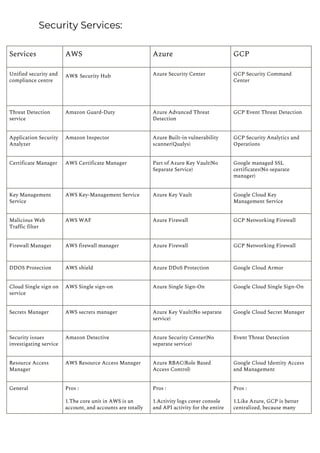
Security Services:
Services AWS Azure GCP
Unified security and
compliance centre
AW​s ​Security Hub Azure Security Center GCP Security Command
Center
Threat Detection
service
Amazon Guard-Duty Azure Advanced Threat
Detection
GCP Event Threat Detection
Application Security
Analyzer
Amazon Inspector Azure Built-in vulnerability
scanner(Qualys)
GCP Security Analytics and
Operations
Certificate Manager AWS Certificate Manager Part of Azure Key Vault(No
Separate Service)
Google managed SSL
certificates(No separate
manager)
Key Management
Service
AWS Key-Management Service Azure Key Vault Google Cloud Key
Management Service
Malicious Web
Traffic filter
AWS WAF Azure Firewall GCP Networking Firewall
Firewall Manager AWS firewall manager Azure Firewall GCP Networking Firewall
DDOS Protection AWS shield Azure DDoS Protection Google Cloud Armor
Cloud Single sign on
service
AWS Single sign-on Azure Single Sign-On Google Cloud Single Sign-On
Secrets Manager AWS secrets manager Azure Key Vault(No separate
service)
Google Cloud Secret Manager
Security issues
investigating service
Amazon Detective Azure Security Center(No
separate service)
Event Threat Detection
Resource Access
Manager
AWS Resource Access Manager Azure RBAC(Role Based
Access Control)
Google Cloud Identity Access
and Management
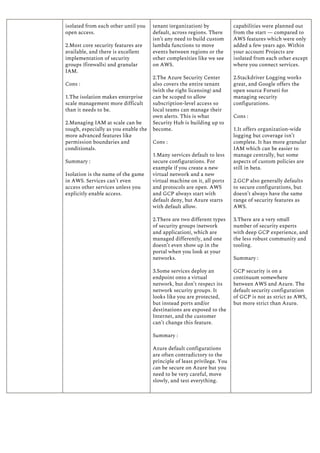
General Pros :
1.The core unit in AWS is an
account, and accounts are totally
Pros :
1.Activity logs cover console
and API activity for the entire
Pros :
1.Like Azure, GCP is better
centralized, because many
isolated from each other until you
open access.
2.Most core security features are
available, and there is excellent
implementation of security
groups (firewalls) and granular
IAM.
Cons :
1.The isolation makes enterprise
scale management more difficult
than it needs to be.
2.Managing IAM at scale can be
tough, especially as you enable the
more advanced features like
permission boundaries and
conditionals.
Summary :
Isolation is the name of the game
in AWS. Services can’t even
access other services unless you
explicitly enable access.
tenant (organization) by
default, across regions. There
isn’t any need to build custom
lambda functions to move
events between regions or the
other complexities like we see
on AWS.
2.The Azure Security Center
also covers the entire tenant
(with the right licensing) and
can be scoped to allow
subscription-level access so
local teams can manage their
own alerts. This is what
Security Hub is building up to
become.
Cons :
1.Many services default to less
secure configurations. For
example if you create a new
virtual network and a new
virtual machine on it, all ports
and protocols are open. AWS
and GCP always start with
default deny, but Azure starts
with default allow.
2.There are two different types
of security groups (network
and application), which are
managed differently, and one
doesn’t even show up in the
portal when you look at your
networks.
3.Some services deploy an
endpoint onto a virtual
network, but don’t respect its
network security groups. It
looks like you are protected,
but instead ports and/or
destinations are exposed to the
Internet, and the customer
can’t change this feature.
Summary :
Azure default configurations
are often contradictory to the
principle of least privilege. You
can​ be secure on Azure but you
need to be very careful, move
slowly, and test everything.
capabilities were planned out
from the start — compared to
AWS features which were only
added a few years ago. Within
your account Projects are
isolated from each other except
where you connect services.
2.Stackdriver Logging works
great, and Google offers the
open source Forseti for
managing security
configurations.
Cons :
1.It offers organization-wide
logging but coverage isn’t
complete. It has more granular
IAM which can be easier to
manage centrally, but some
aspects of custom policies are
still in beta.
2.GCP also generally defaults
to secure configurations, but
doesn’t always have the same
range of security features as
AWS.
3.There are a very small
number of security experts
with deep GCP experience, and
the less robust community and
tooling.
Summary :
GCP security is on a
continuum somewhere
between AWS and Azure. The
default security configuration
of GCP is not as strict as AWS,
but more strict than Azure.
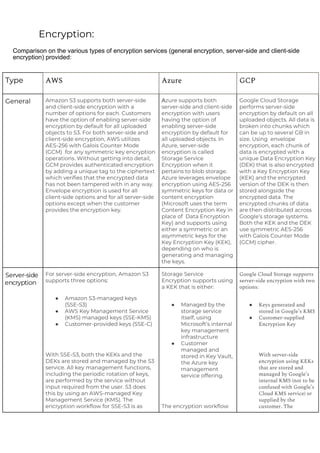
Encryption:
Type AWS Azure GCP
General Amazon S3 supports both server-side
and client-side encryption with a
number of options for each. Customers
have the option of enabling server-side
encryption by default for all uploaded
objects to S3. For both server-side and
client-side encryption, AWS utilizes
AES-256 with Galois Counter Mode
(GCM) for any symmetric key encryption
operations. Without getting into detail,
GCM provides authenticated encryption
by adding a unique tag to the ciphertext
which verifies that the encrypted data
has not been tampered with in any way.
Envelope encryption is used for all
client-side options and for all server-side
options except when the customer
provides the encryption key.
A​zure supports both
server-side and client-side
encryption with users
having the option of
enabling server-side
encryption by default for
all uploaded objects. In
Azure, server-side
encryption is called
Storage Service
Encryption when it
pertains to blob storage.
Azure leverages envelope
encryption using AES-256
symmetric keys for data or
content encryption
(Microsoft uses the term
Content Encryption Key in
place of Data Encryption
Key) and supports using
either a symmetric or an
asymmetric keys for the
Key Encryption Key (KEK),
depending on who is
generating and managing
the keys.
Google Cloud Storage
performs server-side
encryption by default on all
uploaded objects. All data is
broken into chunks which
can be up to several GB in
size. Using envelope
encryption, each chunk of
data is encrypted with a
unique Data Encryption Key
(DEK) that is also encrypted
with a Key Encryption Key
(KEK) and the encrypted
version of the DEK is then
stored alongside the
encrypted data. The
encrypted chunks of data
are then distributed across
Google’s storage systems.
Both the KEK and the DEK
use symmetric AES-256
with Galois Counter Mode
(GCM) cipher.
For server-side encryption, Amazon S3
supports three options:
● Amazon S3-managed keys
(SSE-S3)
● AWS Key Management Service
(KMS) managed keys (SSE-KMS)
● Customer-provided keys (SSE-C)
With SSE-S3, both the KEKs and the
DEKs are stored and managed by the S3
service. All key management functions,
including the periodic rotation of keys,
are performed by the service without
input required from the user. S3 does
this by using an AWS-managed Key
Management Service (KMS). The
encryption workflow for SSE-S3 is as
Storage Service
Encryption supports using
a KEK that is either:
● Managed by the
storage service
itself, using
Microsoft’s internal
key management
infrastructure
● Customer
managed and
stored in Key Vault,
the Azure key
management
service offering.
The encryption workflow
Google Cloud Storage supports
server-side encryption with two
options:
● Keys generated and
stored in Google’s KMS
● Customer-supplied
Encryption Key
With server-side
encryption using KEKs
that are stored and
managed by Google’s
internal KMS (not to be
confused with Google’s
Cloud KMS service) or
supplied by the
customer. The
Server-side
encryption
Comparison on the various types of encryption services (general encryption, server-side and client-side
encryption) provided:
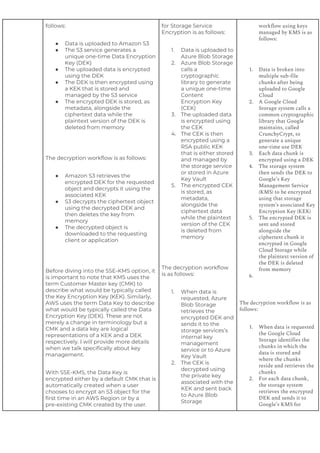
follows:
● Data is uploaded to Amazon S3
● The S3 service generates a
unique one-time Data Encryption
Key (DEK)
● The uploaded data is encrypted
using the DEK
● The DEK is then encrypted using
a KEK that is stored and
managed by the S3 service
● The encrypted DEK is stored, as
metadata, alongside the
ciphertext data while the
plaintext version of the DEK is
deleted from memory
The decryption workflow is as follows:
● Amazon S3 retrieves the
encrypted DEK for the requested
object and decrypts it using the
associated KEK
● S3 decrypts the ciphertext object
using the decrypted DEK and
then deletes the key from
memory
● The decrypted object is
downloaded to the requesting
client or application
Before diving into the SSE-KMS option, it
is important to note that KMS uses the
term Customer Master key (CMK) to
describe what would be typically called
the Key Encryption Key (KEK). Similarly,
AWS uses the term Data Key to describe
what would be typically called the Data
Encryption Key (DEK). These are not
merely a change in terminology but a
CMK and a data key are logical
representations of a KEK and a DEK
respectively. I will provide more details
when we talk specifically about key
management.
With SSE-KMS, the Data Key is
encrypted either by a default CMK that is
automatically created when a user
chooses to encrypt an S3 object for the
first time in an AWS Region or by a
pre-existing CMK created by the user.
for Storage Service
Encryption is as follows:
1. Data is uploaded to
Azure Blob Storage
2. Azure Blob Storage
calls a
cryptographic
library to generate
a unique one-time
Content
Encryption Key
(CEK)
3. The uploaded data
is encrypted using
the CEK
4. The CEK is then
encrypted using a
RSA public KEK
that is either stored
and managed by
the storage service
or stored in Azure
Key Vault
5. The encrypted CEK
is stored, as
metadata,
alongside the
ciphertext data
while the plaintext
version of the CEK
is deleted from
memory
The decryption workflow
is as follows:
1. When data is
requested, Azure
Blob Storage
retrieves the
encrypted DEK and
sends it to the
storage services’s
internal key
management
service or to Azure
Key Vault
2. The CEK is
decrypted using
the private key
associated with the
KEK and sent back
to Azure Blob
Storage
workflow using keys
managed by KMS is as
follows:
1. Data is broken into
multiple sub-file
chunks after being
uploaded to Google
Cloud
2. A Google Cloud
Storage system calls a
common cryptographic
library that Google
maintains, called
CrunchyCrypt, to
generate a unique
one-time use DEK
3. Each data chunk is
encrypted using a DEK
4. The storage system
then sends the DEK to
Google’s Key
Management Service
(KMS) to be encrypted
using that storage
system’s associated Key
Encryption Key (KEK)
5. The encrypted DEK is
sent and stored
alongside the
ciphertext chunk it
encrypted in Google
Cloud Storage while
the plaintext version of
the DEK is deleted
from memory
6.
The decryption workflow is as
follows:
1. When data is requested
the Google Cloud
Storage identifies the
chunks in which the
data is stored and
where the chunks
reside and retrieves the
chunks
2. For each data chunk,
the storage system
retrieves the encrypted
DEK and sends it to
Google’s KMS for
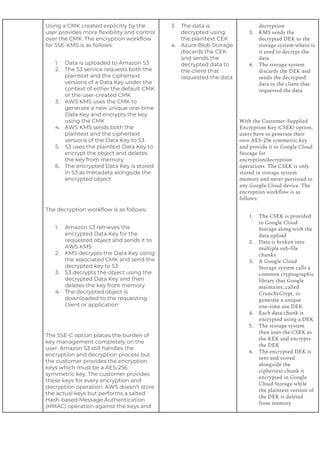
Using a CMK created explicitly by the
user provides more flexibility and control
over the CMK. The encryption workflow
for SSE-KMS is as follows:
1. Data is uploaded to Amazon S3
2. The S3 service requests both the
plaintext and the ciphertext
versions of a Data Key under the
context of either the default CMK
or the user-created CMK
3. AWS KMS uses the CMK to
generate a new unique one-time
Data Key and encrypts the key
using the CMK
4. AWS KMS sends both the
plaintext and the ciphertext
versions of the Data Key to S3
5. S3 uses the plaintext Data Key to
encrypt the object and deletes
the key from memory
6. The encrypted Data Key is stored
in S3 as metadata alongside the
encrypted object
The decryption workflow is as follows:
1. Amazon S3 retrieves the
encrypted Data Key for the
requested object and sends it to
AWS KMS
2. KMS decrypts the Data Key using
the associated CMK and send the
decrypted key to S3
3. S3 decrypts the object using the
decrypted Data Key and then
deletes the key from memory
4. The decrypted object is
downloaded to the requesting
client or application
The SSE-C option places the burden of
key management completely on the
user. Amazon S3 still handles the
encryption and decryption process but
the customer provides the encryption
keys which must be a AES-256
symmetric key. The customer provides
these keys for every encryption and
decryption operation. AWS doesn’t store
the actual keys but performs a salted
Hash-based Message Authentication
(HMAC) operation against the keys and
3. The data is
decrypted using
the plaintext CEK
4. Azure Blob Storage
discards the CEK
and sends the
decrypted data to
the client that
requested the data
decryption
3. KMS sends the
decrypted DEK to the
storage system where is
it used to decrypt the
data
4. The storage system
discards the DEK and
sends the decrypted
data to the client that
requested the data
With the Customer-Supplied
Encryption Key (CSEK) option,
users have to generate their
own AES-256 symmetric key
and provide it to Google Cloud
Storage for
encryption/decryption
operations. The CSEK is only
stored in storage system
memory and never persisted to
any Google Cloud device. The
encryption workflow is as
follows:
1. The CSEK is provided
to Google Cloud
Storage along with the
data upload
2. Data is broken into
multiple sub-file
chunks
3. A Google Cloud
Storage system calls a
common cryptographic
library that Google
maintains, called
CrunchyCrypt, to
generate a unique
one-time use DEK
4. Each data chunk is
encrypted using a DEK
5. The storage system
then uses the CSEK as
the KEK and encrypts
the DEK
6. The encrypted DEK is
sent and stored
alongside the
ciphertext chunk it
encrypted in Google
Cloud Storage while
the plaintext version of
the DEK is deleted
from memory
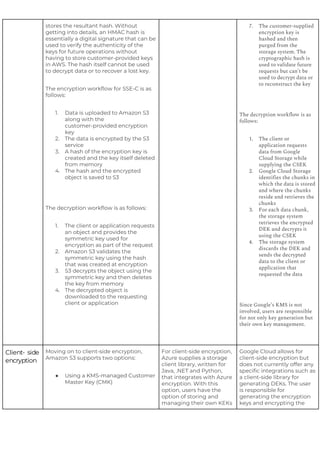
stores the resultant hash. Without
getting into details, an HMAC hash is
essentially a digital signature that can be
used to verify the authenticity of the
keys for future operations without
having to store customer-provided keys
in AWS. The hash itself cannot be used
to decrypt data or to recover a lost key.
The encryption workflow for SSE-C is as
follows:
1. Data is uploaded to Amazon S3
along with the
customer-provided encryption
key
2. The data is encrypted by the S3
service
3. A hash of the encryption key is
created and the key itself deleted
from memory
4. The hash and the encrypted
object is saved to S3
The decryption workflow is as follows:
1. The client or application requests
an object and provides the
symmetric key used for
encryption as part of the request
2. Amazon S3 validates the
symmetric key using the hash
that was created at encryption
3. S3 decrypts the object using the
symmetric key and then deletes
the key from memory
4. The decrypted object is
downloaded to the requesting
client or application
7. The customer-supplied
encryption key is
hashed and then
purged from the
storage system. The
cryptographic hash is
used to validate future
requests but can’t be
used to decrypt data or
to reconstruct the key
The decryption workflow is as
follows:
1. The client or
application requests
data from Google
Cloud Storage while
supplying the CSEK
2. Google Cloud Storage
identifies the chunks in
which the data is stored
and where the chunks
reside and retrieves the
chunks
3. For each data chunk,
the storage system
retrieves the encrypted
DEK and decrypts it
using the CSEK
4. The storage system
discards the DEK and
sends the decrypted
data to the client or
application that
requested the data
Since Google’s KMS is not
involved, users are responsible
for not only key generation but
their own key management.
Moving on to client-side encryption,
Amazon S3 supports two options:
● Using a KMS-managed Customer
Master Key (CMK)
For client-side encryption,
Azure supplies a storage
client library, written for
Java, .NET and Python,
that integrates with Azure
encryption. With this
option, users have the
option of storing and
managing their own KEKs
Google Cloud allows for
client-side encryption but
does not currently offer any
specific integrations such as
a client-side library for
generating DEKs. The user
is responsible for
generating the encryption
keys and encrypting the
Client- side
encryption
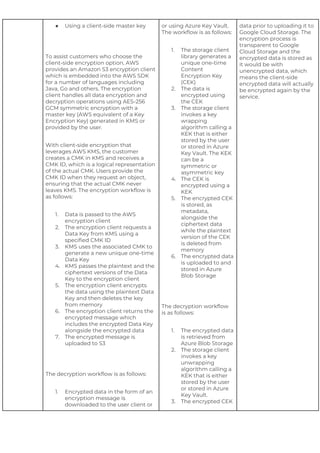
● Using a client-side master key
To assist customers who choose the
client-side encryption option, AWS
provides an Amazon S3 encryption client
which is embedded into the AWS SDK
for a number of languages including
Java, Go and others. The encryption
client handles all data encryption and
decryption operations using AES-256
GCM symmetric encryption with a
master key (AWS equivalent of a Key
Encryption Key) generated in KMS or
provided by the user.
With client-side encryption that
leverages AWS KMS, the customer
creates a CMK in KMS and receives a
CMK ID, which is a logical representation
of the actual CMK. Users provide the
CMK ID when they request an object,
ensuring that the actual CMK never
leaves KMS. The encryption workflow is
as follows:
1. Data is passed to the AWS
encryption client
2. The encryption client requests a
Data Key from KMS using a
specified CMK ID
3. KMS uses the associated CMK to
generate a new unique one-time
Data Key
4. KMS passes the plaintext and the
ciphertext versions of the Data
Key to the encryption client
5. The encryption client encrypts
the data using the plaintext Data
Key and then deletes the key
from memory
6. The encryption client returns the
encrypted message which
includes the encrypted Data Key
alongside the encrypted data
7. The encrypted message is
uploaded to S3
The decryption workflow is as follows:
1. Encrypted data in the form of an
encryption message is
downloaded to the user client or
or using Azure Key Vault.
The workflow is as follows:
1. The storage client
library generates a
unique one-time
Content
Encryption Key
(CEK)
2. The data is
encrypted using
the CEK
3. The storage client
invokes a key
wrapping
algorithm calling a
KEK that is either
stored by the user
or stored in Azure
Key Vault. The KEK
can be a
symmetric or
asymmetric key
4. The CEK is
encrypted using a
KEK
5. The encrypted CEK
is stored, as
metadata,
alongside the
ciphertext data
while the plaintext
version of the CEK
is deleted from
memory
6. The encrypted data
is uploaded to and
stored in Azure
Blob Storage
The decryption workflow
is as follows:
1. The encrypted data
is retrieved from
Azure Blob Storage
2. The storage client
invokes a key
unwrapping
algorithm calling a
KEK that is either
stored by the user
or stored in Azure
Key Vault.
3. The encrypted CEK
data prior to uploading it to
Google Cloud Storage. The
encryption process is
transparent to Google
Cloud Storage and the
encrypted data is stored as
it would be with
unencrypted data, which
means the client-side
encrypted data will actually
be encrypted again by the
service.
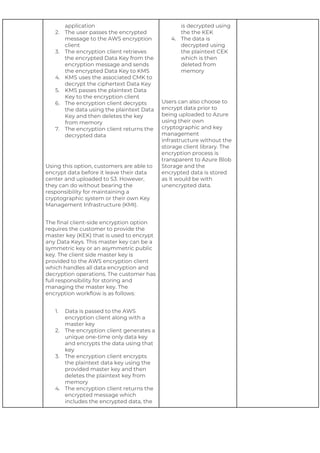
application
2. The user passes the encrypted
message to the AWS encryption
client
3. The encryption client retrieves
the encrypted Data Key from the
encryption message and sends
the encrypted Data Key to KMS
4. KMS uses the associated CMK to
decrypt the ciphertext Data Key
5. KMS passes the plaintext Data
Key to the encryption client
6. The encryption client decrypts
the data using the plaintext Data
Key and then deletes the key
from memory
7. The encryption client returns the
decrypted data
Using this option, customers are able to
encrypt data before it leave their data
center and uploaded to S3. However,
they can do without bearing the
responsibility for maintaining a
cryptographic system or their own Key
Management Infrastructure (KMI).
The final client-side encryption option
requires the customer to provide the
master key (KEK) that is used to encrypt
any Data Keys. This master key can be a
symmetric key or an asymmetric public
key. The client side master key is
provided to the AWS encryption client
which handles all data encryption and
decryption operations. The customer has
full responsibility for storing and
managing the master key. The
encryption workflow is as follows:
1. Data is passed to the AWS
encryption client along with a
master key
2. The encryption client generates a
unique one-time only data key
and encrypts the data using that
key
3. The encryption client encrypts
the plaintext data key using the
provided master key and then
deletes the plaintext key from
memory
4. The encryption client returns the
encrypted message which
includes the encrypted data, the
is decrypted using
the the KEK
4. The data is
decrypted using
the plaintext CEK
which is then
deleted from
memory
Users can also choose to
encrypt data prior to
being uploaded to Azure
using their own
cryptographic and key
management
infrastructure without the
storage client library. The
encryption process is
transparent to Azure Blob
Storage and the
encrypted data is stored
as it would be with
unencrypted data.
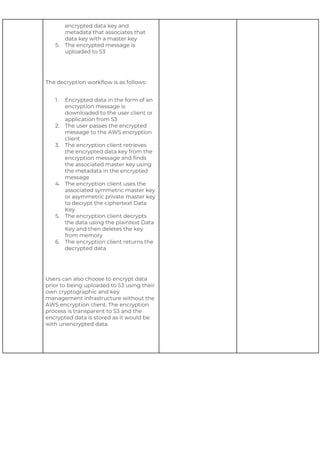
encrypted data key and
metadata that associates that
data key with a master key
5. The encrypted message is
uploaded to S3
The decryption workflow is as follows:
1. Encrypted data in the form of an
encryption message is
downloaded to the user client or
application from S3
2. The user passes the encrypted
message to the AWS encryption
client
3. The encryption client retrieves
the encrypted data key from the
encryption message and finds
the associated master key using
the metadata in the encrypted
message
4. The encryption client uses the
associated symmetric master key
or asymmetric private master key
to decrypt the ciphertext Data
Key
5. The encryption client decrypts
the data using the plaintext Data
Key and then deletes the key
from memory
6. The encryption client returns the
decrypted data
Users can also choose to encrypt data
prior to being uploaded to S3 using their
own cryptographic and key
management infrastructure without the
AWS encryption client. The encryption
process is transparent to S3 and the
encrypted data is stored as it would be
with unencrypted data.
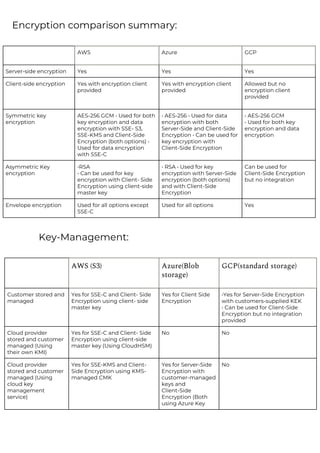
Encryption comparison summary:
AWS Azure GCP
Server-side encryption Yes Yes Yes
Client-side encryption Yes with encryption client
provided
Yes with encryption client
provided
Allowed but no
encryption client
provided
Symmetric key
encryption
AES-256 GCM • Used for both
key encryption and data
encryption with SSE- S3,
SSE-KMS and Client-Side
Encryption (both options) •
Used for data encryption
with SSE-C
• AES-256 • Used for data
encryption with both
Server-Side and Client-Side
Encryption • Can be used for
key encryption with
Client-Side Encryption
• AES-256 GCM
• Used for both key
encryption and data
encryption
Asymmetric Key
encryption
•RSA
• Can be used for key
encryption with Client- Side
Encryption using client-side
master key
• RSA • Used for key
encryption with Server-Side
encryption (both options)
and with Client-Side
Encryption
Can be used for
Client-Side Encryption
but no integration
Envelope encryption Used for all options except
SSE-C
Used for all options Yes
Key-Management:
AWS (S3) Azure(Blob
storage)
GCP(standard storage)
Customer stored and
managed
Yes for SSE-C and Client- Side
Encryption using client- side
master key
Yes for Client Side
Encryption
•Yes for Server-Side Encryption
with customers-supplied KEK
• Can be used for Client-Side
Encryption but no integration
provided
Cloud provider
stored and customer
managed (Using
their own KMI)
Yes for SSE-C and Client- Side
Encryption using client-side
master key (Using CloudHSM)
No No
Cloud provider
stored and customer
managed (Using
cloud key
management
service)
Yes for SSE-KMS and Client-
Side Encryption using KMS-
managed CMK
Yes for Server-Side
Encryption with
customer-managed
keys and
Client-Side
Encryption (Both
using Azure Key
No
Vault)
Cloud provider
stored and managed
Yes for SSE-S3 Yes for Server-Side
Encryption with
service- managed
keys
Default encryption method
Identity Access Management:
Services AWS Azure GCP
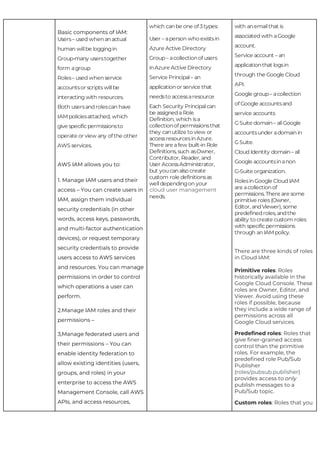
Identity
Management
for Apps
Amazon Cognito
Amazon Cognito lets you add user
sign-up, sign-in, and access control
to your web and mobile apps
quickly and easily.
Security:
Amazon Cognito User Pools
provide a secure user directory that
scales to hundreds of millions of
users.
With Amazon Cognito, your users
can sign in through social identity
providers such as Google,
Facebook, and ​Amazon​, and
through enterprise identity
providers such as ​Microsoft Active
Directory​ via ​SAML​.
Amazon Cognito User Pools is a
standards-based Identity Provider
and supports identity and access
management standards, such as
Oauth 2.0, ​SAML 2.0​, and OpenID
Connect.
Amazon Cognito supports
multi-factor authentication and
encryption of data-at-rest and
in-transit. Amazon Cognito is
HIPAA eligible​ and ​PCI DSS​, ​SOC​,
ISO/IEC 27001​, ​ISO/IEC 27017​,
ISO/IEC 27018​, and ​ISO 9001
compliant.
Azure Active Directory
Azure AD (Active Directory) is
Microsoft’s multi-tenant,
cloud-based Identity as a Service
(IDaaS) solution.
It provides organizations of all
sizes an affordable and easy to
use means of enabling Single
Sign-On (SSO) to thousands of
first and third-party Software as
a Service (SaaS) applications like
Office 365, Salesforce.com,
ServiceNow, Concur and others.
For organizations building their
own applications, Azure AD can
be easily integrated providing a
world-class identity solution.
In addition to SSO, Azure AD
has enhanced capabilities for
robust identity management and
security, such as multi-factor
authentication, self-service
password reset, privileged
identity management, role based
access control, application usage
monitoring, auditing and
security monitoring and alerting.
-
Identity
access and
Management
AWS Identity access and
Management
Management (IAM) enables you
to manage access to AWS
services and resources securely.
Azure RBAC-Role Based
Access Control
Google Cloud IAM
AWS Identity andAccess Grantingaccessto Azure
resourcesstarts with
creatingaSecurity Principal,
Anidentity canbe any of the
following:
Google account – any user
No such service
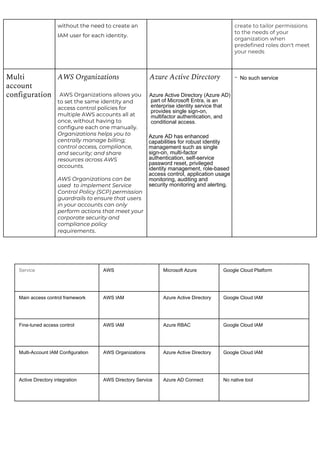
Basic components of IAM:
AWS IAM allows you to:
1. ​Manage IAM users ​and ​their
access​ – You can create users in
IAM, assign them individual
security credentials (in other
words, access keys, passwords,
and ​multi-factor authentication
devices), or request temporary
security credentials to provide
users access to AWS services
and resources. You can manage
permissions in order to control
which operations a user can
perform.
2.​Manage IAM roles​ and ​their
permissions​ –
3,​Manage federated users​ and
their permissions​ – You can
enable identity federation to
allow existing identities (users,
groups, and roles) in your
enterprise to access the AWS
Management Console, call AWS
APIs, and access resources,
cloud user management
There are three kinds of roles
in Cloud IAM:
Primitive roles​: Roles
historically available in the
Google Cloud Console. These
roles are Owner, Editor, and
Viewer. Avoid using these
roles if possible, because
they include a wide range of
permissions across all
Google Cloud services.
Predefined roles​: Roles that
give finer-grained access
control than the primitive
roles. For example, the
predefined role Pub/Sub
Publisher
(​roles/pubsub.publisher​)
provides access to ​only
publish messages to a
Pub/Sub topic.
Custom roles​: Roles that you
Users– used whenanactual
human willbe loggingin
Group-many userstogether
form agroup
Roles– used whenservice
accountsor scripts willbe
interacting with resources.
Both usersandrolescan have
IAMpoliciesattached, which
give specificpermissionsto
operate or view any of the other
AWS services.
which canbe one of 3types:
User – aperson who existsin
Azure Active Directory
Group– acollectionof users
inAzure Active Directory
Service Principal– an
applicationor service that
needsto accessaresource
Each Security Principalcan
be assigneda Role
Definition, which isa
collectionof permissionsthat
they canutilize to view or
accessresourcesinAzure.
There are afew built-in Role
Definitions, such asOwner,
Contributor, Reader, and
User AccessAdministrator,
but youcanalso create
custom role definitionsas
welldependingon your
needs.
with anemailthat is
associated with aGoogle
account.
Service account – an
applicationthat logsin
through the Google Cloud
API.
Google group– acollection
of Google accountsand
service accounts
GSuite domain– allGoogle
accountsunder adomainin
GSuite.
Cloud Identity domain– all
Google accountsinanon
G-Suite organization.
RolesinGoogle Cloud IAM
are acollectionof
permissions. There are some
primitive roles (Owner,
Editor, andViewer), some
predefinedroles, andthe
ability to create custom roles
with specificpermissions
through an IAMpolicy.
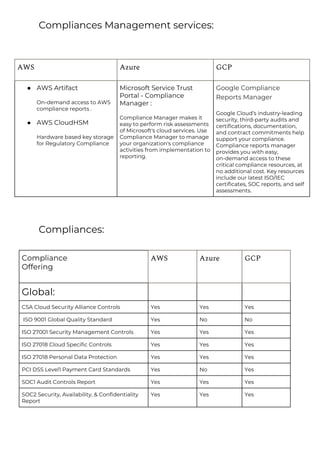
without the need to create an
IAM user for each identity.
create to tailor permissions
to the needs of your
organization when
predefined roles don't meet
your needs
Multi
account
configuration
AWS Organizations
​AWS Organizations​ allows you
to set the same identity and
access control policies for
multiple AWS accounts all at
once, without having to
configure each one manually.
Organizations helps you to
centrally manage billing;
control access, compliance,
and security; and share
resources across AWS
accounts.
AWS Organizations can be
used to implement Service
Control Policy (SCP) permission
guardrails to ensure that users
in your accounts can only
perform actions that meet your
corporate security and
compliance policy
requirements​.
Azure Active Directory -
Service AWS Microsoft Azure Google Cloud Platform
Main access control framework AWS IAM Azure Active Directory Google Cloud IAM
Fine-tuned access control AWS IAM Azure RBAC Google Cloud IAM
Multi-Account IAM Configuration AWS Organizations Azure Active Directory Google Cloud IAM
Active Directory integration AWS Directory Service Azure AD Connect No native tool
No such service
Azure Active Directory (Azure AD)
part of Microsoft Entra, is an
enterprise identity service that
provides single sign-on,
multifactor authentication, and
conditional access.
Azure AD has enhanced
capabilities for robust identity
management such as single
sign-on, multi-factor
authentication, self-service
password reset, privileged
identity management, role-based
access control, application usage
monitoring, auditing and
security monitoring and alerting.
Compliances Management services:
AWS Azure GCP
● AWS Artifact
On-demand access to AWS
compliance reports .
● AWS CloudHSM
Hardware based key storage
for Regulatory Compliance
Microsoft Service Trust
Portal - Compliance
Manager :
Compliance Manager makes it
easy to perform risk assessments
of Microsoft's cloud services. Use
Compliance Manager to manage
your organization's compliance
activities from implementation to
reporting.
Google Compliance
Reports Manager
Google Cloud’s industry-leading
security, third-party audits and
certifications, documentation,
and contract commitments help
support your compliance.
Compliance reports manager
provides you with easy,
on-demand access to these
critical compliance resources, at
no additional cost. Key resources
include our latest ISO/IEC
certificates, SOC reports, and self
assessments.
Compliances:
Compliance
Offering
AWS Azure GCP
Global:
CSA Cloud Security Alliance Controls Yes Yes Yes
ISO 9001 Global Quality Standard Yes No No
ISO 27001 Security Management Controls Yes Yes Yes
ISO 27018 Cloud Specific Controls Yes Yes Yes
ISO 27018 Personal Data Protection Yes Yes Yes
PCI DSS Level1 Payment Card Standards Yes No Yes
SOC1 Audit Controls Report Yes Yes Yes
SOC2 Security, Availability, & Confidentiality
Report
Yes Yes Yes
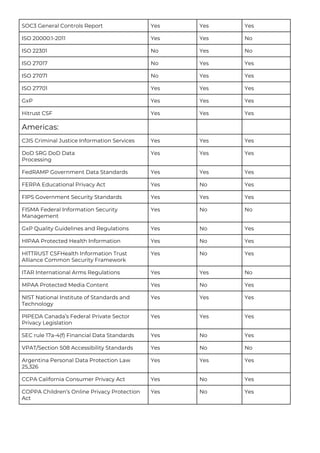
SOC3 General Controls Report Yes Yes Yes
ISO 20000:1-2011 Yes Yes No
ISO 22301 No Yes No
ISO 27017 No Yes Yes
ISO 27071 No Yes Yes
ISO 27701 Yes Yes Yes
GxP Yes Yes Yes
Hitrust CSF Yes Yes Yes
Americas:
CJIS Criminal Justice Information Services Yes Yes Yes
DoD SRG DoD Data
Processing
Yes Yes Yes
FedRAMP Government Data Standards Yes Yes Yes
FERPA Educational Privacy Act Yes No Yes
FIPS Government Security Standards Yes Yes Yes
FISMA Federal Information Security
Management
Yes No No
GxP Quality Guidelines and Regulations Yes No Yes
HIPAA Protected Health Information Yes No Yes
HITTRUST CSFHealth Information Trust
Alliance Common Security Framework
Yes No Yes
ITAR International Arms Regulations Yes Yes No
MPAA Protected Media Content Yes No Yes
NIST National Institute of Standards and
Technology
Yes Yes Yes
PIPEDA Canada’s Federal Private Sector
Privacy Legislation
Yes Yes Yes
SEC rule 17a-4(f) Financial Data Standards Yes No Yes
VPAT/Section 508 Accessibility Standards Yes No No
Argentina Personal Data Protection Law
25,326
Yes Yes Yes
CCPA California Consumer Privacy Act Yes No Yes
COPPA Children’s Online Privacy Protection
Act
Yes No Yes
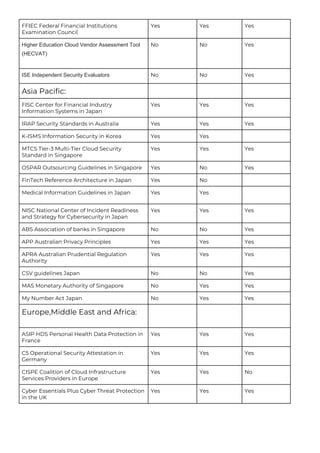
FFIEC Federal Financial Institutions
Examination Council
Yes Yes Yes
Higher Education Cloud Vendor Assessment Tool
(HECVAT)
No No Yes
ISE Independent Security Evaluators No No Yes
Asia Pacific:
FISC Center for Financial Industry
Information Systems in Japan
Yes Yes Yes
IRAP Security Standards in Australia Yes Yes Yes
K-ISMS Information Security in Korea Yes Yes
MTCS Tier-3 Multi-Tier Cloud Security
Standard in Singapore
Yes Yes Yes
OSPAR Outsourcing Guidelines in Singapore Yes No Yes
FinTech Reference Architecture in Japan Yes No
Medical Information Guidelines in Japan Yes Yes
NISC National Center of Incident Readiness
and Strategy for Cybersecurity in Japan
Yes Yes Yes
ABS Association of banks in Singapore No No Yes
APP Australian Privacy Principles Yes Yes Yes
APRA Australian Prudential Regulation
Authority
Yes Yes Yes
CSV guidelines Japan No No Yes
MAS Monetary Authority of Singapore No Yes Yes
My Number Act Japan No Yes Yes
Europe,Middle East and Africa:
ASIP HDS Personal Health Data Protection in
France
Yes Yes Yes
C5 Operational Security Attestation in
Germany
Yes Yes Yes
CISPE Coalition of Cloud Infrastructure
Services Providers in Europe
Yes Yes No
Cyber Essentials Plus Cyber Threat Protection
in the UK
Yes Yes Yes
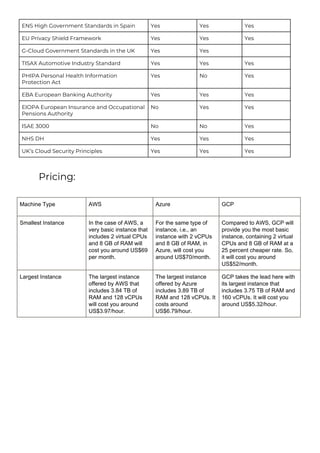
ENS High Government Standards in Spain Yes Yes Yes
EU Privacy Shield Framework Yes Yes Yes
G-Cloud Government Standards in the UK Yes Yes
TISAX Automotive Industry Standard Yes Yes Yes
PHIPA Personal Health Information
Protection Act
Yes No Yes
EBA European Banking Authority Yes Yes Yes
EIOPA European Insurance and Occupational
Pensions Authority
No Yes Yes
ISAE 3000 No No Yes
NHS DH Yes Yes Yes
UK’s Cloud Security Principles Yes Yes Yes
Pricing:
Machine Type AWS Azure GCP
Smallest Instance In the case of AWS, a
very basic instance that
includes 2 virtual CPUs
and 8 GB of RAM will
cost you around US$69
per month.
For the same type of
instance, i.e., an
instance with 2 vCPUs
and 8 GB of RAM, in
Azure, will cost you
around US$70/month.
Compared to AWS, GCP will
provide you the most basic
instance, containing 2 virtual
CPUs and 8 GB of RAM at a
25 percent cheaper rate. So,
it will cost you around
US$52/month.
Largest Instance The largest instance
offered by AWS that
includes 3.84 TB of
RAM and 128 vCPUs
will cost you around
US$3.97/hour.
The largest instance
offered by Azure
includes 3.89 TB of
RAM and 128 vCPUs. It
costs around
US$6.79/hour.
GCP takes the lead here with
its largest instance that
includes 3.75 TB of RAM and
160 vCPUs. It will cost you
around US$5.32/hour.
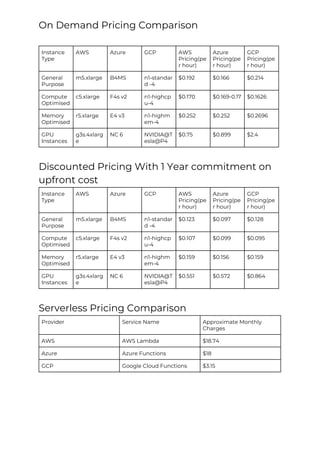
On Demand Pricing Comparison
Instance
Type
AWS Azure GCP AWS
Pricing(pe
r hour)
Azure
Pricing(pe
r hour)
GCP
Pricing(pe
r hour)
General
Purpose
m5.xlarge B4MS n1-standar
d -4
$0.192 $0.166 $0.214
Compute
Optimised
c5.xlarge F4s v2 n1-highcp
u-4
$0.170 $0.169-0.17 $0.1626
Memory
Optimised
r5.xlarge E4 v3 n1-highm
em-4
$0.252 $0.252 $0.2696
GPU
Instances
g3s.4xlarg
e
NC 6 NVIDIA@T
esla@P4
$0.75 $0.899 $2.4
Discounted Pricing With 1 Year commitment on
upfront cost
Instance
Type
AWS Azure GCP AWS
Pricing(pe
r hour)
Azure
Pricing(pe
r hour)
GCP
Pricing(pe
r hour)
General
Purpose
m5.xlarge B4MS n1-standar
d -4
$0.123 $0.097 $0.128
Compute
Optimised
c5.xlarge F4s v2 n1-highcp
u-4
$0.107 $0.099 $0.095
Memory
Optimised
r5.xlarge E4 v3 n1-highm
em-4
$0.159 $0.156 $0.159
GPU
Instances
g3s.4xlarg
e
NC 6 NVIDIA@T
esla@P4
$0.551 $0.572 $0.864
Serverless Pricing Comparison
Provider Service Name Approximate Monthly
Charges
AWS AWS Lambda $18.74
Azure Azure Functions $18
GCP Google Cloud Functions $3.15

Cloud_providers_comparison.pdf

  • 1.
    Services AWS AzureGCP IaaS Amazon Elastic Compute Cloud Virtual Machines Google Compute Engine PaaS AWS Elastic Beanstalk Amazon lightsail App Service and Cloud Services Google App Engine Containers Amazon Elastic Compute Cloud Container Service Azure Kubernetes Service (AKS), Azure Container Registry Google Kubernetes Engine, GCP Container Registry Serverless Functions AWS Lambda AWS Fargate Azure Functions Google Cloud Functions Virtual private server Amazon lightsail Azure Virtual Network Google Virtual Private Cloud(VPC) Hybrid cloud / Virtual machines VMware cloud on AWS Azure Virtual Machine Google Compute Engine Virtual Machine Instances On-Premise Services AWS Outposts Azure Stack HCI Istio and GKE Batch computing Services AWS Batch Azure Batch Google Dataflow Compute Services: Comparative Study: Cloud Providers AWS vs Azure vs GCP github.com/Harshith-umesh medium.com/@harshith.umesh
  • 2.
    Networking Services Services AWSAzure GCP Virtual Network Amazon Virtual Private Cloud (VPC) Virtual Networks (VNets) Virtual Private Cloud Elastic Load Balancer Elastic Load Balancer Load Balancer Google Cloud Load Balancing Peering Direct Connect ExpressRoute Google Cloud Interconnect DNS Amazon Route 53 Azure DNS Google Cloud DNS Monitor and control Microservices AWS App Mesh Azure Monitoring Google Monitoring and Trace Content delivery network (CDN) Amazon Cloudfront Azure CDN Google Cloud CDN API Manager Amazon API Gateway Azure API Management Google Apigee Database Services: Services AWS Azure GCP RDBMS Amazon Aurora Amazon RDS SQL Database Google Cloud SQL NoSQL: Key–Value Amazon DynamoDB Table Storage Google Cloud Datastore Google Cloud Bigtable NoSQL: Indexed Amazon SimpleDB Azure Cosmos DB Google Cloud Datastore In-memory caching system Amazon ElastiCache Azure cache for Redis Google MemoryStore Data Warehousing Amazon Red-shift Azure SQL Data Warehouse Google BigQuery Database Migration Service AWS Data migration service Azure Database Migration Service GCP Database Migration Time Series Database Amazon Timestream Azure Time Series Insights Google TimeSeries
  • 3.
    Storage Services: Storage AWSAzure GCP File System Amazon Elastic file system(EFS) Security​-There are three main levels of access controls to consider when it comes to EFS file systems. 1.IAM permissions for API calls 2.Security groups for EC2 instances 3.Network File System-level users, groups, and permissions Amazon groups play a critical role in establishing network connectivity between EC2 instances and EFS file systems.. security groups act as firewalls and enforce rules. Azure Files - Security​ - Fine grained access control to Azure Files is granted by assigning file share using Azure Active Directory Domain Services. The steps are : 1.Enable Azure AD DS authentication over SMB for your storage account. 2.Assign access permissions for a share to an Azure AD identity 3.Configure NTFS permissions over SMB for directories and files. 4.Mount an Azure FileShare from a domain joined VM. Cloud Filestore - Security​- In a Filestore instance, only root users on connected clients have read/write access to the file share. You grant access to Filestore operations by granting Cloud Identity and Access Management (IAM) roles to users​. IAM permissions only control access to Filestore operations, like creating a Filestore instance. Access to operations on the Filestore file share, like read or execute, are determined by Linux permissions. You can use the Filestore Editor and Filestore Viewer roles to grant Filestore permissions to users. If you prefer, you can also use ​primitive roles​ for this purpose. Highly durable storage Amazon S3 (simple storage system) Security​-S3 is the only cloud storage platform that supports three different forms of encryption, including server-side encryption and client-side encryption. You can manage access to Amazon S3 by granting other AWS accounts and users permissions to perform resource operations by writing an access policy in IAM.You can also add an optional layer of security by enabling Multi-Factor Authentication (MFA) for object operations. S3 supports security standards and compliance certifications Azure Disk Storage - Security​ - Azure Disk Storage supports authentication and authorization with Azure AD for the Blob and Queue services via role-based access control (RBAC). Nearline storage Coldline storage Security-​Uniform (recommended): ​Uniform bucket-level access​ allows you to use ​Cloud Identity and Access Management (Cloud IAM)​ alone to manage permissions. Cloud IAM applies permissions to all the objects contained inside the bucket or groups of objects with common name prefixes. Cloud IAM also allows you to use features that are not available when working with ACLs, such as ​Cloud IAM Conditions​ and Cloud Audit Logs.
  • 4.
    including PCI-DSS, HIPAA/HITECH, FedRAMP,EU Data Protection Directive, and FISMA. Amazon EFS Fine-grained: The fine-grained option enables you to use Cloud IAM and ​Access Control Lists (ACLs)​ together to manage permissions. ACLs are a legacy access control system for Cloud Storage designed for interoperability with Amazon S3. You can specify access and apply permissions at both the bucket level and per individual object. Archival data Amazon Glacier Glacier stores data in the form of archives. An archive can represent a single file, or you can combine several files to be uploaded as a single archive, and organized in vaults. Security​ –By default, only the account owner can access Amazon Glacier data. If other people or services need to access the data, you can set up access controls using AWS IAM service. Glacier uses server-side encryption to encrypt all data at rest. Amazon Glacier allows you to lock vaults where long-term records retention is mandated, along with the use of lockable policies. Azure Archive Storage - Security​ - Archive Storage provides secure data transfer to the cloud using HTTPS and automatically secures that data at rest using 256-bit AES keys. Archival Storage - Security-​The principle of least privilege is a critical foundational element in GCP security and security more broadly.​ ​All cloud storage data are encrypted. The user can also provide their own encryption keys using gutil. Rapidly Changing Data Amazon Elastic Block system (EBS) Security​:IAM service enables access to EBS volumes, allowing you to specify who can access which EBS volumes. EBS encryption enables data-at-rest and data-in-motion security. It offers seamless encryption of both EBS boot volumes and data volumes as well as snapshots. Access control plus encryption offers a strong defense-in-depth security strategy for your data. Amazon EFS Azure Data Lake - Security​ - Azure Data Lake Storage Gen2 implements an access control model that supports both Azure role-based access control (RBAC) and POSIX-like access control lists (ACLs). Standard Storage - Security - The Cloud Storage access control system includes the ability to specify that objects are publicly readable. The Cloud Storage access control system includes the ability to specify that buckets are publicly writable. While configuring a bucket this way can be convenient for various purposes, we recommend against using this permission - it can be abused for distributing illegal content, viruses, and other malware, and the bucket owner is
  • 5.
    legally and financially responsiblefor the content stored in their buckets. Temporary Storage Amazon EC2 instance storage Security​ ​–IAM service helps to gain secure control over which users can perform operations such as launch and termination of EC2 instances in your account. When you stop or terminate an instance, the applications and data in its instance store are erased, and thus no other instance can have access to the instance store in the future. Azure VM Temporary Storage - Security​ - Fine grained access control for Azure VMs is achieved using RBAC(Role Based Access Control). - Large-Scale Data transfer Aws snowball Security ​–Snowball can be integrated with AWS Identity and Access Management (IAM) services to control access over which actions a user can perform. Similarly, an IAM user that creates a Snowball job must have permissions to access the Amazon S3 buckets that will be used for the import operations. All data loaded onto a Snowball appliance is encrypted using 256-bit encryption. Snowball is physically secured using an industry-standard Trusted Platform Module (TPM) that uses a dedicated processor designed to detect any unauthorised modifications to the hardware, firmware, or software. In addition, Snowball is included in the AWS HIPAA compliance program so you can use Snowball to transfer large amounts of Protected Health Information (PHI) data in and out of AWS. Azure Data Box - Security​ - 1.Data Box Device Protection 2.Data Box Service Protection 3.Data Box Data Protection Cloud Data Transfer- Security​: Securely capture, ship, and upload your data to Google Cloud Storage using the Transfer Appliance 100 TB or 480 TB models.​Data is encrypted at the moment of capture and you decrypt your own data once as it is ingested into its final storage bucket. The Cloud Storage Transfer Service allow you to delete existing objects in the destination bucket if they don't have a corresponding object in the source. Delete source objects after transferring them.
  • 6.
    Security Services: Services AWSAzure GCP Unified security and compliance centre AW​s ​Security Hub Azure Security Center GCP Security Command Center Threat Detection service Amazon Guard-Duty Azure Advanced Threat Detection GCP Event Threat Detection Application Security Analyzer Amazon Inspector Azure Built-in vulnerability scanner(Qualys) GCP Security Analytics and Operations Certificate Manager AWS Certificate Manager Part of Azure Key Vault(No Separate Service) Google managed SSL certificates(No separate manager) Key Management Service AWS Key-Management Service Azure Key Vault Google Cloud Key Management Service Malicious Web Traffic filter AWS WAF Azure Firewall GCP Networking Firewall Firewall Manager AWS firewall manager Azure Firewall GCP Networking Firewall DDOS Protection AWS shield Azure DDoS Protection Google Cloud Armor Cloud Single sign on service AWS Single sign-on Azure Single Sign-On Google Cloud Single Sign-On Secrets Manager AWS secrets manager Azure Key Vault(No separate service) Google Cloud Secret Manager Security issues investigating service Amazon Detective Azure Security Center(No separate service) Event Threat Detection Resource Access Manager AWS Resource Access Manager Azure RBAC(Role Based Access Control) Google Cloud Identity Access and Management General Pros : 1.The core unit in AWS is an account, and accounts are totally Pros : 1.Activity logs cover console and API activity for the entire Pros : 1.Like Azure, GCP is better centralized, because many
  • 7.
    isolated from eachother until you open access. 2.Most core security features are available, and there is excellent implementation of security groups (firewalls) and granular IAM. Cons : 1.The isolation makes enterprise scale management more difficult than it needs to be. 2.Managing IAM at scale can be tough, especially as you enable the more advanced features like permission boundaries and conditionals. Summary : Isolation is the name of the game in AWS. Services can’t even access other services unless you explicitly enable access. tenant (organization) by default, across regions. There isn’t any need to build custom lambda functions to move events between regions or the other complexities like we see on AWS. 2.The Azure Security Center also covers the entire tenant (with the right licensing) and can be scoped to allow subscription-level access so local teams can manage their own alerts. This is what Security Hub is building up to become. Cons : 1.Many services default to less secure configurations. For example if you create a new virtual network and a new virtual machine on it, all ports and protocols are open. AWS and GCP always start with default deny, but Azure starts with default allow. 2.There are two different types of security groups (network and application), which are managed differently, and one doesn’t even show up in the portal when you look at your networks. 3.Some services deploy an endpoint onto a virtual network, but don’t respect its network security groups. It looks like you are protected, but instead ports and/or destinations are exposed to the Internet, and the customer can’t change this feature. Summary : Azure default configurations are often contradictory to the principle of least privilege. You can​ be secure on Azure but you need to be very careful, move slowly, and test everything. capabilities were planned out from the start — compared to AWS features which were only added a few years ago. Within your account Projects are isolated from each other except where you connect services. 2.Stackdriver Logging works great, and Google offers the open source Forseti for managing security configurations. Cons : 1.It offers organization-wide logging but coverage isn’t complete. It has more granular IAM which can be easier to manage centrally, but some aspects of custom policies are still in beta. 2.GCP also generally defaults to secure configurations, but doesn’t always have the same range of security features as AWS. 3.There are a very small number of security experts with deep GCP experience, and the less robust community and tooling. Summary : GCP security is on a continuum somewhere between AWS and Azure. The default security configuration of GCP is not as strict as AWS, but more strict than Azure.
  • 8.
    Encryption: Type AWS AzureGCP General Amazon S3 supports both server-side and client-side encryption with a number of options for each. Customers have the option of enabling server-side encryption by default for all uploaded objects to S3. For both server-side and client-side encryption, AWS utilizes AES-256 with Galois Counter Mode (GCM) for any symmetric key encryption operations. Without getting into detail, GCM provides authenticated encryption by adding a unique tag to the ciphertext which verifies that the encrypted data has not been tampered with in any way. Envelope encryption is used for all client-side options and for all server-side options except when the customer provides the encryption key. A​zure supports both server-side and client-side encryption with users having the option of enabling server-side encryption by default for all uploaded objects. In Azure, server-side encryption is called Storage Service Encryption when it pertains to blob storage. Azure leverages envelope encryption using AES-256 symmetric keys for data or content encryption (Microsoft uses the term Content Encryption Key in place of Data Encryption Key) and supports using either a symmetric or an asymmetric keys for the Key Encryption Key (KEK), depending on who is generating and managing the keys. Google Cloud Storage performs server-side encryption by default on all uploaded objects. All data is broken into chunks which can be up to several GB in size. Using envelope encryption, each chunk of data is encrypted with a unique Data Encryption Key (DEK) that is also encrypted with a Key Encryption Key (KEK) and the encrypted version of the DEK is then stored alongside the encrypted data. The encrypted chunks of data are then distributed across Google’s storage systems. Both the KEK and the DEK use symmetric AES-256 with Galois Counter Mode (GCM) cipher. For server-side encryption, Amazon S3 supports three options: ● Amazon S3-managed keys (SSE-S3) ● AWS Key Management Service (KMS) managed keys (SSE-KMS) ● Customer-provided keys (SSE-C) With SSE-S3, both the KEKs and the DEKs are stored and managed by the S3 service. All key management functions, including the periodic rotation of keys, are performed by the service without input required from the user. S3 does this by using an AWS-managed Key Management Service (KMS). The encryption workflow for SSE-S3 is as Storage Service Encryption supports using a KEK that is either: ● Managed by the storage service itself, using Microsoft’s internal key management infrastructure ● Customer managed and stored in Key Vault, the Azure key management service offering. The encryption workflow Google Cloud Storage supports server-side encryption with two options: ● Keys generated and stored in Google’s KMS ● Customer-supplied Encryption Key With server-side encryption using KEKs that are stored and managed by Google’s internal KMS (not to be confused with Google’s Cloud KMS service) or supplied by the customer. The Server-side encryption Comparison on the various types of encryption services (general encryption, server-side and client-side encryption) provided:
  • 9.
    follows: ● Data isuploaded to Amazon S3 ● The S3 service generates a unique one-time Data Encryption Key (DEK) ● The uploaded data is encrypted using the DEK ● The DEK is then encrypted using a KEK that is stored and managed by the S3 service ● The encrypted DEK is stored, as metadata, alongside the ciphertext data while the plaintext version of the DEK is deleted from memory The decryption workflow is as follows: ● Amazon S3 retrieves the encrypted DEK for the requested object and decrypts it using the associated KEK ● S3 decrypts the ciphertext object using the decrypted DEK and then deletes the key from memory ● The decrypted object is downloaded to the requesting client or application Before diving into the SSE-KMS option, it is important to note that KMS uses the term Customer Master key (CMK) to describe what would be typically called the Key Encryption Key (KEK). Similarly, AWS uses the term Data Key to describe what would be typically called the Data Encryption Key (DEK). These are not merely a change in terminology but a CMK and a data key are logical representations of a KEK and a DEK respectively. I will provide more details when we talk specifically about key management. With SSE-KMS, the Data Key is encrypted either by a default CMK that is automatically created when a user chooses to encrypt an S3 object for the first time in an AWS Region or by a pre-existing CMK created by the user. for Storage Service Encryption is as follows: 1. Data is uploaded to Azure Blob Storage 2. Azure Blob Storage calls a cryptographic library to generate a unique one-time Content Encryption Key (CEK) 3. The uploaded data is encrypted using the CEK 4. The CEK is then encrypted using a RSA public KEK that is either stored and managed by the storage service or stored in Azure Key Vault 5. The encrypted CEK is stored, as metadata, alongside the ciphertext data while the plaintext version of the CEK is deleted from memory The decryption workflow is as follows: 1. When data is requested, Azure Blob Storage retrieves the encrypted DEK and sends it to the storage services’s internal key management service or to Azure Key Vault 2. The CEK is decrypted using the private key associated with the KEK and sent back to Azure Blob Storage workflow using keys managed by KMS is as follows: 1. Data is broken into multiple sub-file chunks after being uploaded to Google Cloud 2. A Google Cloud Storage system calls a common cryptographic library that Google maintains, called CrunchyCrypt, to generate a unique one-time use DEK 3. Each data chunk is encrypted using a DEK 4. The storage system then sends the DEK to Google’s Key Management Service (KMS) to be encrypted using that storage system’s associated Key Encryption Key (KEK) 5. The encrypted DEK is sent and stored alongside the ciphertext chunk it encrypted in Google Cloud Storage while the plaintext version of the DEK is deleted from memory 6. The decryption workflow is as follows: 1. When data is requested the Google Cloud Storage identifies the chunks in which the data is stored and where the chunks reside and retrieves the chunks 2. For each data chunk, the storage system retrieves the encrypted DEK and sends it to Google’s KMS for
  • 10.
    Using a CMKcreated explicitly by the user provides more flexibility and control over the CMK. The encryption workflow for SSE-KMS is as follows: 1. Data is uploaded to Amazon S3 2. The S3 service requests both the plaintext and the ciphertext versions of a Data Key under the context of either the default CMK or the user-created CMK 3. AWS KMS uses the CMK to generate a new unique one-time Data Key and encrypts the key using the CMK 4. AWS KMS sends both the plaintext and the ciphertext versions of the Data Key to S3 5. S3 uses the plaintext Data Key to encrypt the object and deletes the key from memory 6. The encrypted Data Key is stored in S3 as metadata alongside the encrypted object The decryption workflow is as follows: 1. Amazon S3 retrieves the encrypted Data Key for the requested object and sends it to AWS KMS 2. KMS decrypts the Data Key using the associated CMK and send the decrypted key to S3 3. S3 decrypts the object using the decrypted Data Key and then deletes the key from memory 4. The decrypted object is downloaded to the requesting client or application The SSE-C option places the burden of key management completely on the user. Amazon S3 still handles the encryption and decryption process but the customer provides the encryption keys which must be a AES-256 symmetric key. The customer provides these keys for every encryption and decryption operation. AWS doesn’t store the actual keys but performs a salted Hash-based Message Authentication (HMAC) operation against the keys and 3. The data is decrypted using the plaintext CEK 4. Azure Blob Storage discards the CEK and sends the decrypted data to the client that requested the data decryption 3. KMS sends the decrypted DEK to the storage system where is it used to decrypt the data 4. The storage system discards the DEK and sends the decrypted data to the client that requested the data With the Customer-Supplied Encryption Key (CSEK) option, users have to generate their own AES-256 symmetric key and provide it to Google Cloud Storage for encryption/decryption operations. The CSEK is only stored in storage system memory and never persisted to any Google Cloud device. The encryption workflow is as follows: 1. The CSEK is provided to Google Cloud Storage along with the data upload 2. Data is broken into multiple sub-file chunks 3. A Google Cloud Storage system calls a common cryptographic library that Google maintains, called CrunchyCrypt, to generate a unique one-time use DEK 4. Each data chunk is encrypted using a DEK 5. The storage system then uses the CSEK as the KEK and encrypts the DEK 6. The encrypted DEK is sent and stored alongside the ciphertext chunk it encrypted in Google Cloud Storage while the plaintext version of the DEK is deleted from memory
  • 11.
    stores the resultanthash. Without getting into details, an HMAC hash is essentially a digital signature that can be used to verify the authenticity of the keys for future operations without having to store customer-provided keys in AWS. The hash itself cannot be used to decrypt data or to recover a lost key. The encryption workflow for SSE-C is as follows: 1. Data is uploaded to Amazon S3 along with the customer-provided encryption key 2. The data is encrypted by the S3 service 3. A hash of the encryption key is created and the key itself deleted from memory 4. The hash and the encrypted object is saved to S3 The decryption workflow is as follows: 1. The client or application requests an object and provides the symmetric key used for encryption as part of the request 2. Amazon S3 validates the symmetric key using the hash that was created at encryption 3. S3 decrypts the object using the symmetric key and then deletes the key from memory 4. The decrypted object is downloaded to the requesting client or application 7. The customer-supplied encryption key is hashed and then purged from the storage system. The cryptographic hash is used to validate future requests but can’t be used to decrypt data or to reconstruct the key The decryption workflow is as follows: 1. The client or application requests data from Google Cloud Storage while supplying the CSEK 2. Google Cloud Storage identifies the chunks in which the data is stored and where the chunks reside and retrieves the chunks 3. For each data chunk, the storage system retrieves the encrypted DEK and decrypts it using the CSEK 4. The storage system discards the DEK and sends the decrypted data to the client or application that requested the data Since Google’s KMS is not involved, users are responsible for not only key generation but their own key management. Moving on to client-side encryption, Amazon S3 supports two options: ● Using a KMS-managed Customer Master Key (CMK) For client-side encryption, Azure supplies a storage client library, written for Java, .NET and Python, that integrates with Azure encryption. With this option, users have the option of storing and managing their own KEKs Google Cloud allows for client-side encryption but does not currently offer any specific integrations such as a client-side library for generating DEKs. The user is responsible for generating the encryption keys and encrypting the Client- side encryption
  • 12.
    ● Using aclient-side master key To assist customers who choose the client-side encryption option, AWS provides an Amazon S3 encryption client which is embedded into the AWS SDK for a number of languages including Java, Go and others. The encryption client handles all data encryption and decryption operations using AES-256 GCM symmetric encryption with a master key (AWS equivalent of a Key Encryption Key) generated in KMS or provided by the user. With client-side encryption that leverages AWS KMS, the customer creates a CMK in KMS and receives a CMK ID, which is a logical representation of the actual CMK. Users provide the CMK ID when they request an object, ensuring that the actual CMK never leaves KMS. The encryption workflow is as follows: 1. Data is passed to the AWS encryption client 2. The encryption client requests a Data Key from KMS using a specified CMK ID 3. KMS uses the associated CMK to generate a new unique one-time Data Key 4. KMS passes the plaintext and the ciphertext versions of the Data Key to the encryption client 5. The encryption client encrypts the data using the plaintext Data Key and then deletes the key from memory 6. The encryption client returns the encrypted message which includes the encrypted Data Key alongside the encrypted data 7. The encrypted message is uploaded to S3 The decryption workflow is as follows: 1. Encrypted data in the form of an encryption message is downloaded to the user client or or using Azure Key Vault. The workflow is as follows: 1. The storage client library generates a unique one-time Content Encryption Key (CEK) 2. The data is encrypted using the CEK 3. The storage client invokes a key wrapping algorithm calling a KEK that is either stored by the user or stored in Azure Key Vault. The KEK can be a symmetric or asymmetric key 4. The CEK is encrypted using a KEK 5. The encrypted CEK is stored, as metadata, alongside the ciphertext data while the plaintext version of the CEK is deleted from memory 6. The encrypted data is uploaded to and stored in Azure Blob Storage The decryption workflow is as follows: 1. The encrypted data is retrieved from Azure Blob Storage 2. The storage client invokes a key unwrapping algorithm calling a KEK that is either stored by the user or stored in Azure Key Vault. 3. The encrypted CEK data prior to uploading it to Google Cloud Storage. The encryption process is transparent to Google Cloud Storage and the encrypted data is stored as it would be with unencrypted data, which means the client-side encrypted data will actually be encrypted again by the service.
  • 13.
    application 2. The userpasses the encrypted message to the AWS encryption client 3. The encryption client retrieves the encrypted Data Key from the encryption message and sends the encrypted Data Key to KMS 4. KMS uses the associated CMK to decrypt the ciphertext Data Key 5. KMS passes the plaintext Data Key to the encryption client 6. The encryption client decrypts the data using the plaintext Data Key and then deletes the key from memory 7. The encryption client returns the decrypted data Using this option, customers are able to encrypt data before it leave their data center and uploaded to S3. However, they can do without bearing the responsibility for maintaining a cryptographic system or their own Key Management Infrastructure (KMI). The final client-side encryption option requires the customer to provide the master key (KEK) that is used to encrypt any Data Keys. This master key can be a symmetric key or an asymmetric public key. The client side master key is provided to the AWS encryption client which handles all data encryption and decryption operations. The customer has full responsibility for storing and managing the master key. The encryption workflow is as follows: 1. Data is passed to the AWS encryption client along with a master key 2. The encryption client generates a unique one-time only data key and encrypts the data using that key 3. The encryption client encrypts the plaintext data key using the provided master key and then deletes the plaintext key from memory 4. The encryption client returns the encrypted message which includes the encrypted data, the is decrypted using the the KEK 4. The data is decrypted using the plaintext CEK which is then deleted from memory Users can also choose to encrypt data prior to being uploaded to Azure using their own cryptographic and key management infrastructure without the storage client library. The encryption process is transparent to Azure Blob Storage and the encrypted data is stored as it would be with unencrypted data.
  • 14.
    encrypted data keyand metadata that associates that data key with a master key 5. The encrypted message is uploaded to S3 The decryption workflow is as follows: 1. Encrypted data in the form of an encryption message is downloaded to the user client or application from S3 2. The user passes the encrypted message to the AWS encryption client 3. The encryption client retrieves the encrypted data key from the encryption message and finds the associated master key using the metadata in the encrypted message 4. The encryption client uses the associated symmetric master key or asymmetric private master key to decrypt the ciphertext Data Key 5. The encryption client decrypts the data using the plaintext Data Key and then deletes the key from memory 6. The encryption client returns the decrypted data Users can also choose to encrypt data prior to being uploaded to S3 using their own cryptographic and key management infrastructure without the AWS encryption client. The encryption process is transparent to S3 and the encrypted data is stored as it would be with unencrypted data.
  • 15.
    Encryption comparison summary: AWSAzure GCP Server-side encryption Yes Yes Yes Client-side encryption Yes with encryption client provided Yes with encryption client provided Allowed but no encryption client provided Symmetric key encryption AES-256 GCM • Used for both key encryption and data encryption with SSE- S3, SSE-KMS and Client-Side Encryption (both options) • Used for data encryption with SSE-C • AES-256 • Used for data encryption with both Server-Side and Client-Side Encryption • Can be used for key encryption with Client-Side Encryption • AES-256 GCM • Used for both key encryption and data encryption Asymmetric Key encryption •RSA • Can be used for key encryption with Client- Side Encryption using client-side master key • RSA • Used for key encryption with Server-Side encryption (both options) and with Client-Side Encryption Can be used for Client-Side Encryption but no integration Envelope encryption Used for all options except SSE-C Used for all options Yes Key-Management: AWS (S3) Azure(Blob storage) GCP(standard storage) Customer stored and managed Yes for SSE-C and Client- Side Encryption using client- side master key Yes for Client Side Encryption •Yes for Server-Side Encryption with customers-supplied KEK • Can be used for Client-Side Encryption but no integration provided Cloud provider stored and customer managed (Using their own KMI) Yes for SSE-C and Client- Side Encryption using client-side master key (Using CloudHSM) No No Cloud provider stored and customer managed (Using cloud key management service) Yes for SSE-KMS and Client- Side Encryption using KMS- managed CMK Yes for Server-Side Encryption with customer-managed keys and Client-Side Encryption (Both using Azure Key No
  • 16.
    Vault) Cloud provider stored andmanaged Yes for SSE-S3 Yes for Server-Side Encryption with service- managed keys Default encryption method Identity Access Management: Services AWS Azure GCP Identity Management for Apps Amazon Cognito Amazon Cognito lets you add user sign-up, sign-in, and access control to your web and mobile apps quickly and easily. Security: Amazon Cognito User Pools provide a secure user directory that scales to hundreds of millions of users. With Amazon Cognito, your users can sign in through social identity providers such as Google, Facebook, and ​Amazon​, and through enterprise identity providers such as ​Microsoft Active Directory​ via ​SAML​. Amazon Cognito User Pools is a standards-based Identity Provider and supports identity and access management standards, such as Oauth 2.0, ​SAML 2.0​, and OpenID Connect. Amazon Cognito supports multi-factor authentication and encryption of data-at-rest and in-transit. Amazon Cognito is HIPAA eligible​ and ​PCI DSS​, ​SOC​, ISO/IEC 27001​, ​ISO/IEC 27017​, ISO/IEC 27018​, and ​ISO 9001 compliant. Azure Active Directory Azure AD (Active Directory) is Microsoft’s multi-tenant, cloud-based Identity as a Service (IDaaS) solution. It provides organizations of all sizes an affordable and easy to use means of enabling Single Sign-On (SSO) to thousands of first and third-party Software as a Service (SaaS) applications like Office 365, Salesforce.com, ServiceNow, Concur and others. For organizations building their own applications, Azure AD can be easily integrated providing a world-class identity solution. In addition to SSO, Azure AD has enhanced capabilities for robust identity management and security, such as multi-factor authentication, self-service password reset, privileged identity management, role based access control, application usage monitoring, auditing and security monitoring and alerting. - Identity access and Management AWS Identity access and Management Management (IAM) enables you to manage access to AWS services and resources securely. Azure RBAC-Role Based Access Control Google Cloud IAM AWS Identity andAccess Grantingaccessto Azure resourcesstarts with creatingaSecurity Principal, Anidentity canbe any of the following: Google account – any user No such service
  • 17.
    Basic components ofIAM: AWS IAM allows you to: 1. ​Manage IAM users ​and ​their access​ – You can create users in IAM, assign them individual security credentials (in other words, access keys, passwords, and ​multi-factor authentication devices), or request temporary security credentials to provide users access to AWS services and resources. You can manage permissions in order to control which operations a user can perform. 2.​Manage IAM roles​ and ​their permissions​ – 3,​Manage federated users​ and their permissions​ – You can enable identity federation to allow existing identities (users, groups, and roles) in your enterprise to access the AWS Management Console, call AWS APIs, and access resources, cloud user management There are three kinds of roles in Cloud IAM: Primitive roles​: Roles historically available in the Google Cloud Console. These roles are Owner, Editor, and Viewer. Avoid using these roles if possible, because they include a wide range of permissions across all Google Cloud services. Predefined roles​: Roles that give finer-grained access control than the primitive roles. For example, the predefined role Pub/Sub Publisher (​roles/pubsub.publisher​) provides access to ​only publish messages to a Pub/Sub topic. Custom roles​: Roles that you Users– used whenanactual human willbe loggingin Group-many userstogether form agroup Roles– used whenservice accountsor scripts willbe interacting with resources. Both usersandrolescan have IAMpoliciesattached, which give specificpermissionsto operate or view any of the other AWS services. which canbe one of 3types: User – aperson who existsin Azure Active Directory Group– acollectionof users inAzure Active Directory Service Principal– an applicationor service that needsto accessaresource Each Security Principalcan be assigneda Role Definition, which isa collectionof permissionsthat they canutilize to view or accessresourcesinAzure. There are afew built-in Role Definitions, such asOwner, Contributor, Reader, and User AccessAdministrator, but youcanalso create custom role definitionsas welldependingon your needs. with anemailthat is associated with aGoogle account. Service account – an applicationthat logsin through the Google Cloud API. Google group– acollection of Google accountsand service accounts GSuite domain– allGoogle accountsunder adomainin GSuite. Cloud Identity domain– all Google accountsinanon G-Suite organization. RolesinGoogle Cloud IAM are acollectionof permissions. There are some primitive roles (Owner, Editor, andViewer), some predefinedroles, andthe ability to create custom roles with specificpermissions through an IAMpolicy.
  • 18.
    without the needto create an IAM user for each identity. create to tailor permissions to the needs of your organization when predefined roles don't meet your needs Multi account configuration AWS Organizations ​AWS Organizations​ allows you to set the same identity and access control policies for multiple AWS accounts all at once, without having to configure each one manually. Organizations helps you to centrally manage billing; control access, compliance, and security; and share resources across AWS accounts. AWS Organizations can be used to implement Service Control Policy (SCP) permission guardrails to ensure that users in your accounts can only perform actions that meet your corporate security and compliance policy requirements​. Azure Active Directory - Service AWS Microsoft Azure Google Cloud Platform Main access control framework AWS IAM Azure Active Directory Google Cloud IAM Fine-tuned access control AWS IAM Azure RBAC Google Cloud IAM Multi-Account IAM Configuration AWS Organizations Azure Active Directory Google Cloud IAM Active Directory integration AWS Directory Service Azure AD Connect No native tool No such service Azure Active Directory (Azure AD) part of Microsoft Entra, is an enterprise identity service that provides single sign-on, multifactor authentication, and conditional access. Azure AD has enhanced capabilities for robust identity management such as single sign-on, multi-factor authentication, self-service password reset, privileged identity management, role-based access control, application usage monitoring, auditing and security monitoring and alerting.
  • 19.
    Compliances Management services: AWSAzure GCP ● AWS Artifact On-demand access to AWS compliance reports . ● AWS CloudHSM Hardware based key storage for Regulatory Compliance Microsoft Service Trust Portal - Compliance Manager : Compliance Manager makes it easy to perform risk assessments of Microsoft's cloud services. Use Compliance Manager to manage your organization's compliance activities from implementation to reporting. Google Compliance Reports Manager Google Cloud’s industry-leading security, third-party audits and certifications, documentation, and contract commitments help support your compliance. Compliance reports manager provides you with easy, on-demand access to these critical compliance resources, at no additional cost. Key resources include our latest ISO/IEC certificates, SOC reports, and self assessments. Compliances: Compliance Offering AWS Azure GCP Global: CSA Cloud Security Alliance Controls Yes Yes Yes ISO 9001 Global Quality Standard Yes No No ISO 27001 Security Management Controls Yes Yes Yes ISO 27018 Cloud Specific Controls Yes Yes Yes ISO 27018 Personal Data Protection Yes Yes Yes PCI DSS Level1 Payment Card Standards Yes No Yes SOC1 Audit Controls Report Yes Yes Yes SOC2 Security, Availability, & Confidentiality Report Yes Yes Yes
  • 20.
    SOC3 General ControlsReport Yes Yes Yes ISO 20000:1-2011 Yes Yes No ISO 22301 No Yes No ISO 27017 No Yes Yes ISO 27071 No Yes Yes ISO 27701 Yes Yes Yes GxP Yes Yes Yes Hitrust CSF Yes Yes Yes Americas: CJIS Criminal Justice Information Services Yes Yes Yes DoD SRG DoD Data Processing Yes Yes Yes FedRAMP Government Data Standards Yes Yes Yes FERPA Educational Privacy Act Yes No Yes FIPS Government Security Standards Yes Yes Yes FISMA Federal Information Security Management Yes No No GxP Quality Guidelines and Regulations Yes No Yes HIPAA Protected Health Information Yes No Yes HITTRUST CSFHealth Information Trust Alliance Common Security Framework Yes No Yes ITAR International Arms Regulations Yes Yes No MPAA Protected Media Content Yes No Yes NIST National Institute of Standards and Technology Yes Yes Yes PIPEDA Canada’s Federal Private Sector Privacy Legislation Yes Yes Yes SEC rule 17a-4(f) Financial Data Standards Yes No Yes VPAT/Section 508 Accessibility Standards Yes No No Argentina Personal Data Protection Law 25,326 Yes Yes Yes CCPA California Consumer Privacy Act Yes No Yes COPPA Children’s Online Privacy Protection Act Yes No Yes
  • 21.
    FFIEC Federal FinancialInstitutions Examination Council Yes Yes Yes Higher Education Cloud Vendor Assessment Tool (HECVAT) No No Yes ISE Independent Security Evaluators No No Yes Asia Pacific: FISC Center for Financial Industry Information Systems in Japan Yes Yes Yes IRAP Security Standards in Australia Yes Yes Yes K-ISMS Information Security in Korea Yes Yes MTCS Tier-3 Multi-Tier Cloud Security Standard in Singapore Yes Yes Yes OSPAR Outsourcing Guidelines in Singapore Yes No Yes FinTech Reference Architecture in Japan Yes No Medical Information Guidelines in Japan Yes Yes NISC National Center of Incident Readiness and Strategy for Cybersecurity in Japan Yes Yes Yes ABS Association of banks in Singapore No No Yes APP Australian Privacy Principles Yes Yes Yes APRA Australian Prudential Regulation Authority Yes Yes Yes CSV guidelines Japan No No Yes MAS Monetary Authority of Singapore No Yes Yes My Number Act Japan No Yes Yes Europe,Middle East and Africa: ASIP HDS Personal Health Data Protection in France Yes Yes Yes C5 Operational Security Attestation in Germany Yes Yes Yes CISPE Coalition of Cloud Infrastructure Services Providers in Europe Yes Yes No Cyber Essentials Plus Cyber Threat Protection in the UK Yes Yes Yes
  • 22.
    ENS High GovernmentStandards in Spain Yes Yes Yes EU Privacy Shield Framework Yes Yes Yes G-Cloud Government Standards in the UK Yes Yes TISAX Automotive Industry Standard Yes Yes Yes PHIPA Personal Health Information Protection Act Yes No Yes EBA European Banking Authority Yes Yes Yes EIOPA European Insurance and Occupational Pensions Authority No Yes Yes ISAE 3000 No No Yes NHS DH Yes Yes Yes UK’s Cloud Security Principles Yes Yes Yes Pricing: Machine Type AWS Azure GCP Smallest Instance In the case of AWS, a very basic instance that includes 2 virtual CPUs and 8 GB of RAM will cost you around US$69 per month. For the same type of instance, i.e., an instance with 2 vCPUs and 8 GB of RAM, in Azure, will cost you around US$70/month. Compared to AWS, GCP will provide you the most basic instance, containing 2 virtual CPUs and 8 GB of RAM at a 25 percent cheaper rate. So, it will cost you around US$52/month. Largest Instance The largest instance offered by AWS that includes 3.84 TB of RAM and 128 vCPUs will cost you around US$3.97/hour. The largest instance offered by Azure includes 3.89 TB of RAM and 128 vCPUs. It costs around US$6.79/hour. GCP takes the lead here with its largest instance that includes 3.75 TB of RAM and 160 vCPUs. It will cost you around US$5.32/hour.
  • 23.
    On Demand PricingComparison Instance Type AWS Azure GCP AWS Pricing(pe r hour) Azure Pricing(pe r hour) GCP Pricing(pe r hour) General Purpose m5.xlarge B4MS n1-standar d -4 $0.192 $0.166 $0.214 Compute Optimised c5.xlarge F4s v2 n1-highcp u-4 $0.170 $0.169-0.17 $0.1626 Memory Optimised r5.xlarge E4 v3 n1-highm em-4 $0.252 $0.252 $0.2696 GPU Instances g3s.4xlarg e NC 6 NVIDIA@T esla@P4 $0.75 $0.899 $2.4 Discounted Pricing With 1 Year commitment on upfront cost Instance Type AWS Azure GCP AWS Pricing(pe r hour) Azure Pricing(pe r hour) GCP Pricing(pe r hour) General Purpose m5.xlarge B4MS n1-standar d -4 $0.123 $0.097 $0.128 Compute Optimised c5.xlarge F4s v2 n1-highcp u-4 $0.107 $0.099 $0.095 Memory Optimised r5.xlarge E4 v3 n1-highm em-4 $0.159 $0.156 $0.159 GPU Instances g3s.4xlarg e NC 6 NVIDIA@T esla@P4 $0.551 $0.572 $0.864 Serverless Pricing Comparison Provider Service Name Approximate Monthly Charges AWS AWS Lambda $18.74 Azure Azure Functions $18 GCP Google Cloud Functions $3.15