Google Apps Script
​ Shashidhar Gurumurthy
​ Technical Solution Architect
​ sgurumurthy@salesforce.com
​ 
Minimal Fuss Data Transformation using Google Apps Script
Agenda
v Google Apps Script – What, Why & WIIFM
v Getting Started
v Some Transformations
v Interacting with Salesforce
v Preserving Parent /Child Relationship without External Id
Overview
A brief overview of ‘What’ & ‘Why’ Google Apps Script
What’s Google Apps Script
v A scripting language based on Javascript
v Let’s you work with Google Apps such as Docs, Sheets & Forms by
extending their functionality
v Add custom menus, dialogs and sidebars to Google Docs, Sheets & Forms
v Write custom functions for Google Sheets
v Publish web apps – either standalone or embedded in Google Sites
v Interact with other Google Services such as AdSense, Analytics, Calendar,
Drive, Gmail & Maps
Why Google Apps Script
v Familiarity
v Ease of a spreadsheet
v Known language: Javascript
v If you have a Google account, you have Google Apps Script
v Nothing to install – code editor right in the browser
v Runs on Google infrastructure
v Better than Excel/CSVs – no corruption of special characters
Relevancy
​ What’s in it for me?
v Most Salesforce projects have a data management requirement.
v Data loads from internal & external sources
v  Change formats
v  Combining files, splitting files
v Data loads between Production & Sandbox environments
v  Maintain parent child relationships
v Excel/CSV not very efficient (manual steps required) whereas ETL tools are,
probably, an overkill during early stages of a project.
v Google Apps Script provides a middle ground to automate (script) data
transformations.
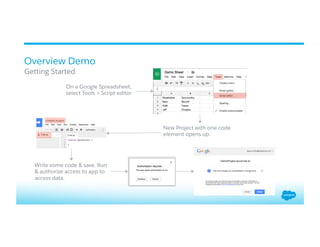
Overview Demo
​ Getting Started
On a Google Spreadsheet,
select Tools > Script editor
New Project with one code
element opens up.
Write some code & save. Run
& authorize access to app to
access data.
Services and Functions
Some theory before we get into the juicy bits
Key Services & Classes
​ Key functions
v SpreadsheetApp: Allows users to open Google Sheets and to create new ones.
This class is the parent class for the Spreadsheet service.
v  getActive().addMenu()
v ScriptApp: Access and manipulate script publishing and triggers.
v  getService().getUrl() – returns web url – used for OAuth redirect url.
v PropertiesService: Allows scripts to store simple data in key-value pairs scoped
to one script, one user of a script, or one document in which an add-on is used.
v  getScriptProperties()
v  getUserProperties()
v  getDocumentProperties()
Key Services & Classes
Key functions
v HtmlService: This service allows scripts to return HTML, usually as a user
interface.
v  createHtmlOutput()
v Utilities: This service provides utilities for string encoding/decoding, date
formatting, JSON manipulation, and other miscellaneous tasks.
v URL Fetch Service: This service allows scripts to access other resources on the
web by fetching URLs. Supports HTTP headers and methods.
v  fetch(url, options)
v Many other services such as Calendar, Contacts, Drive, Document, Mail Service,
Gmail and other advanced Google services are available.
Reading & Writing Sheets
​ Key Functions and Usage
v getActiveSpreadsheet(): Returns the currently active spreadsheet or null if there
is none.
v getActiveSheet(): Returns the active sheet in a spreadsheet.
v openById(id) and openByUrl(url): Opens the spreadsheet with the given id/url.
v spreadsheet.getSheetByName(name): Within a spreadsheet, get a particular
sheet by name.
v setActiveSheet(sheet): Sets the active sheet in a spreadsheet.
v setActiveSpreadsheet(newActiveSpreadsheet): Sets the active spreadsheet.
Reading & Writing Sheets
​ Key Functions and Usage
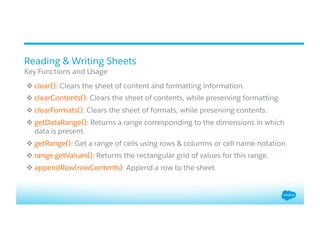
v clear(): Clears the sheet of content and formatting information.
v clearContents(): Clears the sheet of contents, while preserving formatting.
v clearFormats(): Clears the sheet of formats, while preserving contents.
v getDataRange(): Returns a range corresponding to the dimensions in which
data is present.
v getRange(): Get a range of cells using rows & columns or cell name notation.
v range.getValues(): Returns the rectangular grid of values for this range.
v appendRow(rowContents): Append a row to the sheet.
Usage Scenarios
Typical scenarios where you will find a use for Google Apps Script
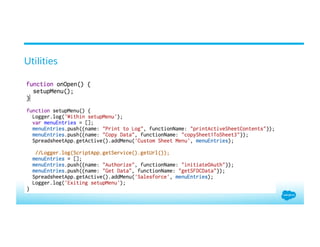
Utilities
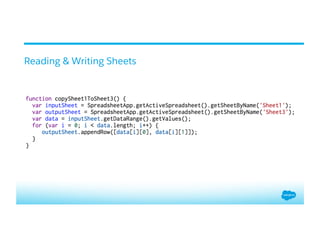
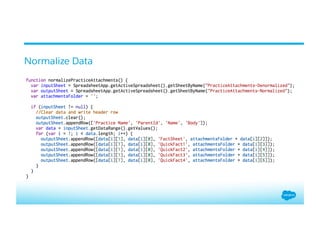
Reading & Writing Sheets
Normalize Data
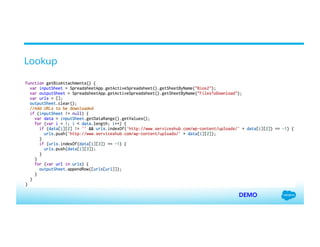
Lookup
DEMO
Read from / Write to Salesforce
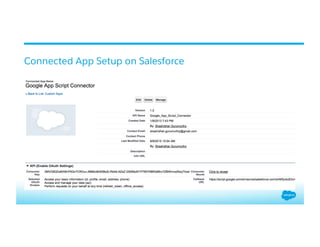
v Setup Connected App on Salesforce
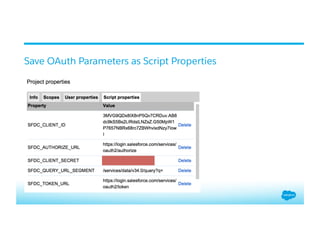
v Setup OAuth flow on Apps Script
v Connect to Salesforce using UrlFetch Service
Connected App Setup on Salesforce
Save OAuth Parameters as Script Properties
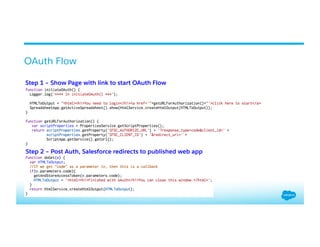
OAuth Flow
Step 1 – Show Page with link to start OAuth Flow
Step 2 – Post Auth, Salesforce redirects to published web app
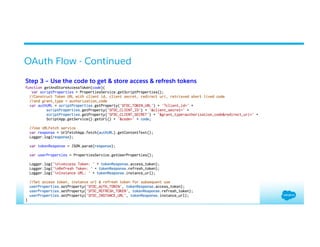
OAuth Flow - Continued
Step 3 – Use the code to get & store access & refresh tokens
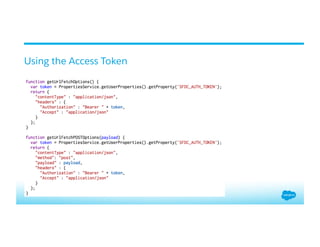
Using the Access Token
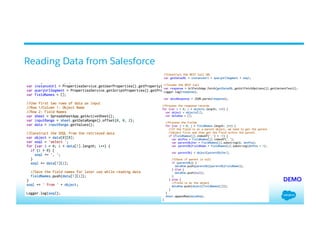
Reading Data from Salesforce
DEMO
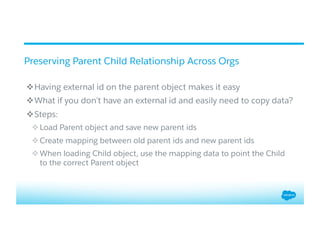
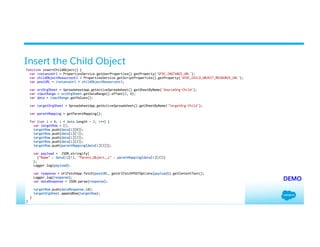
Preserving Parent Child Relationship Across Orgs
v Having external id on the parent object makes it easy
v What if you don’t have an external id and easily need to copy data?
v Steps:
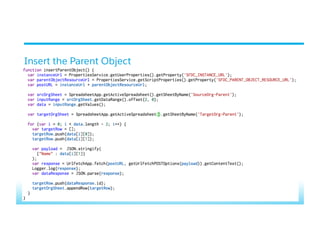
v Load Parent object and save new parent ids
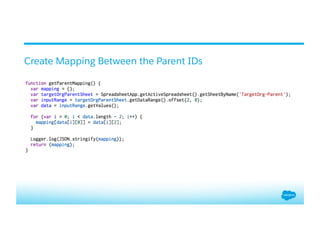
v Create mapping between old parent ids and new parent ids
v When loading Child object, use the mapping data to point the Child
to the correct Parent object
Insert the Parent Object
Create Mapping Between the Parent IDs
Insert the Child Object
DEMO
Reference Material
v Google Apps Script Home: https://developers.google.com/apps-script/
v YouTube Video – Integrating Google Apps with Salesforce using
Google Apps Script (Arun Nagarajan, Nov 2012):
http://bit.ly/1M9OWur
v YouTube Video – Integrating Salesforce.com with Google Apps
(Arun Nagarajan, Dreamforce 2013): http://bit.ly/1LWnCwE
v This Presentation: Session’s Chatter Feed on Dreamforce App
v Code: https://github.com/shashig/df15-google-apps-script
v Spreadsheet to go with demo code: http://bit.ly/1LF0TCI
Q & A
Thank you

Minimal Fuss Data Transformation Using Google Apps Scripts

  • 1.
    Google Apps Script ​ ShashidharGurumurthy ​ Technical Solution Architect ​ sgurumurthy@salesforce.com ​  Minimal Fuss Data Transformation using Google Apps Script
  • 2.
    Agenda v Google Apps Script– What, Why & WIIFM v Getting Started v Some Transformations v Interacting with Salesforce v Preserving Parent /Child Relationship without External Id
  • 3.
    Overview A brief overviewof ‘What’ & ‘Why’ Google Apps Script
  • 4.
    What’s Google AppsScript v A scripting language based on Javascript v Let’s you work with Google Apps such as Docs, Sheets & Forms by extending their functionality v Add custom menus, dialogs and sidebars to Google Docs, Sheets & Forms v Write custom functions for Google Sheets v Publish web apps – either standalone or embedded in Google Sites v Interact with other Google Services such as AdSense, Analytics, Calendar, Drive, Gmail & Maps
  • 5.
    Why Google AppsScript v Familiarity v Ease of a spreadsheet v Known language: Javascript v If you have a Google account, you have Google Apps Script v Nothing to install – code editor right in the browser v Runs on Google infrastructure v Better than Excel/CSVs – no corruption of special characters
  • 6.
    Relevancy ​ What’s in itfor me? v Most Salesforce projects have a data management requirement. v Data loads from internal & external sources v  Change formats v  Combining files, splitting files v Data loads between Production & Sandbox environments v  Maintain parent child relationships v Excel/CSV not very efficient (manual steps required) whereas ETL tools are, probably, an overkill during early stages of a project. v Google Apps Script provides a middle ground to automate (script) data transformations.
  • 7.
    Overview Demo ​ Getting Started Ona Google Spreadsheet, select Tools > Script editor New Project with one code element opens up. Write some code & save. Run & authorize access to app to access data.
  • 8.
    Services and Functions Sometheory before we get into the juicy bits
  • 9.
    Key Services &Classes ​ Key functions v SpreadsheetApp: Allows users to open Google Sheets and to create new ones. This class is the parent class for the Spreadsheet service. v  getActive().addMenu() v ScriptApp: Access and manipulate script publishing and triggers. v  getService().getUrl() – returns web url – used for OAuth redirect url. v PropertiesService: Allows scripts to store simple data in key-value pairs scoped to one script, one user of a script, or one document in which an add-on is used. v  getScriptProperties() v  getUserProperties() v  getDocumentProperties()
  • 10.
    Key Services &Classes Key functions v HtmlService: This service allows scripts to return HTML, usually as a user interface. v  createHtmlOutput() v Utilities: This service provides utilities for string encoding/decoding, date formatting, JSON manipulation, and other miscellaneous tasks. v URL Fetch Service: This service allows scripts to access other resources on the web by fetching URLs. Supports HTTP headers and methods. v  fetch(url, options) v Many other services such as Calendar, Contacts, Drive, Document, Mail Service, Gmail and other advanced Google services are available.
  • 11.
    Reading & WritingSheets ​ Key Functions and Usage v getActiveSpreadsheet(): Returns the currently active spreadsheet or null if there is none. v getActiveSheet(): Returns the active sheet in a spreadsheet. v openById(id) and openByUrl(url): Opens the spreadsheet with the given id/url. v spreadsheet.getSheetByName(name): Within a spreadsheet, get a particular sheet by name. v setActiveSheet(sheet): Sets the active sheet in a spreadsheet. v setActiveSpreadsheet(newActiveSpreadsheet): Sets the active spreadsheet.
  • 12.
    Reading & WritingSheets ​ Key Functions and Usage v clear(): Clears the sheet of content and formatting information. v clearContents(): Clears the sheet of contents, while preserving formatting. v clearFormats(): Clears the sheet of formats, while preserving contents. v getDataRange(): Returns a range corresponding to the dimensions in which data is present. v getRange(): Get a range of cells using rows & columns or cell name notation. v range.getValues(): Returns the rectangular grid of values for this range. v appendRow(rowContents): Append a row to the sheet.
  • 13.
    Usage Scenarios Typical scenarioswhere you will find a use for Google Apps Script
  • 14.
  • 15.
  • 16.
  • 17.
  • 18.
    Read from /Write to Salesforce v Setup Connected App on Salesforce v Setup OAuth flow on Apps Script v Connect to Salesforce using UrlFetch Service
  • 19.
    Connected App Setupon Salesforce
  • 20.
    Save OAuth Parametersas Script Properties
  • 21.
    OAuth Flow Step 1– Show Page with link to start OAuth Flow Step 2 – Post Auth, Salesforce redirects to published web app
  • 22.
    OAuth Flow -Continued Step 3 – Use the code to get & store access & refresh tokens
  • 23.
  • 24.
    Reading Data fromSalesforce DEMO
  • 25.
    Preserving Parent ChildRelationship Across Orgs v Having external id on the parent object makes it easy v What if you don’t have an external id and easily need to copy data? v Steps: v Load Parent object and save new parent ids v Create mapping between old parent ids and new parent ids v When loading Child object, use the mapping data to point the Child to the correct Parent object
  • 26.
  • 27.
    Create Mapping Betweenthe Parent IDs
  • 28.
    Insert the ChildObject DEMO
  • 29.
    Reference Material v Google AppsScript Home: https://developers.google.com/apps-script/ v YouTube Video – Integrating Google Apps with Salesforce using Google Apps Script (Arun Nagarajan, Nov 2012): http://bit.ly/1M9OWur v YouTube Video – Integrating Salesforce.com with Google Apps (Arun Nagarajan, Dreamforce 2013): http://bit.ly/1LWnCwE v This Presentation: Session’s Chatter Feed on Dreamforce App v Code: https://github.com/shashig/df15-google-apps-script v Spreadsheet to go with demo code: http://bit.ly/1LF0TCI
  • 30.
  • 31.