Currency Translation in HFM
Keith Berry
US-Analytics
US-Analytics is an industry leading professional services firm focused
on helping clients successfully establish and maintain long term Business
Intelligence (BI) and Enterprise Performance Management (EPM)
applications and programs.
• BI and EPM Strategy and Processes
• Custom and packaged BI and EPM Applications
• Oracle Infrastructure
• Managed Services and Hosting
For over a decade, market leading companies have trusted US-Analytics
to solve complex business problems, drive managerial excellence, and
deliver operational agility.
Learn more at Booth #107 or
www.us-analytics.com
 12+ Years Hyperion implementation experience
 Certified in HFM and Essbase
 Second year at Kscope
Background
Currency Translation 101
● US GAAP
● ASC Topic 830, Foreign Currency Matters (old SFAS 52)
● IFRS
● IAS 21,The Effects of Changes In Foreign Exchange Rates
Some differences in determining functional currency and translating
hyperinflationary currencies
Guidance
• Local Currency
● Currency where the entity is located
• Functional Currency
● “Currency of the primary economic environment in which the entity operates”
● Determined by multiple factors listed in accounting guidance
● Management judgment
• Reporting/Presentation Currency
● Currency in which the consolidated entity will report
Currency Type Definitions
• Temporal Rate Method
● Also called Remeasurement
● Translate from Local Currency to Functional Currency
● Translation gain/loss reported as part of Net Income
• Current Rate Method
● Translate from Functional Currency to Reporting Currency
● Translation gain/loss reported in Equity
Translation Methods
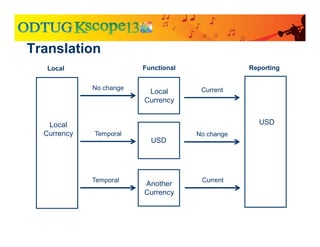
Translation
Local
Currency
USD
USD
Local
Currency
Another
Currency
No change
Temporal
Temporal
Current
Current
No change
Local Functional Reporting
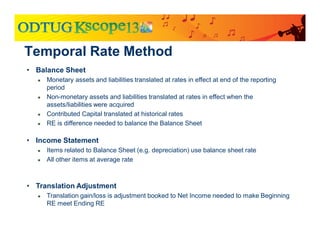
• Balance Sheet
● Monetary assets and liabilities translated at rates in effect at end of the reporting
period
● Non-monetary assets and liabilities translated at rates in effect when the
assets/liabilities were acquired
● Contributed Capital translated at historical rates
● RE is difference needed to balance the Balance Sheet
• Income Statement
● Items related to Balance Sheet (e.g. depreciation) use balance sheet rate
● All other items at average rate
• Translation Adjustment
● Translation gain/loss is adjustment booked to Net Income needed to make Beginning
RE meet Ending RE
Temporal Rate Method
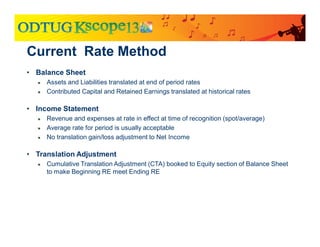
Current Rate Method
• Balance Sheet
● Assets and Liabilities translated at end of period rates
● Contributed Capital and Retained Earnings translated at historical rates
• Income Statement
● Revenue and expenses at rate in effect at time of recognition (spot/average)
● Average rate for period is usually acceptable
● No translation gain/loss adjustment to Net Income
• Translation Adjustment
● Cumulative Translation Adjustment (CTA) booked to Equity section of Balance Sheet
to make Beginning RE meet Ending RE
Current Rate Example
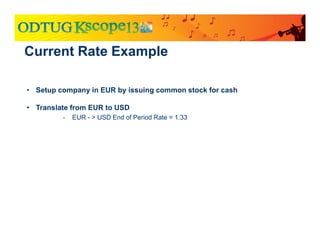
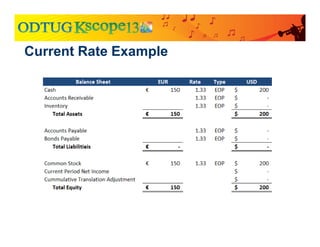
• Setup company in EUR by issuing common stock for cash
• Translate from EUR to USD
• EUR - > USD End of Period Rate = 1.33
Current Rate Example
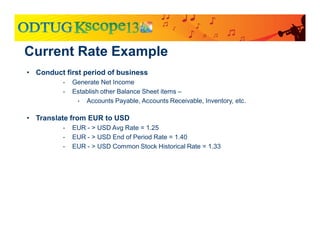
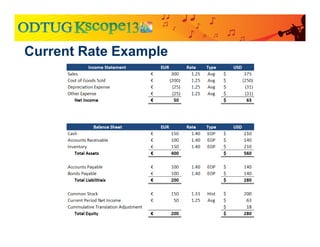
• Conduct first period of business
• Generate Net Income
• Establish other Balance Sheet items –
• Accounts Payable, Accounts Receivable, Inventory, etc.
• Translate from EUR to USD
• EUR - > USD Avg Rate = 1.25
• EUR - > USD End of Period Rate = 1.40
• EUR - > USD Common Stock Historical Rate = 1.33
Current Rate Example
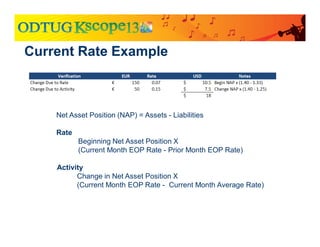
Net Asset Position (NAP) = Assets - Liabilities
Rate
Beginning Net Asset Position X
(Current Month EOP Rate - Prior Month EOP Rate)
Activity
Change in Net Asset Position X
(Current Month EOP Rate - Current Month Average Rate)
Recap
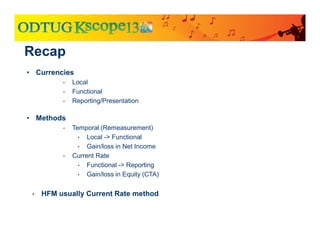
• Currencies
• Local
• Functional
• Reporting/Presentation
• Methods
• Temporal (Remeasurement)
• Local -> Functional
• Gain/loss in Net Income
• Current Rate
• Functional -> Reporting
• Gain/loss in Equity (CTA)
• HFM usually Current Rate method
HFM Translation Out of the Box
Configuration
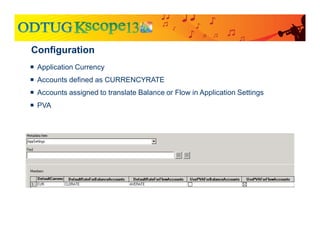
 Application Currency
 Accounts defined as CURRENCYRATE
 Accounts assigned to translate Balance or Flow in Application Settings
 PVA
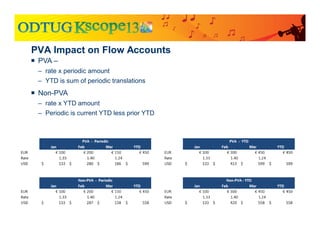
PVA Impact on Flow Accounts
 PVA –
– rate x periodic amount
– YTD is sum of periodic translations
 Non-PVA
– rate x YTD amount
– Periodic is current YTD less prior YTD
Configuration
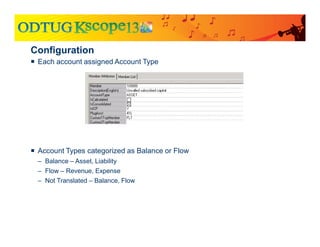
 Each account assigned Account Type
 Account Types categorized as Balance or Flow
– Balance – Asset, Liability
– Flow – Revenue, Expense
– Not Translated – Balance, Flow
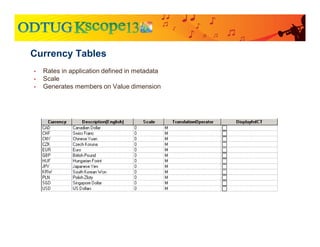
• Rates in application defined in metadata
• Scale
• Generates members on Value dimension
Currency Tables
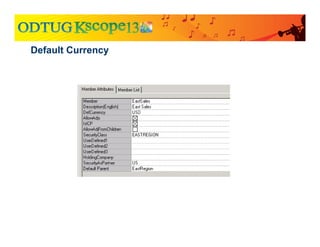
Default Currency
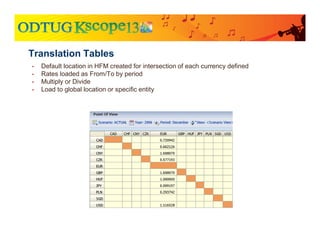
• Default location in HFM created for intersection of each currency defined
• Rates loaded as From/To by period
• Multiply or Divide
• Load to global location or specific entity
Translation Tables
• Direct rate in current entity Italy.EUR -> Italy.USD
• Indirect rate in current entity Italy.USD -> Italy.EUR
• Direct rate in [None] entity [None].EUR -> [None].USD
• Indirect rate in [None] entity [None].USD -> [None].EUR
• Triangulation through application currency
Default Translation
• If specific From/To rate not loaded, HFM will derive rate via the application’s
base currency
● Example:
● Application Currency = EUR
● GBP -> CHF rate has not been loaded
● GBP -> EUR
● EUR -> CHF
● GBP -> EUR = 1.17
● EUR -> CHF = 1.23
● GBP -> CHF translated at 1.17 x 1.23 = 1.439
Triangulation
Calculation
● There are too many data points to handle individually
● Group the data by dimension to make it easier to manage
● Must pull all data points in a group to access any single
point
● HFM calls these groups “subcubes”
HFM Deals With Data in Groups
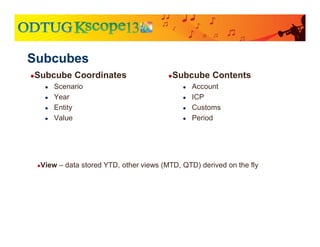
●Subcube Contents
● Account
● ICP
● Customs
● Period
●Subcube Coordinates
● Scenario
● Year
● Entity
● Value
Subcubes
●View – data stored YTD, other views (MTD, QTD) derived on the fly
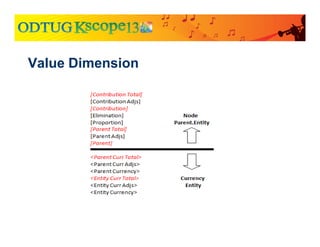
Two types of subcubes based on the Value Dimension
● Currency Subcubes
● Base data for the entity
● Triplet
● The angle brackets
● Node Subcubes
● Tracks aggregation and eliminations for an entity into a specific parent
● The square brackets – [Elimination], [Proportion], etc.
● Currency of the parent (not identified in member name)
Subcube Types
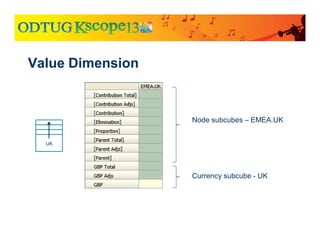
Value Dimension
GBP Total
GBP Adjs
GBP
France
UK
Node subcubes – EMEA.UK
Currency subcube – UK
EMEA
Node subcubes – EMEA.France
Currency subcube – France
Currency subcube - EMEA
HFM Value Dimension
[Elimination]
[Proportion], Etc.
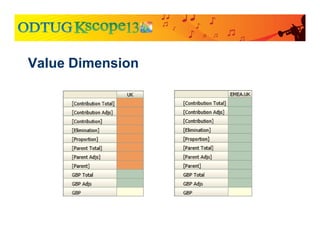
Value Dimension
Node subcubes – EMEA.UK
Currency subcube - UK
UK
Value Dimension
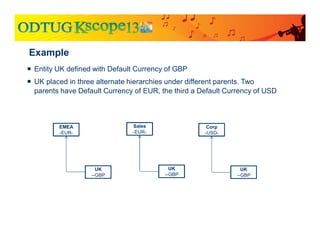
Example
 Entity UK defined with Default Currency of GBP
 UK placed in three alternate hierarchies under different parents. Two
parents have Default Currency of EUR, the third a Default Currency of USD
UK
--GBP
EMEA
-EUR-
UK
--GBP
Sales
-EUR-
UK
--GBP
Corp
-USD-
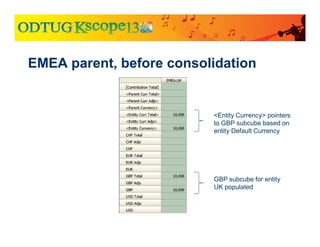
EMEA parent, before consolidation
GBP subcube for entity
UK populated
<Entity Currency> pointers
to GBP subcube based on
entity Default Currency
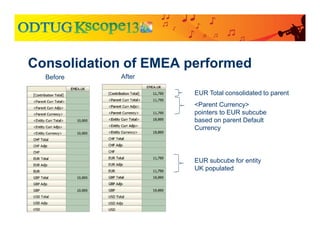
Consolidation of EMEA performed
EUR subcube for entity
UK populated
Before After
<Parent Currency>
pointers to EUR subcube
based on parent Default
Currency
EUR Total consolidated to parent
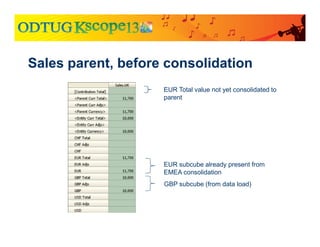
Sales parent, before consolidation
GBP subcube (from data load)
EUR subcube already present from
EMEA consolidation
EUR Total value not yet consolidated to
parent
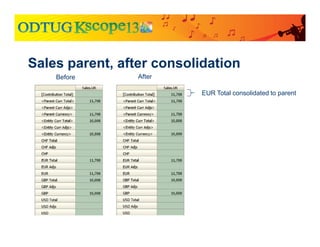
Sales parent, after consolidation
EUR Total consolidated to parent
Before After
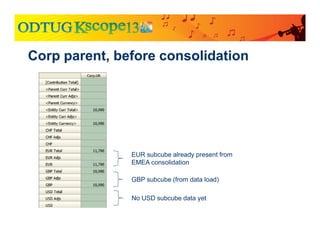
Corp parent, before consolidation
GBP subcube (from data load)
EUR subcube already present from
EMEA consolidation
No USD subcube data yet
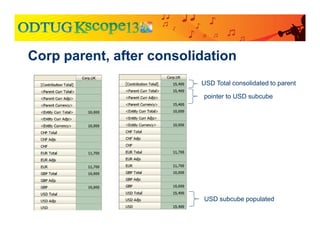
Corp parent, after consolidation
USD subcube populated
USD Total consolidated to parent
pointer to USD subcube
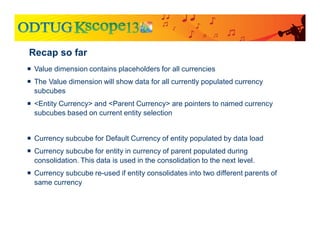
Recap so far
 Value dimension contains placeholders for all currencies
 The Value dimension will show data for all currently populated currency
subcubes
 <Entity Currency> and <Parent Currency> are pointers to named currency
subcubes based on current entity selection
 Currency subcube for Default Currency of entity populated by data load
 Currency subcube for entity in currency of parent populated during
consolidation. This data is used in the consolidation to the next level.

 Currency subcube re-used if entity consolidates into two different parents of
same currency
Compare to adjustment through [Parent Adjs]
Journal booked to [Parent Adjs] for UK under EMEA
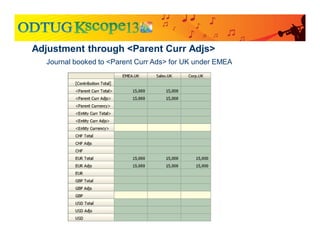
Adjustment through <Parent Curr Adjs>
Journal booked to <Parent Curr Ads> for UK under EMEA
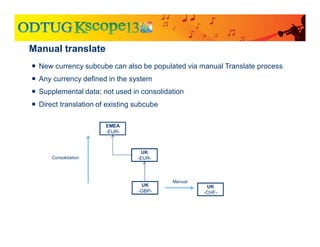
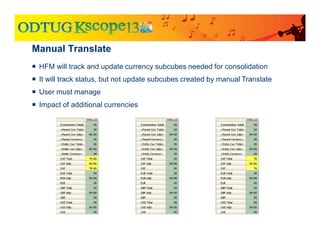
Manual translate
 New currency subcube can also be populated via manual Translate process
 Any currency defined in the system
 Supplemental data; not used in consolidation
 Direct translation of existing subcube
UK
-EUR-
UK
-GBP-
EMEA
-EUR-
UK
-CHF-
Consolidation
Manual
Manual Translate
 HFM will track and update currency subcubes needed for consolidation
 It will track status, but not update subcubes created by manual Translate
 User must manage
 Impact of additional currencies
Custom Translation Components
• Translation Rules
• CTA Calculation
• Historical Rate/Override Process
Custom Translation
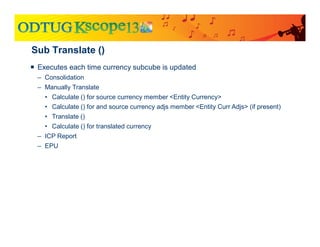
Sub Translate ()
 Executes each time currency subcube is updated
– Consolidation
– Manually Translate
• Calculate () for source currency member <Entity Currency>
• Calculate () for and source currency adjs member <Entity Curr Adjs> (if present)
• Translate ()
• Calculate () for translated currency
– ICP Report
– EPU
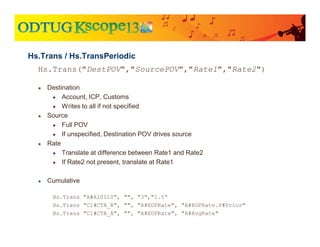
Hs.Trans("DestPOV","SourcePOV","Rate1","Rate2")
● Destination
● Account, ICP, Customs
● Writes to all if not specified
● Source
● Full POV
● If unspecified, Destination POV drives source
● Rate
● Translate at difference between Rate1 and Rate2
● If Rate2 not present, translate at Rate1
● Cumulative
Hs.Trans "A#A10110", "", "3","1.5“
Hs.Trans "C1#CTA_R", "", "A#EOPRate", "A#EOPRate.P#Prior"
Hs.Trans "C1#CTA_A", "", "A#EOPRate", "A#AvgRate"
Hs.Trans / Hs.TransPeriodic
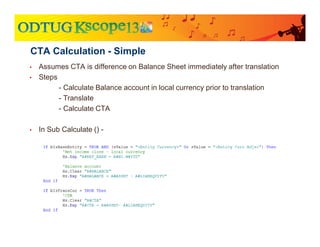
• Assumes CTA is difference on Balance Sheet immediately after translation
• Steps
- Calculate Balance account in local currency prior to translation
- Translate
- Calculate CTA
• In Sub Calculate () -
CTA Calculation - Simple
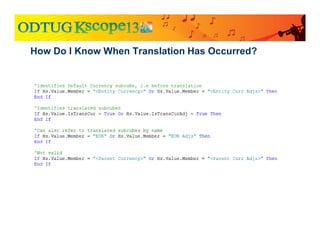
How Do I Know When Translation Has Occurred?
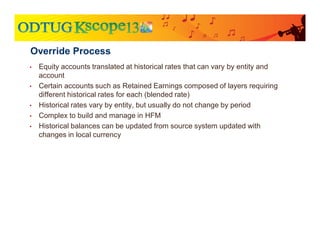
• Equity accounts translated at historical rates that can vary by entity and
account
• Certain accounts such as Retained Earnings composed of layers requiring
different historical rates for each (blended rate)
• Historical rates vary by entity, but usually do not change by period
• Complex to build and manage in HFM
• Historical balances can be updated from source system updated with
changes in local currency
Override Process
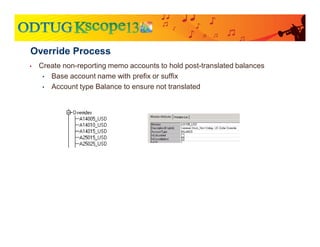
• Create non-reporting memo accounts to hold post-translated balances
• Base account name with prefix or suffix
• Account type Balance to ensure not translated
Override Process
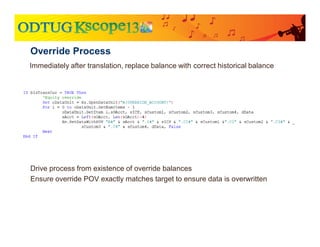
Immediately after translation, replace balance with correct historical balance
Override Process
Drive process from existence of override balances
Ensure override POV exactly matches target to ensure data is overwritten

Currency Translation in HFM

  • 1.
    Currency Translation inHFM Keith Berry US-Analytics
  • 2.
    US-Analytics is anindustry leading professional services firm focused on helping clients successfully establish and maintain long term Business Intelligence (BI) and Enterprise Performance Management (EPM) applications and programs. • BI and EPM Strategy and Processes • Custom and packaged BI and EPM Applications • Oracle Infrastructure • Managed Services and Hosting For over a decade, market leading companies have trusted US-Analytics to solve complex business problems, drive managerial excellence, and deliver operational agility. Learn more at Booth #107 or www.us-analytics.com
  • 3.
     12+ YearsHyperion implementation experience  Certified in HFM and Essbase  Second year at Kscope Background
  • 4.
  • 5.
    ● US GAAP ●ASC Topic 830, Foreign Currency Matters (old SFAS 52) ● IFRS ● IAS 21,The Effects of Changes In Foreign Exchange Rates Some differences in determining functional currency and translating hyperinflationary currencies Guidance
  • 6.
    • Local Currency ●Currency where the entity is located • Functional Currency ● “Currency of the primary economic environment in which the entity operates” ● Determined by multiple factors listed in accounting guidance ● Management judgment • Reporting/Presentation Currency ● Currency in which the consolidated entity will report Currency Type Definitions
  • 7.
    • Temporal RateMethod ● Also called Remeasurement ● Translate from Local Currency to Functional Currency ● Translation gain/loss reported as part of Net Income • Current Rate Method ● Translate from Functional Currency to Reporting Currency ● Translation gain/loss reported in Equity Translation Methods
  • 8.
  • 9.
    • Balance Sheet ●Monetary assets and liabilities translated at rates in effect at end of the reporting period ● Non-monetary assets and liabilities translated at rates in effect when the assets/liabilities were acquired ● Contributed Capital translated at historical rates ● RE is difference needed to balance the Balance Sheet • Income Statement ● Items related to Balance Sheet (e.g. depreciation) use balance sheet rate ● All other items at average rate • Translation Adjustment ● Translation gain/loss is adjustment booked to Net Income needed to make Beginning RE meet Ending RE Temporal Rate Method
  • 10.
    Current Rate Method •Balance Sheet ● Assets and Liabilities translated at end of period rates ● Contributed Capital and Retained Earnings translated at historical rates • Income Statement ● Revenue and expenses at rate in effect at time of recognition (spot/average) ● Average rate for period is usually acceptable ● No translation gain/loss adjustment to Net Income • Translation Adjustment ● Cumulative Translation Adjustment (CTA) booked to Equity section of Balance Sheet to make Beginning RE meet Ending RE
  • 11.
    Current Rate Example •Setup company in EUR by issuing common stock for cash • Translate from EUR to USD • EUR - > USD End of Period Rate = 1.33
  • 12.
  • 13.
    Current Rate Example •Conduct first period of business • Generate Net Income • Establish other Balance Sheet items – • Accounts Payable, Accounts Receivable, Inventory, etc. • Translate from EUR to USD • EUR - > USD Avg Rate = 1.25 • EUR - > USD End of Period Rate = 1.40 • EUR - > USD Common Stock Historical Rate = 1.33
  • 14.
  • 15.
    Current Rate Example NetAsset Position (NAP) = Assets - Liabilities Rate Beginning Net Asset Position X (Current Month EOP Rate - Prior Month EOP Rate) Activity Change in Net Asset Position X (Current Month EOP Rate - Current Month Average Rate)
  • 16.
    Recap • Currencies • Local •Functional • Reporting/Presentation • Methods • Temporal (Remeasurement) • Local -> Functional • Gain/loss in Net Income • Current Rate • Functional -> Reporting • Gain/loss in Equity (CTA) • HFM usually Current Rate method
  • 17.
  • 18.
    Configuration  Application Currency Accounts defined as CURRENCYRATE  Accounts assigned to translate Balance or Flow in Application Settings  PVA
  • 19.
    PVA Impact onFlow Accounts  PVA – – rate x periodic amount – YTD is sum of periodic translations  Non-PVA – rate x YTD amount – Periodic is current YTD less prior YTD
  • 20.
    Configuration  Each accountassigned Account Type  Account Types categorized as Balance or Flow – Balance – Asset, Liability – Flow – Revenue, Expense – Not Translated – Balance, Flow
  • 21.
    • Rates inapplication defined in metadata • Scale • Generates members on Value dimension Currency Tables
  • 22.
  • 23.
    • Default locationin HFM created for intersection of each currency defined • Rates loaded as From/To by period • Multiply or Divide • Load to global location or specific entity Translation Tables
  • 24.
    • Direct ratein current entity Italy.EUR -> Italy.USD • Indirect rate in current entity Italy.USD -> Italy.EUR • Direct rate in [None] entity [None].EUR -> [None].USD • Indirect rate in [None] entity [None].USD -> [None].EUR • Triangulation through application currency Default Translation
  • 25.
    • If specificFrom/To rate not loaded, HFM will derive rate via the application’s base currency ● Example: ● Application Currency = EUR ● GBP -> CHF rate has not been loaded ● GBP -> EUR ● EUR -> CHF ● GBP -> EUR = 1.17 ● EUR -> CHF = 1.23 ● GBP -> CHF translated at 1.17 x 1.23 = 1.439 Triangulation
  • 26.
  • 27.
    ● There aretoo many data points to handle individually ● Group the data by dimension to make it easier to manage ● Must pull all data points in a group to access any single point ● HFM calls these groups “subcubes” HFM Deals With Data in Groups
  • 28.
    ●Subcube Contents ● Account ●ICP ● Customs ● Period ●Subcube Coordinates ● Scenario ● Year ● Entity ● Value Subcubes ●View – data stored YTD, other views (MTD, QTD) derived on the fly
  • 29.
    Two types ofsubcubes based on the Value Dimension ● Currency Subcubes ● Base data for the entity ● Triplet ● The angle brackets ● Node Subcubes ● Tracks aggregation and eliminations for an entity into a specific parent ● The square brackets – [Elimination], [Proportion], etc. ● Currency of the parent (not identified in member name) Subcube Types
  • 30.
  • 31.
    GBP Total GBP Adjs GBP France UK Nodesubcubes – EMEA.UK Currency subcube – UK EMEA Node subcubes – EMEA.France Currency subcube – France Currency subcube - EMEA HFM Value Dimension [Elimination] [Proportion], Etc.
  • 32.
    Value Dimension Node subcubes– EMEA.UK Currency subcube - UK UK
  • 33.
  • 34.
    Example  Entity UKdefined with Default Currency of GBP  UK placed in three alternate hierarchies under different parents. Two parents have Default Currency of EUR, the third a Default Currency of USD UK --GBP EMEA -EUR- UK --GBP Sales -EUR- UK --GBP Corp -USD-
  • 35.
    EMEA parent, beforeconsolidation GBP subcube for entity UK populated <Entity Currency> pointers to GBP subcube based on entity Default Currency
  • 36.
    Consolidation of EMEAperformed EUR subcube for entity UK populated Before After <Parent Currency> pointers to EUR subcube based on parent Default Currency EUR Total consolidated to parent
  • 37.
    Sales parent, beforeconsolidation GBP subcube (from data load) EUR subcube already present from EMEA consolidation EUR Total value not yet consolidated to parent
  • 38.
    Sales parent, afterconsolidation EUR Total consolidated to parent Before After
  • 39.
    Corp parent, beforeconsolidation GBP subcube (from data load) EUR subcube already present from EMEA consolidation No USD subcube data yet
  • 40.
    Corp parent, afterconsolidation USD subcube populated USD Total consolidated to parent pointer to USD subcube
  • 41.
    Recap so far Value dimension contains placeholders for all currencies  The Value dimension will show data for all currently populated currency subcubes  <Entity Currency> and <Parent Currency> are pointers to named currency subcubes based on current entity selection  Currency subcube for Default Currency of entity populated by data load  Currency subcube for entity in currency of parent populated during consolidation. This data is used in the consolidation to the next level.  Currency subcube re-used if entity consolidates into two different parents of same currency
  • 42.
    Compare to adjustmentthrough [Parent Adjs] Journal booked to [Parent Adjs] for UK under EMEA
  • 43.
    Adjustment through <ParentCurr Adjs> Journal booked to <Parent Curr Ads> for UK under EMEA
  • 44.
    Manual translate  Newcurrency subcube can also be populated via manual Translate process  Any currency defined in the system  Supplemental data; not used in consolidation  Direct translation of existing subcube UK -EUR- UK -GBP- EMEA -EUR- UK -CHF- Consolidation Manual
  • 45.
    Manual Translate  HFMwill track and update currency subcubes needed for consolidation  It will track status, but not update subcubes created by manual Translate  User must manage  Impact of additional currencies
  • 46.
  • 47.
    • Translation Rules •CTA Calculation • Historical Rate/Override Process Custom Translation
  • 48.
    Sub Translate () Executes each time currency subcube is updated – Consolidation – Manually Translate • Calculate () for source currency member <Entity Currency> • Calculate () for and source currency adjs member <Entity Curr Adjs> (if present) • Translate () • Calculate () for translated currency – ICP Report – EPU
  • 49.
    Hs.Trans("DestPOV","SourcePOV","Rate1","Rate2") ● Destination ● Account,ICP, Customs ● Writes to all if not specified ● Source ● Full POV ● If unspecified, Destination POV drives source ● Rate ● Translate at difference between Rate1 and Rate2 ● If Rate2 not present, translate at Rate1 ● Cumulative Hs.Trans "A#A10110", "", "3","1.5“ Hs.Trans "C1#CTA_R", "", "A#EOPRate", "A#EOPRate.P#Prior" Hs.Trans "C1#CTA_A", "", "A#EOPRate", "A#AvgRate" Hs.Trans / Hs.TransPeriodic
  • 50.
    • Assumes CTAis difference on Balance Sheet immediately after translation • Steps - Calculate Balance account in local currency prior to translation - Translate - Calculate CTA • In Sub Calculate () - CTA Calculation - Simple
  • 51.
    How Do IKnow When Translation Has Occurred?
  • 52.
    • Equity accountstranslated at historical rates that can vary by entity and account • Certain accounts such as Retained Earnings composed of layers requiring different historical rates for each (blended rate) • Historical rates vary by entity, but usually do not change by period • Complex to build and manage in HFM • Historical balances can be updated from source system updated with changes in local currency Override Process
  • 53.
    • Create non-reportingmemo accounts to hold post-translated balances • Base account name with prefix or suffix • Account type Balance to ensure not translated Override Process
  • 54.
    Immediately after translation,replace balance with correct historical balance Override Process Drive process from existence of override balances Ensure override POV exactly matches target to ensure data is overwritten