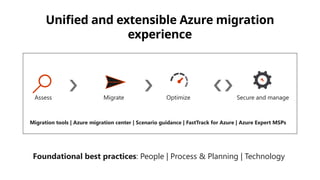
Assess Migrate OptimizeSecure and manage
Foundational best practices: People | Process & Planning | Technology
Migration tools | Azure migration center | Scenario guidance | FastTrack for Azure | Azure Expert MSPs
Unified and extensible Azure migration
experience
7.
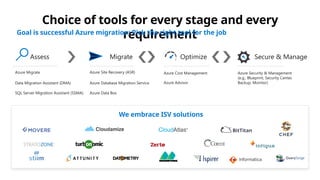
Choice of toolsfor every stage and every
requirement
Goal is successful Azure migration: Pick the right tool for the job
We embrace ISV solutions
Assess Secure & Manage
Data Migration Assistant (DMA)
Azure Migrate
SQL Server Migration Assistant (SSMA)
Azure Security & Management
(e.g., Blueprint, Security Center,
Backup, Monitor)
Migrate
Azure Database Migration Service
Azure Site Recovery (ASR)
Azure Data Box
Optimize
Azure Cost Management
Azure Advisor
8.
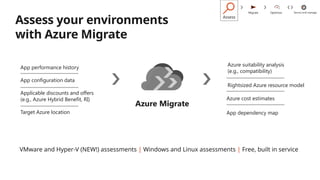
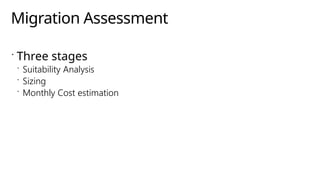
VMware and Hyper-V(NEW!) assessments | Windows and Linux assessments | Free, built in service
Assess your environments
with Azure Migrate
Rightsized Azure resource model
Azure cost estimates
App dependency map
Azure suitability analysis
(e.g., compatibility)
App performance history
App configuration data
Applicable discounts and offers
(e.g., Azure Hybrid Benefit, RI)
Target Azure location
Azure Migrate
Assess
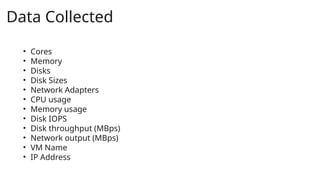
• Cores
• Memory
•Disks
• Disk Sizes
• Network Adapters
• CPU usage
• Memory usage
• Disk IOPS
• Disk throughput (MBps)
• Network output (MBps)
• VM Name
• IP Address
Data Collected
12.
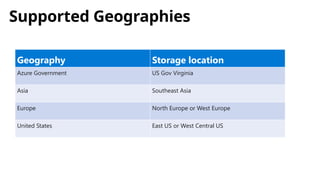
Supported Geographies
Geography Storagelocation
Azure Government US Gov Virginia
Asia Southeast Asia
Europe North Europe or West Europe
United States East US or West Central US
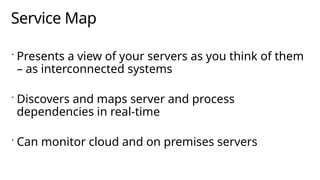
Service Map
Presentsa view of your servers as you think of them
– as interconnected systems
Discovers and maps server and process
dependencies in real-time
Can monitor cloud and on premises servers
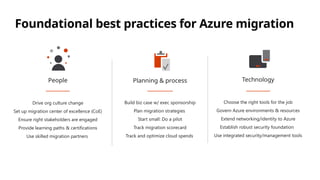
Foundational best practicesfor Azure migration
Drive org culture change
Set up migration center of excellence (CoE)
Ensure right stakeholders are engaged
Provide learning paths & certifications
Use skilled migration partners
People
Build biz case w/ exec sponsorship
Plan migration strategies
Start small: Do a pilot
Track migration scorecard
Track and optimize cloud spends
Planning & process
Choose the right tools for the job
Govern Azure environments & resources
Extend networking/identity to Azure
Establish robust security foundation
Use integrated security/management tools
Technology
23.
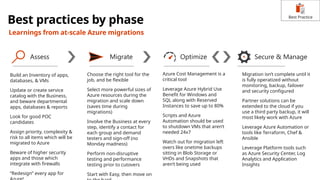
Best practices byphase
Learnings from at-scale Azure migrations
Assess Secure & Manage
Migrate Optimize
Build an Inventory of apps,
databases, & VMs
Update or create service
catalog with the Business,
and beware departmental
apps, databases & reports
Look for good POC
candidates
Assign priority, complexity &
risk to all items which will be
migrated to Azure
Beware of higher security
apps and those which
integrate with firewalls
“Redesign” every app for
Choose the right tool for the
job, and be flexible
Select more powerful sizes of
Azure resources during the
migration and scale down
(saves time during
migrations)
Involve the Business at every
step, identify a contact for
each group and demand
testers and sign-off (no
Monday madness)
Perform non-disruptive
testing and performance
testing prior to cutovers
Start with Easy, then move on
Azure Cost Management is a
critical tool
Leverage Azure Hybrid Use
Benefit for Windows and
SQL along with Reserved
Instances to save up to 80%
Scripts and Azure
Automation should be used
to shutdown VMs that aren’t
needed 24x7
Watch out for migration left
overs like onetime backups
sitting in Blob Storage or
VHDs and Snapshots that
aren’t being used
Migration isn’t complete until it
is fully operatized without
monitoring, backup, failover
and security configured
Partner solutions can be
extended to the cloud if you
use a third party backup, it will
most likely work with Azure
Leverage Azure Automation or
tools like Terraform, Chef &
Ansible
Leverage Platform tools such
as Azure Security Center, Log
Analytics and Application
Insights
Best Practice
24.
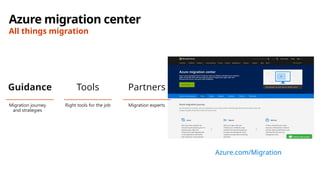
Azure migration center
Allthings migration
Azure.com/Migration
Migration journey
and strategies
Guidance
Migration experts
Partners
Right tools for the job
Tools
25.
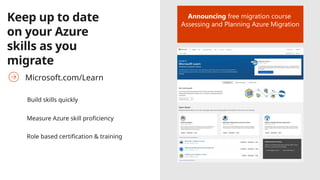
Keep up todate
on your Azure
skills as you
migrate
Microsoft.com/Learn
Build skills quickly
Measure Azure skill proficiency
Role based certification & training
Announcing free migration course
Assessing and Planning Azure Migration
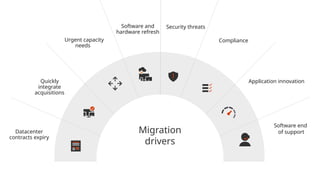
#4 There are a number of reasons that are driving people to look at Azure
#16 The Microsoft Monitoring Agent service collects events from log files and Windows event log, performance data, and other telemetry. Even when the agent is unable to communicate with the Log Analytics service it reports to, the agent continues to run and queues the collected data on the disk of the monitored computer. When the connection is restored, the Microsoft Monitoring Agent service sends collected data to the service.
Dependency Agent - Service Map shows connections between servers, processes, and ports across any TCP-connected architecture with no configuration required, other than installation of an agent.