®


Integration Framework


                        © 2011 IBM Corporation
IBM Software Group | Tivoli software


History
Integration has been an integral part of the Enterprise Asset Management
system Maximo for more than 10 years.
The first integration used PL/SQL with triggers and store procedures. It was
called the MIG (Maximo Integration Gateway).

When Maximo began conversion to Java. The JMIG (Java MIG) was
implementedIBM Software Group | Lotus software
            in the Maximo version 4.x.

When Maximo was fully implemented in Java the JMIG was renamed MEA
(Maximo Enterprise Adapter) for Maximo 5 and 6.

With the acquisition of MRO Software by IBM the integration was renamed
Integration Framework and is part of the Tivoli process automation engine
used for several IBM applications


                                                  IBM Confidential – For Internal Use
                                                  Only
IBM Software Group | Tivoli software


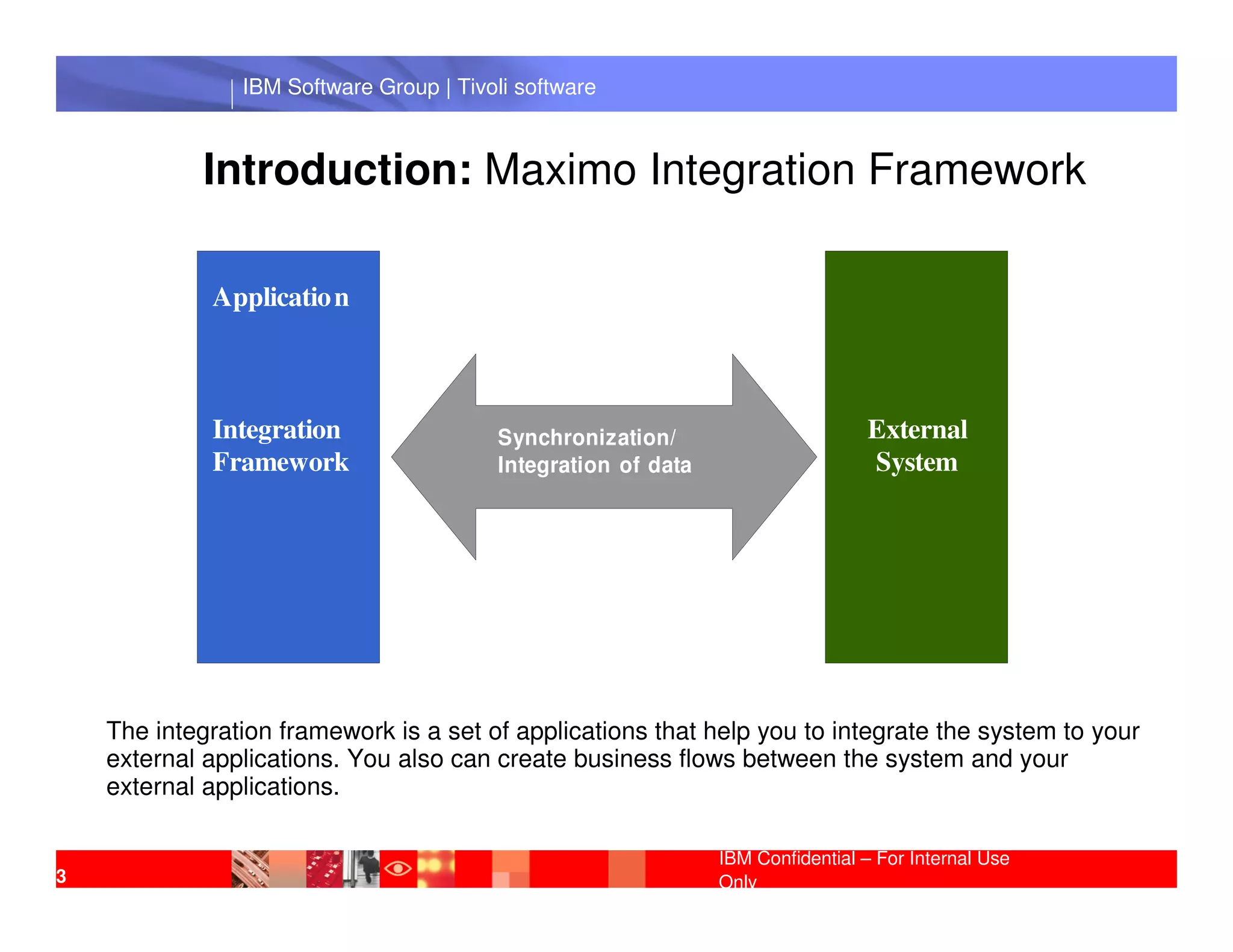
             Introduction: Maximo Integration Framework

             Applicatio n


             Integration                 Synchronization/                       External
             Framework                   Integration of data                    System
                  IBM Software Group | Lotus software


    The integration framework is a set of applications that help you to integrate the system to your
    external applications. You also can create business flows between the system and your
    external applications.

                                                               IBM Confidential – For Internal Use
3                                                              Only
IBM Software Group | Tivoli software


                 Asynchronous X Synchronous

Asynchronous processing means the two systems do not have a real-time
connection. The transaction is sent from the application to a queue then from
the queue to the external system. The same thing happens for transactions
coming from the external system: the transaction is sent from the external
system to a queue then from the queue to the application.
             IBM Software Group | Lotus software

Synchronous processing means the two systems have a real-time
connection. The transaction is sent from the application directly to the
external system. The same thing happens for transactions coming from the
external system: the transaction is sent from the external system directly to
the application.

                                                  IBM Confidential – For Internal Use
                                                  Only
IBM Software Group | Tivoli software


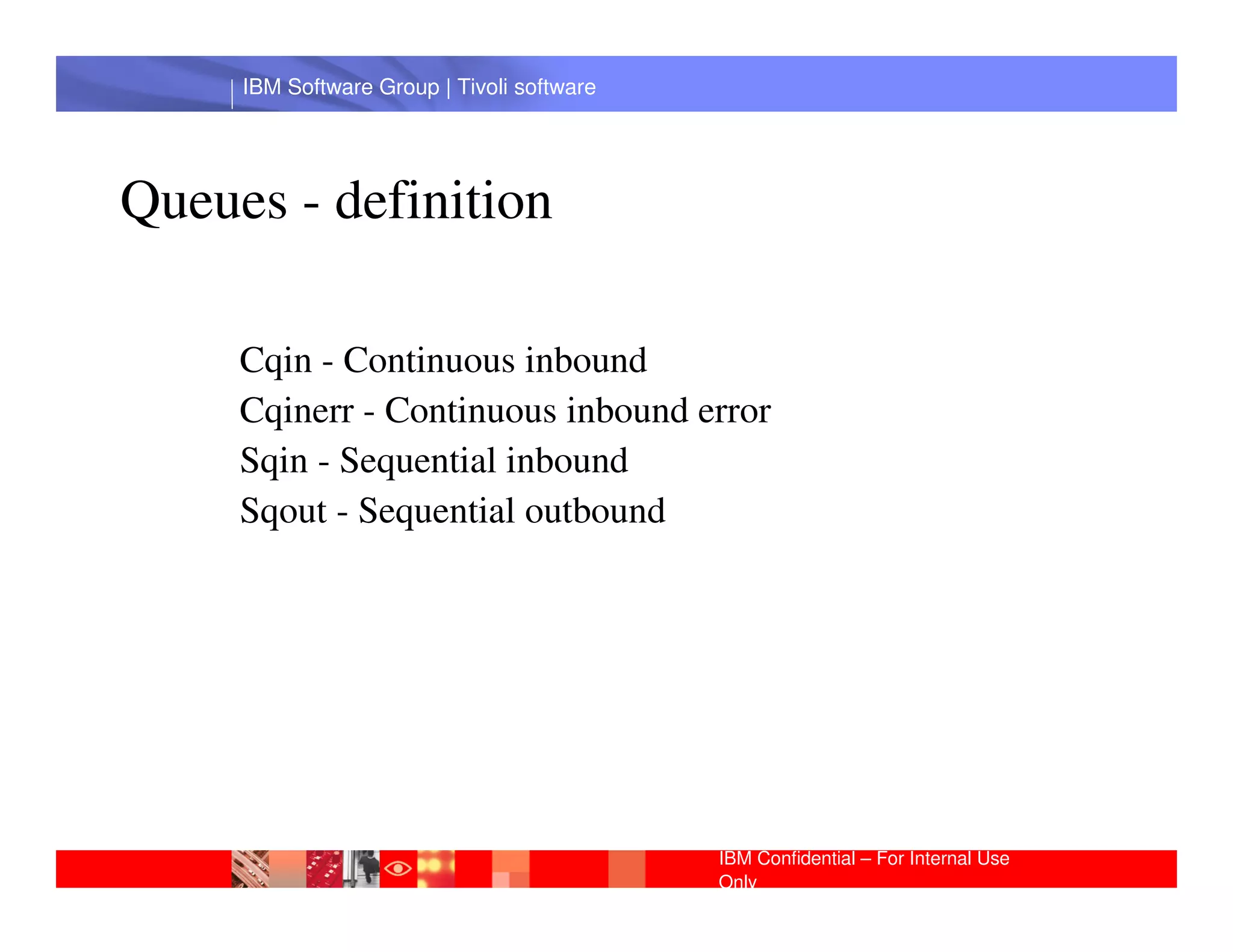
Queues - definition

     Cqin - Continuous inbound
     Cqinerr - Continuous inbound error
     Sqin - Sequential inbound
      IBM Software Group | Lotus software
     Sqout - Sequential outbound


                                            IBM Confidential – For Internal Use
                                            Only
IBM Software Group | Tivoli software


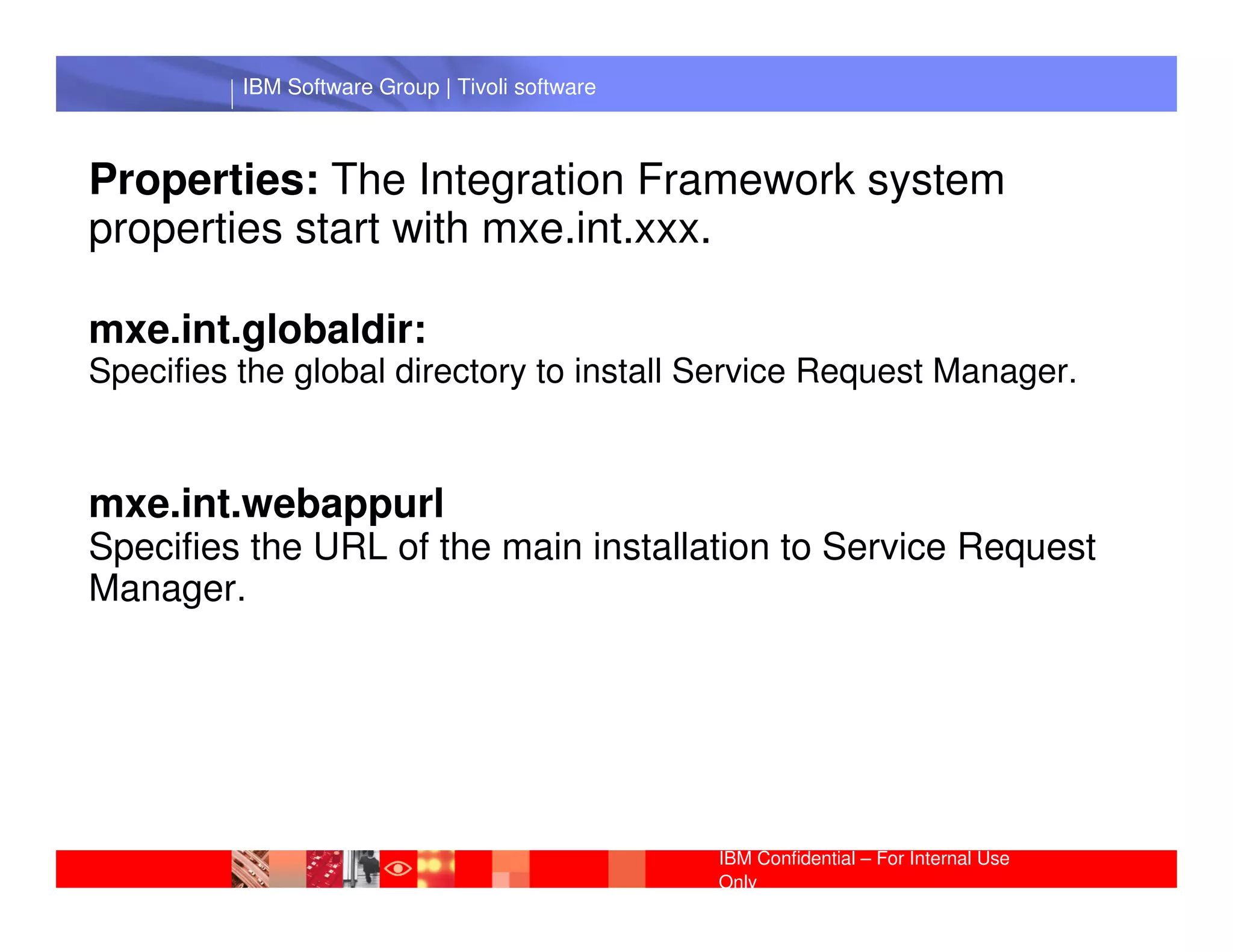
Properties: The Integration Framework system
properties start with mxe.int.xxx.

mxe.int.globaldir:
Specifies the global directory to install Service Request Manager.


           IBM Software Group | Lotus software
mxe.int.webappurl
Specifies the URL of the main installation to Service Request
Manager.


                                                 IBM Confidential – For Internal Use
                                                 Only
IBM Software Group | Tivoli software


 IBM Software Group | Lotus software


                                       IBM Confidential – For Internal Use
                                       Only
IBM Software Group | Tivoli software


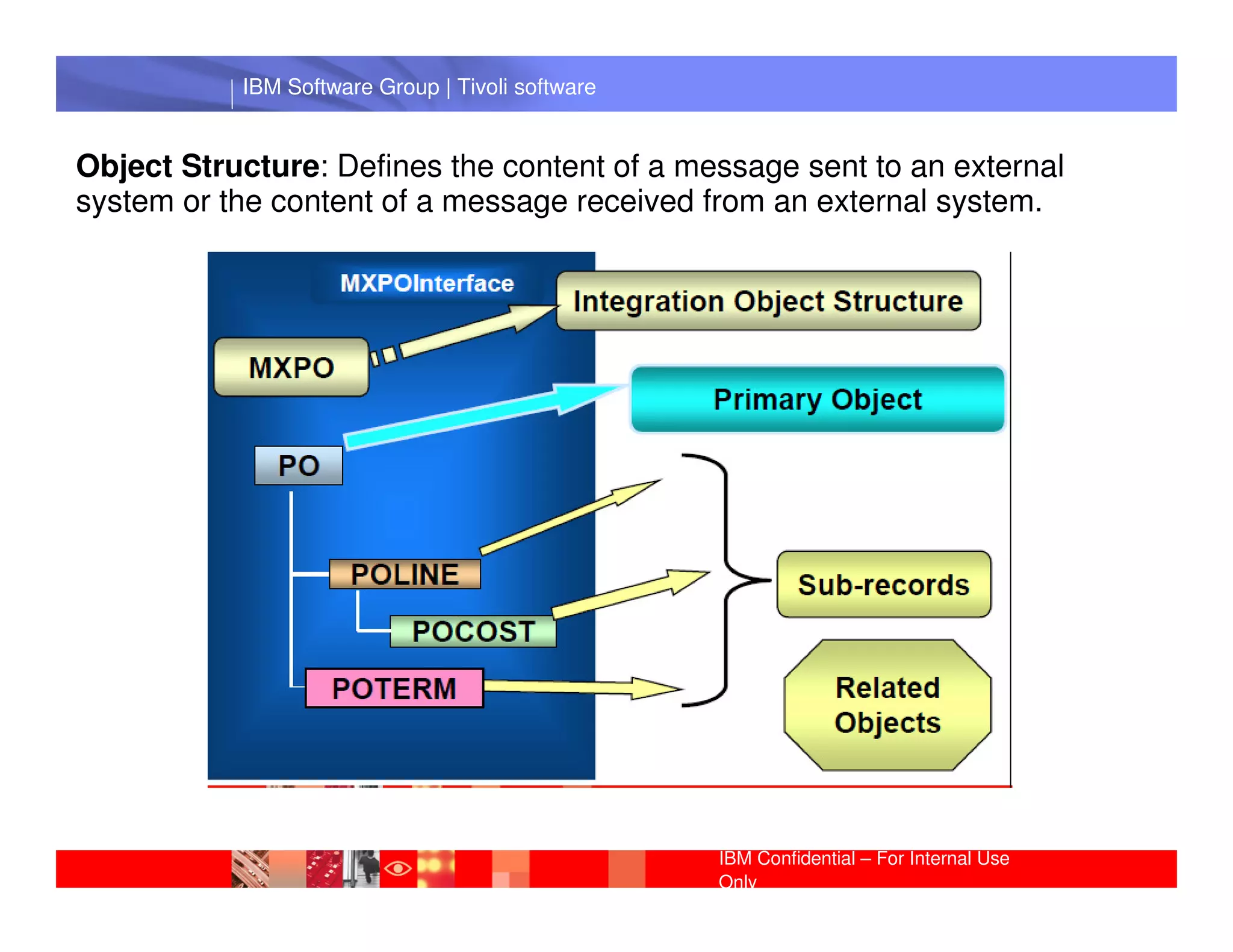
Object Structure: Defines the content of a message sent to an external
system or the content of a message received from an external system.


             IBM Software Group | Lotus software


                                                  IBM Confidential – For Internal Use
                                                  Only
IBM Software Group | Tivoli software


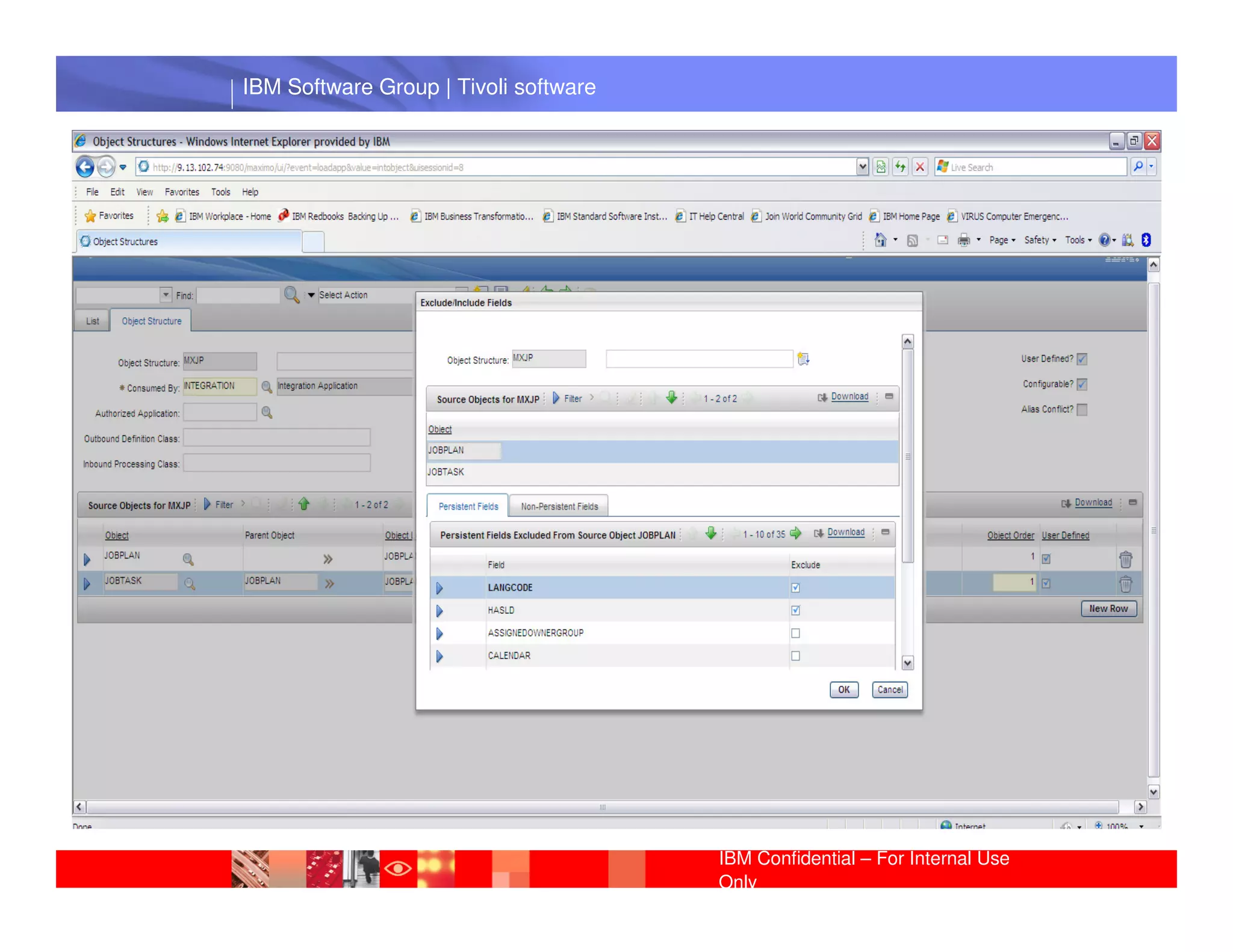
Activity: Create a Object Structure for Job Plan


• Enter Object Structure and Consumed By
• Enter Source Objects: JOBPLAN and JOBTASK
           IBM Software Group | Lotus software
• Exclude/Include fields


                                                 IBM Confidential – For Internal Use
                                                 Only
IBM Software Group | Tivoli software


 IBM Software Group | Lotus software


                                       IBM Confidential – For Internal Use
                                       Only
IBM Software Group | Tivoli software


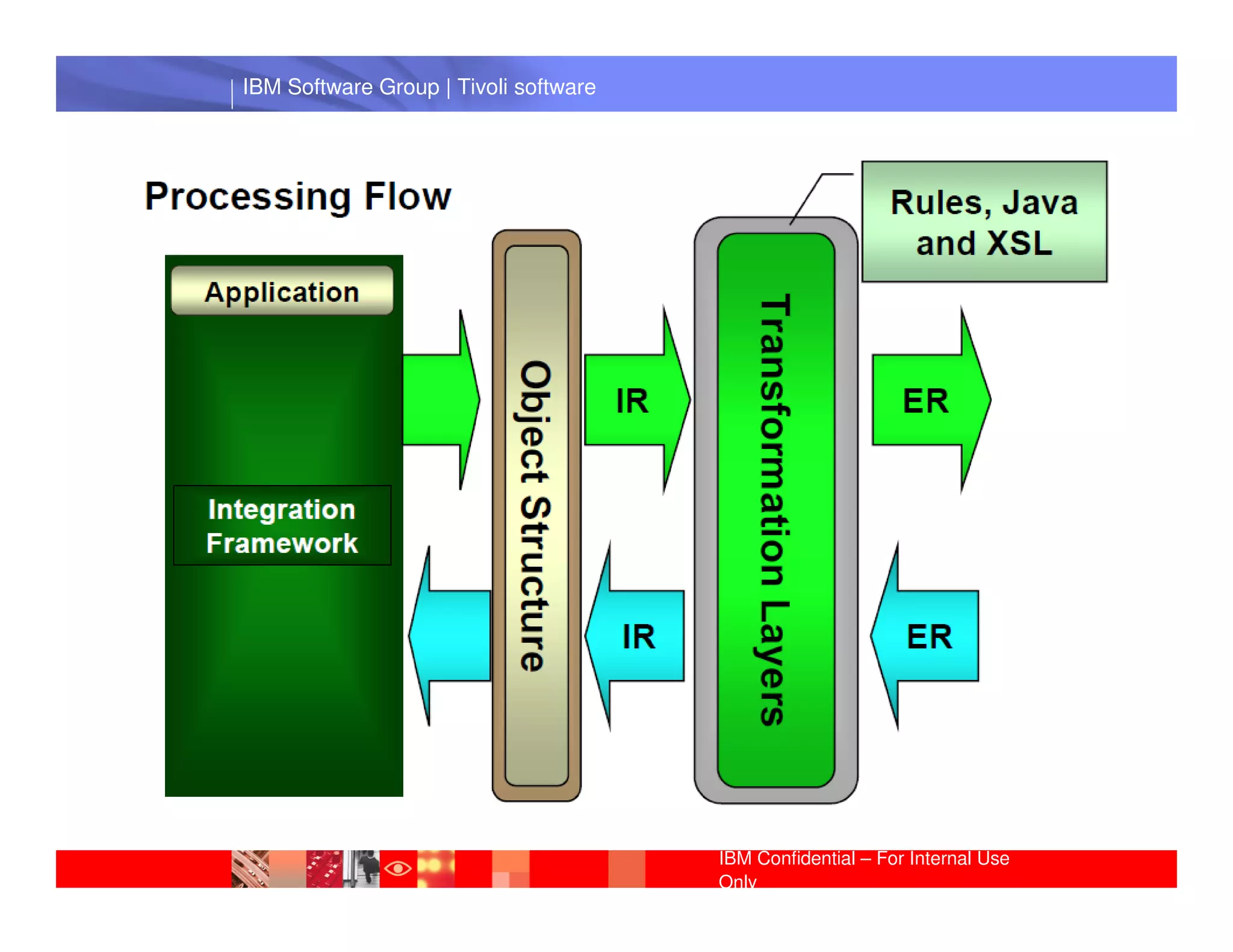
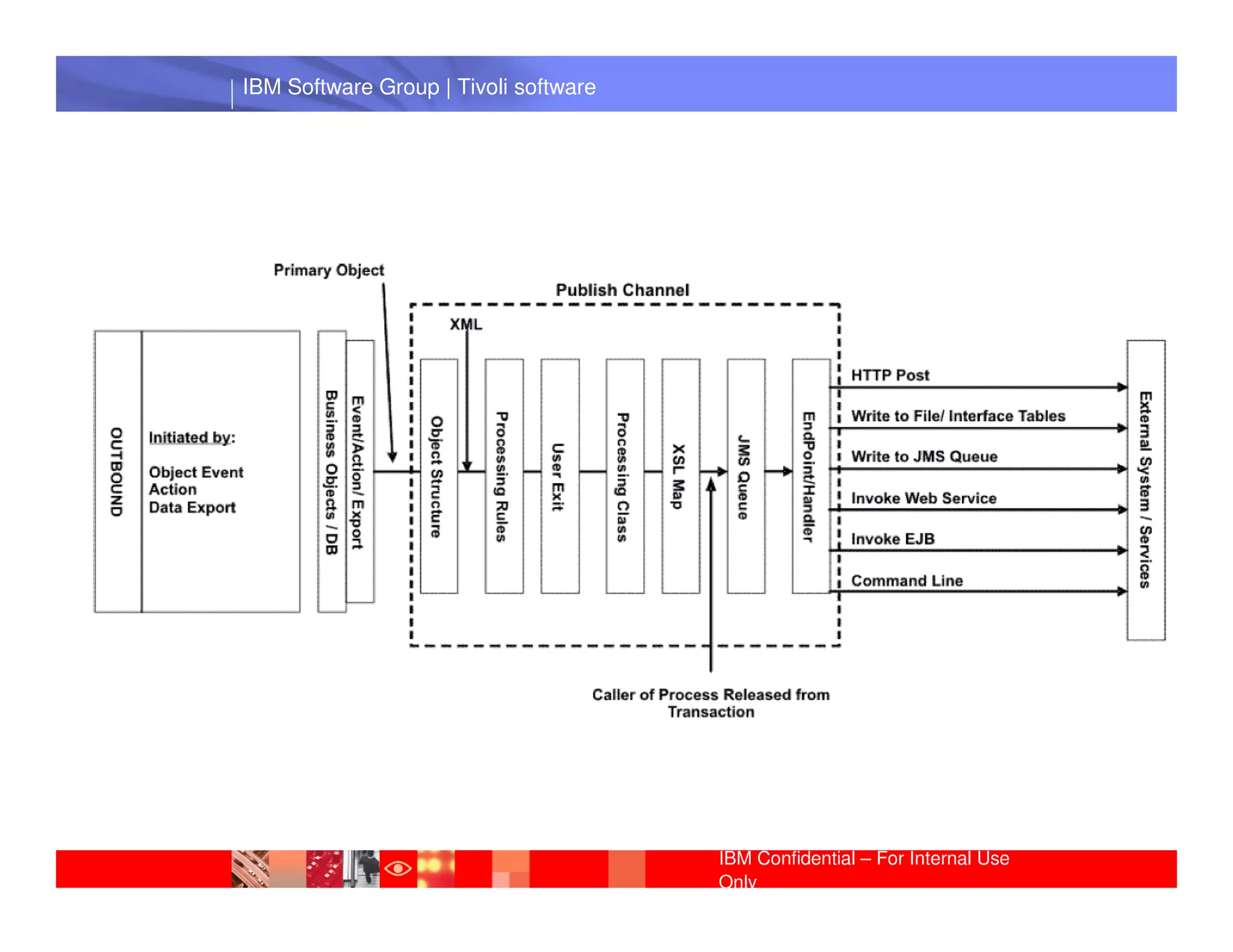
A publish channel is the pipeline for sending data
asynchronously from the system to an external system.


The records can go through a series of transformation layers using
rules (no programming), Java or XSL. The result is an external
record that is sent to the external system in a format the external
             IBM Software Group | Lotus software
system understands.


                                                 IBM Confidential – For Internal Use
                                                 Only
IBM Software Group | Tivoli software


 IBM Software Group | Lotus software


                                       IBM Confidential – For Internal Use
                                       Only
IBM Software Group | Tivoli software


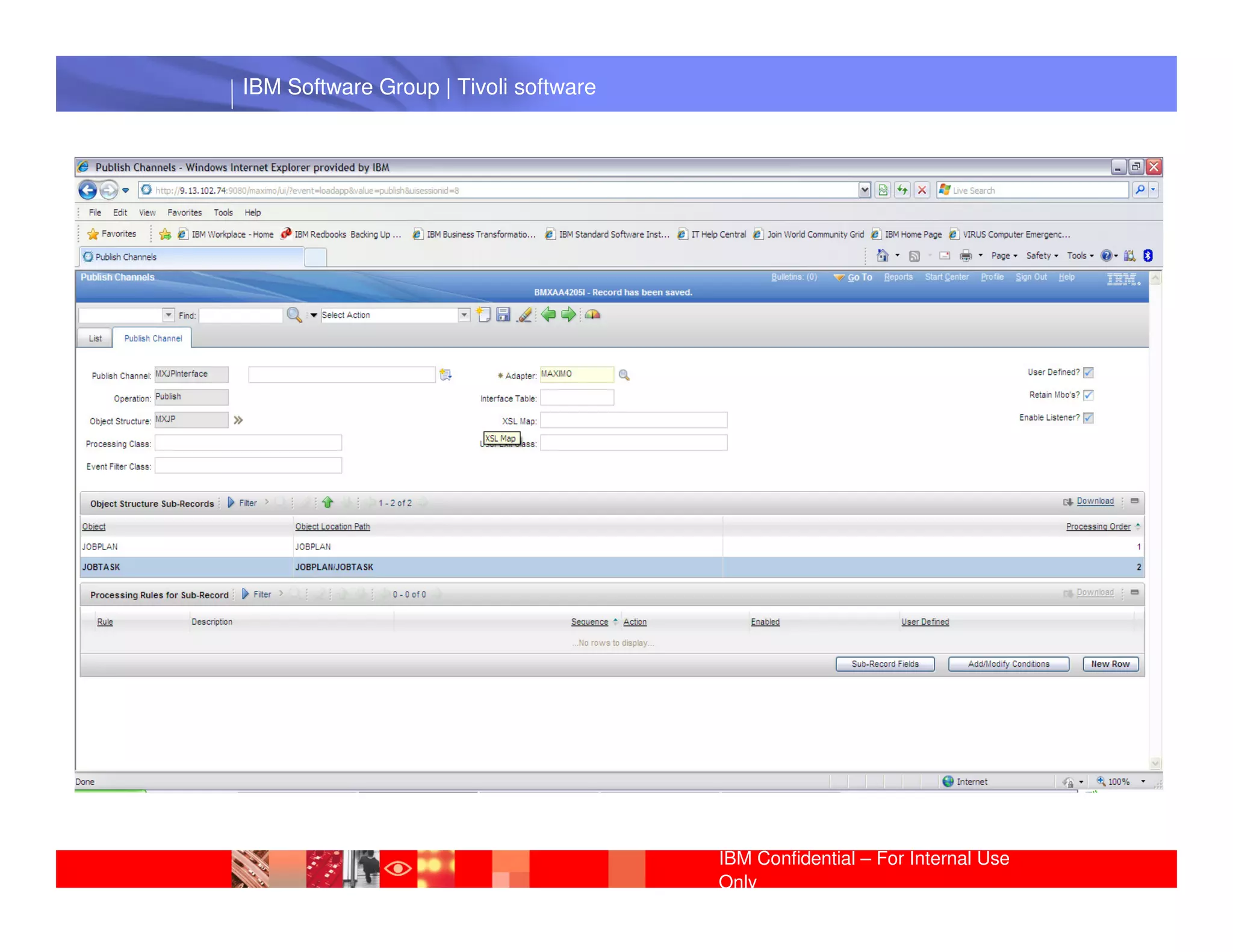
Activity: Create a Publish Channel

• Enter Publish Channel name
• Attach the object created previously
• Enable Listener Software Group | Lotus software
            IBM


                                                IBM Confidential – For Internal Use
                                                Only
IBM Software Group | Tivoli software


 IBM Software Group | Lotus software


                                       IBM Confidential – For Internal Use
                                       Only
IBM Software Group | Tivoli software


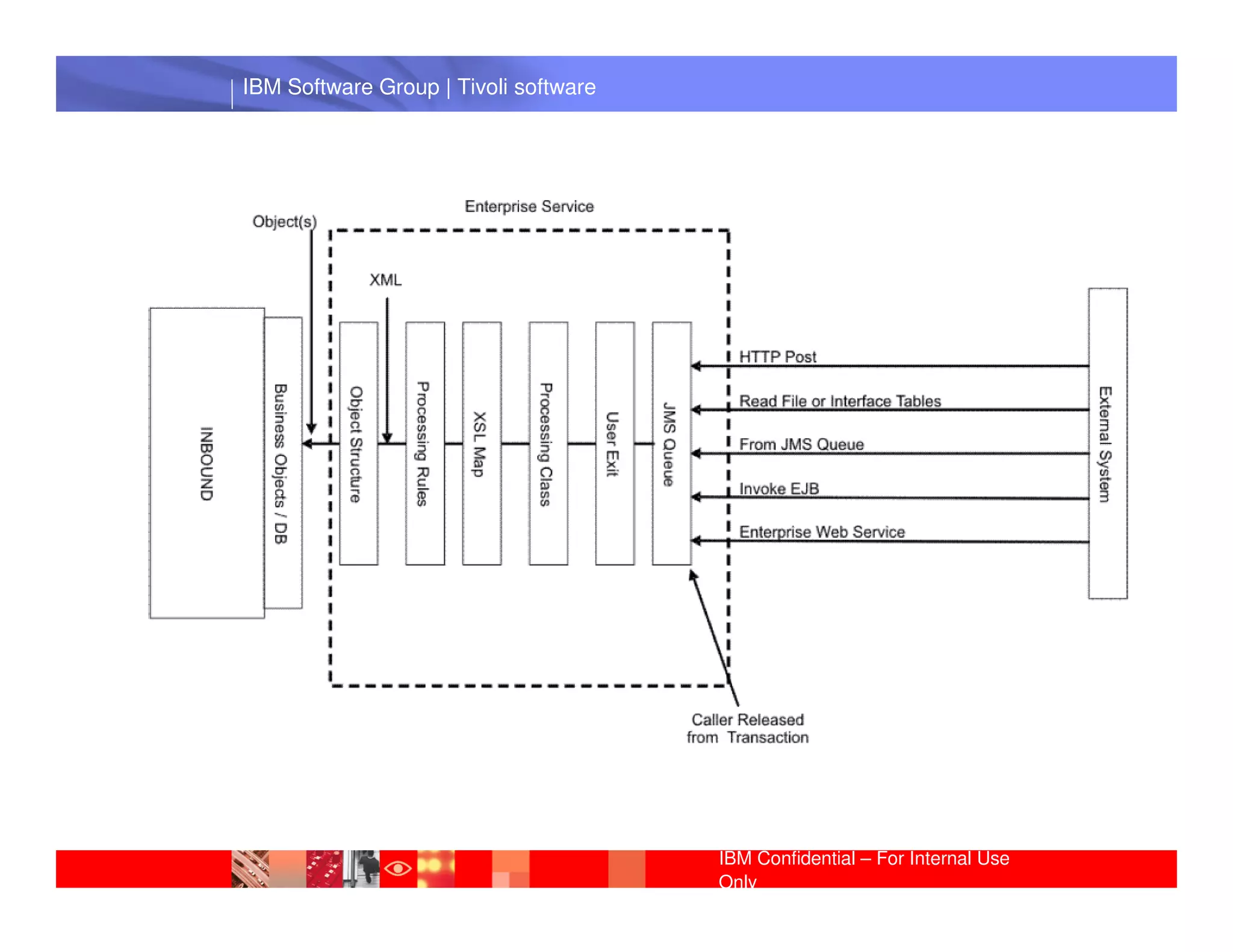
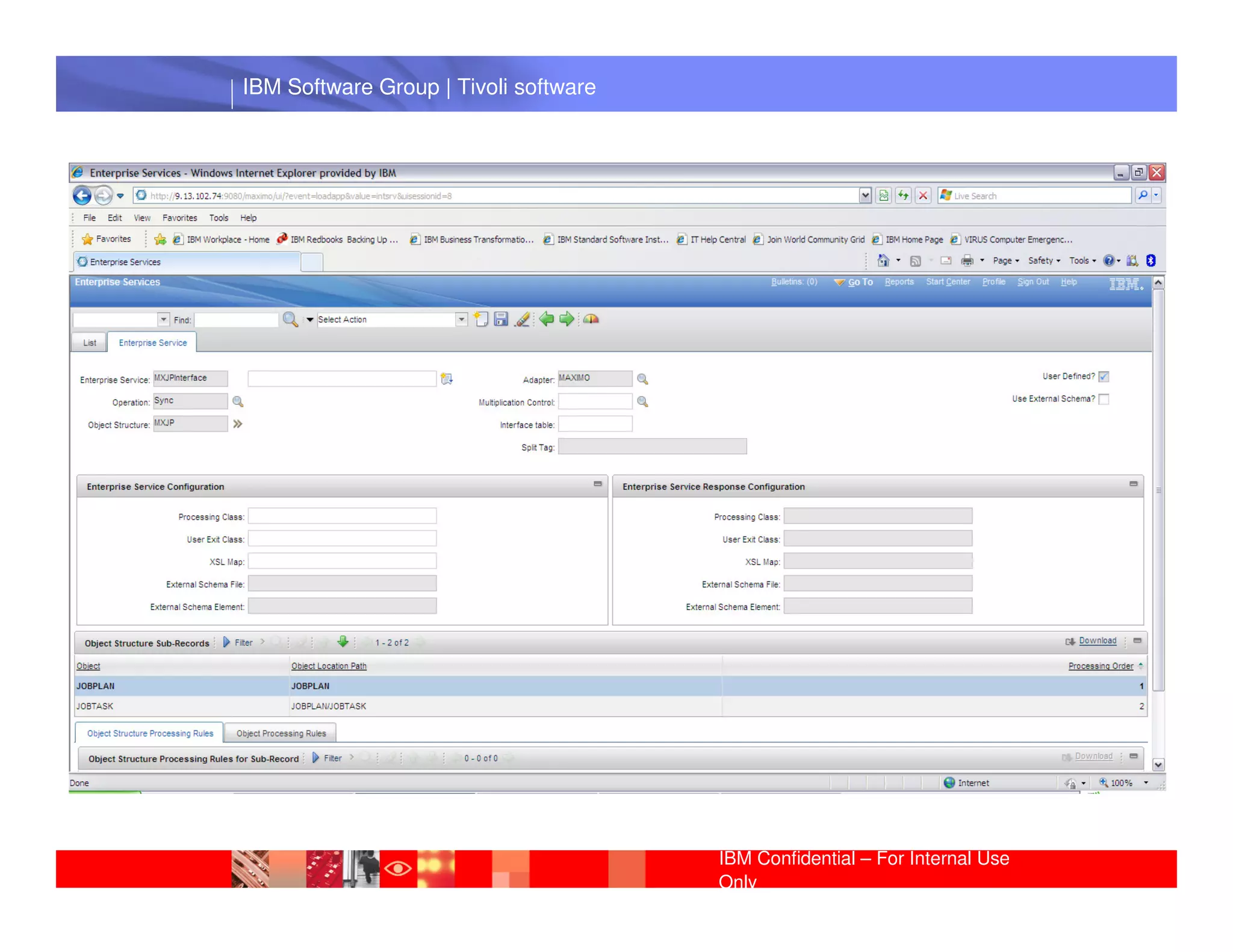
The enterprise service is a pipeline for querying system data
and importing data into the system from an external system


The external record can go to a series of transformation layers to
convert it to the format that the application using Integration
FrameworkIBM Software Group | Lotus software
             understands.


                                                 IBM Confidential – For Internal Use
                                                 Only
IBM Software Group | Tivoli software


 IBM Software Group | Lotus software


                                       IBM Confidential – For Internal Use
                                       Only
IBM Software Group | Tivoli software


Activity: Create an Enterprise Server


• Enterprise Service name
• Attach theIBM Software Group | Lotus software
             object created previously


                                                 IBM Confidential – For Internal Use
                                                 Only
IBM Software Group | Tivoli software


 IBM Software Group | Lotus software


                                       IBM Confidential – For Internal Use
                                       Only
IBM Software Group | Tivoli software


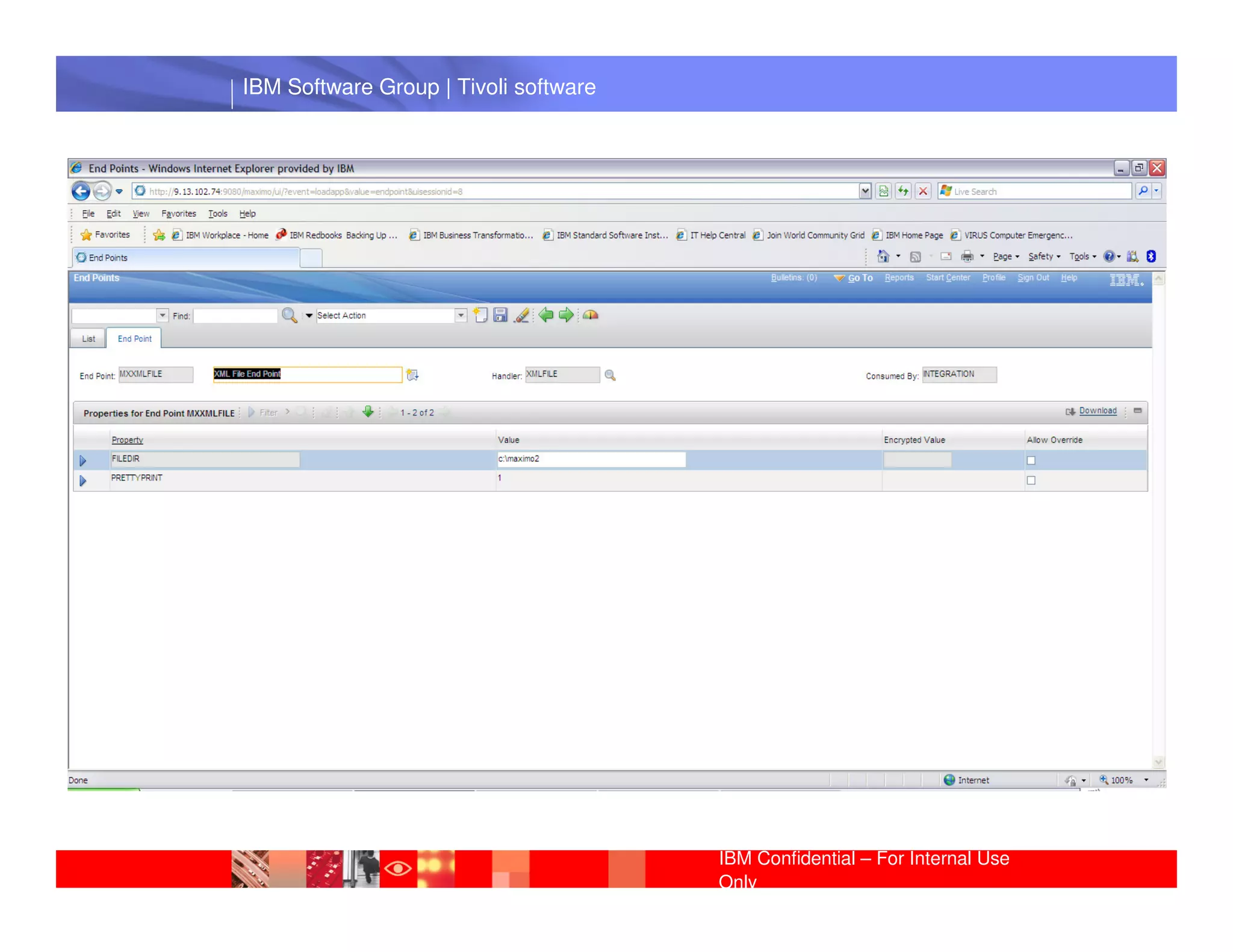
End point: Modes that you use to communicate with
external applications.

Activity: Edit the End Point


• End point name
           IBM Software Group | Lotus software
• Handler: XMLFILE
• Properties: PRETTYPRINT and FILEDIR


                                                 IBM Confidential – For Internal Use
                                                 Only
IBM Software Group | Tivoli software


 IBM Software Group | Lotus software


                                       IBM Confidential – For Internal Use
                                       Only
IBM Software Group | Tivoli software


 IBM Software Group | Lotus software


                                       IBM Confidential – For Internal Use
                                       Only
IBM Software Group | Tivoli software


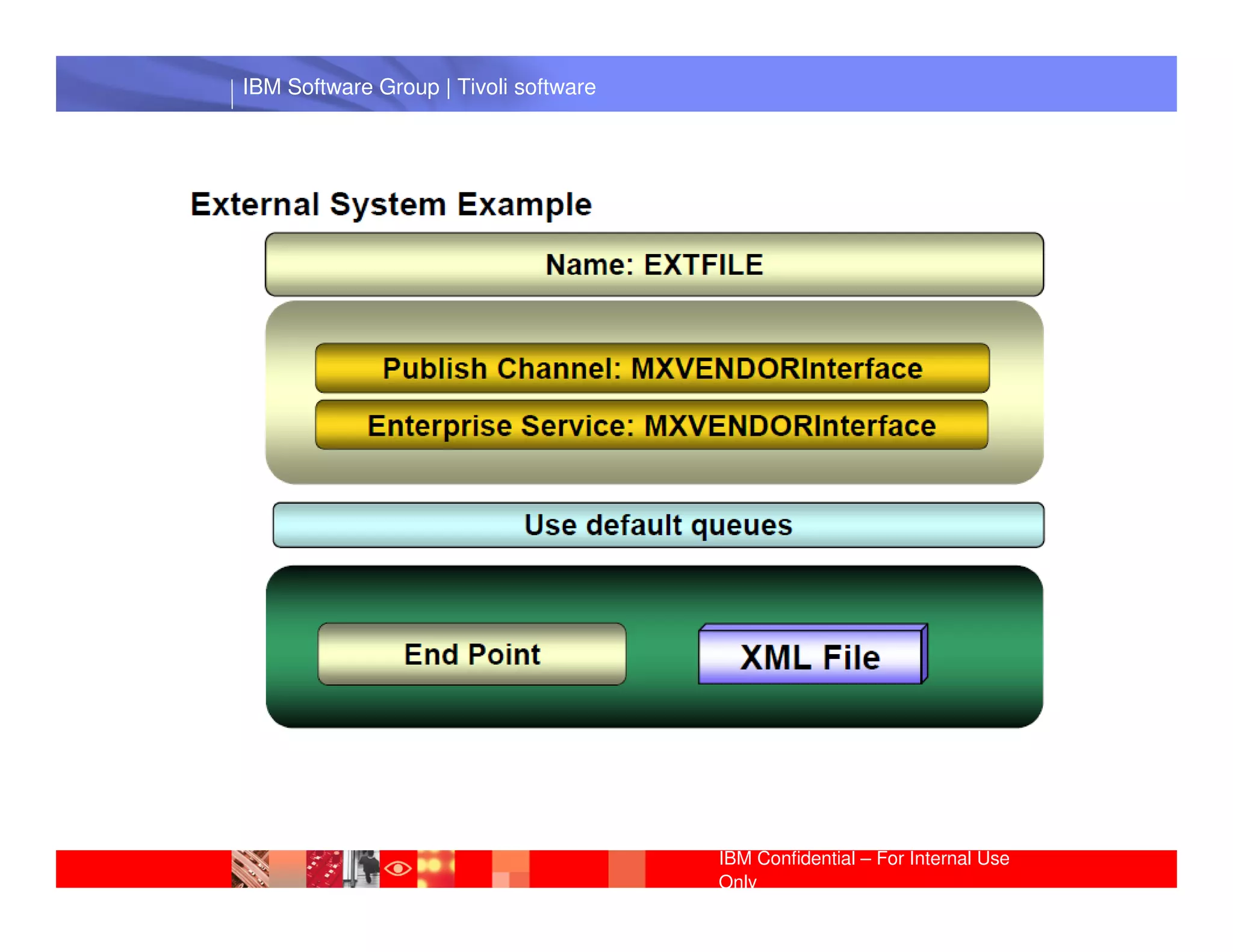
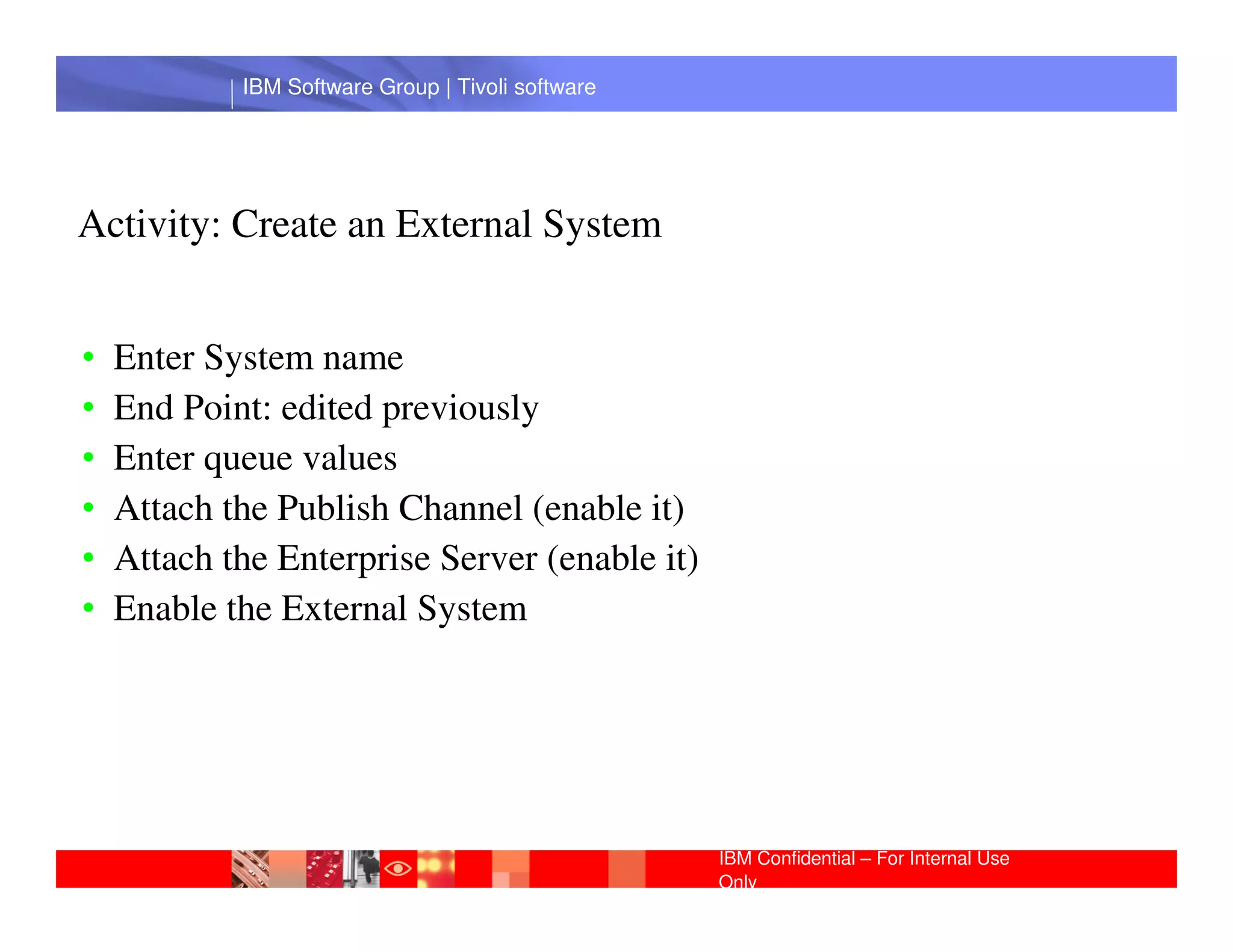
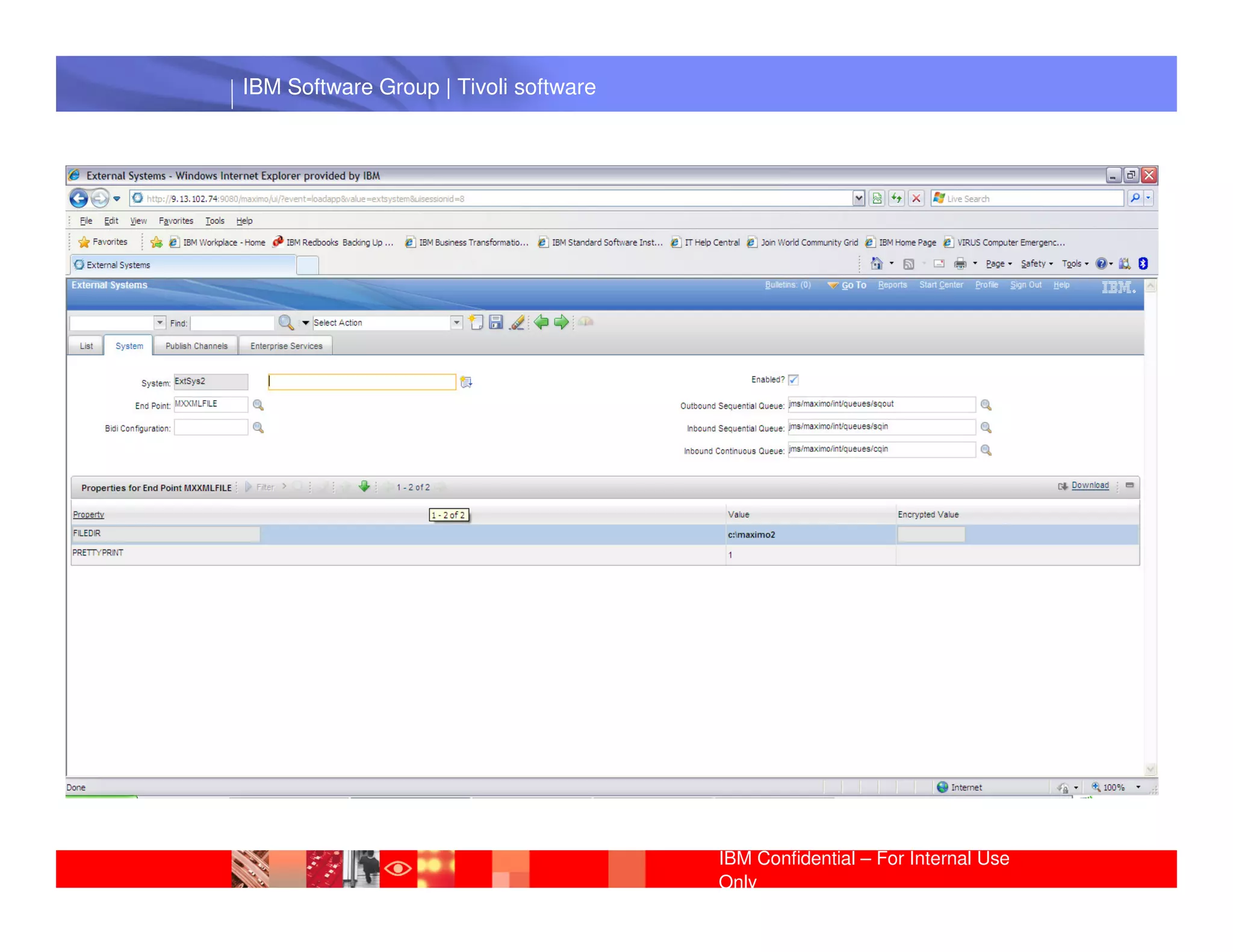
Activity: Create an External System


•   Enter System name
•   End Point: edited previously
•   Enter queue values
             IBM Software Group | Lotus software
•   Attach the Publish Channel (enable it)
•   Attach the Enterprise Server (enable it)
•   Enable the External System


                                                 IBM Confidential – For Internal Use
                                                 Only
IBM Software Group | Tivoli software


 IBM Software Group | Lotus software


                                       IBM Confidential – For Internal Use
                                       Only
IBM Software Group | Tivoli software


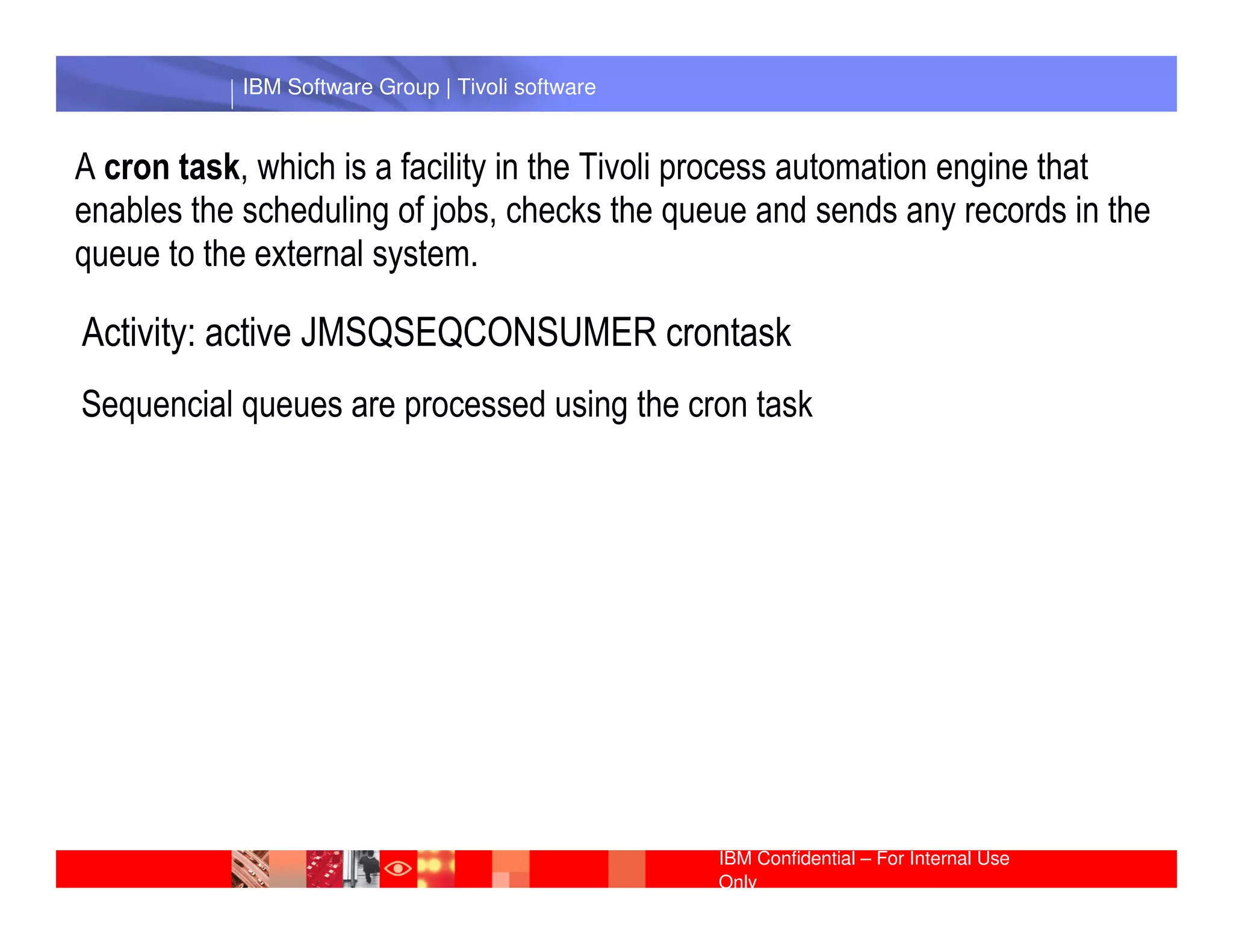
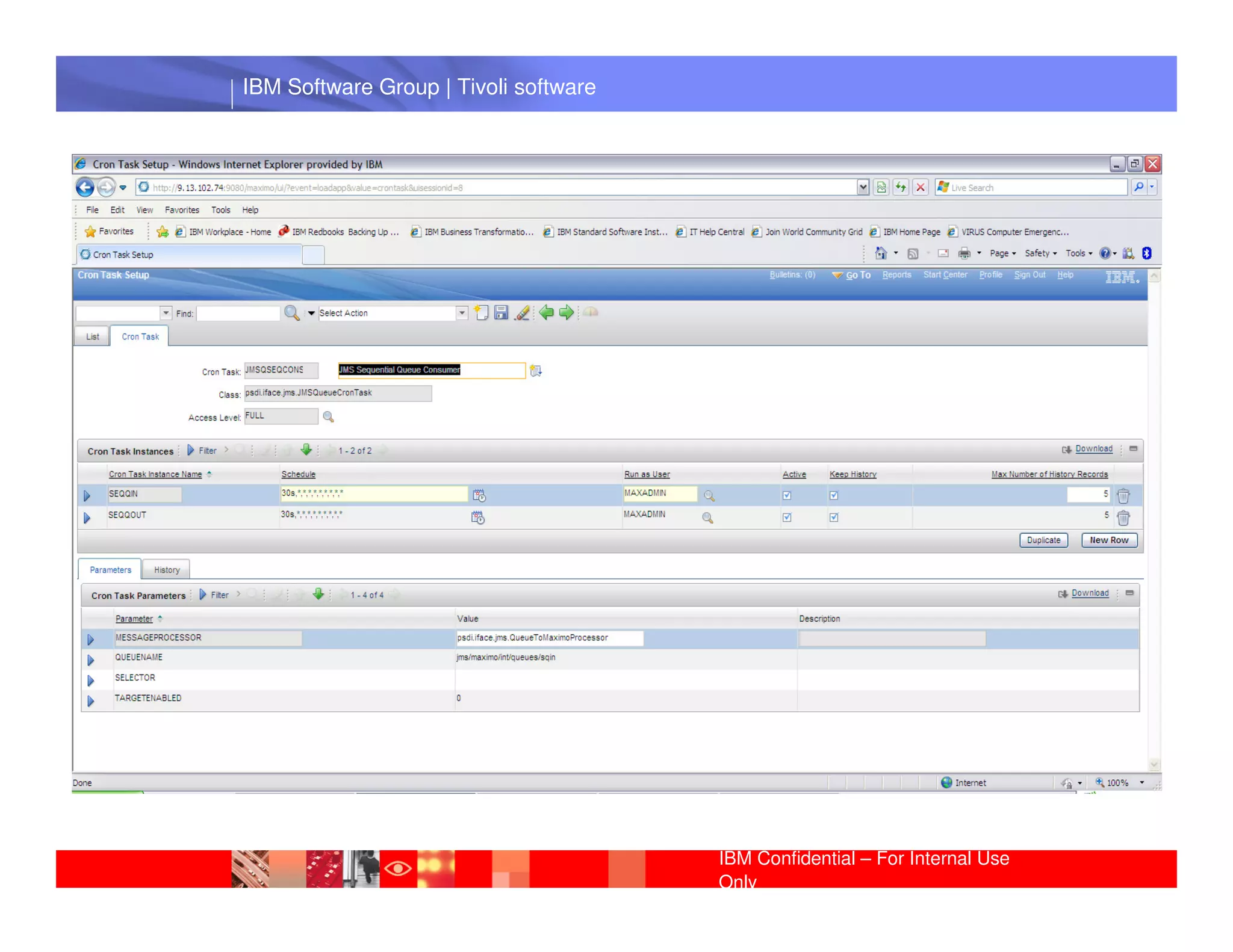
A cron task, which is a facility in the Tivoli process automation engine that
enables the scheduling of jobs, checks the queue and sends any records in the
queue to the external system.

Activity: active JMSQSEQCONSUMER crontask
Sequencial queues are processed using the cron task

             IBM Software Group | Lotus software


                                                  IBM Confidential – For Internal Use
                                                  Only
IBM Software Group | Tivoli software


 IBM Software Group | Lotus software


                                       IBM Confidential – For Internal Use
                                       Only
IBM Software Group | Tivoli software


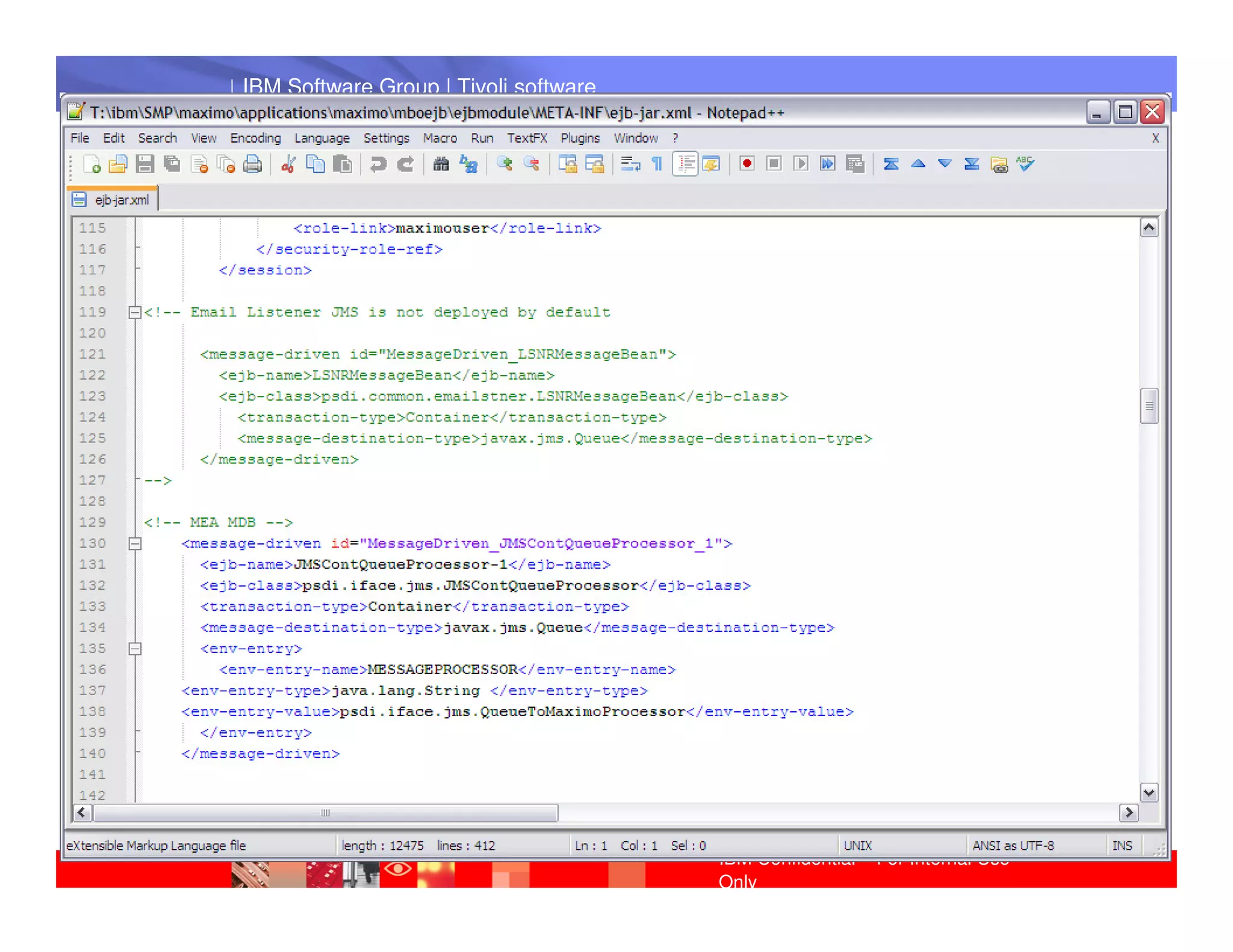
The continuous queues are processed using instances of a Message
Driven Bean that is comes with the Integration Framework.

The MDB is a java class that is called to receive a message passed to it from
the JMS queue. This process is like trigger: as soon as a message arrives in
the queue the MDB is called and a message is passed

             IBM Software Group | Lotus software
..SMPmaximoapplicationsmaximomboejbejbmoduleMETA-INF

          ejb-jar.xml
          ibm-ejb-jar-bnd.xmi


                                                  IBM Confidential – For Internal Use
                                                  Only
IBM Software Group | Tivoli software


 IBM Software Group | Lotus software


                                       IBM Confidential – For Internal Use
                                       Only
IBM Software Group | Tivoli software


Activity: Perform an outbound operation


• Go to external system → publish channel and export it.
  Verify XML file


• Listener IBM Software Group | Lotus software
     Create a new job plan
     Verify XML file


                                                 IBM Confidential – For Internal Use
                                                 Only
IBM Software Group | Tivoli software


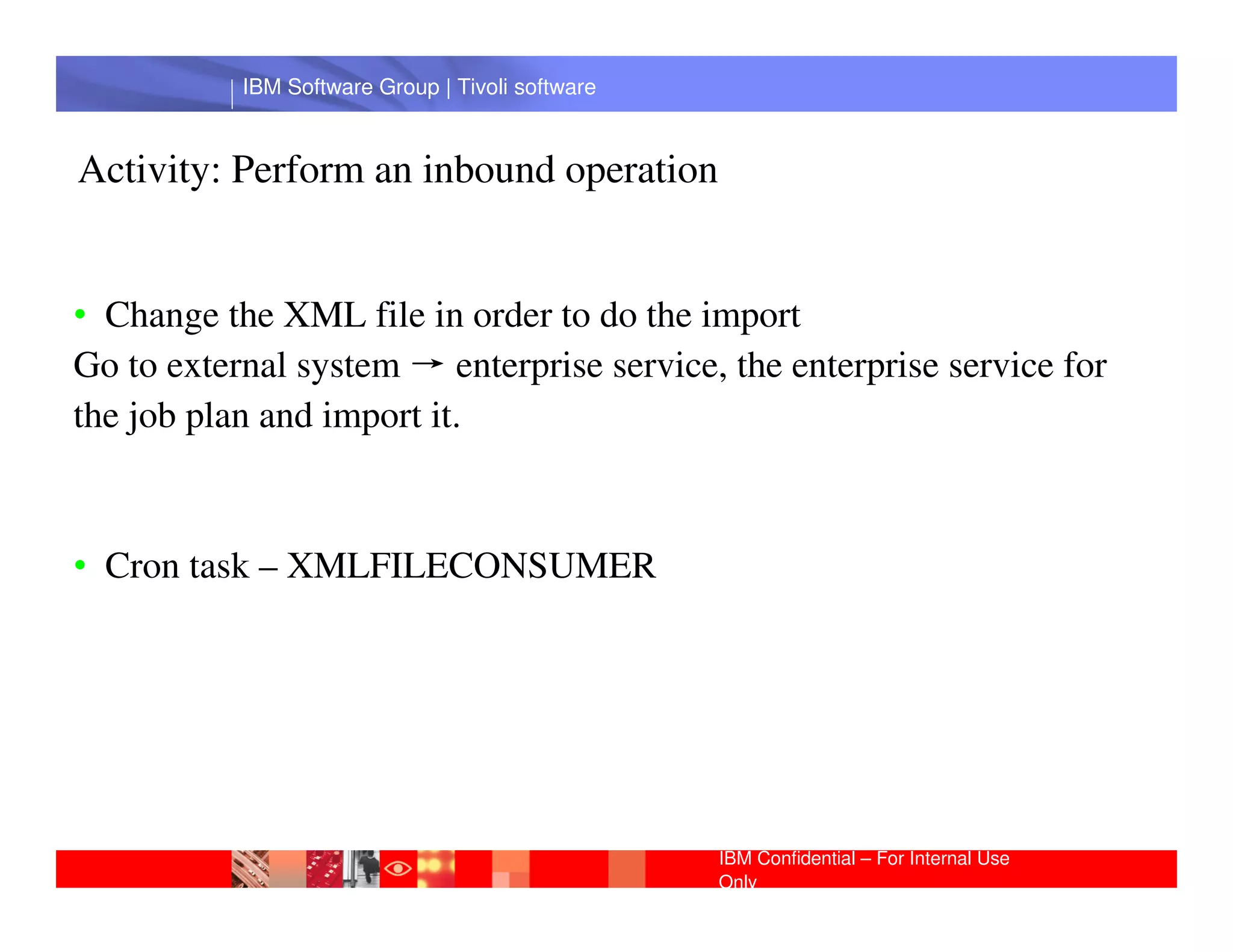
Activity: Perform an inbound operation


• Change the XML file in order to do the import
Go to external system → enterprise service, the enterprise service for
the job plan and import it.
            IBM Software Group | Lotus software
• Cron task – XMLFILECONSUMER


                                                  IBM Confidential – For Internal Use
                                                  Only
IBM Software Group | Tivoli software


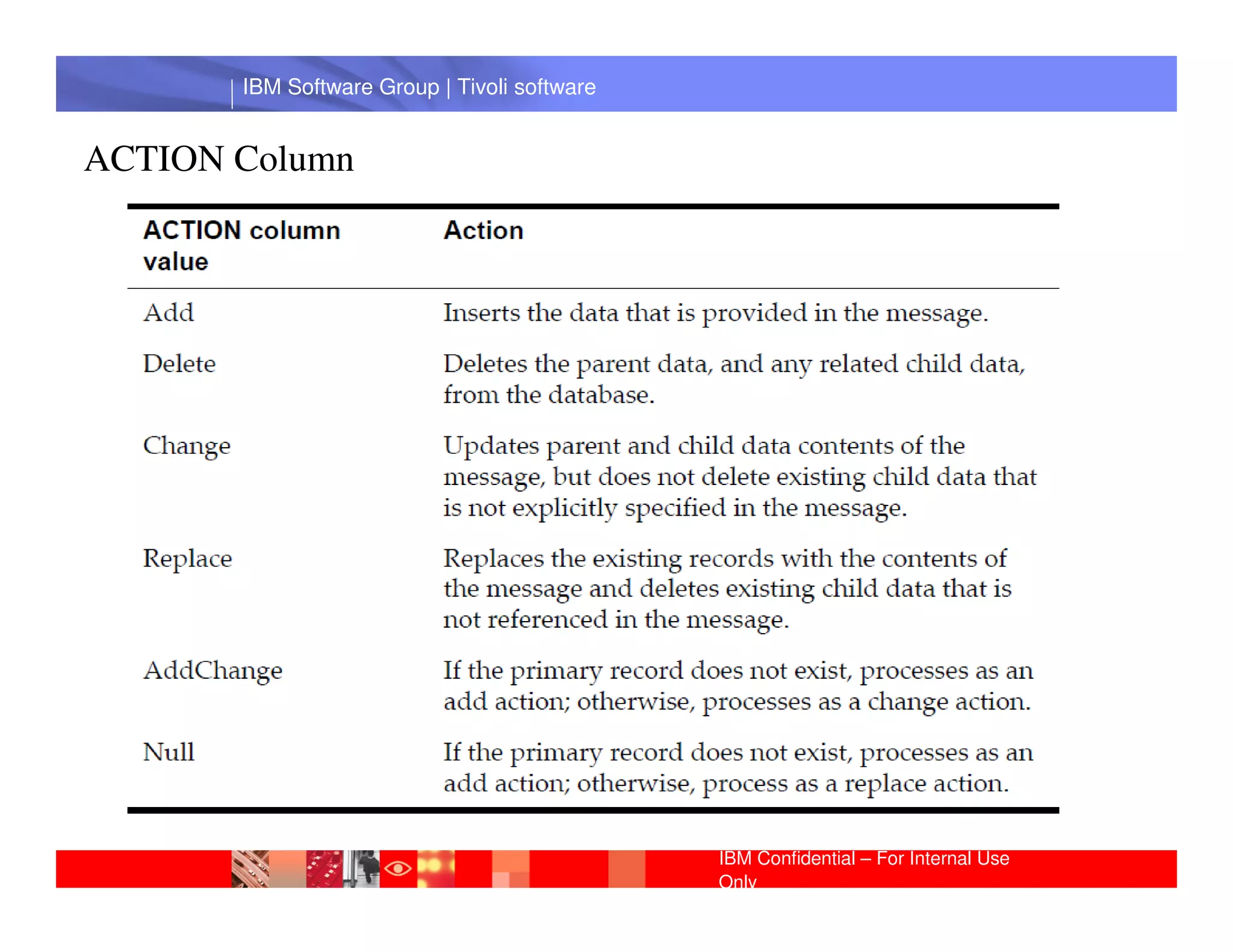
ACTION Column


        IBM Software Group | Lotus software


                                              IBM Confidential – For Internal Use
                                              Only
IBM Software Group | Tivoli software


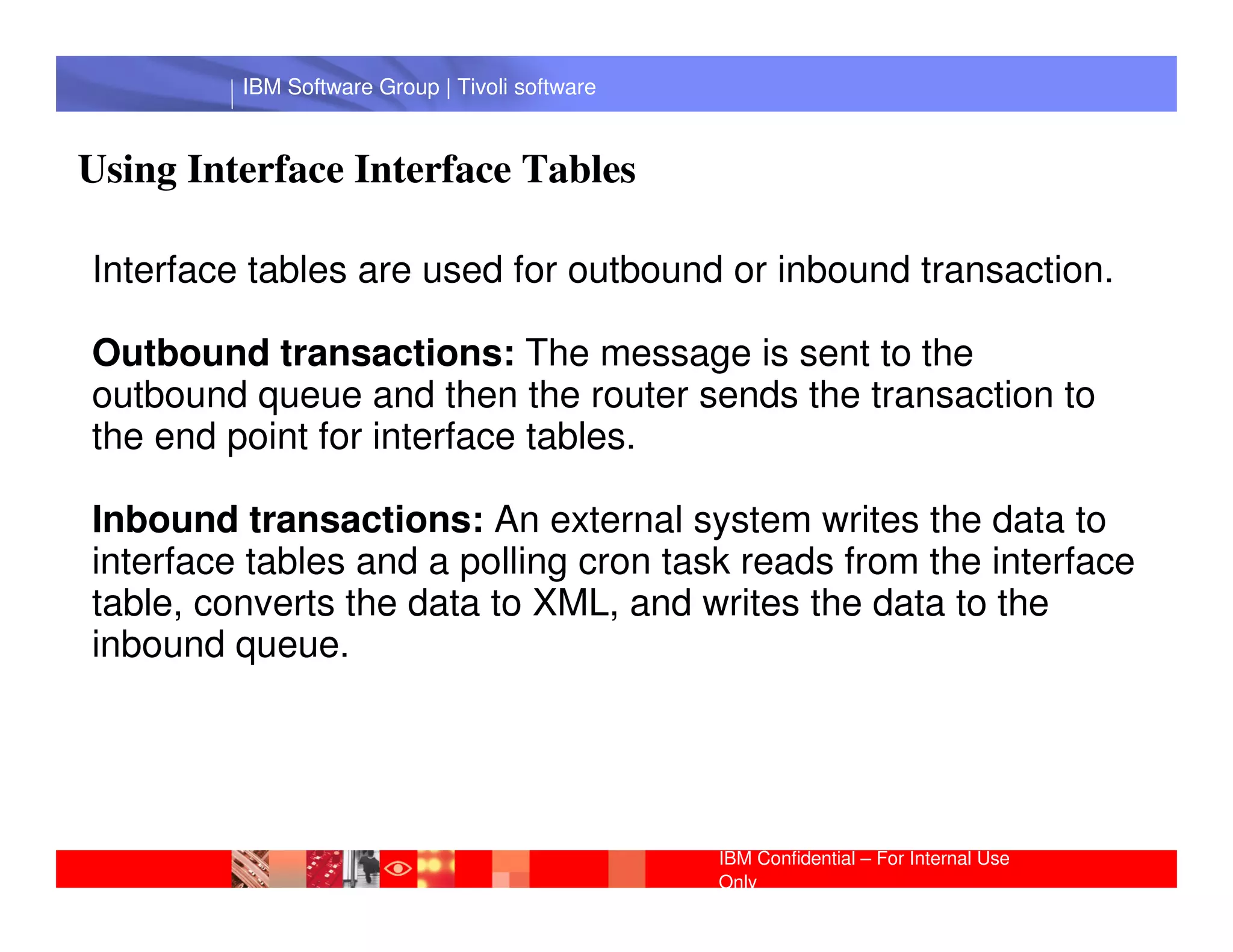
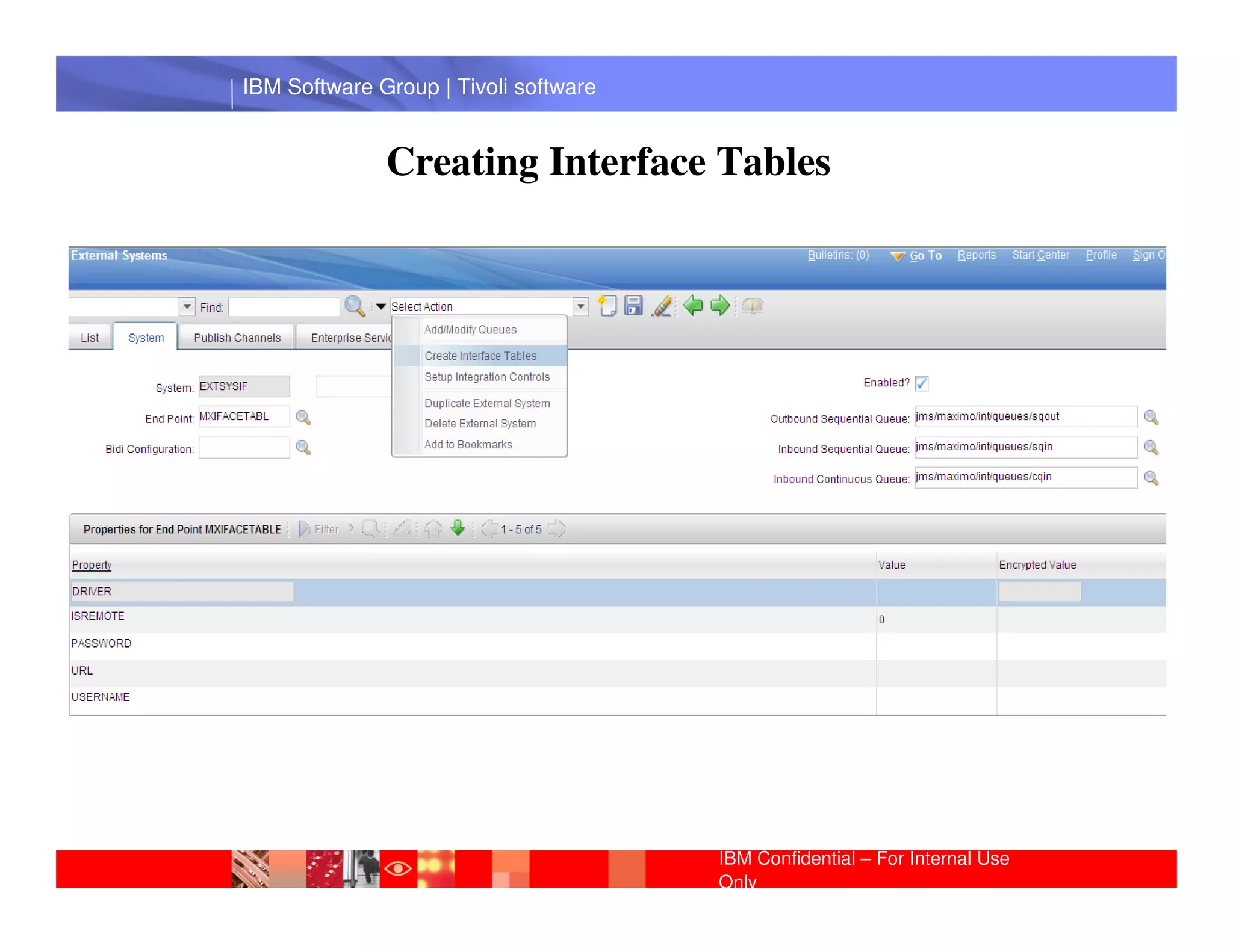
Using Interface Interface Tables

Interface tables are used for outbound or inbound transaction.

Outbound transactions: The message is sent to the
outbound queue and then the router sends the transaction to
the end point for interface tables.
          IBM Software Group | Lotus software
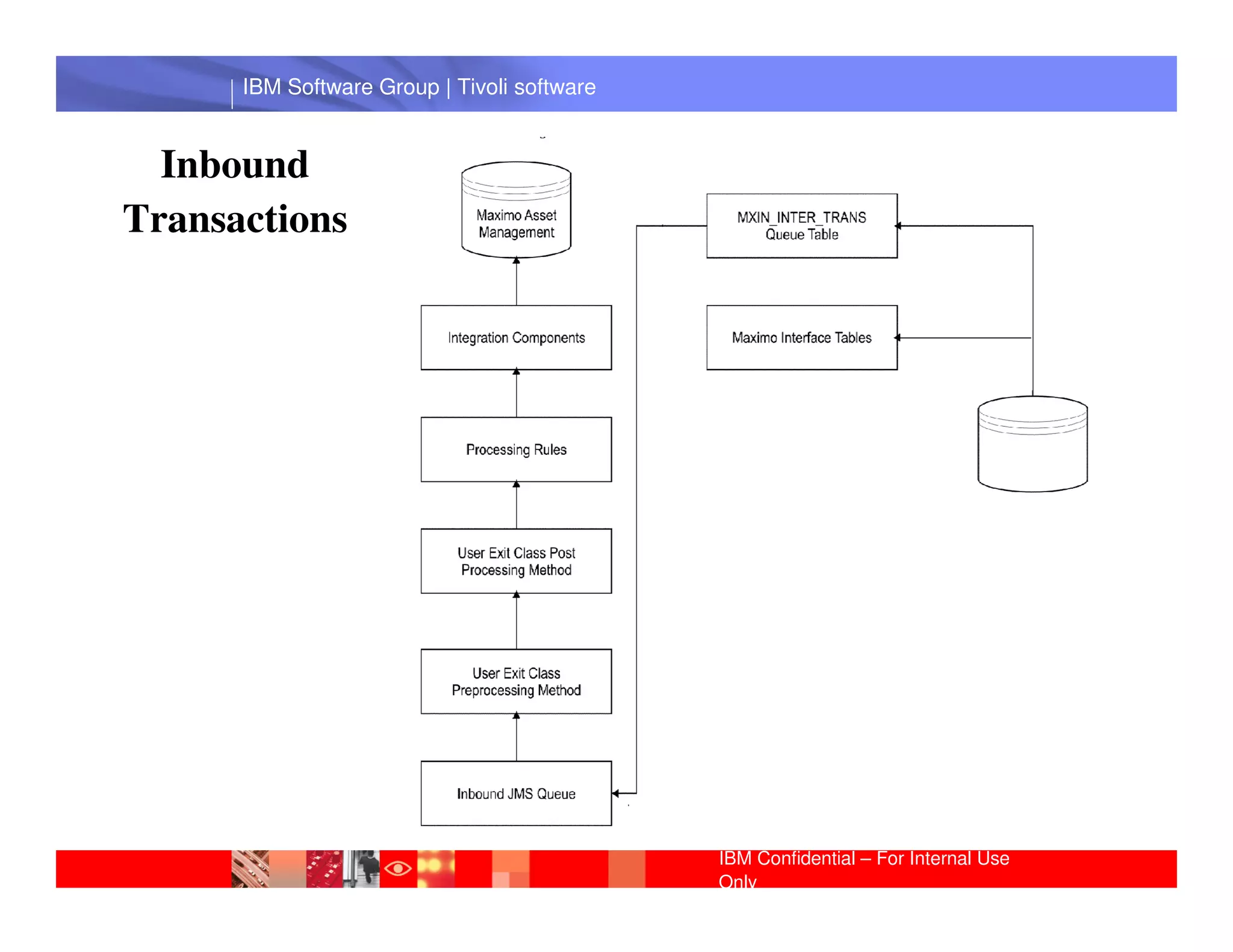
Inbound transactions: An external system writes the data to
interface tables and a polling cron task reads from the interface
table, converts the data to XML, and writes the data to the
inbound queue.


                                                IBM Confidential – For Internal Use
                                                Only
IBM Software Group | Tivoli software


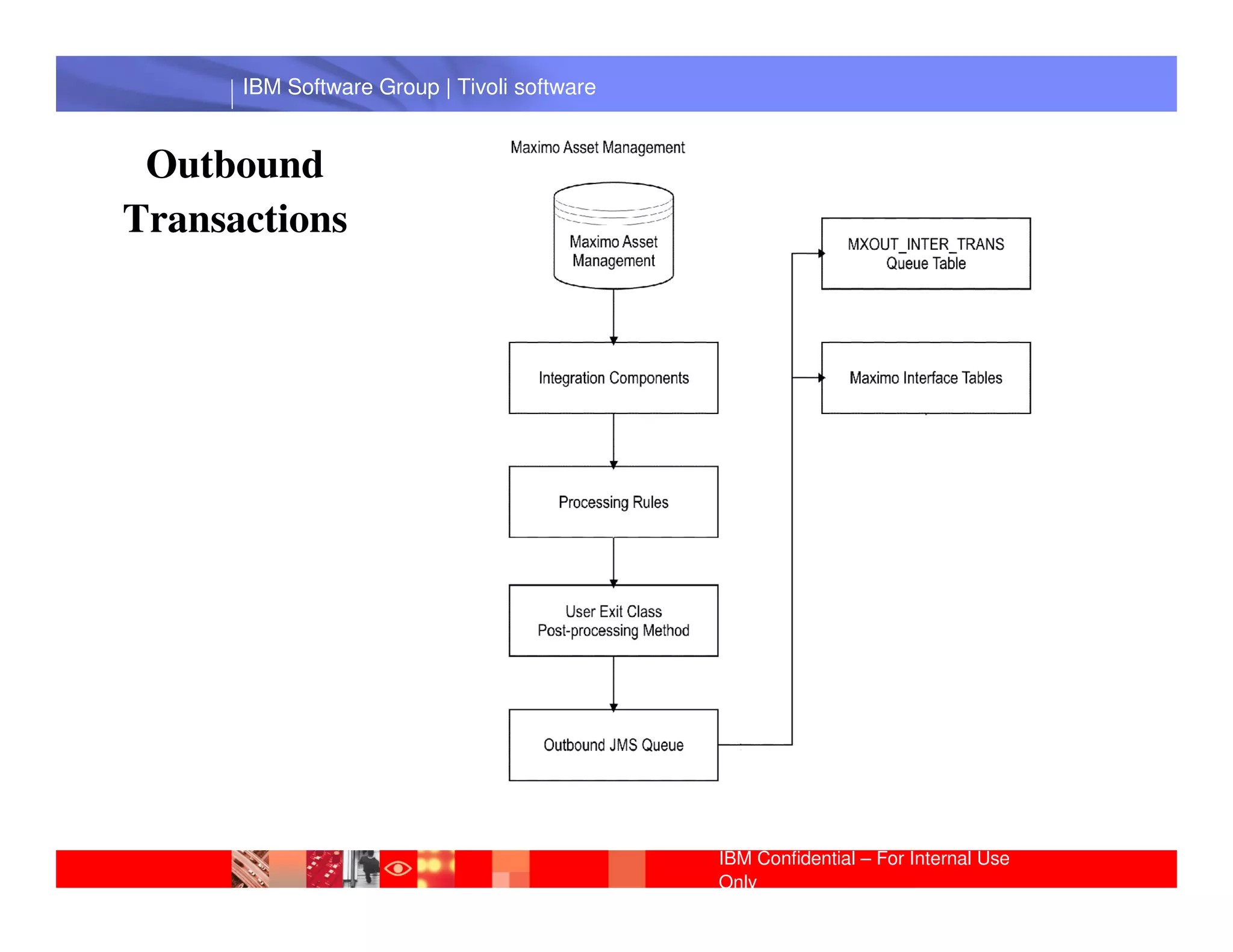
 Outbound
Transactions


       IBM Software Group | Lotus software


                                             IBM Confidential – For Internal Use
                                             Only
IBM Software Group | Tivoli software


  Inbound
Transactions


       IBM Software Group | Lotus software


                                             IBM Confidential – For Internal Use
                                             Only
IBM Software Group | Tivoli software


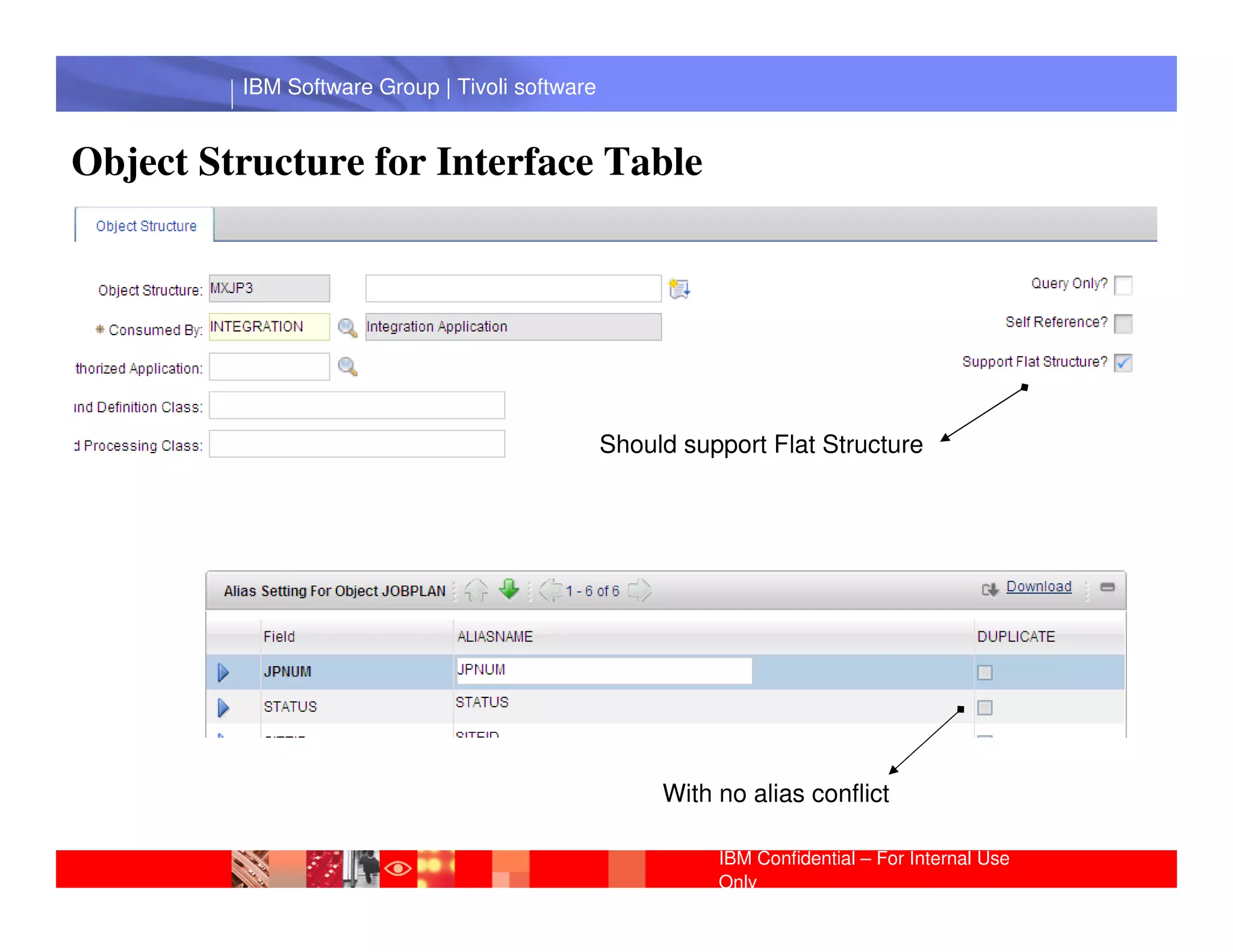
Object Structure for Interface Table


                                                Should support Flat Structure
          IBM Software Group | Lotus software


                                                     With no alias conflict

                                                          IBM Confidential – For Internal Use
                                                          Only
IBM Software Group | Tivoli software


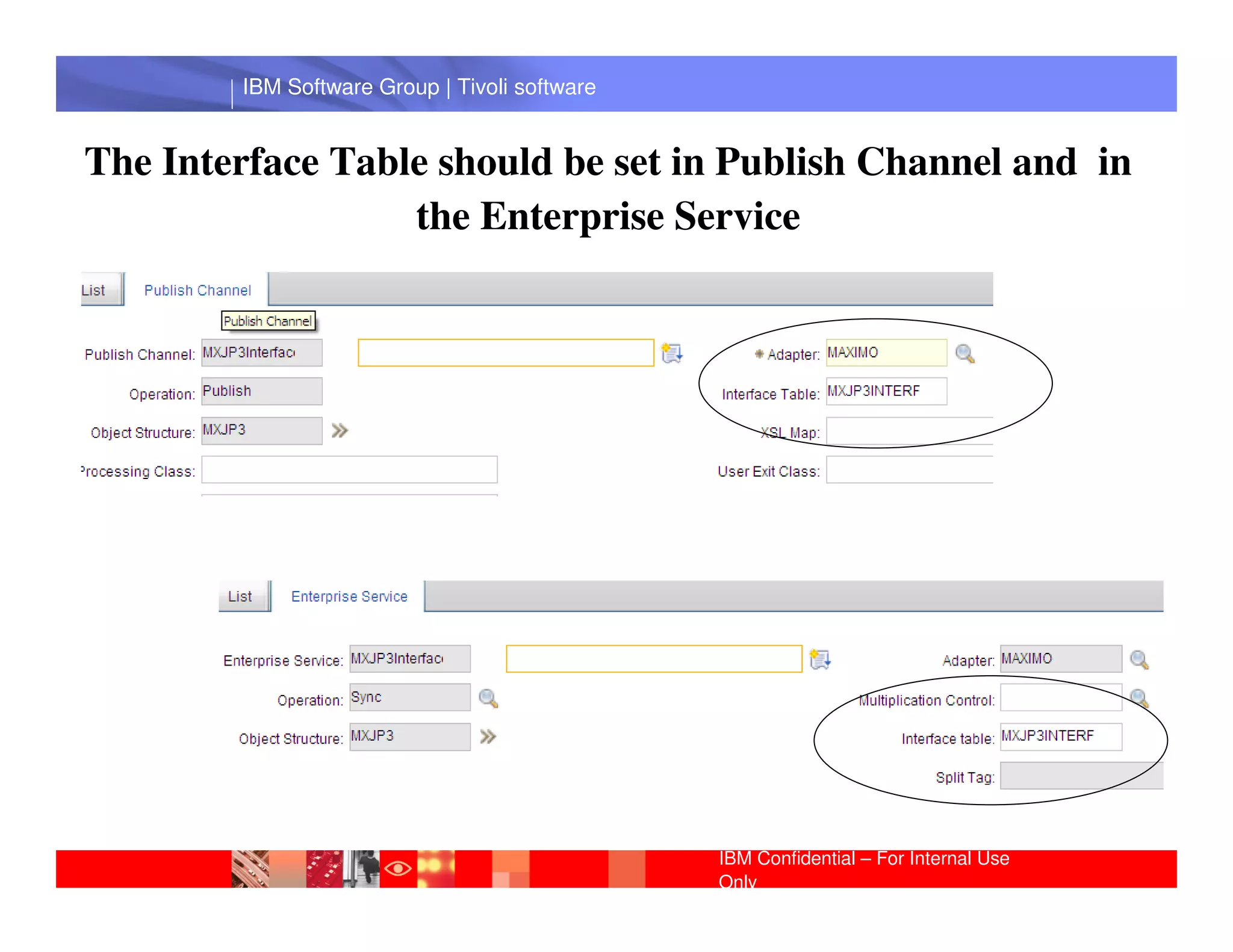
The Interface Table should be set in Publish Channel and in
                  the Enterprise Service


         IBM Software Group | Lotus software


                                               IBM Confidential – For Internal Use
                                               Only
IBM Software Group | Tivoli software


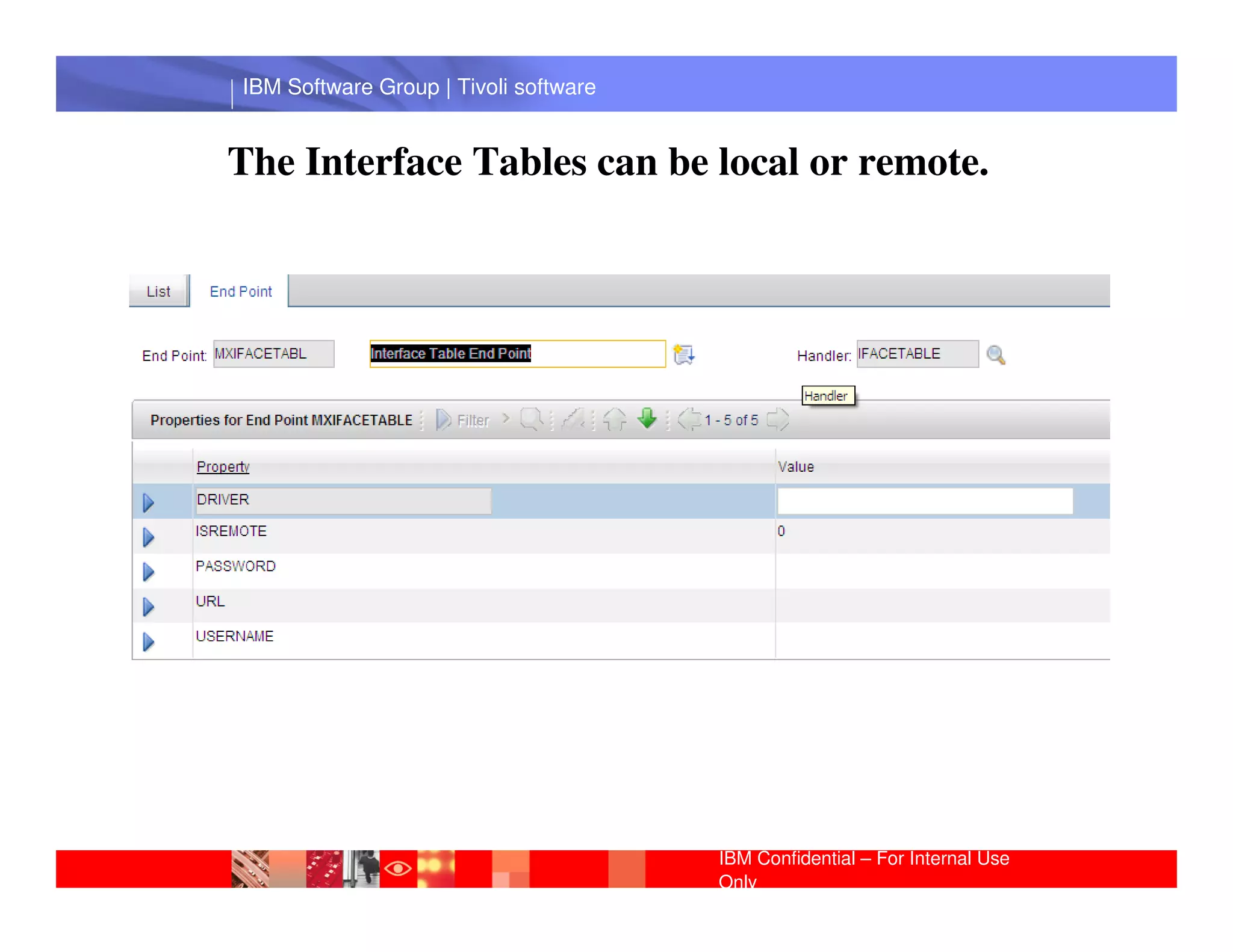
The Interface Tables can be local or remote.


 IBM Software Group | Lotus software


                                       IBM Confidential – For Internal Use
                                       Only
IBM Software Group | Tivoli software


              Creating Interface Tables


 IBM Software Group | Lotus software


                                       IBM Confidential – For Internal Use
                                       Only
IBM Software Group | Tivoli software


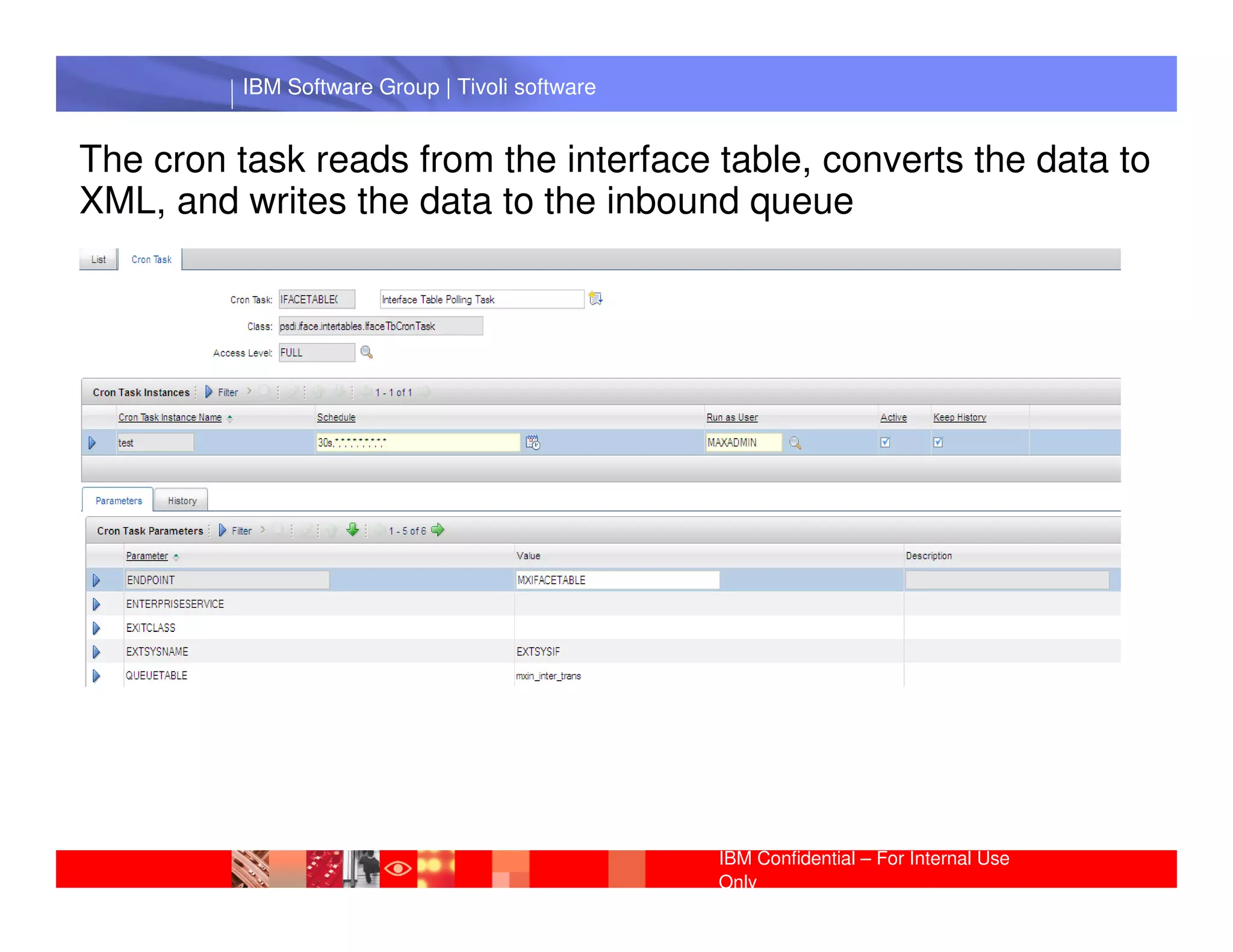
The cron task reads from the interface table, converts the data to
XML, and writes the data to the inbound queue


           IBM Software Group | Lotus software


                                                 IBM Confidential – For Internal Use
                                                 Only
IBM Software Group | Tivoli software


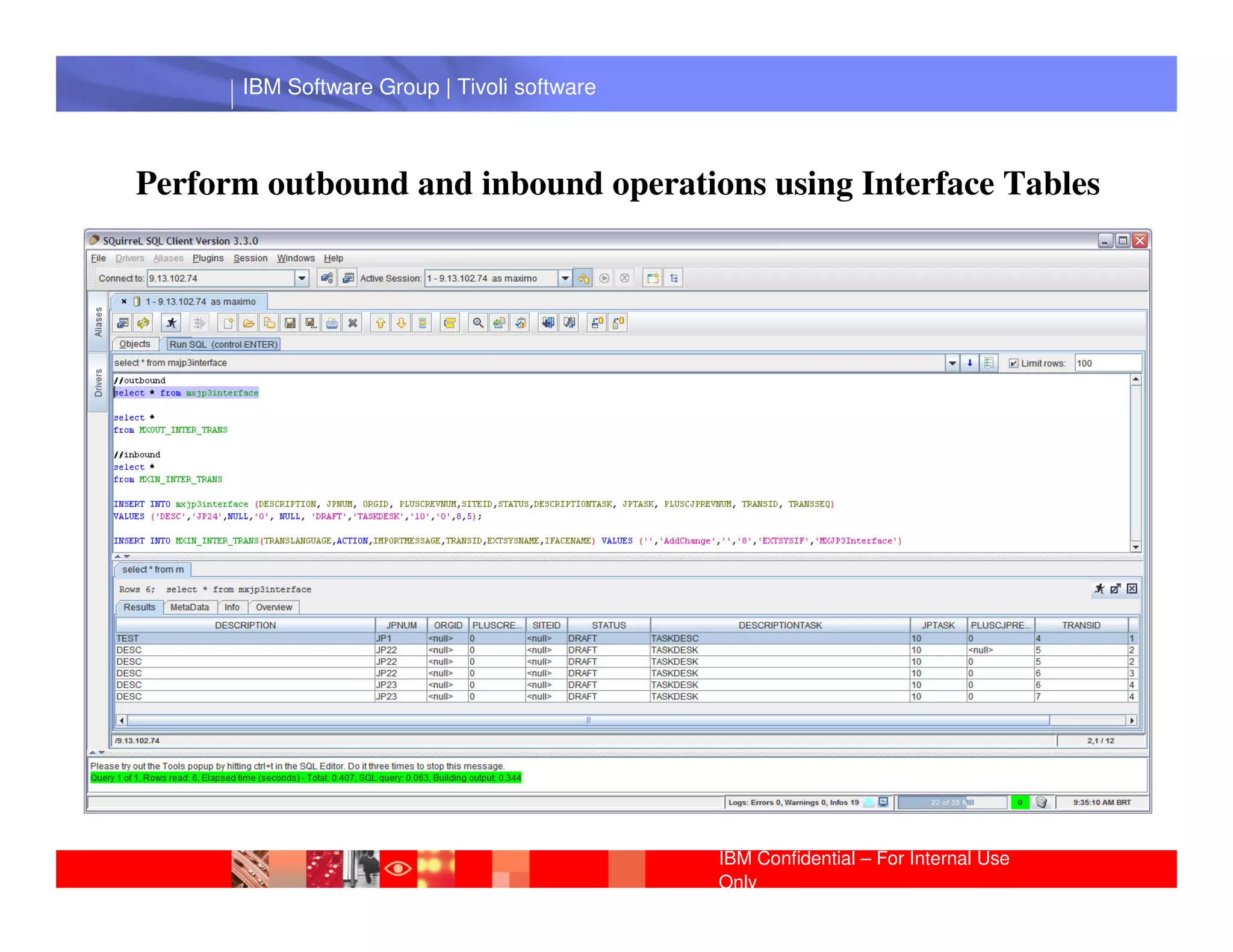
Perform outbound and inbound operations using Interface Tables


       IBM Software Group | Lotus software


                                             IBM Confidential – For Internal Use
                                             Only
IBM Software Group | Tivoli software


Web Services Concepts
Web services is a distributed computing approach that is language and
platform independent. It does not require a specific environment and it is not
dependant on a specific language.

Web services are loosely coupled. They expose only the external interfaces.
One of the most important characteristics of Web Services is that they are
based on Standards
              IBM Software Group | Lotus software
Data is represented in XML which is a standard for data representation.
Web services are self describing and discoverable using WSDL and UDDI.
Web Services use the SOAP standard protocol of communication.


                                                    IBM Confidential – For Internal Use
                                                    Only
IBM Software Group | Tivoli software


Integation Framework for Web Services
A transaction can be sent asynchronously through the queue to a
Web service end point or a transaction can be sent with a
synchronous call to the end point.

The asynchronous case requires configuring of the end point and
assigning the end point to anGroup |system or a publish channel.
           IBM Software external Lotus software
Synchronous processing requires the creation of a Java class to call
the end point. The Java class can be executed from a menu action,
from a button in the current application, or from customization in an
attribute validation, or Mbo customization.


                                                IBM Confidential – For Internal Use
                                                Only
IBM Software Group | Tivoli software


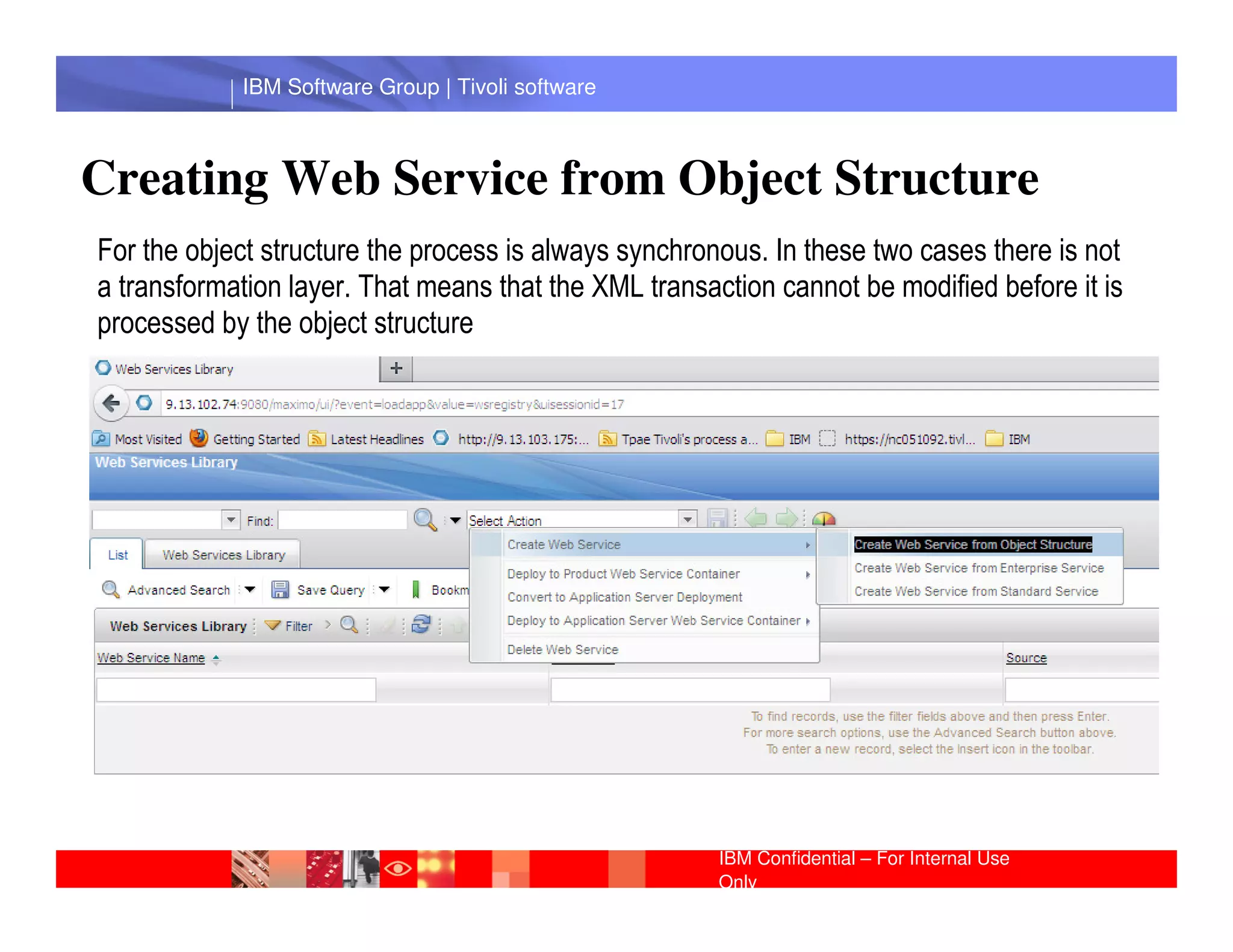
Creating Web Service from Object Structure
For the object structure the process is always synchronous. In these two cases there is not
a transformation layer. That means that the XML transaction cannot be modified before it is
processed by the object structure


              IBM Software Group | Lotus software


                                                       IBM Confidential – For Internal Use
                                                       Only
IBM Software Group | Tivoli software


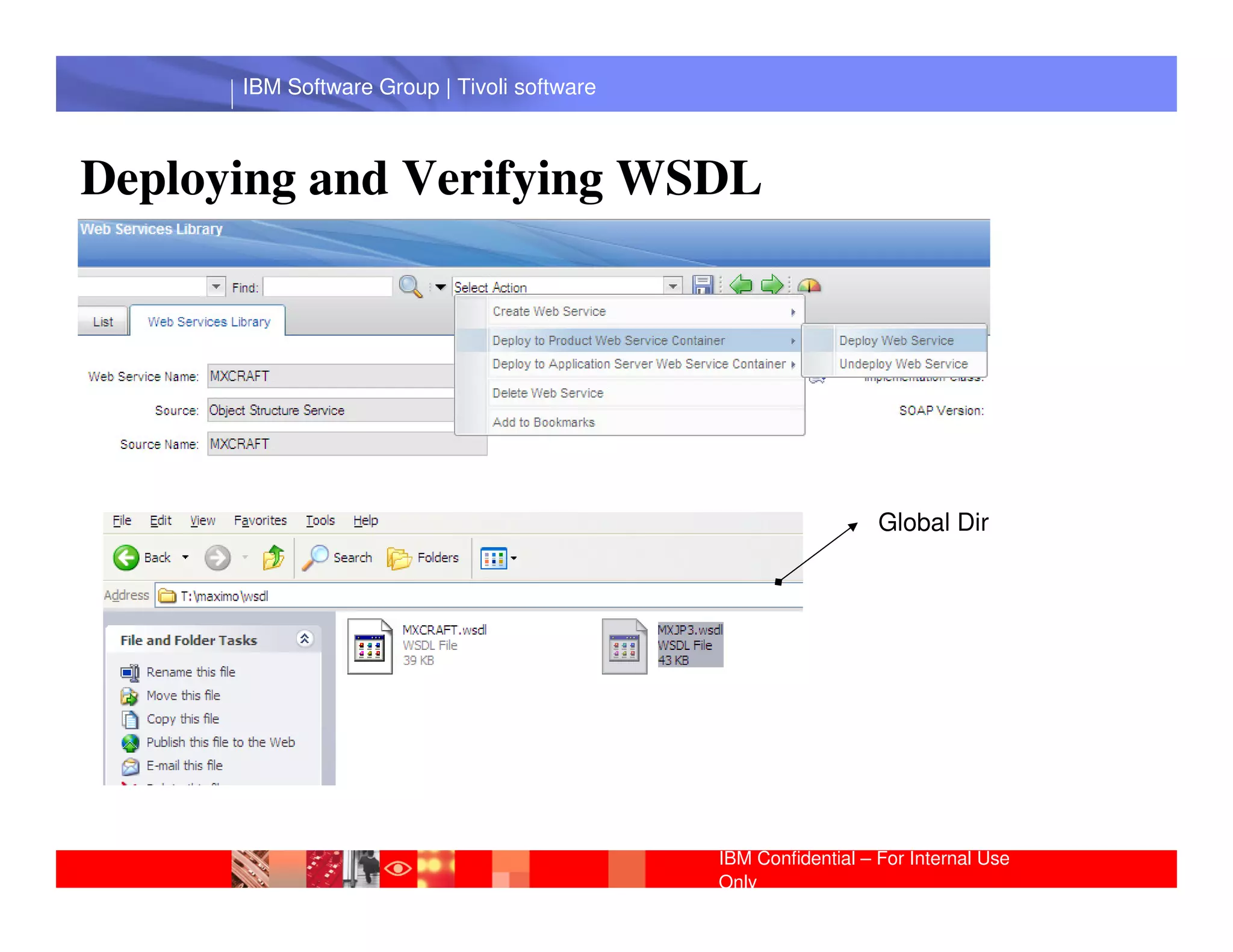
Deploying and Verifying WSDL


       IBM Software Group | Lotus software
                                                                Global Dir


                                             IBM Confidential – For Internal Use
                                             Only
IBM Software Group | Tivoli software


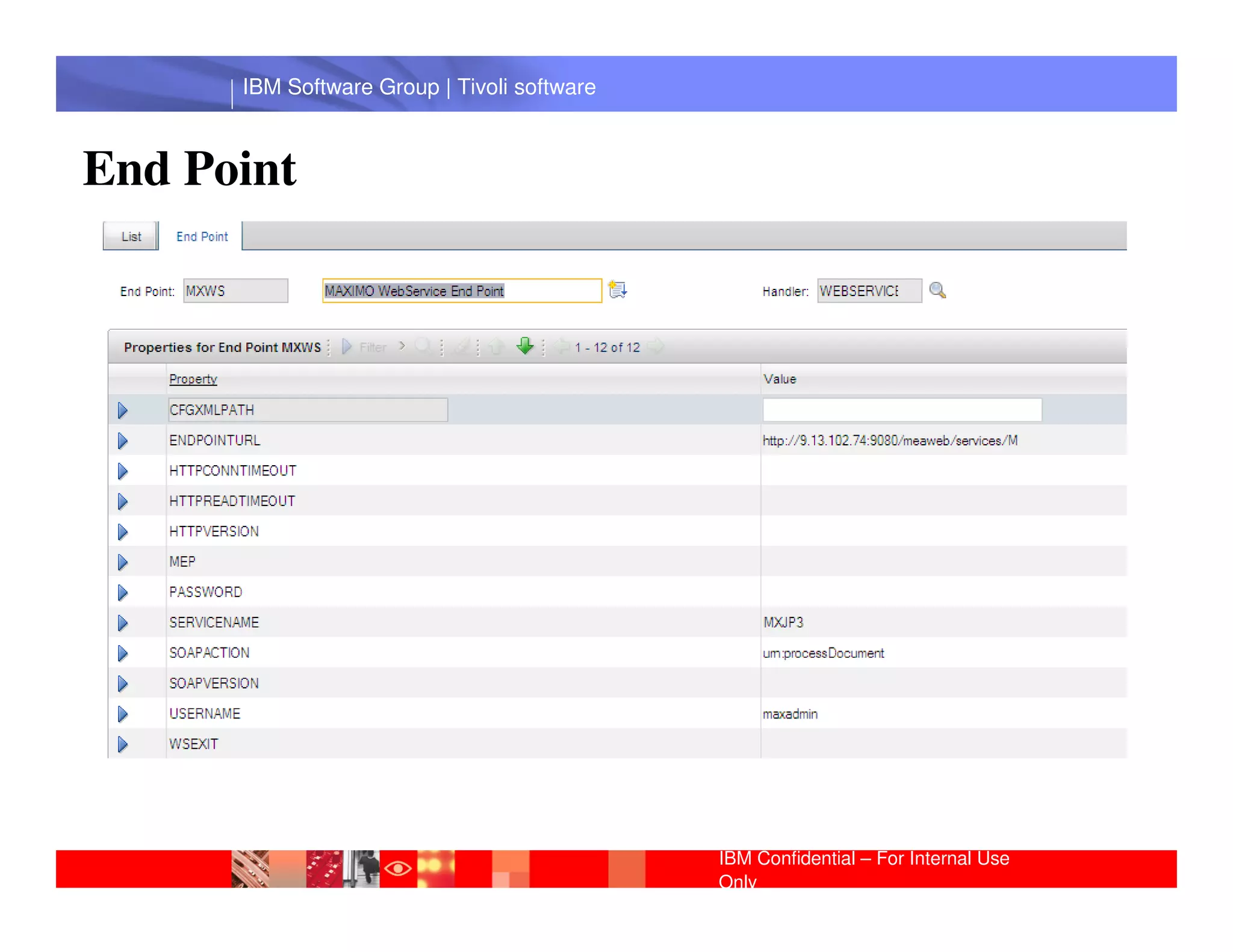
End Point


       IBM Software Group | Lotus software


                                             IBM Confidential – For Internal Use
                                             Only
IBM Software Group | Tivoli software


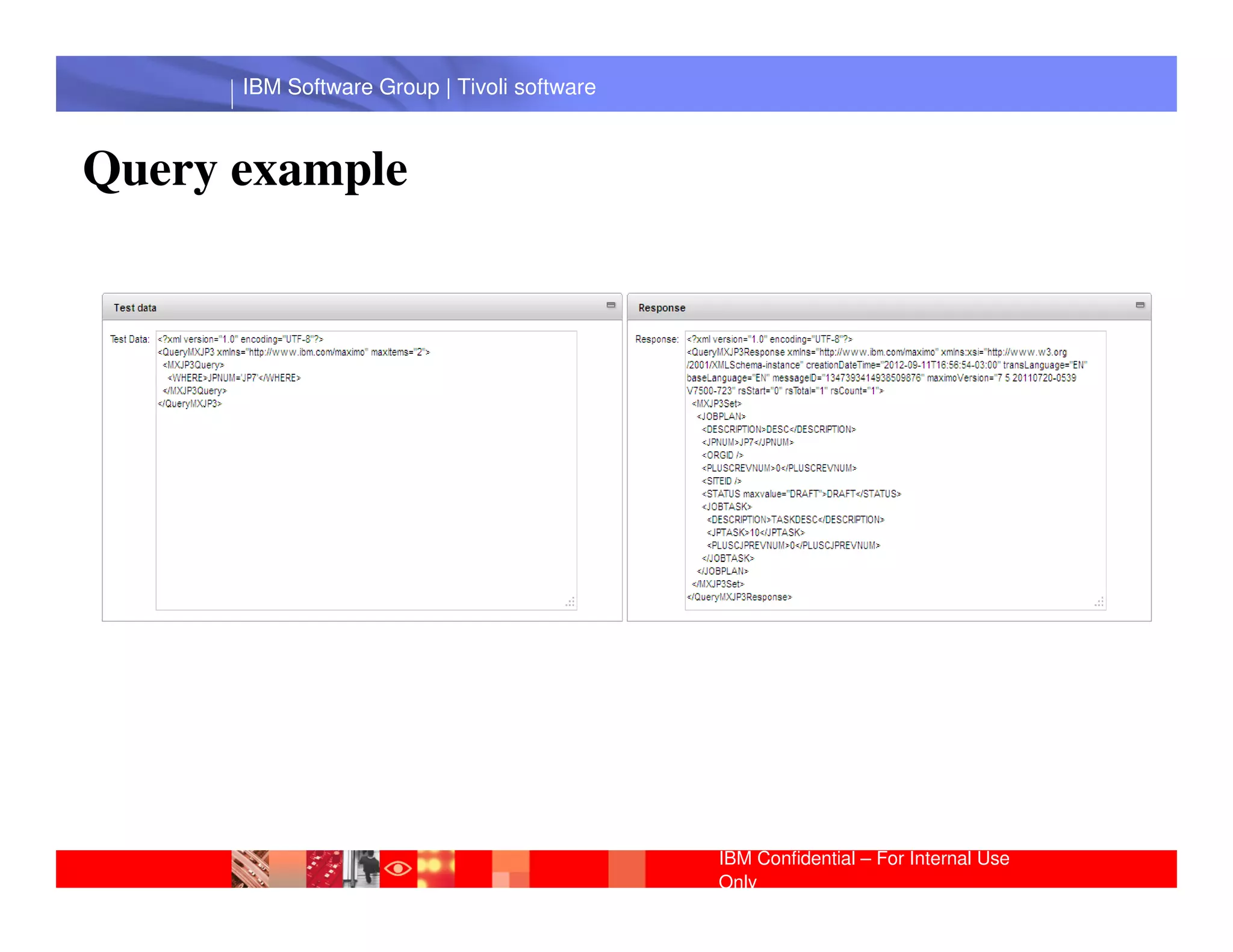
Query example


       IBM Software Group | Lotus software


                                             IBM Confidential – For Internal Use
                                             Only
IBM Software Group | Tivoli software


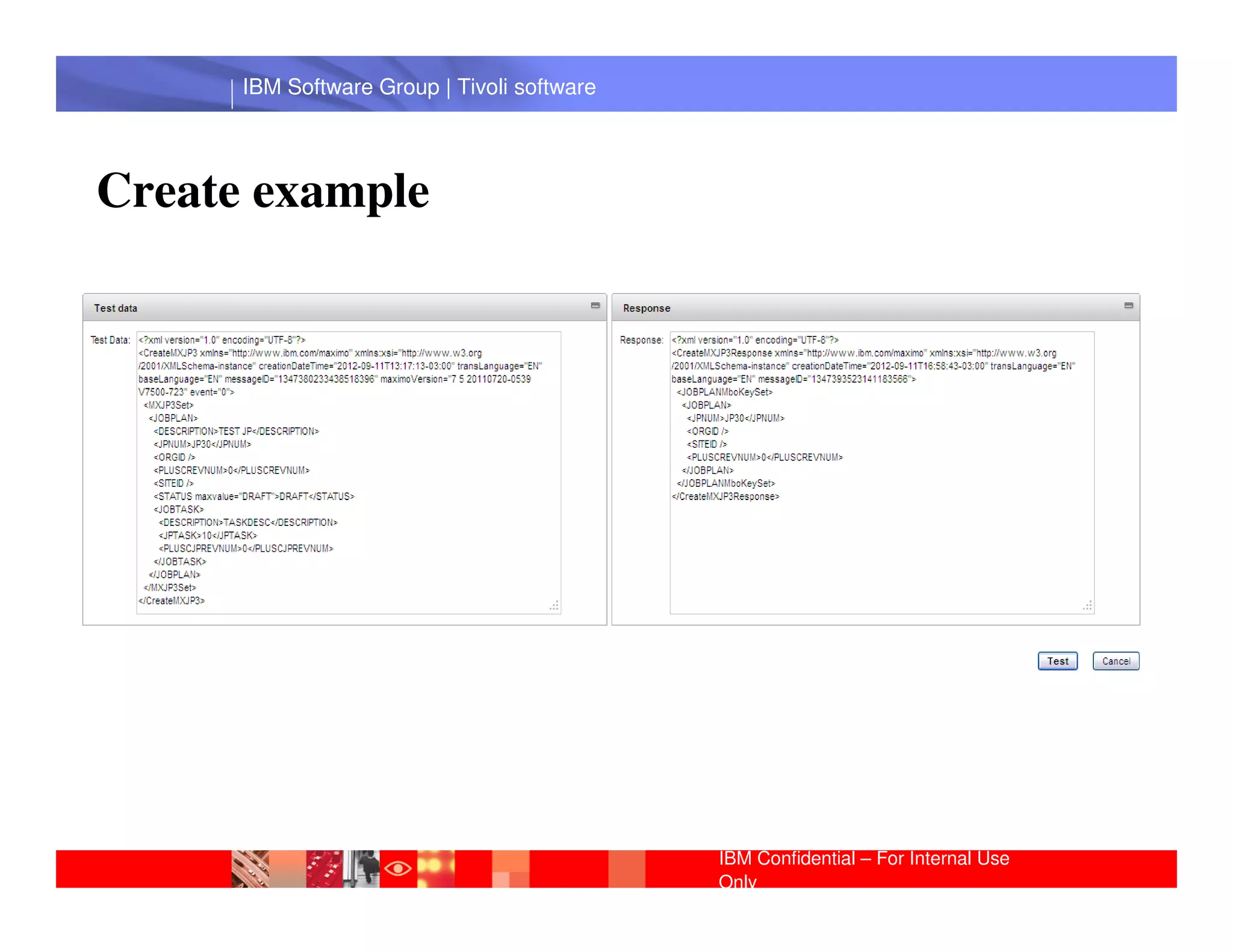
Create example


       IBM Software Group | Lotus software


                                             IBM Confidential – For Internal Use
                                             Only
IBM Software Group | Tivoli software


 IBM Software Group | Lotus software


                                       IBM Confidential – For Internal Use
                                       Only
IBM Software Group | Tivoli software


 IBM Software Group | Lotus software


                                       IBM Confidential – For Internal Use
                                       Only
IBM Software Group | Tivoli software


              Questions
 IBM Software Group | Lotus software


                                       IBM Confidential – For Internal Use
                                       Only

MIF Workshop Raquel Bortoluci Sep 2012

  • 1.
    ® Integration Framework © 2011 IBM Corporation
  • 2.
    IBM Software Group| Tivoli software History Integration has been an integral part of the Enterprise Asset Management system Maximo for more than 10 years. The first integration used PL/SQL with triggers and store procedures. It was called the MIG (Maximo Integration Gateway). When Maximo began conversion to Java. The JMIG (Java MIG) was implementedIBM Software Group | Lotus software in the Maximo version 4.x. When Maximo was fully implemented in Java the JMIG was renamed MEA (Maximo Enterprise Adapter) for Maximo 5 and 6. With the acquisition of MRO Software by IBM the integration was renamed Integration Framework and is part of the Tivoli process automation engine used for several IBM applications IBM Confidential – For Internal Use Only
  • 3.
    IBM Software Group| Tivoli software Introduction: Maximo Integration Framework Applicatio n Integration Synchronization/ External Framework Integration of data System IBM Software Group | Lotus software The integration framework is a set of applications that help you to integrate the system to your external applications. You also can create business flows between the system and your external applications. IBM Confidential – For Internal Use 3 Only
  • 4.
    IBM Software Group| Tivoli software Asynchronous X Synchronous Asynchronous processing means the two systems do not have a real-time connection. The transaction is sent from the application to a queue then from the queue to the external system. The same thing happens for transactions coming from the external system: the transaction is sent from the external system to a queue then from the queue to the application. IBM Software Group | Lotus software Synchronous processing means the two systems have a real-time connection. The transaction is sent from the application directly to the external system. The same thing happens for transactions coming from the external system: the transaction is sent from the external system directly to the application. IBM Confidential – For Internal Use Only
  • 5.
    IBM Software Group| Tivoli software Queues - definition Cqin - Continuous inbound Cqinerr - Continuous inbound error Sqin - Sequential inbound IBM Software Group | Lotus software Sqout - Sequential outbound IBM Confidential – For Internal Use Only
  • 6.
    IBM Software Group| Tivoli software Properties: The Integration Framework system properties start with mxe.int.xxx. mxe.int.globaldir: Specifies the global directory to install Service Request Manager. IBM Software Group | Lotus software mxe.int.webappurl Specifies the URL of the main installation to Service Request Manager. IBM Confidential – For Internal Use Only
  • 7.
    IBM Software Group| Tivoli software IBM Software Group | Lotus software IBM Confidential – For Internal Use Only
  • 8.
    IBM Software Group| Tivoli software Object Structure: Defines the content of a message sent to an external system or the content of a message received from an external system. IBM Software Group | Lotus software IBM Confidential – For Internal Use Only
  • 9.
    IBM Software Group| Tivoli software Activity: Create a Object Structure for Job Plan • Enter Object Structure and Consumed By • Enter Source Objects: JOBPLAN and JOBTASK IBM Software Group | Lotus software • Exclude/Include fields IBM Confidential – For Internal Use Only
  • 10.
    IBM Software Group| Tivoli software IBM Software Group | Lotus software IBM Confidential – For Internal Use Only
  • 11.
    IBM Software Group| Tivoli software A publish channel is the pipeline for sending data asynchronously from the system to an external system. The records can go through a series of transformation layers using rules (no programming), Java or XSL. The result is an external record that is sent to the external system in a format the external IBM Software Group | Lotus software system understands. IBM Confidential – For Internal Use Only
  • 12.
    IBM Software Group| Tivoli software IBM Software Group | Lotus software IBM Confidential – For Internal Use Only
  • 13.
    IBM Software Group| Tivoli software Activity: Create a Publish Channel • Enter Publish Channel name • Attach the object created previously • Enable Listener Software Group | Lotus software IBM IBM Confidential – For Internal Use Only
  • 14.
    IBM Software Group| Tivoli software IBM Software Group | Lotus software IBM Confidential – For Internal Use Only
  • 15.
    IBM Software Group| Tivoli software The enterprise service is a pipeline for querying system data and importing data into the system from an external system The external record can go to a series of transformation layers to convert it to the format that the application using Integration FrameworkIBM Software Group | Lotus software understands. IBM Confidential – For Internal Use Only
  • 16.
    IBM Software Group| Tivoli software IBM Software Group | Lotus software IBM Confidential – For Internal Use Only
  • 17.
    IBM Software Group| Tivoli software Activity: Create an Enterprise Server • Enterprise Service name • Attach theIBM Software Group | Lotus software object created previously IBM Confidential – For Internal Use Only
  • 18.
    IBM Software Group| Tivoli software IBM Software Group | Lotus software IBM Confidential – For Internal Use Only
  • 19.
    IBM Software Group| Tivoli software End point: Modes that you use to communicate with external applications. Activity: Edit the End Point • End point name IBM Software Group | Lotus software • Handler: XMLFILE • Properties: PRETTYPRINT and FILEDIR IBM Confidential – For Internal Use Only
  • 20.
    IBM Software Group| Tivoli software IBM Software Group | Lotus software IBM Confidential – For Internal Use Only
  • 21.
    IBM Software Group| Tivoli software IBM Software Group | Lotus software IBM Confidential – For Internal Use Only
  • 22.
    IBM Software Group| Tivoli software Activity: Create an External System • Enter System name • End Point: edited previously • Enter queue values IBM Software Group | Lotus software • Attach the Publish Channel (enable it) • Attach the Enterprise Server (enable it) • Enable the External System IBM Confidential – For Internal Use Only
  • 23.
    IBM Software Group| Tivoli software IBM Software Group | Lotus software IBM Confidential – For Internal Use Only
  • 24.
    IBM Software Group| Tivoli software A cron task, which is a facility in the Tivoli process automation engine that enables the scheduling of jobs, checks the queue and sends any records in the queue to the external system. Activity: active JMSQSEQCONSUMER crontask Sequencial queues are processed using the cron task IBM Software Group | Lotus software IBM Confidential – For Internal Use Only
  • 25.
    IBM Software Group| Tivoli software IBM Software Group | Lotus software IBM Confidential – For Internal Use Only
  • 26.
    IBM Software Group| Tivoli software The continuous queues are processed using instances of a Message Driven Bean that is comes with the Integration Framework. The MDB is a java class that is called to receive a message passed to it from the JMS queue. This process is like trigger: as soon as a message arrives in the queue the MDB is called and a message is passed IBM Software Group | Lotus software ..SMPmaximoapplicationsmaximomboejbejbmoduleMETA-INF ejb-jar.xml ibm-ejb-jar-bnd.xmi IBM Confidential – For Internal Use Only
  • 27.
    IBM Software Group| Tivoli software IBM Software Group | Lotus software IBM Confidential – For Internal Use Only
  • 28.
    IBM Software Group| Tivoli software Activity: Perform an outbound operation • Go to external system → publish channel and export it. Verify XML file • Listener IBM Software Group | Lotus software Create a new job plan Verify XML file IBM Confidential – For Internal Use Only
  • 29.
    IBM Software Group| Tivoli software Activity: Perform an inbound operation • Change the XML file in order to do the import Go to external system → enterprise service, the enterprise service for the job plan and import it. IBM Software Group | Lotus software • Cron task – XMLFILECONSUMER IBM Confidential – For Internal Use Only
  • 30.
    IBM Software Group| Tivoli software ACTION Column IBM Software Group | Lotus software IBM Confidential – For Internal Use Only
  • 31.
    IBM Software Group| Tivoli software Using Interface Interface Tables Interface tables are used for outbound or inbound transaction. Outbound transactions: The message is sent to the outbound queue and then the router sends the transaction to the end point for interface tables. IBM Software Group | Lotus software Inbound transactions: An external system writes the data to interface tables and a polling cron task reads from the interface table, converts the data to XML, and writes the data to the inbound queue. IBM Confidential – For Internal Use Only
  • 32.
    IBM Software Group| Tivoli software Outbound Transactions IBM Software Group | Lotus software IBM Confidential – For Internal Use Only
  • 33.
    IBM Software Group| Tivoli software Inbound Transactions IBM Software Group | Lotus software IBM Confidential – For Internal Use Only
  • 34.
    IBM Software Group| Tivoli software Object Structure for Interface Table Should support Flat Structure IBM Software Group | Lotus software With no alias conflict IBM Confidential – For Internal Use Only
  • 35.
    IBM Software Group| Tivoli software The Interface Table should be set in Publish Channel and in the Enterprise Service IBM Software Group | Lotus software IBM Confidential – For Internal Use Only
  • 36.
    IBM Software Group| Tivoli software The Interface Tables can be local or remote. IBM Software Group | Lotus software IBM Confidential – For Internal Use Only
  • 37.
    IBM Software Group| Tivoli software Creating Interface Tables IBM Software Group | Lotus software IBM Confidential – For Internal Use Only
  • 38.
    IBM Software Group| Tivoli software The cron task reads from the interface table, converts the data to XML, and writes the data to the inbound queue IBM Software Group | Lotus software IBM Confidential – For Internal Use Only
  • 39.
    IBM Software Group| Tivoli software Perform outbound and inbound operations using Interface Tables IBM Software Group | Lotus software IBM Confidential – For Internal Use Only
  • 40.
    IBM Software Group| Tivoli software Web Services Concepts Web services is a distributed computing approach that is language and platform independent. It does not require a specific environment and it is not dependant on a specific language. Web services are loosely coupled. They expose only the external interfaces. One of the most important characteristics of Web Services is that they are based on Standards IBM Software Group | Lotus software Data is represented in XML which is a standard for data representation. Web services are self describing and discoverable using WSDL and UDDI. Web Services use the SOAP standard protocol of communication. IBM Confidential – For Internal Use Only
  • 41.
    IBM Software Group| Tivoli software Integation Framework for Web Services A transaction can be sent asynchronously through the queue to a Web service end point or a transaction can be sent with a synchronous call to the end point. The asynchronous case requires configuring of the end point and assigning the end point to anGroup |system or a publish channel. IBM Software external Lotus software Synchronous processing requires the creation of a Java class to call the end point. The Java class can be executed from a menu action, from a button in the current application, or from customization in an attribute validation, or Mbo customization. IBM Confidential – For Internal Use Only
  • 42.
    IBM Software Group| Tivoli software Creating Web Service from Object Structure For the object structure the process is always synchronous. In these two cases there is not a transformation layer. That means that the XML transaction cannot be modified before it is processed by the object structure IBM Software Group | Lotus software IBM Confidential – For Internal Use Only
  • 43.
    IBM Software Group| Tivoli software Deploying and Verifying WSDL IBM Software Group | Lotus software Global Dir IBM Confidential – For Internal Use Only
  • 44.
    IBM Software Group| Tivoli software End Point IBM Software Group | Lotus software IBM Confidential – For Internal Use Only
  • 45.
    IBM Software Group| Tivoli software Query example IBM Software Group | Lotus software IBM Confidential – For Internal Use Only
  • 46.
    IBM Software Group| Tivoli software Create example IBM Software Group | Lotus software IBM Confidential – For Internal Use Only
  • 47.
    IBM Software Group| Tivoli software IBM Software Group | Lotus software IBM Confidential – For Internal Use Only
  • 48.
    IBM Software Group| Tivoli software IBM Software Group | Lotus software IBM Confidential – For Internal Use Only
  • 49.
    IBM Software Group| Tivoli software Questions IBM Software Group | Lotus software IBM Confidential – For Internal Use Only