Introduction
 Welcome to today's presentation on Microsoft Server and managing client
restrictions via Group Policy Object (GPO).
 In this session, we will explore the powerful capabilities of Microsoft Server and how
it enables administrators to control and manage client restrictions effectively.
 We will specifically focus on Group Policy Object, which is a key component of
Microsoft Server, and discuss how it can be utilized to enforce restrictions on client
machines within an organization.
[By :- Sahil, Deepak, Mukesh & Rahul ]
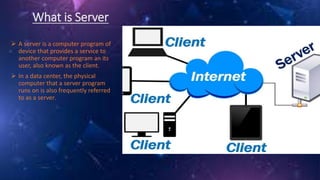
What is Server
 A server is a computer program of
device that provides a service to
another computer program an its
user, also known as the client.
 In a data center, the physical
computer that a server program
runs on is also frequently referred
to as a server.
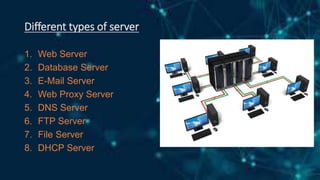
Different types of server
1. Web Server
2. Database Server
3. E-Mail Server
4. Web Proxy Server
5. DNS Server
6. FTP Server
7. File Server
8. DHCP Server
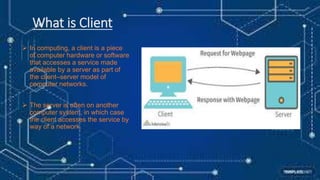
What is Client
 In computing, a client is a piece
of computer hardware or software
that accesses a service made
available by a server as part of
the client–server model of
computer networks.
 The server is often on another
computer system, in which case
the client accesses the service by
way of a network.
Group Policy Object
Group Policy Objects (GPOs) are a feature in Microsoft Windows
operating systems that allow administrators to manage and
enforce various settings and configurations for user accounts and
computer systems within a networked environment. GPOs provide
a centralized way to apply policies, security settings, software
installations, and other configurations across multiple machines or
users within a domain.
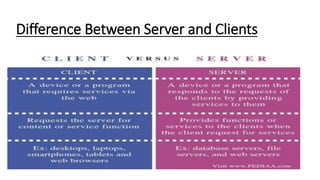
Difference Between Server and Clients
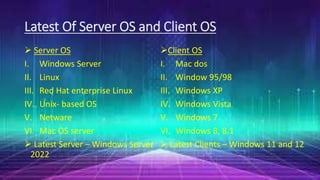
Latest Of Server OS and Client OS
 Server OS
I. Windows Server
II. Linux
III. Red Hat enterprise Linux
IV. Unix- based OS
V. Netware
VI. Mac OS server
 Latest Server – Windows Server
2022
Client OS
I. Mac dos
II. Window 95/98
III. Windows XP
IV. Windows Vista
V. Windows 7
VI. Windows 8, 8.1
 Latest Clients – Windows 11 and 12
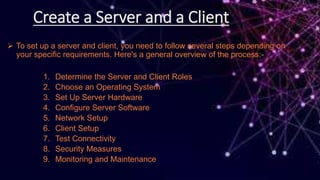
Create a Server and a Client
 To set up a server and client, you need to follow several steps depending on
your specific requirements. Here's a general overview of the process:-
1. Determine the Server and Client Roles
2. Choose an Operating System
3. Set Up Server Hardware
4. Configure Server Software
5. Network Setup
6. Client Setup
7. Test Connectivity
8. Security Measures
9. Monitoring and Maintenance
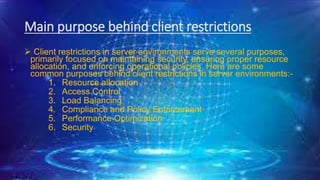
Main purpose behind client restrictions
 Client restrictions in server environments serve several purposes,
primarily focused on maintaining security, ensuring proper resource
allocation, and enforcing operational policies. Here are some
common purposes behind client restrictions in server environments:-
1. Resource allocation
2. Access Control
3. Load Balancing
4. Compliance and Policy Enforcement
5. Performance Optimization
6. Security
How can we implement
restrictions on a client
 Implementing client restrictions in a server environment can be accomplished
through various methods and techniques. The specific implementation depends
on the nature of the restrictions you want to impose. Here are some common
approaches:-
1. Access Control Lists(ACLS)
2. User Authentication and Authorization
3. Rate Limiting
4. Captcha or Challenge-Response Mechanisms
5. Traffic Filtering and Firewall Rules
6. Session Management
7. Whitelisting and Blacklisting
8. Application-Level Restrictions
Microsoft Webserver presentation on Powerpoint

Microsoft Webserver presentation on Powerpoint

  • 1.
    Introduction  Welcome totoday's presentation on Microsoft Server and managing client restrictions via Group Policy Object (GPO).  In this session, we will explore the powerful capabilities of Microsoft Server and how it enables administrators to control and manage client restrictions effectively.  We will specifically focus on Group Policy Object, which is a key component of Microsoft Server, and discuss how it can be utilized to enforce restrictions on client machines within an organization. [By :- Sahil, Deepak, Mukesh & Rahul ]
  • 2.
    What is Server A server is a computer program of device that provides a service to another computer program an its user, also known as the client.  In a data center, the physical computer that a server program runs on is also frequently referred to as a server.
  • 3.
    Different types ofserver 1. Web Server 2. Database Server 3. E-Mail Server 4. Web Proxy Server 5. DNS Server 6. FTP Server 7. File Server 8. DHCP Server
  • 4.
    What is Client In computing, a client is a piece of computer hardware or software that accesses a service made available by a server as part of the client–server model of computer networks.  The server is often on another computer system, in which case the client accesses the service by way of a network.
  • 5.
    Group Policy Object GroupPolicy Objects (GPOs) are a feature in Microsoft Windows operating systems that allow administrators to manage and enforce various settings and configurations for user accounts and computer systems within a networked environment. GPOs provide a centralized way to apply policies, security settings, software installations, and other configurations across multiple machines or users within a domain.
  • 6.
  • 7.
    Latest Of ServerOS and Client OS  Server OS I. Windows Server II. Linux III. Red Hat enterprise Linux IV. Unix- based OS V. Netware VI. Mac OS server  Latest Server – Windows Server 2022 Client OS I. Mac dos II. Window 95/98 III. Windows XP IV. Windows Vista V. Windows 7 VI. Windows 8, 8.1  Latest Clients – Windows 11 and 12
  • 8.
    Create a Serverand a Client  To set up a server and client, you need to follow several steps depending on your specific requirements. Here's a general overview of the process:- 1. Determine the Server and Client Roles 2. Choose an Operating System 3. Set Up Server Hardware 4. Configure Server Software 5. Network Setup 6. Client Setup 7. Test Connectivity 8. Security Measures 9. Monitoring and Maintenance
  • 9.
    Main purpose behindclient restrictions  Client restrictions in server environments serve several purposes, primarily focused on maintaining security, ensuring proper resource allocation, and enforcing operational policies. Here are some common purposes behind client restrictions in server environments:- 1. Resource allocation 2. Access Control 3. Load Balancing 4. Compliance and Policy Enforcement 5. Performance Optimization 6. Security
  • 10.
    How can weimplement restrictions on a client  Implementing client restrictions in a server environment can be accomplished through various methods and techniques. The specific implementation depends on the nature of the restrictions you want to impose. Here are some common approaches:- 1. Access Control Lists(ACLS) 2. User Authentication and Authorization 3. Rate Limiting 4. Captcha or Challenge-Response Mechanisms 5. Traffic Filtering and Firewall Rules 6. Session Management 7. Whitelisting and Blacklisting 8. Application-Level Restrictions