Microservices in Azure
How Microsoft's public cloud supports
modern application architecture
Doug Vanderweide, MCSE, MCSD, MCT
https://www.dougv.com
@dougvdotcom
linkedin.com/in/dougvdotcom
Today's objectives
"microservices," "SOA" and other termsDefine
the architecture of a microservices-based applicationUnderstand
the base services Azure provides to support that patternDiscover
supporting services used alongside those base servicesDescribe
metrics and monitoring optionsReview
What Are Microservices, Really?
Or 'Service-Oriented Architecture.' Or whatever the kids are calling it these days.
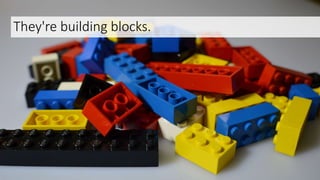
They're building blocks.
We can build simple structures from a few blocks,
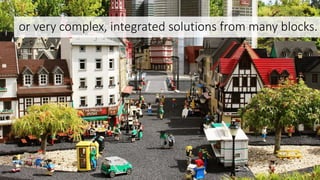
or very complex, integrated solutions from many blocks.
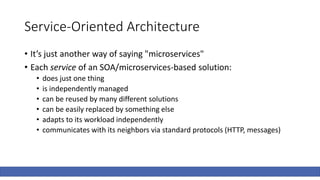
Service-Oriented Architecture
• It’s just another way of saying "microservices"
• Each service of an SOA/microservices-based solution:
• does just one thing
• is independently managed
• can be reused by many different solutions
• can be easily replaced by something else
• adapts to its workload independently
• communicates with its neighbors via standard protocols (HTTP, messages)
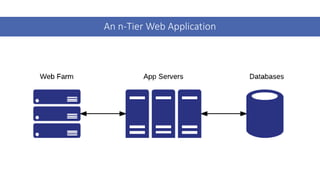
An n-Tier Web Application
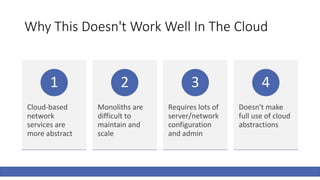
Why This Doesn't Work Well In The Cloud
Cloud-based
network
services are
more abstract
1
Monoliths are
difficult to
maintain and
scale
2
Requires lots of
server/network
configuration
and admin
3
Doesn't make
full use of cloud
abstractions
4
Microservices
To The Rescue!
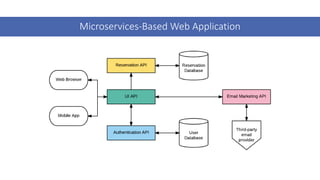
Microservices-Based Web Application
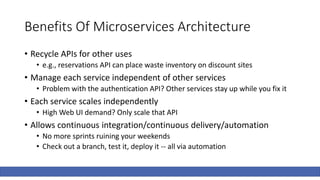
Benefits Of Microservices Architecture
• Recycle APIs for other uses
• e.g., reservations API can place waste inventory on discount sites
• Manage each service independent of other services
• Problem with the authentication API? Other services stay up while you fix it
• Each service scales independently
• High Web UI demand? Only scale that API
• Allows continuous integration/continuous delivery/automation
• No more sprints ruining your weekends
• Check out a branch, test it, deploy it -- all via automation
Basic Azure PaaS Options
The public cloud services that host your underlying APIs/microservices
App Service
• Azure Resource Manager's adoption of ASM Cloud Services
• Web and Worker roles are now Web, API, Mobile, Logic or Function apps
• Uses anonymous, generalized guest OS to host services
• Windows and Linux
• Azure handles most configuration and management
• You have control over runtimes, some environment aspects
Web Apps
• Used to host websites
• Built for high availability
• Multi-instance
• Automatic load balancing/health probes
• Can be scaled on a schedule or via metric
• Meet anticipated or unanticipated demand
• Built for CI/CD via git, VSTS, cloud file storage
Logic Apps
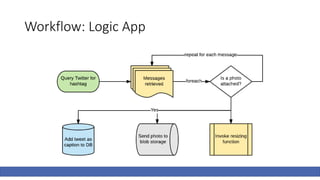
• Used to chain together API workflows
• Trigger event kicks off workflow
• Workflow performs a task, using inputs
• Process can be looped, building off each input
• Incorporates common APIs, aka connectors
• Twitter, Facebook, Google, YouTube, etc.
• Available for most Microsoft and Azure SaaS workloads
• Office 365, SQL Server, Dynamics, Power BI, OneDrive, etc.
• Many other enterprise workloads available
• Salesforce, Oracle, SAP, etc.
Mobile Apps
• Intended to serve as the "back end" tooling
• Effectively used to create API endpoints and data stores
• Simplified management for offline data sync
• SQL, NoSQL, Azure Storage
• You can create your own data API, too
• Used to manage push notifications (via Notification Hubs)
• Provides easy SSO management
• Azure Active Directory, Facebook, Twitter, Microsoft, Google
API Apps
• Very similar to Web Apps
• Adds Swagger-based API management tooling
• Service discovery
• Documentation
• Access control / authentication
Containers
Isolating workloads to speed up deployments and improve reliability
What Are Containers?
• Means of packaging software and services together
• System libraries, tools, services, settings, runtime and code itself
• Isolates its workload from other workloads on the host
• Allows you to pack several workloads onto a single guest OS host
• Provides repeatable results for multiple deployments
• Tends to reduce deployment time and overhead
• Build the container image, create multiple instances from that image
• Tends to increase deployment tempo
• Simplified testing, easy versioning
Azure Container Service
• Azure fully supports Docker containers
• Docker Swarm and Kubernetes
• Support for Mesosphere
• DC/OS and Marathon
• Azure Container Registry support
• Pull directly to Container Service, App Service, Batch, Service Fabric
Azure Service Fabric
• Microsoft's proprietary distributed systems platform
• Most Azure services are hosted on Service Fabric
• SQL Database, Cosmos DB, IoT Hub, Dynamics 365, etc.
• Container-based
• Windows, Linux, "reliable actors"
• Designed to host microservices
• Stateless and stateful
• Runs on Azure, on-prem and even other cloud providers
• Dev environment matches production environment
Serverless
Azure's serverless technology, and the future of microservices
What Is Serverless?
• Vendor manages all infrastructure aspects
• Instances, instance size, patching, networking, availability, runtimes, etc.
• You write code that can run in this predefined environment
• You pay only for what you use
• Number of executions
• Amount of CPU and memory needed to perform the task
Functions
• Azure's serverless solution
• Backboned on Web Apps; effectively, they're supercharged WebJobs
• Provisioned when needed, deallocated when not
• Can be provisioned continuously, too
• Works on trigger / input / output model
• Something happens;
• the function (optionally) retrieves some input;
• and (usually) creates some output
Supporting Services
Microservice-based architectures still need state and storage
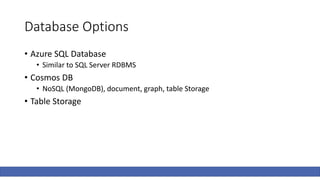
Database Options
• Azure SQL Database
• Similar to SQL Server RDBMS
• Cosmos DB
• NoSQL (MongoDB), document, graph, table Storage
• Table Storage
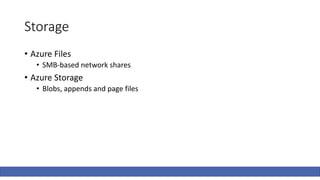
Storage
• Azure Files
• SMB-based network shares
• Azure Storage
• Blobs, appends and page files
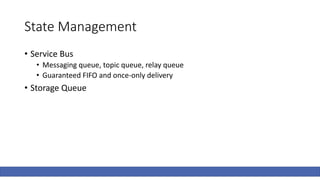
State Management
• Service Bus
• Messaging queue, topic queue, relay queue
• Guaranteed FIFO and once-only delivery
• Storage Queue
Cache And Key Storage
• Azure CDN
• Global distribution of static/cached files
• Verizon Standard and Akamai Standard
• Verizon Premium (includes robust rules engine)
• Redis Cache
• In-memory cache / transient storage
• Azure Key Vault
• HSM-backed storage of secrets and keys
High Availability
• Azure Traffic Manager
• DNS-based routing
• Global Replication
• Storage, Azure SQL Database, Cosmos DB, Azure Active Directory
• Autoscaling
• App Service
• Functions
• Container Host VMs (via metrics and VMSS)
Monitoring
Automation requires exceptional metrics
Application Insights
• Application Performance Management service
• Collects telemetry from .NET, Java and Node.JS-based applications
• Focused on Web applications/HTTP-backed services
• Most microservices are delivered via HTTP
• Provides feedback on performance, latency, errors, etc.
• Very low overhead; about as expensive as an HTTPS cookie
• Can bridge multiple services and aggregate results
• New feature, in preview
• Can export metrics to Power BI, other receivers (via JSON)
Operations Management Suite (OMS)
• Basically SCOM for Azure/the cloud
• Monitor resources regardless of location (on-prem/hybrid/SaaS)
• More useful for watching service health than application performance
Topology of the Demo
Image Sharing Solutions
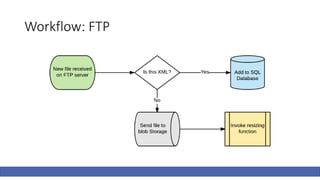
• Allows contributions via FTP
• Mines Twitter for tweets with a certain hashtag
• Allows API access to upload and retrieve images
• Has a GUI so humans can moderate the content
• Processes image resizing/processing asynchronously via Functions
• Uses Service Bus messaging to coordinate workflows
• Easily distributed in new regions for HA/BCDR
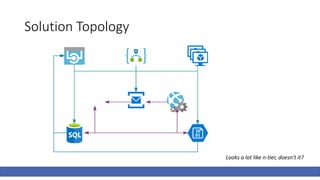
• Kinda looks like n-tier when you look at how it works
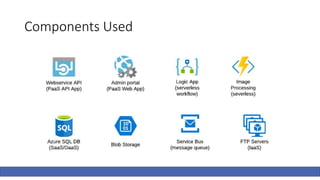
Components Used
Workflow: FTP
Workflow: Logic App
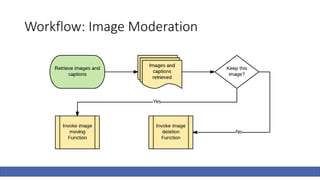
Workflow: Image Moderation
Solution Topology
Looks a lot like n-tier, doesn't it?
Demo Time!
A distributed system for managing photos from multiple sources
Questions? Ideas? Let's Share!
• Doug Vanderweide
• https://www.dougv.com
• @dougvdotcom
• linkedin.com/in/dougvdotcom
• LinuxAcademy.com
• CloudAssessments.com
• Photos via pixabay.com

Microservices in Azure

  • 1.
    Microservices in Azure HowMicrosoft's public cloud supports modern application architecture Doug Vanderweide, MCSE, MCSD, MCT https://www.dougv.com @dougvdotcom linkedin.com/in/dougvdotcom
  • 2.
    Today's objectives "microservices," "SOA"and other termsDefine the architecture of a microservices-based applicationUnderstand the base services Azure provides to support that patternDiscover supporting services used alongside those base servicesDescribe metrics and monitoring optionsReview
  • 3.
    What Are Microservices,Really? Or 'Service-Oriented Architecture.' Or whatever the kids are calling it these days.
  • 4.
  • 5.
    We can buildsimple structures from a few blocks,
  • 6.
    or very complex,integrated solutions from many blocks.
  • 7.
    Service-Oriented Architecture • It’sjust another way of saying "microservices" • Each service of an SOA/microservices-based solution: • does just one thing • is independently managed • can be reused by many different solutions • can be easily replaced by something else • adapts to its workload independently • communicates with its neighbors via standard protocols (HTTP, messages)
  • 8.
    An n-Tier WebApplication
  • 9.
    Why This Doesn'tWork Well In The Cloud Cloud-based network services are more abstract 1 Monoliths are difficult to maintain and scale 2 Requires lots of server/network configuration and admin 3 Doesn't make full use of cloud abstractions 4
  • 10.
  • 11.
  • 12.
    Benefits Of MicroservicesArchitecture • Recycle APIs for other uses • e.g., reservations API can place waste inventory on discount sites • Manage each service independent of other services • Problem with the authentication API? Other services stay up while you fix it • Each service scales independently • High Web UI demand? Only scale that API • Allows continuous integration/continuous delivery/automation • No more sprints ruining your weekends • Check out a branch, test it, deploy it -- all via automation
  • 13.
    Basic Azure PaaSOptions The public cloud services that host your underlying APIs/microservices
  • 14.
    App Service • AzureResource Manager's adoption of ASM Cloud Services • Web and Worker roles are now Web, API, Mobile, Logic or Function apps • Uses anonymous, generalized guest OS to host services • Windows and Linux • Azure handles most configuration and management • You have control over runtimes, some environment aspects
  • 15.
    Web Apps • Usedto host websites • Built for high availability • Multi-instance • Automatic load balancing/health probes • Can be scaled on a schedule or via metric • Meet anticipated or unanticipated demand • Built for CI/CD via git, VSTS, cloud file storage
  • 16.
    Logic Apps • Usedto chain together API workflows • Trigger event kicks off workflow • Workflow performs a task, using inputs • Process can be looped, building off each input • Incorporates common APIs, aka connectors • Twitter, Facebook, Google, YouTube, etc. • Available for most Microsoft and Azure SaaS workloads • Office 365, SQL Server, Dynamics, Power BI, OneDrive, etc. • Many other enterprise workloads available • Salesforce, Oracle, SAP, etc.
  • 17.
    Mobile Apps • Intendedto serve as the "back end" tooling • Effectively used to create API endpoints and data stores • Simplified management for offline data sync • SQL, NoSQL, Azure Storage • You can create your own data API, too • Used to manage push notifications (via Notification Hubs) • Provides easy SSO management • Azure Active Directory, Facebook, Twitter, Microsoft, Google
  • 18.
    API Apps • Verysimilar to Web Apps • Adds Swagger-based API management tooling • Service discovery • Documentation • Access control / authentication
  • 19.
    Containers Isolating workloads tospeed up deployments and improve reliability
  • 20.
    What Are Containers? •Means of packaging software and services together • System libraries, tools, services, settings, runtime and code itself • Isolates its workload from other workloads on the host • Allows you to pack several workloads onto a single guest OS host • Provides repeatable results for multiple deployments • Tends to reduce deployment time and overhead • Build the container image, create multiple instances from that image • Tends to increase deployment tempo • Simplified testing, easy versioning
  • 21.
    Azure Container Service •Azure fully supports Docker containers • Docker Swarm and Kubernetes • Support for Mesosphere • DC/OS and Marathon • Azure Container Registry support • Pull directly to Container Service, App Service, Batch, Service Fabric
  • 22.
    Azure Service Fabric •Microsoft's proprietary distributed systems platform • Most Azure services are hosted on Service Fabric • SQL Database, Cosmos DB, IoT Hub, Dynamics 365, etc. • Container-based • Windows, Linux, "reliable actors" • Designed to host microservices • Stateless and stateful • Runs on Azure, on-prem and even other cloud providers • Dev environment matches production environment
  • 23.
    Serverless Azure's serverless technology,and the future of microservices
  • 24.
    What Is Serverless? •Vendor manages all infrastructure aspects • Instances, instance size, patching, networking, availability, runtimes, etc. • You write code that can run in this predefined environment • You pay only for what you use • Number of executions • Amount of CPU and memory needed to perform the task
  • 25.
    Functions • Azure's serverlesssolution • Backboned on Web Apps; effectively, they're supercharged WebJobs • Provisioned when needed, deallocated when not • Can be provisioned continuously, too • Works on trigger / input / output model • Something happens; • the function (optionally) retrieves some input; • and (usually) creates some output
  • 26.
  • 27.
    Database Options • AzureSQL Database • Similar to SQL Server RDBMS • Cosmos DB • NoSQL (MongoDB), document, graph, table Storage • Table Storage
  • 28.
    Storage • Azure Files •SMB-based network shares • Azure Storage • Blobs, appends and page files
  • 29.
    State Management • ServiceBus • Messaging queue, topic queue, relay queue • Guaranteed FIFO and once-only delivery • Storage Queue
  • 30.
    Cache And KeyStorage • Azure CDN • Global distribution of static/cached files • Verizon Standard and Akamai Standard • Verizon Premium (includes robust rules engine) • Redis Cache • In-memory cache / transient storage • Azure Key Vault • HSM-backed storage of secrets and keys
  • 31.
    High Availability • AzureTraffic Manager • DNS-based routing • Global Replication • Storage, Azure SQL Database, Cosmos DB, Azure Active Directory • Autoscaling • App Service • Functions • Container Host VMs (via metrics and VMSS)
  • 32.
  • 33.
    Application Insights • ApplicationPerformance Management service • Collects telemetry from .NET, Java and Node.JS-based applications • Focused on Web applications/HTTP-backed services • Most microservices are delivered via HTTP • Provides feedback on performance, latency, errors, etc. • Very low overhead; about as expensive as an HTTPS cookie • Can bridge multiple services and aggregate results • New feature, in preview • Can export metrics to Power BI, other receivers (via JSON)
  • 34.
    Operations Management Suite(OMS) • Basically SCOM for Azure/the cloud • Monitor resources regardless of location (on-prem/hybrid/SaaS) • More useful for watching service health than application performance
  • 35.
  • 36.
    Image Sharing Solutions •Allows contributions via FTP • Mines Twitter for tweets with a certain hashtag • Allows API access to upload and retrieve images • Has a GUI so humans can moderate the content • Processes image resizing/processing asynchronously via Functions • Uses Service Bus messaging to coordinate workflows • Easily distributed in new regions for HA/BCDR • Kinda looks like n-tier when you look at how it works
  • 37.
  • 38.
  • 39.
  • 40.
  • 41.
    Solution Topology Looks alot like n-tier, doesn't it?
  • 42.
    Demo Time! A distributedsystem for managing photos from multiple sources
  • 43.
    Questions? Ideas? Let'sShare! • Doug Vanderweide • https://www.dougv.com • @dougvdotcom • linkedin.com/in/dougvdotcom • LinuxAcademy.com • CloudAssessments.com • Photos via pixabay.com