


Microservices
Patterns & Practices
By : Meysam Javadi
SANAY
Objectives
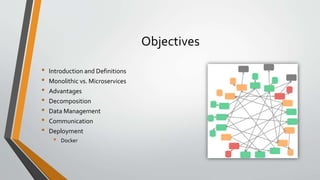
• Introduction and Definitions
• Monolithic vs. Microservices
• Advantages
• Decomposition
• Data Management
• Communication
• Deployment
• Docker
Intro.
• “micro web services" was first used by Dr. Peter Rogers during a conference
on cloud computing in 2005
• Microservices used in different software architects events in 2011
• Adrian Cockcroft from Netflix called “fine grained SOA”
• Amazon, Netflix and Uber
Definition 1
• is an approach to developing a single application as a suite of small services, each running in
its own process and communicating with lightweight mechanisms, often an HTTP resource
API.These services are built around business capabilities and independently deployable by
fully automated deployment machinery.There is a bare minimum of centralized
management of these services, which may be written in different programming languages
and use different data storage technologies.
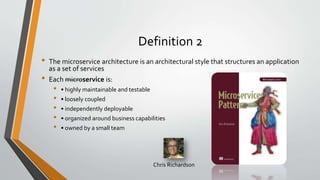
Definition 2
• The microservice architecture is an architectural style that structures an application
as a set of services
• Each microservice is:
• • highly maintainable and testable
• • loosely coupled
• • independently deployable
• • organized around business capabilities
• • owned by a small team
Chris Richardson
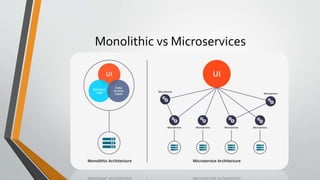
Monolithic vs Microservices
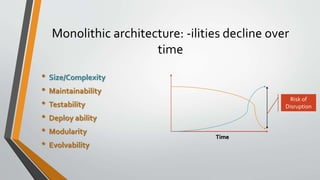
Monolithic architecture: -ilities decline over
time
• Size/Complexity
• Maintainability
• Testability
• Deploy ability
• Modularity
• Evolvability
Risk of
Disruption
Time
Advantages of Microservices
• Shrinking Big problems and Small teams
• Continuous Integration/Continuous delivery & Fast iteration
• Improved maintainability
• Better testability
• Fault & Performance isolation
• Technology independent
• Scalability
Decomposition
How to decompose an application into services?
• Business capability
• Stable architecture since the business
capabilities are relatively stable
• Development teams are cross-functional,
autonomous, and organized around
delivering business value rather than
technical features
• Services are cohesive and loosely coupled
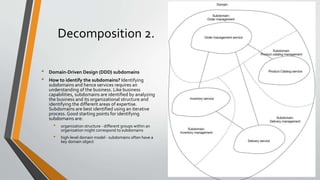
Decomposition 2.
• Domain-Driven Design (DDD) subdomains
• How to identify the subdomains? Identifying
subdomains and hence services requires an
understanding of the business. Like business
capabilities, subdomains are identified by analyzing
the business and its organizational structure and
identifying the different areas of expertise.
Subdomains are best identified using an iterative
process. Good starting points for identifying
subdomains are:
• organization structure - different groups within an
organization might correspond to subdomains
• high-level domain model - subdomains often have a
key domain object
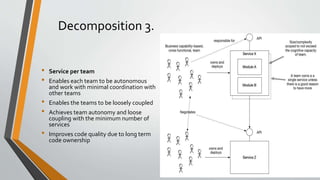
Decomposition 3.
• Service per team
• Enables each team to be autonomous
and work with minimal coordination with
other teams
• Enables the teams to be loosely coupled
• Achieves team autonomy and loose
coupling with the minimum number of
services
• Improves code quality due to long term
code ownership
Data management 1
Database per service
• Private-tables-per-service
• Schema-per-service
• Database-server-per-service
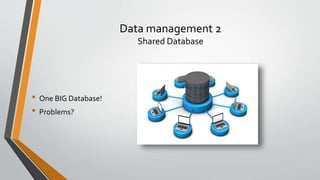
Data management 2
Shared Database
• One BIG Database!
• Problems?
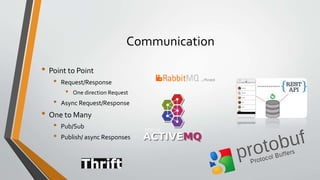
Communication
• Point to Point
• Request/Response
• One direction Request
• Async Request/Response
• One to Many
• Pub/Sub
• Publish/ async Responses
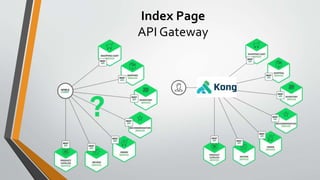
Index Page
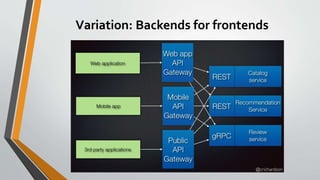
API Gateway
Variation: Backends for frontends
Deployment Requirements
• Services are written using a variety of languages, frameworks, and framework
versions
• Each service consists of multiple service instances for throughput and availability
• Building and deploying a service must be fast
• Service must be deployed and scaled independently
• Service instances need to be isolated
• Resources consumed by a service must be constrained
• Deployment must be cost-effective
Introduction to Docker
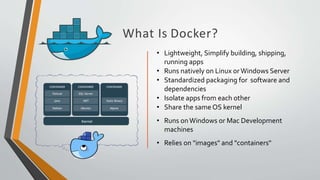
What Is Docker?
• Lightweight, Simplify building, shipping,
running apps
• Runs natively on Linux orWindows Server
• Standardized packaging for software and
dependencies
• Isolate apps from each other
• Share the same OS kernel
• Runs onWindows or Mac Development
machines
• Relies on "images" and "containers"
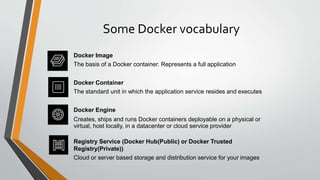
Some Docker vocabulary
Docker Image
The basis of a Docker container. Represents a full application
Docker Container
The standard unit in which the application service resides and executes
Docker Engine
Creates, ships and runs Docker containers deployable on a physical or
virtual, host locally, in a datacenter or cloud service provider
Registry Service (Docker Hub(Public) or Docker Trusted
Registry(Private))
Cloud or server based storage and distribution service for your images
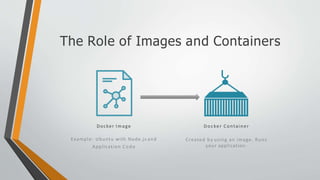
The Role of Images and Containers
Docker Image
Example: Ubuntu with Node.js and
Application Code
Docker Container
Created by using an image. Runs
your application.
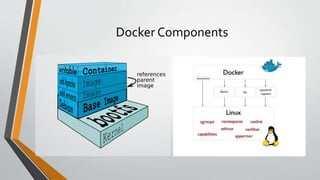
Docker Components
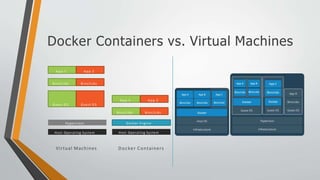
Docker Containers vs. Virtual Machines
A p p 1 A p p 2
Bins/Libs Bins/Libs
Guest O S Guest O S
Hypervisor
Host Operating System
A p p 1
Bins/Libs
A p p 2
Bins/Libs
Docker Engine
Host Operating System
Virtual Machines Docker Containers
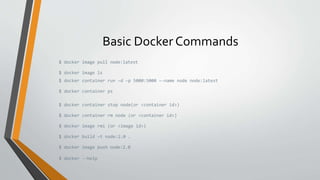
Basic Docker Commands
$ docker image pull node:latest
$ docker image ls
$ docker container run –d –p 5000:5000 –-name node node:latest
$ docker container ps
$ docker container stop node(or <container id>)
$ docker container rm node (or <container id>)
$ docker image rmi (or <image id>)
$ docker build –t node:2.0 .
$ docker image push node:2.0
$ docker --help
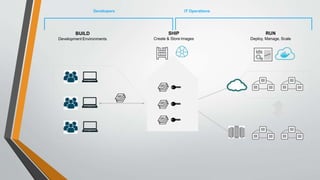
Developers IT Operations
BUILD
Development Environments
SHIP
Create & Store Images
RUN
Deploy, Manage, Scale
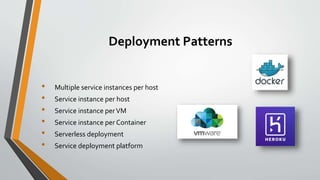
Deployment Patterns
• Multiple service instances per host
• Service instance per host
• Service instance perVM
• Service instance per Container
• Serverless deployment
• Service deployment platform
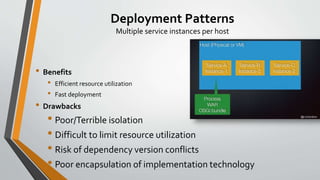
Deployment Patterns
Multiple service instances per host
• Benefits
• Efficient resource utilization
• Fast deployment
• Drawbacks
• Poor/Terrible isolation
• Difficult to limit resource utilization
• Risk of dependency version conflicts
• Poor encapsulation of implementation technology
Deployment Patterns
Service perVM host
• Benefits
• Great isolation
• Great manageability
• VM encapsulates implementation technology
• Drawbacks
• Less efficient resource utilization
• Slow deployment
Deployment Patterns
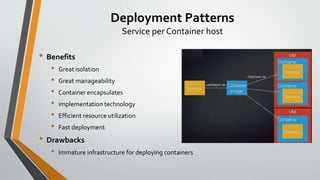
Service per Container host
• Benefits
• Great isolation
• Great manageability
• Container encapsulates
• implementation technology
• Efficient resource utilization
• Fast deployment
• Drawbacks
• Immature infrastructure for deploying containers
A big problem
Microservices

Microservices

  • 1.
  • 2.
    Objectives • Introduction andDefinitions • Monolithic vs. Microservices • Advantages • Decomposition • Data Management • Communication • Deployment • Docker
  • 3.
    Intro. • “micro webservices" was first used by Dr. Peter Rogers during a conference on cloud computing in 2005 • Microservices used in different software architects events in 2011 • Adrian Cockcroft from Netflix called “fine grained SOA” • Amazon, Netflix and Uber
  • 4.
    Definition 1 • isan approach to developing a single application as a suite of small services, each running in its own process and communicating with lightweight mechanisms, often an HTTP resource API.These services are built around business capabilities and independently deployable by fully automated deployment machinery.There is a bare minimum of centralized management of these services, which may be written in different programming languages and use different data storage technologies.
  • 5.
    Definition 2 • Themicroservice architecture is an architectural style that structures an application as a set of services • Each microservice is: • • highly maintainable and testable • • loosely coupled • • independently deployable • • organized around business capabilities • • owned by a small team Chris Richardson
  • 6.
  • 7.
    Monolithic architecture: -ilitiesdecline over time • Size/Complexity • Maintainability • Testability • Deploy ability • Modularity • Evolvability Risk of Disruption Time
  • 8.
    Advantages of Microservices •Shrinking Big problems and Small teams • Continuous Integration/Continuous delivery & Fast iteration • Improved maintainability • Better testability • Fault & Performance isolation • Technology independent • Scalability
  • 9.
    Decomposition How to decomposean application into services? • Business capability • Stable architecture since the business capabilities are relatively stable • Development teams are cross-functional, autonomous, and organized around delivering business value rather than technical features • Services are cohesive and loosely coupled
  • 10.
    Decomposition 2. • Domain-DrivenDesign (DDD) subdomains • How to identify the subdomains? Identifying subdomains and hence services requires an understanding of the business. Like business capabilities, subdomains are identified by analyzing the business and its organizational structure and identifying the different areas of expertise. Subdomains are best identified using an iterative process. Good starting points for identifying subdomains are: • organization structure - different groups within an organization might correspond to subdomains • high-level domain model - subdomains often have a key domain object
  • 11.
    Decomposition 3. • Serviceper team • Enables each team to be autonomous and work with minimal coordination with other teams • Enables the teams to be loosely coupled • Achieves team autonomy and loose coupling with the minimum number of services • Improves code quality due to long term code ownership
  • 12.
    Data management 1 Databaseper service • Private-tables-per-service • Schema-per-service • Database-server-per-service
  • 13.
    Data management 2 SharedDatabase • One BIG Database! • Problems?
  • 14.
    Communication • Point toPoint • Request/Response • One direction Request • Async Request/Response • One to Many • Pub/Sub • Publish/ async Responses
  • 15.
  • 16.
  • 17.
    Deployment Requirements • Servicesare written using a variety of languages, frameworks, and framework versions • Each service consists of multiple service instances for throughput and availability • Building and deploying a service must be fast • Service must be deployed and scaled independently • Service instances need to be isolated • Resources consumed by a service must be constrained • Deployment must be cost-effective
  • 18.
  • 19.
    What Is Docker? •Lightweight, Simplify building, shipping, running apps • Runs natively on Linux orWindows Server • Standardized packaging for software and dependencies • Isolate apps from each other • Share the same OS kernel • Runs onWindows or Mac Development machines • Relies on "images" and "containers"
  • 20.
    Some Docker vocabulary DockerImage The basis of a Docker container. Represents a full application Docker Container The standard unit in which the application service resides and executes Docker Engine Creates, ships and runs Docker containers deployable on a physical or virtual, host locally, in a datacenter or cloud service provider Registry Service (Docker Hub(Public) or Docker Trusted Registry(Private)) Cloud or server based storage and distribution service for your images
  • 21.
    The Role ofImages and Containers Docker Image Example: Ubuntu with Node.js and Application Code Docker Container Created by using an image. Runs your application.
  • 22.
  • 23.
    Docker Containers vs.Virtual Machines A p p 1 A p p 2 Bins/Libs Bins/Libs Guest O S Guest O S Hypervisor Host Operating System A p p 1 Bins/Libs A p p 2 Bins/Libs Docker Engine Host Operating System Virtual Machines Docker Containers
  • 24.
    Basic Docker Commands $docker image pull node:latest $ docker image ls $ docker container run –d –p 5000:5000 –-name node node:latest $ docker container ps $ docker container stop node(or <container id>) $ docker container rm node (or <container id>) $ docker image rmi (or <image id>) $ docker build –t node:2.0 . $ docker image push node:2.0 $ docker --help
  • 25.
    Developers IT Operations BUILD DevelopmentEnvironments SHIP Create & Store Images RUN Deploy, Manage, Scale
  • 26.
    Deployment Patterns • Multipleservice instances per host • Service instance per host • Service instance perVM • Service instance per Container • Serverless deployment • Service deployment platform
  • 27.
    Deployment Patterns Multiple serviceinstances per host • Benefits • Efficient resource utilization • Fast deployment • Drawbacks • Poor/Terrible isolation • Difficult to limit resource utilization • Risk of dependency version conflicts • Poor encapsulation of implementation technology
  • 28.
    Deployment Patterns Service perVMhost • Benefits • Great isolation • Great manageability • VM encapsulates implementation technology • Drawbacks • Less efficient resource utilization • Slow deployment
  • 29.
    Deployment Patterns Service perContainer host • Benefits • Great isolation • Great manageability • Container encapsulates • implementation technology • Efficient resource utilization • Fast deployment • Drawbacks • Immature infrastructure for deploying containers
  • 30.