Chapter (4):
Bios and Dos programming in
assembly
12/18/2023 1
12/18/2023 2
Chapter (4):
Outlines:
 Bios INT 10H programming: using INT 10H to:
 Clear the screen
 Set the cursor position
 others
 Dos interrupt IN 21H: using INT 21H to:
 Input character from keyboard
 Output the character to screen
 Input & output string
12/18/2023 3
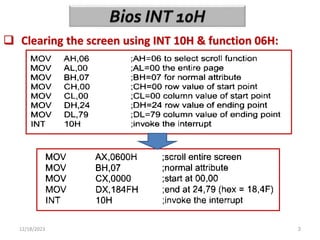
 Clearing the screen using INT 10H & function 06H:
12/18/2023 4
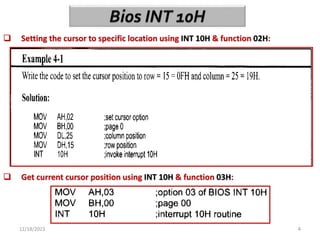
 Setting the cursor to specific location using INT 10H & function 02H:
 Get current cursor position using INT 10H & function 03H:
12/18/2023 5
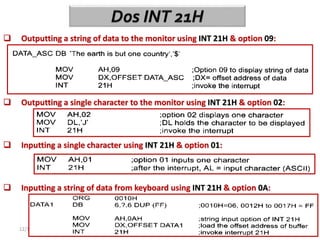
 Outputting a string of data to the monitor using INT 21H & option 09:
 Outputting a single character to the monitor using INT 21H & option 02:
 Inputting a single character using INT 21H & option 01:
 Inputting a string of data from keyboard using INT 21H & option 0A:
12/18/2023 6
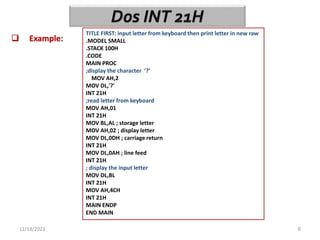
 Example:
TITLE FIRST: input letter from keyboard then print letter in new raw
.MODEL SMALL
.STACK 100H
.CODE
MAIN PROC
;display the character ‘?’
MOV AH,2
MOV DL,'?'
INT 21H
;read letter from keyboard
MOV AH,01
INT 21H
MOV BL,AL ; storage letter
MOV AH,02 ; display letter
MOV DL,0DH ; carriage return
INT 21H
MOV DL,0AH ; line feed
INT 21H
; display the input letter
MOV DL,BL
INT 21H
MOV AH,4CH
INT 21H
MAIN ENDP
END MAIN
12/18/2023 7
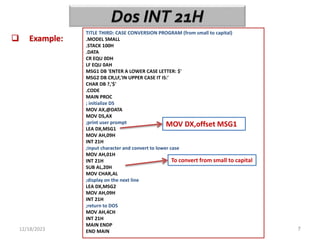
 Example:
TITLE THIRD: CASE CONVERSION PROGRAM (from small to capital)
.MODEL SMALL
.STACK 100H
.DATA
CR EQU 0DH
LF EQU 0AH
MSG1 DB 'ENTER A LOWER CASE LETTER: $'
MSG2 DB CR,LF,'IN UPPER CASE IT IS:'
CHAR DB ?,'$'
.CODE
MAIN PROC
; initialize DS
MOV AX,@DATA
MOV DS,AX
;print user prompt
LEA DX,MSG1
MOV AH,09H
INT 21H
;input character and convert to lower case
MOV AH,01H
INT 21H
SUB AL,20H
MOV CHAR,AL
;display on the next line
LEA DX,MSG2
MOV AH,09H
INT 21H
;return to DOS
MOV AH,4CH
INT 21H
MAIN ENDP
END MAIN
MOV DX,offset MSG1
To convert from small to capital
12/18/2023 8
 Example:
In text file
12/18/2023 9
 Example:
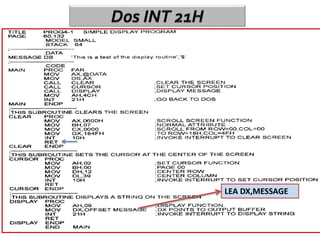
LEA DX,MESSAGE
12/18/2023 10
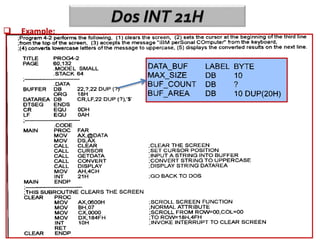
 Example:
12/18/2023 11
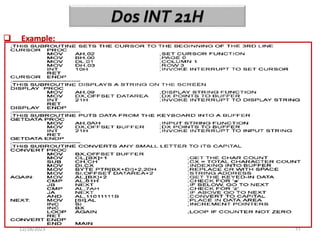
 Example:
12/18/2023 12
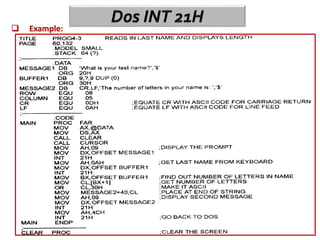
 Example:
Chapter (5):
Macro and the Mouse
12/18/2023 13
12/18/2023 14
Chapter (5):
Outlines:
 Define macro and how to use in assembly:
 How macro expanding by assembler:
 How to control the expanded of macro in list file:
 Define the local variable in macro:
 How to include the macro in another file:
12/18/2023 15
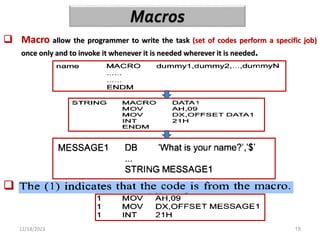
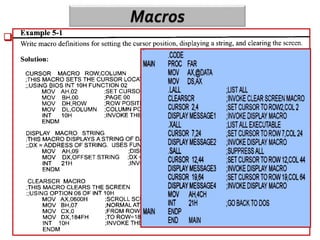
 Macro allow the programmer to write the task (set of codes perform a specific job)
once only and to invoke it whenever it is needed wherever it is needed.
 In list file the code (string message1) is expanded to:
12/18/2023 16
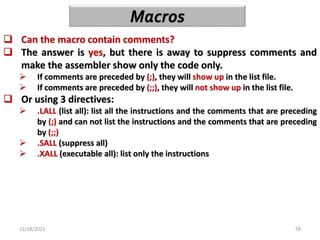
 Can the macro contain comments?
 The answer is yes, but there is away to suppress comments and
make the assembler show only the code only.
 If comments are preceded by (;), they will show up in the list file.
 If comments are preceded by (;;), they will not show up in the list file.
 Or using 3 directives:
 .LALL (list all): list all the instructions and the comments that are preceding
by (;) and can not list the instructions and the comments that are preceding
by (;;)
 .SALL (suppress all)
 .XALL (executable all): list only the instructions
12/18/2023 17
 Example:
12/18/2023 18
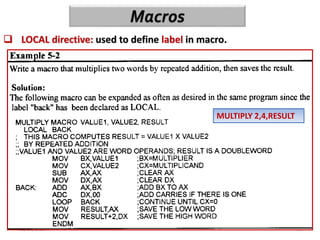
 LOCAL directive: used to define label in macro.
MULTIPLY 2,4,RESULT
12/18/2023 19
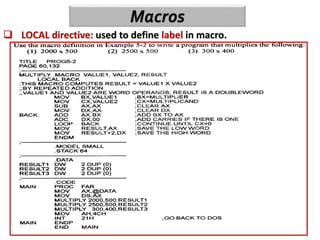
 LOCAL directive: used to define label in macro.
12/18/2023 20
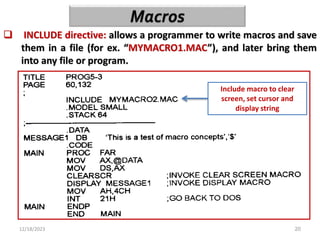
 INCLUDE directive: allows a programmer to write macros and save
them in a file (for ex. “MYMACRO1.MAC”), and later bring them
into any file or program.
Include macro to clear
screen, set cursor and
display string
Chapter (6):
Signed Numbers & Strings &
Tables
12/18/2023 21
Lifted……
12/18/2023 22
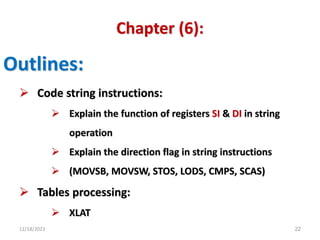
Chapter (6):
Outlines:
 Code string instructions:
 Explain the function of registers SI & DI in string
operation
 Explain the direction flag in string instructions
 (MOVSB, MOVSW, STOS, LODS, CMPS, SCAS)
 Tables processing:
 XLAT
12/18/2023 23
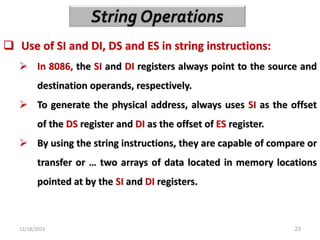
 Use of SI and DI, DS and ES in string instructions:
 In 8086, the SI and DI registers always point to the source and
destination operands, respectively.
 To generate the physical address, always uses SI as the offset
of the DS register and DI as the offset of ES register.
 By using the string instructions, they are capable of compare or
transfer or … two arrays of data located in memory locations
pointed at by the SI and DI registers.
12/18/2023 24
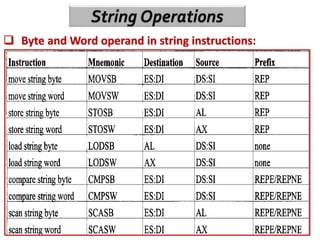
 Byte and Word operand in string instructions:
12/18/2023 25
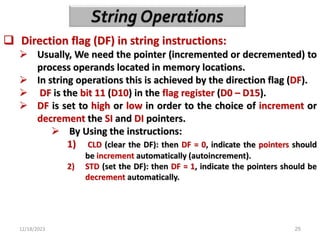
 Direction flag (DF) in string instructions:
 Usually, We need the pointer (incremented or decremented) to
process operands located in memory locations.
 In string operations this is achieved by the direction flag (DF).
 DF is the bit 11 (D10) in the flag register (D0 – D15).
 DF is set to high or low in order to the choice of increment or
decrement the SI and DI pointers.
 By Using the instructions:
1) CLD (clear the DF): then DF = 0, indicate the pointers should
be increment automatically (autoincrement).
2) STD (set the DF): then DF = 1, indicate the pointers should be
decrement automatically.
12/18/2023 26
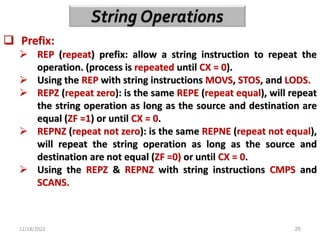
 Prefix:
 REP (repeat) prefix: allow a string instruction to repeat the
operation. (process is repeated until CX = 0).
 Using the REP with string instructions MOVS, STOS, and LODS.
 REPZ (repeat zero): is the same REPE (repeat equal), will repeat
the string operation as long as the source and destination are
equal (ZF =1) or until CX = 0.
 REPNZ (repeat not zero): is the same REPNE (repeat not equal),
will repeat the string operation as long as the source and
destination are not equal (ZF =0) or until CX = 0.
 Using the REPZ & REPNZ with string instructions CMPS and
SCANS.
12/18/2023 27
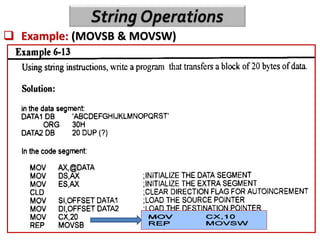
 Example: (MOVSB & MOVSW)
12/18/2023 28
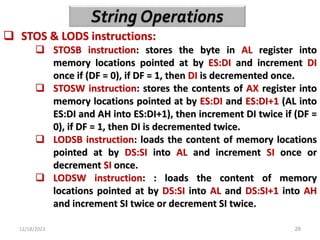
 STOS & LODS instructions:
 STOSB instruction: stores the byte in AL register into
memory locations pointed at by ES:DI and increment DI
once if (DF = 0), if DF = 1, then DI is decremented once.
 STOSW instruction: stores the contents of AX register into
memory locations pointed at by ES:DI and ES:DI+1 (AL into
ES:DI and AH into ES:DI+1), then increment DI twice if (DF =
0), if DF = 1, then DI is decremented twice.
 LODSB instruction: loads the content of memory locations
pointed at by DS:SI into AL and increment SI once or
decrement SI once.
 LODSW instruction: : loads the content of memory
locations pointed at by DS:SI into AL and DS:SI+1 into AH
and increment SI twice or decrement SI twice.
12/18/2023 29
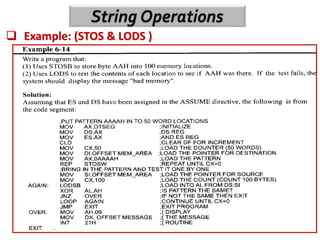
 Example: (STOS & LODS )
12/18/2023 30
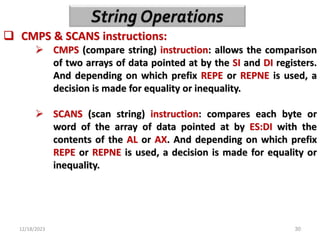
 CMPS & SCANS instructions:
 CMPS (compare string) instruction: allows the comparison
of two arrays of data pointed at by the SI and DI registers.
And depending on which prefix REPE or REPNE is used, a
decision is made for equality or inequality.
 SCANS (scan string) instruction: compares each byte or
word of the array of data pointed at by ES:DI with the
contents of the AL or AX. And depending on which prefix
REPE or REPNE is used, a decision is made for equality or
inequality.
12/18/2023 31
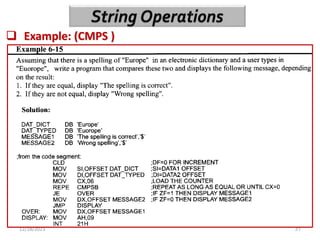
 Example: (CMPS )
12/18/2023 32
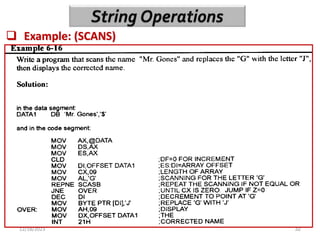
 Example: (SCANS)
12/18/2023 33
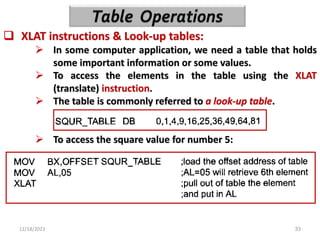
 XLAT instructions & Look-up tables:
 In some computer application, we need a table that holds
some important information or some values.
 To access the elements in the table using the XLAT
(translate) instruction.
 The table is commonly referred to a look-up table.
 To access the square value for number 5:
Any Question?
12/18/2023 34

micro_lecture-ch-456.pptx

  • 1.
    Chapter (4): Bios andDos programming in assembly 12/18/2023 1
  • 2.
    12/18/2023 2 Chapter (4): Outlines: Bios INT 10H programming: using INT 10H to:  Clear the screen  Set the cursor position  others  Dos interrupt IN 21H: using INT 21H to:  Input character from keyboard  Output the character to screen  Input & output string
  • 3.
    12/18/2023 3  Clearingthe screen using INT 10H & function 06H:
  • 4.
    12/18/2023 4  Settingthe cursor to specific location using INT 10H & function 02H:  Get current cursor position using INT 10H & function 03H:
  • 5.
    12/18/2023 5  Outputtinga string of data to the monitor using INT 21H & option 09:  Outputting a single character to the monitor using INT 21H & option 02:  Inputting a single character using INT 21H & option 01:  Inputting a string of data from keyboard using INT 21H & option 0A:
  • 6.
    12/18/2023 6  Example: TITLEFIRST: input letter from keyboard then print letter in new raw .MODEL SMALL .STACK 100H .CODE MAIN PROC ;display the character ‘?’ MOV AH,2 MOV DL,'?' INT 21H ;read letter from keyboard MOV AH,01 INT 21H MOV BL,AL ; storage letter MOV AH,02 ; display letter MOV DL,0DH ; carriage return INT 21H MOV DL,0AH ; line feed INT 21H ; display the input letter MOV DL,BL INT 21H MOV AH,4CH INT 21H MAIN ENDP END MAIN
  • 7.
    12/18/2023 7  Example: TITLETHIRD: CASE CONVERSION PROGRAM (from small to capital) .MODEL SMALL .STACK 100H .DATA CR EQU 0DH LF EQU 0AH MSG1 DB 'ENTER A LOWER CASE LETTER: $' MSG2 DB CR,LF,'IN UPPER CASE IT IS:' CHAR DB ?,'$' .CODE MAIN PROC ; initialize DS MOV AX,@DATA MOV DS,AX ;print user prompt LEA DX,MSG1 MOV AH,09H INT 21H ;input character and convert to lower case MOV AH,01H INT 21H SUB AL,20H MOV CHAR,AL ;display on the next line LEA DX,MSG2 MOV AH,09H INT 21H ;return to DOS MOV AH,4CH INT 21H MAIN ENDP END MAIN MOV DX,offset MSG1 To convert from small to capital
  • 8.
  • 9.
  • 10.
  • 11.
  • 12.
  • 13.
    Chapter (5): Macro andthe Mouse 12/18/2023 13
  • 14.
    12/18/2023 14 Chapter (5): Outlines: Define macro and how to use in assembly:  How macro expanding by assembler:  How to control the expanded of macro in list file:  Define the local variable in macro:  How to include the macro in another file:
  • 15.
    12/18/2023 15  Macroallow the programmer to write the task (set of codes perform a specific job) once only and to invoke it whenever it is needed wherever it is needed.  In list file the code (string message1) is expanded to:
  • 16.
    12/18/2023 16  Canthe macro contain comments?  The answer is yes, but there is away to suppress comments and make the assembler show only the code only.  If comments are preceded by (;), they will show up in the list file.  If comments are preceded by (;;), they will not show up in the list file.  Or using 3 directives:  .LALL (list all): list all the instructions and the comments that are preceding by (;) and can not list the instructions and the comments that are preceding by (;;)  .SALL (suppress all)  .XALL (executable all): list only the instructions
  • 17.
  • 18.
    12/18/2023 18  LOCALdirective: used to define label in macro. MULTIPLY 2,4,RESULT
  • 19.
    12/18/2023 19  LOCALdirective: used to define label in macro.
  • 20.
    12/18/2023 20  INCLUDEdirective: allows a programmer to write macros and save them in a file (for ex. “MYMACRO1.MAC”), and later bring them into any file or program. Include macro to clear screen, set cursor and display string
  • 21.
    Chapter (6): Signed Numbers& Strings & Tables 12/18/2023 21 Lifted……
  • 22.
    12/18/2023 22 Chapter (6): Outlines: Code string instructions:  Explain the function of registers SI & DI in string operation  Explain the direction flag in string instructions  (MOVSB, MOVSW, STOS, LODS, CMPS, SCAS)  Tables processing:  XLAT
  • 23.
    12/18/2023 23  Useof SI and DI, DS and ES in string instructions:  In 8086, the SI and DI registers always point to the source and destination operands, respectively.  To generate the physical address, always uses SI as the offset of the DS register and DI as the offset of ES register.  By using the string instructions, they are capable of compare or transfer or … two arrays of data located in memory locations pointed at by the SI and DI registers.
  • 24.
    12/18/2023 24  Byteand Word operand in string instructions:
  • 25.
    12/18/2023 25  Directionflag (DF) in string instructions:  Usually, We need the pointer (incremented or decremented) to process operands located in memory locations.  In string operations this is achieved by the direction flag (DF).  DF is the bit 11 (D10) in the flag register (D0 – D15).  DF is set to high or low in order to the choice of increment or decrement the SI and DI pointers.  By Using the instructions: 1) CLD (clear the DF): then DF = 0, indicate the pointers should be increment automatically (autoincrement). 2) STD (set the DF): then DF = 1, indicate the pointers should be decrement automatically.
  • 26.
    12/18/2023 26  Prefix: REP (repeat) prefix: allow a string instruction to repeat the operation. (process is repeated until CX = 0).  Using the REP with string instructions MOVS, STOS, and LODS.  REPZ (repeat zero): is the same REPE (repeat equal), will repeat the string operation as long as the source and destination are equal (ZF =1) or until CX = 0.  REPNZ (repeat not zero): is the same REPNE (repeat not equal), will repeat the string operation as long as the source and destination are not equal (ZF =0) or until CX = 0.  Using the REPZ & REPNZ with string instructions CMPS and SCANS.
  • 27.
  • 28.
    12/18/2023 28  STOS& LODS instructions:  STOSB instruction: stores the byte in AL register into memory locations pointed at by ES:DI and increment DI once if (DF = 0), if DF = 1, then DI is decremented once.  STOSW instruction: stores the contents of AX register into memory locations pointed at by ES:DI and ES:DI+1 (AL into ES:DI and AH into ES:DI+1), then increment DI twice if (DF = 0), if DF = 1, then DI is decremented twice.  LODSB instruction: loads the content of memory locations pointed at by DS:SI into AL and increment SI once or decrement SI once.  LODSW instruction: : loads the content of memory locations pointed at by DS:SI into AL and DS:SI+1 into AH and increment SI twice or decrement SI twice.
  • 29.
  • 30.
    12/18/2023 30  CMPS& SCANS instructions:  CMPS (compare string) instruction: allows the comparison of two arrays of data pointed at by the SI and DI registers. And depending on which prefix REPE or REPNE is used, a decision is made for equality or inequality.  SCANS (scan string) instruction: compares each byte or word of the array of data pointed at by ES:DI with the contents of the AL or AX. And depending on which prefix REPE or REPNE is used, a decision is made for equality or inequality.
  • 31.
  • 32.
  • 33.
    12/18/2023 33  XLATinstructions & Look-up tables:  In some computer application, we need a table that holds some important information or some values.  To access the elements in the table using the XLAT (translate) instruction.  The table is commonly referred to a look-up table.  To access the square value for number 5:
  • 34.

Editor's Notes