MICRO FRONT-ENDS
Ori Calvo
Trainologic
2
Technology evolves quickly
 Backbone, Knockout, Ember, Meteor, AngularJS …
 React, Angular, VueJS …
 We can build awesome apps with AngularJS
 Would you join a company that only uses AngularJS ?
3
Front-end gets bigger
 Migrating to latest technology stacks takes time
 The big bang approach is not practical
4
End-to-End teams
 VS. technical teams
 Each team delivers separately
 Each team has its own opinion …
5
Micro Front-Ends Approach
“Recipes for building a web app with multiple teams using
different JavaScript frameworks”
https://micro-frontends.org/
Michael Geers
6
Who am I
 Ori Calvo
 Head of Front end technologies @ Trainologic
 Over 20 years of development/leading experience
 Manager of the WDCIL Meetup group
 Owner of the extremely popular t-rex library
7
Tomorrow Seminar
 Building Reusable Web Components
 Gil Fink
8
Recipes
 Multiple SPAs at different URLs
 Web components
 IFrames
 Shared event bus
 Layout service
 The single-spa framework
9
Multi SPAs
 Each SPA lives in its own URL
 Probably the easiest solution 
 Not so great UX 
 Use a reverse proxy to simplify navigation
10
Multi SPAs - DEMO
 window.open
 Set a gateway
 Shared app store
 Shared API
11
Multi SPAs - More
 Shared infra can be moved to a dedicated NPM package
 Can use window.opener to share state & API
 Switching between existing tabs is tricky
 Many opened tabs  Performance issues
12
single-spa Meta-framework
 Hosts multiple applications inside single SPA
 Implements a cross application router
 Only one active at a time
 Each application is associated with a router prefix
 Each application must support: bootstrap, mount, unmount
13
single-spa DEMO
14
index.html
<body>
<script src="/dist/common-dependencies.js"></script>
<script src="/dist/root-application.js"></script>
<div class="navbar">
<ul>
<a onclick="singleSpaNavigate('/app1')"><li>App 1</li></a>
<a onclick="singleSpaNavigate('/app2')"><li>App 2</li></a>
</ul>
</div>
<div class="app1"></div>
<div class="app2"></div>
</body>
15
Root App
import * as singleSpa from 'single-spa';
singleSpa.registerApplication('app1',
() => import ('./app1/main.js'),
location => location.pathname.startsWith(`/app1`));
singleSpa.registerApplication('app2',
() => import ('./app2/main.js'),
location => location.pathname.startsWith(`/app2`));
singleSpa.start();
16
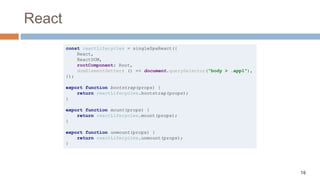
React
const reactLifecycles = singleSpaReact({
React,
ReactDOM,
rootComponent: Root,
domElementGetter: () => document.querySelector("body > .app1"),
});
export function bootstrap(props) {
return reactLifecycles.bootstrap(props);
}
export function mount(props) {
return reactLifecycles.mount(props);
}
export function unmount(props) {
return reactLifecycles.unmount(props);
}
17
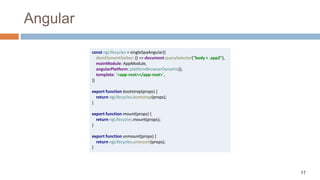
Angular
const ngLifecycles = singleSpaAngular({
domElementGetter: () => document.querySelector("body > .app2"),
mainModule: AppModule,
angularPlatform: platformBrowserDynamic(),
template: `<app-root></app-root>`,
})
export function bootstrap(props) {
return ngLifecycles.bootstrap(props);
}
export function mount(props) {
return ngLifecycles.mount(props);
}
export function unmount(props) {
return ngLifecycles.unmount(props);
}
18
single-spa
 All major FX are supported
 Does not help with component interaction
 Need to manually configure a webpack build
 Use React/Angular eject
 Mounting & unmounting are heavy operations
19
The Web Components Standard
 HTML imports
 HTML templates
 Custom elements
 Shadow DOM
20
Custom Element
class MyClock extends HTMLElement {
constructor() {
super();
}
connectedCallback() {
this.innerText = new Date();
}
}
customElements.define('my-clock', MyClock);
21
Custom Element
 DEMO
22
Web Components
 Maintain a single SPA
 Use custom elements as integration layer
 Each component is wrapped inside a custom element
 Internally you may use whatever FX you want
23
Web Components
 DEMO
24
Web Components
 Probably another wrapper is required
 Per host application type 
 Custom element supports attributeChangedCallback
 However, attribute must be a string
 Versioning
 Loading two React/Angular instances is tricky
 Stencil
 Angular Elements
25
IFrames
 Quite similar to the “Multi SPA” approach
 Allows for component interaction
 Over application interaction
 However,
 Scrollbar is a nightmare
 CSS does not cascade easily
 Cannot nest too much
 Bundle size
26
Layout Service
 Project Mosaic at https://www.mosaic9.org/
 Offers Tailor layout service
 Composing a website out of various Fragments
 Inspired by Facebook’s BigPipe
27
Summary
 Lots of recipes and small tools
 No significant leader
 single-spa is probably the most famous
 Should resemble the organization layout
THANK YOU
Ori Calvo
Trainologic

Micro Front-Ends

  • 1.
  • 2.
    2 Technology evolves quickly Backbone, Knockout, Ember, Meteor, AngularJS …  React, Angular, VueJS …  We can build awesome apps with AngularJS  Would you join a company that only uses AngularJS ?
  • 3.
    3 Front-end gets bigger Migrating to latest technology stacks takes time  The big bang approach is not practical
  • 4.
    4 End-to-End teams  VS.technical teams  Each team delivers separately  Each team has its own opinion …
  • 5.
    5 Micro Front-Ends Approach “Recipesfor building a web app with multiple teams using different JavaScript frameworks” https://micro-frontends.org/ Michael Geers
  • 6.
    6 Who am I Ori Calvo  Head of Front end technologies @ Trainologic  Over 20 years of development/leading experience  Manager of the WDCIL Meetup group  Owner of the extremely popular t-rex library
  • 7.
    7 Tomorrow Seminar  BuildingReusable Web Components  Gil Fink
  • 8.
    8 Recipes  Multiple SPAsat different URLs  Web components  IFrames  Shared event bus  Layout service  The single-spa framework
  • 9.
    9 Multi SPAs  EachSPA lives in its own URL  Probably the easiest solution   Not so great UX   Use a reverse proxy to simplify navigation
  • 10.
    10 Multi SPAs -DEMO  window.open  Set a gateway  Shared app store  Shared API
  • 11.
    11 Multi SPAs -More  Shared infra can be moved to a dedicated NPM package  Can use window.opener to share state & API  Switching between existing tabs is tricky  Many opened tabs  Performance issues
  • 12.
    12 single-spa Meta-framework  Hostsmultiple applications inside single SPA  Implements a cross application router  Only one active at a time  Each application is associated with a router prefix  Each application must support: bootstrap, mount, unmount
  • 13.
  • 14.
    14 index.html <body> <script src="/dist/common-dependencies.js"></script> <script src="/dist/root-application.js"></script> <divclass="navbar"> <ul> <a onclick="singleSpaNavigate('/app1')"><li>App 1</li></a> <a onclick="singleSpaNavigate('/app2')"><li>App 2</li></a> </ul> </div> <div class="app1"></div> <div class="app2"></div> </body>
  • 15.
    15 Root App import *as singleSpa from 'single-spa'; singleSpa.registerApplication('app1', () => import ('./app1/main.js'), location => location.pathname.startsWith(`/app1`)); singleSpa.registerApplication('app2', () => import ('./app2/main.js'), location => location.pathname.startsWith(`/app2`)); singleSpa.start();
  • 16.
    16 React const reactLifecycles =singleSpaReact({ React, ReactDOM, rootComponent: Root, domElementGetter: () => document.querySelector("body > .app1"), }); export function bootstrap(props) { return reactLifecycles.bootstrap(props); } export function mount(props) { return reactLifecycles.mount(props); } export function unmount(props) { return reactLifecycles.unmount(props); }
  • 17.
    17 Angular const ngLifecycles =singleSpaAngular({ domElementGetter: () => document.querySelector("body > .app2"), mainModule: AppModule, angularPlatform: platformBrowserDynamic(), template: `<app-root></app-root>`, }) export function bootstrap(props) { return ngLifecycles.bootstrap(props); } export function mount(props) { return ngLifecycles.mount(props); } export function unmount(props) { return ngLifecycles.unmount(props); }
  • 18.
    18 single-spa  All majorFX are supported  Does not help with component interaction  Need to manually configure a webpack build  Use React/Angular eject  Mounting & unmounting are heavy operations
  • 19.
    19 The Web ComponentsStandard  HTML imports  HTML templates  Custom elements  Shadow DOM
  • 20.
    20 Custom Element class MyClockextends HTMLElement { constructor() { super(); } connectedCallback() { this.innerText = new Date(); } } customElements.define('my-clock', MyClock);
  • 21.
  • 22.
    22 Web Components  Maintaina single SPA  Use custom elements as integration layer  Each component is wrapped inside a custom element  Internally you may use whatever FX you want
  • 23.
  • 24.
    24 Web Components  Probablyanother wrapper is required  Per host application type   Custom element supports attributeChangedCallback  However, attribute must be a string  Versioning  Loading two React/Angular instances is tricky  Stencil  Angular Elements
  • 25.
    25 IFrames  Quite similarto the “Multi SPA” approach  Allows for component interaction  Over application interaction  However,  Scrollbar is a nightmare  CSS does not cascade easily  Cannot nest too much  Bundle size
  • 26.
    26 Layout Service  ProjectMosaic at https://www.mosaic9.org/  Offers Tailor layout service  Composing a website out of various Fragments  Inspired by Facebook’s BigPipe
  • 27.
    27 Summary  Lots ofrecipes and small tools  No significant leader  single-spa is probably the most famous  Should resemble the organization layout
  • 28.