Memory Management – Page ‹#› of 49
CSCI 4717 – Computer Architecture
Memory Management
• Uni-program – memory split into two parts
– One for Operating System (monitor)
– One for currently executing program
• Multi-program
– Non-O/S part is sub-divided and shared among active
processes
• Remember segment registers in the 8086
architecture
– Hardware designed to meet needs of O/S
– Base Address = segment address
Memory Management – Page ‹#› of 49
CSCI 4717 – Computer Architecture
Swapping
• Problem: I/O (Printing, Network,
Keyboard, etc.) is so slow compared with
CPU that even in multi-programming
system, CPU can be idle most of the time
• Solutions:
– Increase main memory
• Expensive
• Programmers will eventually use all of this memory
for a single process
– Swapping
Memory Management – Page ‹#› of 49
CSCI 4717 – Computer Architecture
What is Swapping?
• Long term queue of processes stored on disk
• Processes “swapped” in as space becomes available
• As a process completes it is moved out of main
memory
• If none of the processes in memory are ready (i.e. all
I/O blocked)
– Swap out a blocked process to intermediate queue
– Swap in a ready process or a new process
• But swapping is an I/O process!
– It could make the situation worse
Memory Management – Page ‹#› of 49
CSCI 4717 – Computer Architecture
Partitioning
• Splitting memory into sections to allocate
to processes (including Operating System)
• Two types
– Fixed-sized partitions
– Variable-sized partitions
Memory Management – Page ‹#› of 49
CSCI 4717 – Computer Architecture
Fixed-Sized Partitions (continued)
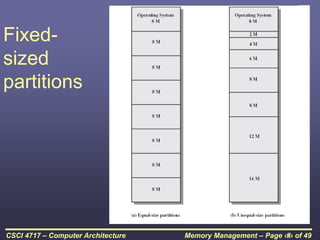
• Equal size or Unequal size partitions
• Process is fitted into smallest hole that will
take it (best fit)
• Some wasted memory due to each block
having a hole of unused memory at the
end of its partition
• Leads to variable sized partitions
Memory Management – Page ‹#› of 49
CSCI 4717 – Computer Architecture
Fixed-
sized
partitions
Memory Management – Page ‹#› of 49
CSCI 4717 – Computer Architecture
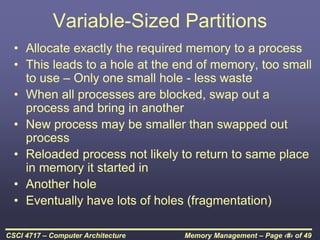
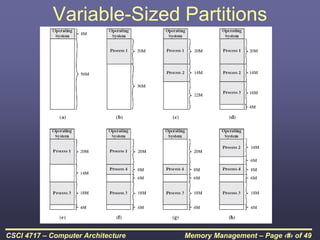
Variable-Sized Partitions
• Allocate exactly the required memory to a process
• This leads to a hole at the end of memory, too small
to use – Only one small hole - less waste
• When all processes are blocked, swap out a
process and bring in another
• New process may be smaller than swapped out
process
• Reloaded process not likely to return to same place
in memory it started in
• Another hole
• Eventually have lots of holes (fragmentation)
Memory Management – Page ‹#› of 49
CSCI 4717 – Computer Architecture
Variable-Sized Partitions
Memory Management – Page ‹#› of 49
CSCI 4717 – Computer Architecture
Solutions to Holes in Variable-
Sized Partitions
• Coalesce - Join adjacent holes into a
single large hole
Memory Management – Page ‹#› of 49
CSCI 4717 – Computer Architecture
Overlays
• In the early days of computing, programmers
had a small amount of memory to squeeze
programs into
• First "stabs" at memory management were
overlays:
– Programmer divided single application into smaller
independent programs called overlays
– When program first loaded, load first overlay into
memory
– When new overlay was required, next overlay is
read from drive and loaded in place of previous one
Memory Management – Page ‹#› of 49
CSCI 4717 – Computer Architecture
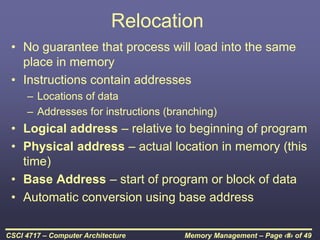
Relocation
• No guarantee that process will load into the same
place in memory
• Instructions contain addresses
– Locations of data
– Addresses for instructions (branching)
• Logical address – relative to beginning of program
• Physical address – actual location in memory (this
time)
• Base Address – start of program or block of data
• Automatic conversion using base address
Memory Management – Page ‹#› of 49
CSCI 4717 – Computer Architecture
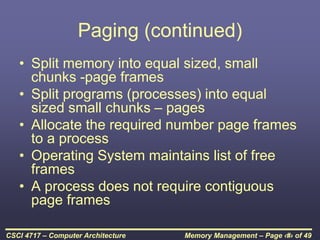
Paging (continued)
• Split memory into equal sized, small
chunks -page frames
• Split programs (processes) into equal
sized small chunks – pages
• Allocate the required number page frames
to a process
• Operating System maintains list of free
frames
• A process does not require contiguous
page frames
Memory Management – Page ‹#› of 49
CSCI 4717 – Computer Architecture
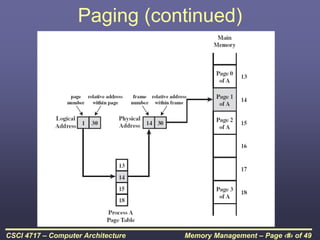
Paging (continued)
• Use page table to keep track of how the
process is distributed through the pages in
memory
• Now addressing becomes page
number:relative address within page which
is mapped to frame number:relative
address within frame.
Memory Management – Page ‹#› of 49
CSCI 4717 – Computer Architecture
Paging (continued)
Memory Management – Page ‹#› of 49
CSCI 4717 – Computer Architecture
Paging Example – Before
Process A
Page 0
Page 1
Page 2
Page 3
13
14
15
16
17
18
19
20
21
Free frame list
13
14
15
18
20
In
use
In
use
In
use
In
use
Memory Management – Page ‹#› of 49
CSCI 4717 – Computer Architecture
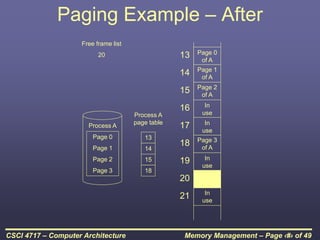
Paging Example – After
Process A
Page 0
Page 1
Page 2
Page 3
Free frame list
20
Process A
page table
13
14
15
18
13
14
15
16
17
18
19
20
21
In
use
In
use
In
use
In
use
Page 0
of A
Page 1
of A
Page 2
of A
Page 3
of A

Memory Management Architecture.ppt

  • 1.
    Memory Management –Page ‹#› of 49 CSCI 4717 – Computer Architecture Memory Management • Uni-program – memory split into two parts – One for Operating System (monitor) – One for currently executing program • Multi-program – Non-O/S part is sub-divided and shared among active processes • Remember segment registers in the 8086 architecture – Hardware designed to meet needs of O/S – Base Address = segment address
  • 2.
    Memory Management –Page ‹#› of 49 CSCI 4717 – Computer Architecture Swapping • Problem: I/O (Printing, Network, Keyboard, etc.) is so slow compared with CPU that even in multi-programming system, CPU can be idle most of the time • Solutions: – Increase main memory • Expensive • Programmers will eventually use all of this memory for a single process – Swapping
  • 3.
    Memory Management –Page ‹#› of 49 CSCI 4717 – Computer Architecture What is Swapping? • Long term queue of processes stored on disk • Processes “swapped” in as space becomes available • As a process completes it is moved out of main memory • If none of the processes in memory are ready (i.e. all I/O blocked) – Swap out a blocked process to intermediate queue – Swap in a ready process or a new process • But swapping is an I/O process! – It could make the situation worse
  • 4.
    Memory Management –Page ‹#› of 49 CSCI 4717 – Computer Architecture Partitioning • Splitting memory into sections to allocate to processes (including Operating System) • Two types – Fixed-sized partitions – Variable-sized partitions
  • 5.
    Memory Management –Page ‹#› of 49 CSCI 4717 – Computer Architecture Fixed-Sized Partitions (continued) • Equal size or Unequal size partitions • Process is fitted into smallest hole that will take it (best fit) • Some wasted memory due to each block having a hole of unused memory at the end of its partition • Leads to variable sized partitions
  • 6.
    Memory Management –Page ‹#› of 49 CSCI 4717 – Computer Architecture Fixed- sized partitions
  • 7.
    Memory Management –Page ‹#› of 49 CSCI 4717 – Computer Architecture Variable-Sized Partitions • Allocate exactly the required memory to a process • This leads to a hole at the end of memory, too small to use – Only one small hole - less waste • When all processes are blocked, swap out a process and bring in another • New process may be smaller than swapped out process • Reloaded process not likely to return to same place in memory it started in • Another hole • Eventually have lots of holes (fragmentation)
  • 8.
    Memory Management –Page ‹#› of 49 CSCI 4717 – Computer Architecture Variable-Sized Partitions
  • 9.
    Memory Management –Page ‹#› of 49 CSCI 4717 – Computer Architecture Solutions to Holes in Variable- Sized Partitions • Coalesce - Join adjacent holes into a single large hole
  • 10.
    Memory Management –Page ‹#› of 49 CSCI 4717 – Computer Architecture Overlays • In the early days of computing, programmers had a small amount of memory to squeeze programs into • First "stabs" at memory management were overlays: – Programmer divided single application into smaller independent programs called overlays – When program first loaded, load first overlay into memory – When new overlay was required, next overlay is read from drive and loaded in place of previous one
  • 11.
    Memory Management –Page ‹#› of 49 CSCI 4717 – Computer Architecture Relocation • No guarantee that process will load into the same place in memory • Instructions contain addresses – Locations of data – Addresses for instructions (branching) • Logical address – relative to beginning of program • Physical address – actual location in memory (this time) • Base Address – start of program or block of data • Automatic conversion using base address
  • 12.
    Memory Management –Page ‹#› of 49 CSCI 4717 – Computer Architecture Paging (continued) • Split memory into equal sized, small chunks -page frames • Split programs (processes) into equal sized small chunks – pages • Allocate the required number page frames to a process • Operating System maintains list of free frames • A process does not require contiguous page frames
  • 13.
    Memory Management –Page ‹#› of 49 CSCI 4717 – Computer Architecture Paging (continued) • Use page table to keep track of how the process is distributed through the pages in memory • Now addressing becomes page number:relative address within page which is mapped to frame number:relative address within frame.
  • 14.
    Memory Management –Page ‹#› of 49 CSCI 4717 – Computer Architecture Paging (continued)
  • 15.
    Memory Management –Page ‹#› of 49 CSCI 4717 – Computer Architecture Paging Example – Before Process A Page 0 Page 1 Page 2 Page 3 13 14 15 16 17 18 19 20 21 Free frame list 13 14 15 18 20 In use In use In use In use
  • 16.
    Memory Management –Page ‹#› of 49 CSCI 4717 – Computer Architecture Paging Example – After Process A Page 0 Page 1 Page 2 Page 3 Free frame list 20 Process A page table 13 14 15 18 13 14 15 16 17 18 19 20 21 In use In use In use In use Page 0 of A Page 1 of A Page 2 of A Page 3 of A