4. How did you use media
technologies in the construction and
 research, planning and evaluation
               stages?
Research for teaser trailer
• The internet – I used the internet to research in to
  teaser trailers, to get a better understanding of them
  because this is what our group decided to make.
• Using the internet I found out the history of teaser
  trailers and why they are made.
• What the main purpose of them are and the main
  conventions of a teaser trailer as well.
• How teaser trailers depend on the genre of the film
  as well.
• Our group made a horror genre teaser trailer which
  meant using the internet we had to research in to
  that genre.
YouTube
• Using YouTube I was able to watch teaser trailers for all
  different genres and from this I could see the different
  conventions for each genre.
• After watching teaser trailers for all different genres are group
  decided to make a horror genre one.
• YouTube allowed us to see horror genre videos from all
  different years so we were able to compare them and see the
  changes in the horror genre throughout time.
• I was able to embed videos from YouTube on to my Tumblr A2
  Media blog and then do technical analysis about them.
Research other websites
• For my research and planning I used websites such as IMDb
  (The Internet Movie Database) and Wikipedia.
• These types of websites were great for finding out
  information on teaser trailers and horror genre.
• On IMDb I could find out the top 50 horror genre films which
  people had voted for and I decided to watch as many teaser
  trailers for the films in the list.
• This helped with the research and planning because I got a
  better understanding in the differences in teaser trailers.
Tumblr
• For all the research and planning I used a blogging website
  called Tumblr which I was able to post everything on to.
• I could also embed videos from YouTube on to Tumblr and
  upload pictures as well.
• By having a blog you can refer back to your research and
  previous blog posts whenever you want.
• It is like a timeline of the progress of our teaser trailer
  because it has in order from research and planning, to
  filming, to editing and then the teaser trailer.
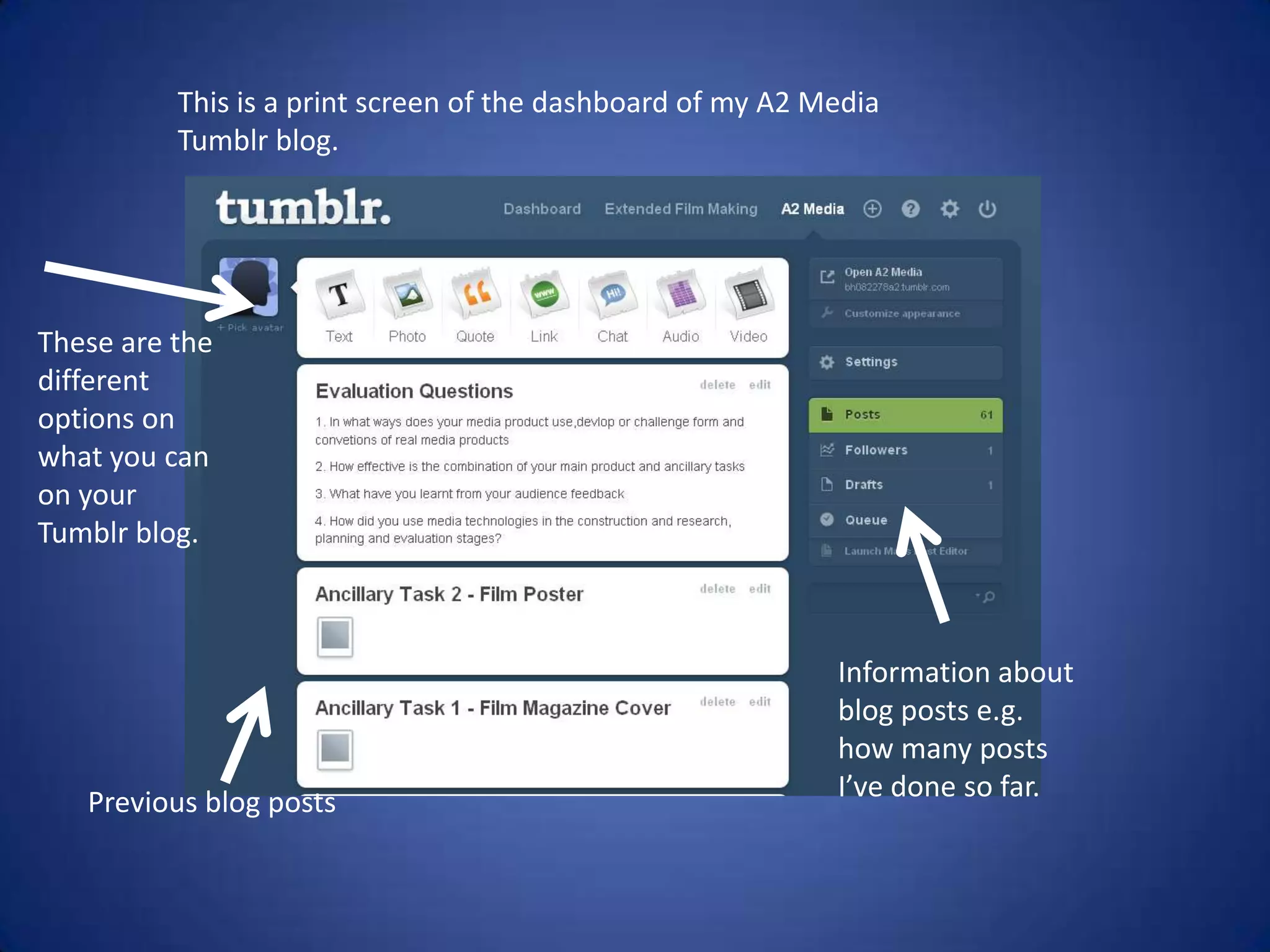
This is a print screen of the dashboard of my A2 Media
          Tumblr blog.


These are the
different
options on
what you can
on your
Tumblr blog.


                                                            Information about
                                                            blog posts e.g.
                                                            how many posts
   Previous blog posts                                      I’ve done so far.
Camera
• I used the camera from my phone to take photos of the location are group
  was going to film in for the teaser trailer.
• After taking the location shots I uploaded the photos on to Tumblr and
  wrote about them.
• Our group used a camera from college to film the footage for the teaser
  trailer and then we had to save the files of the footage on to a memory
  card.
• Then the next step was to upload the footage from the memory card so
  the files were on the computer and passport.
• In our group we had a number of problems with the passports we lost all
  of our editing a number of times throughout making the teaser trailer.
• All of the lighting in our teaser trailer was natural.
Adobe Premiere Pro CS4
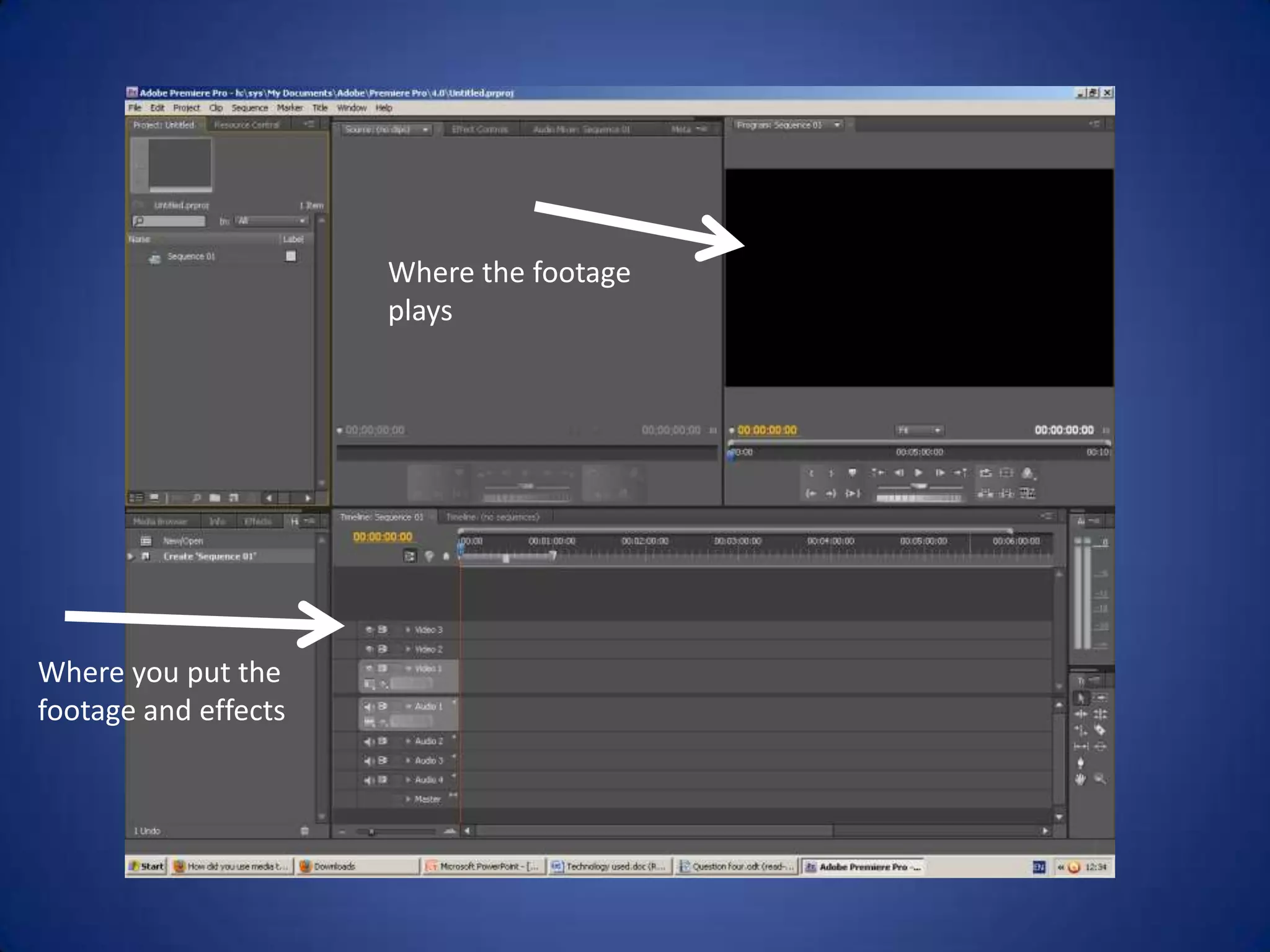
• After uploading the footage to the passport our group could
  start to edit the footage and make the teaser trailer using
  Adobe Premiere Pro CS4.
• Using Adobe Premiere Pro CS4 are group were able to shorten
  the files because there was footage we didn’t need.
• Adobe Premiere Pro CS4 have a number of different effects
  you are able to use.
• For our teaser trailer we used the “dip to black” effect the
  majority of the time in between each shot.
• We had to clear all the sound from each shot because we
  were using music instead for the teaser trailer.
Where the footage
                      plays


Where you put the
footage and effects
Adobe after Effects CS4
• Our group used Adobe after Effects CS4 for the titles in our
  teaser trailer.
• Using the programme we could make how the titles appeared
  in the teaser trailer, it looked much better to how they looked
  in Adobe Premiere Pro CS4.
• Our group made the titles flash when they appear in the
  teaser trailer and changed the colour of them to red.
• We made the speed of the titles faster and adding cuts to try
  and make it link with the music we used.
• This is because in horror genre teaser trailers the titles are
  normally fast cuts.
• An example would be in the opening scene of Se7en, where
  the titles are fast and flash in and out.
Audacity
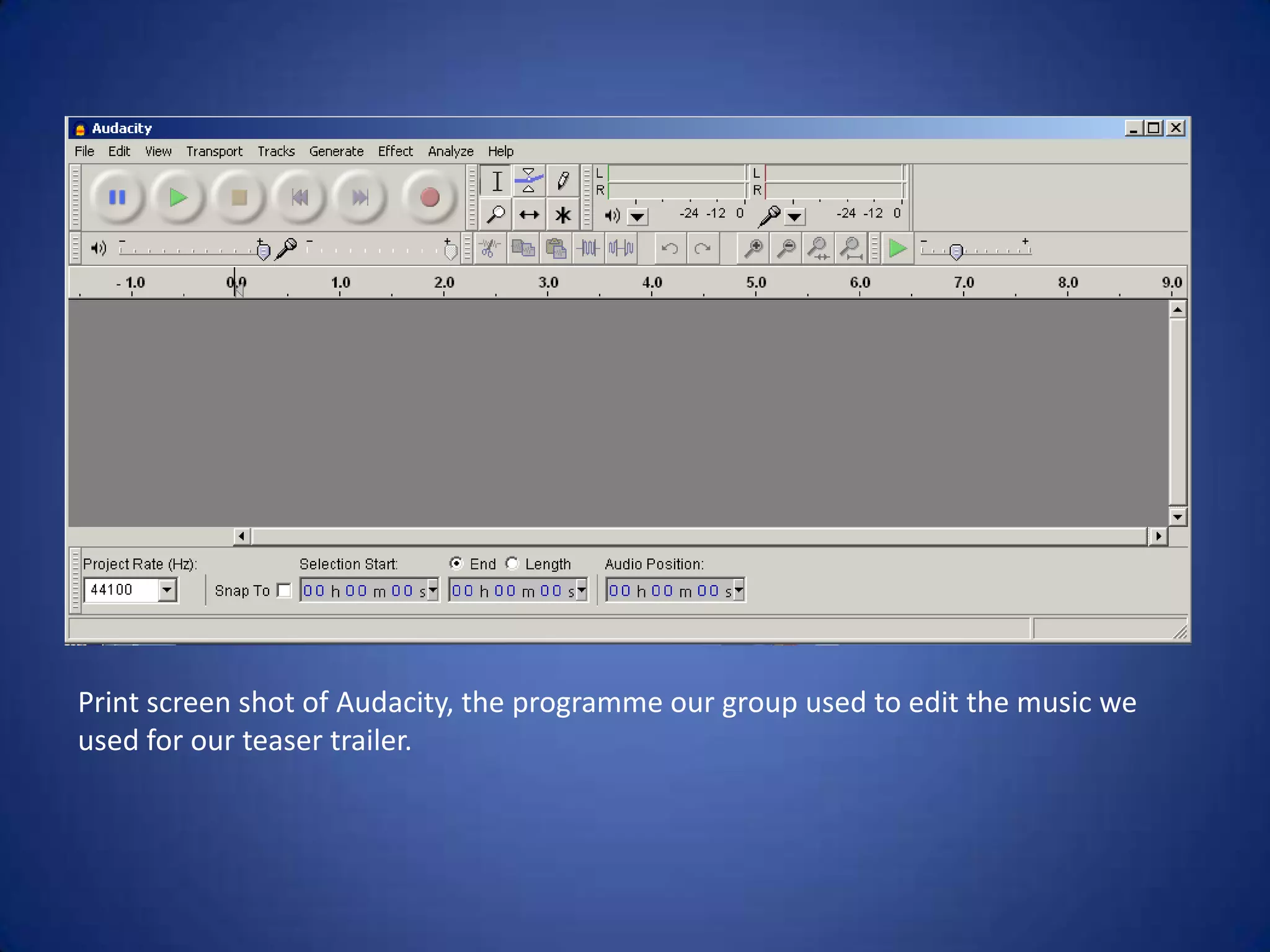
• After finding the music we wanted to use for our teaser trailer
  our group used a programme called Audacity.
• Using Audacity you are able to edit the song and cut the
  music up.
• We used Audacity because the song was over four minutes
  long and our teaser trailer was only a minute along.
• This meant the song needed shortening to the part which we
  wanted to use for the teaser trailer.
• You could also edit the volume of the song so if we wanted to
  we could have made the song louder and quieter.
Print screen shot of Audacity, the programme our group used to edit the music we
used for our teaser trailer.
Microsoft Paint & Photoshop
• For the ancillary tasks which were to create a poster and film
  magazine front cover for the teaser trailer I used Photoshop
  and Paint.
• For most of the ideas and planning for the ancillary tasks I
  used Microsoft Paint.
• Using Microsoft Paint I was able to cut images and resize
  them, to put them in to my ancillary tasks.
• For the images and texts I used on my ancillary tasks I created
  them using Adobe Photoshop CS5.1
• I was able to edit the colours of the images on Photoshop.
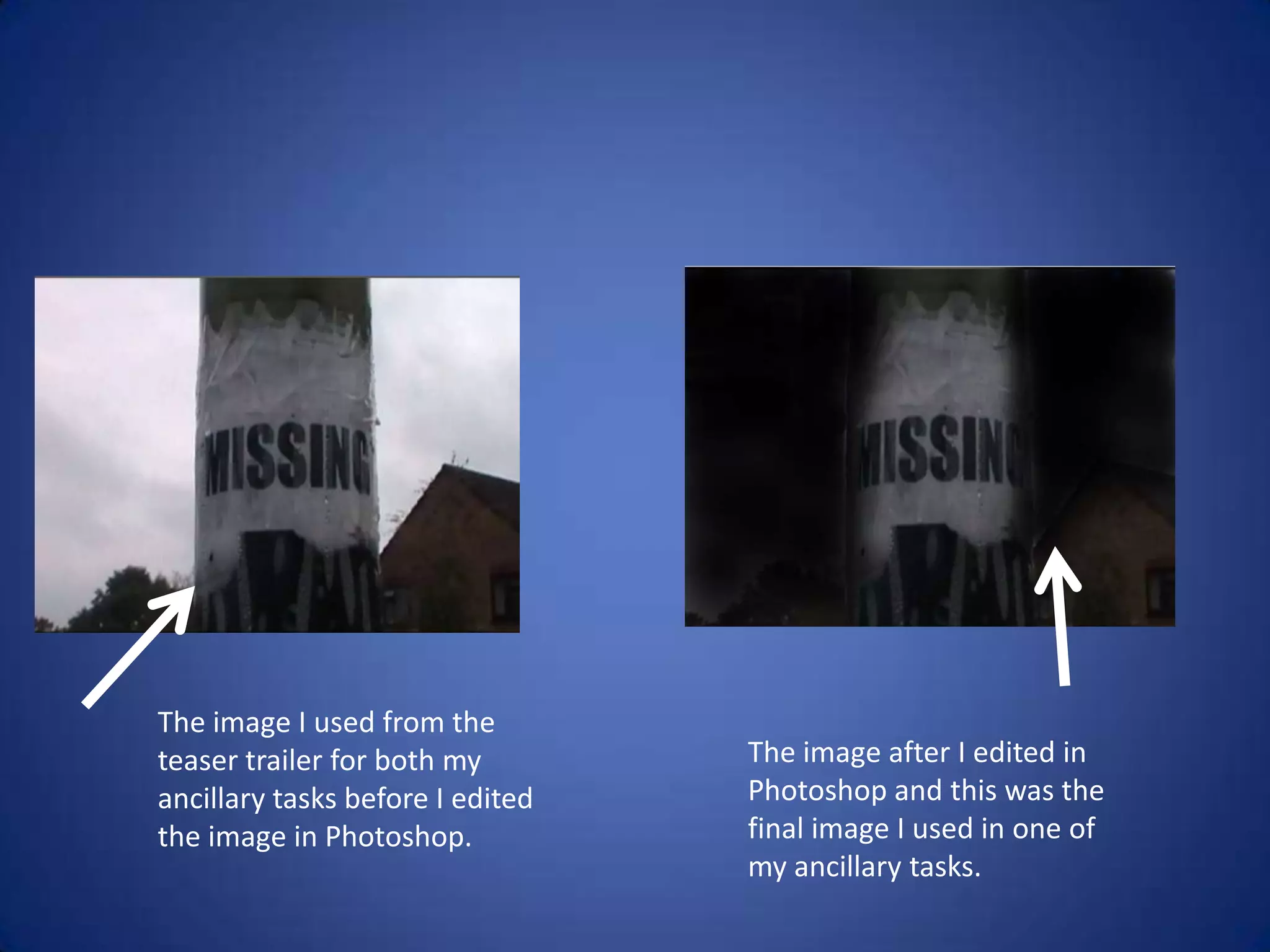
The image I used from the
teaser trailer for both my        The image after I edited in
ancillary tasks before I edited   Photoshop and this was the
the image in Photoshop.           final image I used in one of
                                  my ancillary tasks.
Research for ancillary tasks

• For the research for the ancillary tasks I used in the internet to
  look at examples of film magazine front covers and teaser film
  posters.
• After researching in to them I got examples and uploaded
  them on to my Tumblr blog and then wrote about them.
• And planned how I could use the research for the ancillary
  tasks.
Evaluation
• For the evaluation I used Microsoft Word to wrote notes for
  each evaluation question.
• Then from my notes I used Microsoft PowerPoint to create a
  PowerPoint and answer one of the questions.
• After making the PowerPoint I uploaded it on to a website
  called slide-share which allowed me to embed the PowerPoint
  on to my Tumblr blog.

media

  • 1.
    4. How didyou use media technologies in the construction and research, planning and evaluation stages?
  • 2.
    Research for teasertrailer • The internet – I used the internet to research in to teaser trailers, to get a better understanding of them because this is what our group decided to make. • Using the internet I found out the history of teaser trailers and why they are made. • What the main purpose of them are and the main conventions of a teaser trailer as well. • How teaser trailers depend on the genre of the film as well. • Our group made a horror genre teaser trailer which meant using the internet we had to research in to that genre.
  • 3.
    YouTube • Using YouTubeI was able to watch teaser trailers for all different genres and from this I could see the different conventions for each genre. • After watching teaser trailers for all different genres are group decided to make a horror genre one. • YouTube allowed us to see horror genre videos from all different years so we were able to compare them and see the changes in the horror genre throughout time. • I was able to embed videos from YouTube on to my Tumblr A2 Media blog and then do technical analysis about them.
  • 4.
    Research other websites •For my research and planning I used websites such as IMDb (The Internet Movie Database) and Wikipedia. • These types of websites were great for finding out information on teaser trailers and horror genre. • On IMDb I could find out the top 50 horror genre films which people had voted for and I decided to watch as many teaser trailers for the films in the list. • This helped with the research and planning because I got a better understanding in the differences in teaser trailers.
  • 5.
    Tumblr • For allthe research and planning I used a blogging website called Tumblr which I was able to post everything on to. • I could also embed videos from YouTube on to Tumblr and upload pictures as well. • By having a blog you can refer back to your research and previous blog posts whenever you want. • It is like a timeline of the progress of our teaser trailer because it has in order from research and planning, to filming, to editing and then the teaser trailer.
  • 6.
    This is aprint screen of the dashboard of my A2 Media Tumblr blog. These are the different options on what you can on your Tumblr blog. Information about blog posts e.g. how many posts Previous blog posts I’ve done so far.
  • 7.
    Camera • I usedthe camera from my phone to take photos of the location are group was going to film in for the teaser trailer. • After taking the location shots I uploaded the photos on to Tumblr and wrote about them. • Our group used a camera from college to film the footage for the teaser trailer and then we had to save the files of the footage on to a memory card. • Then the next step was to upload the footage from the memory card so the files were on the computer and passport. • In our group we had a number of problems with the passports we lost all of our editing a number of times throughout making the teaser trailer. • All of the lighting in our teaser trailer was natural.
  • 8.
    Adobe Premiere ProCS4 • After uploading the footage to the passport our group could start to edit the footage and make the teaser trailer using Adobe Premiere Pro CS4. • Using Adobe Premiere Pro CS4 are group were able to shorten the files because there was footage we didn’t need. • Adobe Premiere Pro CS4 have a number of different effects you are able to use. • For our teaser trailer we used the “dip to black” effect the majority of the time in between each shot. • We had to clear all the sound from each shot because we were using music instead for the teaser trailer.
  • 9.
    Where the footage plays Where you put the footage and effects
  • 10.
    Adobe after EffectsCS4 • Our group used Adobe after Effects CS4 for the titles in our teaser trailer. • Using the programme we could make how the titles appeared in the teaser trailer, it looked much better to how they looked in Adobe Premiere Pro CS4. • Our group made the titles flash when they appear in the teaser trailer and changed the colour of them to red. • We made the speed of the titles faster and adding cuts to try and make it link with the music we used. • This is because in horror genre teaser trailers the titles are normally fast cuts. • An example would be in the opening scene of Se7en, where the titles are fast and flash in and out.
  • 11.
    Audacity • After findingthe music we wanted to use for our teaser trailer our group used a programme called Audacity. • Using Audacity you are able to edit the song and cut the music up. • We used Audacity because the song was over four minutes long and our teaser trailer was only a minute along. • This meant the song needed shortening to the part which we wanted to use for the teaser trailer. • You could also edit the volume of the song so if we wanted to we could have made the song louder and quieter.
  • 12.
    Print screen shotof Audacity, the programme our group used to edit the music we used for our teaser trailer.
  • 13.
    Microsoft Paint &Photoshop • For the ancillary tasks which were to create a poster and film magazine front cover for the teaser trailer I used Photoshop and Paint. • For most of the ideas and planning for the ancillary tasks I used Microsoft Paint. • Using Microsoft Paint I was able to cut images and resize them, to put them in to my ancillary tasks. • For the images and texts I used on my ancillary tasks I created them using Adobe Photoshop CS5.1 • I was able to edit the colours of the images on Photoshop.
  • 14.
    The image Iused from the teaser trailer for both my The image after I edited in ancillary tasks before I edited Photoshop and this was the the image in Photoshop. final image I used in one of my ancillary tasks.
  • 15.
    Research for ancillarytasks • For the research for the ancillary tasks I used in the internet to look at examples of film magazine front covers and teaser film posters. • After researching in to them I got examples and uploaded them on to my Tumblr blog and then wrote about them. • And planned how I could use the research for the ancillary tasks.
  • 16.
    Evaluation • For theevaluation I used Microsoft Word to wrote notes for each evaluation question. • Then from my notes I used Microsoft PowerPoint to create a PowerPoint and answer one of the questions. • After making the PowerPoint I uploaded it on to a website called slide-share which allowed me to embed the PowerPoint on to my Tumblr blog.