© DHI 
MIKE BY DHI SAAS 
New features as of October 2014 
In October 2014, we have added a set of new features to the MIKE by DHI SaaS portal and available instances. The new features 
aim to further improve the user experience by: 
 Improving performance by upgrading the standard instances 
 Providing a MIKE by DHI/GPU bundle, offering a significant performance boost for certain models 
 Providing multi-region support, such as offering instances hosted on hardware near your location 
The new features are explained in more details below. 
SAAS UPGRADE 
UPGRADE OF STANDARD INSTANCES 
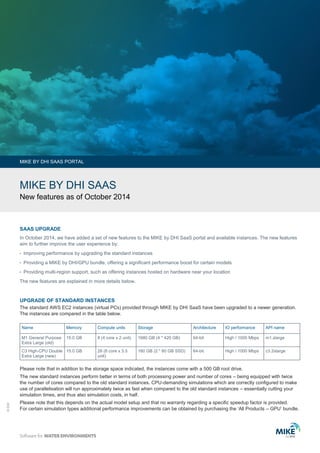
The standard AWS EC2 instances (virtual PCs) provided through MIKE by DHI SaaS have been upgraded to a newer generation. 
The instances are compared in the table below. 
MIKE BY DHI SAAS PORTAL 
Name Memory Compute units Storage Architecture IO performance API name 
M1 General Purpose 
Extra Large (old) 
15.0 GB 8 (4 core x 2 unit) 1680 GB (4 * 420 GB) 64-bit High / 1000 Mbps m1.xlarge 
C3 High-CPU Double 
Extra Large (new) 
15.0 GB 28 (8 core x 3.5 
unit) 
160 GB (2 * 80 GB SSD) 64-bit High / 1000 Mbps c3.2xlarge 
Please note that in addition to the storage space indicated, the instances come with a 500 GB root drive. 
The new standard instances perform better in terms of both processing power and number of cores – being equipped with twice 
the number of cores compared to the old standard instances. CPU-demanding simulations which are correctly configured to make 
use of parallelisation will run approximately twice as fast when compared to the old standard instances – essentially cutting your 
simulation times, and thus also simulation costs, in half. 
Please note that this depends on the actual model setup and that no warranty regarding a specific speedup factor is provided. 
For certain simulation types additional performance improvements can be obtained by purchasing the ‘All Products – GPU’ bundle.
Improved MIKE by DHI 
SaaS Portal 
http://saas.dhigroup.com 
MIKE BY DHI SAAS PORTAL 
© DHI / Photo: iStock © Erie 
We offer a new product/hardware bundle. In terms of software, the licence is equivalent to ‘MIKE by DHI All Products’ package. 
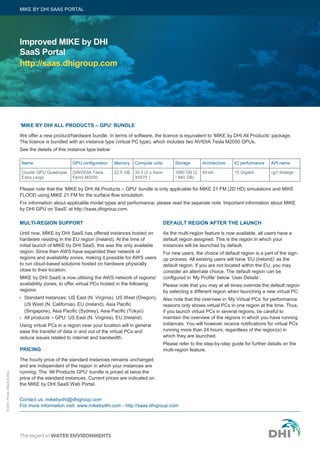
The licence is bundled with an instance type (virtual PC type), which includes two NVIDIA Tesla M2050 GPUs. 
See the details of this instance type below: 
Contact us: mikebydhi@dhigroup.com 
For more information visit: www.mikebydhi.com - http://saas.dhigroup.com 
‘MIKE BY DHI ALL PRODUCTS – GPU’ BUNDLE 
Please note that the ‘MIKE by DHI All Products – GPU’ bundle is only applicable for MIKE 21 FM (2D HD) simulations and MIKE 
FLOOD using MIKE 21 FM for the surface flow simulation. 
For information about applicable model types and performance, please read the separate note ‘Important information about MIKE 
by DHI GPU on SaaS’ at http://saas.dhigroup.com. 
MULTI-REGION SUPPORT 
Until now, MIKE by DHI SaaS has offered instances hosted on 
hardware residing in the EU region (Ireland). At the time of 
initial launch of MIKE by DHI SaaS, this was the only available 
region. Since then AWS have expanded their network of 
regions and availability zones, making it possible for AWS users 
to run cloud-based solutions hosted on hardware physically 
close to their location. 
MIKE by DHI SaaS is now utilising the AWS network of regions/ 
availability zones, to offer virtual PCs hosted in the following 
regions: 
 Standard instances: US East (N. Virginia). US West (Oregon), 
US West (N. California), EU (Ireland), Asia Pacific 
(Singapore), Asia Pacific (Sydney), Asia Pacific (Tokyo) 
 All products – GPU: US East (N. Virginia), EU (Ireland) 
Using virtual PCs in a region near your location will in general 
ease the transfer of data in and out of the virtual PCs and 
reduce issues related to internet and bandwidth. 
PRICING 
The hourly price of the standard instances remains unchanged 
and are independent of the region in which your instances are 
running. The ‘All Products GPU’ bundle is priced at twice the 
price of the standard instances. Current prices are indicated on 
the MIKE by DHI SaaS Web Portal. 
DEFAULT REGION AFTER THE LAUNCH 
As the multi-region feature is now available, all users have a 
default region assigned. This is the region in which your 
instances will be launched by default. 
For new users, the choice of default region is a part of the sign-up 
process. All existing users will have ‘EU (Ireland)’ as the 
default region. If you are not located within the EU, you may 
consider an alternate choice. The default region can be 
configured in ‘My Profile’ below ‘User Details’. 
Please note that you may at all times override the default region 
by selecting a different region when launching a new virtual PC. 
Also note that the overview in ‘My Virtual PCs’ for performance 
reasons only shows virtual PCs in one region at the time. Thus, 
if you launch virtual PCs in several regions, be careful to 
maintain the overview of the regions in which you have running 
instances. You will however receive notifications for virtual PCs 
running more than 24 hours, regardless of the region(s) in 
which they are launched. 
Please refer to the step-by-step guide for further details on the 
multi-region feature. 
Name Memory Compute units Storage Architecture IO performance GPU configuration API name 
Cluster GPU Quadruple 
Extra Large 
22.5 GB 33.5 (2 x Xeon 
X5570 ) 
1680 GB (2 
* 840 GB) 
2xNVIDIA Tesla 64-bit 10 Gigabit cg1.4xlarge 
Fermi M2050

MIKE BY DHI SAAS - New features as of October 2014

  • 1.
    © DHI MIKEBY DHI SAAS New features as of October 2014 In October 2014, we have added a set of new features to the MIKE by DHI SaaS portal and available instances. The new features aim to further improve the user experience by:  Improving performance by upgrading the standard instances  Providing a MIKE by DHI/GPU bundle, offering a significant performance boost for certain models  Providing multi-region support, such as offering instances hosted on hardware near your location The new features are explained in more details below. SAAS UPGRADE UPGRADE OF STANDARD INSTANCES The standard AWS EC2 instances (virtual PCs) provided through MIKE by DHI SaaS have been upgraded to a newer generation. The instances are compared in the table below. MIKE BY DHI SAAS PORTAL Name Memory Compute units Storage Architecture IO performance API name M1 General Purpose Extra Large (old) 15.0 GB 8 (4 core x 2 unit) 1680 GB (4 * 420 GB) 64-bit High / 1000 Mbps m1.xlarge C3 High-CPU Double Extra Large (new) 15.0 GB 28 (8 core x 3.5 unit) 160 GB (2 * 80 GB SSD) 64-bit High / 1000 Mbps c3.2xlarge Please note that in addition to the storage space indicated, the instances come with a 500 GB root drive. The new standard instances perform better in terms of both processing power and number of cores – being equipped with twice the number of cores compared to the old standard instances. CPU-demanding simulations which are correctly configured to make use of parallelisation will run approximately twice as fast when compared to the old standard instances – essentially cutting your simulation times, and thus also simulation costs, in half. Please note that this depends on the actual model setup and that no warranty regarding a specific speedup factor is provided. For certain simulation types additional performance improvements can be obtained by purchasing the ‘All Products – GPU’ bundle.
  • 2.
    Improved MIKE byDHI SaaS Portal http://saas.dhigroup.com MIKE BY DHI SAAS PORTAL © DHI / Photo: iStock © Erie We offer a new product/hardware bundle. In terms of software, the licence is equivalent to ‘MIKE by DHI All Products’ package. The licence is bundled with an instance type (virtual PC type), which includes two NVIDIA Tesla M2050 GPUs. See the details of this instance type below: Contact us: mikebydhi@dhigroup.com For more information visit: www.mikebydhi.com - http://saas.dhigroup.com ‘MIKE BY DHI ALL PRODUCTS – GPU’ BUNDLE Please note that the ‘MIKE by DHI All Products – GPU’ bundle is only applicable for MIKE 21 FM (2D HD) simulations and MIKE FLOOD using MIKE 21 FM for the surface flow simulation. For information about applicable model types and performance, please read the separate note ‘Important information about MIKE by DHI GPU on SaaS’ at http://saas.dhigroup.com. MULTI-REGION SUPPORT Until now, MIKE by DHI SaaS has offered instances hosted on hardware residing in the EU region (Ireland). At the time of initial launch of MIKE by DHI SaaS, this was the only available region. Since then AWS have expanded their network of regions and availability zones, making it possible for AWS users to run cloud-based solutions hosted on hardware physically close to their location. MIKE by DHI SaaS is now utilising the AWS network of regions/ availability zones, to offer virtual PCs hosted in the following regions:  Standard instances: US East (N. Virginia). US West (Oregon), US West (N. California), EU (Ireland), Asia Pacific (Singapore), Asia Pacific (Sydney), Asia Pacific (Tokyo)  All products – GPU: US East (N. Virginia), EU (Ireland) Using virtual PCs in a region near your location will in general ease the transfer of data in and out of the virtual PCs and reduce issues related to internet and bandwidth. PRICING The hourly price of the standard instances remains unchanged and are independent of the region in which your instances are running. The ‘All Products GPU’ bundle is priced at twice the price of the standard instances. Current prices are indicated on the MIKE by DHI SaaS Web Portal. DEFAULT REGION AFTER THE LAUNCH As the multi-region feature is now available, all users have a default region assigned. This is the region in which your instances will be launched by default. For new users, the choice of default region is a part of the sign-up process. All existing users will have ‘EU (Ireland)’ as the default region. If you are not located within the EU, you may consider an alternate choice. The default region can be configured in ‘My Profile’ below ‘User Details’. Please note that you may at all times override the default region by selecting a different region when launching a new virtual PC. Also note that the overview in ‘My Virtual PCs’ for performance reasons only shows virtual PCs in one region at the time. Thus, if you launch virtual PCs in several regions, be careful to maintain the overview of the regions in which you have running instances. You will however receive notifications for virtual PCs running more than 24 hours, regardless of the region(s) in which they are launched. Please refer to the step-by-step guide for further details on the multi-region feature. Name Memory Compute units Storage Architecture IO performance GPU configuration API name Cluster GPU Quadruple Extra Large 22.5 GB 33.5 (2 x Xeon X5570 ) 1680 GB (2 * 840 GB) 2xNVIDIA Tesla 64-bit 10 Gigabit cg1.4xlarge Fermi M2050