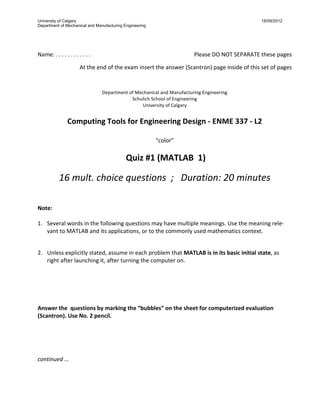
University of Calgary 18/09/2012
Department of Mechanical and Manufacturing Engineering


Name:
.
.
.
.
.
.
.
.
.
.
.
.
 
 Please
DO
NOT
SEPARATE
these
pages


 At
the
end
of
the
exam
insert
the
answer
(Scantron)
page
inside
of
this
set
of
pages


Department
of
Mechanical
and
Manufacturing
Engineering

Schulich
School
of
Engineering

University
of
Calgary


Computing Tools for Engineering Design ‐ ENME 337 ‐ L2 
 
“color”


 Quiz #1 (MATLAB  1) 


16 mult. choice questions  ;   Duration: 20 minutes 
 
 
Note: 
 
1.
 Several
words
in
the
following
questions
may
have
multiple
meanings.
Use
the
meaning
rele‐
vant
to
MATLAB
and
its
applications,
or
to
the
commonly
used
mathematics
context.


2.
 Unless
explicitly
stated,
assume
in
each
problem
that MATLAB is in its basic initial state,
as

right
after
launching
it,
after
turning
the
computer
on.


Answer the  questions by marking the “bubbles” on the sheet for computerized evaluation 
(Scantron). Use No. 2 pencil. 


continued ... 
 
  2 
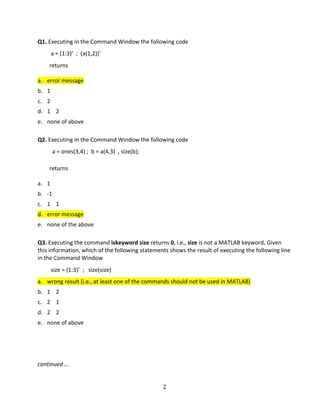
Q1.
Executing
in
the
Command
Window
the
following
code


a
=
(1:3)’ 
;

(a(1,2))’


 returns


a.
 error
message

b.
 1


c.
 2

d.
 1


2

e.
 none
of
above

 
Q2.
Executing
in
the
Command
Window
the
following
code


a
=
ones(3,4)
;

b
=
a(4,3)

,
size(b);


 returns


a.
 1

b.
 ‐1

c.
 1


1

d.
 error
message

e.
 none
of
the
above

 
Q3.
Executing
the
command
iskeyword size returns 0,
i.e.,
size is
not
a
MATLAB
keyword. Given

this
information,
which
of
the
following
statements
shows
the
result
of
executing
the
following
line

in
the
Command
Window


size
=
(1:3)’ 
;


size(size)

a.
 wrong
result
(i.e.,
at
least
one
of
the
commands
should
not
be
used
in
MATLAB)

b.
 1


2

c.
 2


1

d.
 2


2

e.
 none
of
above


continued ... 
  3 
Q4.
Executing
in
the
Command
Window
the
following
code


a
=
[1:2]’
;
size(a)


 returns


a.
 error
message

b.
 1


2

c.
 2


1

d.
 2

e.
 none
of
above

 
Q5.
Executing
in
the
Command
Window
the
following
code


a
=
1:2
;
size[a]


 returns


a.
 error
message

b.
 1


2

c.
 2


1

d.
 2

e.
 none
of
above

 
Q6.
 The
following
lines
show
collections
of
characters
(e.g.,
_xm,
m3)

that
either
can
or
can
not
be

valid
names
of
MATLAB
variables.
Which
line
contains
EXCLUSIVELY
valid
names
?


a.
 _xm
m3,
abc,
a_B


(wrong,
but
accepted
in
Quiz
1
‐>
“
_
“
not
allowed
as
1st

char
of
var.
name)

b.
 m3,
3_m,
m_3,
aB


c.
 AA,
for,
a‐b,
ab

d.
 AA,
BB,
m3,
a‐B

e.
 none
of
above


continued ... 
   
  4 
Q7.
Which
of
the
following
statements
is
correct
? 
a.
 Function
“clear”
clears
only
the
scalar
variables,
but
does
not
clear
arrays

b.
 Function
“clc”
clears
all
variables

c.
 Function
“clc”
clears
only
constants

d.
 Function
“clear
a”
clears
all
variables
of
the
type
“array”

e.
 None
of
the
above


Q8.
Executing
in
the
Command
Window
the
following
code


 A
=
eye(1,10)
;

size(A(2,2))


 returns


a.
 1

b.
 0

c.
 error
message

d.
 1


1

e.
 none
of
the
above

 
Q9.
Executing
in
the
Command
Window
the
following
code


 A
=
[1:1:5;;2:1:6]
;

size(A)


 returns


a.
 2


5

b.
 5


2

c.
 error
message

d.
 3


5

e.
 none
of
the
above


continued ... 
  5 
Q10.
Executing
the
command
iskeyword sin returns 0,
i.e.,
sin
is
not
a
MATLAB
keyword. Given
this

information,
which
of
the
following
statements
shows
the
result
of
executing,
in
the
Command

Window,
of
the
line


sqrt(sin(‐pi/2))

;

sin
=
size(1:5)

a.
 wrong
result
(i.e.,
at
least
one
of
the
commands
should
not
be
used)

b.
 1

c.
 1


5

d.
 i

e.
 none
of
above

 
Q11.
Which
of
the
following
statements
is
correct
? 
a.
 Function
“who”
returns
the
name
of
the
currently
logged
user

b.
 Function
“who”
returns
the
name
of
the
system
administrator

c.
 Function
“whos”
displays
the
user
IDs
for
all
accounts
on
the
computer

d.
 Function
“who”
displays
the
web
address
of
the
system
administrator

e.
 None
of
the
above

 
Q12.
After
executing
the
following
script
file
in
MATLAB


x
=
[2:4
;
‐1:1
;
1
2
3];

y=x(2,:);

size(y')

the
displayed
result
is


a.
 2


2


b.
 3


1

c.
 2


1

d.
 1


3

e.
 none
of
above


continued ... 


  6 
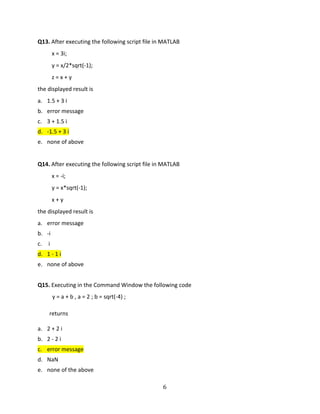
Q13.
After
executing
the
following
script
file
in
MATLAB


x
=
3i;

y
=
x/2*sqrt(‐1);

z
=
x
+
y

the
displayed
result
is

a.
 1.5
+
3
i

b.
 error
message


c.
 3
+
1.5
i

d.
 ‐1.5
+
3
i

e.
 none
of
above

 
Q14.
After
executing
the
following
script
file
in
MATLAB


x
=
‐i;

y
=
x*sqrt(‐1);

x
+
y

the
displayed
result
is

a.
 error
message

b.
 ‐i


c.
 
i

d.
 1
‐
1
i

e.
 none
of
above


Q15.
Executing
in
the
Command
Window
the
following
code


y
=
a
+
b
,
a
=
2
;
b
=
sqrt(‐4)
;


 returns


a.
 2
+
2
i

b.
 2
‐
2
i

c.
 error
message

d.
 NaN

e.
 none
of
the
above

  7 
Q16.
Executing
in
the
Command
Window
the
following
code


x = [1:3.4; -6:3.5:0.5] ; size(x)


 returns


a.
 error
message

b.
 2

 
2


c.
 2

 3

d.
 3

 3

e.
 none
of
the
above


matlab example

  • 1.
    University of Calgary18/09/2012 Department of Mechanical and Manufacturing Engineering 
 Name:
.
.
.
.
.
.
.
.
.
.
.
.
 
 Please
DO
NOT
SEPARATE
these
pages
 
 At
the
end
of
the
exam
insert
the
answer
(Scantron)
page
inside
of
this
set
of
pages
 
 Department
of
Mechanical
and
Manufacturing
Engineering
 Schulich
School
of
Engineering
 University
of
Calgary
 
 Computing Tools for Engineering Design ‐ ENME 337 ‐ L2    “color”
 
  Quiz #1 (MATLAB  1)  
 16 mult. choice questions  ;   Duration: 20 minutes      Note:    1.
 Several
words
in
the
following
questions
may
have
multiple
meanings.
Use
the
meaning
rele‐ vant
to
MATLAB
and
its
applications,
or
to
the
commonly
used
mathematics
context.
 
 2.
 Unless
explicitly
stated,
assume
in
each
problem
that MATLAB is in its basic initial state,
as
 right
after
launching
it,
after
turning
the
computer
on.
 
 
     Answer the  questions by marking the “bubbles” on the sheet for computerized evaluation  (Scantron). Use No. 2 pencil.          continued ...   
  • 2.
      2  Q1.
Executing
in
the
Command
Window
the
following
code
 
 
a
=
(1:3)’ 
;

(a(1,2))’
 
returns
 
 a.
 error
message
 b.
 1


 c.
 2
 d.
 1


2
 e.
 none
of
above
   Q2.
Executing
in
the
Command
Window
the
following
code


a
=
ones(3,4)
;

b
=
a(4,3)

,
size(b);
 
 returns
 
 a.
 1
 b.
 ‐1
 c.
 1


1
 d.
 error
message
 e.
 none
of
the
above
   Q3.
Executing
the
command
iskeyword size returns 0,
i.e.,
size is
not
a
MATLAB
keyword. Given
 this
information,
which
of
the
following
statements
shows
the
result
of
executing
the
following
line
 in
the
Command
Window


size
=
(1:3)’ 
;


size(size)
 a.
 wrong
result
(i.e.,
at
least
one
of
the
commands
should
not
be
used
in
MATLAB)
 b.
 1


2
 c.
 2


1
 d.
 2


2
 e.
 none
of
above
       continued ... 
  • 3.
      3  Q4.
Executing
in
the
Command
Window
the
following
code


a
=
[1:2]’
;
size(a)
 
returns
 
 a.
 error
message
 b.
 1


2
 c.
 2


1
 d.
 2
 e.
 none
of
above
   Q5.
Executing
in
the
Command
Window
the
following
code


a
=
1:2
;
size[a]
 
 returns
 
 a.
 error
message
 b.
 1


2
 c.
 2


1
 d.
 2
 e.
 none
of
above
   Q6.
 The
following
lines
show
collections
of
characters
(e.g.,
_xm,
m3)

that
either
can
or
can
not
be
 valid
names
of
MATLAB
variables.
Which
line
contains
EXCLUSIVELY
valid
names
?
 

 a.
 _xm
m3,
abc,
a_B


(wrong,
but
accepted
in
Quiz
1
‐>
“
_
“
not
allowed
as
1st 
char
of
var.
name)
 b.
 m3,
3_m,
m_3,
aB

 c.
 AA,
for,
a‐b,
ab
 d.
 AA,
BB,
m3,
a‐B
 e.
 none
of
above
     continued ...     
  • 4.
      4  Q7.
Which
of
the
following
statements
is
correct
?  a.
 Function
“clear”
clears
only
the
scalar
variables,
but
does
not
clear
arrays
 b.
Function
“clc”
clears
all
variables
 c.
 Function
“clc”
clears
only
constants
 d.
 Function
“clear
a”
clears
all
variables
of
the
type
“array”
 e.
 None
of
the
above
 
 Q8.
Executing
in
the
Command
Window
the
following
code
 
 A
=
eye(1,10)
;

size(A(2,2))
 
 returns
 
 a.
 1
 b.
 0
 c.
 error
message
 d.
 1


1
 e.
 none
of
the
above
   Q9.
Executing
in
the
Command
Window
the
following
code
 
 A
=
[1:1:5;;2:1:6]
;

size(A)
 
 returns
 
 a.
 2


5
 b.
 5


2
 c.
 error
message
 d.
 3


5
 e.
 none
of
the
above
       continued ... 
  • 5.
      5  Q10.
Executing
the
command
iskeyword sin returns 0,
i.e.,
sin
is
not
a
MATLAB
keyword. Given
this
 information,
which
of
the
following
statements
shows
the
result
of
executing,
in
the
Command
 Window,
of
the
line


 sqrt(sin(‐pi/2))

;

sin
=
size(1:5)
 a.
 wrong
result
(i.e.,
at
least
one
of
the
commands
should
not
be
used)
 b.
1
 c.
 1


5
 d.
 i
 e.
 none
of
above
   Q11.
Which
of
the
following
statements
is
correct
?  a.
 Function
“who”
returns
the
name
of
the
currently
logged
user
 b.
 Function
“who”
returns
the
name
of
the
system
administrator
 c.
 Function
“whos”
displays
the
user
IDs
for
all
accounts
on
the
computer
 d.
 Function
“who”
displays
the
web
address
of
the
system
administrator
 e.
 None
of
the
above
   Q12.
After
executing
the
following
script
file
in
MATLAB

 x
=
[2:4
;
‐1:1
;
1
2
3];
 y=x(2,:);
 size(y')
 the
displayed
result
is
 
 a.
 2


2

 b.
 3


1
 c.
 2


1
 d.
 1


3
 e.
 none
of
above
 
 
 continued ...  
 

  • 6.
      6  Q13.
After
executing
the
following
script
file
in
MATLAB

 x
=
3i;
 y
=
x/2*sqrt(‐1);
 z
=
x
+
y
 the
displayed
result
is
 a.
 1.5
+
3
i
 b.
error
message

 c.
 3
+
1.5
i
 d.
 ‐1.5
+
3
i
 e.
 none
of
above
   Q14.
After
executing
the
following
script
file
in
MATLAB

 x
=
‐i;
 y
=
x*sqrt(‐1);
 x
+
y
 the
displayed
result
is
 a.
 error
message
 b.
 ‐i

 c.
 
i
 d.
 1
‐
1
i
 e.
 none
of
above
 
 Q15.
Executing
in
the
Command
Window
the
following
code


y
=
a
+
b
,
a
=
2
;
b
=
sqrt(‐4)
;
 
 returns
 
 a.
 2
+
2
i
 b.
 2
‐
2
i
 c.
 error
message
 d.
 NaN
 e.
 none
of
the
above

  • 7.
      7  Q16.
Executing
in
the
Command
Window
the
following
code


x= [1:3.4; -6:3.5:0.5] ; size(x)
 
 returns
 
 a.
 error
message
 b.
 2

 
2

 c.
 2

 3
 d.
 3

 3
 e.
 none
of
the
above