www.teachingcomputing.com
Mastering Programming in Python
Lesson 3a
• Introduction to the language, SEQUENCE variables, create a Chat bot
• Introduction SELECTION (if else statements)
• Introducing ITERATION (While loops)
• Introducing For Loops
• Use of Functions/Modular Programming
• Introducing Lists /Operations/List comprehension
• Use of Dictionaries
• String Manipulation
• File Handling – Reading and writing to CSV Files
• Importing and Exporting Files
• Transversing, Enumeration, Zip Merging
• Recursion
• Practical Programming
• Consolidation of all your skills – useful resources
• Includes Computer Science theory and Exciting themes for every
lesson including: Quantum Computing, History of Computing,
Future of storage, Brain Processing, and more …
Series Overview
*Please note that each lesson is not bound to a specific time (so it can be taken at your own pace)
Information/Theory/Discuss
Task (Code provided)
Challenge (DIY!)
Suggested Project/HW
In this lesson you will …
 Learn about Iteration (loops)
 How loops work and what they are
 Create and adapt programs using loops
 Intro to the random number generator
 Learn about trace tabling (white box testing)
 Wonders of the Fibonacci Sequence
 Focus on: While Loops
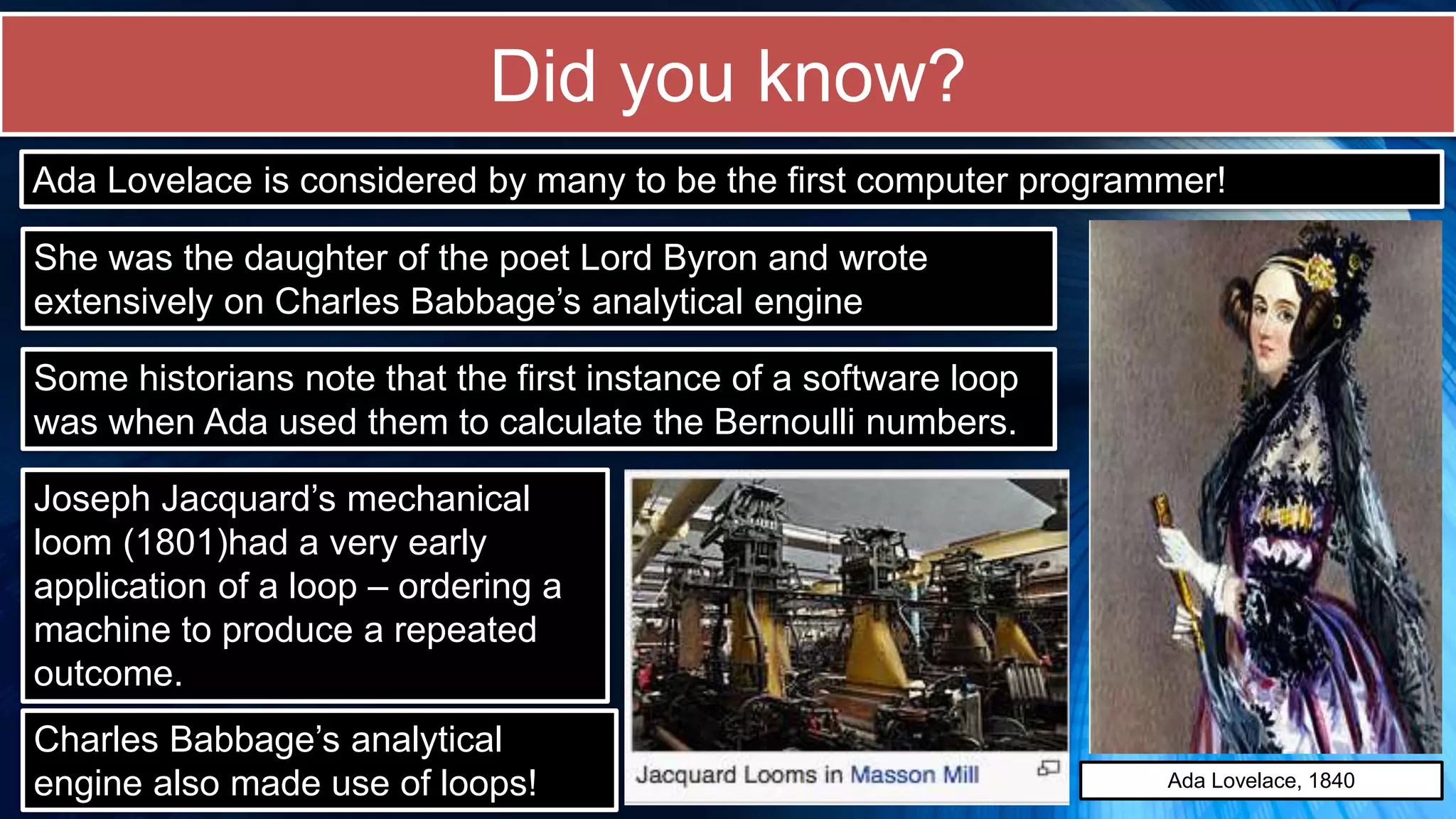
Did you know?
Ada Lovelace is considered by many to be the first computer programmer!
She was the daughter of the poet Lord Byron and wrote
extensively on Charles Babbage’s analytical engine
Some historians note that the first instance of a software loop
was when Ada used them to calculate the Bernoulli numbers.
Joseph Jacquard’s mechanical
loom (1801)had a very early
application of a loop – ordering a
machine to produce a repeated
outcome.
Ada Lovelace, 1840
Charles Babbage’s analytical
engine also made use of loops!
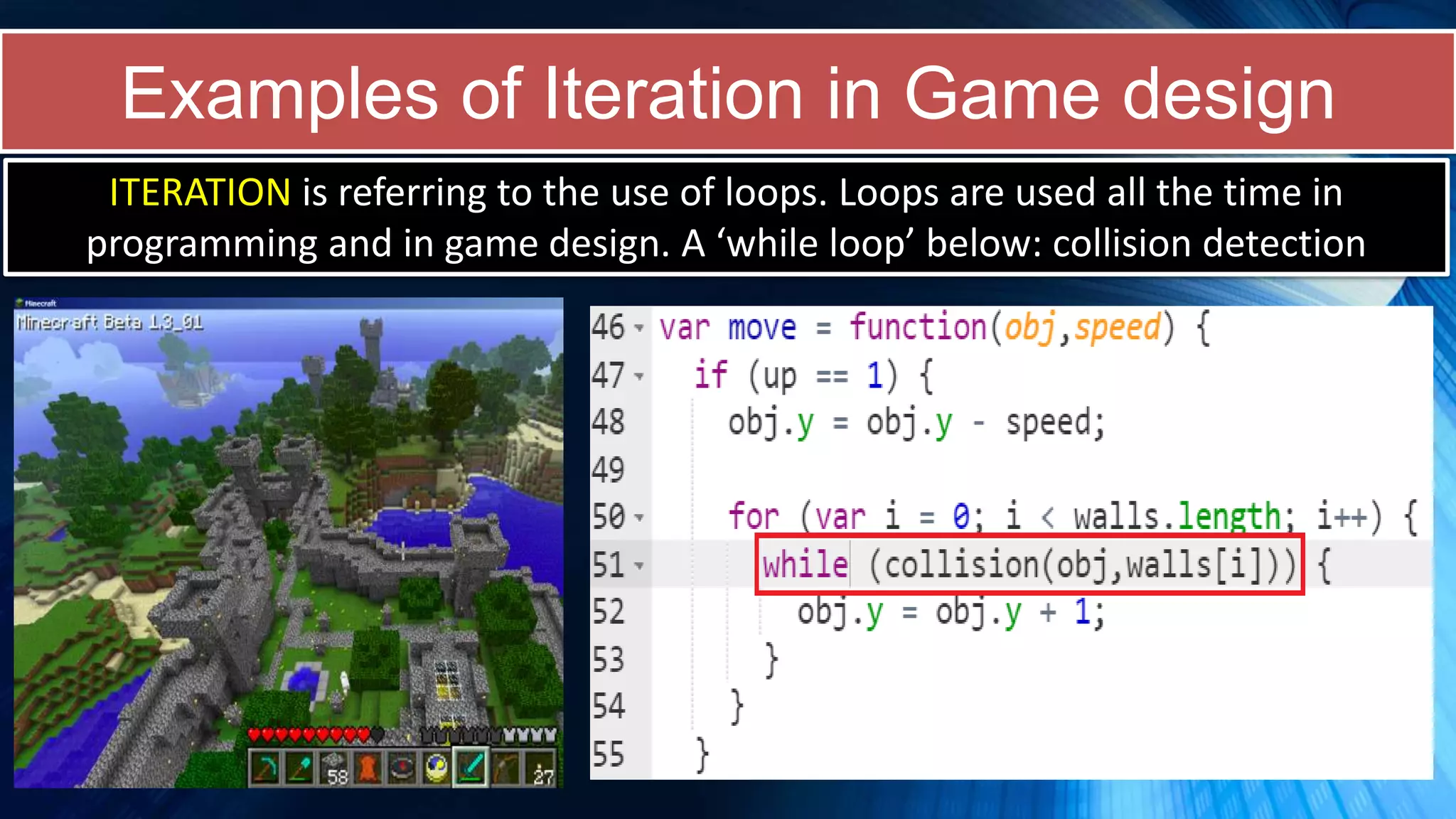
Examples of Iteration in Game design
ITERATION is referring to the use of loops. Loops are used all the time in
programming and in game design. A ‘while loop’ below: collision detection
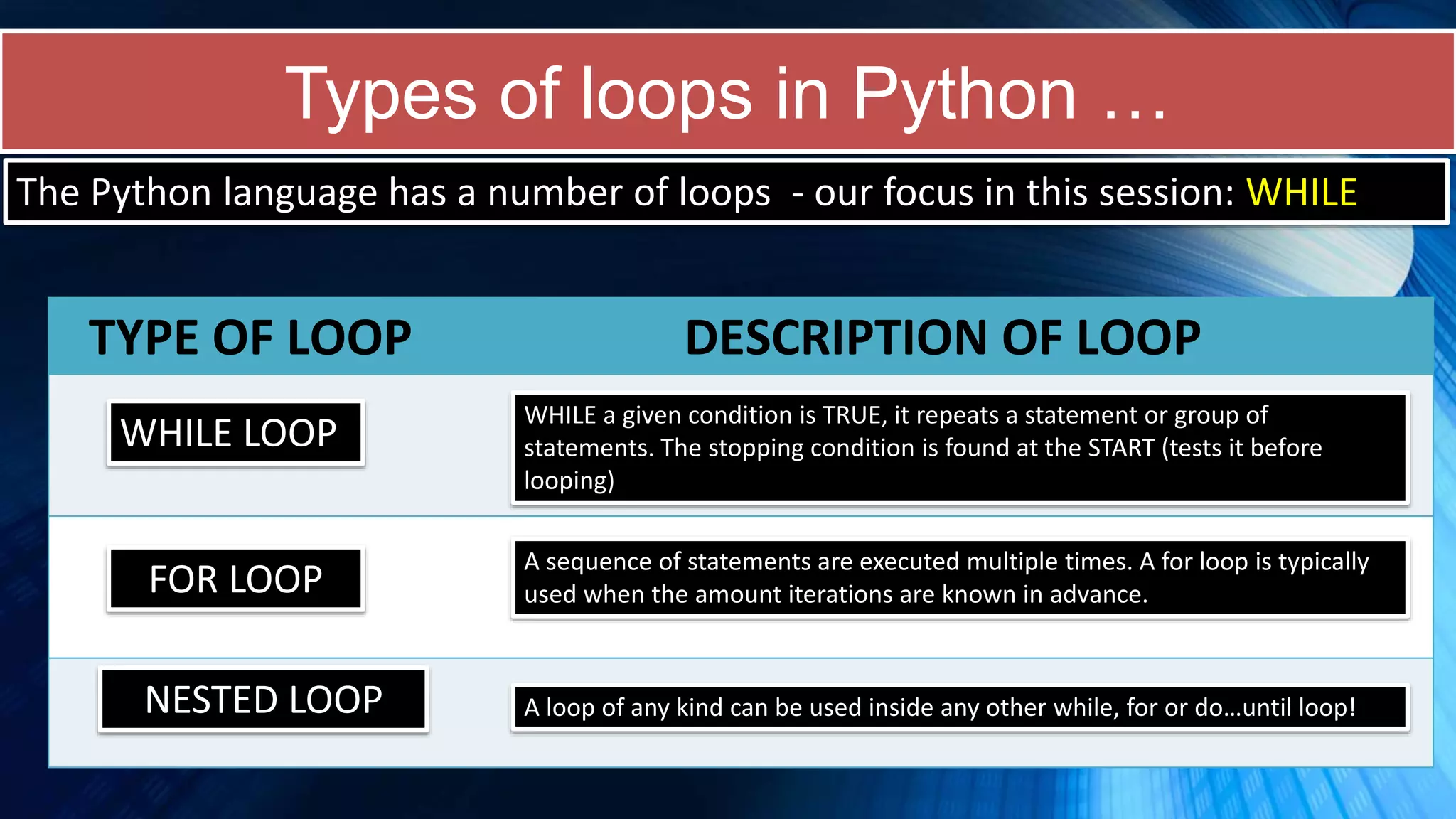
Types of loops in Python …
The Python language has a number of loops - our focus in this session: WHILE
TYPE OF LOOP DESCRIPTION OF LOOP
WHILE LOOP
WHILE a given condition is TRUE, it repeats a statement or group of
statements. The stopping condition is found at the START (tests it before
looping)
FOR LOOP
A sequence of statements are executed multiple times. A for loop is typically
used when the amount iterations are known in advance.
NESTED LOOP A loop of any kind can be used inside any other while, for or do…until loop!
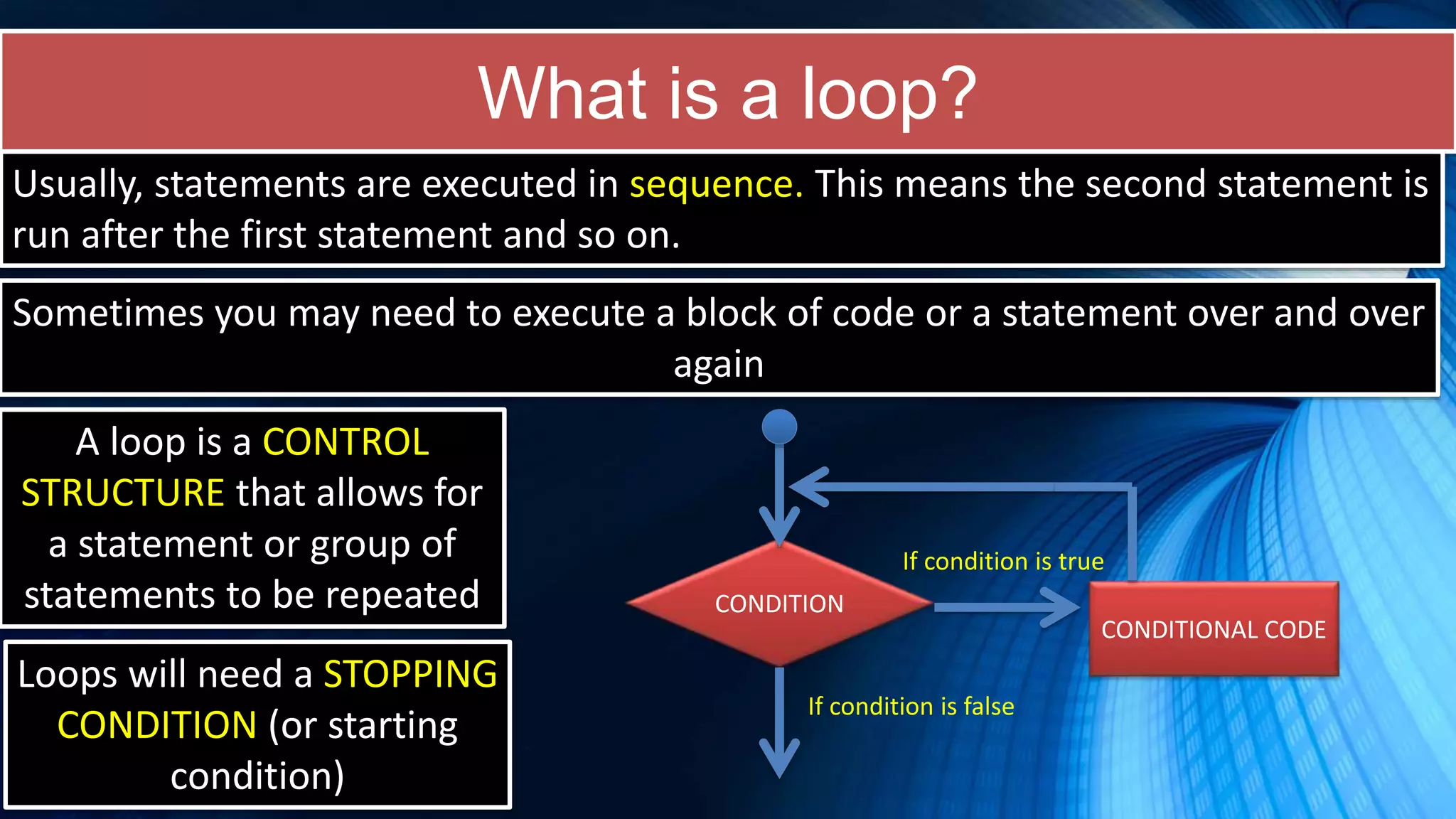
What is a loop?
Usually, statements are executed in sequence. This means the second statement is
run after the first statement and so on.
Sometimes you may need to execute a block of code or a statement over and over
again
A loop is a CONTROL
STRUCTURE that allows for
a statement or group of
statements to be repeated
Loops will need a STOPPING
CONDITION (or starting
condition)
CONDITION
CONDITIONAL CODE
If condition is true
If condition is false
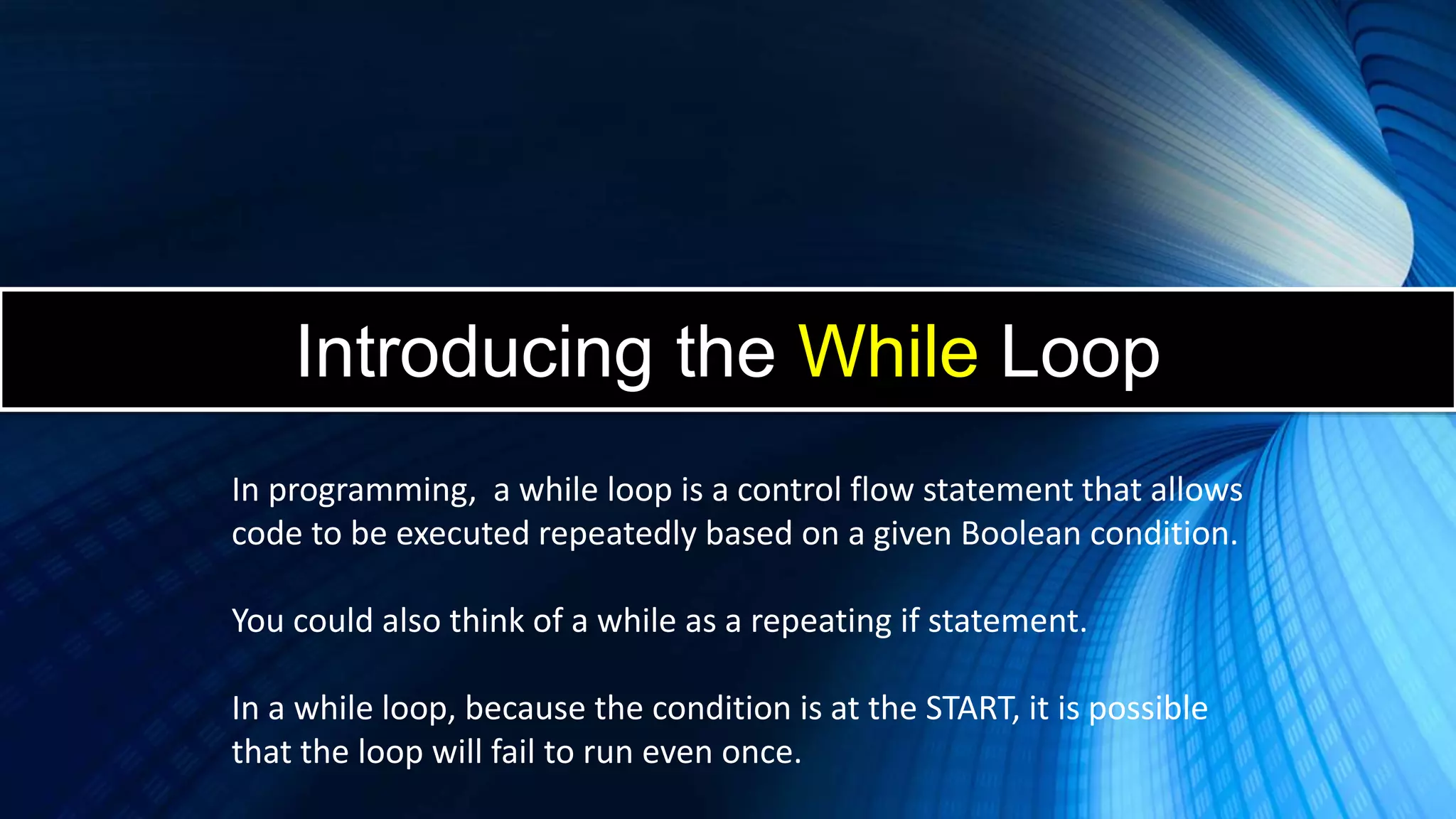
Introducing the While Loop
In programming, a while loop is a control flow statement that allows
code to be executed repeatedly based on a given Boolean condition.
You could also think of a while as a repeating if statement.
In a while loop, because the condition is at the START, it is possible
that the loop will fail to run even once.
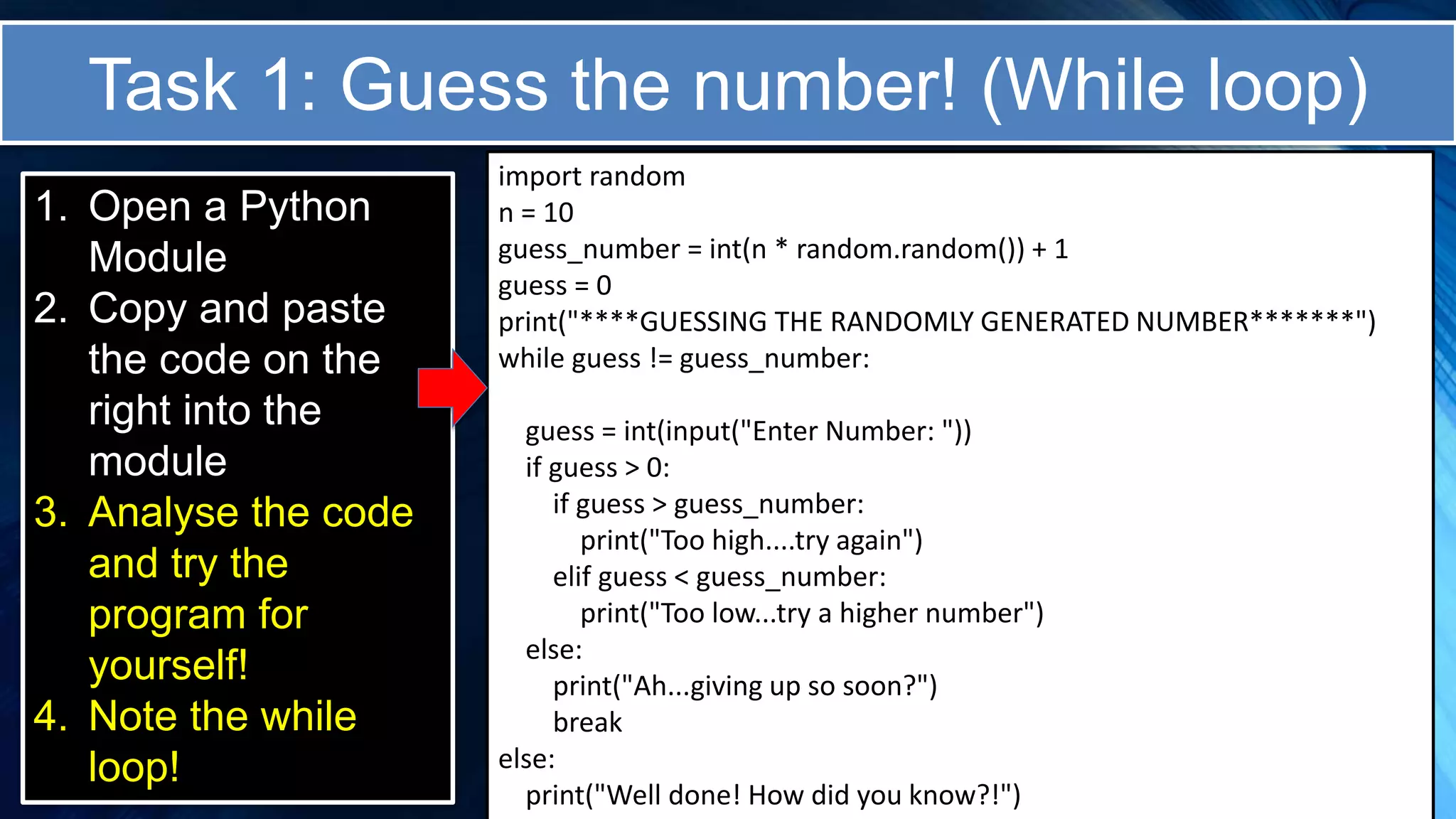
Task 1: Guess the number! (While loop)
1. Open a Python
Module
2. Copy and paste
the code on the
right into the
module
3. Analyse the code
and try the
program for
yourself!
4. Note the while
loop!
import random
n = 10
guess_number = int(n * random.random()) + 1
guess = 0
print("****GUESSING THE RANDOMLY GENERATED NUMBER*******")
while guess != guess_number:
guess = int(input("Enter Number: "))
if guess > 0:
if guess > guess_number:
print("Too high....try again")
elif guess < guess_number:
print("Too low...try a higher number")
else:
print("Ah...giving up so soon?")
break
else:
print("Well done! How did you know?!")
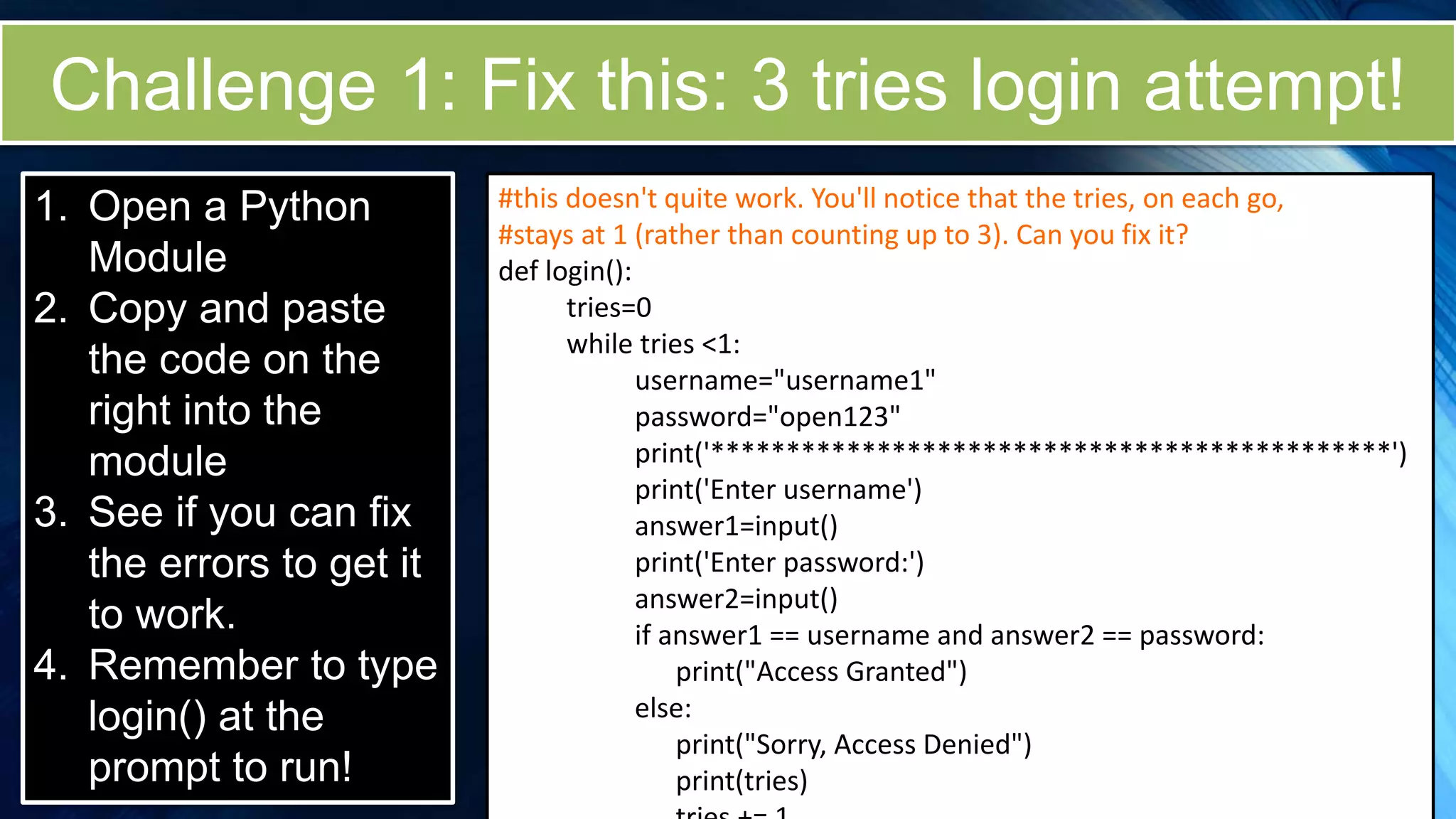
Challenge 1: Fix this: 3 tries login attempt!
1. Open a Python
Module
2. Copy and paste
the code on the
right into the
module
3. See if you can fix
the errors to get it
to work.
4. Remember to type
login() at the
prompt to run!
#this doesn't quite work. You'll notice that the tries, on each go,
#stays at 1 (rather than counting up to 3). Can you fix it?
def login():
tries=0
while tries <1:
username="username1"
password="open123"
print('*********************************************')
print('Enter username')
answer1=input()
print('Enter password:')
answer2=input()
if answer1 == username and answer2 == password:
print("Access Granted")
else:
print("Sorry, Access Denied")
print(tries)
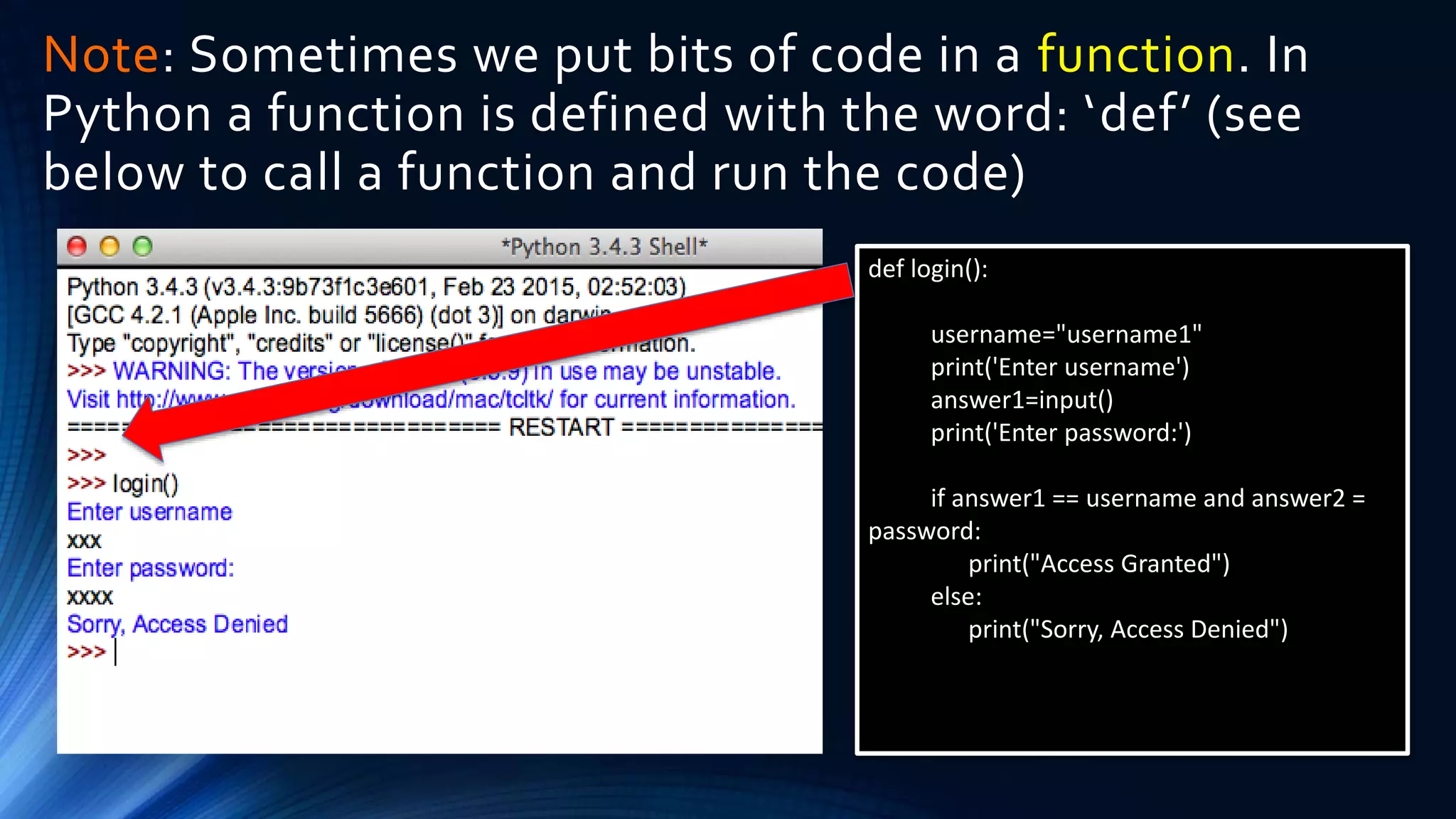
Note: Sometimes we put bits of code in a function. In
Python a function is defined with the word: ‘def’ (see
below to call a function and run the code)
def login():
username="username1"
print('Enter username')
answer1=input()
print('Enter password:')
if answer1 == username and answer2 =
password:
print("Access Granted")
else:
print("Sorry, Access Denied")
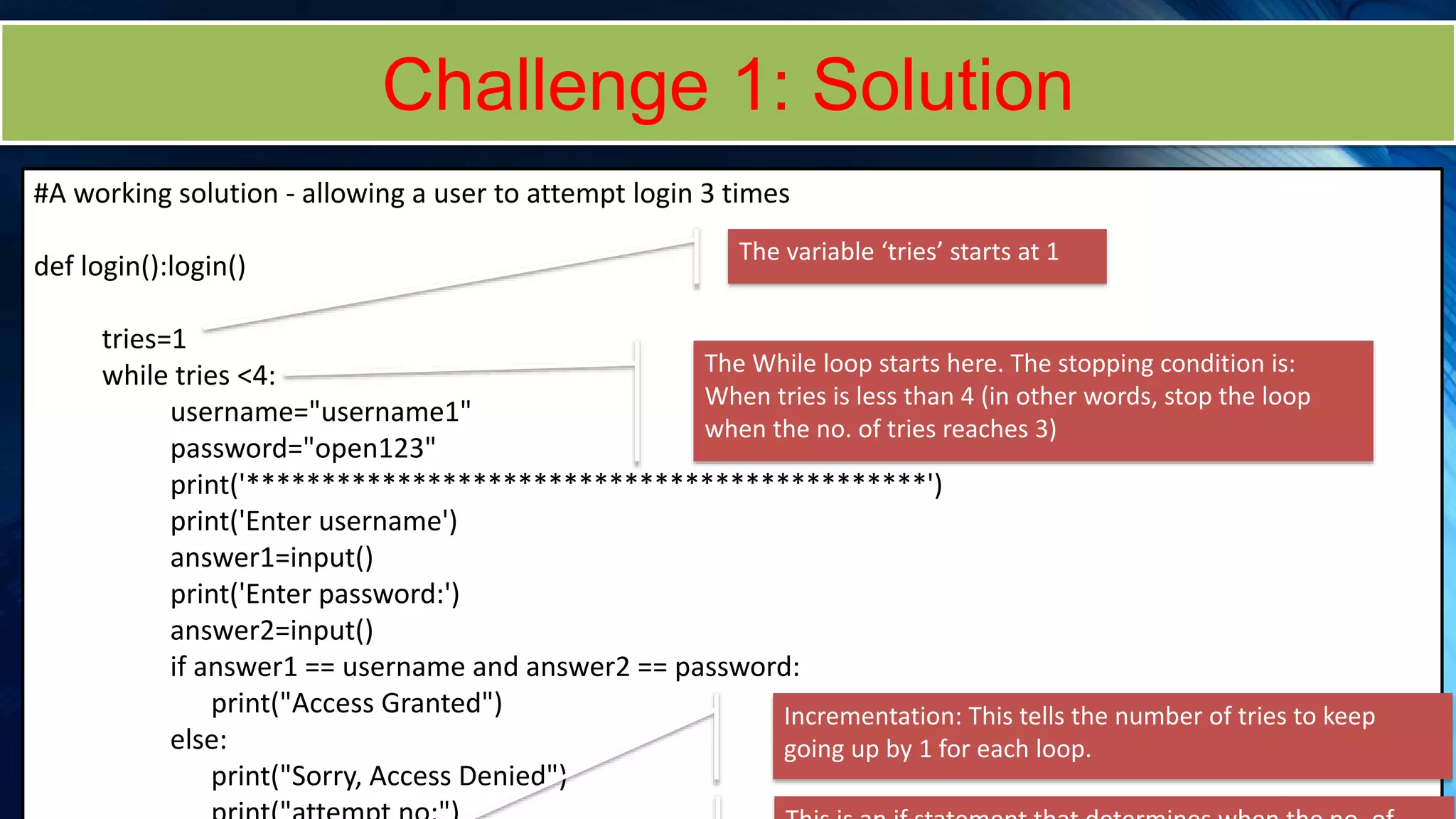
Challenge 1: Solution
#A working solution - allowing a user to attempt login 3 times
def login():login()
tries=1
while tries <4:
username="username1"
password="open123"
print('*********************************************')
print('Enter username')
answer1=input()
print('Enter password:')
answer2=input()
if answer1 == username and answer2 == password:
print("Access Granted")
else:
print("Sorry, Access Denied")
The variable ‘tries’ starts at 1
The While loop starts here. The stopping condition is:
When tries is less than 4 (in other words, stop the loop
when the no. of tries reaches 3)
Incrementation: This tells the number of tries to keep
going up by 1 for each loop.
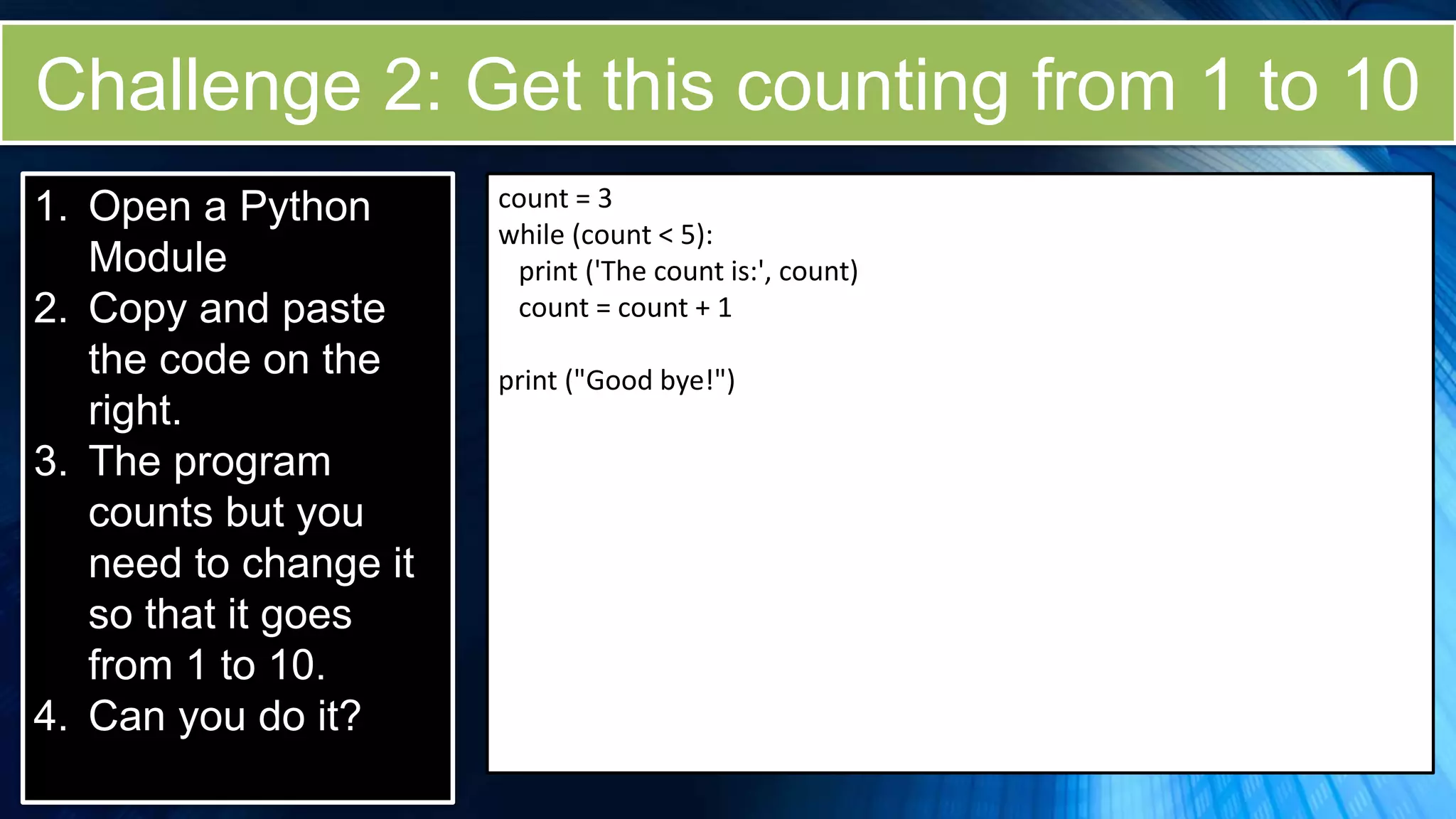
Challenge 2: Get this counting from 1 to 10
1. Open a Python
Module
2. Copy and paste
the code on the
right.
3. The program
counts but you
need to change it
so that it goes
from 1 to 10.
4. Can you do it?
count = 3
while (count < 5):
print ('The count is:', count)
count = count + 1
print ("Good bye!")
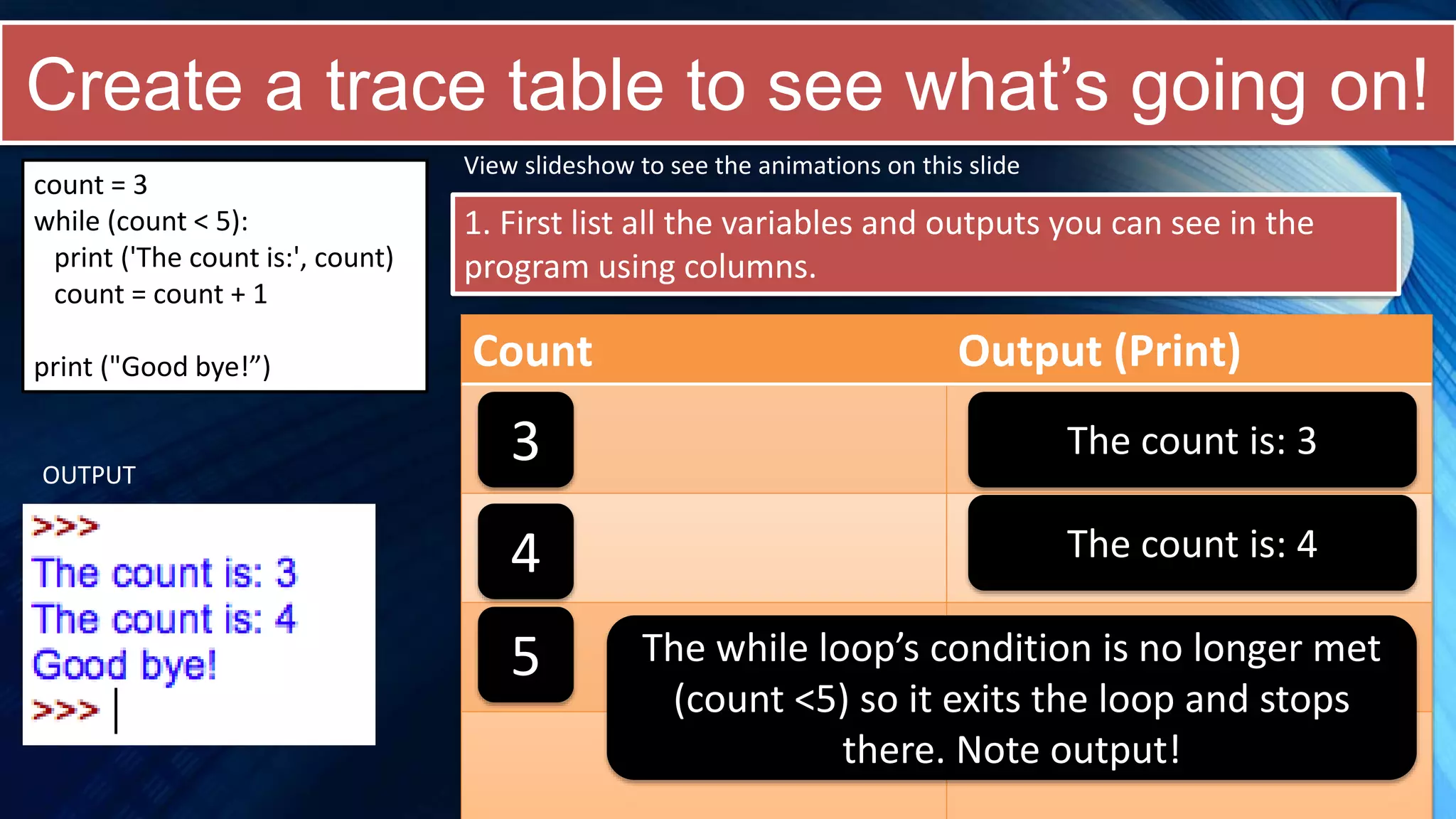
Create a trace table to see what’s going on!
count = 3
while (count < 5):
print ('The count is:', count)
count = count + 1
print ("Good bye!”)
1. First list all the variables and outputs you can see in the
program using columns.
Count Output (Print)
View slideshow to see the animations on this slide
3 The count is: 3
OUTPUT
4 The count is: 4
5 The while loop’s condition is no longer met
(count <5) so it exits the loop and stops
there. Note output!
Challenge 2: Solution
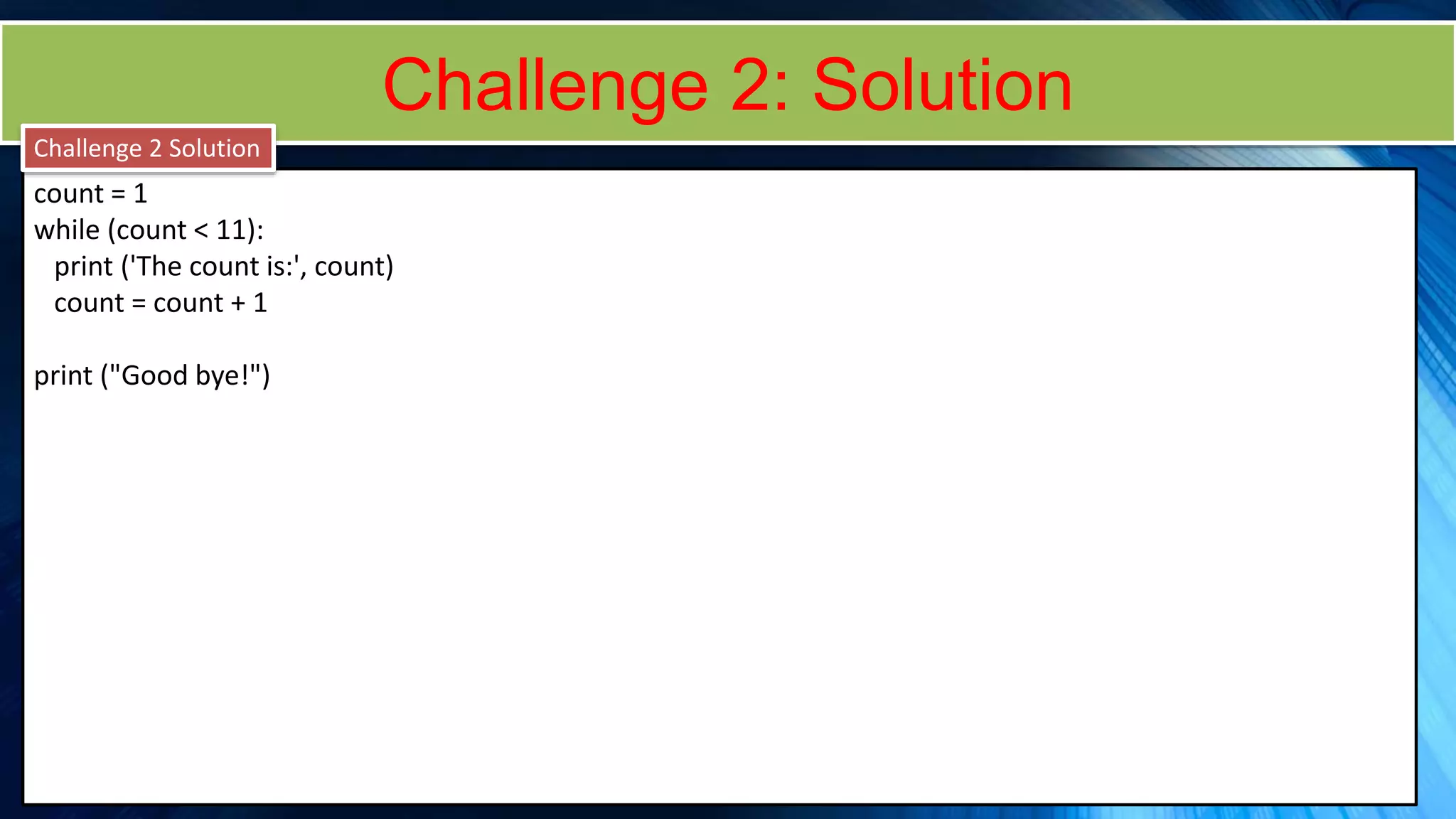
count = 1
while (count < 11):
print ('The count is:', count)
count = count + 1
print ("Good bye!")
Challenge 2 Solution
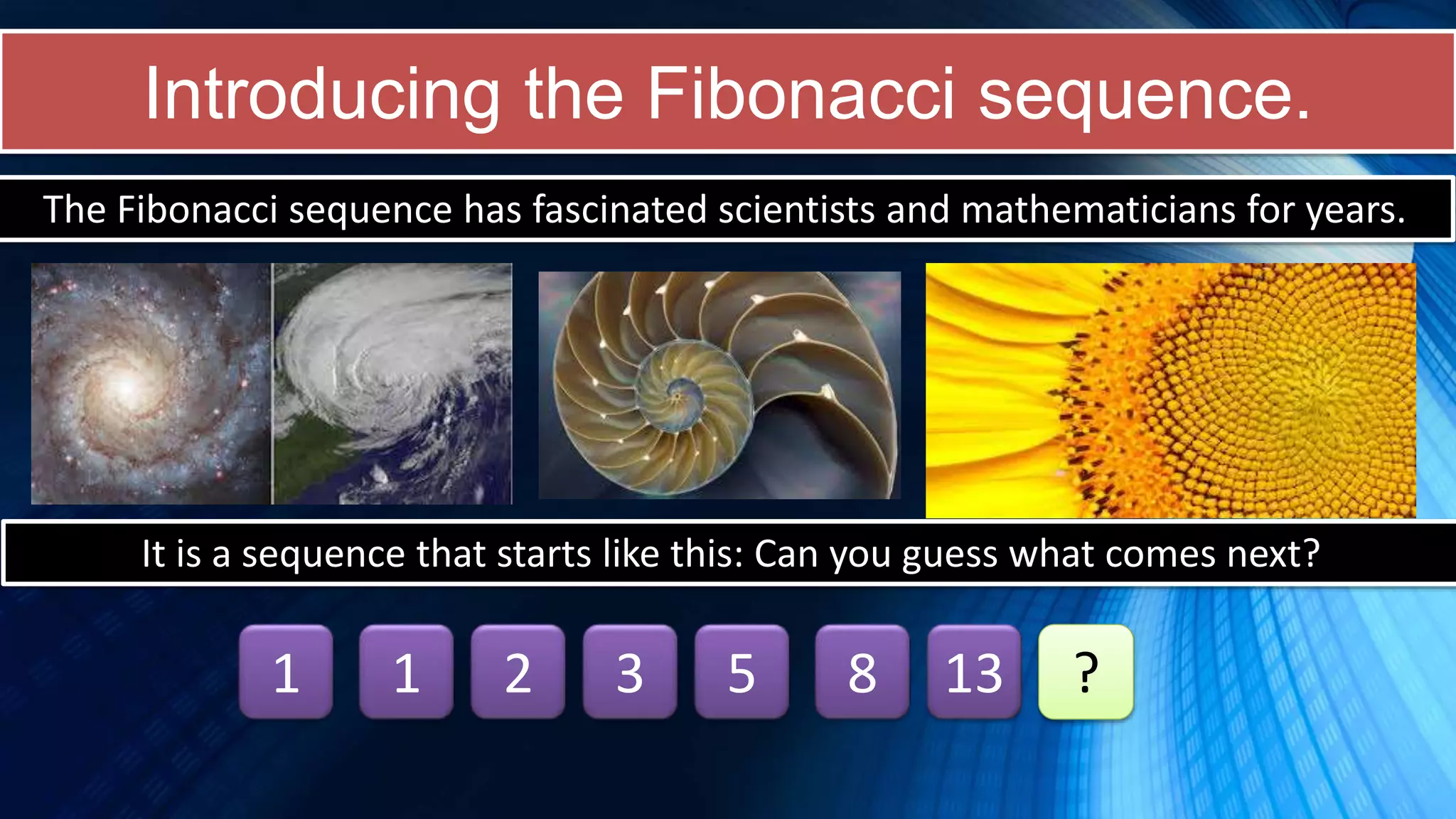
Introducing the Fibonacci sequence.
The Fibonacci sequence has fascinated scientists and mathematicians for years.
It is a sequence that starts like this: Can you guess what comes next?
1 1 2 3 5 8 13 ?
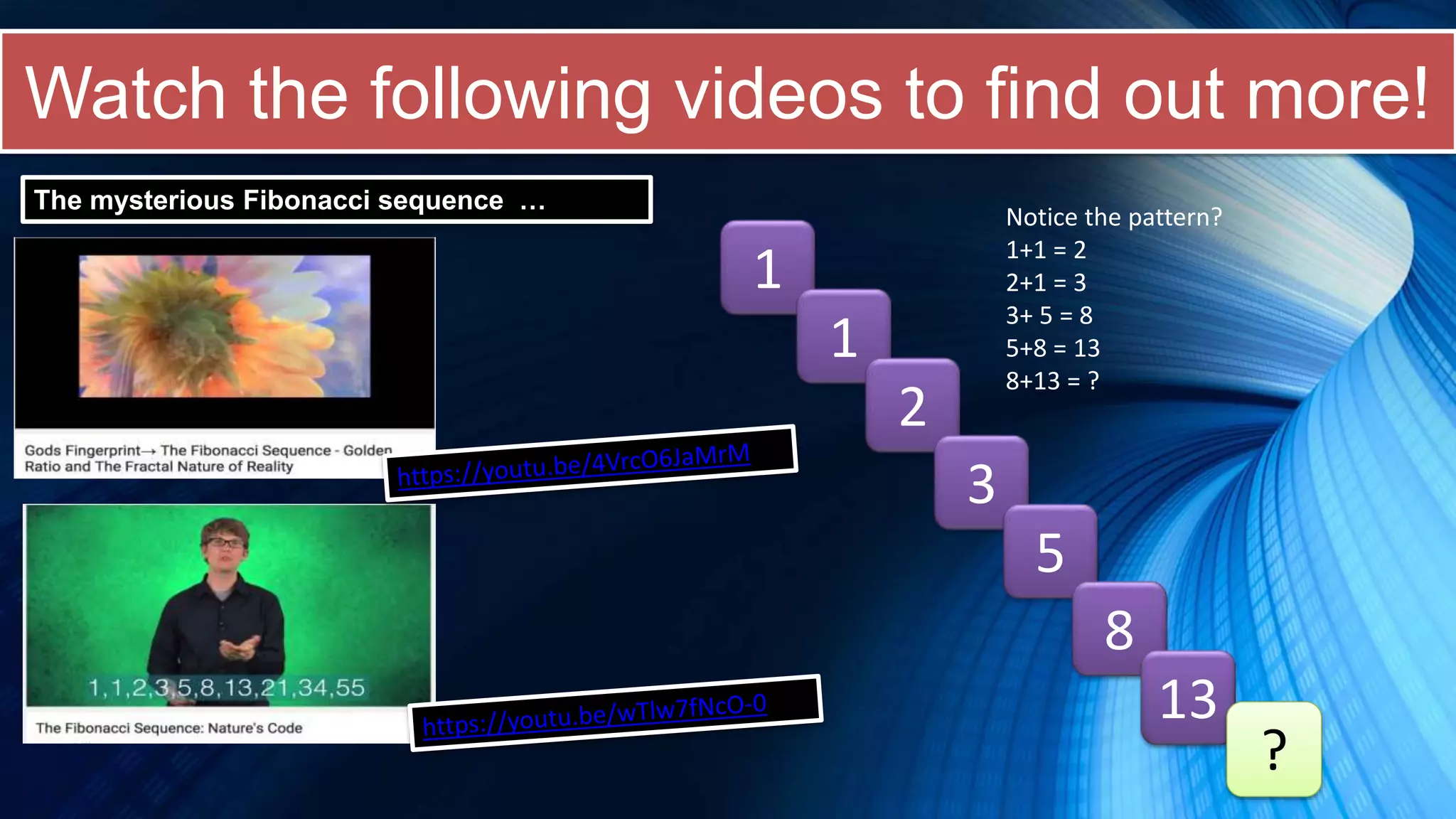
Watch the following videos to find out more!
The mysterious Fibonacci sequence …
1
1
2
3
5
8
13
?
Notice the pattern?
1+1 = 2
2+1 = 3
3+ 5 = 8
5+8 = 13
8+13 = ?
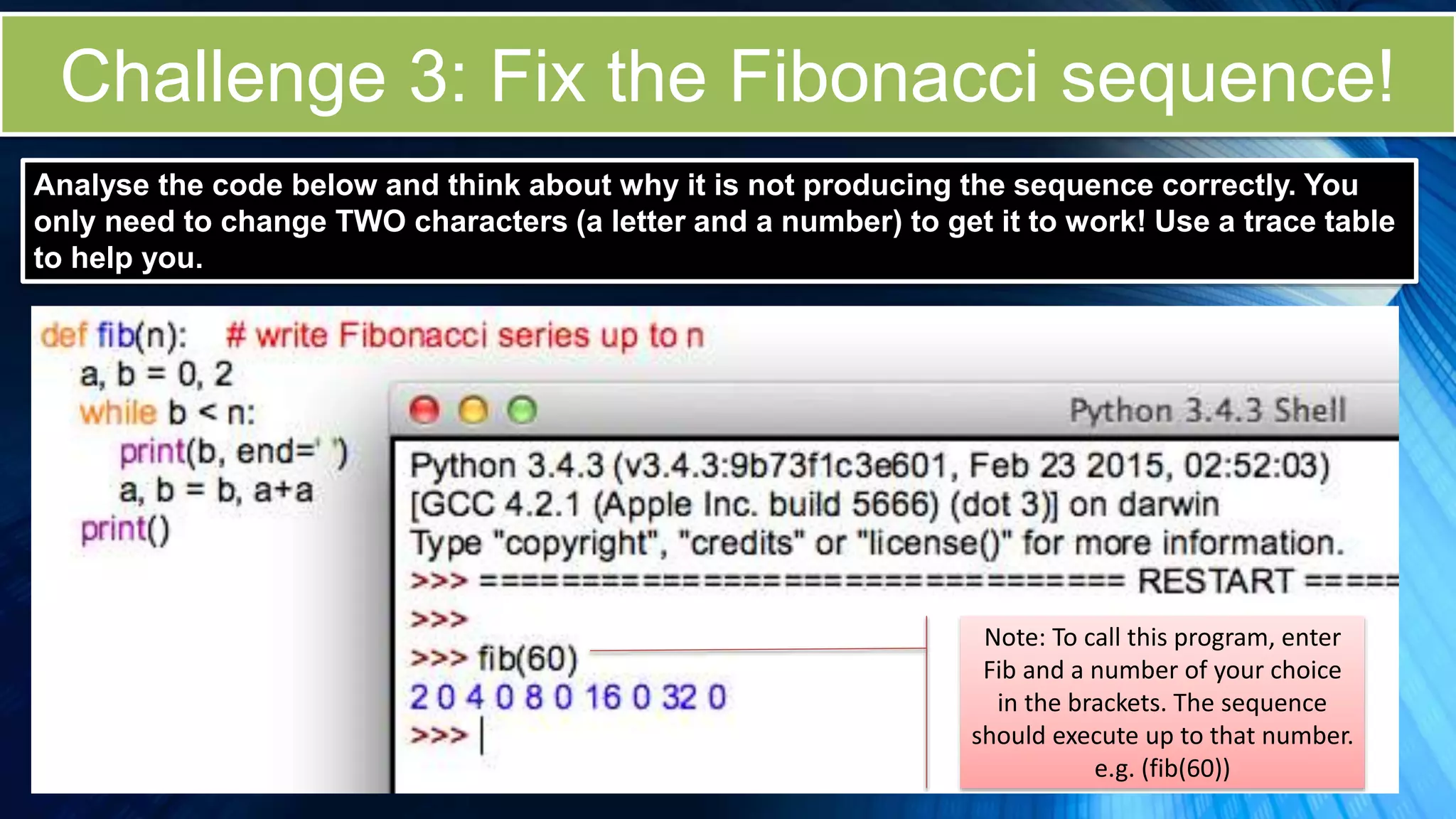
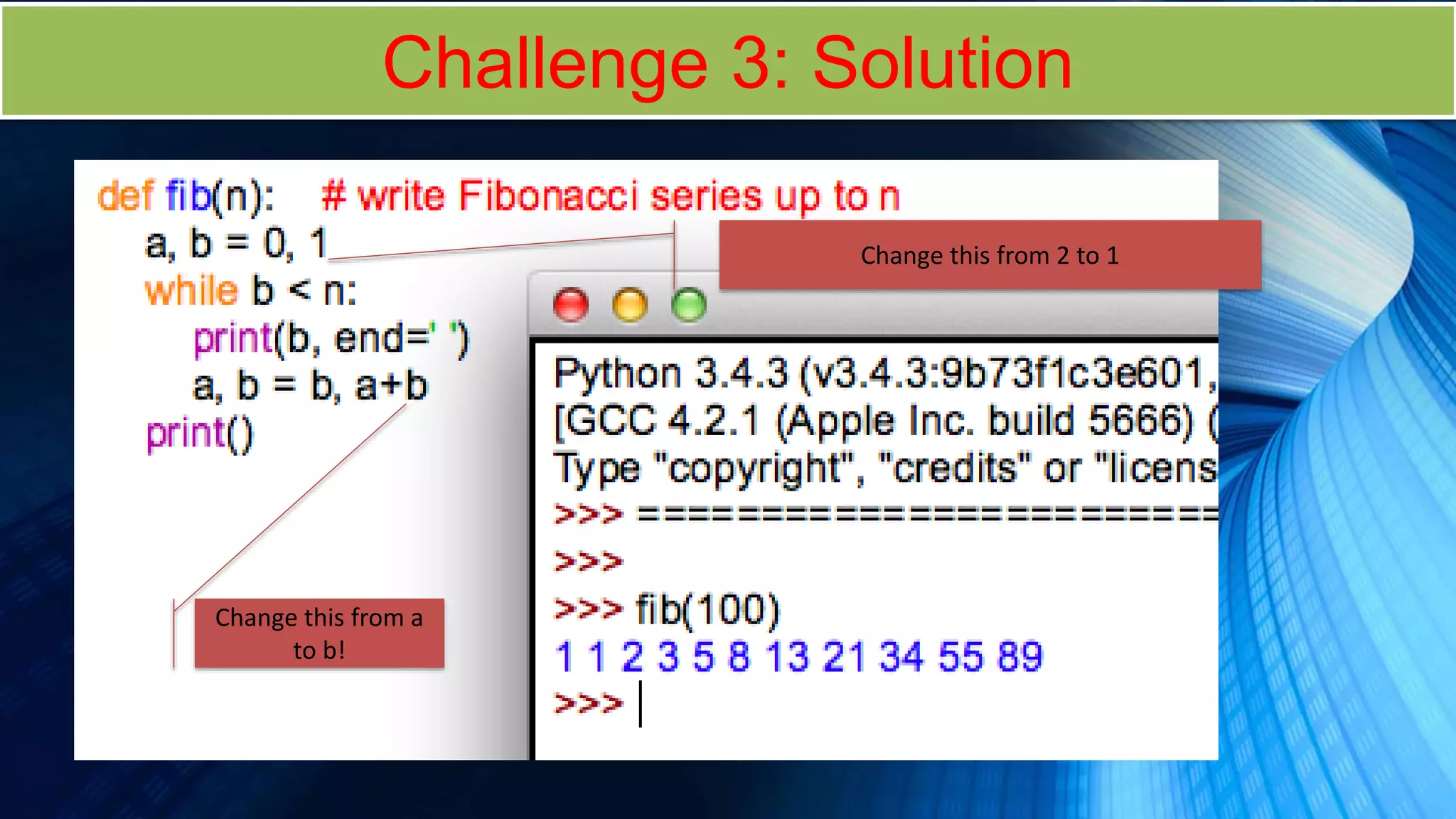
Challenge 3: Fix the Fibonacci sequence!
Note: To call this program, enter
Fib and a number of your choice
in the brackets. The sequence
should execute up to that number.
e.g. (fib(60))
Analyse the code below and think about why it is not producing the sequence correctly. You
only need to change TWO characters (a letter and a number) to get it to work! Use a trace table
to help you.
Challenge 3: Solution
Change this from 2 to 1
Change this from a
to b!
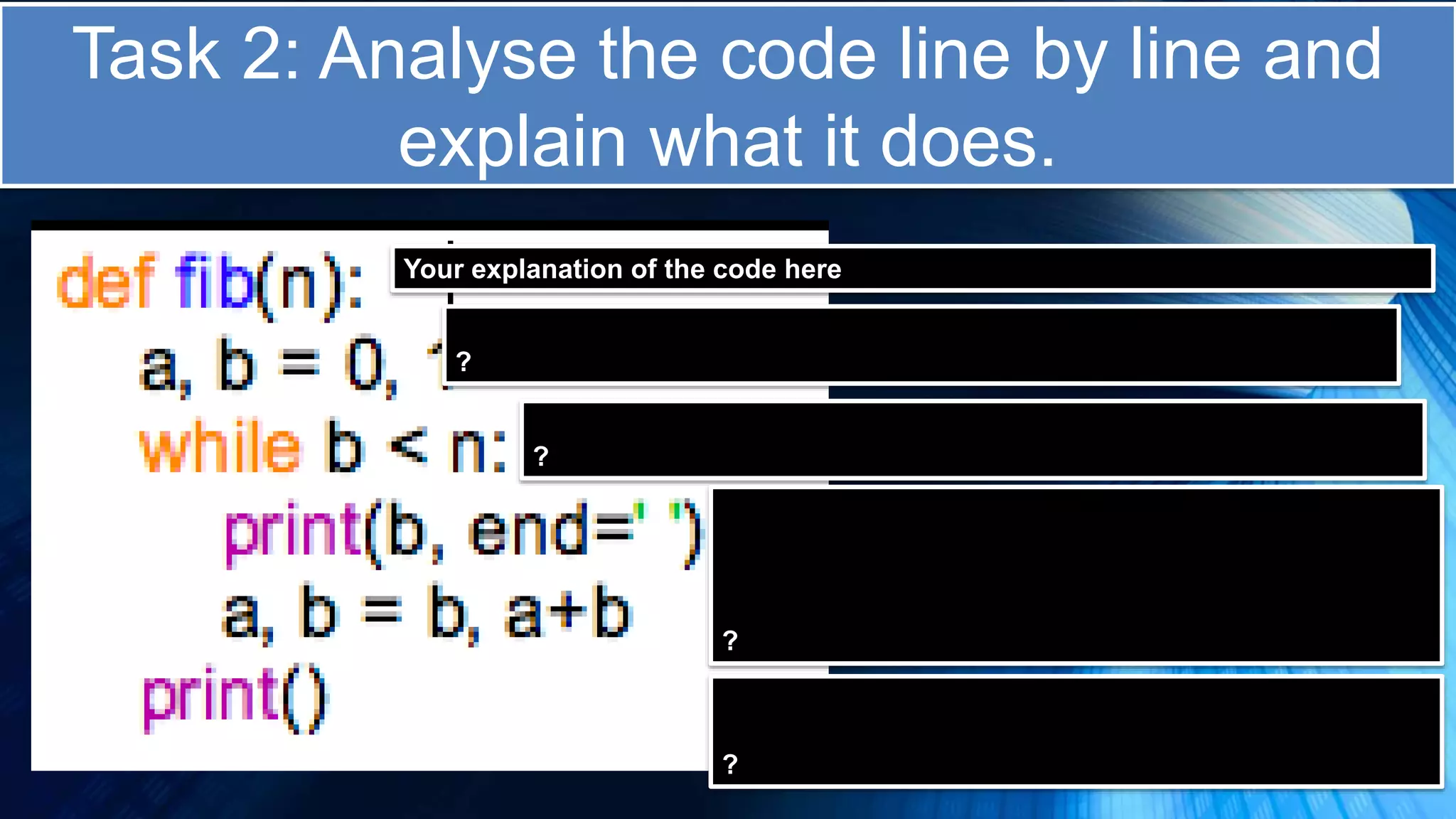
Task 2: Analyse the code line by line and
explain what it does.
Your explanation of the code here
?
?
?
?
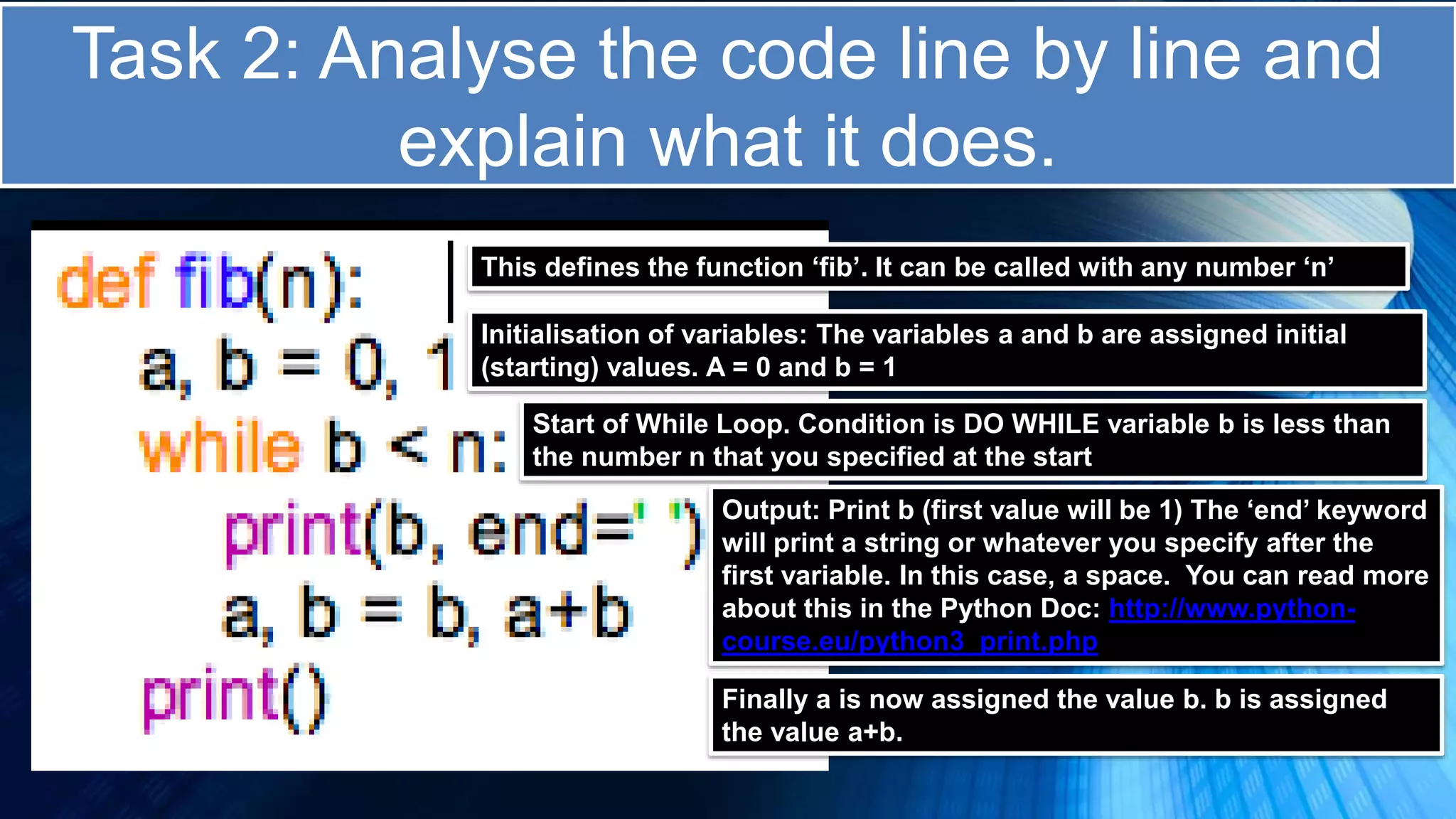
Task 2: Analyse the code line by line and
explain what it does.
This defines the function ‘fib’. It can be called with any number ‘n’
Initialisation of variables: The variables a and b are assigned initial
(starting) values. A = 0 and b = 1
Start of While Loop. Condition is DO WHILE variable b is less than
the number n that you specified at the start
Output: Print b (first value will be 1) The ‘end’ keyword
will print a string or whatever you specify after the
first variable. In this case, a space. You can read more
about this in the Python Doc: http://www.python-
course.eu/python3_print.php
Finally a is now assigned the value b. b is assigned
the value a+b.
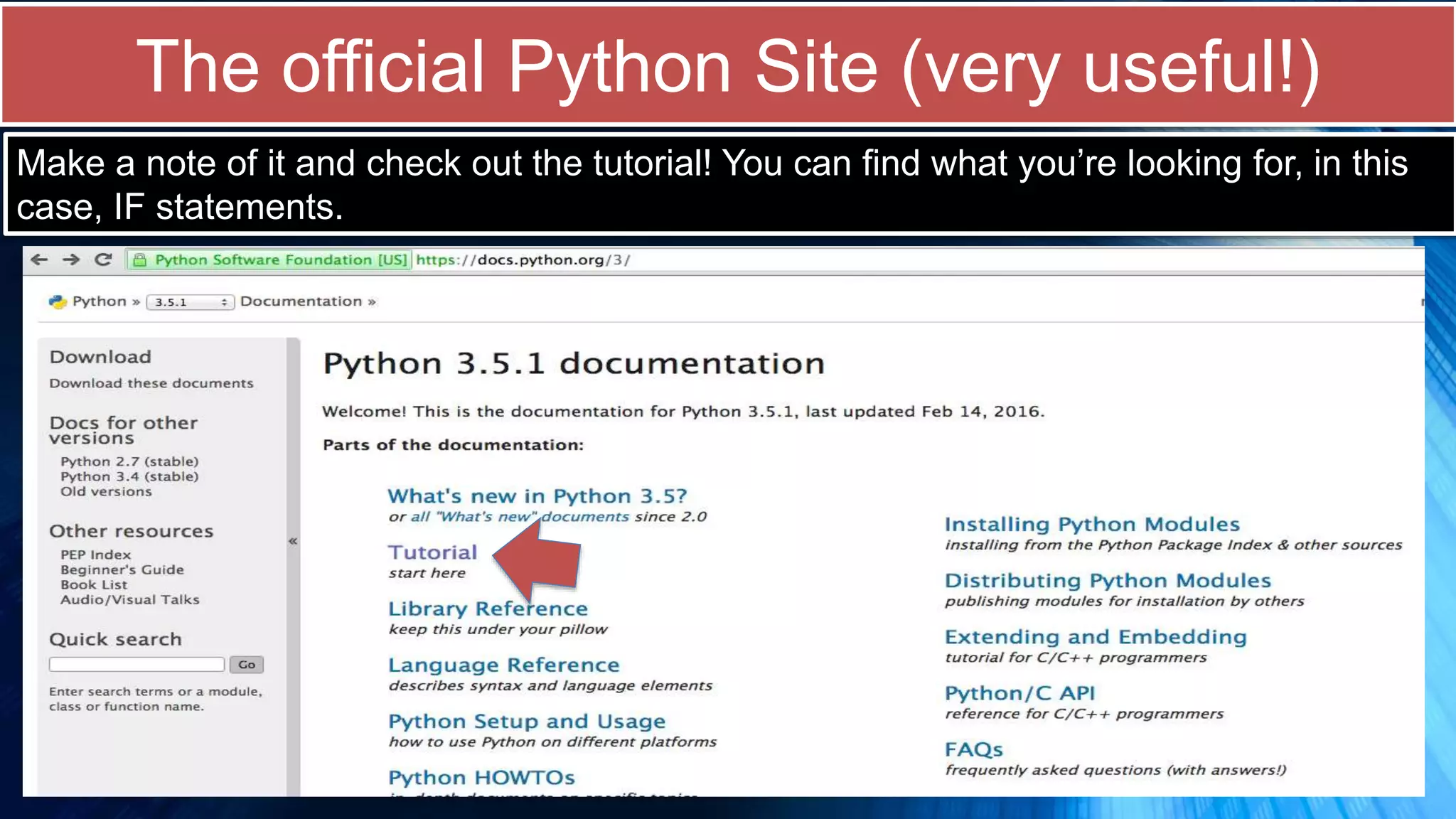
The official Python Site (very useful!)
Make a note of it and check out the tutorial! You can find what you’re looking for, in this
case, IF statements.
Useful Videos to watch on covered topics
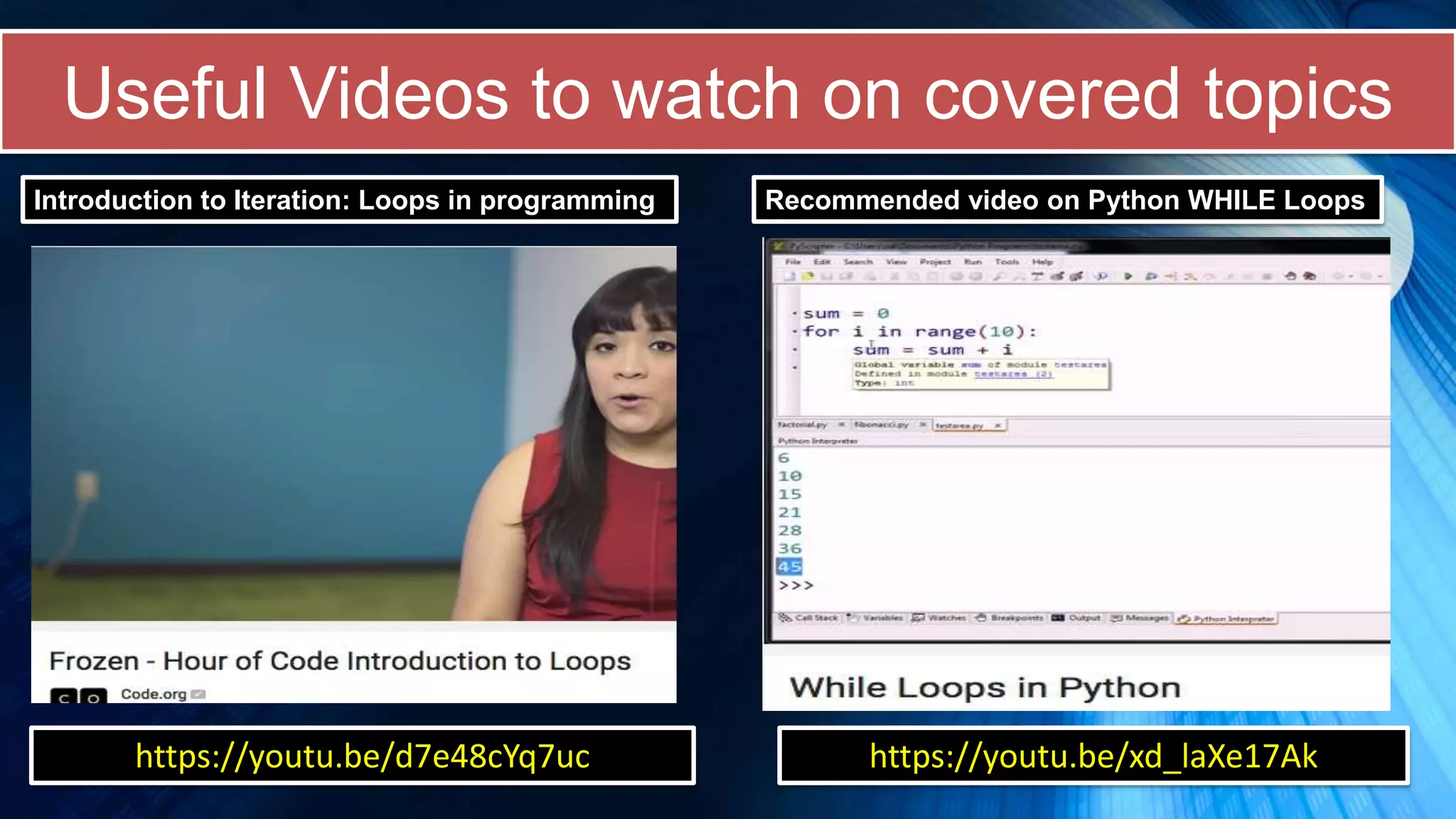
Introduction to Iteration: Loops in programming Recommended video on Python WHILE Loops
https://youtu.be/d7e48cYq7uc https://youtu.be/xd_laXe17Ak
Suggested Project / HW / Research
 Create a research information point on the Fibonacci sequence
 What is the Fibonacci sequence?
 What applications has it had in science and technology?
 What are the different methods in which it can be coded (research and code!)
 Extension: One method of coding the Fibonacci sequence involves recursion –
what is recursion? How is it different from using a loop?
 Compare and contrast the use of WHILE AND FOR LOOPS in Python
 Give 3 examples of WHILE LOOPS in Python
 Research ‘For Loops’ (coming next) and give 3 examples of their use in Python
 In which situations is it more advantageous to use a WHILE loop over a FOR?
 Another type of loop is the Repeat….Until (or Do…Until). The stopping condition in
this loop is at the end. When is this more advantageous to use then the WHILE?
Useful links and additional reading
http://anh.cs.luc.edu/python/hands-on/3.1/handsonHtml/index.html
http://www.pythonschool.net/basics/while-loops/
http://anh.cs.luc.edu/python/hands-
on/3.1/handsonHtml/whilestatements.html
http://www.pythonforbeginners.com/control-flow-2/python-for-and-while-loops

Mastering Python lesson 3a

  • 1.
  • 2.
    • Introduction tothe language, SEQUENCE variables, create a Chat bot • Introduction SELECTION (if else statements) • Introducing ITERATION (While loops) • Introducing For Loops • Use of Functions/Modular Programming • Introducing Lists /Operations/List comprehension • Use of Dictionaries • String Manipulation • File Handling – Reading and writing to CSV Files • Importing and Exporting Files • Transversing, Enumeration, Zip Merging • Recursion • Practical Programming • Consolidation of all your skills – useful resources • Includes Computer Science theory and Exciting themes for every lesson including: Quantum Computing, History of Computing, Future of storage, Brain Processing, and more … Series Overview *Please note that each lesson is not bound to a specific time (so it can be taken at your own pace) Information/Theory/Discuss Task (Code provided) Challenge (DIY!) Suggested Project/HW
  • 3.
    In this lessonyou will …  Learn about Iteration (loops)  How loops work and what they are  Create and adapt programs using loops  Intro to the random number generator  Learn about trace tabling (white box testing)  Wonders of the Fibonacci Sequence  Focus on: While Loops
  • 4.
    Did you know? AdaLovelace is considered by many to be the first computer programmer! She was the daughter of the poet Lord Byron and wrote extensively on Charles Babbage’s analytical engine Some historians note that the first instance of a software loop was when Ada used them to calculate the Bernoulli numbers. Joseph Jacquard’s mechanical loom (1801)had a very early application of a loop – ordering a machine to produce a repeated outcome. Ada Lovelace, 1840 Charles Babbage’s analytical engine also made use of loops!
  • 5.
    Examples of Iterationin Game design ITERATION is referring to the use of loops. Loops are used all the time in programming and in game design. A ‘while loop’ below: collision detection
  • 6.
    Types of loopsin Python … The Python language has a number of loops - our focus in this session: WHILE TYPE OF LOOP DESCRIPTION OF LOOP WHILE LOOP WHILE a given condition is TRUE, it repeats a statement or group of statements. The stopping condition is found at the START (tests it before looping) FOR LOOP A sequence of statements are executed multiple times. A for loop is typically used when the amount iterations are known in advance. NESTED LOOP A loop of any kind can be used inside any other while, for or do…until loop!
  • 7.
    What is aloop? Usually, statements are executed in sequence. This means the second statement is run after the first statement and so on. Sometimes you may need to execute a block of code or a statement over and over again A loop is a CONTROL STRUCTURE that allows for a statement or group of statements to be repeated Loops will need a STOPPING CONDITION (or starting condition) CONDITION CONDITIONAL CODE If condition is true If condition is false
  • 8.
    Introducing the WhileLoop In programming, a while loop is a control flow statement that allows code to be executed repeatedly based on a given Boolean condition. You could also think of a while as a repeating if statement. In a while loop, because the condition is at the START, it is possible that the loop will fail to run even once.
  • 9.
    Task 1: Guessthe number! (While loop) 1. Open a Python Module 2. Copy and paste the code on the right into the module 3. Analyse the code and try the program for yourself! 4. Note the while loop! import random n = 10 guess_number = int(n * random.random()) + 1 guess = 0 print("****GUESSING THE RANDOMLY GENERATED NUMBER*******") while guess != guess_number: guess = int(input("Enter Number: ")) if guess > 0: if guess > guess_number: print("Too high....try again") elif guess < guess_number: print("Too low...try a higher number") else: print("Ah...giving up so soon?") break else: print("Well done! How did you know?!")
  • 10.
    Challenge 1: Fixthis: 3 tries login attempt! 1. Open a Python Module 2. Copy and paste the code on the right into the module 3. See if you can fix the errors to get it to work. 4. Remember to type login() at the prompt to run! #this doesn't quite work. You'll notice that the tries, on each go, #stays at 1 (rather than counting up to 3). Can you fix it? def login(): tries=0 while tries <1: username="username1" password="open123" print('*********************************************') print('Enter username') answer1=input() print('Enter password:') answer2=input() if answer1 == username and answer2 == password: print("Access Granted") else: print("Sorry, Access Denied") print(tries)
  • 11.
    Note: Sometimes weput bits of code in a function. In Python a function is defined with the word: ‘def’ (see below to call a function and run the code) def login(): username="username1" print('Enter username') answer1=input() print('Enter password:') if answer1 == username and answer2 = password: print("Access Granted") else: print("Sorry, Access Denied")
  • 12.
    Challenge 1: Solution #Aworking solution - allowing a user to attempt login 3 times def login():login() tries=1 while tries <4: username="username1" password="open123" print('*********************************************') print('Enter username') answer1=input() print('Enter password:') answer2=input() if answer1 == username and answer2 == password: print("Access Granted") else: print("Sorry, Access Denied") The variable ‘tries’ starts at 1 The While loop starts here. The stopping condition is: When tries is less than 4 (in other words, stop the loop when the no. of tries reaches 3) Incrementation: This tells the number of tries to keep going up by 1 for each loop.
  • 13.
    Challenge 2: Getthis counting from 1 to 10 1. Open a Python Module 2. Copy and paste the code on the right. 3. The program counts but you need to change it so that it goes from 1 to 10. 4. Can you do it? count = 3 while (count < 5): print ('The count is:', count) count = count + 1 print ("Good bye!")
  • 14.
    Create a tracetable to see what’s going on! count = 3 while (count < 5): print ('The count is:', count) count = count + 1 print ("Good bye!”) 1. First list all the variables and outputs you can see in the program using columns. Count Output (Print) View slideshow to see the animations on this slide 3 The count is: 3 OUTPUT 4 The count is: 4 5 The while loop’s condition is no longer met (count <5) so it exits the loop and stops there. Note output!
  • 15.
    Challenge 2: Solution count= 1 while (count < 11): print ('The count is:', count) count = count + 1 print ("Good bye!") Challenge 2 Solution
  • 16.
    Introducing the Fibonaccisequence. The Fibonacci sequence has fascinated scientists and mathematicians for years. It is a sequence that starts like this: Can you guess what comes next? 1 1 2 3 5 8 13 ?
  • 17.
    Watch the followingvideos to find out more! The mysterious Fibonacci sequence … 1 1 2 3 5 8 13 ? Notice the pattern? 1+1 = 2 2+1 = 3 3+ 5 = 8 5+8 = 13 8+13 = ?
  • 18.
    Challenge 3: Fixthe Fibonacci sequence! Note: To call this program, enter Fib and a number of your choice in the brackets. The sequence should execute up to that number. e.g. (fib(60)) Analyse the code below and think about why it is not producing the sequence correctly. You only need to change TWO characters (a letter and a number) to get it to work! Use a trace table to help you.
  • 19.
    Challenge 3: Solution Changethis from 2 to 1 Change this from a to b!
  • 20.
    Task 2: Analysethe code line by line and explain what it does. Your explanation of the code here ? ? ? ?
  • 21.
    Task 2: Analysethe code line by line and explain what it does. This defines the function ‘fib’. It can be called with any number ‘n’ Initialisation of variables: The variables a and b are assigned initial (starting) values. A = 0 and b = 1 Start of While Loop. Condition is DO WHILE variable b is less than the number n that you specified at the start Output: Print b (first value will be 1) The ‘end’ keyword will print a string or whatever you specify after the first variable. In this case, a space. You can read more about this in the Python Doc: http://www.python- course.eu/python3_print.php Finally a is now assigned the value b. b is assigned the value a+b.
  • 22.
    The official PythonSite (very useful!) Make a note of it and check out the tutorial! You can find what you’re looking for, in this case, IF statements.
  • 23.
    Useful Videos towatch on covered topics Introduction to Iteration: Loops in programming Recommended video on Python WHILE Loops https://youtu.be/d7e48cYq7uc https://youtu.be/xd_laXe17Ak
  • 24.
    Suggested Project /HW / Research  Create a research information point on the Fibonacci sequence  What is the Fibonacci sequence?  What applications has it had in science and technology?  What are the different methods in which it can be coded (research and code!)  Extension: One method of coding the Fibonacci sequence involves recursion – what is recursion? How is it different from using a loop?  Compare and contrast the use of WHILE AND FOR LOOPS in Python  Give 3 examples of WHILE LOOPS in Python  Research ‘For Loops’ (coming next) and give 3 examples of their use in Python  In which situations is it more advantageous to use a WHILE loop over a FOR?  Another type of loop is the Repeat….Until (or Do…Until). The stopping condition in this loop is at the end. When is this more advantageous to use then the WHILE?
  • 25.
    Useful links andadditional reading http://anh.cs.luc.edu/python/hands-on/3.1/handsonHtml/index.html http://www.pythonschool.net/basics/while-loops/ http://anh.cs.luc.edu/python/hands- on/3.1/handsonHtml/whilestatements.html http://www.pythonforbeginners.com/control-flow-2/python-for-and-while-loops

Editor's Notes

  • #2 Associated Resource: Python GUI Programming: See www.teachingcomputing.com (resources overview) for more information
  • #3 Associated Resource: Python GUI Programming: See www.teachingcomputing.com (resources overview) for more information
  • #4 Image source: http://www.peardeck.com
  • #5 Image(s) source: wikipedia
  • #6 Image(s) source: Dreamstime.com (royalty free images)
  • #7 Image(s) source: Dreamstime.com (royalty free images)
  • #8 Image(s) source: Dreamstime.com (royalty free images)
  • #9 Image(s) source: Dreamstime.com (royalty free images)
  • #17 Source: i09.com
  • #18 Source: i09.com
  • #25 Image(s) source: Wikipedia
  • #26 Image(s) source: Wikipedia