By,
Shashidhar T Halakatti
PGDCA,MSc(IT),MTech(Computer Cognition & Technology)
Assistant Professor, Department of Computer Science and Engineering ,
Rural Engineering College, Hulkoti -582205 Dist Gadag State:Karnataka
email: shashi.gadag@gmail.com
Introduction
• Python is named after “Monty Python” and its famous
flying circus, not the snake.
• It is the trade mark of Python Software Foundation.
• It was developed by “Guido Van Rossum”, first released
over a decade in 1991.
Who Uses Python?
• Applications(online/offline)
• Image Processing
• Database Programming
• Embedded Systems
• Web Services
• Online Games
• You Name it, we can do it in Python
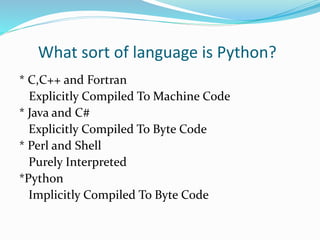
What sort of language is Python?
* C,C++ and Fortran
Explicitly Compiled To Machine Code
* Java and C#
Explicitly Compiled To Byte Code
* Perl and Shell
Purely Interpreted
*Python
Implicitly Compiled To Byte Code
Characteristic’s
* Contains good features from other languages.
* Scripting Language
* Easy To Learn
* Interactive
* Object Oriented
Example’s
* Bit Torrent
* Goggle
* Spotify
* Instagram
* Reddit
* Yahoo Maps
* Quora
* You Tube
Content’s I will be covering in this
session
* Basic Syntax * Variables Types * Basic Operations
*Decision Making * Loops * Lists
* Tuples * Dictionary * Functions
*Modules * Files I/O * Exceptions
* Class & Objects * Inheritance * GUI Objects
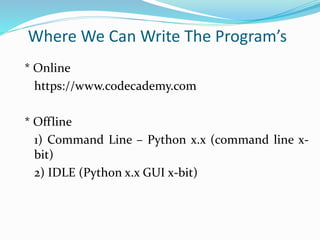
Where We Can Write The Program’s
* Online
https://www.codecademy.com
* Offline
1) Command Line – Python x.x (command line x-
bit)
2) IDLE (Python x.x GUI x-bit)
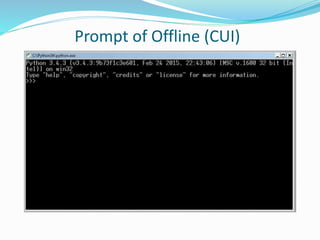
Prompt of Offline (CUI)
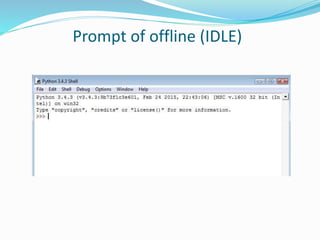
Prompt of offline (IDLE)
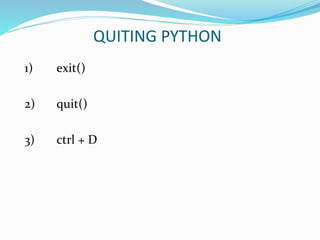
QUITING PYTHON
1) exit()
2) quit()
3) ctrl + D
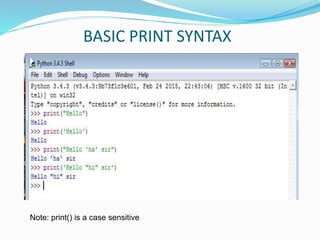
BASIC PRINT SYNTAX
Note: print() is a case sensitive
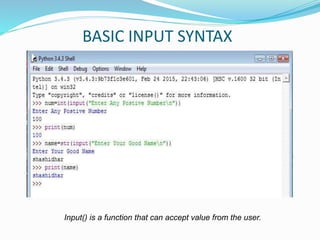
BASIC INPUT SYNTAX
Input() is a function that can accept value from the user.
VARIABLE
1) Variable Names should start with character’s.
2) In other programming language we need to
declare and assign the datatype first.
3) In Python there is no need to declare the datatype
for the variabe.
4) Some example you see in the next slide.
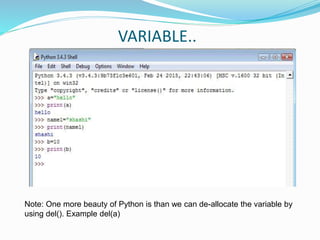
VARIABLE..
Note: One more beauty of Python is than we can de-allocate the variable by
using del(). Example del(a)
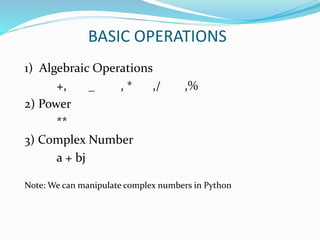
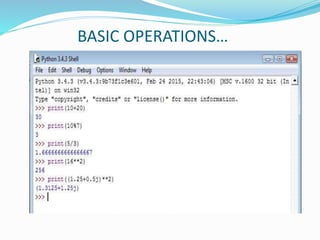
BASIC OPERATIONS
1) Algebraic Operations
+, _ , * ,/ ,%
2) Power
**
3) Complex Number
a + bj
Note: We can manipulate complex numbers in Python
BASIC OPERATIONS…
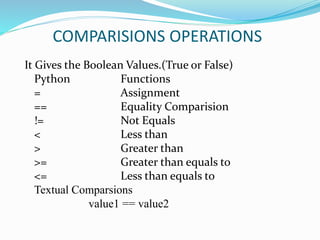
COMPARISIONS OPERATIONS
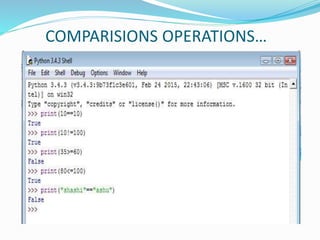
It Gives the Boolean Values.(True or False)
Python Functions
= Assignment
== Equality Comparision
!= Not Equals
< Less than
> Greater than
>= Greater than equals to
<= Less than equals to
Textual Comparsions
value1 == value2
COMPARISIONS OPERATIONS…
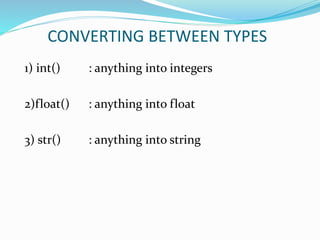
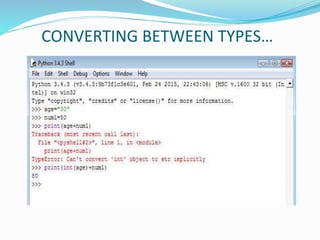
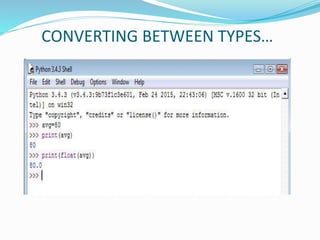
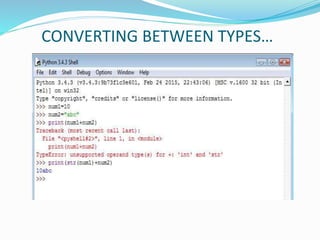
CONVERTING BETWEEN TYPES
1) int() : anything into integers
2)float() : anything into float
3) str() : anything into string
CONVERTING BETWEEN TYPES…
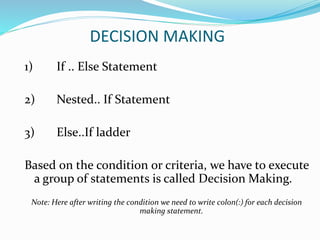
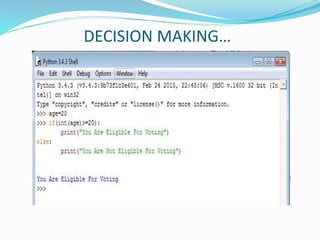
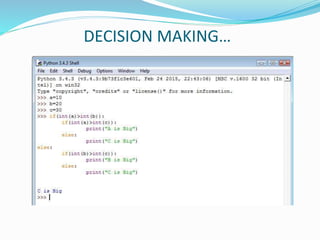
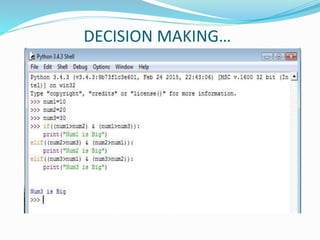
DECISION MAKING
1) If .. Else Statement
2) Nested.. If Statement
3) Else..If ladder
Based on the condition or criteria, we have to execute
a group of statements is called Decision Making.
Note: Here after writing the condition we need to write colon(:) for each decision
making statement.
DECISION MAKING…
DECISION MAKING…
DECISION MAKING…
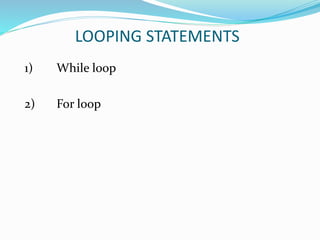
LOOPING STATEMENTS
1) While loop
2) For loop
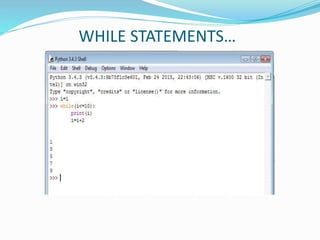
WHILE STATEMENTS…
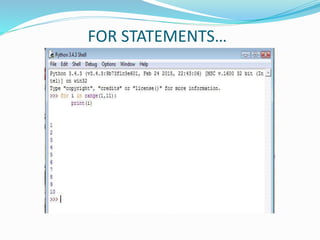
FOR STATEMENTS…
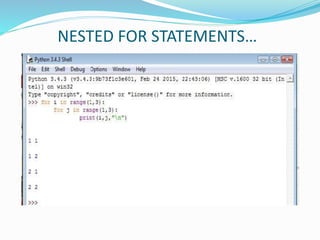
NESTED FOR STATEMENTS…
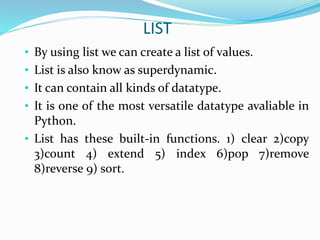
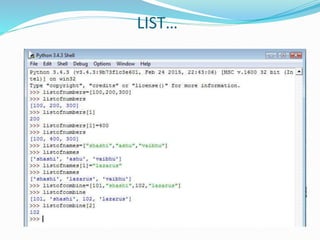
LIST
• By using list we can create a list of values.
• List is also know as superdynamic.
• It can contain all kinds of datatype.
• It is one of the most versatile datatype avaliable in
Python.
• List has these built-in functions. 1) clear 2)copy
3)count 4) extend 5) index 6)pop 7)remove
8)reverse 9) sort.
LIST…
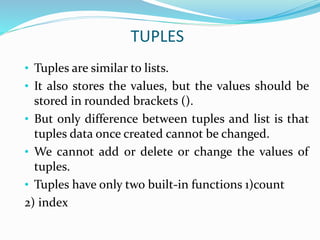
TUPLES
• Tuples are similar to lists.
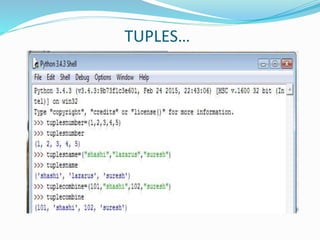
• It also stores the values, but the values should be
stored in rounded brackets ().
• But only difference between tuples and list is that
tuples data once created cannot be changed.
• We cannot add or delete or change the values of
tuples.
• Tuples have only two built-in functions 1)count
2) index
TUPLES…
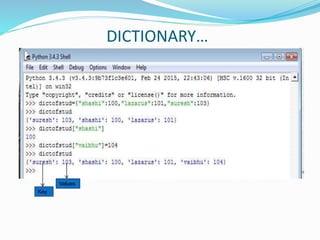
DICTIONARY
• Dictionary is also similar to list.
• But the difference is that in dictionary we are
having key and the values of each item.
• Items are stored in flower brackets {}.
• One key can have more than one values.
DICTIONARY…
Key
Values
FUNCTIONS
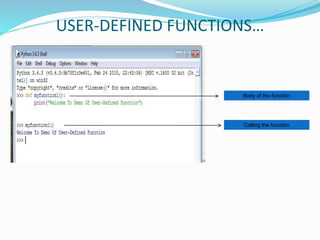
• A functions is a block of code, which executes when we
call that function.
• A functions are of two types.
1) Built-in functions
dir(__builtins__) (to underscore continuous)
help(max)
Example : pow(2,3), max(10,20,15)
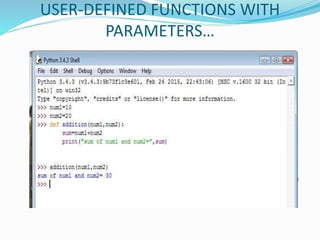
2)User-defined functions.
Here user will create his/her own function according
to his/her need.
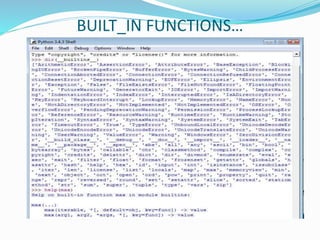
BUILT_IN FUNCTIONS…
USER-DEFINED FUNCTIONS…
Body of the function
Calling the function
USER-DEFINED FUNCTIONS WITH
PARAMETERS…
MODULES
 Modules are the bundles of functions related to that
domain.
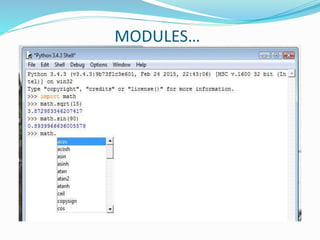
 For example if we want to work on mathematical
operations, then we need to have math module.
 If we import math module, then we can do any
mathematical operations.
MODULES…
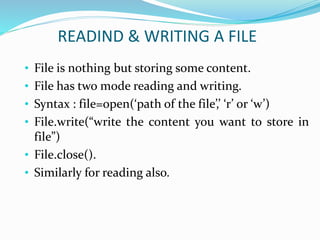
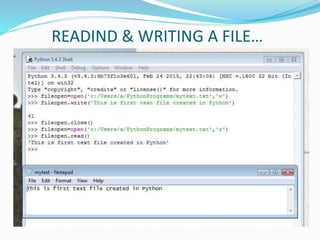
READIND & WRITING A FILE
• File is nothing but storing some content.
• File has two mode reading and writing.
• Syntax : file=open(‘path of the file’,’ ‘r’ or ‘w’)
• File.write(“write the content you want to store in
file”)
• File.close().
• Similarly for reading also.
READIND & WRITING A FILE…
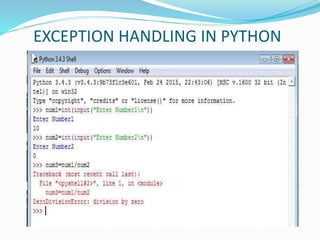
EXCEPTION HANDLING IN PYTHON
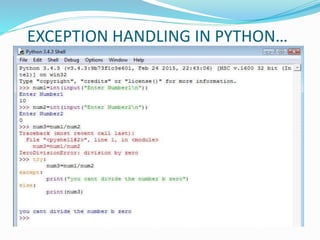
EXCEPTION HANDLING IN PYTHON…
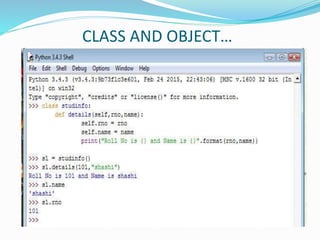
CLASS AND OBJECT
• Class is an template.
• Class contains data members and function.
• Object is an instance of an class
• Using object, we can use the data members and
functions
• To access members we need to use dot operators.
CLASS AND OBJECT…
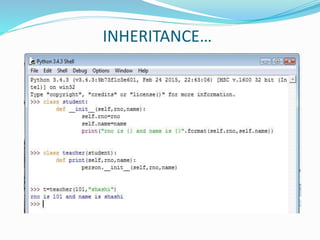
INHERITANCE
* Inheritance is the process of acquiring the data
members and functions of the another class.
INHERITANCE…
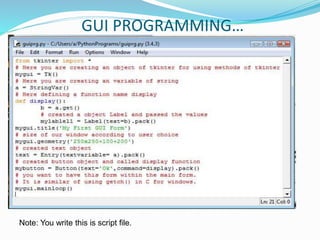
GUI PROGRAMMING
• Graphical User Interface.
• To create windows application
• We need to import tkinter module
• Then use the method which you want to create.
• For example
• First Write the code in script and save the file with
extension “myfirst.py”
• It will take default the extension.
• To Run the script use F5 function key.
GUI PROGRAMMING…
Note: You write this is script file.
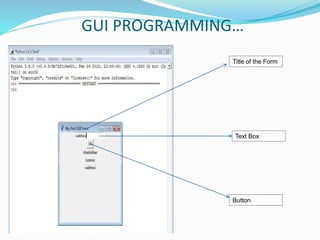
GUI PROGRAMMING…
Title of the Form
Text Box
Button
References
1) Learning To Program Using Python: Cody Jackson
2) Python Programming for the Absolute Beginner
by Michael Dawson
3) Learning To Program With Python By Richard L
Halterman
Thank You For Your Valuable Time
Sparing with this presentation.

Python

  • 1.
    By, Shashidhar T Halakatti PGDCA,MSc(IT),MTech(ComputerCognition & Technology) Assistant Professor, Department of Computer Science and Engineering , Rural Engineering College, Hulkoti -582205 Dist Gadag State:Karnataka email: shashi.gadag@gmail.com
  • 2.
    Introduction • Python isnamed after “Monty Python” and its famous flying circus, not the snake. • It is the trade mark of Python Software Foundation. • It was developed by “Guido Van Rossum”, first released over a decade in 1991.
  • 3.
    Who Uses Python? •Applications(online/offline) • Image Processing • Database Programming • Embedded Systems • Web Services • Online Games • You Name it, we can do it in Python
  • 4.
    What sort oflanguage is Python? * C,C++ and Fortran Explicitly Compiled To Machine Code * Java and C# Explicitly Compiled To Byte Code * Perl and Shell Purely Interpreted *Python Implicitly Compiled To Byte Code
  • 5.
    Characteristic’s * Contains goodfeatures from other languages. * Scripting Language * Easy To Learn * Interactive * Object Oriented
  • 6.
    Example’s * Bit Torrent *Goggle * Spotify * Instagram * Reddit * Yahoo Maps * Quora * You Tube
  • 7.
    Content’s I willbe covering in this session * Basic Syntax * Variables Types * Basic Operations *Decision Making * Loops * Lists * Tuples * Dictionary * Functions *Modules * Files I/O * Exceptions * Class & Objects * Inheritance * GUI Objects
  • 8.
    Where We CanWrite The Program’s * Online https://www.codecademy.com * Offline 1) Command Line – Python x.x (command line x- bit) 2) IDLE (Python x.x GUI x-bit)
  • 9.
  • 10.
  • 11.
    QUITING PYTHON 1) exit() 2)quit() 3) ctrl + D
  • 12.
    BASIC PRINT SYNTAX Note:print() is a case sensitive
  • 13.
    BASIC INPUT SYNTAX Input()is a function that can accept value from the user.
  • 14.
    VARIABLE 1) Variable Namesshould start with character’s. 2) In other programming language we need to declare and assign the datatype first. 3) In Python there is no need to declare the datatype for the variabe. 4) Some example you see in the next slide.
  • 15.
    VARIABLE.. Note: One morebeauty of Python is than we can de-allocate the variable by using del(). Example del(a)
  • 16.
    BASIC OPERATIONS 1) AlgebraicOperations +, _ , * ,/ ,% 2) Power ** 3) Complex Number a + bj Note: We can manipulate complex numbers in Python
  • 17.
  • 18.
    COMPARISIONS OPERATIONS It Givesthe Boolean Values.(True or False) Python Functions = Assignment == Equality Comparision != Not Equals < Less than > Greater than >= Greater than equals to <= Less than equals to Textual Comparsions value1 == value2
  • 19.
  • 20.
    CONVERTING BETWEEN TYPES 1)int() : anything into integers 2)float() : anything into float 3) str() : anything into string
  • 21.
  • 22.
  • 23.
  • 24.
    DECISION MAKING 1) If.. Else Statement 2) Nested.. If Statement 3) Else..If ladder Based on the condition or criteria, we have to execute a group of statements is called Decision Making. Note: Here after writing the condition we need to write colon(:) for each decision making statement.
  • 25.
  • 26.
  • 27.
  • 28.
  • 29.
  • 30.
  • 31.
  • 32.
    LIST • By usinglist we can create a list of values. • List is also know as superdynamic. • It can contain all kinds of datatype. • It is one of the most versatile datatype avaliable in Python. • List has these built-in functions. 1) clear 2)copy 3)count 4) extend 5) index 6)pop 7)remove 8)reverse 9) sort.
  • 33.
  • 34.
    TUPLES • Tuples aresimilar to lists. • It also stores the values, but the values should be stored in rounded brackets (). • But only difference between tuples and list is that tuples data once created cannot be changed. • We cannot add or delete or change the values of tuples. • Tuples have only two built-in functions 1)count 2) index
  • 35.
  • 36.
    DICTIONARY • Dictionary isalso similar to list. • But the difference is that in dictionary we are having key and the values of each item. • Items are stored in flower brackets {}. • One key can have more than one values.
  • 37.
  • 38.
    FUNCTIONS • A functionsis a block of code, which executes when we call that function. • A functions are of two types. 1) Built-in functions dir(__builtins__) (to underscore continuous) help(max) Example : pow(2,3), max(10,20,15) 2)User-defined functions. Here user will create his/her own function according to his/her need.
  • 39.
  • 40.
    USER-DEFINED FUNCTIONS… Body ofthe function Calling the function
  • 41.
  • 42.
    MODULES  Modules arethe bundles of functions related to that domain.  For example if we want to work on mathematical operations, then we need to have math module.  If we import math module, then we can do any mathematical operations.
  • 43.
  • 44.
    READIND & WRITINGA FILE • File is nothing but storing some content. • File has two mode reading and writing. • Syntax : file=open(‘path of the file’,’ ‘r’ or ‘w’) • File.write(“write the content you want to store in file”) • File.close(). • Similarly for reading also.
  • 45.
  • 46.
  • 47.
  • 48.
    CLASS AND OBJECT •Class is an template. • Class contains data members and function. • Object is an instance of an class • Using object, we can use the data members and functions • To access members we need to use dot operators.
  • 49.
  • 50.
    INHERITANCE * Inheritance isthe process of acquiring the data members and functions of the another class.
  • 51.
  • 52.
    GUI PROGRAMMING • GraphicalUser Interface. • To create windows application • We need to import tkinter module • Then use the method which you want to create. • For example • First Write the code in script and save the file with extension “myfirst.py” • It will take default the extension. • To Run the script use F5 function key.
  • 53.
    GUI PROGRAMMING… Note: Youwrite this is script file.
  • 54.
    GUI PROGRAMMING… Title ofthe Form Text Box Button
  • 55.
    References 1) Learning ToProgram Using Python: Cody Jackson 2) Python Programming for the Absolute Beginner by Michael Dawson 3) Learning To Program With Python By Richard L Halterman
  • 56.
    Thank You ForYour Valuable Time Sparing with this presentation.