Content
Variables
 Keywords
 Identifiers
 Operators
 Comments
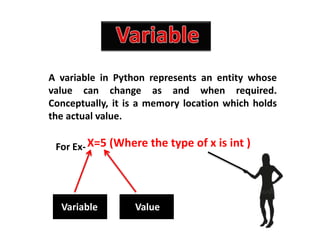
A variable in Python represents an entity whose
value can change as and when required.
Conceptually, it is a memory location which holds
the actual value.
For Ex-X=5 (Where the type of x is int )
Variable Value
Python has a set of keywords that are reserved
words that cannot be used as variable names,
function names, or any other identifiers.
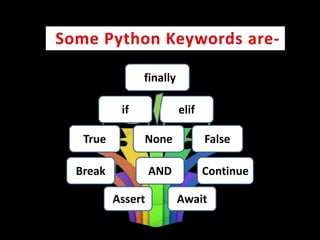
if elif
True None False
Break AND Continue
Assert Await
finally
Identifiers
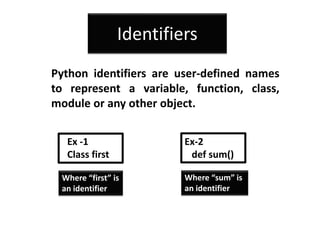
Python identifiers are user-defined names
to represent a variable, function, class,
module or any other object.
Where “first” is
an identifier
Where “sum” is
an identifier
Ex -1
Class first
Ex-2
def sum()
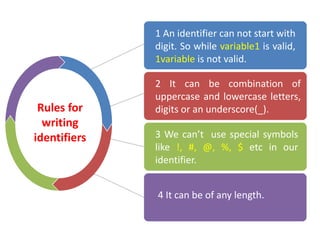
Rules for
writing
identifiers
2 It can be combination of
uppercase and lowercase letters,
digits or an underscore(_).
1 An identifier can not start with
digit. So while variable1 is valid,
1variable is not valid.
3 We can’t use special symbols
like !, #, @, %, $ etc in our
identifier.
4 It can be of any length.
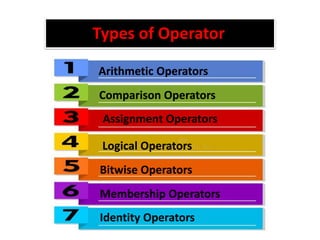
Arithmetic Operators
Comparison Operators
Assignment Operators
Logical Operators
Bitwise Operators
Membership Operators
Identity Operators
Types of Operator
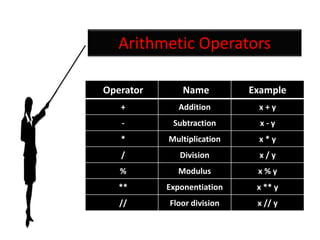
Arithmetic Operators
Operator Name Example
+ Addition x + y
- Subtraction x - y
* Multiplication x * y
/ Division x / y
% Modulus x % y
** Exponentiation x ** y
// Floor division x // y
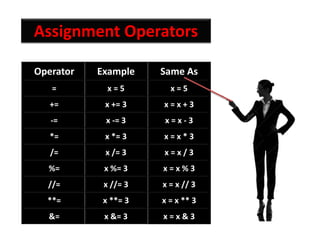
Assignment Operators
Operator Example Same As
= x = 5 x = 5
+= x += 3 x = x + 3
-= x -= 3 x = x - 3
*= x *= 3 x = x * 3
/= x /= 3 x = x / 3
%= x %= 3 x = x % 3
//= x //= 3 x = x // 3
**= x **= 3 x = x ** 3
&= x &= 3 x = x & 3
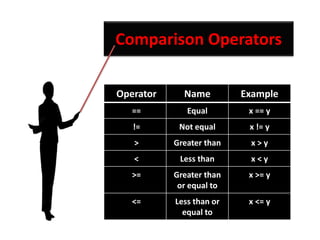
Comparison Operators
Operator Name Example
== Equal x == y
!= Not equal x != y
> Greater than x > y
< Less than x < y
>= Greater than
or equal to
x >= y
<= Less than or
equal to
x <= y
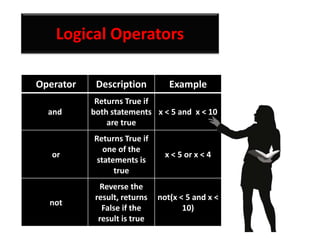
Logical Operators
Operator Description Example
and
Returns True if
both statements
are true
x < 5 and x < 10
or
Returns True if
one of the
statements is
true
x < 5 or x < 4
not
Reverse the
result, returns
False if the
result is true
not(x < 5 and x <
10)
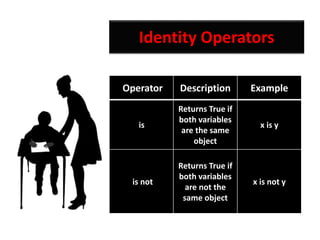
Identity Operators
Operator Description Example
is
Returns True if
both variables
are the same
object
x is y
is not
Returns True if
both variables
are not the
same object
x is not y
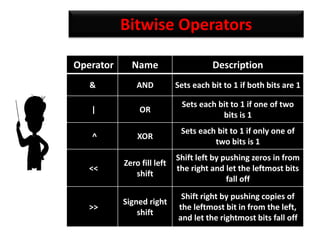
Bitwise Operators
Operator Name Description
& AND Sets each bit to 1 if both bits are 1
| OR
Sets each bit to 1 if one of two
bits is 1
^ XOR
Sets each bit to 1 if only one of
two bits is 1
<<
Zero fill left
shift
Shift left by pushing zeros in from
the right and let the leftmost bits
fall off
>>
Signed right
shift
Shift right by pushing copies of
the leftmost bit in from the left,
and let the rightmost bits fall off
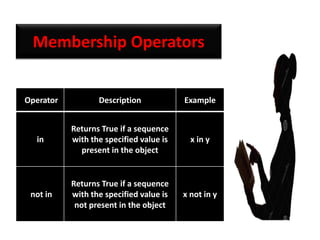
Membership Operators
Operator Description Example
in
Returns True if a sequence
with the specified value is
present in the object
x in y
not in
Returns True if a sequence
with the specified value is
not present in the object
x not in y
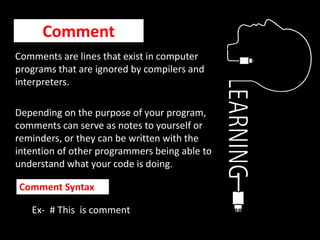
Comment
Comments are lines that exist in computer
programs that are ignored by compilers and
interpreters.
Depending on the purpose of your program,
comments can serve as notes to yourself or
reminders, or they can be written with the
intention of other programmers being able to
understand what your code is doing.
Ex- # This is comment
Comment Syntax
For more presentation
contact us on Gmail id
raginijain0208@gmail.com
Python second ppt

Python second ppt

  • 2.
  • 3.
    A variable inPython represents an entity whose value can change as and when required. Conceptually, it is a memory location which holds the actual value. For Ex-X=5 (Where the type of x is int ) Variable Value
  • 5.
    Python has aset of keywords that are reserved words that cannot be used as variable names, function names, or any other identifiers.
  • 6.
    if elif True NoneFalse Break AND Continue Assert Await finally
  • 7.
    Identifiers Python identifiers areuser-defined names to represent a variable, function, class, module or any other object. Where “first” is an identifier Where “sum” is an identifier Ex -1 Class first Ex-2 def sum()
  • 8.
    Rules for writing identifiers 2 Itcan be combination of uppercase and lowercase letters, digits or an underscore(_). 1 An identifier can not start with digit. So while variable1 is valid, 1variable is not valid. 3 We can’t use special symbols like !, #, @, %, $ etc in our identifier. 4 It can be of any length.
  • 9.
    Arithmetic Operators Comparison Operators AssignmentOperators Logical Operators Bitwise Operators Membership Operators Identity Operators Types of Operator
  • 10.
    Arithmetic Operators Operator NameExample + Addition x + y - Subtraction x - y * Multiplication x * y / Division x / y % Modulus x % y ** Exponentiation x ** y // Floor division x // y
  • 11.
    Assignment Operators Operator ExampleSame As = x = 5 x = 5 += x += 3 x = x + 3 -= x -= 3 x = x - 3 *= x *= 3 x = x * 3 /= x /= 3 x = x / 3 %= x %= 3 x = x % 3 //= x //= 3 x = x // 3 **= x **= 3 x = x ** 3 &= x &= 3 x = x & 3
  • 12.
    Comparison Operators Operator NameExample == Equal x == y != Not equal x != y > Greater than x > y < Less than x < y >= Greater than or equal to x >= y <= Less than or equal to x <= y
  • 13.
    Logical Operators Operator DescriptionExample and Returns True if both statements are true x < 5 and x < 10 or Returns True if one of the statements is true x < 5 or x < 4 not Reverse the result, returns False if the result is true not(x < 5 and x < 10)
  • 14.
    Identity Operators Operator DescriptionExample is Returns True if both variables are the same object x is y is not Returns True if both variables are not the same object x is not y
  • 15.
    Bitwise Operators Operator NameDescription & AND Sets each bit to 1 if both bits are 1 | OR Sets each bit to 1 if one of two bits is 1 ^ XOR Sets each bit to 1 if only one of two bits is 1 << Zero fill left shift Shift left by pushing zeros in from the right and let the leftmost bits fall off >> Signed right shift Shift right by pushing copies of the leftmost bit in from the left, and let the rightmost bits fall off
  • 16.
    Membership Operators Operator DescriptionExample in Returns True if a sequence with the specified value is present in the object x in y not in Returns True if a sequence with the specified value is not present in the object x not in y
  • 17.
    Comment Comments are linesthat exist in computer programs that are ignored by compilers and interpreters. Depending on the purpose of your program, comments can serve as notes to yourself or reminders, or they can be written with the intention of other programmers being able to understand what your code is doing. Ex- # This is comment Comment Syntax
  • 18.
    For more presentation contactus on Gmail id raginijain0208@gmail.com